> ## Documentation Index
> Fetch the complete documentation index at: https://orgo.space/docs/llms.txt
> Use this file to discover all available pages before exploring further.
# API Access
> Integrate with Orgo using the REST API
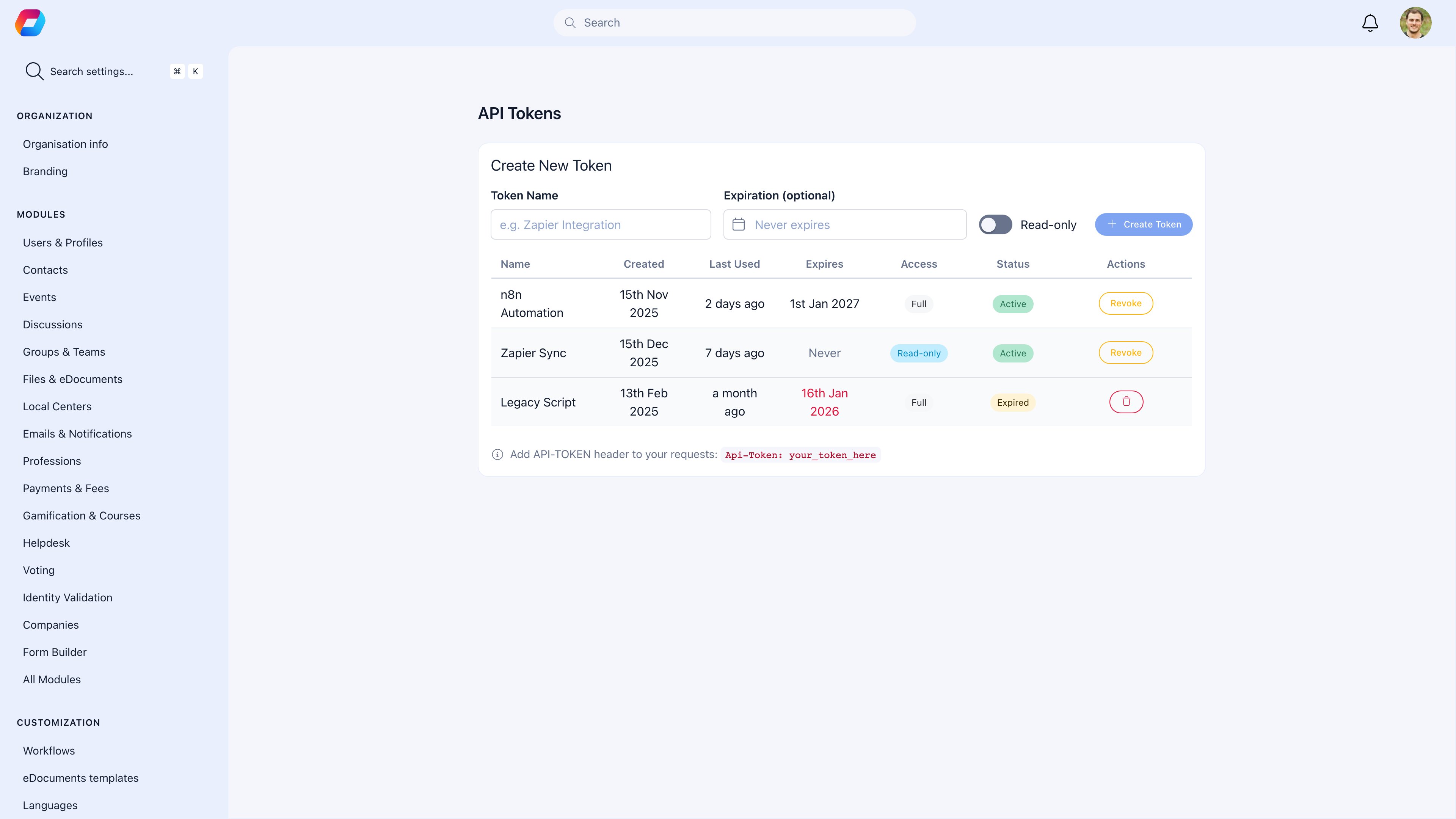
Orgo provides a comprehensive REST API for integrating with external systems. Access member data, manage events, process payments, and automate workflows programmatically.
 ## How to access
**Settings** → **Developers** → **API Access**
Full API documentation: [API Reference](/api-reference)
***
## Prerequisites
* Administrator access required
* API access must be enabled for your organization
***
## API Authentication
### API Keys
Generate API keys for server-to-server integration:
Go to **Settings** → **Developers** → **API Access**.
Click **Generate New API Key**.
Copy the key immediately. It won't be shown again.
Configure what the key can access.
### Using API Keys
Include in request headers:
```
Api-Token: YOUR_API_KEY
```
***
## API Endpoints
Common endpoints:
| Endpoint | Description |
| ------------------- | ----------------------- |
| `/api/v1/users` | Member data |
| `/api/v1/events` | Event management |
| `/api/v1/payments` | Payment records |
| `/api/v1/groups` | Group information |
| `/api/v1/adhesions` | Membership applications |
See [API Reference](/api-reference) for complete documentation.
***
## Rate Limits
API requests are rate-limited:
| Plan | Requests/minute |
| ------------ | --------------- |
| Standard | 60 |
| Professional | 300 |
| Enterprise | Custom |
Exceeding limits returns `429 Too Many Requests`.
***
## Webhooks
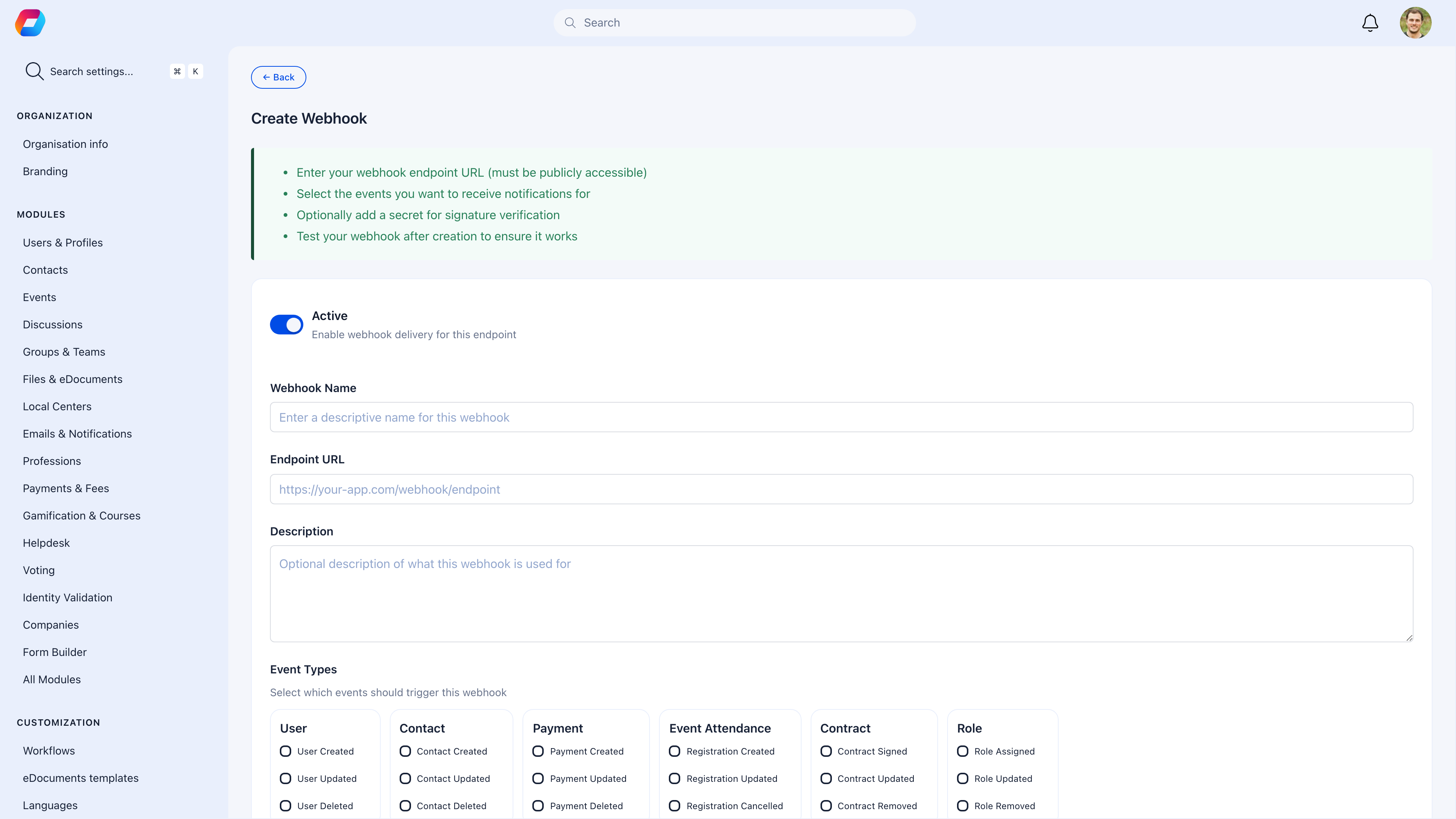
Receive real-time notifications when events occur:
### Setting Up Webhooks
1. Go to **Settings** → **Developers** → **Webhooks**
2. Click **Add Webhook**
3. Enter your endpoint URL
4. Select events to subscribe to
5. Save
## How to access
**Settings** → **Developers** → **API Access**
Full API documentation: [API Reference](/api-reference)
***
## Prerequisites
* Administrator access required
* API access must be enabled for your organization
***
## API Authentication
### API Keys
Generate API keys for server-to-server integration:
Go to **Settings** → **Developers** → **API Access**.
Click **Generate New API Key**.
Copy the key immediately. It won't be shown again.
Configure what the key can access.
### Using API Keys
Include in request headers:
```
Api-Token: YOUR_API_KEY
```
***
## API Endpoints
Common endpoints:
| Endpoint | Description |
| ------------------- | ----------------------- |
| `/api/v1/users` | Member data |
| `/api/v1/events` | Event management |
| `/api/v1/payments` | Payment records |
| `/api/v1/groups` | Group information |
| `/api/v1/adhesions` | Membership applications |
See [API Reference](/api-reference) for complete documentation.
***
## Rate Limits
API requests are rate-limited:
| Plan | Requests/minute |
| ------------ | --------------- |
| Standard | 60 |
| Professional | 300 |
| Enterprise | Custom |
Exceeding limits returns `429 Too Many Requests`.
***
## Webhooks
Receive real-time notifications when events occur:
### Setting Up Webhooks
1. Go to **Settings** → **Developers** → **Webhooks**
2. Click **Add Webhook**
3. Enter your endpoint URL
4. Select events to subscribe to
5. Save
 ### Webhook Events
| Event | Description |
| -------------------- | -------------------------- |
| `user.created` | New member registered |
| `user.updated` | Member profile updated |
| `payment.completed` | Payment successful |
| `event.created` | New event created |
| `adhesion.submitted` | New membership application |
### Webhook Payload
```json theme={null}
{
"event": "user.created",
"timestamp": "2024-01-15T10:30:00Z",
"data": {
"id": "abc123",
"email": "member@example.com"
}
}
```
***
## Security
### Best Practices
Never expose API keys in client-side code or public repositories.
All API requests must use HTTPS.
Generate new keys periodically and revoke old ones.
Grant only the permissions each integration needs.
***
## Common Integrations
Sync member data with Salesforce, HubSpot, or other CRMs.
Keep Mailchimp, Sendinblue, or other email lists updated.
Export payment data to QuickBooks or Xero.
Build internal reporting tools with your data.
***
## Getting Help
* [API Reference](/api-reference) - Complete endpoint documentation
* [OAuth Integration](/platform/oauth) - OAuth server setup
* Contact support for enterprise integrations
***
## Related Features
* [OAuth](/platform/oauth) - OAuth authentication
* [Webhooks](#webhooks) - Real-time notifications
### Webhook Events
| Event | Description |
| -------------------- | -------------------------- |
| `user.created` | New member registered |
| `user.updated` | Member profile updated |
| `payment.completed` | Payment successful |
| `event.created` | New event created |
| `adhesion.submitted` | New membership application |
### Webhook Payload
```json theme={null}
{
"event": "user.created",
"timestamp": "2024-01-15T10:30:00Z",
"data": {
"id": "abc123",
"email": "member@example.com"
}
}
```
***
## Security
### Best Practices
Never expose API keys in client-side code or public repositories.
All API requests must use HTTPS.
Generate new keys periodically and revoke old ones.
Grant only the permissions each integration needs.
***
## Common Integrations
Sync member data with Salesforce, HubSpot, or other CRMs.
Keep Mailchimp, Sendinblue, or other email lists updated.
Export payment data to QuickBooks or Xero.
Build internal reporting tools with your data.
***
## Getting Help
* [API Reference](/api-reference) - Complete endpoint documentation
* [OAuth Integration](/platform/oauth) - OAuth server setup
* Contact support for enterprise integrations
***
## Related Features
* [OAuth](/platform/oauth) - OAuth authentication
* [Webhooks](#webhooks) - Real-time notifications