> ## Documentation Index
> Fetch the complete documentation index at: https://orgo.space/docs/llms.txt
> Use this file to discover all available pages before exploring further.
# Contact Permissions & Data Protection
> Who can see, edit, export and delete contacts, and what the product does and does not give you for a data-protection request
Contacts hold personal data about people who never signed up for an account: donors,
ticket buyers, newsletter subscribers, form respondents. This page answers two questions.
Who on your team can reach that data, and what can you actually do when one of those
people asks you about it.
**Built for** the administrator who decides who is trusted with the contact list, and the
person who has to answer a data-protection request with the tools the product really has.
This page assumes the permission model on [Permissions](/docs/platform/permissions): every
permission is a domain (HR, Financial, Admin) paired with a scope (organisation, regional,
chapter). Only the contact-specific parts are covered here.
 ***
## What each action needs
| Action | Permission required |
| ------------------------------------------------------ | ----------------------------------------------------------------------- |
| View the contact list | HR or Financial, at any scope (see the nine below) |
| Open one contact record | The same, and the contact must be in a chapter you cover |
| Create a contact | HR or Financial, at any scope |
| Edit a contact | The same, on that contact |
| Delete one contact | The same, on that contact |
| Bulk delete from the list | HR or Financial, at any scope |
| Export the contact list to CSV | `HR_TENANT` or `ADMIN_TENANT` only |
| Manage tags on a contact | `HR_TENANT` or `ADMIN_TENANT` |
| Subscribe or unsubscribe a contact from the newsletter | `HR_TENANT` or `ADMIN_TENANT` |
| Email contacts | Communication Manager, through a campaign. There is no per-contact send |
| Write a note on a contact | HR or Financial, on that contact |
| Edit or delete a note | The note's author, or `ADMIN_TENANT` |
| Reveal a stored personal identification number | `HR_TENANT`, `FINANCIAL_TENANT` or `ADMIN_TENANT` |
Emailing is not a contact permission at all. Contacts are reached in bulk through
[newsletter campaigns](/docs/platform/newsletter), which are governed by the Communication
Manager domain. Someone can hold Communication Manager and send to your whole contact
audience without ever being able to open a single contact record, and the reverse is
equally true.
***
## The permission line is wider than it looks
Every contact screen asks for the same thing: HR or Financial permission on the chapter.
Written out, that sounds like two narrow chapter-level grants. It is not. Because a
permission held higher up satisfies a check lower down, and because Admin covers the other
domains at the same level, **nine different permissions open the contact list**:
| Permission | Why it satisfies the check |
| ------------------------ | -------------------------------------------------------------- |
| `ADMIN_TENANT` | Passes every permission check in the product |
| `HR_TENANT` | Organisation scope satisfies the same domain at chapter scope |
| `FINANCIAL_TENANT` | The same, on the Financial side |
| `ADMIN_PARENT_LOCAL` | Admin covers every regional and local permission in its branch |
| `ADMIN_LOCAL` | Admin covers every local permission in its chapter |
| `HR_PARENT_LOCAL` | Regional HR includes chapter HR |
| `HR_LOCAL` | Named directly by the check |
| `FINANCIAL_PARENT_LOCAL` | Regional Financial includes chapter Financial |
| `FINANCIAL_LOCAL` | Named directly by the check |
Granting a permission that sounds unrelated to contacts still grants the contact list.
`ADMIN_LOCAL` for a chapter secretary, `FINANCIAL_PARENT_LOCAL` for a regional treasurer,
`HR_TENANT` for a membership officer: all three open contacts. If the contact directory
holds donor or subscriber data you would not hand to those people, decide that before you
tick the box, not afterwards.
**HR Assistant does not reach contacts.** It is the one HR-family permission that does not,
and holding it changes nothing about the contact module. Event Manager and Communication
Manager do not reach contacts either.
***
## Ordinary members cannot reach contacts
A member with no administrative permission has no route to the contact directory: not the
list, not a record, not search, not export. There is no minimum access level setting that
opens contacts to regular users, and nothing in the member-facing product links to them.
Contacts are an administrative surface only.
***
## Chapter scoping
A contact can be filed under a chapter, and chapter administrators can then be limited to
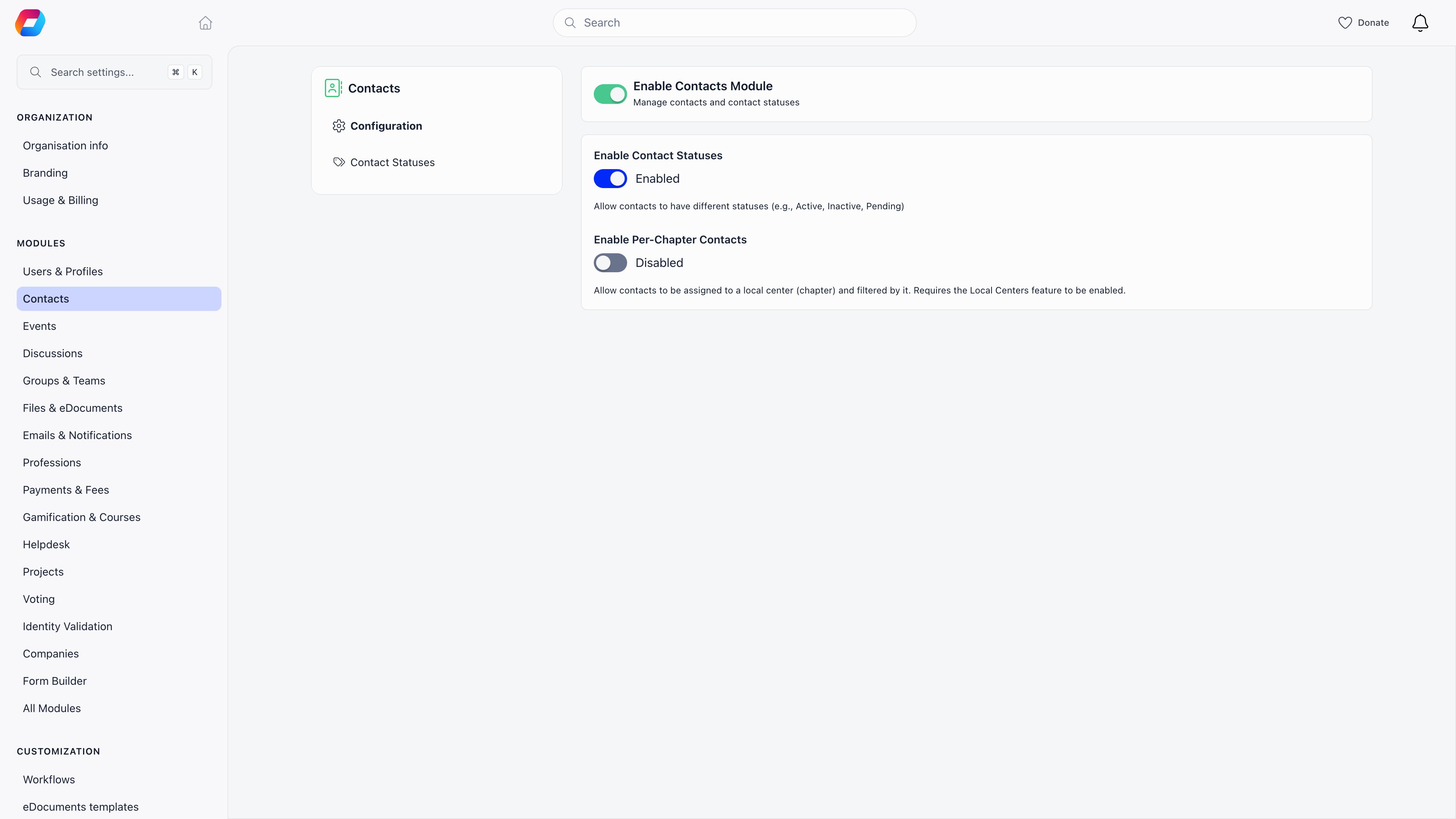
their own. This needs **two** settings switched on together:
| Setting | Where |
| ------------------------------- | ----------------------------------------- |
| **Local Centers** module | **Settings** → **Modules** |
| **Enable Per-Chapter Contacts** | **Settings** → **Modules** → **Contacts** |
Both on, and scoping applies:
* Organisation-scope managers (`HR_TENANT`, `FINANCIAL_TENANT`, `ADMIN_TENANT`) see every
contact, including contacts with no chapter.
* Everyone else sees only contacts in the chapters they cover. Someone who covers no
chapter sees an empty list rather than an error.
* Creating a contact files it under the creator's own chapter by default, and a
chapter-scoped admin cannot file one outside the chapters they cover.
* Editing is re-checked after the change, so a chapter admin cannot move a contact out of
their scope or leave it unfiled.
**With Per-Chapter Contacts off, chapter-scoped administrators get no contacts at all**,
rather than a scoped view. `HR_LOCAL` and `FINANCIAL_LOCAL` holders are refused the list,
the record and every write. Only organisation-scope managers keep access. Turning the
setting off to "simplify things" therefore removes contacts from your chapter teams
entirely.
**A contact with no chapter is invisible to chapter administrators**, even with the setting
on. Contacts created by donations, ticket sales and newsletter signups usually arrive
unfiled, so on a scoped organisation most incoming contacts are visible only to
organisation-scope managers until someone files them.
***
## CSV export, and what is recorded
Export is the one contact action that does not follow the nine-permission rule. **It
requires `HR_TENANT` or `ADMIN_TENANT`.** A chapter or regional administrator who can read
every contact on screen still cannot export them, and adding a chapter filter to the
request does not change that.
Every export writes a row to the [Activity Log](/docs/platform/logs) recording who exported,
when, and the exact request that was made, including any filters. That is your record of
who took a copy of the directory.
The same data pulled another way is not recorded the same way. Reading contacts through the
[API](/docs/platform/api) or through an assistant on the [Orgo MCP connection](/docs/platform/mcp) is
an ordinary read of the contact list: it leaves no export entry, because no export
happened. If your controls depend on knowing when the directory left the product, treat API
tokens and connected apps as their own control point, and scope them narrowly.
The report builder is a second export route. It is `ADMIN_TENANT` only, it can include
contacts and their payments, tags and custom fields, and its exports are recorded too. See
[Reports](/docs/platform/reports).
***
## Data protection
Below is what the product does and does not do with contact personal data. Read it as a
description of the mechanics, not as advice about your obligations.
### What is stored
A contact record holds name and middle name, email, phone, address, town and country, date
of birth, gender, a personal identification number, a bio, employer and role, social
profiles, company details, tags, status, source, notes, custom field answers, and links to
payments, invoices, form submissions and event registrations.
**Of everything on a contact, only the personal identification number is encrypted at
rest.** Email, phone, address, date of birth and gender are stored as ordinary text.
Individual custom fields can be marked as encrypted, one field at a time, but that is
opt-in and off unless someone set it.
The personal identification number is never returned by the normal record; the record only
says whether one exists. Reading the value has a single door, restricted to `HR_TENANT`,
`FINANCIAL_TENANT` and `ADMIN_TENANT`, and every reveal is recorded with who did it, when,
and from where. If that record cannot be written, the reveal is refused.
### Identity documents
An identity record can be attached to a contact, carrying an identification number, the
document type, serial, number and dates, an address, a date of birth, and scanned images of
the document itself. These usually arrive through the flows described in
[Identity Validation](/docs/platform/identity-validation). Treat any contact with an attached
identity as holding considerably more sensitive data than the record on screen suggests.
### What you can do for a data-protection request
* **Produce a copy of what you hold.** There is no "download everything about this person"
button. What exists is the contact record itself, which shows notes, activity, payments,
invoices, event registrations and custom field answers on one screen, and the CSV export,
which covers the directory fields but not notes, payments or emails. Assembling a full
answer means reading the record and copying from it.
* **Correct data.** Edit the record, in the normal way.
* **Stop email.** Unsubscribe the contact, or let them use the unsubscribe link in any
campaign. This does not remove the record.
* **Clear the personal identification number** by saving an empty value on the record.
* **Delete the contact**, subject to the limit below.
### What the product does not do
* **There is no anonymisation.** Nothing replaces a contact's details with placeholders
while keeping the record. Deletion is a real deletion of the row, not a flag, and it
cannot be undone.
* **Deletion is refused while the contact has any payment, invoice or contract.** There is
no option to erase the person and keep the financial record. For most organisations this
means a contact who has ever paid you anything, a donor, a ticket buyer, an invoiced
partner, **cannot be deleted at all**, and those are exactly the people most likely to
ask. The only contacts you can delete are ones with no money and no signed document
attached.
* **Deleting a contact destroys their activity history with them**, including the records of
who exported the contact list containing them and who revealed their personal
identification number. Export anything you need to keep before deleting.
* **Deletion does not reach data already sent elsewhere**, such as email logs, records
synced to a connected CRM, or payloads already delivered to your webhooks.
* **There is no retention policy and no automatic expiry.** Contacts, notes and log entries
stay until somebody removes them. Nothing ages out on its own.
* **Consent is a single switch.** Newsletter subscription is subscribed, unsubscribed, or
never asked. There is no consent timestamp, no record of where consent came from, and no
per-purpose consent on a contact.
Your organisation is the data controller for everything in your contact directory. Orgo
gives you the mechanics described above and nothing more; deciding what you may collect,
how long you may keep it, and how you answer a request from a data subject is yours to
determine, with your own legal advice. Nothing on this page is legal advice and no feature
described here makes an organisation compliant with any law.
***
## What is recorded about a contact
Some, but not all, of what happens to a contact is written to the audit log.
| Recorded | Not recorded |
| -------------------------------------------------------------------------------------------------------- | ----------------------------------------------------------------------------------------------------- |
| Changes to name, email, phone, town, date of birth, gender, chapter, photo and the social profile fields | Changes to address, company fields, bio, status, source, custom field answers and the newsletter flag |
| CSV exports of the directory, with the exporter and the full request | Reads: opening a record leaves no trace |
| Personal identification number revealed, changed or exported | Creating a contact |
| Newsletter subscribe and unsubscribe | Deleting a contact |
| Tags added and removed, and notes deleted | |
Two more limits are worth knowing. Nothing is logged for changes made by an import, by an
automation, or by any unauthenticated flow such as a public form or a donation checkout, so
a field that changed by itself changed through one of those. And demo organisations write
no log entries at all.
**The field-change history is written, but no screen presents it.** The Activity card on a
contact record deliberately leaves field edits out; it shows notes, tags, donations, form
submissions and personal identification number changes. The
[Activity Log](/docs/platform/logs) screen, which does show before and after values, exists for
members and not for contacts. So "who changed this contact's email address" is recorded but
not answerable from the product interface.
***
## Troubleshooting
Check the two settings first. Chapter scoping needs the **Local Centers** module and
**Enable Per-Chapter Contacts** switched on together. With Per-Chapter Contacts off,
chapter-scoped administrators are refused contacts outright rather than given a scoped
view, which looks identical to a permission problem.
With both on, check what they hold. HR Assistant does not reach contacts, and neither
does Event Manager or Communication Manager. They need HR, Financial or Admin at
chapter, regional or organisation scope.
If they hold the right permission and the list is still empty, the contacts probably
have no chapter. Unfiled contacts are invisible to chapter-scoped administrators, and
contacts created by donations, ticket sales and signups arrive unfiled. An
organisation-scope manager can open those and file them.
Deletion is refused while the contact has any payment, invoice or contract attached,
and there is no way to override it or to erase the person while keeping the financial
record. This is the expected behaviour, not a fault, and it applies to every donor and
ticket buyer.
If the request came from the person themselves, what you can do instead is unsubscribe
them from email, clear the personal identification number, and remove notes and any
detail you do not need to keep. The record and its financial history stay.
A bulk delete from the list can also stop on the same rule. If a selection includes one
contact with a payment, deal with that one separately rather than retrying the batch.
Every CSV export writes an entry to the [Activity Log](/docs/platform/logs) naming the
person, the time, and the exact request including any filters. Reading that log needs
`ADMIN_TENANT`. Report builder exports are recorded too.
Two gaps to keep in mind. Contacts pulled through the API, a connected app or an
assistant over MCP are ordinary reads and produce no export entry, so the log answers
"who used the export button", not "who has a copy". And deleting a contact deletes the
export entries that mention them, so a log reviewed after a clean-up may be missing
rows.
Ordinary members have no access to the contact directory, so check what the member
actually holds on their **Permissions** tab. `ADMIN_LOCAL` and `FINANCIAL_LOCAL` both
open contacts even though neither is labelled HR, and a permission attached to their
role counts the same as one ticked on their profile. See
[Assigning Permissions](/docs/platform/permissions-assigning).
If they hold nothing, they are almost certainly seeing a contact through another
feature rather than through the directory: as an attendee on an event they can see, as
a name on an invoice, or mentioned in a discussion. Those surfaces have their own
visibility rules and show far less than a contact record does.
***
## Related
* [Contacts](/docs/platform/contacts) - what a contact is and how the module is switched on
* [Permissions](/docs/platform/permissions) - the domains and scopes this page builds on
* [Assigning Permissions](/docs/platform/permissions-assigning) - granting and checking what someone holds
* [Local Groups](/docs/platform/groups/local-groups) - chapters, regions, and what a scoped grant reaches
* [Profile Activity & Notes](/docs/platform/users/profile-activity) - the Activity card on a contact record
* [Activity Log](/docs/platform/logs) - where export and audit entries are read
* [Identity Validation](/docs/platform/identity-validation) - identity documents attached to a contact
* [Reports](/docs/platform/reports) - the second export route, and who can use it
***
## What each action needs
| Action | Permission required |
| ------------------------------------------------------ | ----------------------------------------------------------------------- |
| View the contact list | HR or Financial, at any scope (see the nine below) |
| Open one contact record | The same, and the contact must be in a chapter you cover |
| Create a contact | HR or Financial, at any scope |
| Edit a contact | The same, on that contact |
| Delete one contact | The same, on that contact |
| Bulk delete from the list | HR or Financial, at any scope |
| Export the contact list to CSV | `HR_TENANT` or `ADMIN_TENANT` only |
| Manage tags on a contact | `HR_TENANT` or `ADMIN_TENANT` |
| Subscribe or unsubscribe a contact from the newsletter | `HR_TENANT` or `ADMIN_TENANT` |
| Email contacts | Communication Manager, through a campaign. There is no per-contact send |
| Write a note on a contact | HR or Financial, on that contact |
| Edit or delete a note | The note's author, or `ADMIN_TENANT` |
| Reveal a stored personal identification number | `HR_TENANT`, `FINANCIAL_TENANT` or `ADMIN_TENANT` |
Emailing is not a contact permission at all. Contacts are reached in bulk through
[newsletter campaigns](/docs/platform/newsletter), which are governed by the Communication
Manager domain. Someone can hold Communication Manager and send to your whole contact
audience without ever being able to open a single contact record, and the reverse is
equally true.
***
## The permission line is wider than it looks
Every contact screen asks for the same thing: HR or Financial permission on the chapter.
Written out, that sounds like two narrow chapter-level grants. It is not. Because a
permission held higher up satisfies a check lower down, and because Admin covers the other
domains at the same level, **nine different permissions open the contact list**:
| Permission | Why it satisfies the check |
| ------------------------ | -------------------------------------------------------------- |
| `ADMIN_TENANT` | Passes every permission check in the product |
| `HR_TENANT` | Organisation scope satisfies the same domain at chapter scope |
| `FINANCIAL_TENANT` | The same, on the Financial side |
| `ADMIN_PARENT_LOCAL` | Admin covers every regional and local permission in its branch |
| `ADMIN_LOCAL` | Admin covers every local permission in its chapter |
| `HR_PARENT_LOCAL` | Regional HR includes chapter HR |
| `HR_LOCAL` | Named directly by the check |
| `FINANCIAL_PARENT_LOCAL` | Regional Financial includes chapter Financial |
| `FINANCIAL_LOCAL` | Named directly by the check |
Granting a permission that sounds unrelated to contacts still grants the contact list.
`ADMIN_LOCAL` for a chapter secretary, `FINANCIAL_PARENT_LOCAL` for a regional treasurer,
`HR_TENANT` for a membership officer: all three open contacts. If the contact directory
holds donor or subscriber data you would not hand to those people, decide that before you
tick the box, not afterwards.
**HR Assistant does not reach contacts.** It is the one HR-family permission that does not,
and holding it changes nothing about the contact module. Event Manager and Communication
Manager do not reach contacts either.
***
## Ordinary members cannot reach contacts
A member with no administrative permission has no route to the contact directory: not the
list, not a record, not search, not export. There is no minimum access level setting that
opens contacts to regular users, and nothing in the member-facing product links to them.
Contacts are an administrative surface only.
***
## Chapter scoping
A contact can be filed under a chapter, and chapter administrators can then be limited to
their own. This needs **two** settings switched on together:
| Setting | Where |
| ------------------------------- | ----------------------------------------- |
| **Local Centers** module | **Settings** → **Modules** |
| **Enable Per-Chapter Contacts** | **Settings** → **Modules** → **Contacts** |
Both on, and scoping applies:
* Organisation-scope managers (`HR_TENANT`, `FINANCIAL_TENANT`, `ADMIN_TENANT`) see every
contact, including contacts with no chapter.
* Everyone else sees only contacts in the chapters they cover. Someone who covers no
chapter sees an empty list rather than an error.
* Creating a contact files it under the creator's own chapter by default, and a
chapter-scoped admin cannot file one outside the chapters they cover.
* Editing is re-checked after the change, so a chapter admin cannot move a contact out of
their scope or leave it unfiled.
**With Per-Chapter Contacts off, chapter-scoped administrators get no contacts at all**,
rather than a scoped view. `HR_LOCAL` and `FINANCIAL_LOCAL` holders are refused the list,
the record and every write. Only organisation-scope managers keep access. Turning the
setting off to "simplify things" therefore removes contacts from your chapter teams
entirely.
**A contact with no chapter is invisible to chapter administrators**, even with the setting
on. Contacts created by donations, ticket sales and newsletter signups usually arrive
unfiled, so on a scoped organisation most incoming contacts are visible only to
organisation-scope managers until someone files them.
***
## CSV export, and what is recorded
Export is the one contact action that does not follow the nine-permission rule. **It
requires `HR_TENANT` or `ADMIN_TENANT`.** A chapter or regional administrator who can read
every contact on screen still cannot export them, and adding a chapter filter to the
request does not change that.
Every export writes a row to the [Activity Log](/docs/platform/logs) recording who exported,
when, and the exact request that was made, including any filters. That is your record of
who took a copy of the directory.
The same data pulled another way is not recorded the same way. Reading contacts through the
[API](/docs/platform/api) or through an assistant on the [Orgo MCP connection](/docs/platform/mcp) is
an ordinary read of the contact list: it leaves no export entry, because no export
happened. If your controls depend on knowing when the directory left the product, treat API
tokens and connected apps as their own control point, and scope them narrowly.
The report builder is a second export route. It is `ADMIN_TENANT` only, it can include
contacts and their payments, tags and custom fields, and its exports are recorded too. See
[Reports](/docs/platform/reports).
***
## Data protection
Below is what the product does and does not do with contact personal data. Read it as a
description of the mechanics, not as advice about your obligations.
### What is stored
A contact record holds name and middle name, email, phone, address, town and country, date
of birth, gender, a personal identification number, a bio, employer and role, social
profiles, company details, tags, status, source, notes, custom field answers, and links to
payments, invoices, form submissions and event registrations.
**Of everything on a contact, only the personal identification number is encrypted at
rest.** Email, phone, address, date of birth and gender are stored as ordinary text.
Individual custom fields can be marked as encrypted, one field at a time, but that is
opt-in and off unless someone set it.
The personal identification number is never returned by the normal record; the record only
says whether one exists. Reading the value has a single door, restricted to `HR_TENANT`,
`FINANCIAL_TENANT` and `ADMIN_TENANT`, and every reveal is recorded with who did it, when,
and from where. If that record cannot be written, the reveal is refused.
### Identity documents
An identity record can be attached to a contact, carrying an identification number, the
document type, serial, number and dates, an address, a date of birth, and scanned images of
the document itself. These usually arrive through the flows described in
[Identity Validation](/docs/platform/identity-validation). Treat any contact with an attached
identity as holding considerably more sensitive data than the record on screen suggests.
### What you can do for a data-protection request
* **Produce a copy of what you hold.** There is no "download everything about this person"
button. What exists is the contact record itself, which shows notes, activity, payments,
invoices, event registrations and custom field answers on one screen, and the CSV export,
which covers the directory fields but not notes, payments or emails. Assembling a full
answer means reading the record and copying from it.
* **Correct data.** Edit the record, in the normal way.
* **Stop email.** Unsubscribe the contact, or let them use the unsubscribe link in any
campaign. This does not remove the record.
* **Clear the personal identification number** by saving an empty value on the record.
* **Delete the contact**, subject to the limit below.
### What the product does not do
* **There is no anonymisation.** Nothing replaces a contact's details with placeholders
while keeping the record. Deletion is a real deletion of the row, not a flag, and it
cannot be undone.
* **Deletion is refused while the contact has any payment, invoice or contract.** There is
no option to erase the person and keep the financial record. For most organisations this
means a contact who has ever paid you anything, a donor, a ticket buyer, an invoiced
partner, **cannot be deleted at all**, and those are exactly the people most likely to
ask. The only contacts you can delete are ones with no money and no signed document
attached.
* **Deleting a contact destroys their activity history with them**, including the records of
who exported the contact list containing them and who revealed their personal
identification number. Export anything you need to keep before deleting.
* **Deletion does not reach data already sent elsewhere**, such as email logs, records
synced to a connected CRM, or payloads already delivered to your webhooks.
* **There is no retention policy and no automatic expiry.** Contacts, notes and log entries
stay until somebody removes them. Nothing ages out on its own.
* **Consent is a single switch.** Newsletter subscription is subscribed, unsubscribed, or
never asked. There is no consent timestamp, no record of where consent came from, and no
per-purpose consent on a contact.
Your organisation is the data controller for everything in your contact directory. Orgo
gives you the mechanics described above and nothing more; deciding what you may collect,
how long you may keep it, and how you answer a request from a data subject is yours to
determine, with your own legal advice. Nothing on this page is legal advice and no feature
described here makes an organisation compliant with any law.
***
## What is recorded about a contact
Some, but not all, of what happens to a contact is written to the audit log.
| Recorded | Not recorded |
| -------------------------------------------------------------------------------------------------------- | ----------------------------------------------------------------------------------------------------- |
| Changes to name, email, phone, town, date of birth, gender, chapter, photo and the social profile fields | Changes to address, company fields, bio, status, source, custom field answers and the newsletter flag |
| CSV exports of the directory, with the exporter and the full request | Reads: opening a record leaves no trace |
| Personal identification number revealed, changed or exported | Creating a contact |
| Newsletter subscribe and unsubscribe | Deleting a contact |
| Tags added and removed, and notes deleted | |
Two more limits are worth knowing. Nothing is logged for changes made by an import, by an
automation, or by any unauthenticated flow such as a public form or a donation checkout, so
a field that changed by itself changed through one of those. And demo organisations write
no log entries at all.
**The field-change history is written, but no screen presents it.** The Activity card on a
contact record deliberately leaves field edits out; it shows notes, tags, donations, form
submissions and personal identification number changes. The
[Activity Log](/docs/platform/logs) screen, which does show before and after values, exists for
members and not for contacts. So "who changed this contact's email address" is recorded but
not answerable from the product interface.
***
## Troubleshooting
Check the two settings first. Chapter scoping needs the **Local Centers** module and
**Enable Per-Chapter Contacts** switched on together. With Per-Chapter Contacts off,
chapter-scoped administrators are refused contacts outright rather than given a scoped
view, which looks identical to a permission problem.
With both on, check what they hold. HR Assistant does not reach contacts, and neither
does Event Manager or Communication Manager. They need HR, Financial or Admin at
chapter, regional or organisation scope.
If they hold the right permission and the list is still empty, the contacts probably
have no chapter. Unfiled contacts are invisible to chapter-scoped administrators, and
contacts created by donations, ticket sales and signups arrive unfiled. An
organisation-scope manager can open those and file them.
Deletion is refused while the contact has any payment, invoice or contract attached,
and there is no way to override it or to erase the person while keeping the financial
record. This is the expected behaviour, not a fault, and it applies to every donor and
ticket buyer.
If the request came from the person themselves, what you can do instead is unsubscribe
them from email, clear the personal identification number, and remove notes and any
detail you do not need to keep. The record and its financial history stay.
A bulk delete from the list can also stop on the same rule. If a selection includes one
contact with a payment, deal with that one separately rather than retrying the batch.
Every CSV export writes an entry to the [Activity Log](/docs/platform/logs) naming the
person, the time, and the exact request including any filters. Reading that log needs
`ADMIN_TENANT`. Report builder exports are recorded too.
Two gaps to keep in mind. Contacts pulled through the API, a connected app or an
assistant over MCP are ordinary reads and produce no export entry, so the log answers
"who used the export button", not "who has a copy". And deleting a contact deletes the
export entries that mention them, so a log reviewed after a clean-up may be missing
rows.
Ordinary members have no access to the contact directory, so check what the member
actually holds on their **Permissions** tab. `ADMIN_LOCAL` and `FINANCIAL_LOCAL` both
open contacts even though neither is labelled HR, and a permission attached to their
role counts the same as one ticked on their profile. See
[Assigning Permissions](/docs/platform/permissions-assigning).
If they hold nothing, they are almost certainly seeing a contact through another
feature rather than through the directory: as an attendee on an event they can see, as
a name on an invoice, or mentioned in a discussion. Those surfaces have their own
visibility rules and show far less than a contact record does.
***
## Related
* [Contacts](/docs/platform/contacts) - what a contact is and how the module is switched on
* [Permissions](/docs/platform/permissions) - the domains and scopes this page builds on
* [Assigning Permissions](/docs/platform/permissions-assigning) - granting and checking what someone holds
* [Local Groups](/docs/platform/groups/local-groups) - chapters, regions, and what a scoped grant reaches
* [Profile Activity & Notes](/docs/platform/users/profile-activity) - the Activity card on a contact record
* [Activity Log](/docs/platform/logs) - where export and audit entries are read
* [Identity Validation](/docs/platform/identity-validation) - identity documents attached to a contact
* [Reports](/docs/platform/reports) - the second export route, and who can use it