> ## Documentation Index
> Fetch the complete documentation index at: https://orgo.space/docs/llms.txt
> Use this file to discover all available pages before exploring further.
# The Contact Record
> Every field on a contact, how statuses, tags and custom fields work, and what the record page and the contacts list show
A contact record is deliberately thinner than a member profile. It holds who the
person is, how to reach them, where they came from, and whatever your
organisation added on top through statuses, tags, custom fields and notes. It
holds no login, no roles, no unit membership and no membership fee.
**Built for** the person who has to keep the donor and subscriber list accurate.
**Replaces** the columns you would otherwise invent in a spreadsheet.
This page is the field-level reference. For what a contact is and how it differs
from a member, start at [Contacts](/docs/platform/contacts).
 ***
## Identity
| Field | Notes |
| ---------------------------------- | --------------------------------------------------------------------------------------------------------------------------------- |
| **Name** | One combined field. Required by the Add Contact form. |
| **Middle name** | Shown when your organisation collects it at checkout, or when the contact already has one. |
| **Email** | Lower-cased and stripped of stray spaces on save. Not required, and not unique. |
| **Phone** | A single free-text field, not split into country code and number. |
| **Gender** | Female, male, or other. |
| **Date of birth** | Displayed with the current age beside it. |
| **Personal identification number** | Stored encrypted. Only `HR_TENANT` and `FINANCIAL_TENANT` see the field, it is masked until revealed, and every reveal is logged. |
| **Bio** | A short free-text description. |
| **Photo** | Uploaded on create, or from the record's edit mode. |
### One name field, split on demand
There is no first-name and last-name pair on a contact. There is one **Name**
field, and Orgo derives a first and last name from it by splitting on spaces
whenever something needs them separately, taking the first word as the first
name and the last word as the last name.
This is why imported names sometimes split oddly. "Maria del Carmen Ruiz" gives a
first name of "Maria" and a last name of "Ruiz"; "Ruiz, Maria" gives a first name
of "Ruiz,". Nothing is lost, because the full string is what is stored and
displayed, but anywhere a first name is used on its own (a personalised email
greeting, for example) will show the split, not your intention. Fix it by editing
the **Name** field into the order you want.
A contact created with an email address but no name is filed under the email
address as its name. That happens on automatic capture paths such as a newsletter
signup, so a list of contacts whose names look like email addresses usually means
those records arrived without a name, not that anything went wrong.
***
## Social profiles
| Field | Format |
| ----------------- | ------------------------------------------------ |
| **LinkedIn URL** | Full URL, `https://www.linkedin.com/in/username` |
| **Twitter URL** | Full URL, `https://twitter.com/username` |
| **Instagram URL** | Full URL, `https://www.instagram.com/username` |
| **Bluesky** | The handle, `handle.bsky.social` |
The record page shows these as icon links. With none of them filled in, the card
reads "No social profiles added".
***
## Address
| Field | Notes |
| ----------- | ------------------------------------------------------------------------------------------------- |
| **Town** | Chosen from Orgo's town list, not typed freely. |
| **Country** | Not entered directly. It is shown read-only, taken from the town. |
| **Chapter** | The local center the contact belongs to. Only present when **Enable Per-Chapter Contacts** is on. |
There is no personal street address field on the contact form. The address you
can record is the **Company address** in Billing Details below, which is what
invoices use.
When a contact has no country of its own, the record and the list display the
country of its town instead. The **Country** column in the list can therefore
show a value that was never set on the record itself. Sorting and filtering by
country read the stored field, so a contact showing a country by way of its town
will not appear under that country in a filtered list.
***
## Organisation and role
Two blocks, filled in by hand.
**Professional Info**
| Field | Holds |
| -------------------------------- | ------------------------------------ |
| **Current Organisation/Company** | Where the person works or volunteers |
| **Current role** | Their job title there |
**Current role** is a job title, not a permission. Contacts have no permissions
at all, and nothing you type here grants access to anything. If you want someone
to be able to sign in, they need a member account. See
[Becoming a member](/docs/platform/contacts/becoming-a-member).
**Billing Details**
| Field | Holds |
| ------------------------------------ | ------------------------------------------------------------------------------------------------------------------- |
| **Company identifier** | The registration identifier. The search button next to it looks the company up and fills in the three fields below. |
| **Company name** | Legal name for invoices |
| **Company address** | Billing address |
| **Company commerce registry number** | Registry number for invoices |
| **Stripe customer** | Read-only. Present once the contact has paid you through Stripe, and links straight into your Stripe dashboard. |
***
## Provenance
Every contact carries a **Source**, set once when the record is created and never
changed afterwards. It is shown as a coloured tag on the record and as a sortable
column in the list.
| Source | Created by |
| -------------- | --------------------------------------------------------- |
| `manual` | Someone adding the contact by hand |
| `import` | A spreadsheet import |
| `form` | A form submission |
| `contact-form` | An embedded contact form on your website |
| `newsletter` | A newsletter signup |
| `event` | An event registration without an account |
| `donation` | A donation checkout |
| `stripe` | A Stripe customer arriving through a payment |
| `contract` | Signing a document through a contract link |
| `system` | Created by Orgo itself as a side effect of another action |
Contacts created by an import also keep a link back to that import, which is what
lets an import be rolled back. What each source fills in is covered in
[Where contacts come from](/docs/platform/contacts/sources).
***
## Status and dates
***
## Identity
| Field | Notes |
| ---------------------------------- | --------------------------------------------------------------------------------------------------------------------------------- |
| **Name** | One combined field. Required by the Add Contact form. |
| **Middle name** | Shown when your organisation collects it at checkout, or when the contact already has one. |
| **Email** | Lower-cased and stripped of stray spaces on save. Not required, and not unique. |
| **Phone** | A single free-text field, not split into country code and number. |
| **Gender** | Female, male, or other. |
| **Date of birth** | Displayed with the current age beside it. |
| **Personal identification number** | Stored encrypted. Only `HR_TENANT` and `FINANCIAL_TENANT` see the field, it is masked until revealed, and every reveal is logged. |
| **Bio** | A short free-text description. |
| **Photo** | Uploaded on create, or from the record's edit mode. |
### One name field, split on demand
There is no first-name and last-name pair on a contact. There is one **Name**
field, and Orgo derives a first and last name from it by splitting on spaces
whenever something needs them separately, taking the first word as the first
name and the last word as the last name.
This is why imported names sometimes split oddly. "Maria del Carmen Ruiz" gives a
first name of "Maria" and a last name of "Ruiz"; "Ruiz, Maria" gives a first name
of "Ruiz,". Nothing is lost, because the full string is what is stored and
displayed, but anywhere a first name is used on its own (a personalised email
greeting, for example) will show the split, not your intention. Fix it by editing
the **Name** field into the order you want.
A contact created with an email address but no name is filed under the email
address as its name. That happens on automatic capture paths such as a newsletter
signup, so a list of contacts whose names look like email addresses usually means
those records arrived without a name, not that anything went wrong.
***
## Social profiles
| Field | Format |
| ----------------- | ------------------------------------------------ |
| **LinkedIn URL** | Full URL, `https://www.linkedin.com/in/username` |
| **Twitter URL** | Full URL, `https://twitter.com/username` |
| **Instagram URL** | Full URL, `https://www.instagram.com/username` |
| **Bluesky** | The handle, `handle.bsky.social` |
The record page shows these as icon links. With none of them filled in, the card
reads "No social profiles added".
***
## Address
| Field | Notes |
| ----------- | ------------------------------------------------------------------------------------------------- |
| **Town** | Chosen from Orgo's town list, not typed freely. |
| **Country** | Not entered directly. It is shown read-only, taken from the town. |
| **Chapter** | The local center the contact belongs to. Only present when **Enable Per-Chapter Contacts** is on. |
There is no personal street address field on the contact form. The address you
can record is the **Company address** in Billing Details below, which is what
invoices use.
When a contact has no country of its own, the record and the list display the
country of its town instead. The **Country** column in the list can therefore
show a value that was never set on the record itself. Sorting and filtering by
country read the stored field, so a contact showing a country by way of its town
will not appear under that country in a filtered list.
***
## Organisation and role
Two blocks, filled in by hand.
**Professional Info**
| Field | Holds |
| -------------------------------- | ------------------------------------ |
| **Current Organisation/Company** | Where the person works or volunteers |
| **Current role** | Their job title there |
**Current role** is a job title, not a permission. Contacts have no permissions
at all, and nothing you type here grants access to anything. If you want someone
to be able to sign in, they need a member account. See
[Becoming a member](/docs/platform/contacts/becoming-a-member).
**Billing Details**
| Field | Holds |
| ------------------------------------ | ------------------------------------------------------------------------------------------------------------------- |
| **Company identifier** | The registration identifier. The search button next to it looks the company up and fills in the three fields below. |
| **Company name** | Legal name for invoices |
| **Company address** | Billing address |
| **Company commerce registry number** | Registry number for invoices |
| **Stripe customer** | Read-only. Present once the contact has paid you through Stripe, and links straight into your Stripe dashboard. |
***
## Provenance
Every contact carries a **Source**, set once when the record is created and never
changed afterwards. It is shown as a coloured tag on the record and as a sortable
column in the list.
| Source | Created by |
| -------------- | --------------------------------------------------------- |
| `manual` | Someone adding the contact by hand |
| `import` | A spreadsheet import |
| `form` | A form submission |
| `contact-form` | An embedded contact form on your website |
| `newsletter` | A newsletter signup |
| `event` | An event registration without an account |
| `donation` | A donation checkout |
| `stripe` | A Stripe customer arriving through a payment |
| `contract` | Signing a document through a contract link |
| `system` | Created by Orgo itself as a side effect of another action |
Contacts created by an import also keep a link back to that import, which is what
lets an import be rolled back. What each source fills in is covered in
[Where contacts come from](/docs/platform/contacts/sources).
***
## Status and dates
 | Field | Notes |
| ---------------------- | ------------------------------------------------------------------------------------------------------------------------------------------------------------------------------------------------------ |
| **Status** | One value from your own list. See [Statuses](#statuses) below. |
| **Last status update** | Stamped whenever a status is set. Clearing a status back to none leaves the old timestamp in place. |
| **Created at** | When the record was created, not when the person first heard of you. |
| **Last update** | The last time any field on the record changed. |
| **Newsletter** | Subscribed, Unsubscribed, or Not subscribed for someone who was never asked. Changed from the Newsletter card, never from the edit form. See [Newsletter and contacts](/docs/platform/contacts/newsletter). |
***
## Duplicate email addresses are possible
**Email is not unique on a contact.** There is no database constraint on it, not
even within one organisation, so the same address can appear on two or more
contact records at once. This is normal data cleaning, not an error state.
Duplicates arise because only one path checks for them. The **Add Contact** form
refuses an email that already belongs to a contact or a member, and offers to
update the existing record instead. Every other path writes without that check:
* Spreadsheet imports
* Newsletter signups and embedded contact forms
* Event registrations, donations and other checkouts
* Records created by Stripe or by contract signing
A second reason is the name split described above: a nameless capture is filed
under its email address, so the same person can end up once as "Ana Popescu" and
once as "[ana@example.com](mailto:ana@example.com)".
Clean them up with the merge tool, which finds duplicates by identical email
address and by identical name, and folds one record into the other so the
payments, tickets and documents on both end up on the record you keep. See
[Merging duplicates](/docs/platform/users/merging-duplicates).
Deleting one of two duplicates is not the same as merging them. Deletion is
refused while the contact has any payment, invoice or signed contract, and where
it does go through it takes the record's whole history with it. Merge first,
delete second.
***
## Statuses
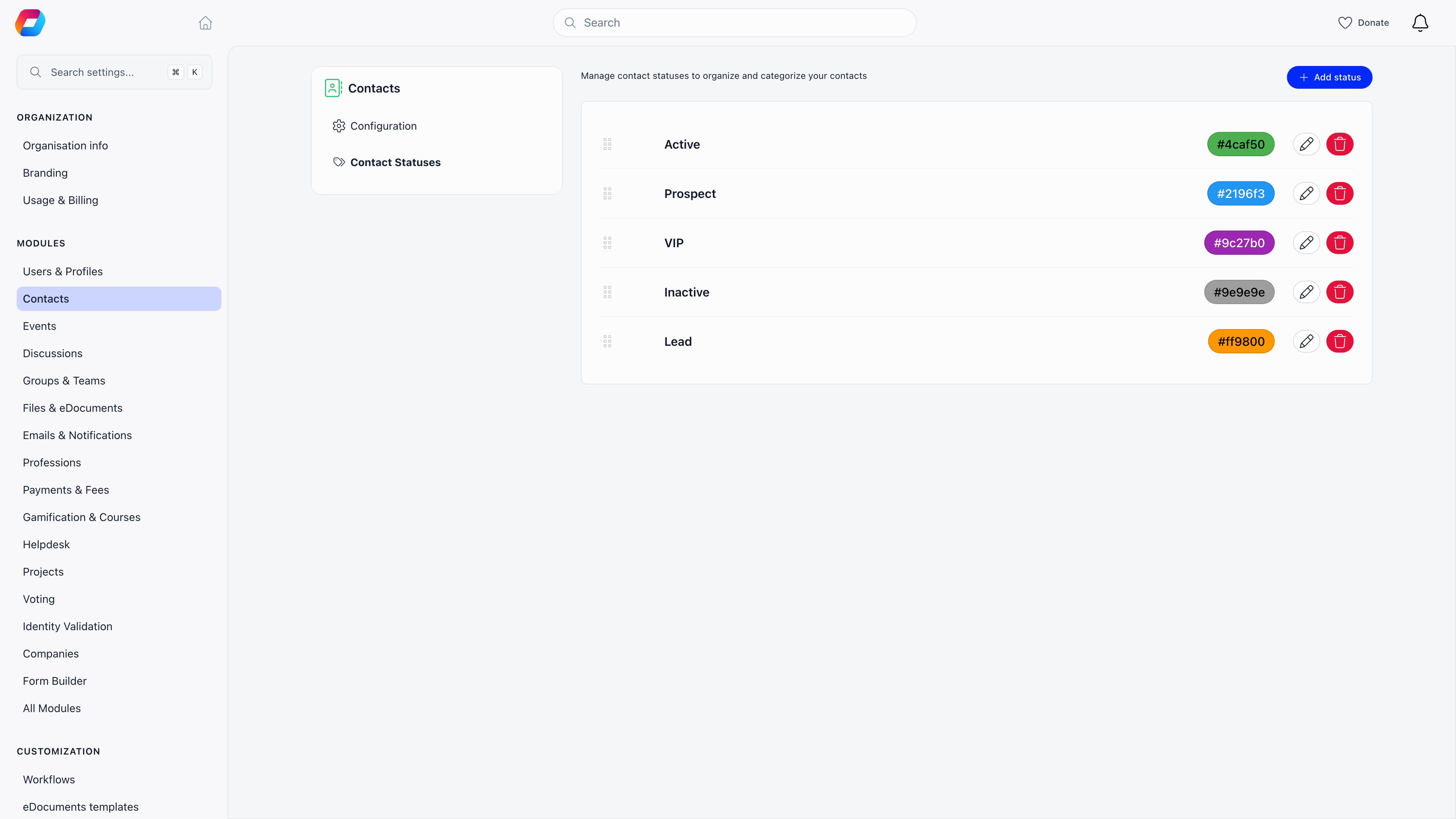
A contact status is a label you define, not a fixed list Orgo ships. Think of it
as a pipeline stage: New lead, Contacted, Qualified, Lapsed, whatever your team
actually says out loud.
Each status has three properties:
| Property | Notes |
| ---------- | ---------------------------------------------------------------------------------------------------------------------------- |
| **Name** | Required. Free text. |
| **Colour** | Required. Chosen from a palette, and used for the tag everywhere the status is shown. |
| **Order** | Set by dragging rows into the sequence you want. The record page renders the list in that order as a left-to-right pipeline. |
### Defining the list
**Settings** → **Modules** → **Contacts** → **Contact Statuses**. Add rows, edit
a name or colour in place, drag to reorder, and delete the ones you stop using.
The list stays editable, so you can rename or reorder at any time. Deleting a
status does not delete the contacts that held it; those records simply go back to
having no status.
Everywhere a status can be chosen, an organisation with none yet gets a
**"No statuses. Manage Statuses"** link straight to this page.
### Setting a status on a contact
Two places, and both save immediately:
* On the record page, click a chip in the status pipeline. A short toast confirms.
* In the contacts list, click the status tag on a row and pick from the dropdown.
This is the fastest way to work through a batch of contacts.
Statuses are gated by **Enable Contact Statuses** under **Settings** → **Modules**
→ **Contacts**. It is on by default. With it off, the status field, the status
column and the status filter all disappear, and nothing is deleted. Contact
statuses are a separate list from member statuses, which are fixed and decide
whether someone can sign in. See [User Statuses](/docs/platform/users/statuses).
***
## Tags
Tags are the multi-choice counterpart to the single-choice status. One contact
can carry as many as you like.
* **The tag catalogue is organisation-wide**, and it is shared with members. The
same tag can sit on a contact and on a member, so you can filter both
populations by it.
* **Casing does not create duplicates.** Orgo normalises each tag name and keeps
one entry per organisation, so "Volunteer", "volunteer" and " Volunteer " are
the same tag, not three.
* **Assignment is per contact.** Open the Tags card, type to search, and pick.
The X on a chip removes it.
| Action | Permission |
| -------------------------------------- | -------------- |
| Add a tag to a contact, or remove one | `HR_TENANT` |
| Create a new tag name in the catalogue | `ADMIN_TENANT` |
The two are separate. Someone with `HR_TENANT` can tag contacts all day using
tags that already exist, but typing a name that is not in the catalogue yet and
pressing Enter will be refused. Ask an organisation administrator to add the tag
once, then everyone can use it.
Tags are also written automatically by [workflows](/docs/platform/workflows), which
can add or remove a tag as an action, and each of those changes is recorded on
the contact's activity feed.
***
## Custom fields
Custom fields are how you record anything Orgo has no column for. They are
defined once under **Settings** → **Users & Profiles** → **Custom Fields** and
reused across members and contacts.
**Only profile fields attach to a contact.** A custom field belongs to one of
several groups depending on where it was created; the profile group is the one
that reaches a person's record. Fields built for a specific form stay on that
form and never appear on a contact. There is one exception by design: the local
center field type is form-only, because a contact already has a Chapter field of
its own.
Which profile fields appear on the contact form is decided by your profile form
configuration, and the read-only **Additional information** card on the record
only shows fields that actually have a value, so a contact with no answers has no
card.
**Field types available:** Input text, Input numeric, Textarea, Dropdown,
Checkboxes, Radio choice, Switcher (True/False), Date and File Upload.
**Visibility levels:** every field is Public, User or Admin, which controls who
can read and write the value.
**Encryption:** a small number of free-text fields per organisation can be
encrypted at rest. The cap is five, and only Input text, Input numeric, Textarea
and Date fields qualify. Choice, switch and file fields cannot be encrypted.
All three of those are explained in full, with the exact rules on who can read
what, on [Custom Fields](/docs/platform/users/custom-fields).
***
## Notes and activity
Two cards that work together.
**Notes** is what your team writes about the contact: what was said on the call,
what to do next. Each note records its author and the time, is capped at 512
characters, and can carry an optional **Called** or **Emailed** action. The
author of a note can edit or delete it, and so can `ADMIN_TENANT`; nobody else
can change someone else's note.
**Activity** is the feed underneath, merged newest first. It combines the notes
with things Orgo records on its own.
| Recorded automatically | When |
| --------------------------------------- | --------------------------------------------------------------------------------------------------------------------------------------------------------------------------------------------------------------------- |
| Tag added or removed | Any time a tag changes, whether by hand or by a workflow |
| Newsletter subscribed or unsubscribed | Only when an administrator uses the subscribe or unsubscribe button on the record, and only in the organization-wide activity log, not on this feed. See [Contacts and the newsletter](/docs/platform/contacts/newsletter) |
| Profile field edited | Any change to a field on the record |
| Personal identification number revealed | Every reveal, with who revealed it |
| Personal identification number changed | Every change to the stored value |
| Note deleted | So a removed note leaves a trace |
| CSV export | Every export of the contacts list |
| Merge and rollback | On both records involved |
Donations and form submissions the contact made appear in the same feed, so the
card reads as one running story rather than an audit dump.
Profile field edits are recorded but are not shown in the feed, which is
deliberate: a record edited in ten fields would otherwise bury the notes. The
entries exist for auditing, so ask an organisation administrator if you need to
see them.
**Who can write and read:** `HR_LOCAL` or `FINANCIAL_LOCAL` over that contact, or
`ADMIN_TENANT`.
Both cards sit behind **Enable Profile Notes & Activity** under **Settings** →
**Modules** → **Users & Profiles** → **Configuration**, which is **off** until
you switch it on and needs `ADMIN_TENANT`. Switching it back off hides the cards
and closes the endpoints behind them, but deletes nothing: existing notes
reappear with their authors and dates when it goes back on. Full detail:
[Profile Activity & Notes](/docs/platform/users/profile-activity).
***
## The record page
Open a contact from the list and you get a modal; the maximise control and the
`/contacts/show/` URL give you the same content as a full page.
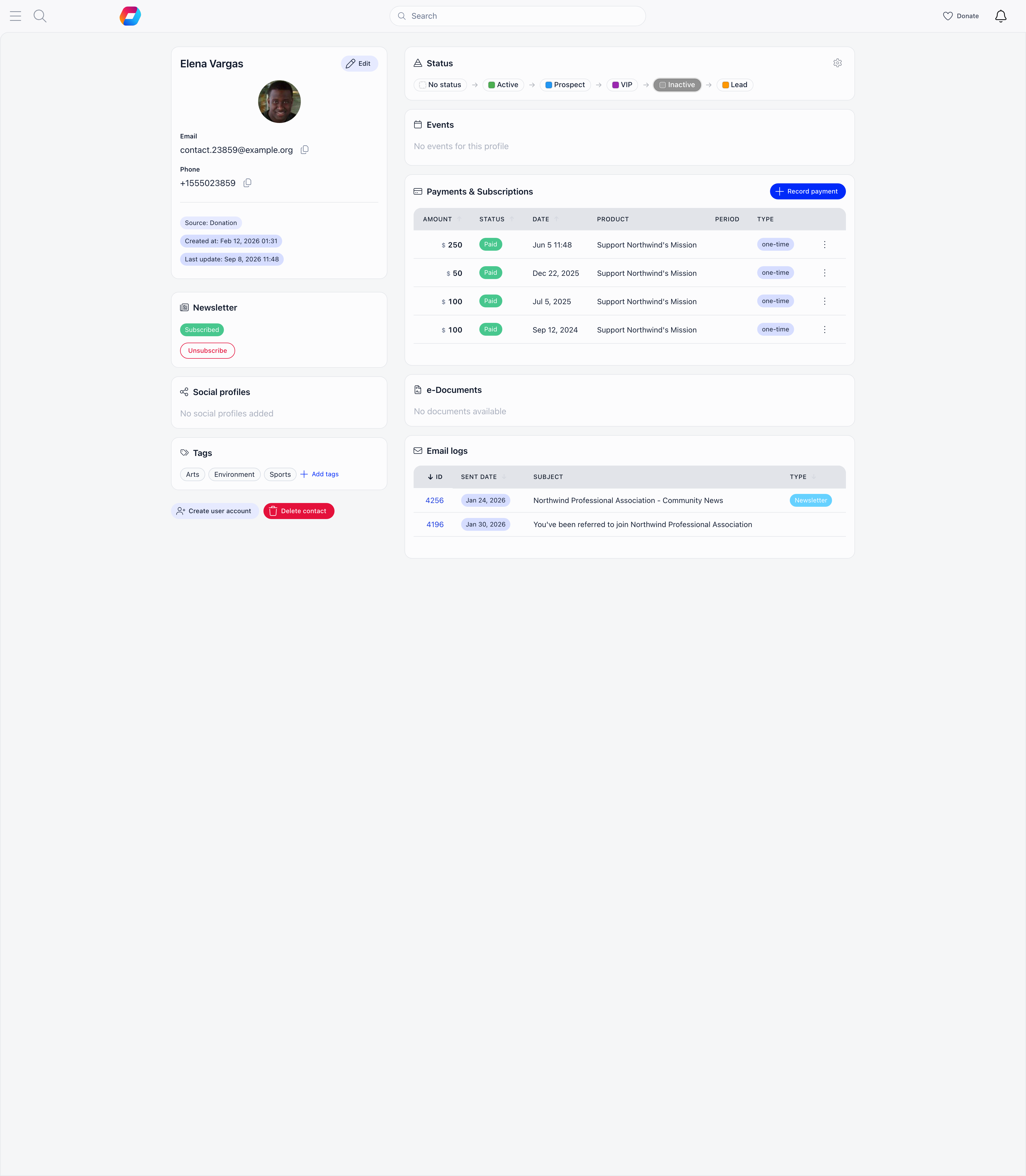
**There are no tabs.** The record is one scrolling page of cards in two columns,
which stack into a single column on a phone. Several cards hide themselves when
they have nothing to show, so not every contact displays every card below.
Left column, top to bottom:
1. **Contact info** with the **Edit** button that turns the whole card into the form
2. **Status** (on a phone only, so it stays near the top)
3. **Newsletter**, with a single Subscribe or Unsubscribe button
4. **Social profiles**
5. **Tags**
6. **Notes**
7. **Activity**
8. **Additional information**, the custom field answers
9. **Create user account** and **Delete contact** buttons
Right column, top to bottom:
1. **Status**, as a left-to-right pipeline of chips
2. **Events** the contact registered for
3. **Payments & Subscriptions**, with the subscription table above the payment list
4. **Company Membership**, when the contact is on a company account
5. **e-Documents**, when that module is on
6. **Email logs**, every message Orgo sent to this address
On a phone the right column falls below the left one, and the Create user account
and Delete buttons move into the menu at the top of the record.
***
## The contacts list
**Contacts** in the main menu. The list is where most day-to-day work happens.
### Columns
Name, Country, Town, Chapter, Email, Phone, Newsletter, Source, Status, Tags,
Date created, Stripe.
* **Name**, **Country**, **Town**, **Newsletter**, **Source** and **Date
created** are sortable. The rest are not.
* **Email** and **Phone** are icon-only to keep the row narrow. Hover to read the
value, click to copy it.
* **Status** is editable in place: click the tag and pick.
* **Tags** are clickable, and clicking one filters the list by it.
* **Chapter** appears only with **Enable Per-Chapter Contacts** on, **Status**
only with **Enable Contact Statuses** on, and **Stripe** only on rows that have
a Stripe customer.
### Search
One box, and it matches **name and email**. It runs when you press Enter or click
the search button next to it, not as you type, so a long list does not re-query
on every keystroke. The X clears it and returns you to the first page. On a phone
the box is behind the search icon in the header.
### Filters
Four dropdowns, and they combine with each other and with the search.
| Filter | Shown when | Notes |
| -------------- | ------------------------------------------------------------ | --------------------------------------------------------------------------------------------------------- |
| **Chapter** | Per-chapter contacts is on and you have at least one chapter | Has its own search box, and indents child chapters under their parent |
| **Status** | **Enable Contact Statuses** is on | Each option carries a live count. With no statuses defined yet, the only entry links to the settings page |
| **Tags** | Your organisation has at least one tag | Multi-select |
| **Newsletter** | Always | All, Subscribed, Not subscribed, Unsubscribed, each with a count |
Counts on the Status and Newsletter dropdowns are fetched the first time you open
them, so they are current rather than cached from page load.
### Paging and bulk actions
The list shows **20 rows per page** and paginates on the server, so filters and
sorting apply across your whole database, not just the page you are looking at.
**Select** turns on the checkboxes. Once rows are ticked, one action is offered:
**delete selected**. There is no bulk tag, no bulk status change and no bulk
newsletter action, so those stay one contact at a time.
Bulk delete is the only bulk action, and it is not reversible. Contacts that
cannot be deleted, because they have a successful payment against them, are
skipped, and the confirmation tells you how many were skipped. Read that number:
a batch that reports fewer deletions than you selected has left records behind on
purpose.
***
## Related
* [Contacts](/docs/platform/contacts) - what a contact is, and how it differs from a member
* [Where contacts come from](/docs/platform/contacts/sources) - every path that creates a record, and what each one fills in
* [Payments and contacts](/docs/platform/contacts/payments) - what a contact can pay for, and the membership fee boundary
* [Newsletter and contacts](/docs/platform/contacts/newsletter) - the subscription field, audiences and unsubscribes
* [Events and contacts](/docs/platform/contacts/events) - registration, badges and the Event App
* [Becoming a member](/docs/platform/contacts/becoming-a-member) - turning a contact into an account that can sign in
* [Contact permissions](/docs/platform/contacts/permissions) - who sees, edits, exports and deletes contacts
* [Custom Fields](/docs/platform/users/custom-fields) - field types, visibility and encryption in full
* [Profile Activity & Notes](/docs/platform/users/profile-activity) - the notes and activity feature end to end
* [Merging duplicates](/docs/platform/users/merging-duplicates) - the fix for duplicate contacts
* [Permissions](/docs/platform/permissions) - what each permission level unlocks
| Field | Notes |
| ---------------------- | ------------------------------------------------------------------------------------------------------------------------------------------------------------------------------------------------------ |
| **Status** | One value from your own list. See [Statuses](#statuses) below. |
| **Last status update** | Stamped whenever a status is set. Clearing a status back to none leaves the old timestamp in place. |
| **Created at** | When the record was created, not when the person first heard of you. |
| **Last update** | The last time any field on the record changed. |
| **Newsletter** | Subscribed, Unsubscribed, or Not subscribed for someone who was never asked. Changed from the Newsletter card, never from the edit form. See [Newsletter and contacts](/docs/platform/contacts/newsletter). |
***
## Duplicate email addresses are possible
**Email is not unique on a contact.** There is no database constraint on it, not
even within one organisation, so the same address can appear on two or more
contact records at once. This is normal data cleaning, not an error state.
Duplicates arise because only one path checks for them. The **Add Contact** form
refuses an email that already belongs to a contact or a member, and offers to
update the existing record instead. Every other path writes without that check:
* Spreadsheet imports
* Newsletter signups and embedded contact forms
* Event registrations, donations and other checkouts
* Records created by Stripe or by contract signing
A second reason is the name split described above: a nameless capture is filed
under its email address, so the same person can end up once as "Ana Popescu" and
once as "[ana@example.com](mailto:ana@example.com)".
Clean them up with the merge tool, which finds duplicates by identical email
address and by identical name, and folds one record into the other so the
payments, tickets and documents on both end up on the record you keep. See
[Merging duplicates](/docs/platform/users/merging-duplicates).
Deleting one of two duplicates is not the same as merging them. Deletion is
refused while the contact has any payment, invoice or signed contract, and where
it does go through it takes the record's whole history with it. Merge first,
delete second.
***
## Statuses
A contact status is a label you define, not a fixed list Orgo ships. Think of it
as a pipeline stage: New lead, Contacted, Qualified, Lapsed, whatever your team
actually says out loud.
Each status has three properties:
| Property | Notes |
| ---------- | ---------------------------------------------------------------------------------------------------------------------------- |
| **Name** | Required. Free text. |
| **Colour** | Required. Chosen from a palette, and used for the tag everywhere the status is shown. |
| **Order** | Set by dragging rows into the sequence you want. The record page renders the list in that order as a left-to-right pipeline. |
### Defining the list
**Settings** → **Modules** → **Contacts** → **Contact Statuses**. Add rows, edit
a name or colour in place, drag to reorder, and delete the ones you stop using.
The list stays editable, so you can rename or reorder at any time. Deleting a
status does not delete the contacts that held it; those records simply go back to
having no status.
Everywhere a status can be chosen, an organisation with none yet gets a
**"No statuses. Manage Statuses"** link straight to this page.
### Setting a status on a contact
Two places, and both save immediately:
* On the record page, click a chip in the status pipeline. A short toast confirms.
* In the contacts list, click the status tag on a row and pick from the dropdown.
This is the fastest way to work through a batch of contacts.
Statuses are gated by **Enable Contact Statuses** under **Settings** → **Modules**
→ **Contacts**. It is on by default. With it off, the status field, the status
column and the status filter all disappear, and nothing is deleted. Contact
statuses are a separate list from member statuses, which are fixed and decide
whether someone can sign in. See [User Statuses](/docs/platform/users/statuses).
***
## Tags
Tags are the multi-choice counterpart to the single-choice status. One contact
can carry as many as you like.
* **The tag catalogue is organisation-wide**, and it is shared with members. The
same tag can sit on a contact and on a member, so you can filter both
populations by it.
* **Casing does not create duplicates.** Orgo normalises each tag name and keeps
one entry per organisation, so "Volunteer", "volunteer" and " Volunteer " are
the same tag, not three.
* **Assignment is per contact.** Open the Tags card, type to search, and pick.
The X on a chip removes it.
| Action | Permission |
| -------------------------------------- | -------------- |
| Add a tag to a contact, or remove one | `HR_TENANT` |
| Create a new tag name in the catalogue | `ADMIN_TENANT` |
The two are separate. Someone with `HR_TENANT` can tag contacts all day using
tags that already exist, but typing a name that is not in the catalogue yet and
pressing Enter will be refused. Ask an organisation administrator to add the tag
once, then everyone can use it.
Tags are also written automatically by [workflows](/docs/platform/workflows), which
can add or remove a tag as an action, and each of those changes is recorded on
the contact's activity feed.
***
## Custom fields
Custom fields are how you record anything Orgo has no column for. They are
defined once under **Settings** → **Users & Profiles** → **Custom Fields** and
reused across members and contacts.
**Only profile fields attach to a contact.** A custom field belongs to one of
several groups depending on where it was created; the profile group is the one
that reaches a person's record. Fields built for a specific form stay on that
form and never appear on a contact. There is one exception by design: the local
center field type is form-only, because a contact already has a Chapter field of
its own.
Which profile fields appear on the contact form is decided by your profile form
configuration, and the read-only **Additional information** card on the record
only shows fields that actually have a value, so a contact with no answers has no
card.
**Field types available:** Input text, Input numeric, Textarea, Dropdown,
Checkboxes, Radio choice, Switcher (True/False), Date and File Upload.
**Visibility levels:** every field is Public, User or Admin, which controls who
can read and write the value.
**Encryption:** a small number of free-text fields per organisation can be
encrypted at rest. The cap is five, and only Input text, Input numeric, Textarea
and Date fields qualify. Choice, switch and file fields cannot be encrypted.
All three of those are explained in full, with the exact rules on who can read
what, on [Custom Fields](/docs/platform/users/custom-fields).
***
## Notes and activity
Two cards that work together.
**Notes** is what your team writes about the contact: what was said on the call,
what to do next. Each note records its author and the time, is capped at 512
characters, and can carry an optional **Called** or **Emailed** action. The
author of a note can edit or delete it, and so can `ADMIN_TENANT`; nobody else
can change someone else's note.
**Activity** is the feed underneath, merged newest first. It combines the notes
with things Orgo records on its own.
| Recorded automatically | When |
| --------------------------------------- | --------------------------------------------------------------------------------------------------------------------------------------------------------------------------------------------------------------------- |
| Tag added or removed | Any time a tag changes, whether by hand or by a workflow |
| Newsletter subscribed or unsubscribed | Only when an administrator uses the subscribe or unsubscribe button on the record, and only in the organization-wide activity log, not on this feed. See [Contacts and the newsletter](/docs/platform/contacts/newsletter) |
| Profile field edited | Any change to a field on the record |
| Personal identification number revealed | Every reveal, with who revealed it |
| Personal identification number changed | Every change to the stored value |
| Note deleted | So a removed note leaves a trace |
| CSV export | Every export of the contacts list |
| Merge and rollback | On both records involved |
Donations and form submissions the contact made appear in the same feed, so the
card reads as one running story rather than an audit dump.
Profile field edits are recorded but are not shown in the feed, which is
deliberate: a record edited in ten fields would otherwise bury the notes. The
entries exist for auditing, so ask an organisation administrator if you need to
see them.
**Who can write and read:** `HR_LOCAL` or `FINANCIAL_LOCAL` over that contact, or
`ADMIN_TENANT`.
Both cards sit behind **Enable Profile Notes & Activity** under **Settings** →
**Modules** → **Users & Profiles** → **Configuration**, which is **off** until
you switch it on and needs `ADMIN_TENANT`. Switching it back off hides the cards
and closes the endpoints behind them, but deletes nothing: existing notes
reappear with their authors and dates when it goes back on. Full detail:
[Profile Activity & Notes](/docs/platform/users/profile-activity).
***
## The record page
Open a contact from the list and you get a modal; the maximise control and the
`/contacts/show/` URL give you the same content as a full page.
**There are no tabs.** The record is one scrolling page of cards in two columns,
which stack into a single column on a phone. Several cards hide themselves when
they have nothing to show, so not every contact displays every card below.
Left column, top to bottom:
1. **Contact info** with the **Edit** button that turns the whole card into the form
2. **Status** (on a phone only, so it stays near the top)
3. **Newsletter**, with a single Subscribe or Unsubscribe button
4. **Social profiles**
5. **Tags**
6. **Notes**
7. **Activity**
8. **Additional information**, the custom field answers
9. **Create user account** and **Delete contact** buttons
Right column, top to bottom:
1. **Status**, as a left-to-right pipeline of chips
2. **Events** the contact registered for
3. **Payments & Subscriptions**, with the subscription table above the payment list
4. **Company Membership**, when the contact is on a company account
5. **e-Documents**, when that module is on
6. **Email logs**, every message Orgo sent to this address
On a phone the right column falls below the left one, and the Create user account
and Delete buttons move into the menu at the top of the record.
***
## The contacts list
**Contacts** in the main menu. The list is where most day-to-day work happens.
### Columns
Name, Country, Town, Chapter, Email, Phone, Newsletter, Source, Status, Tags,
Date created, Stripe.
* **Name**, **Country**, **Town**, **Newsletter**, **Source** and **Date
created** are sortable. The rest are not.
* **Email** and **Phone** are icon-only to keep the row narrow. Hover to read the
value, click to copy it.
* **Status** is editable in place: click the tag and pick.
* **Tags** are clickable, and clicking one filters the list by it.
* **Chapter** appears only with **Enable Per-Chapter Contacts** on, **Status**
only with **Enable Contact Statuses** on, and **Stripe** only on rows that have
a Stripe customer.
### Search
One box, and it matches **name and email**. It runs when you press Enter or click
the search button next to it, not as you type, so a long list does not re-query
on every keystroke. The X clears it and returns you to the first page. On a phone
the box is behind the search icon in the header.
### Filters
Four dropdowns, and they combine with each other and with the search.
| Filter | Shown when | Notes |
| -------------- | ------------------------------------------------------------ | --------------------------------------------------------------------------------------------------------- |
| **Chapter** | Per-chapter contacts is on and you have at least one chapter | Has its own search box, and indents child chapters under their parent |
| **Status** | **Enable Contact Statuses** is on | Each option carries a live count. With no statuses defined yet, the only entry links to the settings page |
| **Tags** | Your organisation has at least one tag | Multi-select |
| **Newsletter** | Always | All, Subscribed, Not subscribed, Unsubscribed, each with a count |
Counts on the Status and Newsletter dropdowns are fetched the first time you open
them, so they are current rather than cached from page load.
### Paging and bulk actions
The list shows **20 rows per page** and paginates on the server, so filters and
sorting apply across your whole database, not just the page you are looking at.
**Select** turns on the checkboxes. Once rows are ticked, one action is offered:
**delete selected**. There is no bulk tag, no bulk status change and no bulk
newsletter action, so those stay one contact at a time.
Bulk delete is the only bulk action, and it is not reversible. Contacts that
cannot be deleted, because they have a successful payment against them, are
skipped, and the confirmation tells you how many were skipped. Read that number:
a batch that reports fewer deletions than you selected has left records behind on
purpose.
***
## Related
* [Contacts](/docs/platform/contacts) - what a contact is, and how it differs from a member
* [Where contacts come from](/docs/platform/contacts/sources) - every path that creates a record, and what each one fills in
* [Payments and contacts](/docs/platform/contacts/payments) - what a contact can pay for, and the membership fee boundary
* [Newsletter and contacts](/docs/platform/contacts/newsletter) - the subscription field, audiences and unsubscribes
* [Events and contacts](/docs/platform/contacts/events) - registration, badges and the Event App
* [Becoming a member](/docs/platform/contacts/becoming-a-member) - turning a contact into an account that can sign in
* [Contact permissions](/docs/platform/contacts/permissions) - who sees, edits, exports and deletes contacts
* [Custom Fields](/docs/platform/users/custom-fields) - field types, visibility and encryption in full
* [Profile Activity & Notes](/docs/platform/users/profile-activity) - the notes and activity feature end to end
* [Merging duplicates](/docs/platform/users/merging-duplicates) - the fix for duplicate contacts
* [Permissions](/docs/platform/permissions) - what each permission level unlocks