> ## Documentation Index
> Fetch the complete documentation index at: https://orgo.space/docs/llms.txt
> Use this file to discover all available pages before exploring further.
# Discussions
> Forum-style posts and conversations within every group
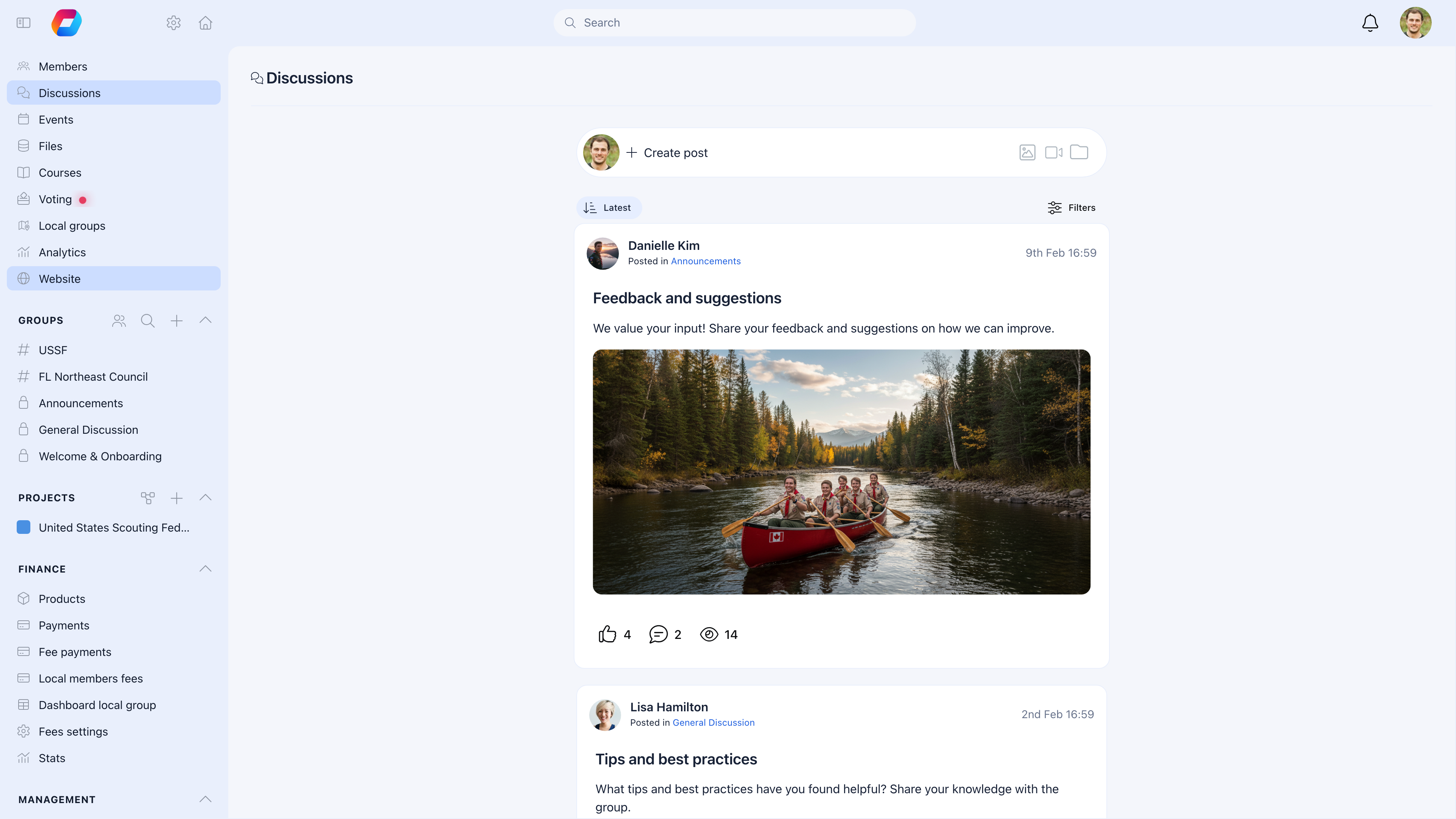
Discussions are the conversation layer inside every group. Members create posts, others reply, react, and share files — like a forum built into each group. The Main Group has org-wide discussions, Local Centers have local conversations, and Private Groups have team-specific threads.
 ***
## How discussions work
Every group (Main Group, Local Centers, Role Groups, Private Groups) can have discussions enabled. When a member creates a post in a group:
1. It appears in that group's **Discussions** tab
2. Group members receive notifications (based on their preferences)
3. Members can reply, react with emojis, or share the post
4. Admins can pin important posts, lock threads, or moderate content
***
## Creating a post
Go to any group → **Discussions** tab → **Create Post**
| Field | What to enter |
| ------------ | ----------------------------------------------------------------------------------------------------- |
| **Title** | Clear headline — "Q4 Planning Meeting Notes" is better than "Update" |
| **Body** | Rich text content with formatting, images, links, and embedded media |
| **Category** | If [Discussion Namespaces](/platform/discussion/discussion-namespaces) are enabled, select a category |
| **Topics** | Tag your post with one or more topics for filtering and organization |
### Media and attachments
Posts support rich media — not just text:
| Media type | How it works |
| ----------------- | --------------------------------------------------------------------------------------------------------- |
| **Images** | Embed directly in the post body. Displayed inline with lightbox preview. |
| **Videos** | Upload MP4/WebM videos that play directly in the feed. |
| **Files** | Attach PDFs, documents, spreadsheets — members download from the post. |
| **Link previews** | Paste a URL and it generates an OpenGraph preview card with title, image, and description. |
| **@Mentions** | Type `@` to mention a member by name. They receive a notification and the mention links to their profile. |
### Rich text features
The editor supports:
* **Bold**, *italic*, ~~strikethrough~~
* Headings, bullet lists, numbered lists
* Links and inline images
* Code blocks and block quotes
* File and media attachments
***
## Comments and reactions
***
## How discussions work
Every group (Main Group, Local Centers, Role Groups, Private Groups) can have discussions enabled. When a member creates a post in a group:
1. It appears in that group's **Discussions** tab
2. Group members receive notifications (based on their preferences)
3. Members can reply, react with emojis, or share the post
4. Admins can pin important posts, lock threads, or moderate content
***
## Creating a post
Go to any group → **Discussions** tab → **Create Post**
| Field | What to enter |
| ------------ | ----------------------------------------------------------------------------------------------------- |
| **Title** | Clear headline — "Q4 Planning Meeting Notes" is better than "Update" |
| **Body** | Rich text content with formatting, images, links, and embedded media |
| **Category** | If [Discussion Namespaces](/platform/discussion/discussion-namespaces) are enabled, select a category |
| **Topics** | Tag your post with one or more topics for filtering and organization |
### Media and attachments
Posts support rich media — not just text:
| Media type | How it works |
| ----------------- | --------------------------------------------------------------------------------------------------------- |
| **Images** | Embed directly in the post body. Displayed inline with lightbox preview. |
| **Videos** | Upload MP4/WebM videos that play directly in the feed. |
| **Files** | Attach PDFs, documents, spreadsheets — members download from the post. |
| **Link previews** | Paste a URL and it generates an OpenGraph preview card with title, image, and description. |
| **@Mentions** | Type `@` to mention a member by name. They receive a notification and the mention links to their profile. |
### Rich text features
The editor supports:
* **Bold**, *italic*, ~~strikethrough~~
* Headings, bullet lists, numbered lists
* Links and inline images
* Code blocks and block quotes
* File and media attachments
***
## Comments and reactions
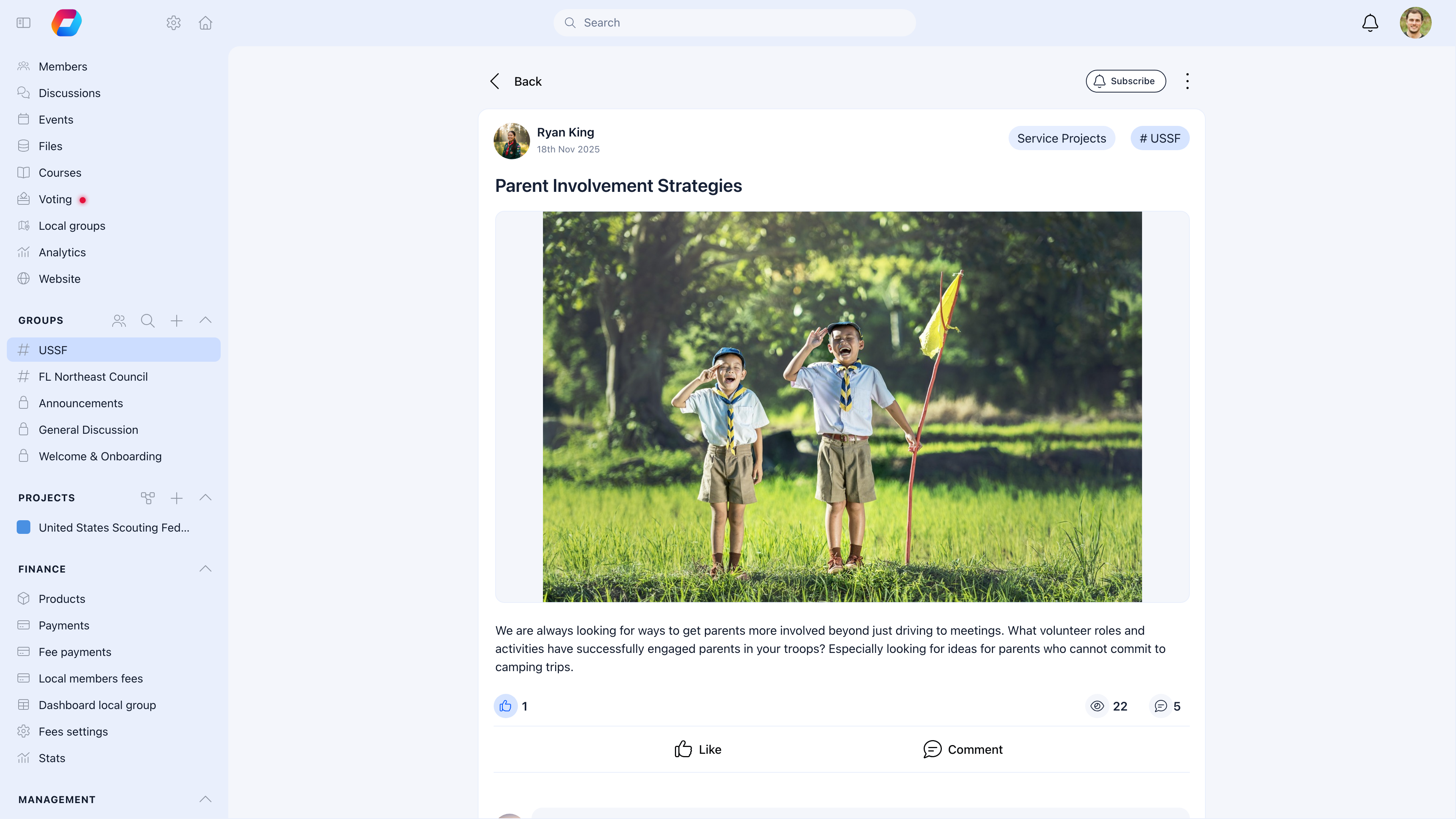 Every post has a comment thread below it. Comments support the same rich text and media as posts — images, videos, files, and mentions.
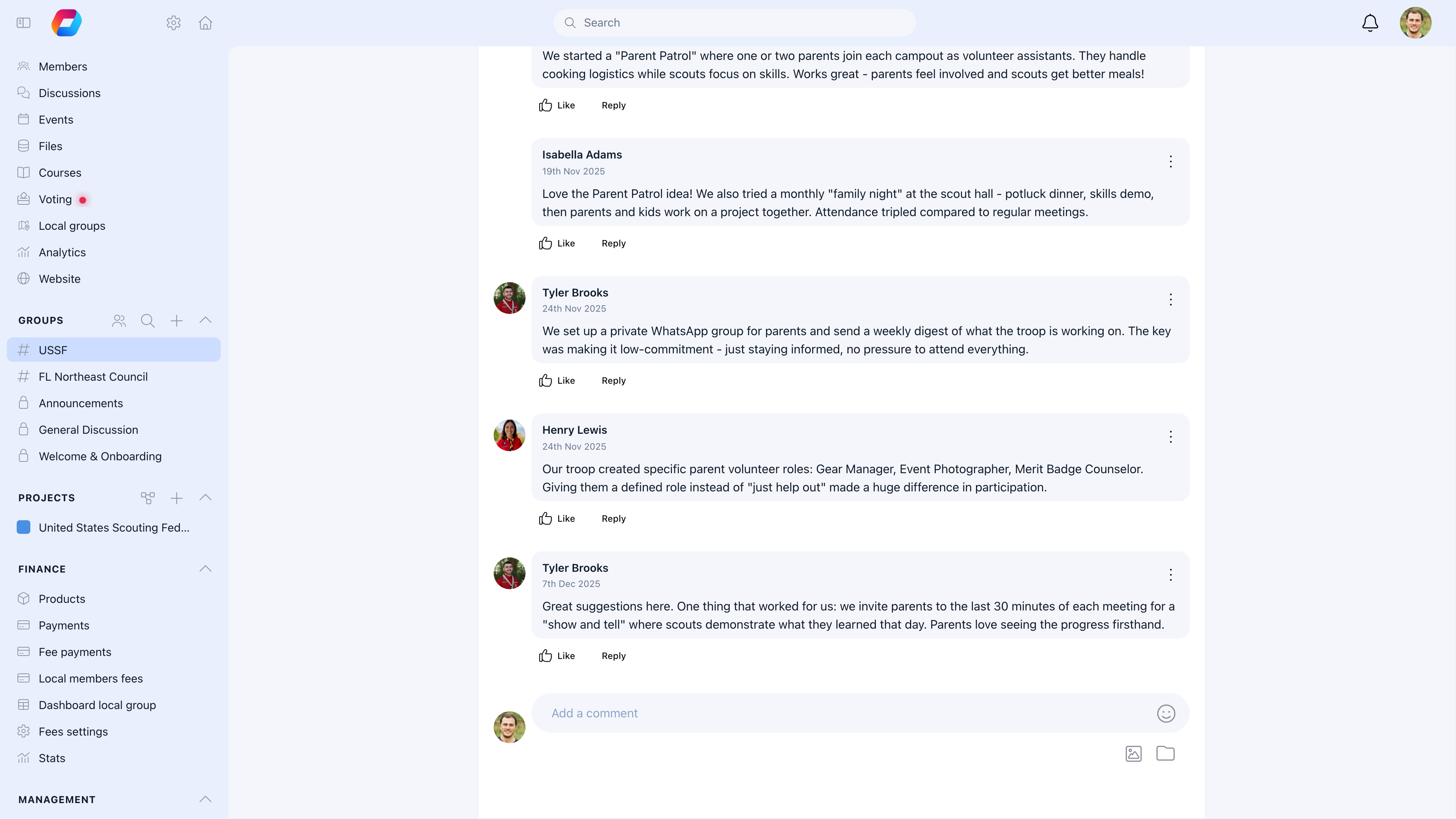 | Action | How |
| ---------------------- | ------------------------------------------------------------------------------------------------ |
| **Comment** | Write a response below the post. Comments appear in chronological order. |
| **Reply to a comment** | Click reply on a specific comment to create a threaded response under it (one level of nesting). |
| **React** | Click an emoji reaction on the post or any comment. Reactions are visible with counts. |
| **Mention** | Type `@name` to notify and link to a specific member in your comment. |
Posts track their **comment count**, **view count**, and **reaction count** — giving you a quick sense of engagement without opening each thread.
***
## Moderation
Admins and group owners can manage discussions:
| Action | What it does |
| ---------- | -------------------------------------------------------------------------------------------- |
| **Pin** | Keep a post at the top of the discussion list — use for announcements or important resources |
| **Lock** | Prevent new replies — useful for resolved topics or closed decisions |
| **Hide** | Remove from the feed without deleting — content preserved but not visible |
| **Delete** | Permanently remove the post and all replies |
| **Move** | Change the post to a different namespace/category |
Members can **report** inappropriate content, which goes to the moderation queue for admin review.
***
## Discussions in different groups
| Group | Discussion character |
| ------------------ | ------------------------------------------------------------------------------------------------------- |
| **Main Group** | Org-wide announcements, general conversation. Often restricted to admin-only posting with open replies. |
| **Local Centers** | Local news, community conversations, area-specific topics. Usually open to all local members. |
| **Role Groups** | Segment-specific coordination — leaders sharing practices, youth peer discussion. |
| **Private Groups** | Team communication — project updates, decisions, meeting notes. |
Each group's discussions are separate. A post in the New York Local Center isn't visible to members of the London branch.
***
## Search and filtering
| Filter | What it does |
| ---------------------- | -------------------------------------------------------------- |
| **Namespace/category** | Show only posts in a specific category (if namespaces enabled) |
| **Author** | Find posts by a specific member |
| **Date** | Sort by newest, oldest, or most recent activity |
| **Full-text search** | Find posts containing specific words |
***
## Setting up discussions
| Action | How |
| ---------------------- | ------------------------------------------------------------------------------------------------ |
| **Comment** | Write a response below the post. Comments appear in chronological order. |
| **Reply to a comment** | Click reply on a specific comment to create a threaded response under it (one level of nesting). |
| **React** | Click an emoji reaction on the post or any comment. Reactions are visible with counts. |
| **Mention** | Type `@name` to notify and link to a specific member in your comment. |
Posts track their **comment count**, **view count**, and **reaction count** — giving you a quick sense of engagement without opening each thread.
***
## Moderation
Admins and group owners can manage discussions:
| Action | What it does |
| ---------- | -------------------------------------------------------------------------------------------- |
| **Pin** | Keep a post at the top of the discussion list — use for announcements or important resources |
| **Lock** | Prevent new replies — useful for resolved topics or closed decisions |
| **Hide** | Remove from the feed without deleting — content preserved but not visible |
| **Delete** | Permanently remove the post and all replies |
| **Move** | Change the post to a different namespace/category |
Members can **report** inappropriate content, which goes to the moderation queue for admin review.
***
## Discussions in different groups
| Group | Discussion character |
| ------------------ | ------------------------------------------------------------------------------------------------------- |
| **Main Group** | Org-wide announcements, general conversation. Often restricted to admin-only posting with open replies. |
| **Local Centers** | Local news, community conversations, area-specific topics. Usually open to all local members. |
| **Role Groups** | Segment-specific coordination — leaders sharing practices, youth peer discussion. |
| **Private Groups** | Team communication — project updates, decisions, meeting notes. |
Each group's discussions are separate. A post in the New York Local Center isn't visible to members of the London branch.
***
## Search and filtering
| Filter | What it does |
| ---------------------- | -------------------------------------------------------------- |
| **Namespace/category** | Show only posts in a specific category (if namespaces enabled) |
| **Author** | Find posts by a specific member |
| **Date** | Sort by newest, oldest, or most recent activity |
| **Full-text search** | Find posts containing specific words |
***
## Setting up discussions
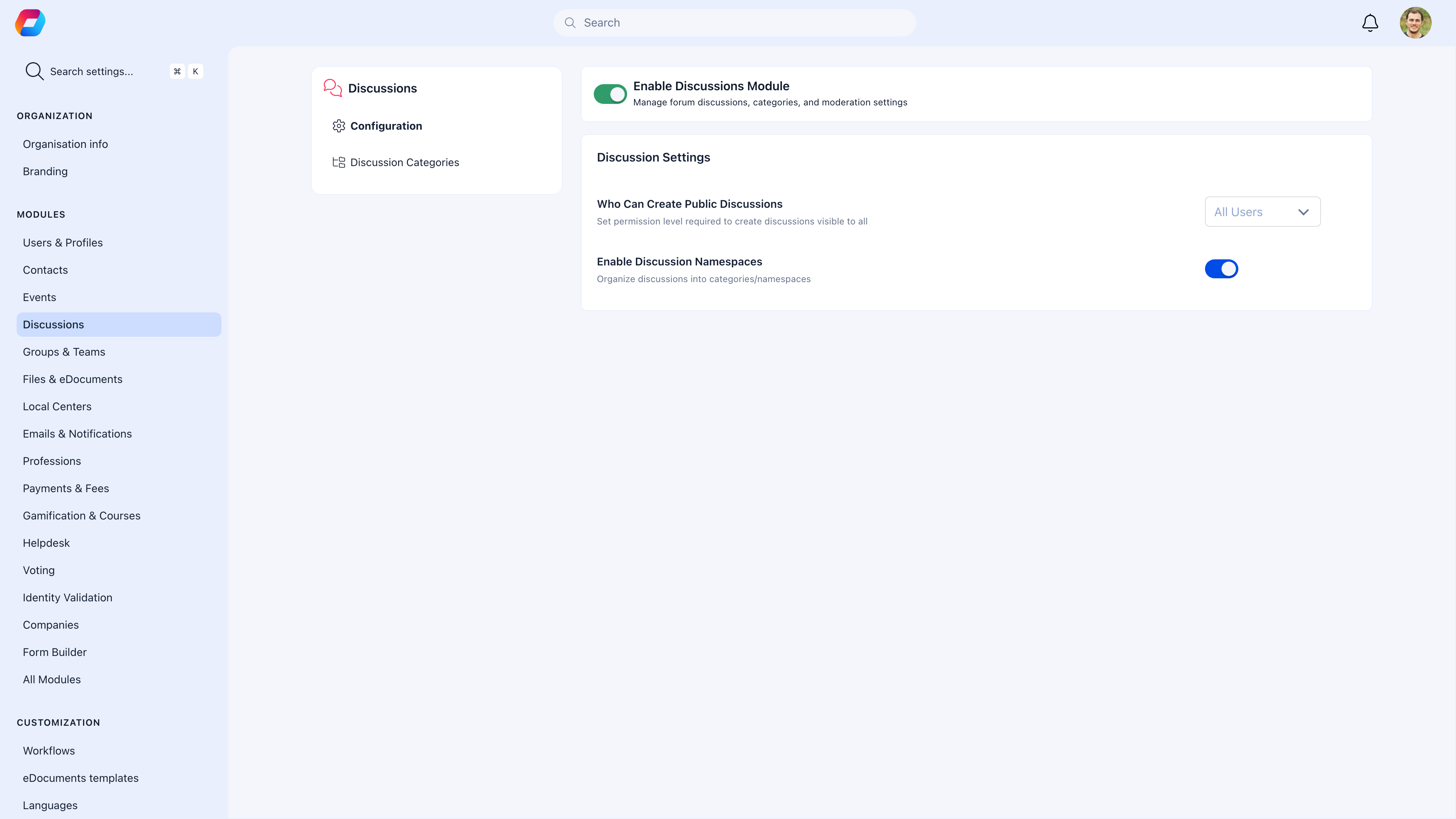 **Settings** → **Discussions**
| Setting | What it does |
| ------------------------------------- | ------------------------------------------------------------------------------------------------------------------- |
| **Who can create public discussions** | Permission level required to create discussions visible to all. Default: All Users. |
| **Enable Discussion Namespaces** | Organize posts into categories/namespaces. See [Discussion Namespaces](/platform/discussion/discussion-namespaces). |
***
## Notifications
Members receive notifications for:
* New posts in groups they belong to
* Replies to their posts
* @mentions
* Moderator actions on their content
Members can adjust discussion notification frequency in their [notification settings](/platform/notifications) — all activity, mentions only, or none.
***
## Common scenarios
Enable "Only admins can post" on the Main Group. It becomes an announcement channel where admins post and members read. Direct open discussion to Local Centers or Private Groups. Members can still reply to admin posts if needed.
Enable [Discussion Namespaces](/platform/discussion/discussion-namespaces). Create categories like "Announcements", "Questions", "Ideas", "Events". Members tag their posts, and everyone can filter by category.
Discussions are **two-way** — members see posts in-app, reply, react, and have conversations. Newsletter is **one-way** — an email campaign that goes to inboxes. Use discussions for engagement and conversation. Use newsletter for announcements that must reach inboxes.
Typically yes, within a time window. After that, only moderators/admins can delete. This prevents accidental loss of threaded conversations where others have already replied.
***
## Related
* [Discussion Namespaces](/platform/discussion/discussion-namespaces) — Organize posts by category
* [Groups](/platform/groups) — Where discussions live
* [Notifications](/platform/notifications) — Discussion notification settings
* [Newsletter](/platform/newsletter) — For one-way email communication
**Settings** → **Discussions**
| Setting | What it does |
| ------------------------------------- | ------------------------------------------------------------------------------------------------------------------- |
| **Who can create public discussions** | Permission level required to create discussions visible to all. Default: All Users. |
| **Enable Discussion Namespaces** | Organize posts into categories/namespaces. See [Discussion Namespaces](/platform/discussion/discussion-namespaces). |
***
## Notifications
Members receive notifications for:
* New posts in groups they belong to
* Replies to their posts
* @mentions
* Moderator actions on their content
Members can adjust discussion notification frequency in their [notification settings](/platform/notifications) — all activity, mentions only, or none.
***
## Common scenarios
Enable "Only admins can post" on the Main Group. It becomes an announcement channel where admins post and members read. Direct open discussion to Local Centers or Private Groups. Members can still reply to admin posts if needed.
Enable [Discussion Namespaces](/platform/discussion/discussion-namespaces). Create categories like "Announcements", "Questions", "Ideas", "Events". Members tag their posts, and everyone can filter by category.
Discussions are **two-way** — members see posts in-app, reply, react, and have conversations. Newsletter is **one-way** — an email campaign that goes to inboxes. Use discussions for engagement and conversation. Use newsletter for announcements that must reach inboxes.
Typically yes, within a time window. After that, only moderators/admins can delete. This prevents accidental loss of threaded conversations where others have already replied.
***
## Related
* [Discussion Namespaces](/platform/discussion/discussion-namespaces) — Organize posts by category
* [Groups](/platform/groups) — Where discussions live
* [Notifications](/platform/notifications) — Discussion notification settings
* [Newsletter](/platform/newsletter) — For one-way email communication