> ## Documentation Index
> Fetch the complete documentation index at: https://orgo.space/docs/llms.txt
> Use this file to discover all available pages before exploring further.
# Blocking Members
> Hide the discussions, posts and replies of one member from your own view of the forum
Blocking is the personal counterpart to moderation. A member who does not want to read another member stops seeing them, without anybody having to take the content down for the whole organization.
A block is one way, private to the person who made it, and limited to Discussions.
***
## What a block hides
Once you block someone, every discussion list you open leaves their content out.
| Where | Effect |
| ---------------------------------------------- | ------------------------------------------------------------------------------------------- |
| Discussions feed, group and local center feeds | Threads they started disappear |
| Dashboard discussion lists and widgets | Same |
| Search box | Their threads no longer come back among discussion results |
| Inside a thread | Their comments and replies disappear, everybody else's stay |
| Paging | The list is filtered before it is counted, so page numbers and infinite scroll stay correct |
Filtering happens on the server, so blocked content never reaches your browser.
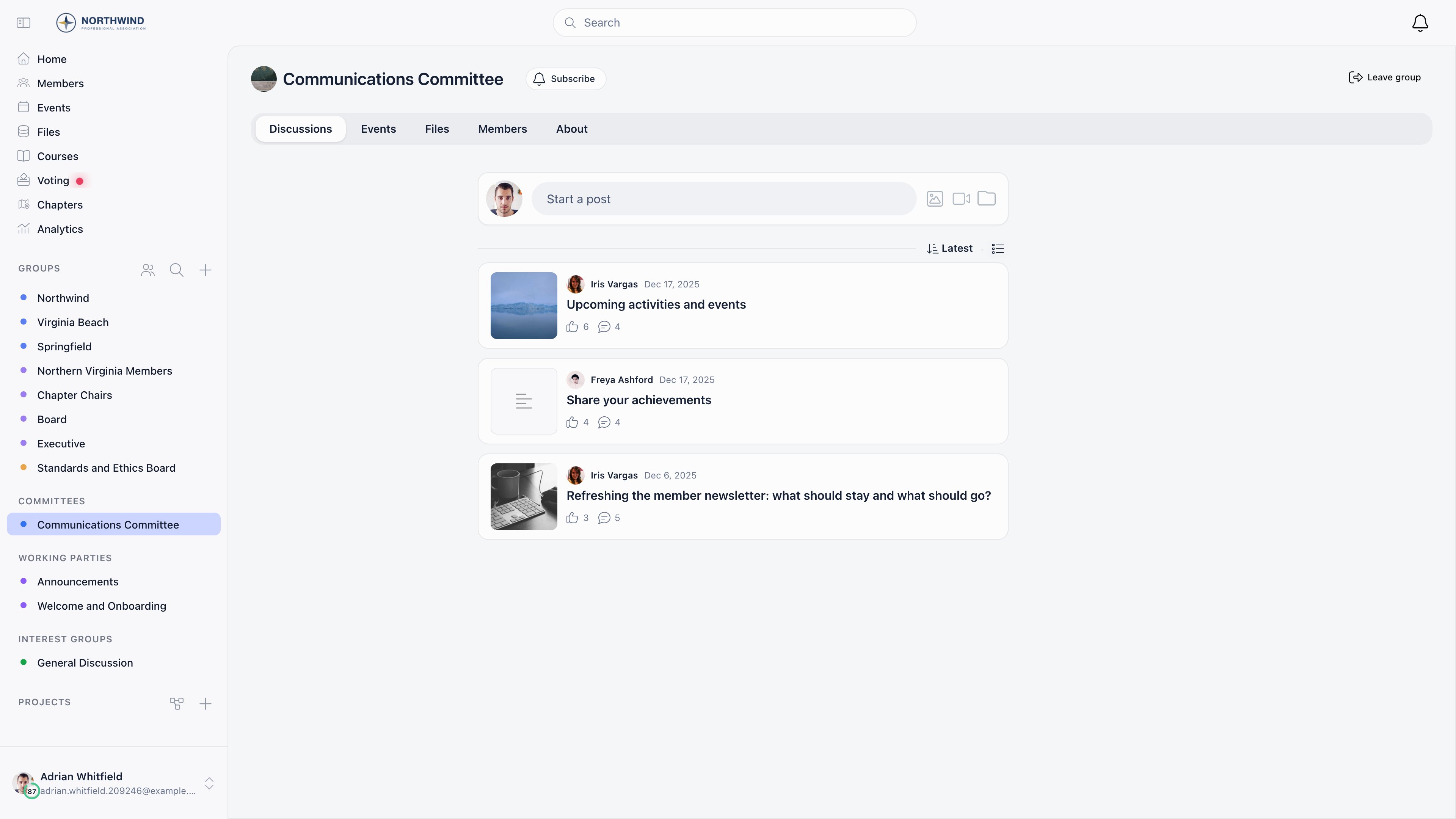
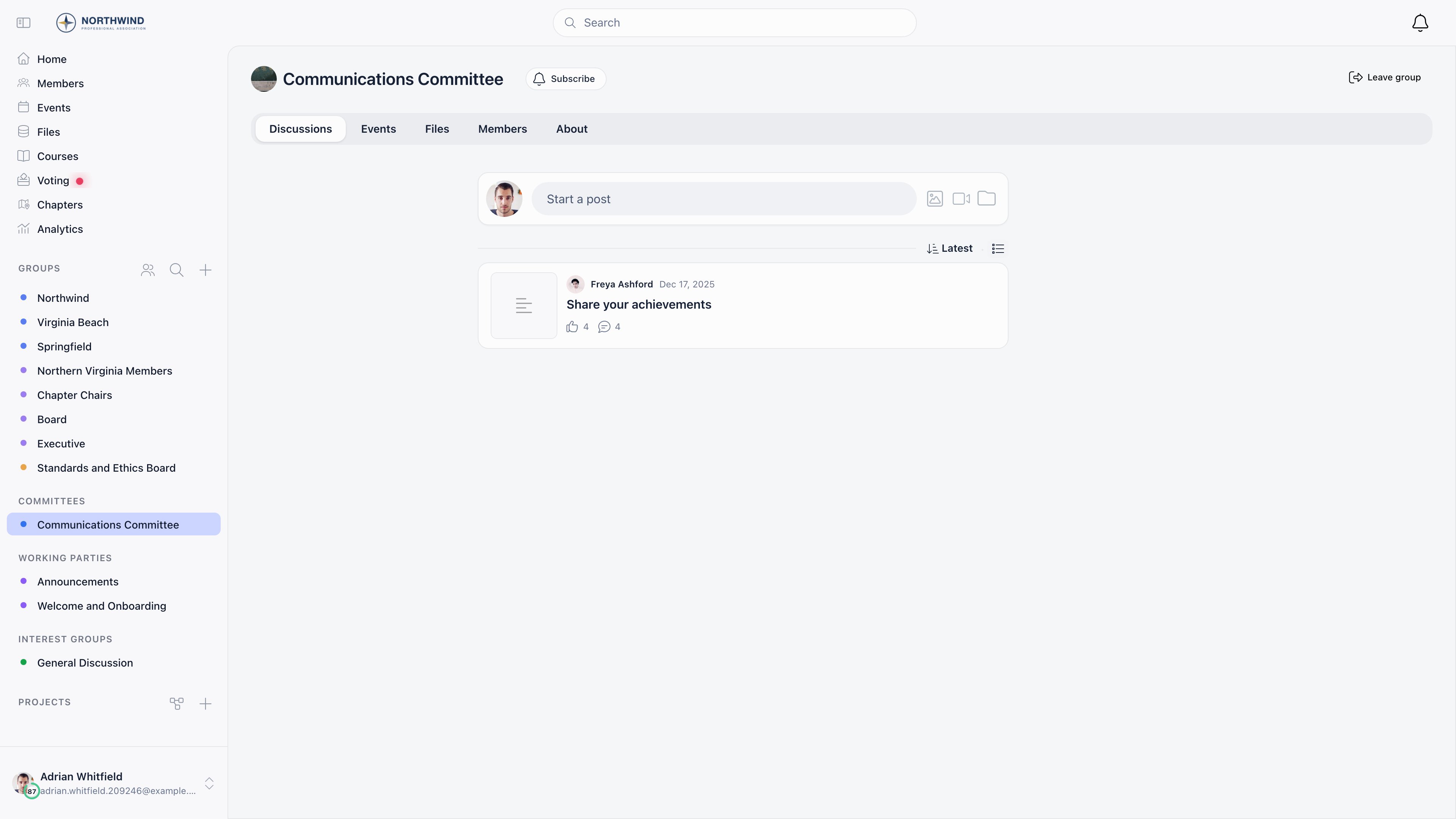
The same group feed, before and after one member is blocked. Two of the three threads were started by the blocked member and are simply gone; the third is untouched, and so is everyone else's view of all three.
 ***
## What a block does not do
* **It does not restrict the blocked member.** They keep posting, commenting and replying, and their content is unchanged for everybody else.
* **Nobody is told.** The member you blocked gets no notification and no marker on their posts, and no other member can see that the block exists.
* **It does not empty a ticket queue.** Support tickets and issues are excluded from the list filtering on purpose, so a personal block never removes a ticket from a queue somebody works. Inside a ticket or an issue thread the block still applies, so comments by a blocked member are hidden from whoever blocked them. Bear that in mind before blocking anyone you also handle tickets with. See [Help Desk](/docs/platform/help-desk) and [Issues](/docs/platform/issues).
* **It does not follow the member around Orgo.** They still appear in the member directory, in group lists, in events and in the event app. Blocking only filters the forum.
* **It does not stop notifications.** If somebody you blocked replies to your post or mentions you, the notification still arrives, even though the comment itself is hidden when you open the thread.
Two side effects are worth knowing. The comment count shown on a thread is a stored total, so it still counts the comments that are now hidden from you: a card can read "8 comments" while you see 6. And a block filters lists, not links, so a direct link to a thread started by somebody you blocked still opens that thread.
***
## Blocking a member
The action lives inside a thread, not on the feed cards.
On the post itself to block the person who started the thread, or on any comment or reply to block its author.
A confirmation dialog explains that you will no longer see posts and comments written by this member.
If you blocked the person who started the thread, you are returned to the discussions list, because there is nothing left on that page to show. Otherwise the comments reload without theirs.
***
## What a block does not do
* **It does not restrict the blocked member.** They keep posting, commenting and replying, and their content is unchanged for everybody else.
* **Nobody is told.** The member you blocked gets no notification and no marker on their posts, and no other member can see that the block exists.
* **It does not empty a ticket queue.** Support tickets and issues are excluded from the list filtering on purpose, so a personal block never removes a ticket from a queue somebody works. Inside a ticket or an issue thread the block still applies, so comments by a blocked member are hidden from whoever blocked them. Bear that in mind before blocking anyone you also handle tickets with. See [Help Desk](/docs/platform/help-desk) and [Issues](/docs/platform/issues).
* **It does not follow the member around Orgo.** They still appear in the member directory, in group lists, in events and in the event app. Blocking only filters the forum.
* **It does not stop notifications.** If somebody you blocked replies to your post or mentions you, the notification still arrives, even though the comment itself is hidden when you open the thread.
Two side effects are worth knowing. The comment count shown on a thread is a stored total, so it still counts the comments that are now hidden from you: a card can read "8 comments" while you see 6. And a block filters lists, not links, so a direct link to a thread started by somebody you blocked still opens that thread.
***
## Blocking a member
The action lives inside a thread, not on the feed cards.
On the post itself to block the person who started the thread, or on any comment or reply to block its author.
A confirmation dialog explains that you will no longer see posts and comments written by this member.
If you blocked the person who started the thread, you are returned to the discussions list, because there is nothing left on that page to show. Otherwise the comments reload without theirs.
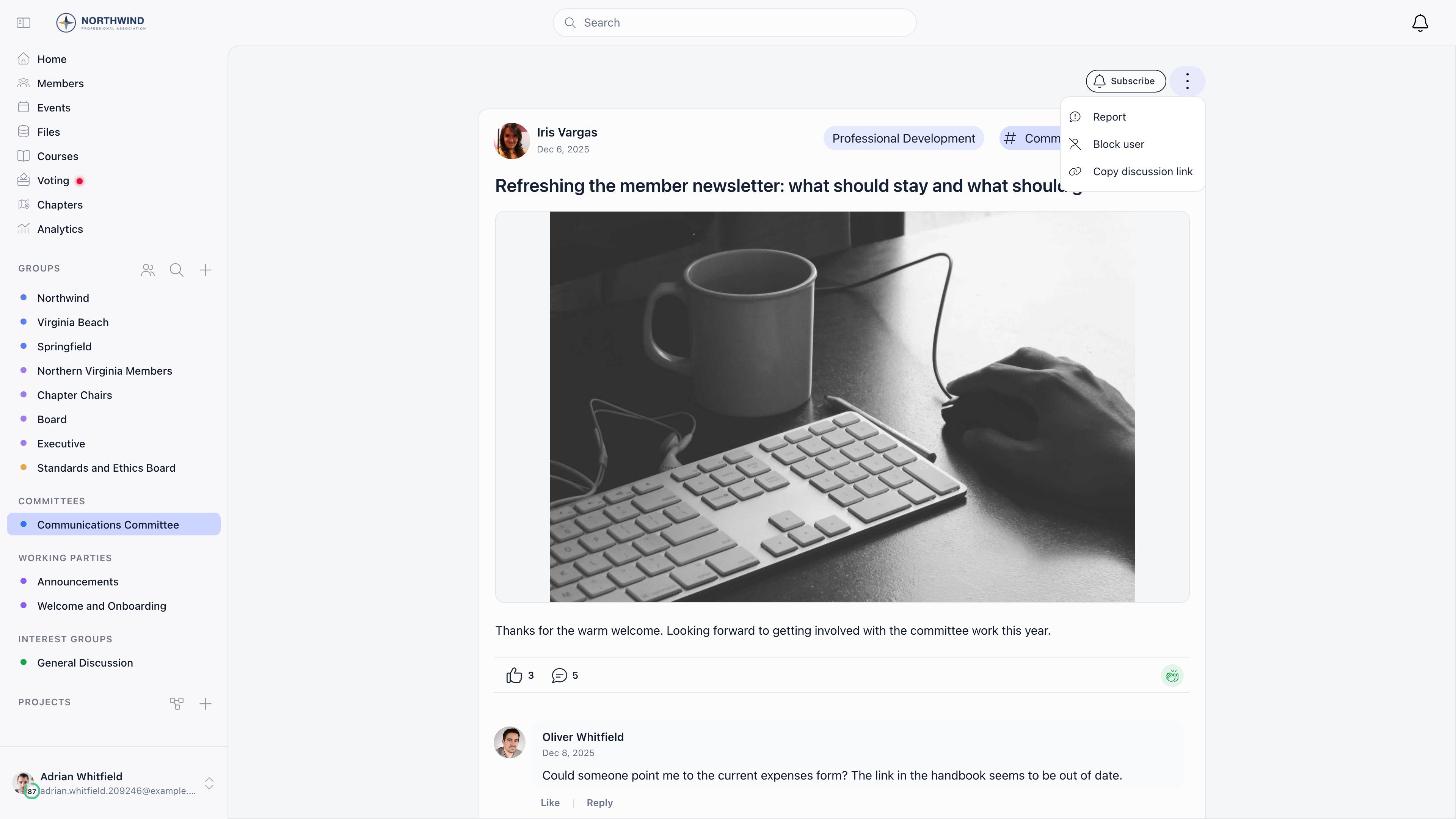 The same action sits on every comment and reply, so you can block someone who never started a thread.
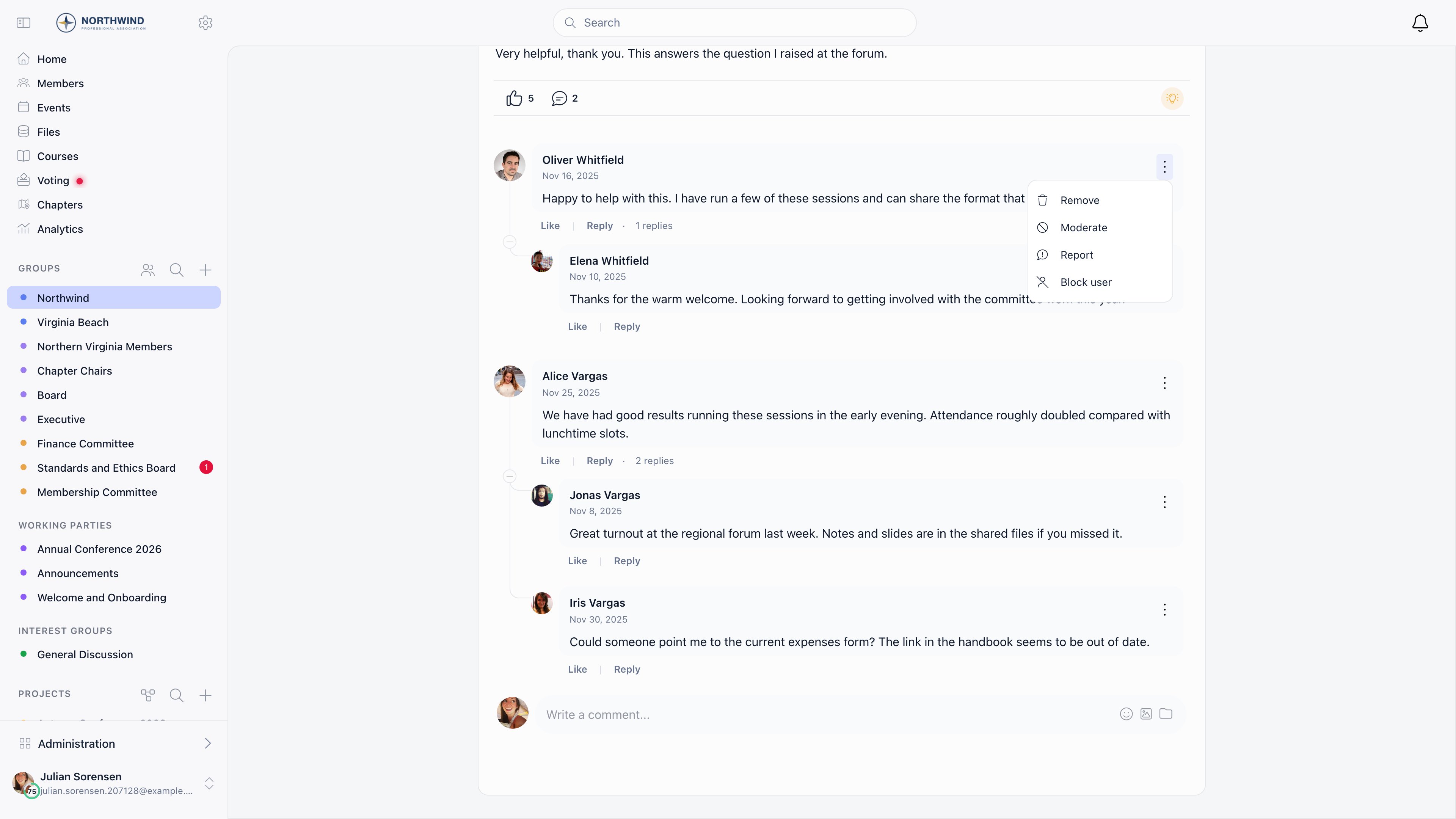
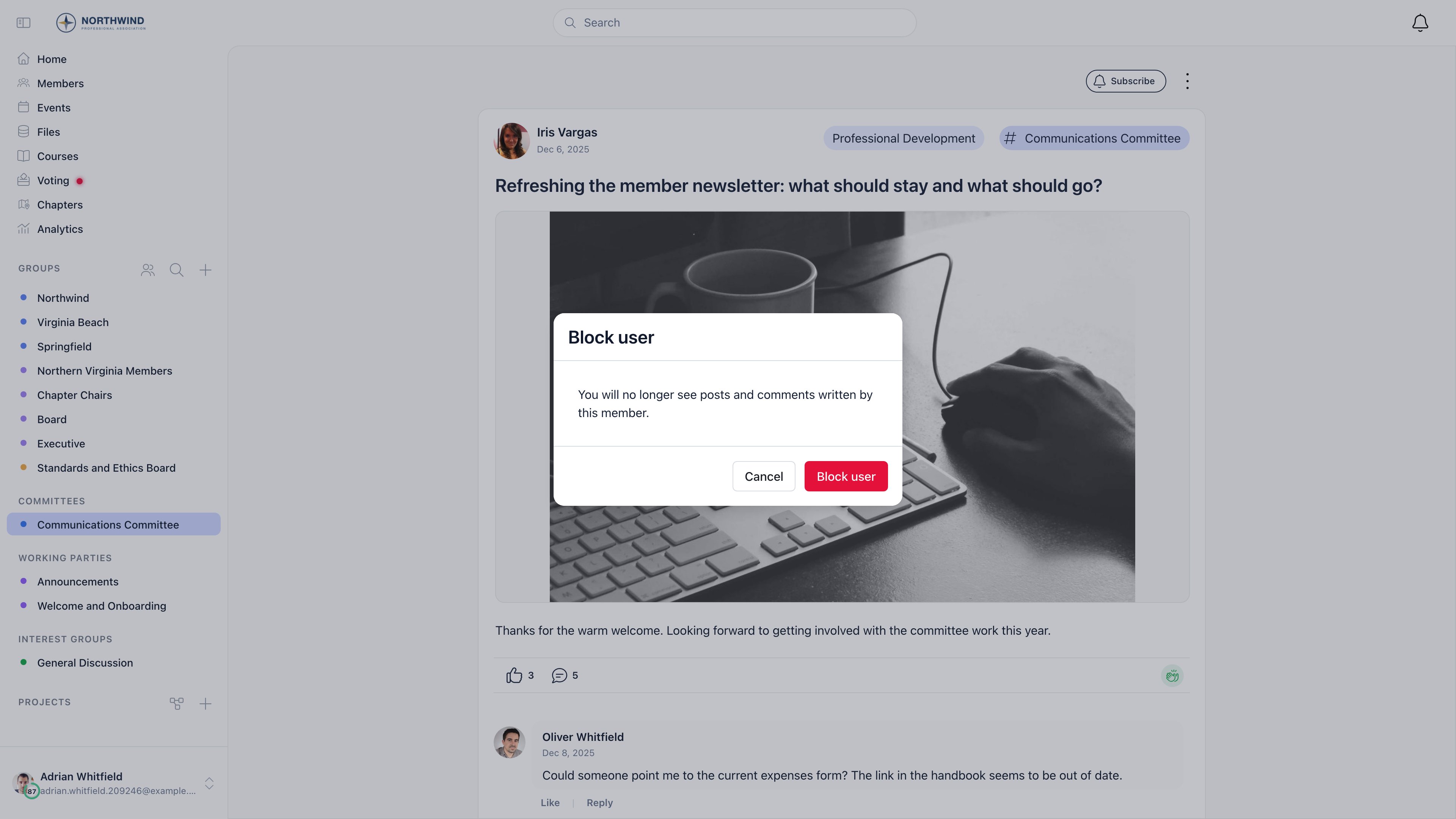 **Block user** is only offered where it would work: never on your own content, and never on a member who cannot be blocked. It is also kept off the post that opens an issue, so an issue never disappears from a queue. The action is still offered on comments inside that thread, and those comments are filtered like any other.
***
## Lifting a block
Then **Settings & Privacy**. The tab appears on your profile only, never on somebody else's.
The panel lists everybody you have blocked, with the date you blocked them.
Their discussions, comments and replies are visible again straight away.
**Block user** is only offered where it would work: never on your own content, and never on a member who cannot be blocked. It is also kept off the post that opens an issue, so an issue never disappears from a queue. The action is still offered on comments inside that thread, and those comments are filtered like any other.
***
## Lifting a block
Then **Settings & Privacy**. The tab appears on your profile only, never on somebody else's.
The panel lists everybody you have blocked, with the date you blocked them.
Their discussions, comments and replies are visible again straight away.
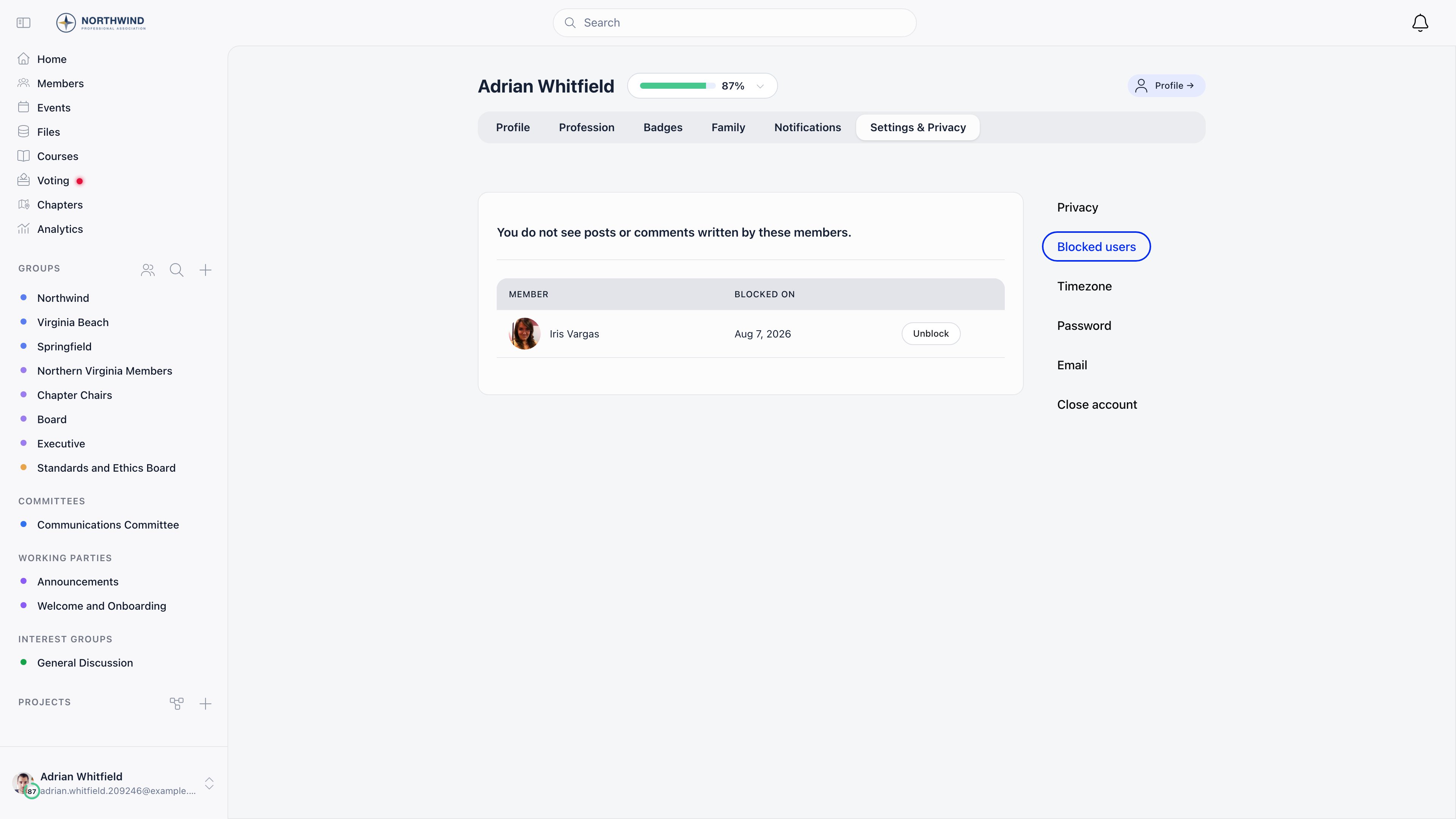 The list is also where a member checks whether a block is the reason somebody seems to have gone quiet.
***
## Who cannot be blocked
Administrators are out of reach. The rule is Orgo's own permission ranking: anybody at or above `HR_LOCAL` cannot be blocked, and neither can a tenant admin.
| Member | Can be blocked |
| ----------------------------------------------------------------------------- | -------------- |
| A member with no permissions | Yes |
| `USER_LOCAL` | Yes |
| `EVENT_LOCAL`, `COMMUNICATION_LOCAL`, `HR_ASSISTANT_LOCAL`, `FINANCIAL_LOCAL` | Yes |
| `HR_LOCAL`, `ADMIN_LOCAL` | No |
| Any `_PARENT_LOCAL` permission | No |
| Any `_TENANT` permission, including `COMMUNICATION_TENANT` | No |
| Tenant admins and super admins | No |
A local center's discussion moderator holds `COMMUNICATION_LOCAL`, which ranks below the floor, so moderators can be blocked. The people who run the organization cannot.
Blocking somebody before they are promoted does not keep them hidden. When a member is given `HR_LOCAL` or anything above it, every block against them is dropped as their permissions are recalculated, and their content comes back for everybody who had blocked them.
Two more attempts are refused: blocking yourself, and blocking a member of another organization.
***
## How this differs from moderation
| | Blocking | [Moderation](/docs/platform/discussion/moderation) |
| ------------------- | ----------------------------------------- | ----------------------------------------------- |
| Who it affects | Only the member who blocked | Everybody |
| Who can do it | Any member | `COMMUNICATION_LOCAL` or `COMMUNICATION_TENANT` |
| What it acts on | Everything one member writes | One post, comment or reply |
| Is the author aware | No | Yes, the content is visibly held or hidden |
| Who can undo it | The member who blocked | Any moderator for that scope |
| Record kept | A private entry on the blocker's own list | The moderation queue and the audit log |
Blocking is not a report. If content breaks your rules, it still has to be moderated or deleted, and blocking the author leaves it up for every other member.
***
## What administrators can see
Nothing. There is no admin screen, no report and no export that lists who has blocked whom. Every member sees their own blocks and only their own, on their own profile. An administrator opening a member's profile does not get the tab, and asking the API for the block list returns the caller's own blocks even for a tenant admin.
Because blocks are invisible to administrators, "that member stopped posting" and "her comments never show up for me" can both be self-inflicted. Ask the member to check **Settings & Privacy** and then **Blocked users** on their own profile before you investigate anything else.
***
## Common questions
Have them open their own profile, then **Settings & Privacy** and **Blocked users**. If the person is on the list, **Unblock** restores everything they wrote, everywhere in the forum, immediately.
No. Anybody ranked `HR_LOCAL` or above, and every tenant admin, cannot be blocked, and blocks made before somebody was promoted are dropped when the promotion takes effect.
No. Blocking filters the forum only. A reply or a mention from a blocked member still produces a notification, and it still follows the member's notification settings. See [Notifications](/docs/platform/notifications).
No. Support tickets and issues never disappear from a queue because of a personal block. Comments inside a ticket are a different matter: those are filtered like any other thread, so an agent who blocked a member will not see that member's replies on the ticket.
No. There is no notification, nothing changes on their side, and they keep seeing the blocker's content as before. A block is one way.
***
## Related
* [Discussions](/docs/platform/discussion) posting, comments and reactions
* [Moderation](/docs/platform/discussion/moderation) the organization-wide way to take content down
* [Permissions](/docs/platform/permissions) what the permission names above mean
* [Privacy Settings](/docs/platform/users/privacy-settings) the other member-owned controls on the same profile screen
* [Notifications](/docs/platform/notifications) what still reaches a member after a block
The list is also where a member checks whether a block is the reason somebody seems to have gone quiet.
***
## Who cannot be blocked
Administrators are out of reach. The rule is Orgo's own permission ranking: anybody at or above `HR_LOCAL` cannot be blocked, and neither can a tenant admin.
| Member | Can be blocked |
| ----------------------------------------------------------------------------- | -------------- |
| A member with no permissions | Yes |
| `USER_LOCAL` | Yes |
| `EVENT_LOCAL`, `COMMUNICATION_LOCAL`, `HR_ASSISTANT_LOCAL`, `FINANCIAL_LOCAL` | Yes |
| `HR_LOCAL`, `ADMIN_LOCAL` | No |
| Any `_PARENT_LOCAL` permission | No |
| Any `_TENANT` permission, including `COMMUNICATION_TENANT` | No |
| Tenant admins and super admins | No |
A local center's discussion moderator holds `COMMUNICATION_LOCAL`, which ranks below the floor, so moderators can be blocked. The people who run the organization cannot.
Blocking somebody before they are promoted does not keep them hidden. When a member is given `HR_LOCAL` or anything above it, every block against them is dropped as their permissions are recalculated, and their content comes back for everybody who had blocked them.
Two more attempts are refused: blocking yourself, and blocking a member of another organization.
***
## How this differs from moderation
| | Blocking | [Moderation](/docs/platform/discussion/moderation) |
| ------------------- | ----------------------------------------- | ----------------------------------------------- |
| Who it affects | Only the member who blocked | Everybody |
| Who can do it | Any member | `COMMUNICATION_LOCAL` or `COMMUNICATION_TENANT` |
| What it acts on | Everything one member writes | One post, comment or reply |
| Is the author aware | No | Yes, the content is visibly held or hidden |
| Who can undo it | The member who blocked | Any moderator for that scope |
| Record kept | A private entry on the blocker's own list | The moderation queue and the audit log |
Blocking is not a report. If content breaks your rules, it still has to be moderated or deleted, and blocking the author leaves it up for every other member.
***
## What administrators can see
Nothing. There is no admin screen, no report and no export that lists who has blocked whom. Every member sees their own blocks and only their own, on their own profile. An administrator opening a member's profile does not get the tab, and asking the API for the block list returns the caller's own blocks even for a tenant admin.
Because blocks are invisible to administrators, "that member stopped posting" and "her comments never show up for me" can both be self-inflicted. Ask the member to check **Settings & Privacy** and then **Blocked users** on their own profile before you investigate anything else.
***
## Common questions
Have them open their own profile, then **Settings & Privacy** and **Blocked users**. If the person is on the list, **Unblock** restores everything they wrote, everywhere in the forum, immediately.
No. Anybody ranked `HR_LOCAL` or above, and every tenant admin, cannot be blocked, and blocks made before somebody was promoted are dropped when the promotion takes effect.
No. Blocking filters the forum only. A reply or a mention from a blocked member still produces a notification, and it still follows the member's notification settings. See [Notifications](/docs/platform/notifications).
No. Support tickets and issues never disappear from a queue because of a personal block. Comments inside a ticket are a different matter: those are filtered like any other thread, so an agent who blocked a member will not see that member's replies on the ticket.
No. There is no notification, nothing changes on their side, and they keep seeing the blocker's content as before. A block is one way.
***
## Related
* [Discussions](/docs/platform/discussion) posting, comments and reactions
* [Moderation](/docs/platform/discussion/moderation) the organization-wide way to take content down
* [Permissions](/docs/platform/permissions) what the permission names above mean
* [Privacy Settings](/docs/platform/users/privacy-settings) the other member-owned controls on the same profile screen
* [Notifications](/docs/platform/notifications) what still reaches a member after a block