> ## Documentation Index
> Fetch the complete documentation index at: https://orgo.space/docs/llms.txt
> Use this file to discover all available pages before exploring further.
# Discussion Namespaces
> Organize discussions into categories so members can find and filter by topic
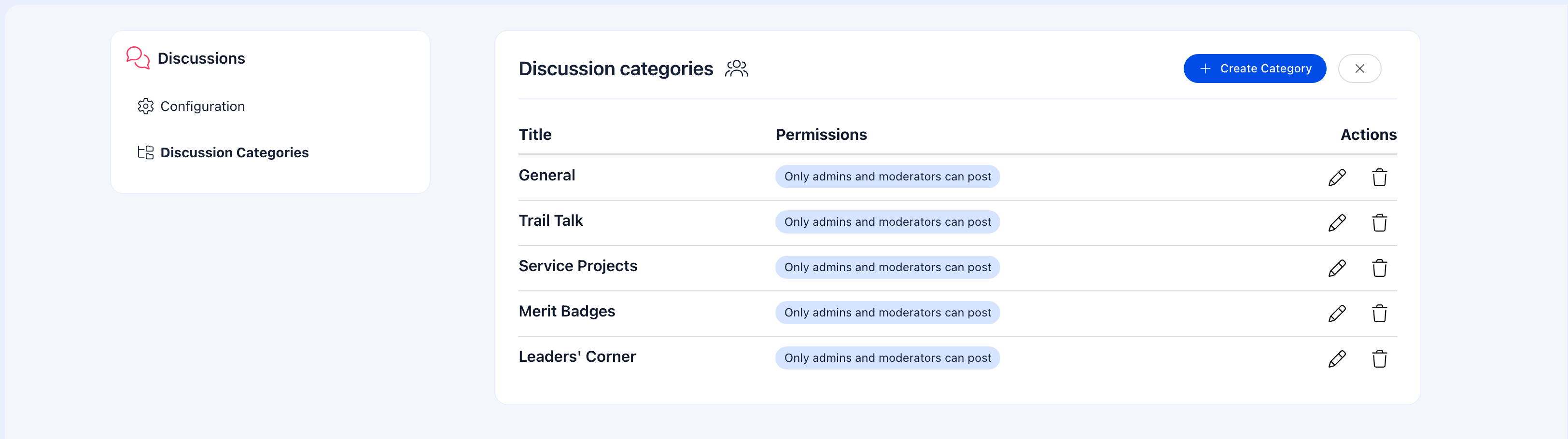
Discussion Namespaces (categories) turn a flat list of posts into an organized forum. Instead of scrolling through everything, members can filter by "Announcements", "Questions", "Ideas", or whatever categories make sense for your organization.
 ***
## Do I need namespaces?
| Your situation | Recommendation |
| ------------------------------------------------------------------------- | ---------------------------------------------------------- |
| Your groups have diverse discussions (news, questions, resources, events) | Yes — categories help members find what they need |
| Your Main Group is an announcement-only channel | Probably not — one type of content doesn't need categories |
| Small organization with low discussion volume | Not yet — add categories when the feed gets busy |
| Active community with 10+ posts per week | Yes — filtering becomes essential |
***
## Setting up namespaces
**Settings** → **Features** → **Discussion Namespaces**
Click **+ Create Category** and enter a name. Create as many as you need (aim for 5-10).
Drag categories to set the display order. Put the most used categories first.
Categories are now available in all groups across the organization. When members create posts, they can select a category. When browsing, they can filter by category.
***
## Recommended categories by organization type
### Community / general organization
| Category | Use for |
| ----------------- | ------------------------------------------------------ |
| **Announcements** | Official news and updates from leadership |
| **General** | Open conversation, anything that doesn't fit elsewhere |
| **Questions** | Help requests, how-to questions |
| **Ideas** | Suggestions, feedback, proposals |
| **Events** | Event-related discussion |
### Professional association
| Category | Use for |
| ------------------ | --------------------------------------------- |
| **Industry News** | Relevant articles, trends, regulatory changes |
| **Best Practices** | Knowledge sharing, professional advice |
| **Job Board** | Employment opportunities |
| **Networking** | Introductions, partnership requests |
| **Resources** | Shared tools, templates, documents |
### Youth / scouting organization
| Category | Use for |
| ------------- | --------------------------------------- |
| **Program** | Activities, program updates, curriculum |
| **Training** | Leader development, certification |
| **Events** | Event planning and follow-up |
| **Resources** | Materials, handbooks, templates |
| **General** | Everything else |
***
## How members use categories
### When creating a post
1. Go to a group → **Discussions** → **Create Post**
2. Write the post content
3. Select a category from the dropdown (optional — uncategorized posts are allowed)
4. Publish
### When browsing
1. Go to a group → **Discussions**
2. Click the category filter dropdown
3. Select a category to see only matching posts
4. Clear the filter to see everything
***
## Key details
* Categories are **organization-wide** — the same set is available in all groups
* Only **administrators** can create, edit, reorder, or delete categories
* Categorizing posts is **optional** — members can post without selecting a category
* Editing a category name updates it everywhere — all existing posts with that category
* Deleting a category removes the tag from existing posts but the posts remain
***
## Common scenarios
Categories are optional by design, so members may skip them. Lead by example — make sure admins always categorize their posts. Consider adding a gentle reminder in the post creation flow. If categories aren't adding value, you might have too many or they might not match how your community actually discusses.
Namespaces are organization-wide — the same categories appear everywhere. This is by design for consistency. If a group doesn't use certain categories, members simply don't select them. The filter only shows categories that have posts in the current group.
5-10 for most organizations. Fewer than 5 and categories aren't adding much. More than 10 and members can't decide where their post belongs. Think broad themes, not specific topics.
Not natively — any member who can post in a group can use any category. To restrict posting, use the group-level "Only admins can post" setting and direct regular member discussion to a different group. For example, "Announcements" category in the Main Group works when only admins can post there.
***
## Related
* [Discussions](/platform/discussion) — The discussion feature overview
* [Groups](/platform/groups) — Where discussions live
* [Main Group](/platform/groups/main-group) — Org-wide discussions
***
## Do I need namespaces?
| Your situation | Recommendation |
| ------------------------------------------------------------------------- | ---------------------------------------------------------- |
| Your groups have diverse discussions (news, questions, resources, events) | Yes — categories help members find what they need |
| Your Main Group is an announcement-only channel | Probably not — one type of content doesn't need categories |
| Small organization with low discussion volume | Not yet — add categories when the feed gets busy |
| Active community with 10+ posts per week | Yes — filtering becomes essential |
***
## Setting up namespaces
**Settings** → **Features** → **Discussion Namespaces**
Click **+ Create Category** and enter a name. Create as many as you need (aim for 5-10).
Drag categories to set the display order. Put the most used categories first.
Categories are now available in all groups across the organization. When members create posts, they can select a category. When browsing, they can filter by category.
***
## Recommended categories by organization type
### Community / general organization
| Category | Use for |
| ----------------- | ------------------------------------------------------ |
| **Announcements** | Official news and updates from leadership |
| **General** | Open conversation, anything that doesn't fit elsewhere |
| **Questions** | Help requests, how-to questions |
| **Ideas** | Suggestions, feedback, proposals |
| **Events** | Event-related discussion |
### Professional association
| Category | Use for |
| ------------------ | --------------------------------------------- |
| **Industry News** | Relevant articles, trends, regulatory changes |
| **Best Practices** | Knowledge sharing, professional advice |
| **Job Board** | Employment opportunities |
| **Networking** | Introductions, partnership requests |
| **Resources** | Shared tools, templates, documents |
### Youth / scouting organization
| Category | Use for |
| ------------- | --------------------------------------- |
| **Program** | Activities, program updates, curriculum |
| **Training** | Leader development, certification |
| **Events** | Event planning and follow-up |
| **Resources** | Materials, handbooks, templates |
| **General** | Everything else |
***
## How members use categories
### When creating a post
1. Go to a group → **Discussions** → **Create Post**
2. Write the post content
3. Select a category from the dropdown (optional — uncategorized posts are allowed)
4. Publish
### When browsing
1. Go to a group → **Discussions**
2. Click the category filter dropdown
3. Select a category to see only matching posts
4. Clear the filter to see everything
***
## Key details
* Categories are **organization-wide** — the same set is available in all groups
* Only **administrators** can create, edit, reorder, or delete categories
* Categorizing posts is **optional** — members can post without selecting a category
* Editing a category name updates it everywhere — all existing posts with that category
* Deleting a category removes the tag from existing posts but the posts remain
***
## Common scenarios
Categories are optional by design, so members may skip them. Lead by example — make sure admins always categorize their posts. Consider adding a gentle reminder in the post creation flow. If categories aren't adding value, you might have too many or they might not match how your community actually discusses.
Namespaces are organization-wide — the same categories appear everywhere. This is by design for consistency. If a group doesn't use certain categories, members simply don't select them. The filter only shows categories that have posts in the current group.
5-10 for most organizations. Fewer than 5 and categories aren't adding much. More than 10 and members can't decide where their post belongs. Think broad themes, not specific topics.
Not natively — any member who can post in a group can use any category. To restrict posting, use the group-level "Only admins can post" setting and direct regular member discussion to a different group. For example, "Announcements" category in the Main Group works when only admins can post there.
***
## Related
* [Discussions](/platform/discussion) — The discussion feature overview
* [Groups](/platform/groups) — Where discussions live
* [Main Group](/platform/groups/main-group) — Org-wide discussions