> ## Documentation Index
> Fetch the complete documentation index at: https://orgo.space/docs/llms.txt
> Use this file to discover all available pages before exploring further.
# Discussions
> Forum-style posts and conversations within every group
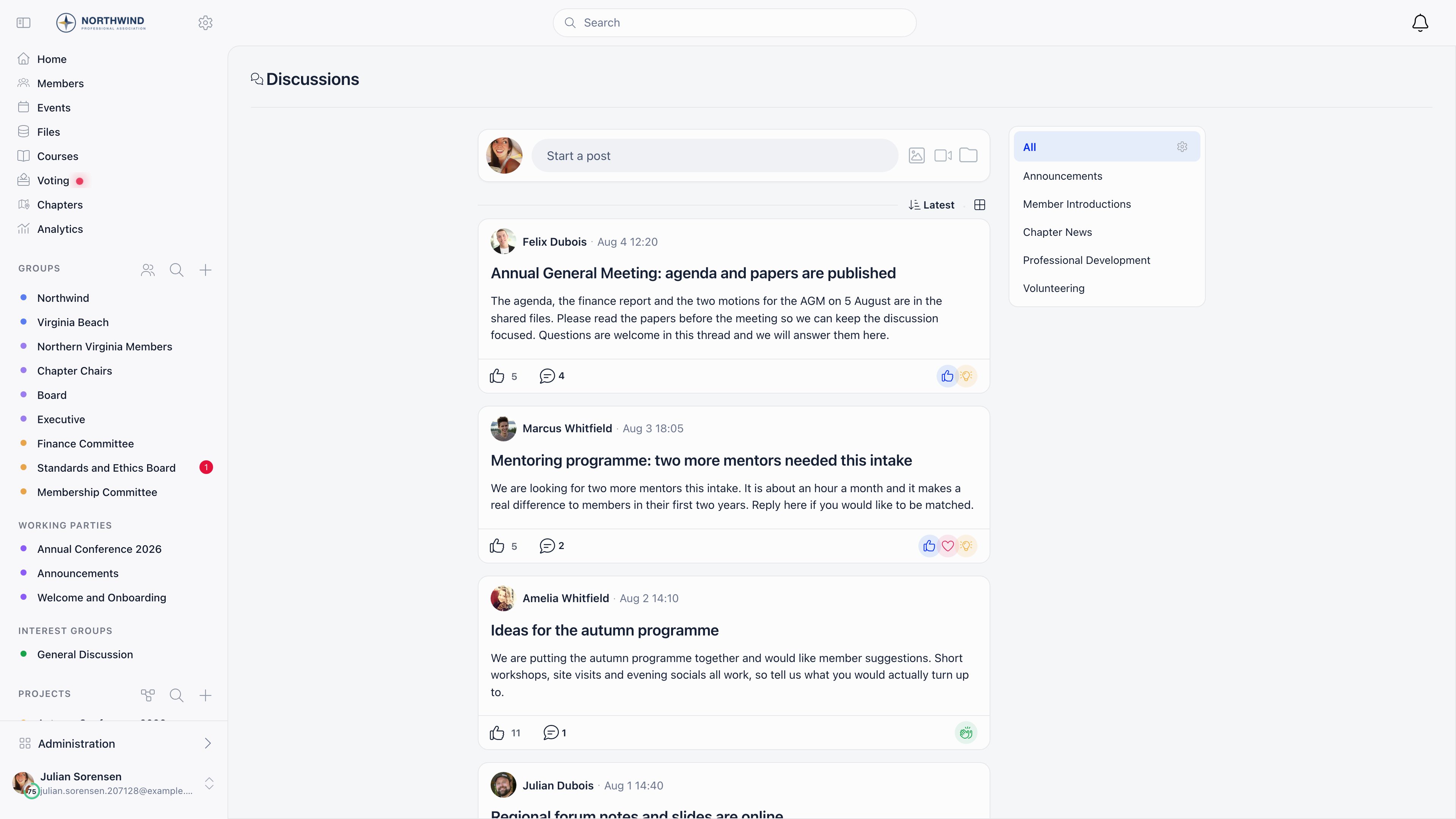
Discussions is Orgo's built-in forum. Members write posts, comment, reply, react and attach files, either in one shared organization-wide feed or inside a specific group, role group or local center.
**Built for** membership organizations that want conversation spaces tied to their own group structure: youth organizations, professional associations, alumni networks and advocacy groups.
**Replaces** Facebook Groups and standalone forums such as Discourse. It is not a chat tool: posts and comments are asynchronous, and everything is scoped by the group structure you already maintain in Orgo.
 ***
## Where a discussion lives
Every discussion is either organization-wide or attached to exactly one unit. Groups, role groups, local centers and organizational units are all units, so a discussion attaches to any of them the same way.
| View | URL | What it shows |
| ------------------------- | ------------------------ | --------------------------------------------------------------------------------- |
| **Discussions** (default) | `/discuss` | Everything you can see: the organization-wide feed plus every group you belong to |
| Organization feed | `/discuss?generalUnit=1` | Only posts that are not tied to a group |
| One group | `/discuss?unit=` | Only that group, role group or local center |
| One discussion | `/discuss/` | The post, its comments and replies |
Visibility follows group membership: you see a discussion if it has no group, or if its group is one of yours (your local center, groups you hold a role in, groups that include all members, and open-access local centers when that setting is on). Administrators are not exempt, so a tenant admin does not see posts in groups they have not joined.
Events do not have discussions. Event conversations live in the event feed inside the event app.
***
## Writing a post
Select **Start a post** at the top of the feed, or the **+** button on mobile.
| Field | What it does |
| -------------- | ------------------------------------------------------------------------------------------------------------------------------------------------------------------------------- |
| **Title** | Optional headline. Decorative Unicode (styled "bold" characters, full-width text) is folded back to plain letters on save. |
| Body | Rich text with emoji, inline `@mentions` (up to 50 per post) and automatic link previews when you paste a URL |
| **Category** | Puts the post in a category. Picking a category that belongs to a group also posts it into that group. See [Discussion Categories](/docs/platform/discussion/discussion-namespaces). |
| Tags | Extra tag pickers, shown only when the selected category has tag groups configured |
| **Posting in** | Where the post goes. Locked to the current group when you open the composer from inside one. |
| Comment toggle | The speech-bubble icon in the composer footer disables comments on the post |
Images, videos and files can be attached with the image, video and folder icons, or by dragging them onto the composer. One selection must stay under 1 GB in total.
***
## Reading and taking part
***
## Where a discussion lives
Every discussion is either organization-wide or attached to exactly one unit. Groups, role groups, local centers and organizational units are all units, so a discussion attaches to any of them the same way.
| View | URL | What it shows |
| ------------------------- | ------------------------ | --------------------------------------------------------------------------------- |
| **Discussions** (default) | `/discuss` | Everything you can see: the organization-wide feed plus every group you belong to |
| Organization feed | `/discuss?generalUnit=1` | Only posts that are not tied to a group |
| One group | `/discuss?unit=` | Only that group, role group or local center |
| One discussion | `/discuss/` | The post, its comments and replies |
Visibility follows group membership: you see a discussion if it has no group, or if its group is one of yours (your local center, groups you hold a role in, groups that include all members, and open-access local centers when that setting is on). Administrators are not exempt, so a tenant admin does not see posts in groups they have not joined.
Events do not have discussions. Event conversations live in the event feed inside the event app.
***
## Writing a post
Select **Start a post** at the top of the feed, or the **+** button on mobile.
| Field | What it does |
| -------------- | ------------------------------------------------------------------------------------------------------------------------------------------------------------------------------- |
| **Title** | Optional headline. Decorative Unicode (styled "bold" characters, full-width text) is folded back to plain letters on save. |
| Body | Rich text with emoji, inline `@mentions` (up to 50 per post) and automatic link previews when you paste a URL |
| **Category** | Puts the post in a category. Picking a category that belongs to a group also posts it into that group. See [Discussion Categories](/docs/platform/discussion/discussion-namespaces). |
| Tags | Extra tag pickers, shown only when the selected category has tag groups configured |
| **Posting in** | Where the post goes. Locked to the current group when you open the composer from inside one. |
| Comment toggle | The speech-bubble icon in the composer footer disables comments on the post |
Images, videos and files can be attached with the image, video and folder icons, or by dragging them onto the composer. One selection must stay under 1 GB in total.
***
## Reading and taking part
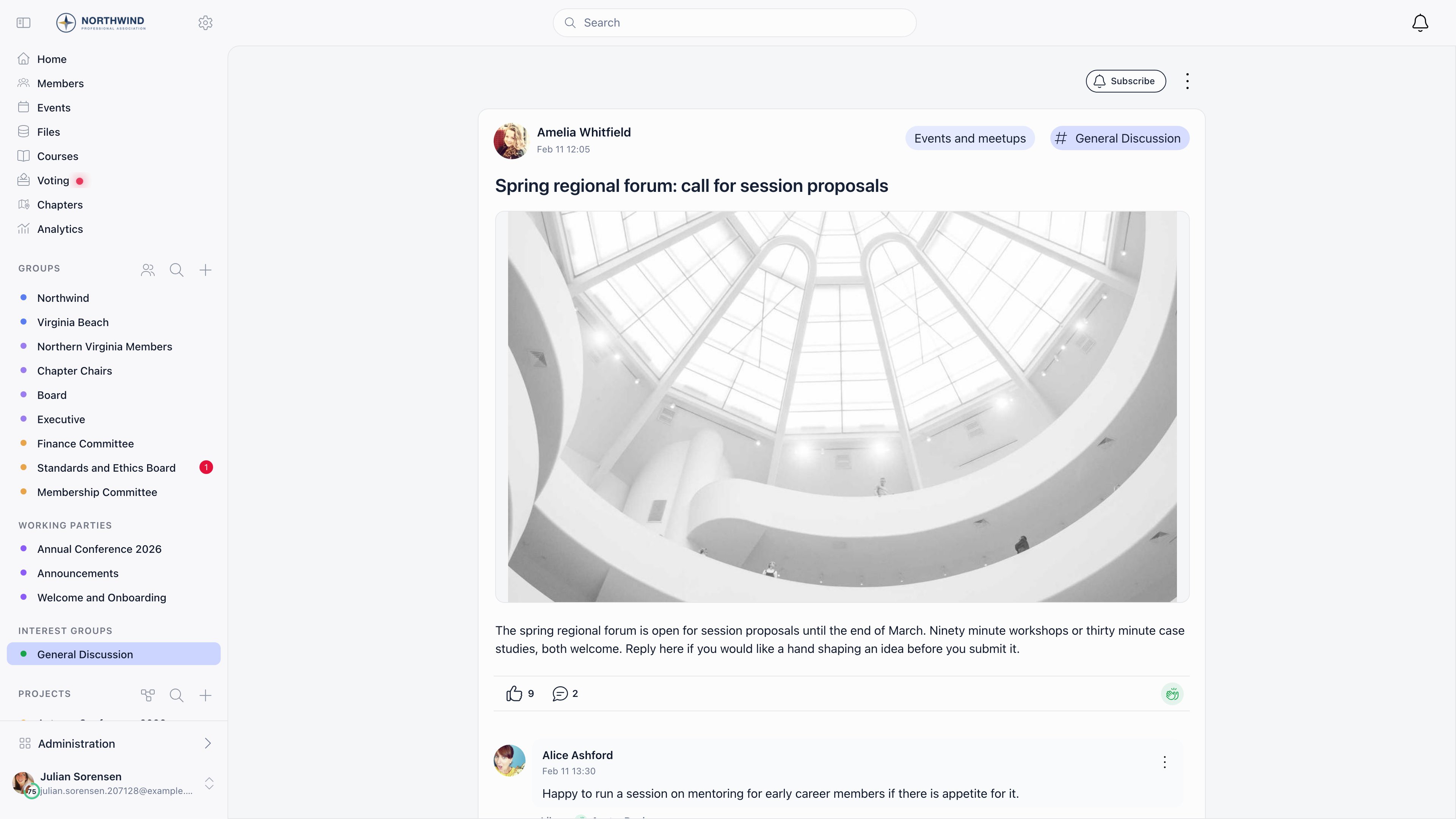 **Reactions.** Four reactions are available on a post or any comment: Like, Love, Celebrate and Informative. You hold one at a time. Hovering a reaction shows the first 20 people who used it, and selecting it opens the full list.
**Comments and replies.** Comments appear oldest first. Every comment can be replied to, and replies can themselves be replied to, so threads nest as deep as the conversation goes. Long threads can be collapsed. Comments carry the same rich text, mentions and attachments as posts.
**Reactions.** Four reactions are available on a post or any comment: Like, Love, Celebrate and Informative. You hold one at a time. Hovering a reaction shows the first 20 people who used it, and selecting it opens the full list.
**Comments and replies.** Comments appear oldest first. Every comment can be replied to, and replies can themselves be replied to, so threads nest as deep as the conversation goes. Long threads can be collapsed. Comments carry the same rich text, mentions and attachments as posts.
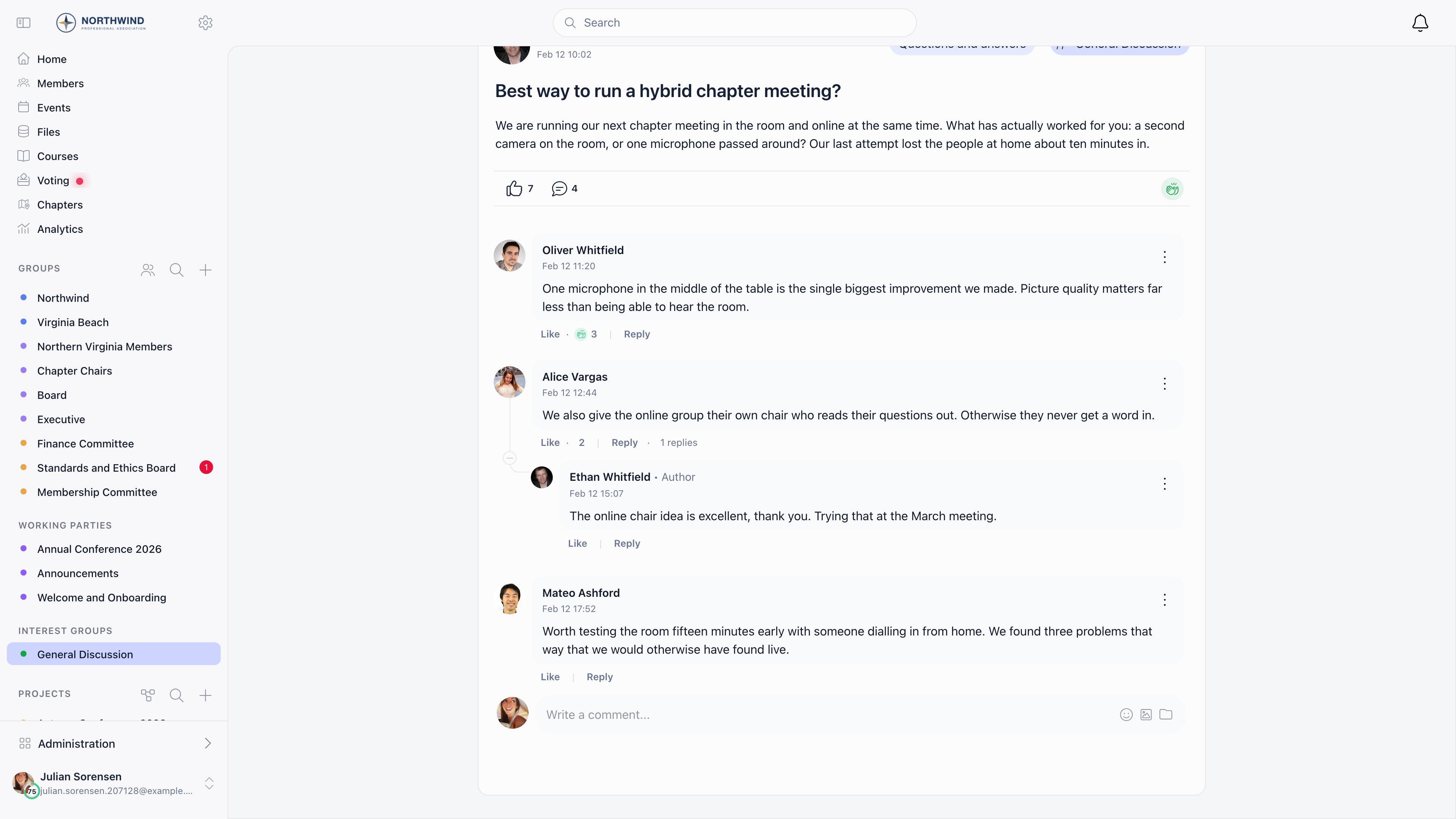 **Counts.** The footer of a post shows its reactions and its comment count. Views are recorded too, as unique viewers with the author's own visits excluded, and they are shown on the discussion cards in the dashboard rather than in the feed.
**Following.** Creating a discussion or commenting on one follows it automatically. **Subscribe** and **Subscribed** on the discussion page turn following on and off by hand.
***
## Who can post where
| Where | Rule |
| ----------------------------------- | -------------------------------------------------------------------------------------------------------------------------------------------------------------- |
| Organization feed | The **Who Can Create Public Discussions** setting (default: All Users). Members below that level can still post in a category set to "Anyone can post". |
| A group, role group or local center | Anyone with access to it. If the group's **Who can post?** is set to **Only admins**, the composer is offered to group admins and holders of `HR_TENANT` only. |
| Editing a post | The author. A moderator can hide it, and a local or tenant admin can delete it. |
| Deleting a discussion or comment | The author, an `ADMIN_LOCAL` of the group, or `ADMIN_TENANT` for organization-wide posts. Deleting somebody else's content is written to the audit log. |
Deleting a comment that already has visible replies keeps the thread: the comment's text and attachments are cleared, and the replies stay.
***
## Finding things
The sort control offers **newest**, **oldest**, **most commented** and **least commented**, and the icon next to it switches between the card view and a compact list. Categories appear as a panel beside the feed on desktop and as tabs on mobile. Selecting a `#tag` under a post filters the feed to that tag. Feeds load more posts as you scroll.
***
## Notifications
Followers are notified when a new comment is added, the author of a comment is notified of replies to it, and mentioned members are notified of the mention. Whether each one also arrives by email depends on the member's own settings and on the organization default **Email Notifications: Discussions**. See [Notifications](/docs/platform/notifications).
***
## Settings
**Counts.** The footer of a post shows its reactions and its comment count. Views are recorded too, as unique viewers with the author's own visits excluded, and they are shown on the discussion cards in the dashboard rather than in the feed.
**Following.** Creating a discussion or commenting on one follows it automatically. **Subscribe** and **Subscribed** on the discussion page turn following on and off by hand.
***
## Who can post where
| Where | Rule |
| ----------------------------------- | -------------------------------------------------------------------------------------------------------------------------------------------------------------- |
| Organization feed | The **Who Can Create Public Discussions** setting (default: All Users). Members below that level can still post in a category set to "Anyone can post". |
| A group, role group or local center | Anyone with access to it. If the group's **Who can post?** is set to **Only admins**, the composer is offered to group admins and holders of `HR_TENANT` only. |
| Editing a post | The author. A moderator can hide it, and a local or tenant admin can delete it. |
| Deleting a discussion or comment | The author, an `ADMIN_LOCAL` of the group, or `ADMIN_TENANT` for organization-wide posts. Deleting somebody else's content is written to the audit log. |
Deleting a comment that already has visible replies keeps the thread: the comment's text and attachments are cleared, and the replies stay.
***
## Finding things
The sort control offers **newest**, **oldest**, **most commented** and **least commented**, and the icon next to it switches between the card view and a compact list. Categories appear as a panel beside the feed on desktop and as tabs on mobile. Selecting a `#tag` under a post filters the feed to that tag. Feeds load more posts as you scroll.
***
## Notifications
Followers are notified when a new comment is added, the author of a comment is notified of replies to it, and mentioned members are notified of the mention. Whether each one also arrives by email depends on the member's own settings and on the organization default **Email Notifications: Discussions**. See [Notifications](/docs/platform/notifications).
***
## Settings
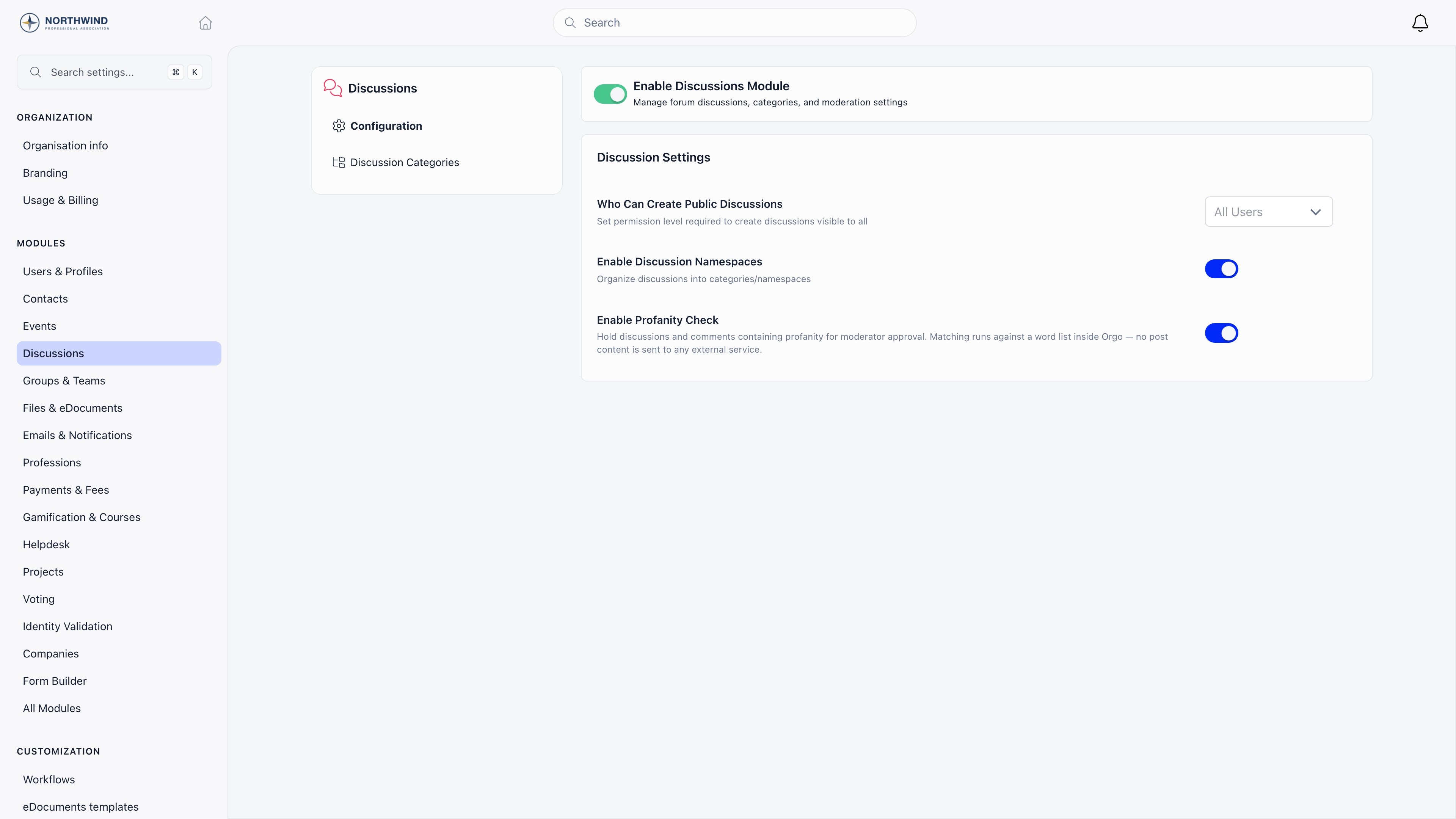 **Settings** and then **Discussions**. Changing these requires `ADMIN_TENANT`.
| Setting | What it does | Default |
| ------------------------------------- | -------------------------------------------------------------------------------------------------------- | --------- |
| **Enable Discussions Module** | Turns the whole feature on or off | On |
| **Who Can Create Public Discussions** | Permission needed to post in the organization-wide feed | All Users |
| **Enable Discussion Namespaces** | Turns on categories and the Discussion Categories screen | On |
| **Enable Profanity Check** | Holds posts containing blocked words for a moderator. See [Moderation](/docs/platform/discussion/moderation). | Off |
***
## Common questions
Set **Who Can Create Public Discussions** to an admin level. The feed becomes an announcement channel, while members keep posting in their groups and local centers. Comments stay open either way, unless the author disables them on a specific post.
Discussions attached to a group are visible only to that group's members, and administrators get no exemption. Check which group the post is in, then check whether the member belongs to it. If the group checks out, have them look at [Blocking Members](/docs/platform/discussion/blocking-members): a member they blocked is hidden from them everywhere in the forum, and only they can see that list.
Yes, at any time. If the post is a comment with replies underneath, the text and attachments are removed and the thread structure stays so the replies still read.
Discussions are two-way and live in the app. The [newsletter](/docs/platform/newsletter) is a one-way email campaign. Use discussions for conversation, newsletters for announcements that must reach an inbox.
***
## Related
* [Discussion Categories](/docs/platform/discussion/discussion-namespaces) organize posts by topic
* [Moderation](/docs/platform/discussion/moderation) hold, review and hide posts
* [Blocking Members](/docs/platform/discussion/blocking-members) how a member hides one other member's content for themselves
* [Groups](/docs/platform/groups) where group discussions live
* [Notifications](/docs/platform/notifications) what reaches a member and how
* [Permissions](/docs/platform/permissions) the permission levels used above
**Settings** and then **Discussions**. Changing these requires `ADMIN_TENANT`.
| Setting | What it does | Default |
| ------------------------------------- | -------------------------------------------------------------------------------------------------------- | --------- |
| **Enable Discussions Module** | Turns the whole feature on or off | On |
| **Who Can Create Public Discussions** | Permission needed to post in the organization-wide feed | All Users |
| **Enable Discussion Namespaces** | Turns on categories and the Discussion Categories screen | On |
| **Enable Profanity Check** | Holds posts containing blocked words for a moderator. See [Moderation](/docs/platform/discussion/moderation). | Off |
***
## Common questions
Set **Who Can Create Public Discussions** to an admin level. The feed becomes an announcement channel, while members keep posting in their groups and local centers. Comments stay open either way, unless the author disables them on a specific post.
Discussions attached to a group are visible only to that group's members, and administrators get no exemption. Check which group the post is in, then check whether the member belongs to it. If the group checks out, have them look at [Blocking Members](/docs/platform/discussion/blocking-members): a member they blocked is hidden from them everywhere in the forum, and only they can see that list.
Yes, at any time. If the post is a comment with replies underneath, the text and attachments are removed and the thread structure stays so the replies still read.
Discussions are two-way and live in the app. The [newsletter](/docs/platform/newsletter) is a one-way email campaign. Use discussions for conversation, newsletters for announcements that must reach an inbox.
***
## Related
* [Discussion Categories](/docs/platform/discussion/discussion-namespaces) organize posts by topic
* [Moderation](/docs/platform/discussion/moderation) hold, review and hide posts
* [Blocking Members](/docs/platform/discussion/blocking-members) how a member hides one other member's content for themselves
* [Groups](/docs/platform/groups) where group discussions live
* [Notifications](/docs/platform/notifications) what reaches a member and how
* [Permissions](/docs/platform/permissions) the permission levels used above