> ## Documentation Index
> Fetch the complete documentation index at: https://orgo.space/docs/llms.txt
> Use this file to discover all available pages before exploring further.
# Discussion Moderation
> Hold posts for review, work the moderation queue and hide published content
Orgo gives moderators three separate tools for discussion content: a word filter that holds posts before anyone sees them, a queue for reviewing what it held, and a hide action for content that is already published.
**Built for** organizations whose forums are open to members without prior approval, where something occasionally has to be caught or taken down.
**Replaces** the manual "someone emailed me a screenshot" routine, and third-party forum moderation add-ons.
***
## Who moderates what
Moderation rights follow the same routing as the rest of discussions: where the post sits decides who can act on it.
| Where the post is | Who moderates it |
| ------------------------------------ | ----------------------------------------------------------------------------------- |
| Organization feed (no group) | `COMMUNICATION_TENANT` |
| A public group (members can join it) | `COMMUNICATION_TENANT` |
| A role group forum | `COMMUNICATION_TENANT` |
| A local center forum | `COMMUNICATION_LOCAL` for that local center. `COMMUNICATION_TENANT` also covers it. |
| A private group | Nobody. Private group posts are never filtered and never appear in a queue. |
Local moderators only ever see their own local center's held posts, never another center's.
***
## Holding posts with the word filter
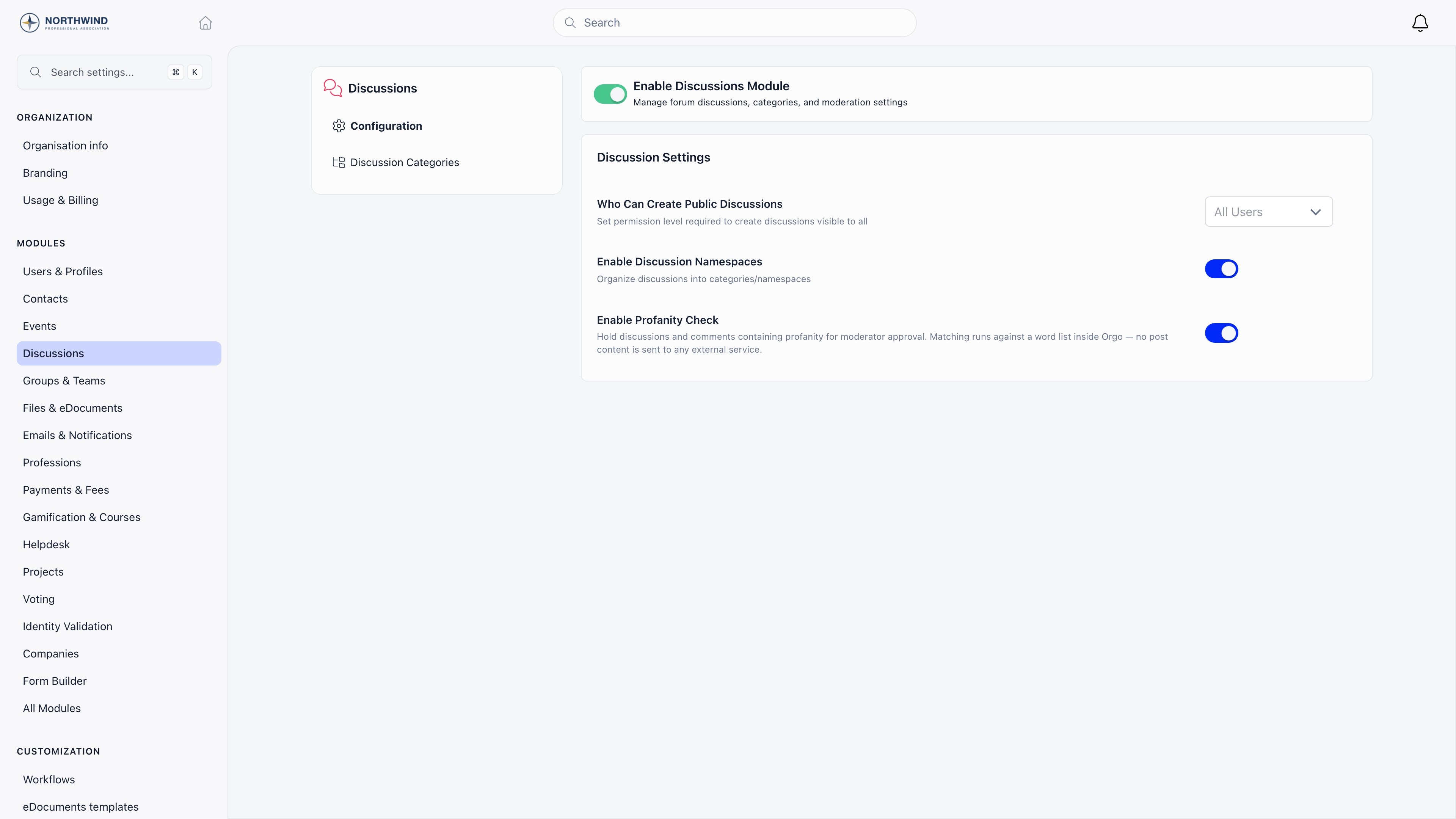 **Settings** and then **Discussions**, and switch on **Enable Profanity Check**. It is off by default, and only `ADMIN_TENANT` can change it.
Once on, the filter runs on the title and body of every new discussion, every comment, every reply and every edit of one. If it matches, the post is held before it becomes visible.
| Detail | Behaviour |
| ------------ | --------------------------------------------------------------------------------------------------------------------------------------------------------------------------------- |
| Word list | A built-in English list, plus any custom words you add |
| Matching | Words of four letters or more also match inside a longer word. Short words, and words that occur inside innocent ones, match whole words only, so "class" does not trip on "ass". |
| Accents | Folded before matching, so "fück" matches "fuck" |
| Custom words | Up to 500, added in the moderation queue screen and editable by `ADMIN_TENANT` only |
Matching runs inside Orgo against a word list. No post content is sent to any external service.
### What the author sees
The post saves, and a message says it was flagged for review and will not be visible until a moderator approves it. Nothing else changes for them: they can still edit it, and editing out the flagged words releases the post immediately, without a moderator. That self-release does not apply once a moderator has rejected the post.
### What everyone else sees
Nothing. A held post is hidden from the feed, from comment threads, from its direct link and from the API, for every member including the author. Notifications that would have gone out (followers, mentions, replies) are held back and sent only if the post is approved.
***
## The moderation queue
**Settings** and then **Discussions**, and switch on **Enable Profanity Check**. It is off by default, and only `ADMIN_TENANT` can change it.
Once on, the filter runs on the title and body of every new discussion, every comment, every reply and every edit of one. If it matches, the post is held before it becomes visible.
| Detail | Behaviour |
| ------------ | --------------------------------------------------------------------------------------------------------------------------------------------------------------------------------- |
| Word list | A built-in English list, plus any custom words you add |
| Matching | Words of four letters or more also match inside a longer word. Short words, and words that occur inside innocent ones, match whole words only, so "class" does not trip on "ass". |
| Accents | Folded before matching, so "fück" matches "fuck" |
| Custom words | Up to 500, added in the moderation queue screen and editable by `ADMIN_TENANT` only |
Matching runs inside Orgo against a word list. No post content is sent to any external service.
### What the author sees
The post saves, and a message says it was flagged for review and will not be visible until a moderator approves it. Nothing else changes for them: they can still edit it, and editing out the flagged words releases the post immediately, without a moderator. That self-release does not apply once a moderator has rejected the post.
### What everyone else sees
Nothing. A held post is hidden from the feed, from comment threads, from its direct link and from the API, for every member including the author. Notifications that would have gone out (followers, mentions, replies) are held back and sent only if the post is approved.
***
## The moderation queue
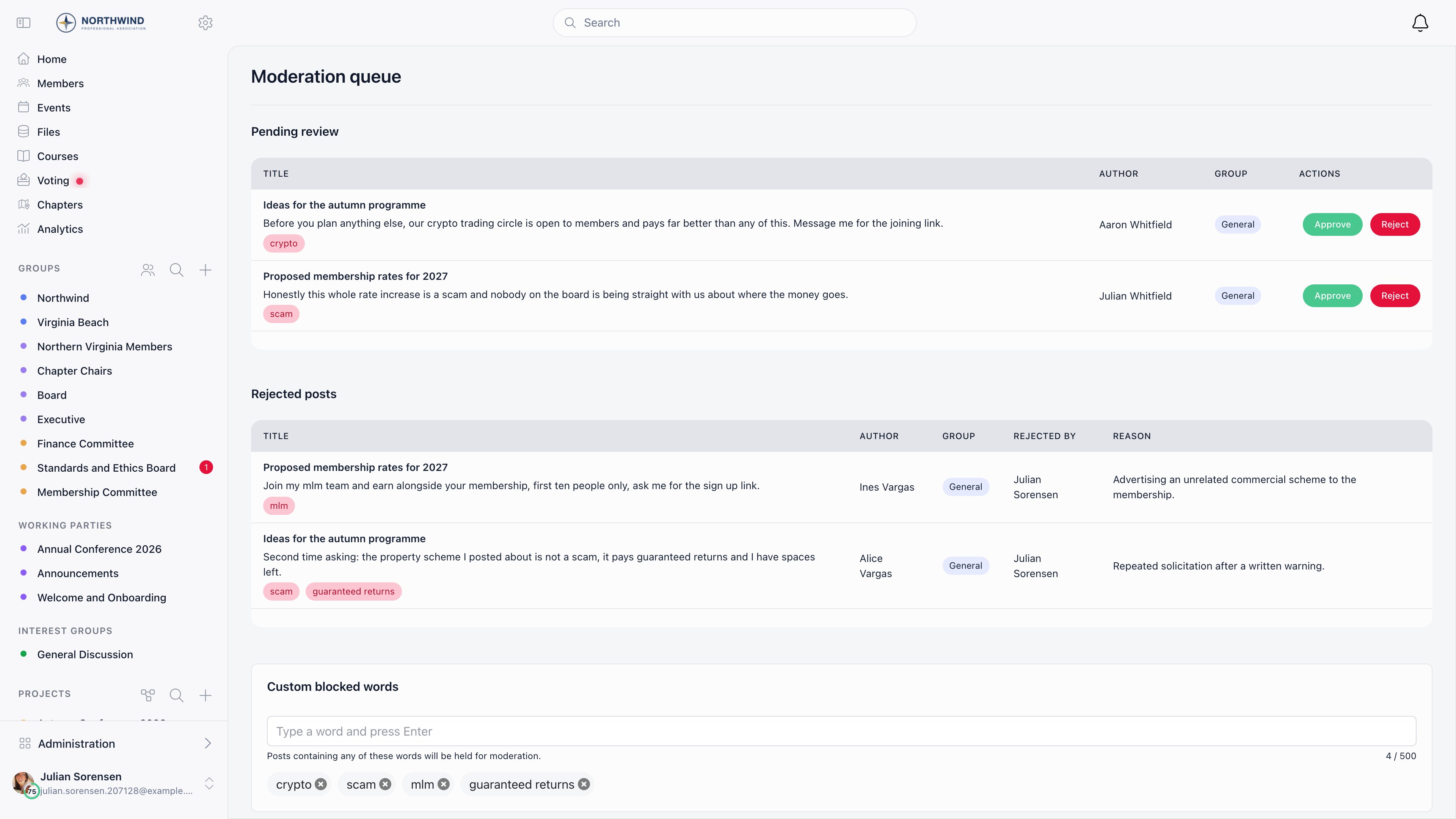 The queue is at `/discuss/moderation-queue`. Two things link to it: a **Moderation queue** entry appears in the **COMMUNICATION** section of the Administration sidebar once the profanity check is on, and on a local center a **Moderation queue** button with a pending count appears in the header next to Info.
The screen has two tables:
* **Pending review**: everything waiting for a decision, newest first. Each row shows the discussion title, the post text (with **Show more** for long ones), the words that were flagged, the author and the group, plus **Approve** and **Reject**.
* **Rejected posts**: the audit trail, showing who rejected each post and the reason.
You only ever see posts you are allowed to act on, so the two tables are already scoped to your groups and centers.
| Action | Effect |
| ----------- | ----------------------------------------------------------------------------------------------------------------------------------------------------------- |
| **Approve** | The post becomes visible, the comment count is recalculated, and the notifications held back while it waited are sent. Your name and the time are recorded. |
| **Reject** | The post stays hidden permanently and moves to the rejected table. You are asked for a reason, which is stored with the record. |
Approving a rejected post reverses the rejection.
Below the tables, `ADMIN_TENANT` holders manage the **Custom blocked words** list. It is a single organization-wide list, so one edit changes what gets held everywhere. Moderators can work the queue without being able to change it.
### Being told about a hold
When a post is held, every moderator for that scope gets an in-app notification linking to the queue, and an email. The author is never alerted about their own held post. Email is capped at 50 moderators per held post; anyone past that still gets the in-app notification and the queue badge.
***
## Hiding a published post
The word filter only catches what it knows. For anything already published, open the post or the comment, then use the three-dot menu.
| Action | Who | Effect |
| --------------------- | ------------------------------------------------------------------------------------- | ------------------------------------------------------------------------------------------------------------------------------------------------------------------------------- |
| **Moderate** | `COMMUNICATION_LOCAL` on the discussion, and not on your own post | Hides the text and any attachments. The discussion shows "Moderated discussion", the comment count drops, and the action is written to the audit log with the original content. |
| **Remove moderation** | Same permission | Restores the post and its count |
| **Delete** | The author, an `ADMIN_LOCAL` of the group, or `ADMIN_TENANT` on the organization feed | Removes it. Deleting someone else's content is logged. |
Hiding is reversible and keeps the evidence. Prefer it to deletion when a decision might be challenged later.
***
## Member reports
Any member can use **Report** on a post or comment that is not their own. The report is recorded against the post, once per member.
Reporting does not hide the post, does not notify anyone, and does not create a queue entry. Reported content still has to be found and hidden by a moderator, so tell members to flag anything urgent to an admin directly.
A member who simply does not want to read another member does not need a moderator at all. See [Blocking Members](/docs/platform/discussion/blocking-members), which hides one member's content for one other member and leaves it up for everybody else.
***
## Common questions
Check the moderation queue. If the word filter is on, the post is held and invisible to everyone, including its author, until it is approved. The author can also release it themselves by editing out the flagged word.
Words of four letters or more match inside longer words, which is what usually causes it. You cannot remove entries from the built-in list, so if a specific term keeps misfiring, turn the check off for a while and rely on Moderate, or keep the check on and work the queue.
The sidebar entry needs `COMMUNICATION_TENANT` and only appears once **Enable Profanity Check** is on, and the header button only appears in a local center. Open `/discuss/moderation-queue` directly if you have neither. If both tables are empty, either there is nothing held or you do not hold moderation rights for any group with held posts.
By design. Private groups are excluded from the filter entirely, so their posts publish straight away and no one can moderate them from the queue. Group admins can still delete content there.
***
## Related
* [Discussions](/docs/platform/discussion) posting, comments and reactions
* [Discussion Categories](/docs/platform/discussion/discussion-namespaces) category scope and posting permissions
* [Permissions](/docs/platform/permissions) what `COMMUNICATION_TENANT` and `COMMUNICATION_LOCAL` cover
* [Notifications](/docs/platform/notifications) how moderators are alerted
* [Groups](/docs/platform/groups) public, private and role groups
The queue is at `/discuss/moderation-queue`. Two things link to it: a **Moderation queue** entry appears in the **COMMUNICATION** section of the Administration sidebar once the profanity check is on, and on a local center a **Moderation queue** button with a pending count appears in the header next to Info.
The screen has two tables:
* **Pending review**: everything waiting for a decision, newest first. Each row shows the discussion title, the post text (with **Show more** for long ones), the words that were flagged, the author and the group, plus **Approve** and **Reject**.
* **Rejected posts**: the audit trail, showing who rejected each post and the reason.
You only ever see posts you are allowed to act on, so the two tables are already scoped to your groups and centers.
| Action | Effect |
| ----------- | ----------------------------------------------------------------------------------------------------------------------------------------------------------- |
| **Approve** | The post becomes visible, the comment count is recalculated, and the notifications held back while it waited are sent. Your name and the time are recorded. |
| **Reject** | The post stays hidden permanently and moves to the rejected table. You are asked for a reason, which is stored with the record. |
Approving a rejected post reverses the rejection.
Below the tables, `ADMIN_TENANT` holders manage the **Custom blocked words** list. It is a single organization-wide list, so one edit changes what gets held everywhere. Moderators can work the queue without being able to change it.
### Being told about a hold
When a post is held, every moderator for that scope gets an in-app notification linking to the queue, and an email. The author is never alerted about their own held post. Email is capped at 50 moderators per held post; anyone past that still gets the in-app notification and the queue badge.
***
## Hiding a published post
The word filter only catches what it knows. For anything already published, open the post or the comment, then use the three-dot menu.
| Action | Who | Effect |
| --------------------- | ------------------------------------------------------------------------------------- | ------------------------------------------------------------------------------------------------------------------------------------------------------------------------------- |
| **Moderate** | `COMMUNICATION_LOCAL` on the discussion, and not on your own post | Hides the text and any attachments. The discussion shows "Moderated discussion", the comment count drops, and the action is written to the audit log with the original content. |
| **Remove moderation** | Same permission | Restores the post and its count |
| **Delete** | The author, an `ADMIN_LOCAL` of the group, or `ADMIN_TENANT` on the organization feed | Removes it. Deleting someone else's content is logged. |
Hiding is reversible and keeps the evidence. Prefer it to deletion when a decision might be challenged later.
***
## Member reports
Any member can use **Report** on a post or comment that is not their own. The report is recorded against the post, once per member.
Reporting does not hide the post, does not notify anyone, and does not create a queue entry. Reported content still has to be found and hidden by a moderator, so tell members to flag anything urgent to an admin directly.
A member who simply does not want to read another member does not need a moderator at all. See [Blocking Members](/docs/platform/discussion/blocking-members), which hides one member's content for one other member and leaves it up for everybody else.
***
## Common questions
Check the moderation queue. If the word filter is on, the post is held and invisible to everyone, including its author, until it is approved. The author can also release it themselves by editing out the flagged word.
Words of four letters or more match inside longer words, which is what usually causes it. You cannot remove entries from the built-in list, so if a specific term keeps misfiring, turn the check off for a while and rely on Moderate, or keep the check on and work the queue.
The sidebar entry needs `COMMUNICATION_TENANT` and only appears once **Enable Profanity Check** is on, and the header button only appears in a local center. Open `/discuss/moderation-queue` directly if you have neither. If both tables are empty, either there is nothing held or you do not hold moderation rights for any group with held posts.
By design. Private groups are excluded from the filter entirely, so their posts publish straight away and no one can moderate them from the queue. Group admins can still delete content there.
***
## Related
* [Discussions](/docs/platform/discussion) posting, comments and reactions
* [Discussion Categories](/docs/platform/discussion/discussion-namespaces) category scope and posting permissions
* [Permissions](/docs/platform/permissions) what `COMMUNICATION_TENANT` and `COMMUNICATION_LOCAL` cover
* [Notifications](/docs/platform/notifications) how moderators are alerted
* [Groups](/docs/platform/groups) public, private and role groups