> ## Documentation Index
> Fetch the complete documentation index at: https://orgo.space/docs/llms.txt
> Use this file to discover all available pages before exploring further.
# E-Voting
> Run secure elections and polls — anonymous voting, timed ballots, and transparent results
E-Voting brings democratic decision-making online. Run board elections, put motions to a member vote, or poll your community on scheduling preferences — all with anonymous voting, one-vote-per-person enforcement, and transparent results.
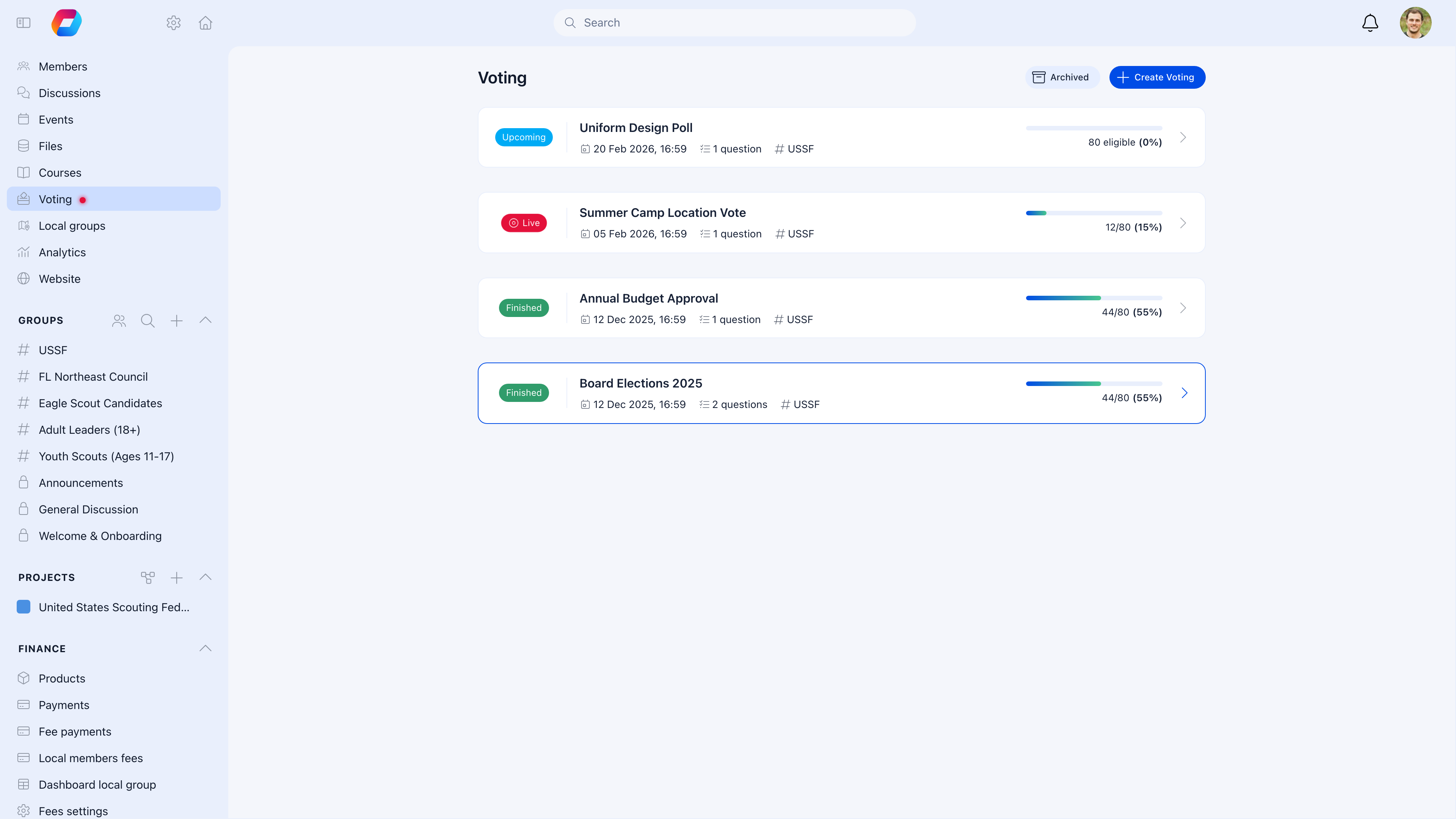 ***
## Votes vs polls
| | Votes | Polls |
| --------------- | -------------------------------------------------- | -------------------------------------------- |
| **Purpose** | Formal elections and binding decisions | Quick opinion gathering |
| **Anonymity** | Anonymous — admins can't see individual choices | Anonymous |
| **Typical use** | Board elections, AGM resolutions, bylaw amendments | Event date preferences, feedback, scheduling |
| **Formality** | Official record | Informal |
Both use the same creation flow — you just toggle whether it's a poll or a formal vote.
***
## Creating a vote
**Voting** → **Create Voting**
***
## Votes vs polls
| | Votes | Polls |
| --------------- | -------------------------------------------------- | -------------------------------------------- |
| **Purpose** | Formal elections and binding decisions | Quick opinion gathering |
| **Anonymity** | Anonymous — admins can't see individual choices | Anonymous |
| **Typical use** | Board elections, AGM resolutions, bylaw amendments | Event date preferences, feedback, scheduling |
| **Formality** | Official record | Informal |
Both use the same creation flow — you just toggle whether it's a poll or a formal vote.
***
## Creating a vote
**Voting** → **Create Voting**
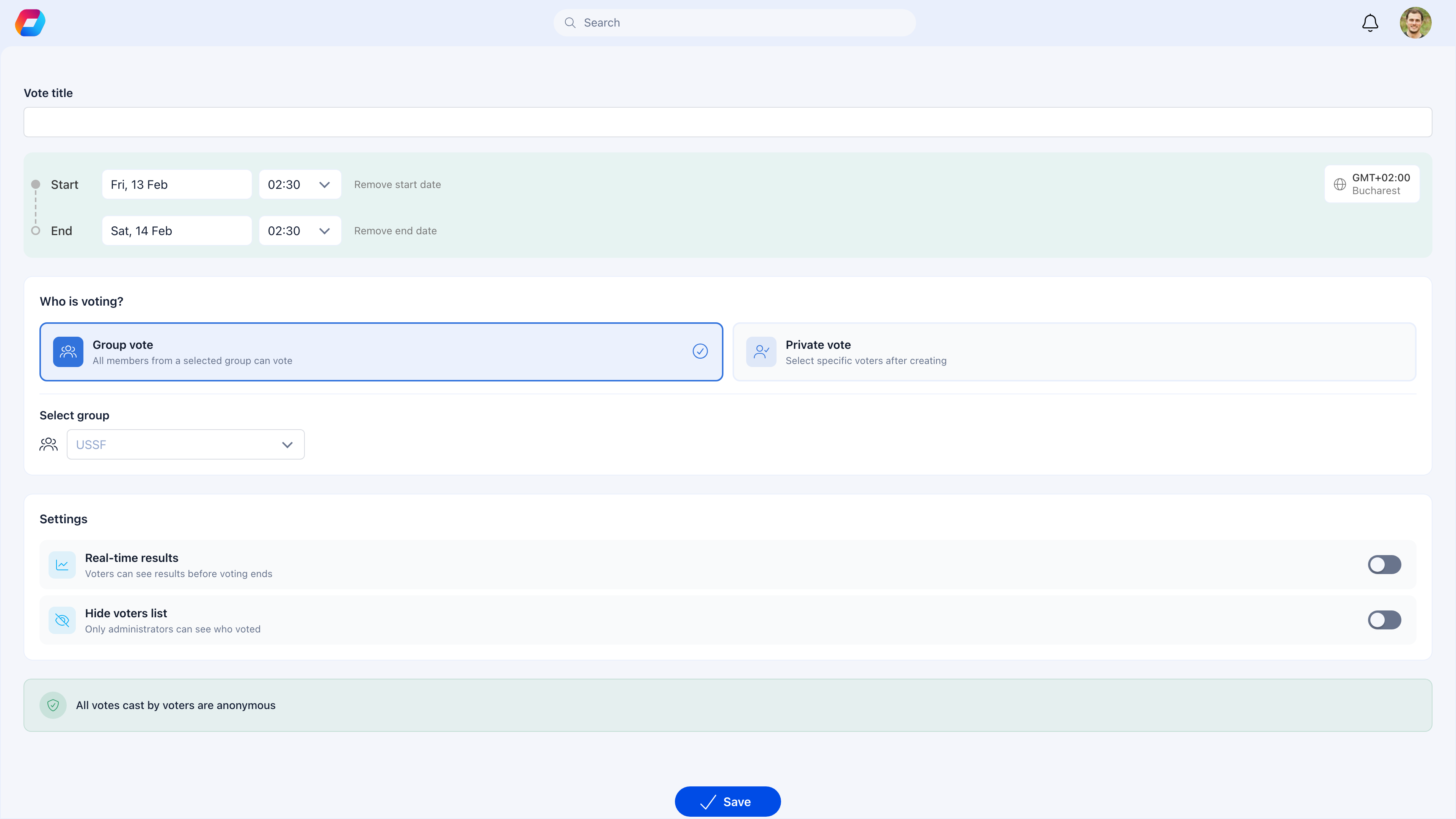 Enter a clear title — "Board Member Election 2025" or "Should we adopt the new bylaws?" You can add multiple questions per vote session (e.g., two board positions in one election).
Add the choices voters can select from. For elections, these are candidates. For motions, typically Yes / No / Abstain.
Define when voting opens and closes. The timezone is shown alongside the dates so members in different regions know exactly when the window opens.
**Group vote** — all members of a selected group can vote. **Private vote** — manually select specific voters after creating.
Toggle **Real-time results** to let voters see running totals while voting is live. Toggle **Hide voters list** so only admins can see who voted.
Votes start as drafts. Publish when you're ready to make it visible to voters.
The green banner at the bottom confirms: **All votes cast by voters are anonymous.** Admins can see who voted but never how they voted.
***
## Vote lifecycle
Each vote moves through four phases:
| Status | What's happening |
| ------------ | -------------------------------------------------------------- |
| **Draft** | Being set up — not visible to voters |
| **Upcoming** | Published and scheduled — voters can see it but can't vote yet |
| **Live** | Voting is open — members can cast their ballots |
| **Closed** | Voting period ended — results are final |
### Upcoming
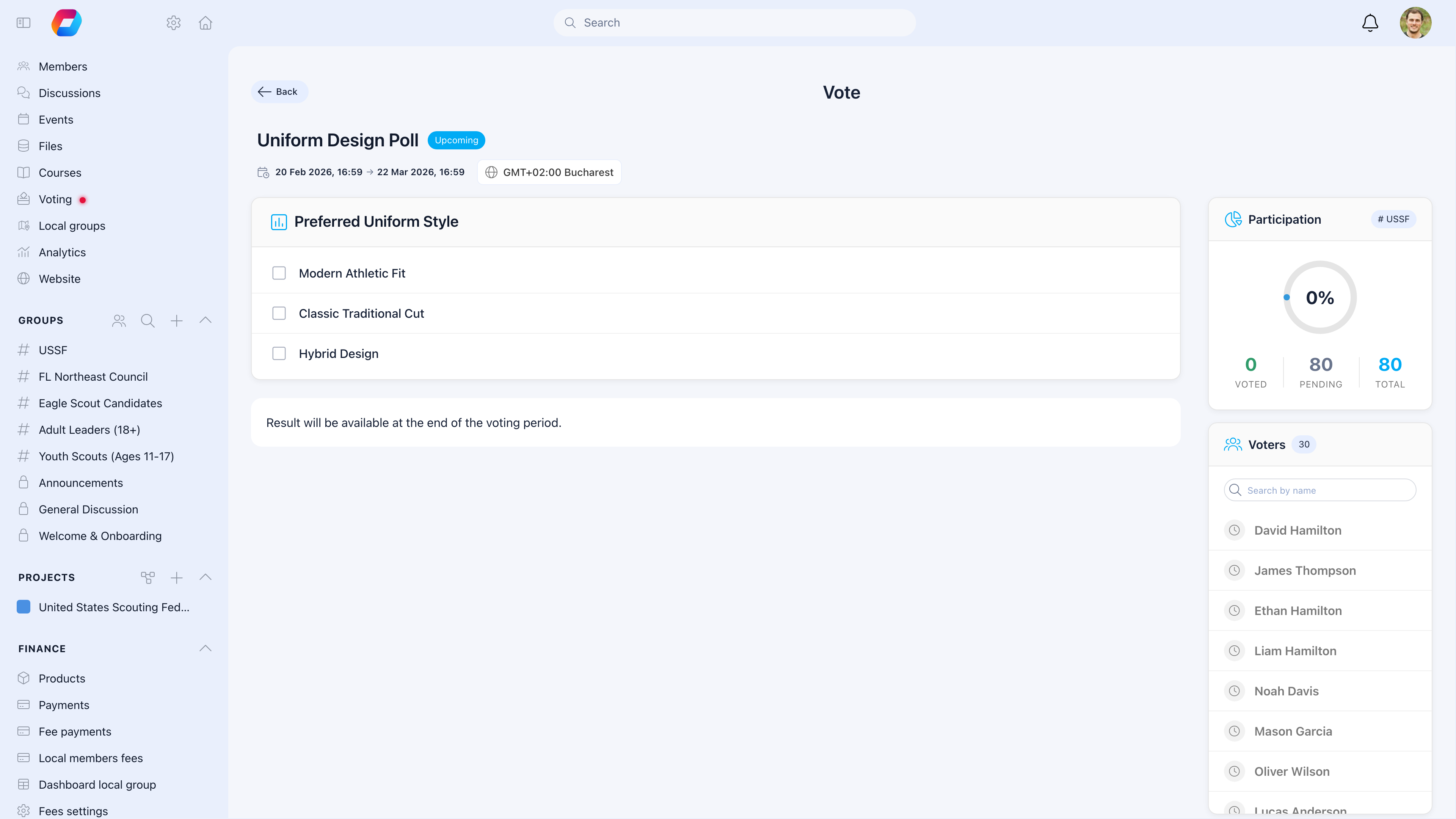
Before voting opens, eligible voters can see the questions and options but can't submit their ballot. The page shows "Result will be available at the end of the voting period."
Enter a clear title — "Board Member Election 2025" or "Should we adopt the new bylaws?" You can add multiple questions per vote session (e.g., two board positions in one election).
Add the choices voters can select from. For elections, these are candidates. For motions, typically Yes / No / Abstain.
Define when voting opens and closes. The timezone is shown alongside the dates so members in different regions know exactly when the window opens.
**Group vote** — all members of a selected group can vote. **Private vote** — manually select specific voters after creating.
Toggle **Real-time results** to let voters see running totals while voting is live. Toggle **Hide voters list** so only admins can see who voted.
Votes start as drafts. Publish when you're ready to make it visible to voters.
The green banner at the bottom confirms: **All votes cast by voters are anonymous.** Admins can see who voted but never how they voted.
***
## Vote lifecycle
Each vote moves through four phases:
| Status | What's happening |
| ------------ | -------------------------------------------------------------- |
| **Draft** | Being set up — not visible to voters |
| **Upcoming** | Published and scheduled — voters can see it but can't vote yet |
| **Live** | Voting is open — members can cast their ballots |
| **Closed** | Voting period ended — results are final |
### Upcoming
Before voting opens, eligible voters can see the questions and options but can't submit their ballot. The page shows "Result will be available at the end of the voting period."
 ### Live voting
When the voting window opens, eligible members see the ballot with a **Submit vote** button. The participation sidebar tracks progress in real time.
### Live voting
When the voting window opens, eligible members see the ballot with a **Submit vote** button. The participation sidebar tracks progress in real time.
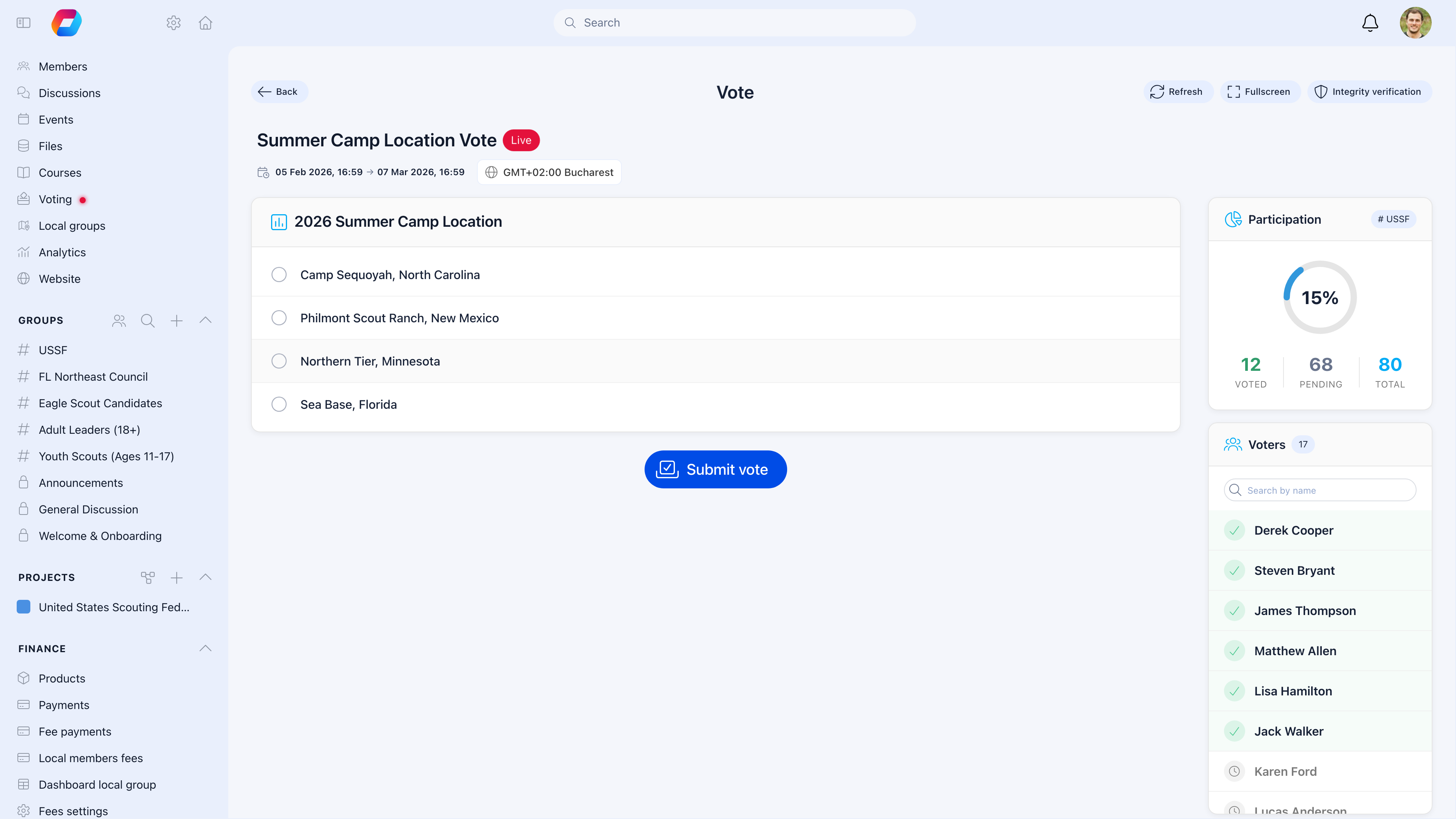 The voters list shows who has voted (green checkmark) and who hasn't — so you can send targeted reminders to non-voters.
***
## Results
When voting closes, results show percentage bars with vote counts for each option, plus participation metrics.
### Election results
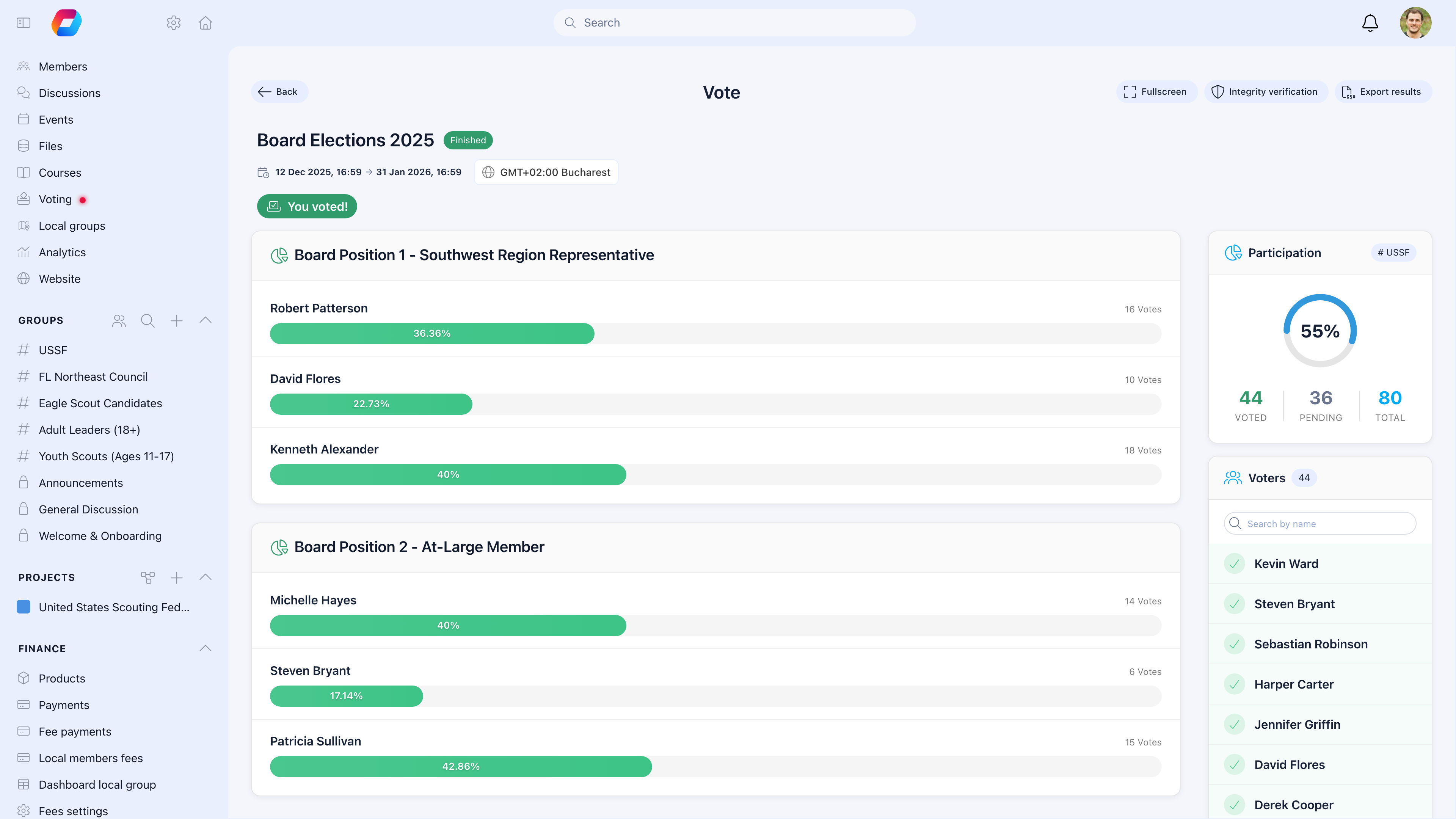
For multi-question elections (like board positions), each question shows its own results:
The voters list shows who has voted (green checkmark) and who hasn't — so you can send targeted reminders to non-voters.
***
## Results
When voting closes, results show percentage bars with vote counts for each option, plus participation metrics.
### Election results
For multi-question elections (like board positions), each question shows its own results:
 ### Motion results
For yes/no motions, results clearly show whether the motion passed:
### Motion results
For yes/no motions, results clearly show whether the motion passed:
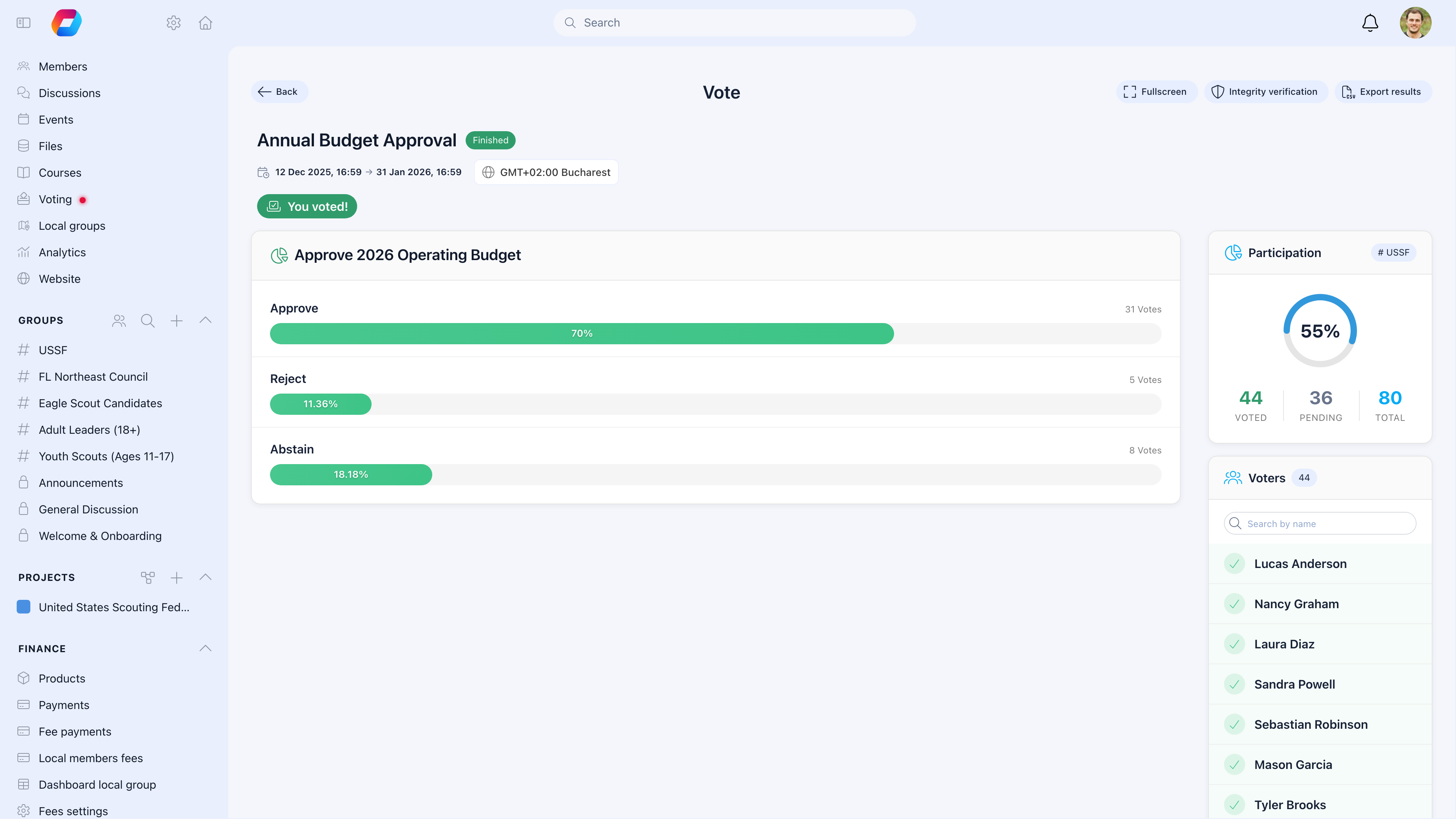 The action bar at the top provides:
* **Fullscreen** — present results on a projector during meetings
* **Integrity verification** — verify ballot authenticity
* **Export results** — download as CSV for official records
Orgo displays results but doesn't declare winners — your organization interprets results based on its own rules (simple majority, supermajority, etc.). Document the outcome in the [Official Gazette](/platform/official-gazette) for the formal record.
***
## Vote settings
| Setting | What it controls |
| --------------------- | -------------------------------------------------------------------------- |
| **Start date/time** | When voting opens — no votes accepted before this |
| **End date/time** | When voting closes — no votes accepted after this |
| **Timezone** | Displayed with dates so members in different regions know the exact window |
| **Real-time results** | If on, voters can see running totals while voting is live |
| **Hide voters list** | Only admins can see who voted and who hasn't |
| **Draft mode** | Hidden from voters until you publish |
### What you can do during each phase
| Phase | Admin actions |
| ------------ | ------------------------------------------------------------------- |
| **Draft** | Edit everything freely |
| **Upcoming** | Edit settings, extend dates |
| **Live** | Monitor participation, send reminders, extend end date, close early |
| **Closed** | View results, export data, verify integrity |
Once votes have been cast, you can't change the question or options. If a significant error is found, close the vote and create a new one.
***
## Who can vote
| Scope | Who's eligible |
| ---------------- | ------------------------------------------------------------- |
| **Group vote** | All members of the selected group |
| **Private vote** | Manually selected voters (add individually or import via CSV) |
For AGM votes, link the vote to your AGM event or group — only the right members can participate. For organization-wide elections, select your main group.
***
## Vote collections
When you need multiple related votes — like electing a president, treasurer, and secretary in the same session — group them into a single vote with multiple questions.
Members see all questions in one unified voting experience, completing all ballots in one session.
***
## Security and anonymity
### What admins can see
* Who has voted (participation tracking with checkmarks)
* Who hasn't voted (to send targeted reminders)
* Aggregate results (totals, percentages, bars)
### What admins cannot see
* How any individual member voted
* Individual ballot choices
### How it's enforced
* **One vote per person** — the system prevents duplicate voting
* **Anonymous ballots** — votes are stored separately from voter identity
* **Time-bound** — votes only accepted during the designated period
* **Sealed ballots** — each ballot gets a cryptographic seal for integrity verification
### Integrity verification
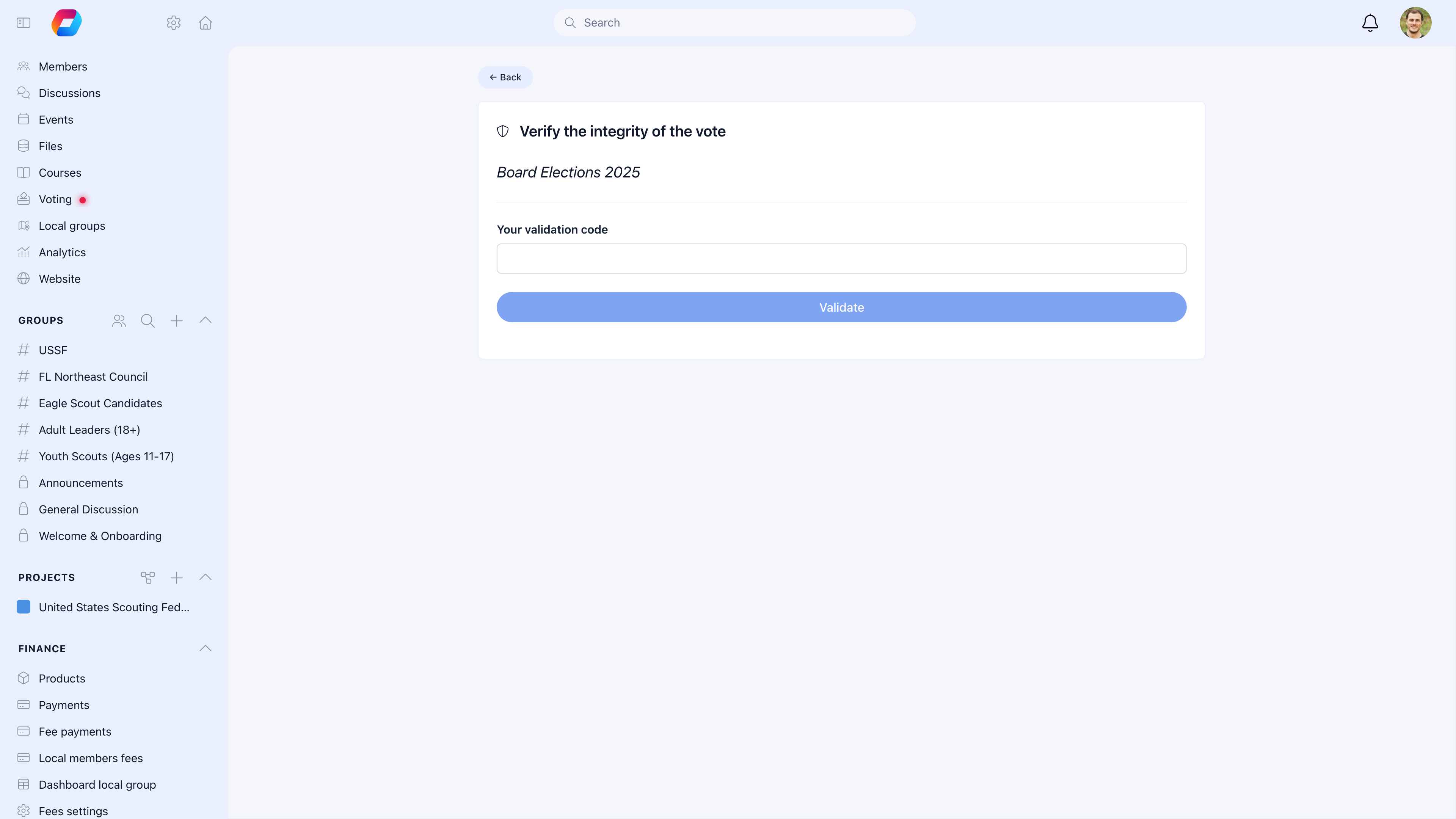
After voting closes, voters can verify their ballot wasn't tampered with using a validation code:
The action bar at the top provides:
* **Fullscreen** — present results on a projector during meetings
* **Integrity verification** — verify ballot authenticity
* **Export results** — download as CSV for official records
Orgo displays results but doesn't declare winners — your organization interprets results based on its own rules (simple majority, supermajority, etc.). Document the outcome in the [Official Gazette](/platform/official-gazette) for the formal record.
***
## Vote settings
| Setting | What it controls |
| --------------------- | -------------------------------------------------------------------------- |
| **Start date/time** | When voting opens — no votes accepted before this |
| **End date/time** | When voting closes — no votes accepted after this |
| **Timezone** | Displayed with dates so members in different regions know the exact window |
| **Real-time results** | If on, voters can see running totals while voting is live |
| **Hide voters list** | Only admins can see who voted and who hasn't |
| **Draft mode** | Hidden from voters until you publish |
### What you can do during each phase
| Phase | Admin actions |
| ------------ | ------------------------------------------------------------------- |
| **Draft** | Edit everything freely |
| **Upcoming** | Edit settings, extend dates |
| **Live** | Monitor participation, send reminders, extend end date, close early |
| **Closed** | View results, export data, verify integrity |
Once votes have been cast, you can't change the question or options. If a significant error is found, close the vote and create a new one.
***
## Who can vote
| Scope | Who's eligible |
| ---------------- | ------------------------------------------------------------- |
| **Group vote** | All members of the selected group |
| **Private vote** | Manually selected voters (add individually or import via CSV) |
For AGM votes, link the vote to your AGM event or group — only the right members can participate. For organization-wide elections, select your main group.
***
## Vote collections
When you need multiple related votes — like electing a president, treasurer, and secretary in the same session — group them into a single vote with multiple questions.
Members see all questions in one unified voting experience, completing all ballots in one session.
***
## Security and anonymity
### What admins can see
* Who has voted (participation tracking with checkmarks)
* Who hasn't voted (to send targeted reminders)
* Aggregate results (totals, percentages, bars)
### What admins cannot see
* How any individual member voted
* Individual ballot choices
### How it's enforced
* **One vote per person** — the system prevents duplicate voting
* **Anonymous ballots** — votes are stored separately from voter identity
* **Time-bound** — votes only accepted during the designated period
* **Sealed ballots** — each ballot gets a cryptographic seal for integrity verification
### Integrity verification
After voting closes, voters can verify their ballot wasn't tampered with using a validation code:
 ***
## Common scenarios
Check: Is the member's account active? Are they in the eligible group for this vote? Is the voting period open? Have they already voted? Members who've already cast a vote see a confirmation instead of the ballot.
The voters list shows exactly who hasn't voted yet — send them targeted reminders. Announce the vote in advance via newsletter. Keep the voting window long enough to accommodate different schedules and time zones.
You can extend the deadline or close early. You can't change the question or options once votes are cast. For significant corrections, close the current vote and create a new one with proper explanation.
Orgo shows raw results (vote counts and percentages). You interpret whether the threshold was met based on your organization's rules. Document the outcome in the [Official Gazette](/platform/official-gazette) for the formal record.
Yes — all votes in Orgo are anonymous by default. Admins see participation (who voted) but never individual choices. Sealed ballots with integrity verification provide an additional layer of trust.
Enable **Real-time results** when creating the vote. Use the **Fullscreen** button to display results on a projector. As votes come in, the percentage bars update live.
***
## Related
* [Events](/platform/events) — Link votes to AGMs and conferences
* [Official Gazette](/platform/official-gazette) — Publish election results formally
* [Notifications](/platform/notifications) — Send voting reminders
***
## Common scenarios
Check: Is the member's account active? Are they in the eligible group for this vote? Is the voting period open? Have they already voted? Members who've already cast a vote see a confirmation instead of the ballot.
The voters list shows exactly who hasn't voted yet — send them targeted reminders. Announce the vote in advance via newsletter. Keep the voting window long enough to accommodate different schedules and time zones.
You can extend the deadline or close early. You can't change the question or options once votes are cast. For significant corrections, close the current vote and create a new one with proper explanation.
Orgo shows raw results (vote counts and percentages). You interpret whether the threshold was met based on your organization's rules. Document the outcome in the [Official Gazette](/platform/official-gazette) for the formal record.
Yes — all votes in Orgo are anonymous by default. Admins see participation (who voted) but never individual choices. Sealed ballots with integrity verification provide an additional layer of trust.
Enable **Real-time results** when creating the vote. Use the **Fullscreen** button to display results on a projector. As votes come in, the percentage bars update live.
***
## Related
* [Events](/platform/events) — Link votes to AGMs and conferences
* [Official Gazette](/platform/official-gazette) — Publish election results formally
* [Notifications](/platform/notifications) — Send voting reminders