> ## Documentation Index
> Fetch the complete documentation index at: https://orgo.space/docs/llms.txt
> Use this file to discover all available pages before exploring further.
# Email templates
> Rewrite the subject and body of an automatic email, insert placeholders, preview it and send yourself a test
Every automatic email ships with a written-for-you version. When that version does
not sound like your organisation, you can replace it: your own subject line, your
own body, your own wording.
**Built for** organisations whose voice matters. **Replaces** apologising for the
robot that emailed your members.
Templates live at **Settings** → **Notifications & Email Campaign** →
**Email Templates** (`/email-templates`) and need ADMIN\_TENANT.
 ***
## Finding the template you want
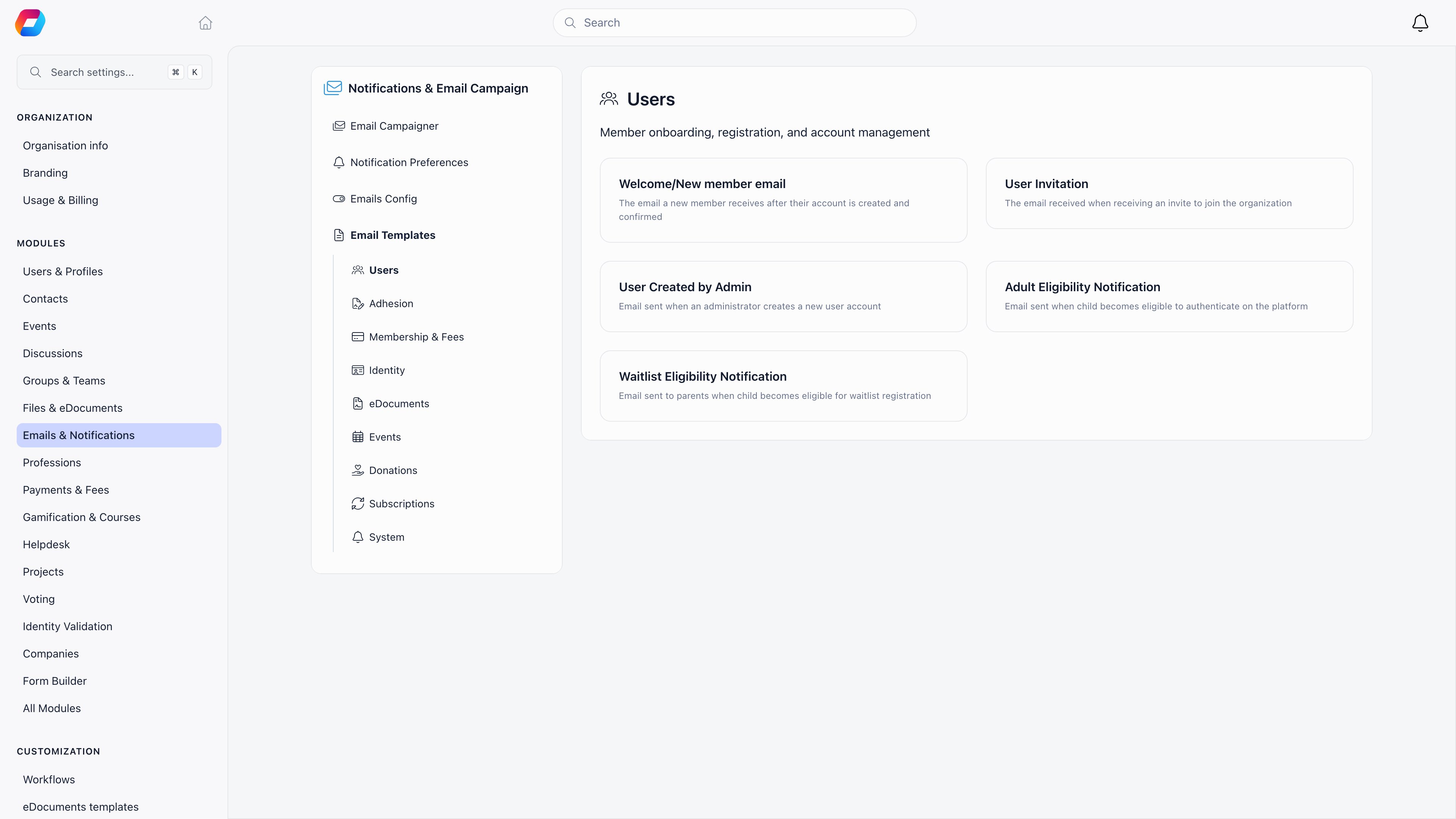
Templates are grouped into categories in the left sidebar: **Users**, **Referrals**,
**Adhesion**, **Membership & Fees**, **Identity**, **eDocuments**, **Events**,
**Donations**, **Subscriptions** and **System**.
Only categories that apply to you appear: Referrals and Adhesion show when those
features are switched on, Membership, Identity, eDocuments, Events, Donations and
Subscriptions disappear when the matching feature is off, and **Users** and
**System** are always there.
A card greyed out with a **Disabled** tag is switched off: still editable, but not
sent until you switch it back on.
***
## Editing a template
The editor opens with the current subject and body loaded. If you have never
customised this email, that is the built-in version in your organisation's
language.
A single line at the top. Placeholders work here too.
A rich text editor with formatting, links and images. Images you paste or
upload are stored when you save.
The **Insert Placeholder** button lists the values available for this email,
each with a short description. Inserting from the menu is safer than typing:
the list is filtered to what this email actually knows about.
**Preview** renders the message with your own account's details filled in.
**Send Test Email** sends it to your own address with `[TEST]` in front of the
subject, from your organisation's real sending address. It saves nothing.
**Save** makes your version the one members receive from that moment on.
***
## Finding the template you want
Templates are grouped into categories in the left sidebar: **Users**, **Referrals**,
**Adhesion**, **Membership & Fees**, **Identity**, **eDocuments**, **Events**,
**Donations**, **Subscriptions** and **System**.
Only categories that apply to you appear: Referrals and Adhesion show when those
features are switched on, Membership, Identity, eDocuments, Events, Donations and
Subscriptions disappear when the matching feature is off, and **Users** and
**System** are always there.
A card greyed out with a **Disabled** tag is switched off: still editable, but not
sent until you switch it back on.
***
## Editing a template
The editor opens with the current subject and body loaded. If you have never
customised this email, that is the built-in version in your organisation's
language.
A single line at the top. Placeholders work here too.
A rich text editor with formatting, links and images. Images you paste or
upload are stored when you save.
The **Insert Placeholder** button lists the values available for this email,
each with a short description. Inserting from the menu is safer than typing:
the list is filtered to what this email actually knows about.
**Preview** renders the message with your own account's details filled in.
**Send Test Email** sends it to your own address with `[TEST]` in front of the
subject, from your organisation's real sending address. It saves nothing.
**Save** makes your version the one members receive from that moment on.
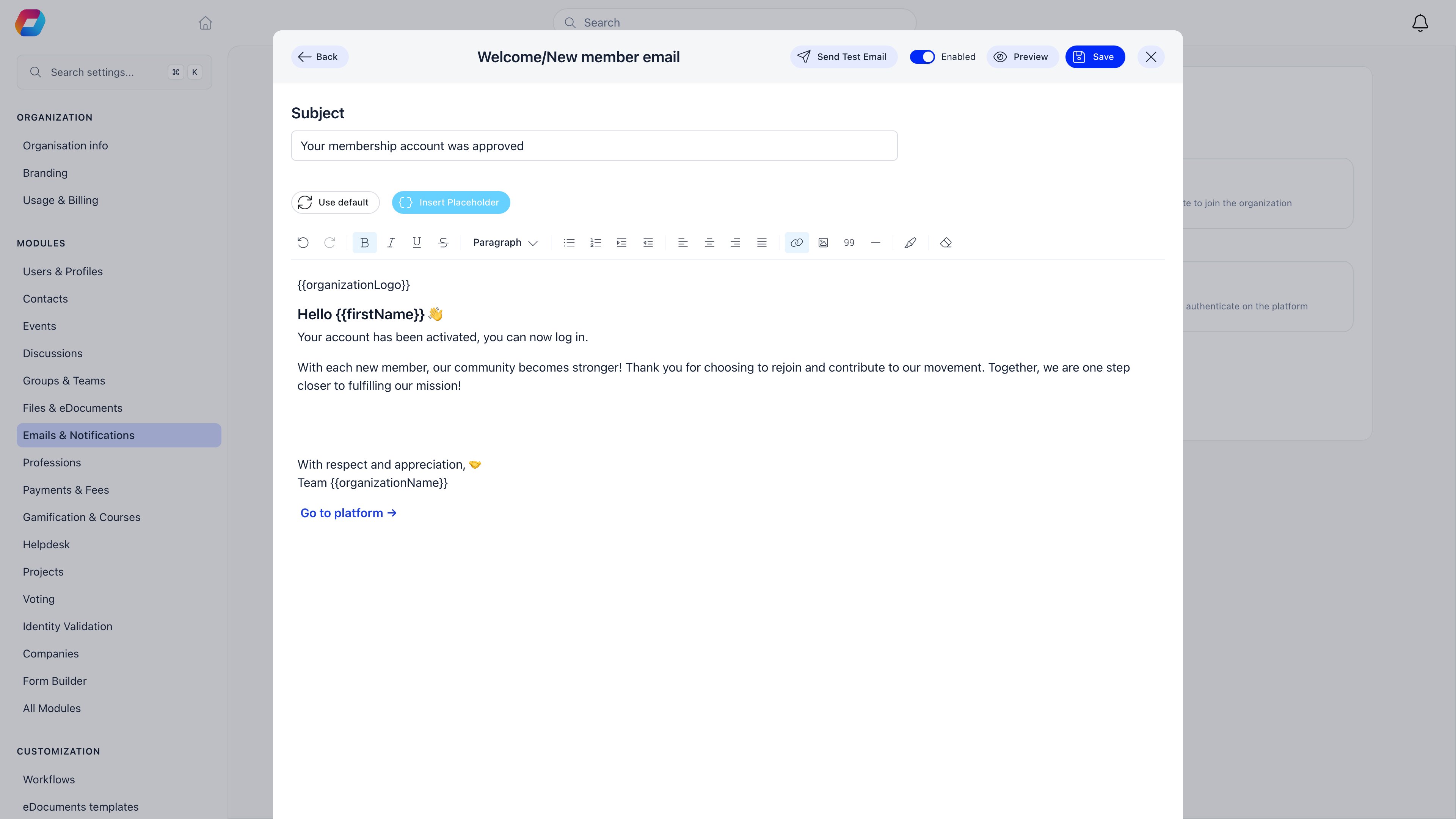 The **Enabled** switch in the editor header turns this one email on or off,
overriding the broader category switch on the
[Emails Config](/docs/platform/emails/system-emails) screen.
***
## Placeholders
A placeholder is written `{{name}}` and is replaced with real data when the email
is sent. These are available in every template:
| Placeholder | Becomes |
| ---------------------------------------------------------------------------------- | ---------------------------------------------------------------- |
| `{{firstName}}`, `{{lastName}}`, `{{fullName}}` | The recipient's name |
| `{{userEmail}}` | The recipient's address |
| `{{userPhoneNumber}}`, `{{userAddress}}`, `{{userTown}}`, `{{userCountry}}` | Their contact details |
| `{{localCenterName}}` | Their local centre |
| `{{companyName}}` | Their company, when the Companies feature is on |
| `{{membershipLevelName}}`, `{{membershipLevelPrice}}` | Their membership tier and its price |
| `{{subscriptionEndDate}}` | The date their membership runs to |
| `{{organizationName}}`, `{{organizationLogo}}` | Your organisation's name and logo image |
| `{{organizationHost}}`, `{{platformLink}}` | Your Orgo address |
| `{{organizationCurrency}}`, `{{organizationTimezone}}`, `{{organizationLanguage}}` | Your organisation's settings |
| `{{contactEmail}}` | Your organisation's contact address |
| `{{profileLink}}` | A link to the recipient's profile |
| `{{paymentLink}}` | A link that takes the member straight to paying their membership |
| `{{contractsLink}}` | A link to the recipient's documents |
| `{{unsubscribeUrl}}`, `{{preferencesUrl}}` | Unsubscribe and notification preference links |
Individual templates add their own. Event emails carry `{{eventName}}`,
`{{eventDate}}`, `{{eventLocation}}` and calendar links; contract reminders carry
`{{contractName}}` and `{{contractExpiryDate}}`; renewal reminders carry
`{{expirationDate}}` and `{{productName}}`. The **Insert Placeholder** menu is the
authoritative list for the template you have open.
`{{ name }}` with spaces and `%name%` both work as well as `{{name}}`. A
placeholder the email does not know about is left in the message as literal text,
so check the preview before saving.
***
## Going back to the original
**Use default** in the editor toolbar throws your version away and reloads the
built-in one. It asks for confirmation, and cannot be undone: the saved custom
template is deleted, not archived, and the email falls back to the built-in
wording exactly as it behaved before you touched it.
***
## Language
The built-in templates exist in English, Romanian and German, and Orgo picks the
one matching your organisation's default language.
Your own version has no language: it is used for every recipient, whatever their
language. A multilingual organisation therefore trades wording control against
translation, keeping the built-in templates for all three languages or customising
and getting one.
The invoice email is the exception, because it is not a template at all. It and
the PDF it carries render in your organisation's default language across all 14
interface languages, falling back to English only when the default is not one of
them. See [Invoices](/docs/platform/fees/invoices).
***
## What you cannot change
Sign-in and security emails cannot be customised at all: login codes,
multi-factor codes, verification codes, password reset and change codes, the
password-changed confirmation and the email-change request. Orgo refuses to save
a template for these types, because they carry live one-time codes and letting
stored HTML into them would turn a compromised admin account into an account
takeover of every member.
A few emails also have no card here at all and always send in their built-in
wording, among them invoices, family invitations, waitlist messages, task
notifications, event-app networking messages and the discussion digest.
Four cards exist for emails that are still produced outside the template system,
so editing them has no effect on what members receive: **Newsletter
Registration**, **Fee Payment Approval**, **Adult Eligibility Notification** and
**Waitlist Eligibility Notification**. Preview and test send still work, which
makes this easy to miss. Treat the built-in wording for those four as fixed.
***
## Troubleshooting
Check whether the email is one of the four listed above, then check
[Email logs](/docs/platform/emails/email-log): the log stores the body that was
actually sent, which settles it immediately.
That value is not available to that template. Open the template, delete the
placeholder and pick a replacement from the **Insert Placeholder** menu.
Test sends go to the address on your own account and use the same sending path
as everything else, so a missing test usually means a delivery problem rather
than a template problem. Check your spam folder, then see
[Emails](/docs/platform/emails).
Use **Use default** in that template. It affects only the template you have
open.
***
## Related
* [System emails](/docs/platform/emails/system-emails) - what each template is for and when it sends
* [Emails](/docs/platform/emails) - sender identity and language rules
* [Email logs](/docs/platform/emails/email-log) - the body that actually went out
* [Newsletter builder](/docs/platform/newsletter-builder) - designing campaigns rather than system emails
* [Languages](/docs/platform/customization/languages) - the setting that picks the built-in language
The **Enabled** switch in the editor header turns this one email on or off,
overriding the broader category switch on the
[Emails Config](/docs/platform/emails/system-emails) screen.
***
## Placeholders
A placeholder is written `{{name}}` and is replaced with real data when the email
is sent. These are available in every template:
| Placeholder | Becomes |
| ---------------------------------------------------------------------------------- | ---------------------------------------------------------------- |
| `{{firstName}}`, `{{lastName}}`, `{{fullName}}` | The recipient's name |
| `{{userEmail}}` | The recipient's address |
| `{{userPhoneNumber}}`, `{{userAddress}}`, `{{userTown}}`, `{{userCountry}}` | Their contact details |
| `{{localCenterName}}` | Their local centre |
| `{{companyName}}` | Their company, when the Companies feature is on |
| `{{membershipLevelName}}`, `{{membershipLevelPrice}}` | Their membership tier and its price |
| `{{subscriptionEndDate}}` | The date their membership runs to |
| `{{organizationName}}`, `{{organizationLogo}}` | Your organisation's name and logo image |
| `{{organizationHost}}`, `{{platformLink}}` | Your Orgo address |
| `{{organizationCurrency}}`, `{{organizationTimezone}}`, `{{organizationLanguage}}` | Your organisation's settings |
| `{{contactEmail}}` | Your organisation's contact address |
| `{{profileLink}}` | A link to the recipient's profile |
| `{{paymentLink}}` | A link that takes the member straight to paying their membership |
| `{{contractsLink}}` | A link to the recipient's documents |
| `{{unsubscribeUrl}}`, `{{preferencesUrl}}` | Unsubscribe and notification preference links |
Individual templates add their own. Event emails carry `{{eventName}}`,
`{{eventDate}}`, `{{eventLocation}}` and calendar links; contract reminders carry
`{{contractName}}` and `{{contractExpiryDate}}`; renewal reminders carry
`{{expirationDate}}` and `{{productName}}`. The **Insert Placeholder** menu is the
authoritative list for the template you have open.
`{{ name }}` with spaces and `%name%` both work as well as `{{name}}`. A
placeholder the email does not know about is left in the message as literal text,
so check the preview before saving.
***
## Going back to the original
**Use default** in the editor toolbar throws your version away and reloads the
built-in one. It asks for confirmation, and cannot be undone: the saved custom
template is deleted, not archived, and the email falls back to the built-in
wording exactly as it behaved before you touched it.
***
## Language
The built-in templates exist in English, Romanian and German, and Orgo picks the
one matching your organisation's default language.
Your own version has no language: it is used for every recipient, whatever their
language. A multilingual organisation therefore trades wording control against
translation, keeping the built-in templates for all three languages or customising
and getting one.
The invoice email is the exception, because it is not a template at all. It and
the PDF it carries render in your organisation's default language across all 14
interface languages, falling back to English only when the default is not one of
them. See [Invoices](/docs/platform/fees/invoices).
***
## What you cannot change
Sign-in and security emails cannot be customised at all: login codes,
multi-factor codes, verification codes, password reset and change codes, the
password-changed confirmation and the email-change request. Orgo refuses to save
a template for these types, because they carry live one-time codes and letting
stored HTML into them would turn a compromised admin account into an account
takeover of every member.
A few emails also have no card here at all and always send in their built-in
wording, among them invoices, family invitations, waitlist messages, task
notifications, event-app networking messages and the discussion digest.
Four cards exist for emails that are still produced outside the template system,
so editing them has no effect on what members receive: **Newsletter
Registration**, **Fee Payment Approval**, **Adult Eligibility Notification** and
**Waitlist Eligibility Notification**. Preview and test send still work, which
makes this easy to miss. Treat the built-in wording for those four as fixed.
***
## Troubleshooting
Check whether the email is one of the four listed above, then check
[Email logs](/docs/platform/emails/email-log): the log stores the body that was
actually sent, which settles it immediately.
That value is not available to that template. Open the template, delete the
placeholder and pick a replacement from the **Insert Placeholder** menu.
Test sends go to the address on your own account and use the same sending path
as everything else, so a missing test usually means a delivery problem rather
than a template problem. Check your spam folder, then see
[Emails](/docs/platform/emails).
Use **Use default** in that template. It affects only the template you have
open.
***
## Related
* [System emails](/docs/platform/emails/system-emails) - what each template is for and when it sends
* [Emails](/docs/platform/emails) - sender identity and language rules
* [Email logs](/docs/platform/emails/email-log) - the body that actually went out
* [Newsletter builder](/docs/platform/newsletter-builder) - designing campaigns rather than system emails
* [Languages](/docs/platform/customization/languages) - the setting that picks the built-in language