> ## Documentation Index
> Fetch the complete documentation index at: https://orgo.space/docs/llms.txt
> Use this file to discover all available pages before exploring further.
# Event App Program, Feed and Votes
> The live surfaces attendees use during an event: the session agenda, the announcement feed, in-event voting and the organiser roster
Alongside [networking](/docs/platform/events/event-app-networking), the [Event App](/docs/platform/events/event-app) carries four more tabs: **Program**, **Feed**, **Vote** and, for organisers, **Participants**. Each one appears only when there is something in it.
 ***
## Program
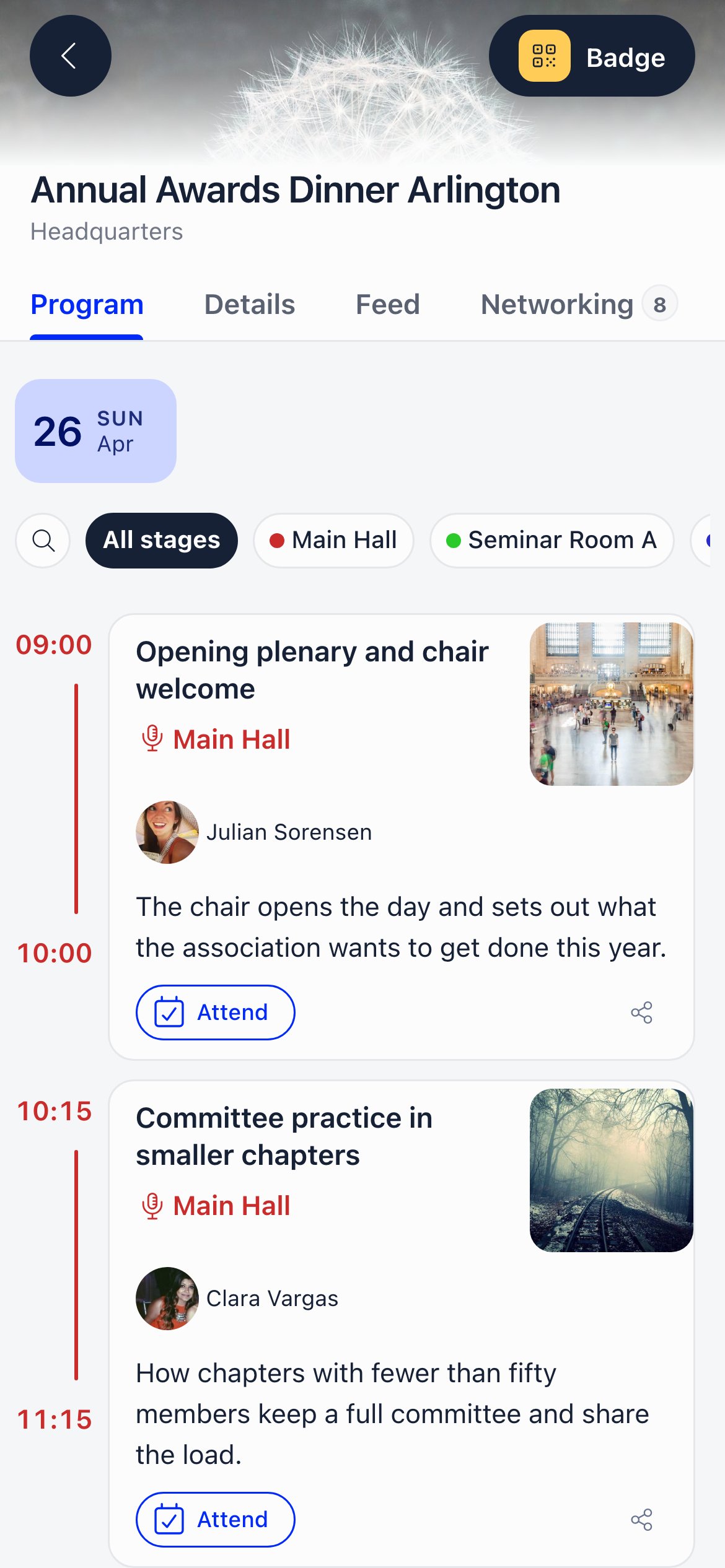
The agenda is built from the event's **sessions**, which are sub-events of the main event. If the event has no sessions, there is no Program tab and the app opens on Details instead.
**Program** is the label everywhere in the interface: this tab, the event sidebar entry that builds it, and the tab on the public event page. Only the underlying addresses still say agenda, which is why the embed URL and the `{eventAgendaUrl}` email placeholder use that word.
**What attendees see**
* Day chips across the top, then sessions in the order you arranged them.
* Per session: title, description, start and end time, place, tags, cover image, speakers, and how many people are attending.
* **Search sessions or speakers**, and a stage filter when your sessions use stages.
* A toggle between **All sessions** and **My Agenda**, with a count. It appears only once the attendee has marked at least one session.
* Tapping a speaker opens their profile with their other sessions and any co-speakers.
* A copy-link action for sharing a session.
**My Agenda**
Attendees mark a session to say they are attending it. Those sessions become their personal agenda, and the count on each session updates. Two rules apply:
* Only people with an active registration on the main event can mark sessions. An organiser who is not registered can browse the agenda but not add themselves to sessions, so rosters and reports stay clean.
* Sessions someone is attending also affect 1:1 networking: a meeting slot that overlaps one of their sessions is flagged as a clash before they book it.
Sessions can be marked as unavailable for networking, which removes that time from the bookable grid entirely.
***
## Feed
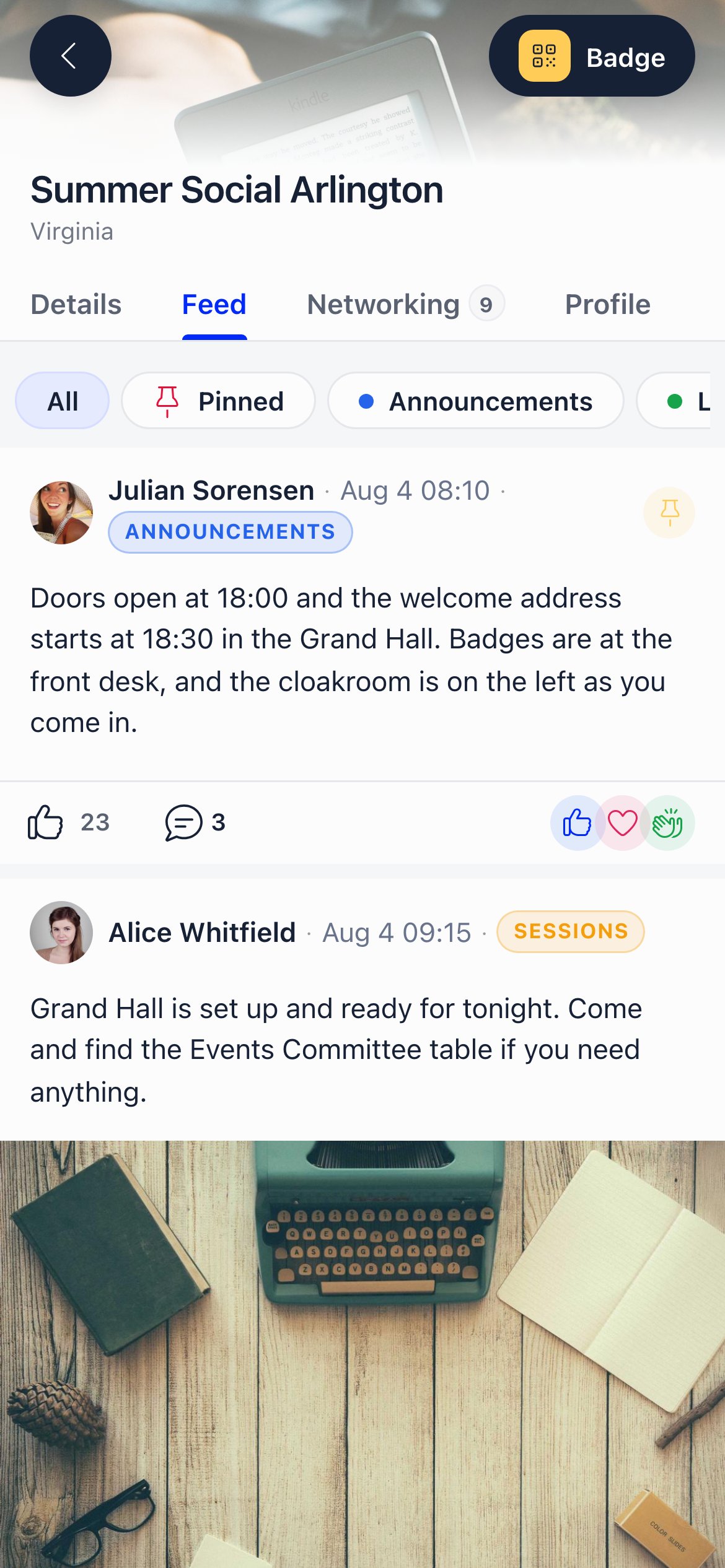
The Feed is the event's announcement stream. It updates live, so a post published from the organiser's laptop appears on attendees' phones without a refresh.
***
## Program
The agenda is built from the event's **sessions**, which are sub-events of the main event. If the event has no sessions, there is no Program tab and the app opens on Details instead.
**Program** is the label everywhere in the interface: this tab, the event sidebar entry that builds it, and the tab on the public event page. Only the underlying addresses still say agenda, which is why the embed URL and the `{eventAgendaUrl}` email placeholder use that word.
**What attendees see**
* Day chips across the top, then sessions in the order you arranged them.
* Per session: title, description, start and end time, place, tags, cover image, speakers, and how many people are attending.
* **Search sessions or speakers**, and a stage filter when your sessions use stages.
* A toggle between **All sessions** and **My Agenda**, with a count. It appears only once the attendee has marked at least one session.
* Tapping a speaker opens their profile with their other sessions and any co-speakers.
* A copy-link action for sharing a session.
**My Agenda**
Attendees mark a session to say they are attending it. Those sessions become their personal agenda, and the count on each session updates. Two rules apply:
* Only people with an active registration on the main event can mark sessions. An organiser who is not registered can browse the agenda but not add themselves to sessions, so rosters and reports stay clean.
* Sessions someone is attending also affect 1:1 networking: a meeting slot that overlaps one of their sessions is flagged as a clash before they book it.
Sessions can be marked as unavailable for networking, which removes that time from the bookable grid entirely.
***
## Feed
The Feed is the event's announcement stream. It updates live, so a post published from the organiser's laptop appears on attendees' phones without a refresh.
 **Who can post what**
| Action | Who |
| ------------------- | ------------------------------------------------------------------------------------------------------------------------------------------------------------------------------------- |
| Post to the feed | The event owner, `EVENT_LOCAL` on the event, or `ADMIN_TENANT`. Non-member attendees cannot start a post |
| Reply to a post | Any attendee with Event App access, members and non-members alike |
| React to a post | Any attendee |
| Pin or unpin a post | Same as posting |
| Edit a post | The author, plus `EVENT_LOCAL` and `ADMIN_TENANT` on anyone's post |
| Delete a post | The author, plus `EVENT_LOCAL` and `ADMIN_TENANT` on anyone's post. A post with replies keeps its place in the thread with its content removed, so the conversation still makes sense |
**What a post can contain**
Text, images, mentions of other members, and a link preview. Replies can carry images too. Posts can be filed under **categories** that you define per event, each with its own name and colour; attendees filter the feed by category with the chips at the top, or by **Pinned**. Pinned posts sit at the top of the feed, most recently pinned first.
**Notifications**
Publishing a post notifies every active attendee (in-app, push and email, depending on each person's settings). Replying notifies the author of the post you replied to, unless you are replying to yourself.
***
## Vote
The Vote tab appears when the event has at least one vote that is upcoming, live or closed. Drafts never appear.
Each vote shows its state: **upcoming**, **Live**, or **Finished**, with the number of questions and the participation rate. Attendees answer every question and submit once; the tab then shows "You voted". Submitting is refused before a vote opens and after it closes.
Results follow the vote's own configuration. Some show results immediately, others only once voting has ended, in which case attendees see "Result will be available at the end of the voting period". Votes that stay open until everyone has voted or until an administrator closes them say so on the card.
Eligibility to see and cast an event vote is a registration with status Registered or Invited that is not cancelled. Note this is slightly narrower than the rule for opening the app itself, so someone whose registration is awaiting an invoice payment can browse the app but cannot vote.
See [E-Voting](/docs/platform/e-voting) for how votes are created and configured.
***
## Participants (organisers only)
The Participants tab is the full administrative attendance screen, embedded in the app so organisers can work from a phone at the venue. It shows every registration, including people who have hidden themselves from the attendee directory, with the same filters, columns, invites, exports and status management as the desktop participant list.
It appears only for people who can manage the event (`ADMIN_TENANT`, `EVENT_TENANT`, or `EVENT_LOCAL` on that event), and only on phones. On a desktop the event sidebar already offers the same screen, so the tab is hidden to keep the tab strip short. Anyone without the permission who opens the URL directly is redirected to Networking or Program.
See [Event Attendance](/docs/platform/events/attendance) for what that screen does.
***
## Badge and scanning
**Who can post what**
| Action | Who |
| ------------------- | ------------------------------------------------------------------------------------------------------------------------------------------------------------------------------------- |
| Post to the feed | The event owner, `EVENT_LOCAL` on the event, or `ADMIN_TENANT`. Non-member attendees cannot start a post |
| Reply to a post | Any attendee with Event App access, members and non-members alike |
| React to a post | Any attendee |
| Pin or unpin a post | Same as posting |
| Edit a post | The author, plus `EVENT_LOCAL` and `ADMIN_TENANT` on anyone's post |
| Delete a post | The author, plus `EVENT_LOCAL` and `ADMIN_TENANT` on anyone's post. A post with replies keeps its place in the thread with its content removed, so the conversation still makes sense |
**What a post can contain**
Text, images, mentions of other members, and a link preview. Replies can carry images too. Posts can be filed under **categories** that you define per event, each with its own name and colour; attendees filter the feed by category with the chips at the top, or by **Pinned**. Pinned posts sit at the top of the feed, most recently pinned first.
**Notifications**
Publishing a post notifies every active attendee (in-app, push and email, depending on each person's settings). Replying notifies the author of the post you replied to, unless you are replying to yourself.
***
## Vote
The Vote tab appears when the event has at least one vote that is upcoming, live or closed. Drafts never appear.
Each vote shows its state: **upcoming**, **Live**, or **Finished**, with the number of questions and the participation rate. Attendees answer every question and submit once; the tab then shows "You voted". Submitting is refused before a vote opens and after it closes.
Results follow the vote's own configuration. Some show results immediately, others only once voting has ended, in which case attendees see "Result will be available at the end of the voting period". Votes that stay open until everyone has voted or until an administrator closes them say so on the card.
Eligibility to see and cast an event vote is a registration with status Registered or Invited that is not cancelled. Note this is slightly narrower than the rule for opening the app itself, so someone whose registration is awaiting an invoice payment can browse the app but cannot vote.
See [E-Voting](/docs/platform/e-voting) for how votes are created and configured.
***
## Participants (organisers only)
The Participants tab is the full administrative attendance screen, embedded in the app so organisers can work from a phone at the venue. It shows every registration, including people who have hidden themselves from the attendee directory, with the same filters, columns, invites, exports and status management as the desktop participant list.
It appears only for people who can manage the event (`ADMIN_TENANT`, `EVENT_TENANT`, or `EVENT_LOCAL` on that event), and only on phones. On a desktop the event sidebar already offers the same screen, so the tab is hidden to keep the tab strip short. Anyone without the permission who opens the URL directly is redirected to Networking or Program.
See [Event Attendance](/docs/platform/events/attendance) for what that screen does.
***
## Badge and scanning
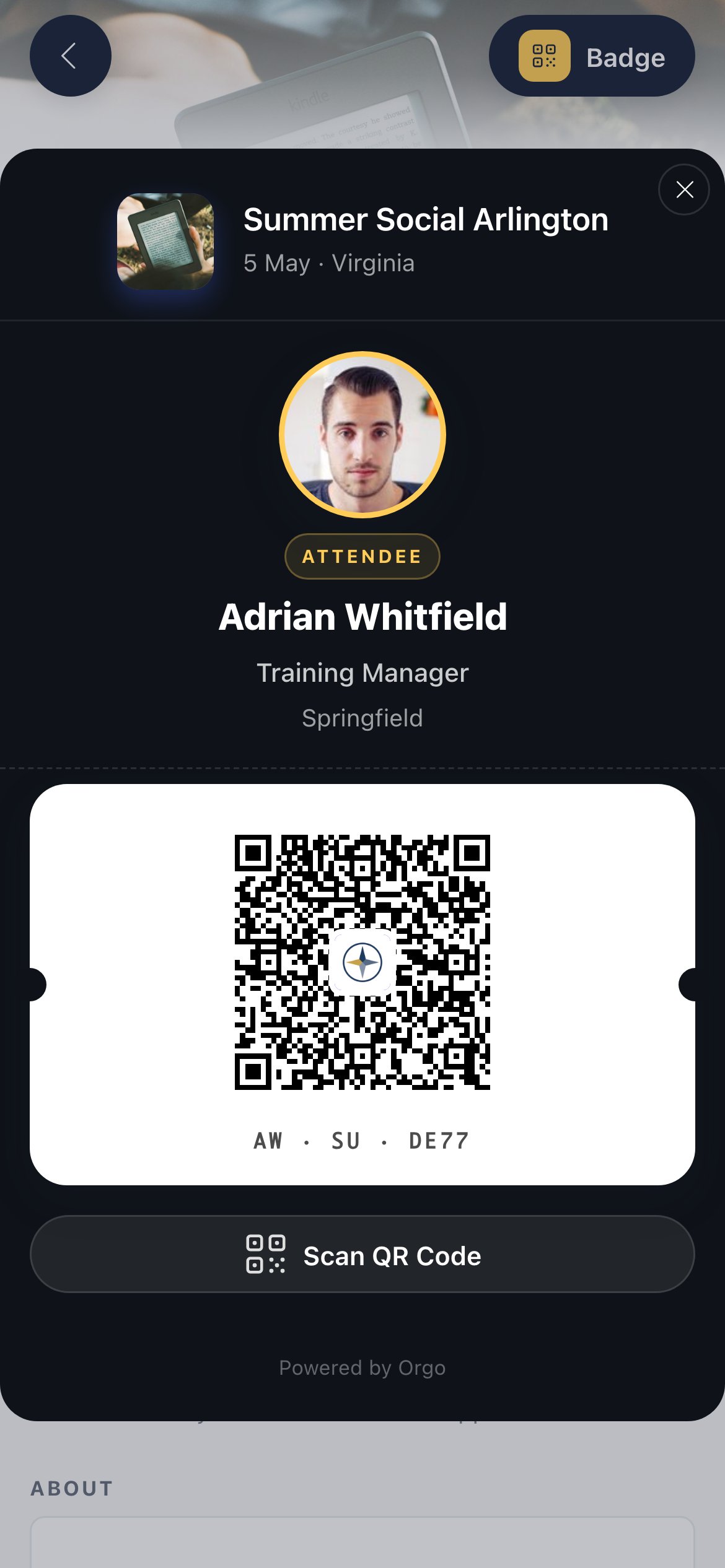 Every tab keeps a **Badge** button in the header. It opens the attendee's badge: their name, the event, and a QR code tied to their registration. It is what gets scanned at the door, and what other attendees scan to save a contact or book a 1:1.
People who can manage the event also get a **Scan QR** button. Scanning another attendee's badge shows who they are and offers the actions available to you, which include checking that person in when you have the permission for it. See [Check-in](/docs/platform/events/check-in).
***
## Troubleshooting
The event has no sessions. Add sub-events to the event and the tab appears; until then the app opens on Details.
Marking sessions requires an active registration on the main event. Managing an event is not the same as attending it. Register them for the event and the option appears.
Starting a post is limited to the event owner, `EVENT_LOCAL` admins and `ADMIN_TENANT`. Everyone else replies and reacts. This keeps the feed an announcement channel rather than an open forum.
Deleting a post that already has replies leaves an empty placeholder so the replies keep their context. Posts with no replies are removed completely.
Voting requires a registration that is Registered or Invited. A registration awaiting an invoice payment grants access to the app but not to voting. Take the payment or change the status.
***
## Related
* [Event App](/docs/platform/events/event-app) - Access, login and the tab overview
* [Event App: networking](/docs/platform/events/event-app-networking) - Directory, connections and 1:1 meetings
* [E-Voting](/docs/platform/e-voting) - Creating and running votes
* [Event Attendance](/docs/platform/events/attendance) - The participant list and statuses
* [Notifications](/docs/platform/notifications) - How attendees receive feed alerts
Every tab keeps a **Badge** button in the header. It opens the attendee's badge: their name, the event, and a QR code tied to their registration. It is what gets scanned at the door, and what other attendees scan to save a contact or book a 1:1.
People who can manage the event also get a **Scan QR** button. Scanning another attendee's badge shows who they are and offers the actions available to you, which include checking that person in when you have the permission for it. See [Check-in](/docs/platform/events/check-in).
***
## Troubleshooting
The event has no sessions. Add sub-events to the event and the tab appears; until then the app opens on Details.
Marking sessions requires an active registration on the main event. Managing an event is not the same as attending it. Register them for the event and the option appears.
Starting a post is limited to the event owner, `EVENT_LOCAL` admins and `ADMIN_TENANT`. Everyone else replies and reacts. This keeps the feed an announcement channel rather than an open forum.
Deleting a post that already has replies leaves an empty placeholder so the replies keep their context. Posts with no replies are removed completely.
Voting requires a registration that is Registered or Invited. A registration awaiting an invoice payment grants access to the app but not to voting. Take the payment or change the status.
***
## Related
* [Event App](/docs/platform/events/event-app) - Access, login and the tab overview
* [Event App: networking](/docs/platform/events/event-app-networking) - Directory, connections and 1:1 meetings
* [E-Voting](/docs/platform/e-voting) - Creating and running votes
* [Event Attendance](/docs/platform/events/attendance) - The participant list and statuses
* [Notifications](/docs/platform/notifications) - How attendees receive feed alerts