> ## Documentation Index
> Fetch the complete documentation index at: https://orgo.space/docs/llms.txt
> Use this file to discover all available pages before exploring further.
# Event Templates
> Save an event setup once and start every new event from it, tickets and registration form included
An event template is a saved blueprint: title, type, location, description, cover image, access settings, registration form, ticket types, and discount codes. Organizers pick a template when creating an event and everything arrives pre-filled.
**Built for** organizations that run the same shape of event repeatedly (monthly meetups, a standard training, a recurring gala) and want every organizer to start from the approved setup instead of rebuilding it.
**Replaces** the copy-paste-and-hope approach of duplicating last year's event.
***
## Where templates live
**Settings → Modules → Events → Templates**. Creating, editing, and deleting templates requires `ADMIN_TENANT`. Templates belong to the whole organization, not to a group or local center.
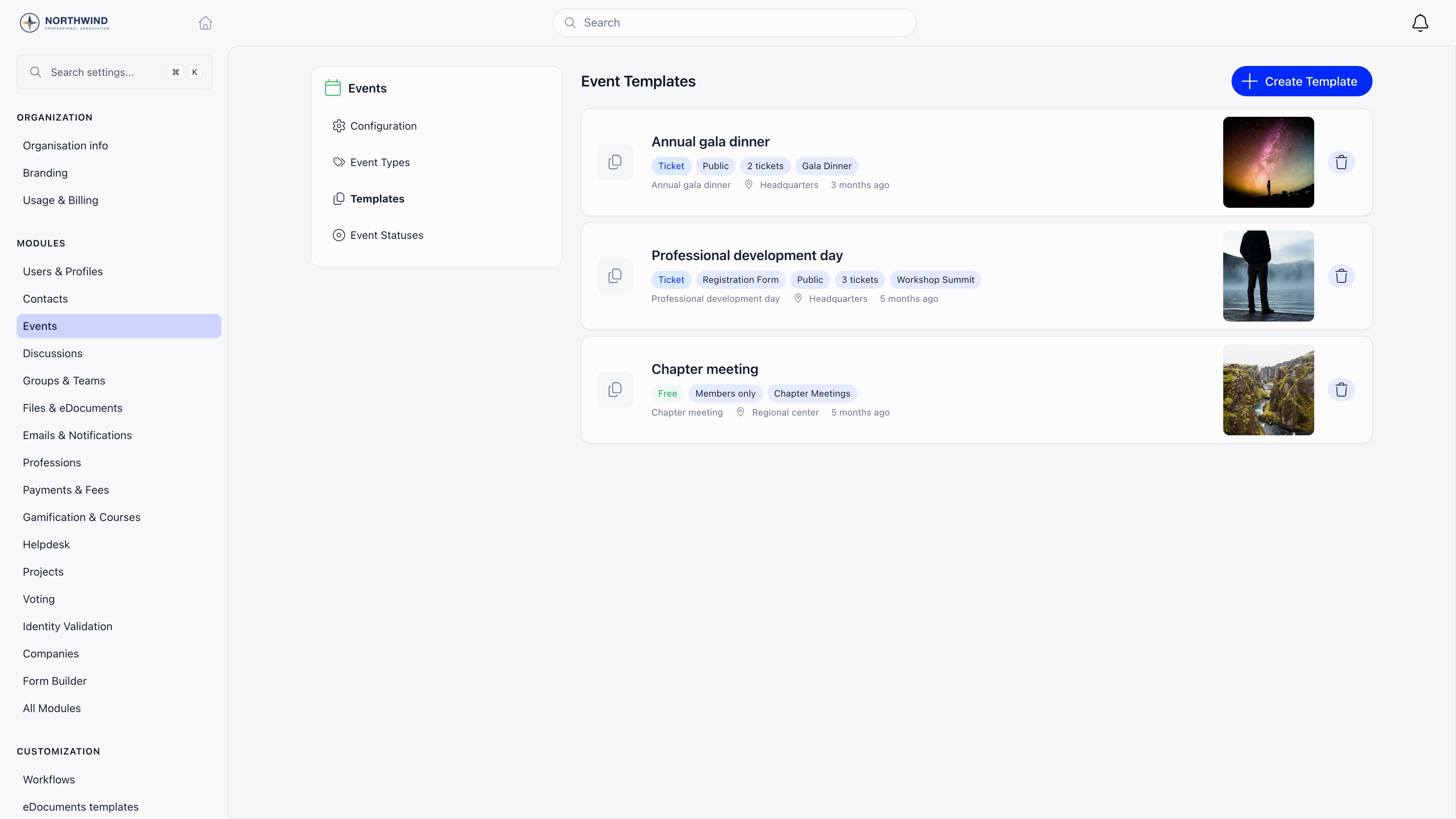 Each card shows the template name, whether it is free or ticketed, whether it is members-only or public, whether it needs a registration form, how many ticket types it carries, and its default event type. Selecting a card opens it for editing; the trash button deletes it after a confirmation.
***
## Two ways to create one
**Settings → Modules → Events → Templates → Create Template**.
Open any event, then use **Save as Template** in the event sidebar and give it a name. This copies the event's settings, its live ticket types (skipping archived ones), its vouchers, and its custom registration fields. Requires `ADMIN_TENANT`.
***
## What a template stores
Each card shows the template name, whether it is free or ticketed, whether it is members-only or public, whether it needs a registration form, how many ticket types it carries, and its default event type. Selecting a card opens it for editing; the trash button deletes it after a confirmation.
***
## Two ways to create one
**Settings → Modules → Events → Templates → Create Template**.
Open any event, then use **Save as Template** in the event sidebar and give it a name. This copies the event's settings, its live ticket types (skipping archived ones), its vouchers, and its custom registration fields. Requires `ADMIN_TENANT`.
***
## What a template stores
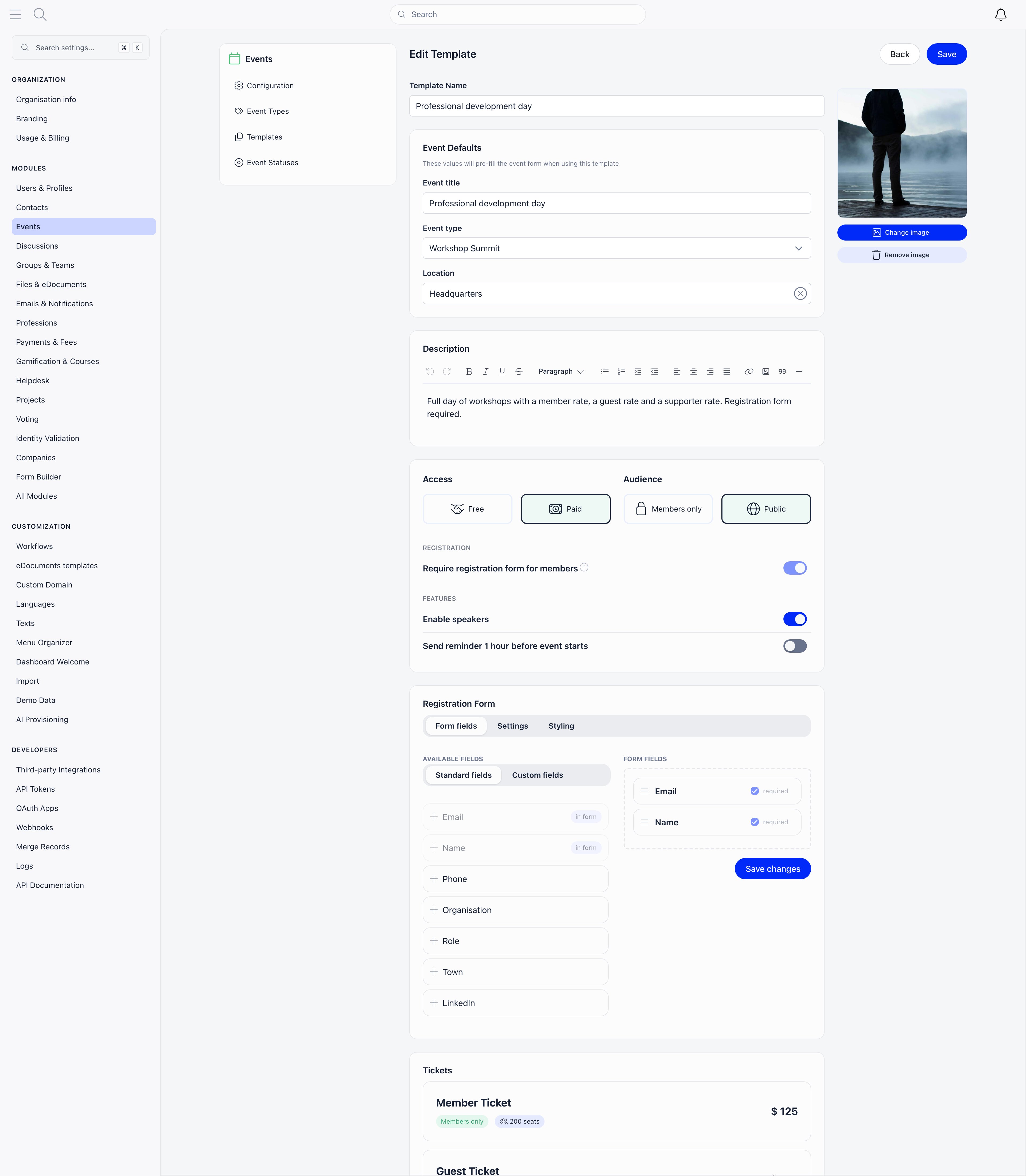 | Section | Fields |
| ----------------- | ---------------------------------------------------------------------------------------- |
| Identity | **Template Name** (what admins see in the list; never shown to attendees) |
| Event Defaults | **Event title**, **Event type**, **Location** (with Places autocomplete and map preview) |
| Description | Rich text, pre-filled into the event description |
| Access | **Free** or **Paid** |
| Audience | **Members only** or **Public** |
| Registration | **Require registration form for members** (locked on for paid), **Max capacity** |
| Features | **Enable speakers**, **Send reminder 1 hour before event starts** |
| Registration Form | Form fields, form settings, and styling (see below) |
| Tickets | Ticket types, when Access is Paid |
| Vouchers | Discount codes, when Access is Paid |
| Cover image | Uploaded and cropped in the right-hand panel |
A template deliberately does **not** carry dates and times, the hosting group, attendees, or speakers. Those are decided per event.
### Registration form
The **Form fields** tab is a drag-and-drop builder. Standard fields available: Email and Name (always required), plus Phone, Organisation, Role, Town, LinkedIn, X (Twitter), Instagram, Company Identifier, Company Name, and Company Address. You can also define custom fields with a name and a type: text input, text area, dropdown, radio, checkboxes, date, or yes/no. Dropdown, radio, and checkbox fields need at least two options.
The **Settings** tab holds **Disable newsletter subscription**, **Disable register checkbox**, and **Custom text at bottom of registration form** (shown above the consent checkboxes).
The **Styling** tab holds **Display title**, **Selected color**, **Button color** and **Hero image border radius**.
### Tickets and vouchers
Ticket types carry their name, price, currency, description, seat limit, sort order, group name, members-only flag, and sale window. Vouchers carry a **Code**, a percentage or fixed **Discount type** and value, a **Currency**, an optional **Max discount amount**, **Max uses**, **Max tickets per use**, the **Active** flag, and an optional restriction to specific ticket types. See [Ticketing](/docs/platform/events/ticketing) for what each of those does at checkout.
***
## Using a template
On the events list, select **Create an event**. When your organization has at least one template, a **Start from template** button appears in the header of the create panel.
| Section | Fields |
| ----------------- | ---------------------------------------------------------------------------------------- |
| Identity | **Template Name** (what admins see in the list; never shown to attendees) |
| Event Defaults | **Event title**, **Event type**, **Location** (with Places autocomplete and map preview) |
| Description | Rich text, pre-filled into the event description |
| Access | **Free** or **Paid** |
| Audience | **Members only** or **Public** |
| Registration | **Require registration form for members** (locked on for paid), **Max capacity** |
| Features | **Enable speakers**, **Send reminder 1 hour before event starts** |
| Registration Form | Form fields, form settings, and styling (see below) |
| Tickets | Ticket types, when Access is Paid |
| Vouchers | Discount codes, when Access is Paid |
| Cover image | Uploaded and cropped in the right-hand panel |
A template deliberately does **not** carry dates and times, the hosting group, attendees, or speakers. Those are decided per event.
### Registration form
The **Form fields** tab is a drag-and-drop builder. Standard fields available: Email and Name (always required), plus Phone, Organisation, Role, Town, LinkedIn, X (Twitter), Instagram, Company Identifier, Company Name, and Company Address. You can also define custom fields with a name and a type: text input, text area, dropdown, radio, checkboxes, date, or yes/no. Dropdown, radio, and checkbox fields need at least two options.
The **Settings** tab holds **Disable newsletter subscription**, **Disable register checkbox**, and **Custom text at bottom of registration form** (shown above the consent checkboxes).
The **Styling** tab holds **Display title**, **Selected color**, **Button color** and **Hero image border radius**.
### Tickets and vouchers
Ticket types carry their name, price, currency, description, seat limit, sort order, group name, members-only flag, and sale window. Vouchers carry a **Code**, a percentage or fixed **Discount type** and value, a **Currency**, an optional **Max discount amount**, **Max uses**, **Max tickets per use**, the **Active** flag, and an optional restriction to specific ticket types. See [Ticketing](/docs/platform/events/ticketing) for what each of those does at checkout.
***
## Using a template
On the events list, select **Create an event**. When your organization has at least one template, a **Start from template** button appears in the header of the create panel.
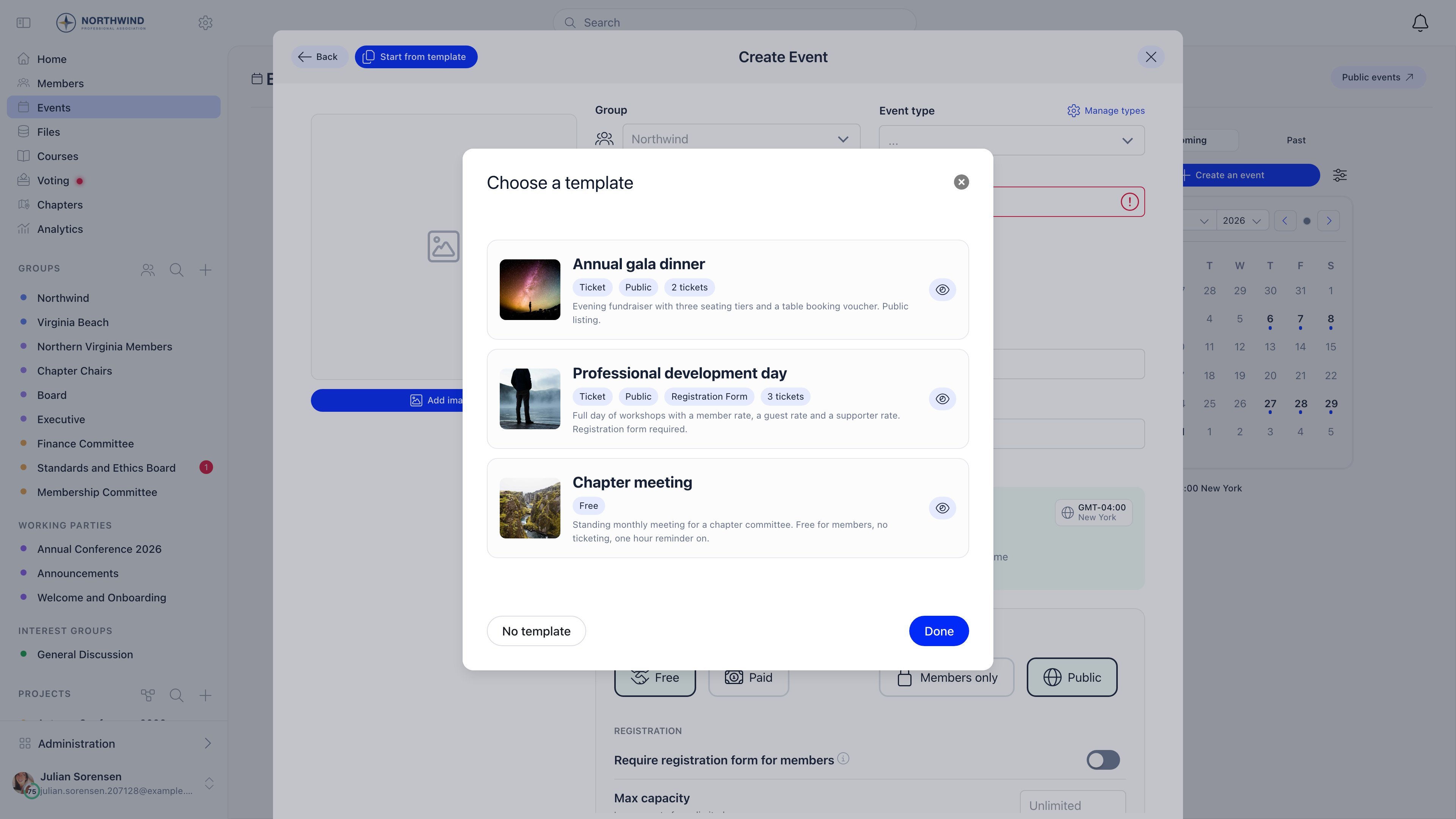 The picker lists every template with its badges. The eye button opens a full preview: cover image, event title, type, location, description, ticket types, vouchers, registration form fields, and max capacity. From the preview you can select **Use this template**.
Selecting a template pre-fills the form. You can still change anything before saving. **No template** clears the form back to defaults while keeping the timezone and the group you already chose.
When you save, Orgo creates the event and then applies the rest of the template: it copies the cover image, creates the ticket types, creates the vouchers, creates the custom fields, and writes the registration form layout.
Template management is admin-only, but the picker itself works for any organizer who can create an event. That is the point: admins curate the setups, everyone else uses them.
***
## Common questions
No. A template is applied once, at creation. Events created earlier keep whatever they had.
Duplicate copies one specific event, including its group and its agenda, and is quickest for "same event, new date". A template is the right tool when several people create similar events and you want a consistent starting point without them hunting for last year's event.
No. The group is always chosen on the event form, because it decides who sees the event and which permissions apply.
Ticket buyers have to supply at least a name and email to receive a ticket, so paid events always collect a form. The toggle is shown but locked.
***
## Related
* [Create Event](/docs/platform/events/create-event) - the form a template pre-fills
* [Event Types and Statuses](/docs/platform/events/event-types) - the type a template can default to
* [Ticketing](/docs/platform/events/ticketing) - ticket types, vouchers, and checkout
* [Registration forms](/docs/platform/events/registration-forms) - the per-event form builder
* [Events overview](/docs/platform/events) - module settings and the event workspace
The picker lists every template with its badges. The eye button opens a full preview: cover image, event title, type, location, description, ticket types, vouchers, registration form fields, and max capacity. From the preview you can select **Use this template**.
Selecting a template pre-fills the form. You can still change anything before saving. **No template** clears the form back to defaults while keeping the timezone and the group you already chose.
When you save, Orgo creates the event and then applies the rest of the template: it copies the cover image, creates the ticket types, creates the vouchers, creates the custom fields, and writes the registration form layout.
Template management is admin-only, but the picker itself works for any organizer who can create an event. That is the point: admins curate the setups, everyone else uses them.
***
## Common questions
No. A template is applied once, at creation. Events created earlier keep whatever they had.
Duplicate copies one specific event, including its group and its agenda, and is quickest for "same event, new date". A template is the right tool when several people create similar events and you want a consistent starting point without them hunting for last year's event.
No. The group is always chosen on the event form, because it decides who sees the event and which permissions apply.
Ticket buyers have to supply at least a name and email to receive a ticket, so paid events always collect a form. The toggle is shown but locked.
***
## Related
* [Create Event](/docs/platform/events/create-event) - the form a template pre-fills
* [Event Types and Statuses](/docs/platform/events/event-types) - the type a template can default to
* [Ticketing](/docs/platform/events/ticketing) - ticket types, vouchers, and checkout
* [Registration forms](/docs/platform/events/registration-forms) - the per-event form builder
* [Events overview](/docs/platform/events) - module settings and the event workspace