> ## Documentation Index
> Fetch the complete documentation index at: https://orgo.space/docs/llms.txt
> Use this file to discover all available pages before exploring further.
# Speakers and Trainers
> List the people presenting at an event, on the event page and per agenda session, and record who trained what
An event can list two kinds of people who are not simply attending: **speakers**, who appear on the
event page and sell the event, and **trainers**, who are recorded against training events and show up
on the member's own profile.
**Built for** conferences, general meetings and training programmes where the line-up is part of the
offer and the record of who taught what has to survive the event.
**Replaces** a hand-written line-up on a landing page, and a separate list of who ran which course.
Neither list registers anybody for the event. A speaker who also needs a seat, a badge or a QR code
must be added on **Participants** as well. See [Attendance](/docs/platform/events/attendance).
***
## Speakers
### Turning the list on
Open the event → **Modify** → **Features** → **Enable speakers**. A **Speakers** entry then appears in
the event sidebar.
### Adding speakers
**Add speaker** opens a search across members and contacts. Pick as many as you need; they stack
up in a list before you commit.
**Create new speaker** takes a full name and an optional email. If the email matches an existing
member or contact, that record is used instead of creating a duplicate. Otherwise a new contact is
created.
The button confirms the count, for example **Add 3 speakers**. Adding somebody twice is rejected.
### What the audience sees
Each speaker is rendered as a card with their photo, name, role and organisation, and their bio.
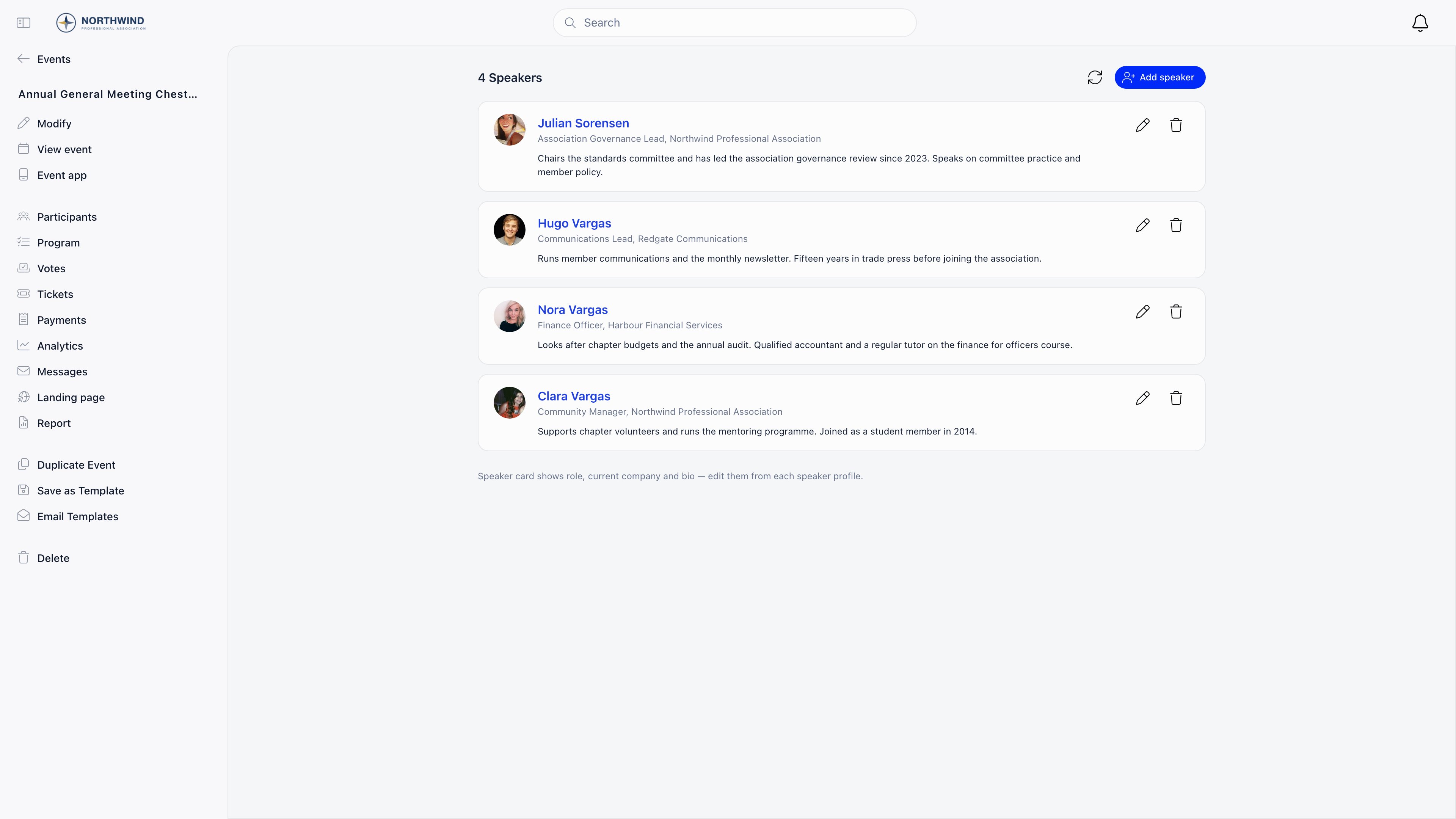 All of that comes from the underlying member profile or contact record. There are no speaker-specific
fields, so to fix a title or a bio you edit the person: the pencil on a speaker card opens the
member's profile edit screen, or the contact record for a non-member.
Speakers show on the event page inside Orgo and on the [public event page](/docs/platform/events/public-page),
which is the argument for filling in a decent photo and headline before you publish.
### Speakers per session
Events with an agenda can give each session its own speakers. Edit a session and use the same search
and **Create new speaker** controls there. Session speakers are independent of the event-level list,
so somebody chairing two sessions is listed on both.
### Permissions
| Action | Who |
| ------------------------ | ------------------------------------------------------------------------------------------------------- |
| Add a speaker | The event owner, or `EVENT_LOCAL` on the event's group, which `EVENT_TENANT` and `ADMIN_TENANT` satisfy |
| Edit or remove a speaker | The event owner, or `ADMIN_TENANT` |
Removing a speaker is narrower than adding one. Somebody with `EVENT_TENANT` who does not own the
event can add speakers but cannot delete them. Either hand the event over or ask an organisation
administrator.
***
## Trainers
Trainers exist only where the organisation runs training as an event type.
### Prerequisite
Set **Settings → Modules → Events → Configuration → Training Event Type** to one of your
[event types](/docs/platform/events/event-types). A **Trainers** entry then appears in the sidebar of every
event using that type, and nowhere else.
### Managing the list
**Add trainer** searches members only: a trainer has to be a member record, because the assignment is
written back to their profile. Removing one asks for confirmation and needs the event owner or
`ADMIN_TENANT`.
Trainers carry no dates, topics or rates. The record is simply "this member trained at this event".
### The trainer flag on a member
A member's **Permissions** tab (member → **Modify** → **Permissions**) has an **is Trainer** checkbox,
visible once a Training Event Type is configured. Editing that tab needs `HR_LOCAL` on the member's
local centre, and `HR_TENANT` when the organisation does not let local admins change permissions.
The flag does two things:
* the member may create events of the training type, even without the permission that event type
normally requires;
* their profile gains a **Trainer** section listing the trainings they led.
### On the member's profile
With a Training Event Type configured, a profile shows a **Trainings** card: the training events the
member attended, and, for a flagged trainer, the trainings they ran. Both lists link straight to the
events.
Certifications on a profile are typed in by hand and are not produced by attending a training. Nothing
in Orgo turns an attendance record into a certificate automatically.
***
## Troubleshooting
**Enable speakers** is off for that event. It is per event, not organisation-wide, so a new event
starts without it.
Either the organisation has no Training Event Type set, or this event is not using that type.
Check the event's type first.
Fix it on the person, not the event. Members show their profile headline and photo; contacts show
their organisation and logo. The change appears on every event they speak at.
Correct: speakers and trainers are separate lists. Add them on **Participants** too if they need a
seat or a ticket.
They are on the event-level list already. Session-level speakers are stored separately, so check
the agenda session as well before assuming it is a bug.
***
## Related
* [Attendance](/docs/platform/events/attendance): the participant list, where speakers also need a place
* [Create an Event](/docs/platform/events/create-event): the Features section and the event type
* [Event Types](/docs/platform/events/event-types): including the type used for training
* [Public Event Page](/docs/platform/events/public-page): where the speaker line-up is shown
* [QR Check-in](/docs/platform/events/check-in): getting speakers through the door
All of that comes from the underlying member profile or contact record. There are no speaker-specific
fields, so to fix a title or a bio you edit the person: the pencil on a speaker card opens the
member's profile edit screen, or the contact record for a non-member.
Speakers show on the event page inside Orgo and on the [public event page](/docs/platform/events/public-page),
which is the argument for filling in a decent photo and headline before you publish.
### Speakers per session
Events with an agenda can give each session its own speakers. Edit a session and use the same search
and **Create new speaker** controls there. Session speakers are independent of the event-level list,
so somebody chairing two sessions is listed on both.
### Permissions
| Action | Who |
| ------------------------ | ------------------------------------------------------------------------------------------------------- |
| Add a speaker | The event owner, or `EVENT_LOCAL` on the event's group, which `EVENT_TENANT` and `ADMIN_TENANT` satisfy |
| Edit or remove a speaker | The event owner, or `ADMIN_TENANT` |
Removing a speaker is narrower than adding one. Somebody with `EVENT_TENANT` who does not own the
event can add speakers but cannot delete them. Either hand the event over or ask an organisation
administrator.
***
## Trainers
Trainers exist only where the organisation runs training as an event type.
### Prerequisite
Set **Settings → Modules → Events → Configuration → Training Event Type** to one of your
[event types](/docs/platform/events/event-types). A **Trainers** entry then appears in the sidebar of every
event using that type, and nowhere else.
### Managing the list
**Add trainer** searches members only: a trainer has to be a member record, because the assignment is
written back to their profile. Removing one asks for confirmation and needs the event owner or
`ADMIN_TENANT`.
Trainers carry no dates, topics or rates. The record is simply "this member trained at this event".
### The trainer flag on a member
A member's **Permissions** tab (member → **Modify** → **Permissions**) has an **is Trainer** checkbox,
visible once a Training Event Type is configured. Editing that tab needs `HR_LOCAL` on the member's
local centre, and `HR_TENANT` when the organisation does not let local admins change permissions.
The flag does two things:
* the member may create events of the training type, even without the permission that event type
normally requires;
* their profile gains a **Trainer** section listing the trainings they led.
### On the member's profile
With a Training Event Type configured, a profile shows a **Trainings** card: the training events the
member attended, and, for a flagged trainer, the trainings they ran. Both lists link straight to the
events.
Certifications on a profile are typed in by hand and are not produced by attending a training. Nothing
in Orgo turns an attendance record into a certificate automatically.
***
## Troubleshooting
**Enable speakers** is off for that event. It is per event, not organisation-wide, so a new event
starts without it.
Either the organisation has no Training Event Type set, or this event is not using that type.
Check the event's type first.
Fix it on the person, not the event. Members show their profile headline and photo; contacts show
their organisation and logo. The change appears on every event they speak at.
Correct: speakers and trainers are separate lists. Add them on **Participants** too if they need a
seat or a ticket.
They are on the event-level list already. Session-level speakers are stored separately, so check
the agenda session as well before assuming it is a bug.
***
## Related
* [Attendance](/docs/platform/events/attendance): the participant list, where speakers also need a place
* [Create an Event](/docs/platform/events/create-event): the Features section and the event type
* [Event Types](/docs/platform/events/event-types): including the type used for training
* [Public Event Page](/docs/platform/events/public-page): where the speaker line-up is shown
* [QR Check-in](/docs/platform/events/check-in): getting speakers through the door