> ## Documentation Index
> Fetch the complete documentation index at: https://orgo.space/docs/llms.txt
> Use this file to discover all available pages before exploring further.
# Donation Pages & Widgets
> The public donation page, embeddable widgets, donor comments and goal tracking
Everything a donor sees. Configuring the campaign itself, including prices,
currencies and how payments are tracked, is covered in
[Donations](/docs/platform/fees/donations).
***
## Landing page
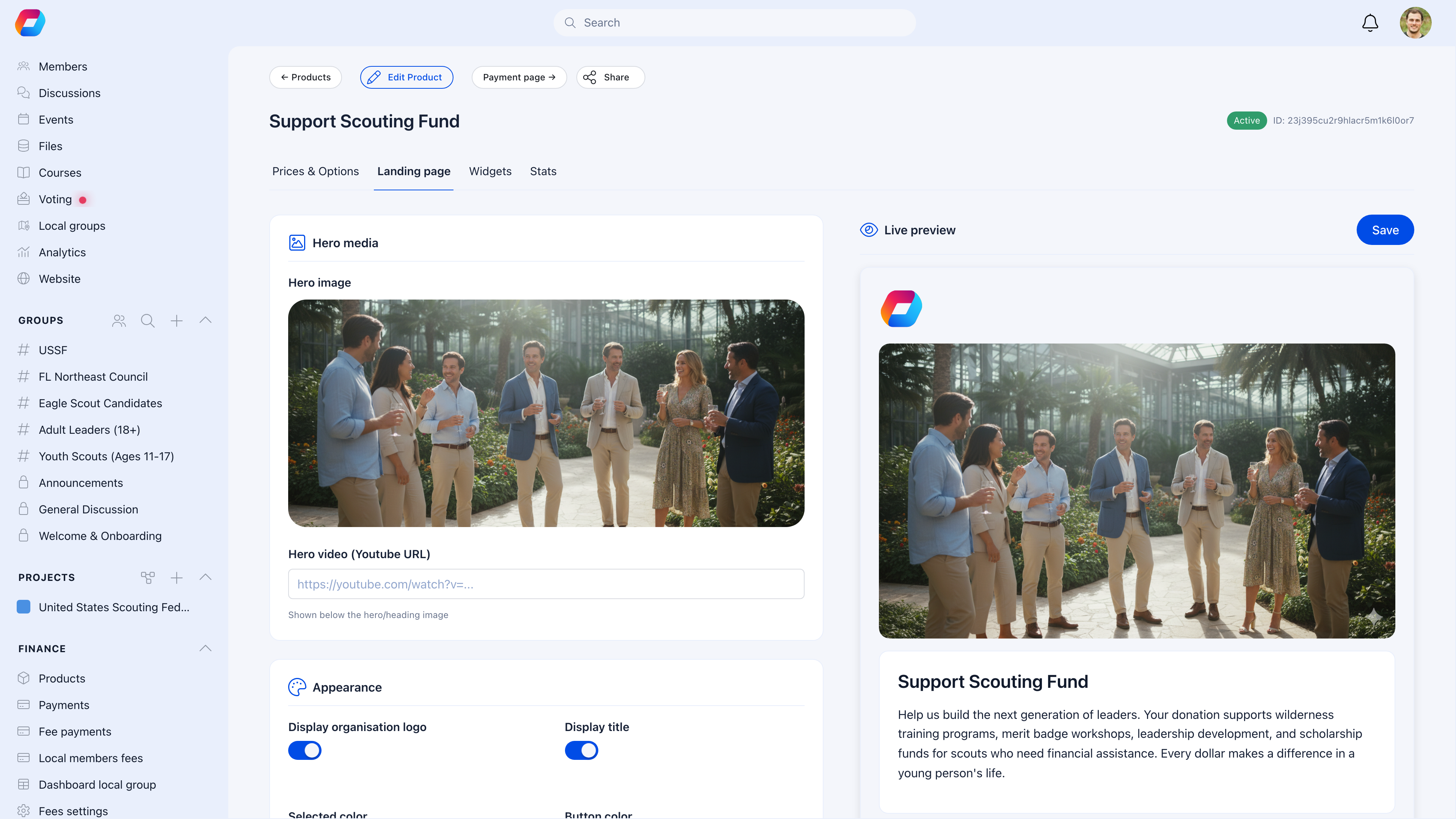
The **Landing page** tab controls how your public donation page looks and feels. A live preview updates as you make changes.
 ### Hero media
| Setting | What it does |
| -------------- | ------------------------------------------------------------------------------ |
| **Hero image** | Upload a campaign photo — displayed full-width at the top of the donation page |
| **Hero video** | Paste a YouTube URL to embed a video above the donation form |
### Appearance
| Setting | What it controls |
| ----------------------------- | ---------------------------------------------------------- |
| **Display organization logo** | Show/hide your org logo at the top of the page |
| **Display title** | Show/hide the campaign name |
| **Selection color** | Accent color for selected amounts and interactive elements |
| **Button color** | Color of the donate button |
| **Light theme only** | Force light mode regardless of visitor's device settings |
### Campaign content
Write a compelling description explaining what the money funds and why it matters. The description supports rich text and appears below the hero section. You can also set a custom **thank you message** shown after a successful donation.
Use the live preview on the right to see exactly how donors will experience the page. Every change you make updates the preview in real time.
***
## The public donation page
Each campaign gets a shareable URL. Enable **External** visibility to let anyone donate — no login required.
The public page combines everything you've configured:
* **Hero image or video** at the top
* **Progress bar** showing amount raised vs. goal
* **Donation count** and total raised
* **Campaign description** with your story
* **Price tier buttons** for quick selection
* **Custom amount** input (if enabled)
* **One-time or monthly** toggle
* **Donor comments** section (if enabled)
* **Recent and top donors** (if enabled)
* **Payment form** powered by Stripe
### Donor experience
1. Donor opens the campaign link
2. Selects a preset amount or enters a custom one
3. Chooses one-time or monthly
4. Enters name, email, and optionally a message
5. Pays via Stripe (cards, Apple Pay, Google Pay, bank transfers)
6. Sees your custom thank-you message
7. Receives a confirmation email
### Confidentiality
Enable **confidentiality** to let donors give anonymously. Their name won't appear on the public donor list — it shows as "Anonymous" instead.
### Local center selection
Enable **local center option** to let donors choose which branch or chapter receives their gift. This is useful for federated organizations where donors want to support their local unit.
***
## Donor comments (words of support)
When the **comment section** is enabled, donors can leave a message with their gift. These messages create powerful social proof on your public page.
### Hero media
| Setting | What it does |
| -------------- | ------------------------------------------------------------------------------ |
| **Hero image** | Upload a campaign photo — displayed full-width at the top of the donation page |
| **Hero video** | Paste a YouTube URL to embed a video above the donation form |
### Appearance
| Setting | What it controls |
| ----------------------------- | ---------------------------------------------------------- |
| **Display organization logo** | Show/hide your org logo at the top of the page |
| **Display title** | Show/hide the campaign name |
| **Selection color** | Accent color for selected amounts and interactive elements |
| **Button color** | Color of the donate button |
| **Light theme only** | Force light mode regardless of visitor's device settings |
### Campaign content
Write a compelling description explaining what the money funds and why it matters. The description supports rich text and appears below the hero section. You can also set a custom **thank you message** shown after a successful donation.
Use the live preview on the right to see exactly how donors will experience the page. Every change you make updates the preview in real time.
***
## The public donation page
Each campaign gets a shareable URL. Enable **External** visibility to let anyone donate — no login required.
The public page combines everything you've configured:
* **Hero image or video** at the top
* **Progress bar** showing amount raised vs. goal
* **Donation count** and total raised
* **Campaign description** with your story
* **Price tier buttons** for quick selection
* **Custom amount** input (if enabled)
* **One-time or monthly** toggle
* **Donor comments** section (if enabled)
* **Recent and top donors** (if enabled)
* **Payment form** powered by Stripe
### Donor experience
1. Donor opens the campaign link
2. Selects a preset amount or enters a custom one
3. Chooses one-time or monthly
4. Enters name, email, and optionally a message
5. Pays via Stripe (cards, Apple Pay, Google Pay, bank transfers)
6. Sees your custom thank-you message
7. Receives a confirmation email
### Confidentiality
Enable **confidentiality** to let donors give anonymously. Their name won't appear on the public donor list — it shows as "Anonymous" instead.
### Local center selection
Enable **local center option** to let donors choose which branch or chapter receives their gift. This is useful for federated organizations where donors want to support their local unit.
***
## Donor comments (words of support)
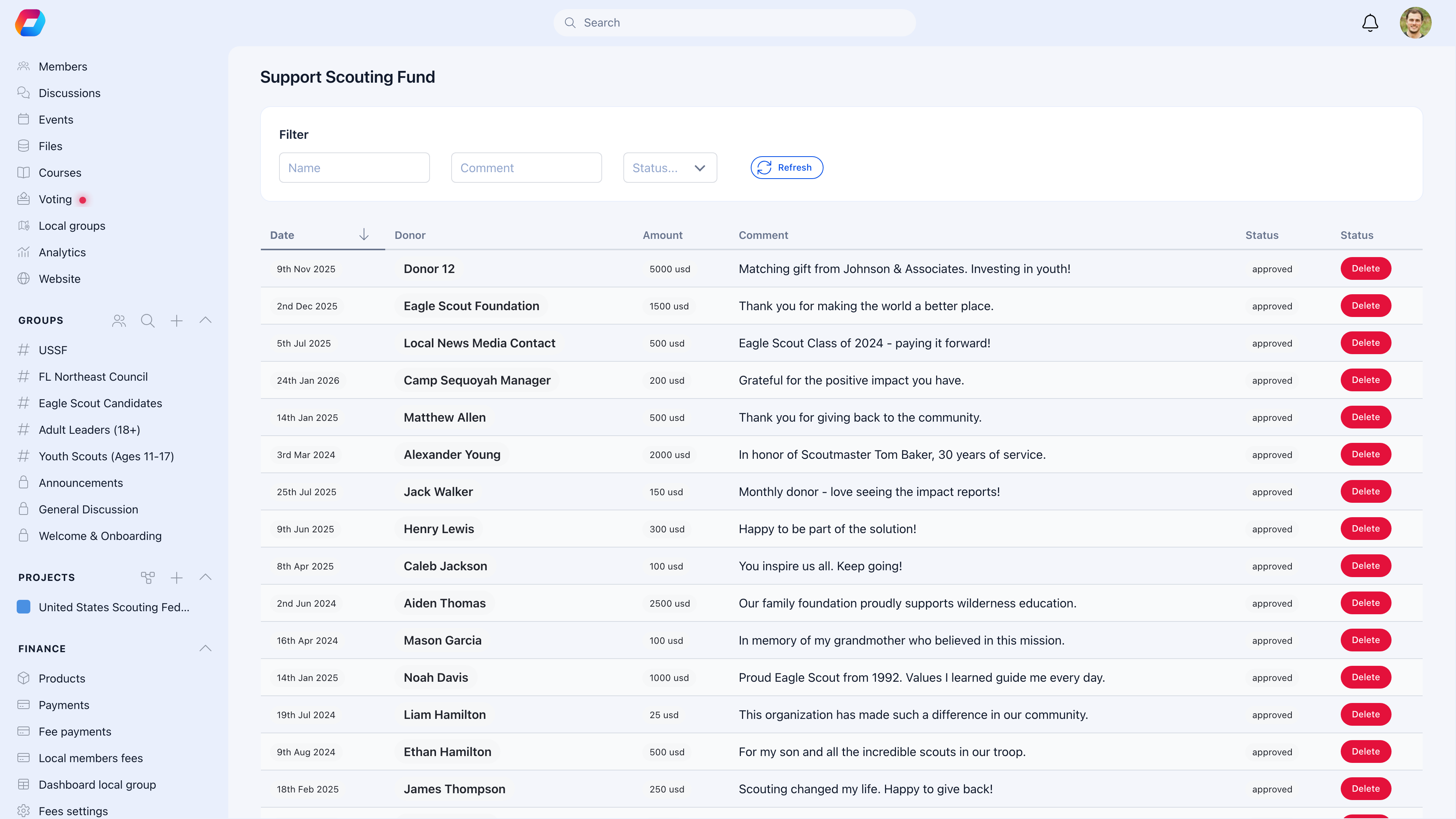
When the **comment section** is enabled, donors can leave a message with their gift. These messages create powerful social proof on your public page.
 ### Moderation workflow
All donor comments go through moderation before appearing publicly:
| Status | What it means |
| ------------ | ----------------------------------- |
| **Pending** | New comment waiting for review |
| **Approved** | Visible on the public donation page |
| **Rejected** | Hidden from public view |
Filter comments by status and use the **Refresh** button to check for new ones. Approved comments appear on the public page with the donor's name (or "Anonymous") and their message.
***
## Donation widgets
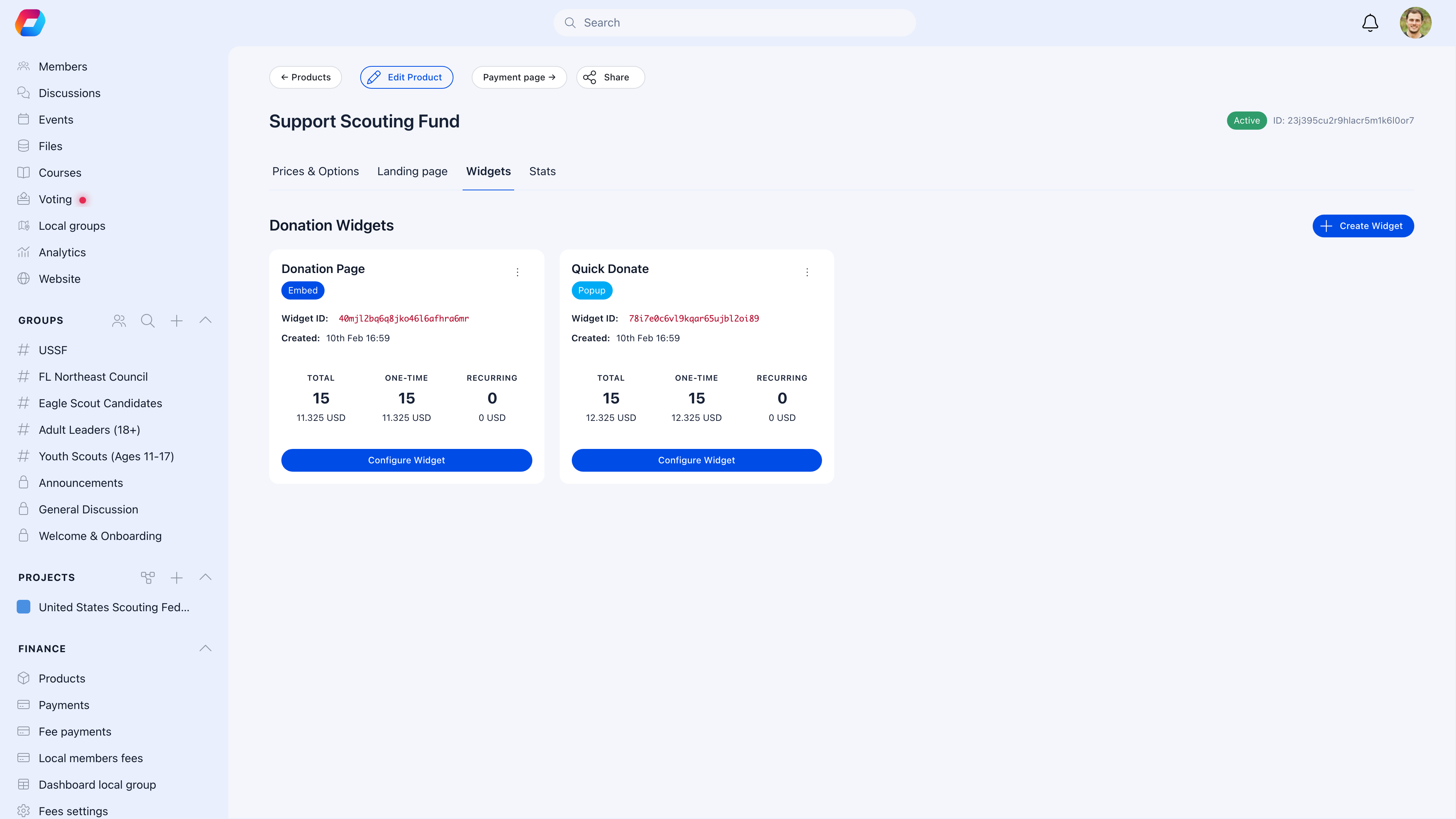
Embed donation forms directly on your website or any external page. The **Widgets** tab lets you create and manage embeddable donation widgets.
### Moderation workflow
All donor comments go through moderation before appearing publicly:
| Status | What it means |
| ------------ | ----------------------------------- |
| **Pending** | New comment waiting for review |
| **Approved** | Visible on the public donation page |
| **Rejected** | Hidden from public view |
Filter comments by status and use the **Refresh** button to check for new ones. Approved comments appear on the public page with the donor's name (or "Anonymous") and their message.
***
## Donation widgets
Embed donation forms directly on your website or any external page. The **Widgets** tab lets you create and manage embeddable donation widgets.
 ### Widget types
A full donation form that renders inline on your page. Visitors fill out the form without leaving your website.
A floating button that opens a donation modal on click. Less intrusive — ideal for sidebars, footers, or blog posts.
### Widget configuration
Each widget has its own set of options:
| Setting | What it controls |
| -------------------------------------- | ----------------------------------------------------------------------- |
| **Preset amounts** | Quick-select amounts for one-time and monthly (e.g., $5, $10, $25, $50) |
| **Default donation type** | Pre-select "once" or "monthly" |
| **Button text & colors** | Customize the CTA button appearance |
| **Primary / background / text colors** | Full color theming |
| **Position** | For popup widgets: bottom-right, bottom-left, top-right, or top-left |
| **Language** | Widget language (English, German, French, Spanish, Italian, Romanian) |
| **Show monthly upsell** | Prompt one-time donors to consider monthly giving |
| **Require address** | Collect full address from donors |
### Widget analytics
Each widget tracks its own performance:
* **Total** donations and revenue
* **One-time** donations and revenue
* **Recurring** subscriptions and revenue
This lets you compare which widget placement drives the most donations.
### Embedding on your site
Click **Configure Widget** to get the embed code. Paste it into your website's HTML — the widget handles everything from amount selection to Stripe checkout.
***
## Goal tracking
Set a fundraising target and donors see a live progress bar on the public page.
| Setting | What it does |
| ---------------- | ---------------------------------------- |
| **Total goal** | Target for cumulative one-time donations |
| **Monthly goal** | Target for recurring monthly revenue |
| **Goal value** | The dollar amount to reach |
The progress bar shows:
* Amount raised vs. goal (e.g., "$23,650 of $35,000")
* Number of donations
* Percentage complete with visual fill
When you hit 100%, the bar fills completely — but donations don't stop. Donors can still give beyond the goal.
Set a realistic goal you can achieve. An 80%-funded campaign creates urgency ("almost there!"). A 5%-funded campaign feels discouraging. If you exceed your goal, celebrate publicly and consider a stretch goal.
***
***
## Related
* [Donations](/docs/platform/fees/donations) — creating a campaign, prices, tracking
* [Products](/docs/platform/fees/products)
### Widget types
A full donation form that renders inline on your page. Visitors fill out the form without leaving your website.
A floating button that opens a donation modal on click. Less intrusive — ideal for sidebars, footers, or blog posts.
### Widget configuration
Each widget has its own set of options:
| Setting | What it controls |
| -------------------------------------- | ----------------------------------------------------------------------- |
| **Preset amounts** | Quick-select amounts for one-time and monthly (e.g., $5, $10, $25, $50) |
| **Default donation type** | Pre-select "once" or "monthly" |
| **Button text & colors** | Customize the CTA button appearance |
| **Primary / background / text colors** | Full color theming |
| **Position** | For popup widgets: bottom-right, bottom-left, top-right, or top-left |
| **Language** | Widget language (English, German, French, Spanish, Italian, Romanian) |
| **Show monthly upsell** | Prompt one-time donors to consider monthly giving |
| **Require address** | Collect full address from donors |
### Widget analytics
Each widget tracks its own performance:
* **Total** donations and revenue
* **One-time** donations and revenue
* **Recurring** subscriptions and revenue
This lets you compare which widget placement drives the most donations.
### Embedding on your site
Click **Configure Widget** to get the embed code. Paste it into your website's HTML — the widget handles everything from amount selection to Stripe checkout.
***
## Goal tracking
Set a fundraising target and donors see a live progress bar on the public page.
| Setting | What it does |
| ---------------- | ---------------------------------------- |
| **Total goal** | Target for cumulative one-time donations |
| **Monthly goal** | Target for recurring monthly revenue |
| **Goal value** | The dollar amount to reach |
The progress bar shows:
* Amount raised vs. goal (e.g., "$23,650 of $35,000")
* Number of donations
* Percentage complete with visual fill
When you hit 100%, the bar fills completely — but donations don't stop. Donors can still give beyond the goal.
Set a realistic goal you can achieve. An 80%-funded campaign creates urgency ("almost there!"). A 5%-funded campaign feels discouraging. If you exceed your goal, celebrate publicly and consider a stretch goal.
***
***
## Related
* [Donations](/docs/platform/fees/donations) — creating a campaign, prices, tracking
* [Products](/docs/platform/fees/products)