> ## Documentation Index
> Fetch the complete documentation index at: https://orgo.space/docs/llms.txt
> Use this file to discover all available pages before exploring further.
# Donations
> Run fundraising campaigns with public pages, donation goals, A/B testing, donor comments, and embeddable widgets
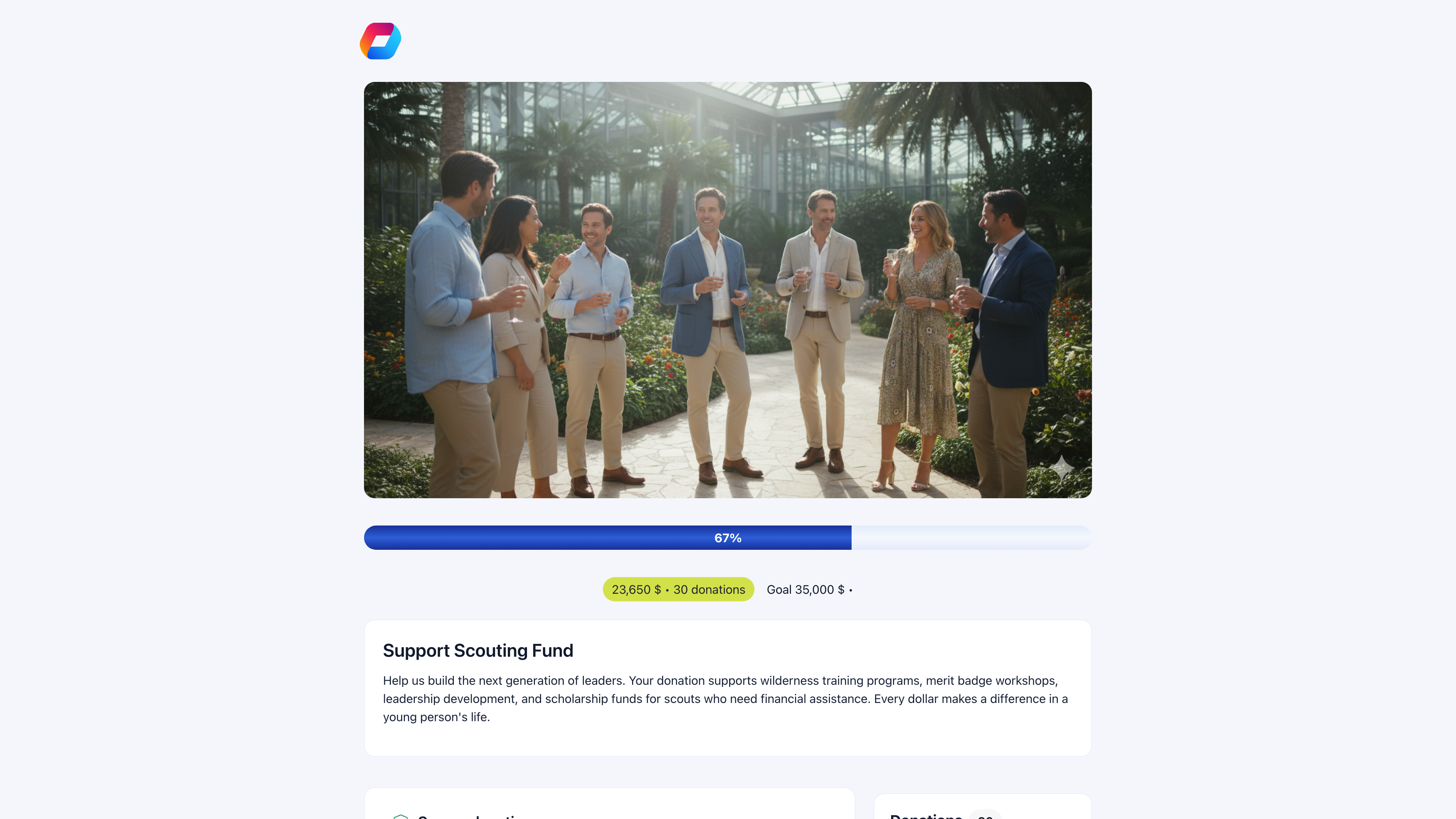
The Donations module turns your organization into a fundraising platform. Create campaigns with public pages, track progress toward goals, collect donor messages, and embed donation widgets on any website — all backed by Stripe.
 ***
## Donations vs. fees
| Use **Donations** when | Use **[Fees](/platform/fees/fees)** when |
| ----------------------------------------- | ---------------------------------------- |
| Contributions are voluntary | Payment is required for membership |
| Amount is flexible (donor chooses) | Amount is fixed per tier |
| Open to the public (non-members too) | Only for existing members |
| Goal-based (raise \$35,000 for a project) | Period-based (annual dues) |
| Tax-deductible charitable giving | Membership subscription |
Many organizations use both: fees for membership dues, donations for fundraising on top.
***
## Creating a donation campaign
**Finance** → **Products** → **Create Product** → type: **Donation**
***
## Donations vs. fees
| Use **Donations** when | Use **[Fees](/platform/fees/fees)** when |
| ----------------------------------------- | ---------------------------------------- |
| Contributions are voluntary | Payment is required for membership |
| Amount is flexible (donor chooses) | Amount is fixed per tier |
| Open to the public (non-members too) | Only for existing members |
| Goal-based (raise \$35,000 for a project) | Period-based (annual dues) |
| Tax-deductible charitable giving | Membership subscription |
Many organizations use both: fees for membership dues, donations for fundraising on top.
***
## Creating a donation campaign
**Finance** → **Products** → **Create Product** → type: **Donation**
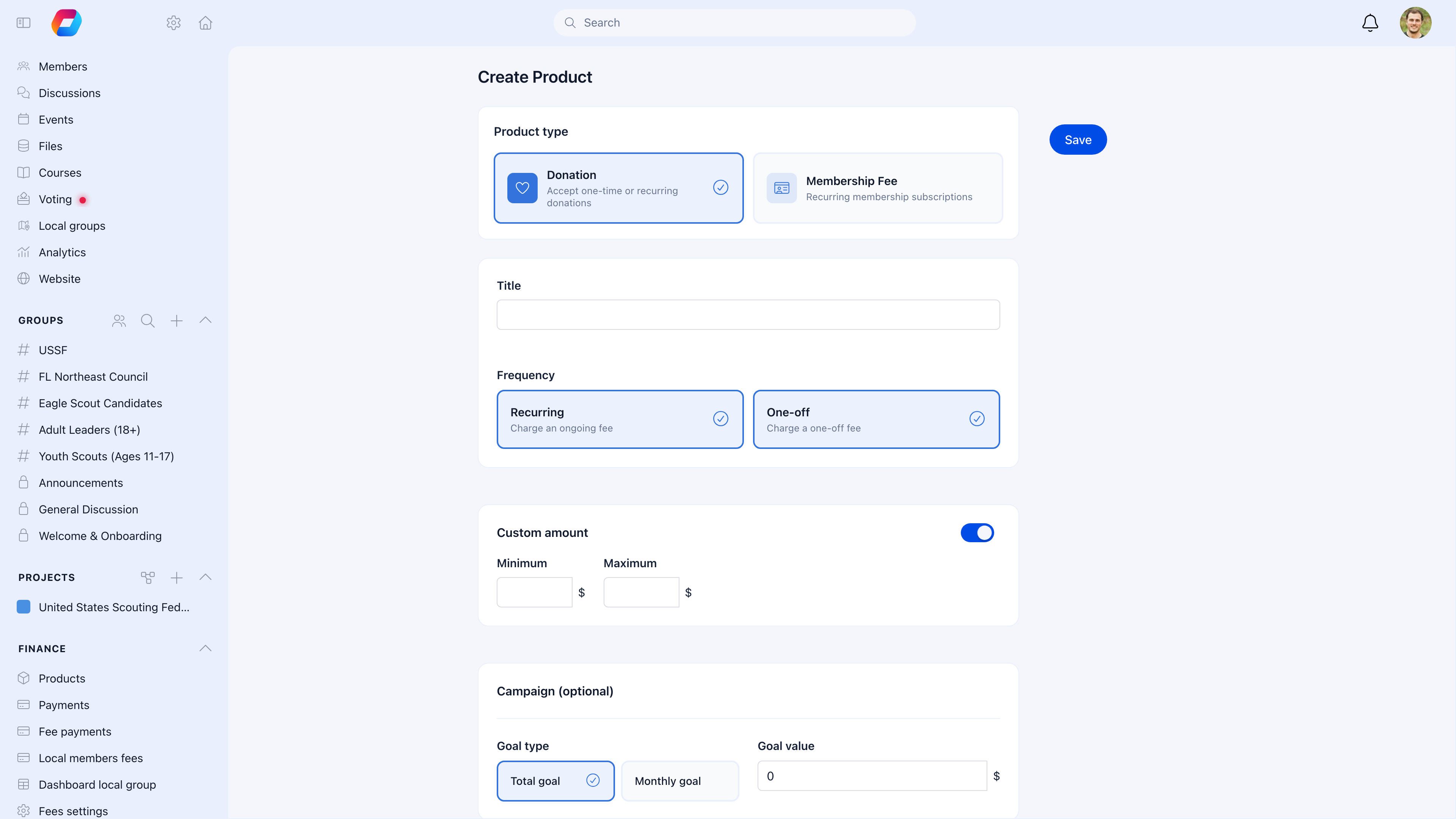 Select **Donation** as the product type. This unlocks campaign features like goals, public pages, donor comments, and widgets.
Give the campaign a title. Choose **Recurring** (monthly subscription), **One-off** (single payment), or both.
Toggle on **Custom amount** to let donors enter any value. Set optional minimum and maximum to keep it reasonable.
Choose **Total goal** or **Monthly goal** and enter a target amount. The public page shows a live progress bar.
After saving, the product detail page opens with tabs for **Prices & Options**, **Landing page**, **Widgets**, and **Stats**.
***
## Prices & options
Each donation campaign can have preset price tiers and product options. The **Prices & Options** tab manages both.
Select **Donation** as the product type. This unlocks campaign features like goals, public pages, donor comments, and widgets.
Give the campaign a title. Choose **Recurring** (monthly subscription), **One-off** (single payment), or both.
Toggle on **Custom amount** to let donors enter any value. Set optional minimum and maximum to keep it reasonable.
Choose **Total goal** or **Monthly goal** and enter a target amount. The public page shows a live progress bar.
After saving, the product detail page opens with tabs for **Prices & Options**, **Landing page**, **Widgets**, and **Stats**.
***
## Prices & options
Each donation campaign can have preset price tiers and product options. The **Prices & Options** tab manages both.
 ### Price tiers
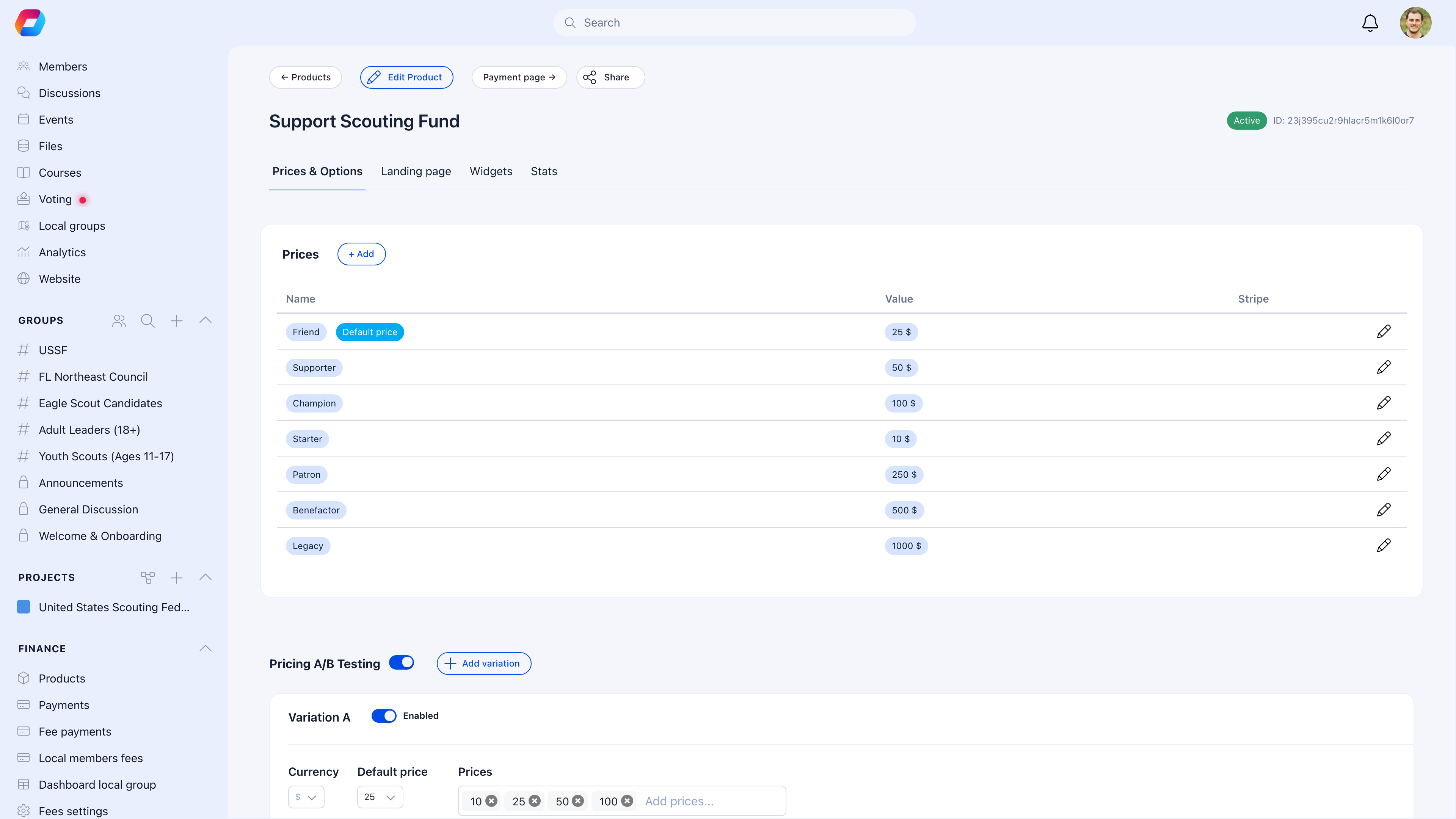
Create suggested donation amounts that appear as quick-select buttons on the public page:
| Tier | Amount | Purpose |
| ---------- | ------------ | ------------------------------ |
| Starter | \$10 | Low-barrier entry |
| Friend | \$25 | Entry-level giving |
| Supporter | \$50 | Mid-range contribution |
| Champion | \$100 | Major donor level |
| Patron | \$250 | Sustainer |
| Benefactor | \$500 | Leadership giving |
| Legacy | \$1,000 | Top-tier gift |
| Custom | Donor enters | For any amount outside presets |
One tier is marked as the **Default price** — it's pre-selected when the page loads. You can also enable **custom price value** so donors can type any amount (with optional min/max).
### A/B testing
Toggle **Pricing A/B Testing** to experiment with different price tier configurations. Each variation shows a different set of preset amounts to donors, and Orgo tracks performance metrics per variation so you can see what works.
### Price tiers
Create suggested donation amounts that appear as quick-select buttons on the public page:
| Tier | Amount | Purpose |
| ---------- | ------------ | ------------------------------ |
| Starter | \$10 | Low-barrier entry |
| Friend | \$25 | Entry-level giving |
| Supporter | \$50 | Mid-range contribution |
| Champion | \$100 | Major donor level |
| Patron | \$250 | Sustainer |
| Benefactor | \$500 | Leadership giving |
| Legacy | \$1,000 | Top-tier gift |
| Custom | Donor enters | For any amount outside presets |
One tier is marked as the **Default price** — it's pre-selected when the page loads. You can also enable **custom price value** so donors can type any amount (with optional min/max).
### A/B testing
Toggle **Pricing A/B Testing** to experiment with different price tier configurations. Each variation shows a different set of preset amounts to donors, and Orgo tracks performance metrics per variation so you can see what works.
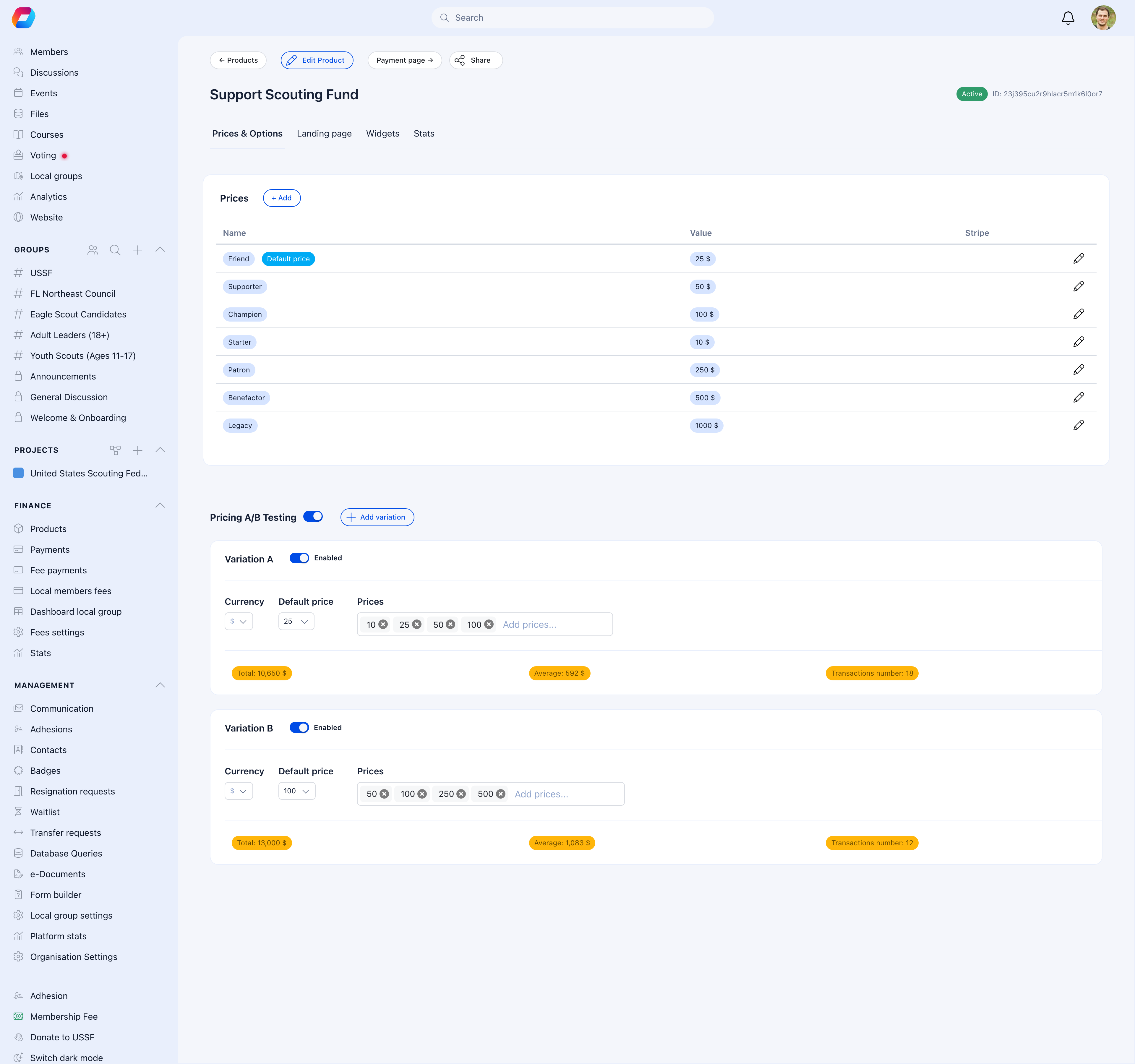 Each variation tracks:
* **Total revenue** collected through that variation
* **Average donation** amount
* **Transaction count** (number of completed donations)
In this example, Variation A (lower tiers) drives more conversions (18 vs. 12), while Variation B (higher tiers) produces a higher average donation ($1,083 vs. $592). Use these insights to optimize your pricing strategy.
### Product options
Add optional choices for donors — like designating their gift to a specific program, selecting a thank-you gift tier, or choosing which project to support.
***
## Landing page
The **Landing page** tab controls how your public donation page looks and feels. A live preview updates as you make changes.
Each variation tracks:
* **Total revenue** collected through that variation
* **Average donation** amount
* **Transaction count** (number of completed donations)
In this example, Variation A (lower tiers) drives more conversions (18 vs. 12), while Variation B (higher tiers) produces a higher average donation ($1,083 vs. $592). Use these insights to optimize your pricing strategy.
### Product options
Add optional choices for donors — like designating their gift to a specific program, selecting a thank-you gift tier, or choosing which project to support.
***
## Landing page
The **Landing page** tab controls how your public donation page looks and feels. A live preview updates as you make changes.
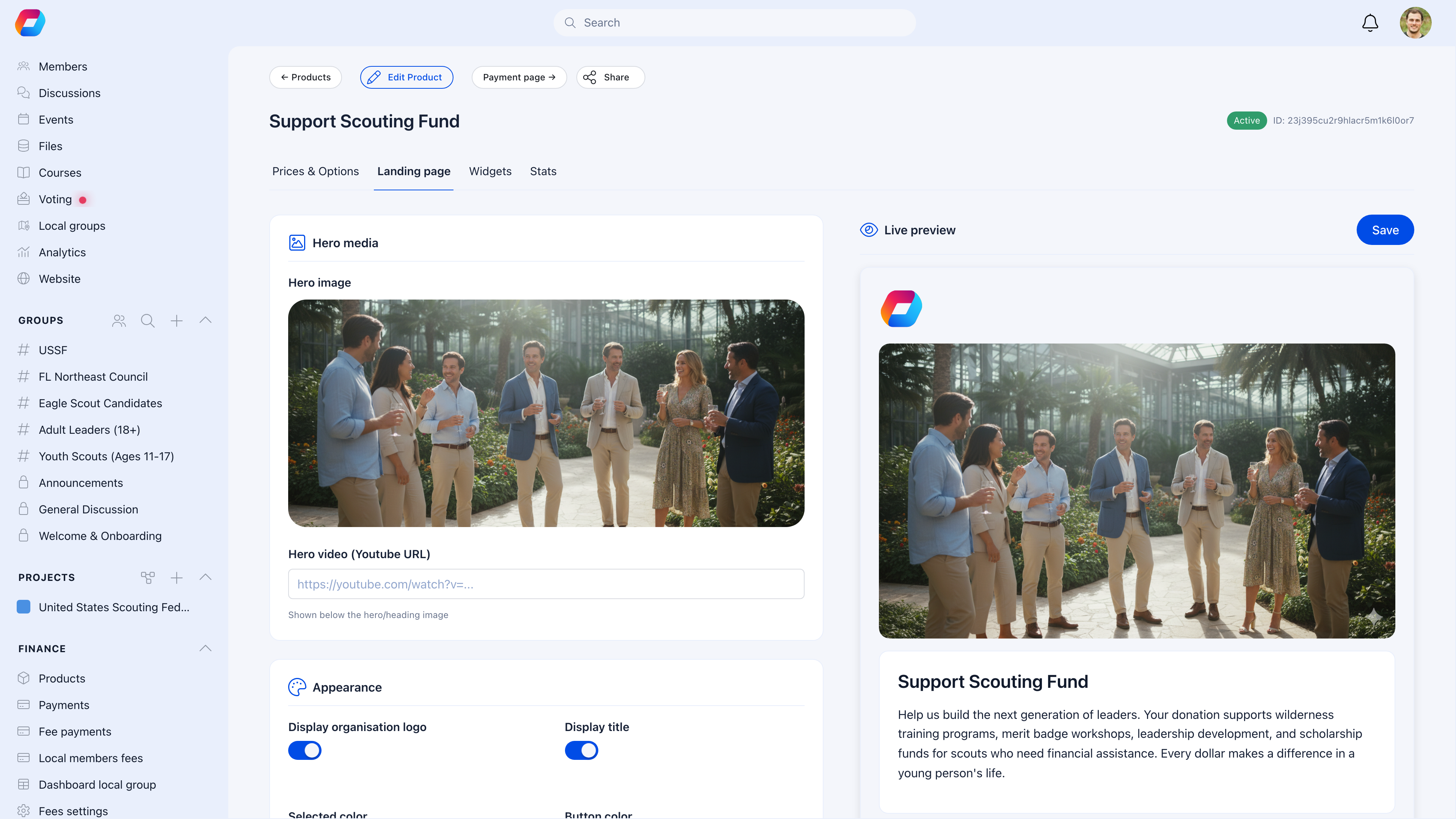 ### Hero media
| Setting | What it does |
| -------------- | ------------------------------------------------------------------------------ |
| **Hero image** | Upload a campaign photo — displayed full-width at the top of the donation page |
| **Hero video** | Paste a YouTube URL to embed a video above the donation form |
### Appearance
| Setting | What it controls |
| ----------------------------- | ---------------------------------------------------------- |
| **Display organization logo** | Show/hide your org logo at the top of the page |
| **Display title** | Show/hide the campaign name |
| **Selection color** | Accent color for selected amounts and interactive elements |
| **Button color** | Color of the donate button |
| **Light theme only** | Force light mode regardless of visitor's device settings |
### Campaign content
Write a compelling description explaining what the money funds and why it matters. The description supports rich text and appears below the hero section. You can also set a custom **thank you message** shown after a successful donation.
Use the live preview on the right to see exactly how donors will experience the page. Every change you make updates the preview in real time.
***
## The public donation page
Each campaign gets a shareable URL. Enable **External** visibility to let anyone donate — no login required.
The public page combines everything you've configured:
* **Hero image or video** at the top
* **Progress bar** showing amount raised vs. goal
* **Donation count** and total raised
* **Campaign description** with your story
* **Price tier buttons** for quick selection
* **Custom amount** input (if enabled)
* **One-time or monthly** toggle
* **Donor comments** section (if enabled)
* **Recent and top donors** (if enabled)
* **Payment form** powered by Stripe
### Donor experience
1. Donor opens the campaign link
2. Selects a preset amount or enters a custom one
3. Chooses one-time or monthly
4. Enters name, email, and optionally a message
5. Pays via Stripe (cards, Apple Pay, Google Pay, bank transfers)
6. Sees your custom thank-you message
7. Receives a confirmation email
### Confidentiality
Enable **confidentiality** to let donors give anonymously. Their name won't appear on the public donor list — it shows as "Anonymous" instead.
### Local center selection
Enable **local center option** to let donors choose which branch or chapter receives their gift. This is useful for federated organizations where donors want to support their local unit.
***
## Donor comments (words of support)
When the **comment section** is enabled, donors can leave a message with their gift. These messages create powerful social proof on your public page.
### Hero media
| Setting | What it does |
| -------------- | ------------------------------------------------------------------------------ |
| **Hero image** | Upload a campaign photo — displayed full-width at the top of the donation page |
| **Hero video** | Paste a YouTube URL to embed a video above the donation form |
### Appearance
| Setting | What it controls |
| ----------------------------- | ---------------------------------------------------------- |
| **Display organization logo** | Show/hide your org logo at the top of the page |
| **Display title** | Show/hide the campaign name |
| **Selection color** | Accent color for selected amounts and interactive elements |
| **Button color** | Color of the donate button |
| **Light theme only** | Force light mode regardless of visitor's device settings |
### Campaign content
Write a compelling description explaining what the money funds and why it matters. The description supports rich text and appears below the hero section. You can also set a custom **thank you message** shown after a successful donation.
Use the live preview on the right to see exactly how donors will experience the page. Every change you make updates the preview in real time.
***
## The public donation page
Each campaign gets a shareable URL. Enable **External** visibility to let anyone donate — no login required.
The public page combines everything you've configured:
* **Hero image or video** at the top
* **Progress bar** showing amount raised vs. goal
* **Donation count** and total raised
* **Campaign description** with your story
* **Price tier buttons** for quick selection
* **Custom amount** input (if enabled)
* **One-time or monthly** toggle
* **Donor comments** section (if enabled)
* **Recent and top donors** (if enabled)
* **Payment form** powered by Stripe
### Donor experience
1. Donor opens the campaign link
2. Selects a preset amount or enters a custom one
3. Chooses one-time or monthly
4. Enters name, email, and optionally a message
5. Pays via Stripe (cards, Apple Pay, Google Pay, bank transfers)
6. Sees your custom thank-you message
7. Receives a confirmation email
### Confidentiality
Enable **confidentiality** to let donors give anonymously. Their name won't appear on the public donor list — it shows as "Anonymous" instead.
### Local center selection
Enable **local center option** to let donors choose which branch or chapter receives their gift. This is useful for federated organizations where donors want to support their local unit.
***
## Donor comments (words of support)
When the **comment section** is enabled, donors can leave a message with their gift. These messages create powerful social proof on your public page.
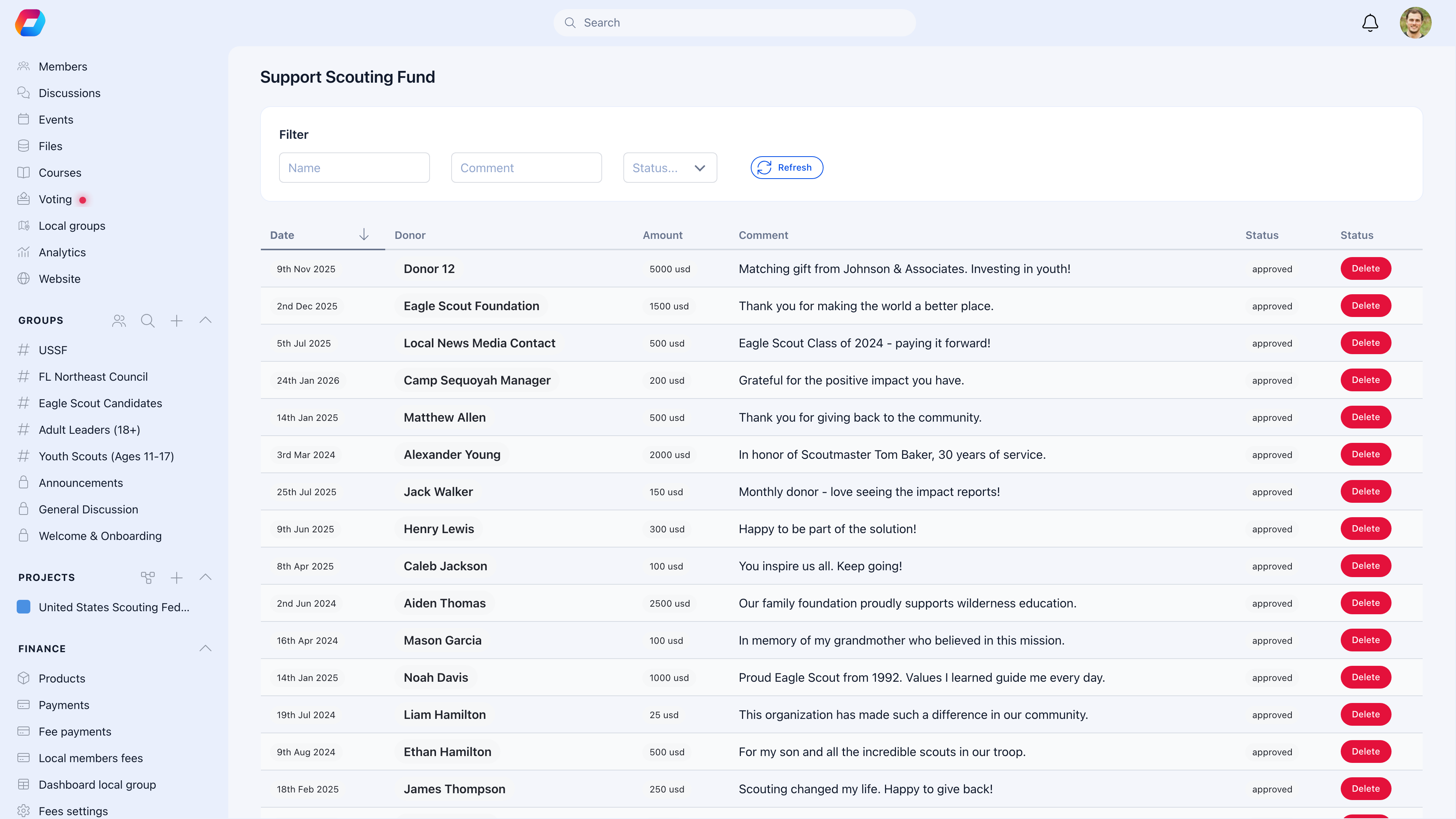 ### Moderation workflow
All donor comments go through moderation before appearing publicly:
| Status | What it means |
| ------------ | ----------------------------------- |
| **Pending** | New comment waiting for review |
| **Approved** | Visible on the public donation page |
| **Rejected** | Hidden from public view |
Filter comments by status and use the **Refresh** button to check for new ones. Approved comments appear on the public page with the donor's name (or "Anonymous") and their message.
***
## Donation widgets
Embed donation forms directly on your website or any external page. The **Widgets** tab lets you create and manage embeddable donation widgets.
### Moderation workflow
All donor comments go through moderation before appearing publicly:
| Status | What it means |
| ------------ | ----------------------------------- |
| **Pending** | New comment waiting for review |
| **Approved** | Visible on the public donation page |
| **Rejected** | Hidden from public view |
Filter comments by status and use the **Refresh** button to check for new ones. Approved comments appear on the public page with the donor's name (or "Anonymous") and their message.
***
## Donation widgets
Embed donation forms directly on your website or any external page. The **Widgets** tab lets you create and manage embeddable donation widgets.
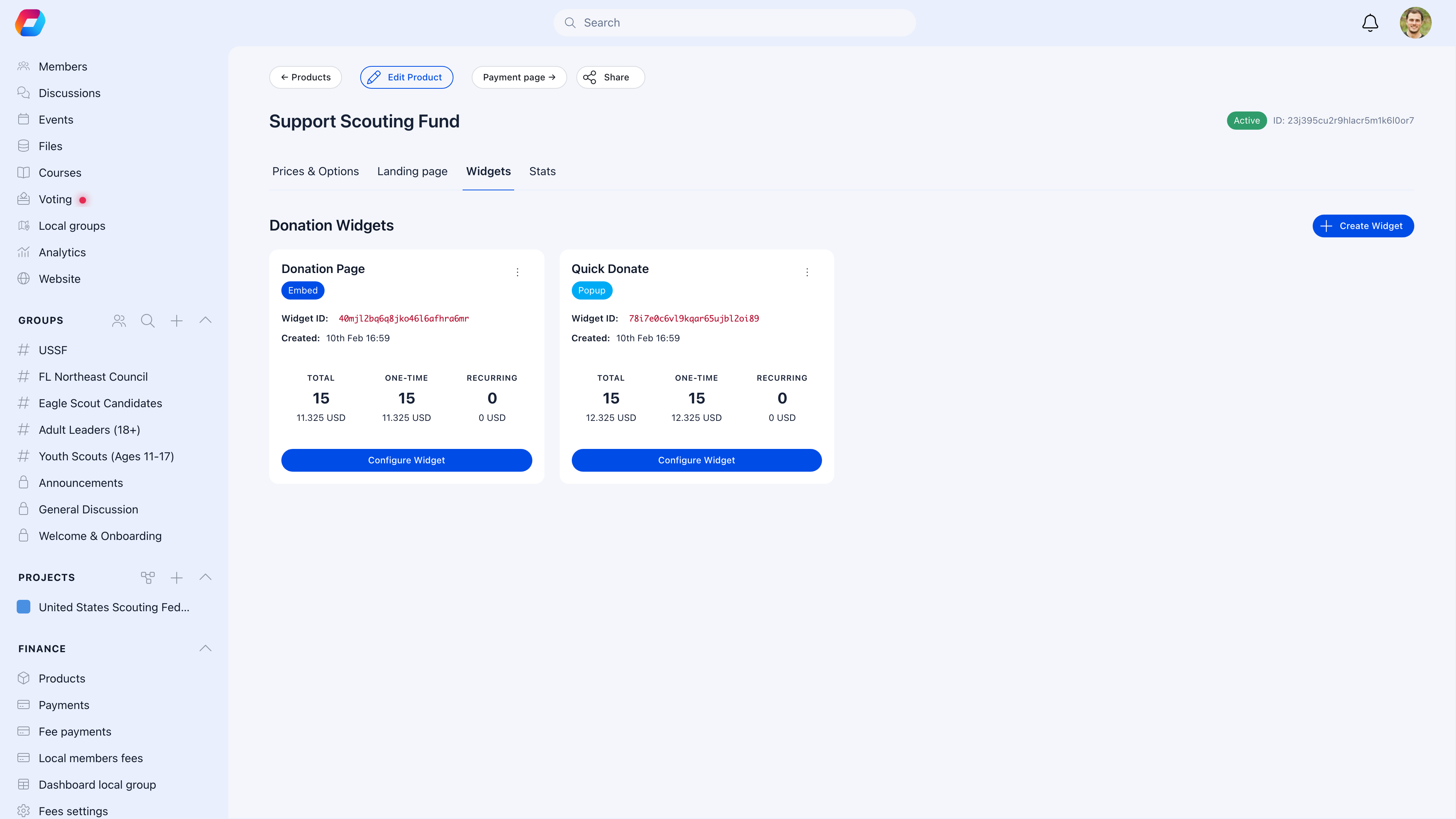 ### Widget types
A full donation form that renders inline on your page. Visitors fill out the form without leaving your website.
A floating button that opens a donation modal on click. Less intrusive — ideal for sidebars, footers, or blog posts.
### Widget configuration
Each widget has its own set of options:
| Setting | What it controls |
| -------------------------------------- | ----------------------------------------------------------------------- |
| **Preset amounts** | Quick-select amounts for one-time and monthly (e.g., $5, $10, $25, $50) |
| **Default donation type** | Pre-select "once" or "monthly" |
| **Button text & colors** | Customize the CTA button appearance |
| **Primary / background / text colors** | Full color theming |
| **Position** | For popup widgets: bottom-right, bottom-left, top-right, or top-left |
| **Language** | Widget language (English, German, French, Spanish, Italian, Romanian) |
| **Show monthly upsell** | Prompt one-time donors to consider monthly giving |
| **Require address** | Collect full address from donors |
### Widget analytics
Each widget tracks its own performance:
* **Total** donations and revenue
* **One-time** donations and revenue
* **Recurring** subscriptions and revenue
This lets you compare which widget placement drives the most donations.
### Embedding on your site
Click **Configure Widget** to get the embed code. Paste it into your website's HTML — the widget handles everything from amount selection to Stripe checkout.
***
## Goal tracking
Set a fundraising target and donors see a live progress bar on the public page.
| Setting | What it does |
| ---------------- | ---------------------------------------- |
| **Total goal** | Target for cumulative one-time donations |
| **Monthly goal** | Target for recurring monthly revenue |
| **Goal value** | The dollar amount to reach |
The progress bar shows:
* Amount raised vs. goal (e.g., "$23,650 of $35,000")
* Number of donations
* Percentage complete with visual fill
When you hit 100%, the bar fills completely — but donations don't stop. Donors can still give beyond the goal.
Set a realistic goal you can achieve. An 80%-funded campaign creates urgency ("almost there!"). A 5%-funded campaign feels discouraging. If you exceed your goal, celebrate publicly and consider a stretch goal.
***
## Payments & tracking
The **Payments** view shows every donation with full details.
### Widget types
A full donation form that renders inline on your page. Visitors fill out the form without leaving your website.
A floating button that opens a donation modal on click. Less intrusive — ideal for sidebars, footers, or blog posts.
### Widget configuration
Each widget has its own set of options:
| Setting | What it controls |
| -------------------------------------- | ----------------------------------------------------------------------- |
| **Preset amounts** | Quick-select amounts for one-time and monthly (e.g., $5, $10, $25, $50) |
| **Default donation type** | Pre-select "once" or "monthly" |
| **Button text & colors** | Customize the CTA button appearance |
| **Primary / background / text colors** | Full color theming |
| **Position** | For popup widgets: bottom-right, bottom-left, top-right, or top-left |
| **Language** | Widget language (English, German, French, Spanish, Italian, Romanian) |
| **Show monthly upsell** | Prompt one-time donors to consider monthly giving |
| **Require address** | Collect full address from donors |
### Widget analytics
Each widget tracks its own performance:
* **Total** donations and revenue
* **One-time** donations and revenue
* **Recurring** subscriptions and revenue
This lets you compare which widget placement drives the most donations.
### Embedding on your site
Click **Configure Widget** to get the embed code. Paste it into your website's HTML — the widget handles everything from amount selection to Stripe checkout.
***
## Goal tracking
Set a fundraising target and donors see a live progress bar on the public page.
| Setting | What it does |
| ---------------- | ---------------------------------------- |
| **Total goal** | Target for cumulative one-time donations |
| **Monthly goal** | Target for recurring monthly revenue |
| **Goal value** | The dollar amount to reach |
The progress bar shows:
* Amount raised vs. goal (e.g., "$23,650 of $35,000")
* Number of donations
* Percentage complete with visual fill
When you hit 100%, the bar fills completely — but donations don't stop. Donors can still give beyond the goal.
Set a realistic goal you can achieve. An 80%-funded campaign creates urgency ("almost there!"). A 5%-funded campaign feels discouraging. If you exceed your goal, celebrate publicly and consider a stretch goal.
***
## Payments & tracking
The **Payments** view shows every donation with full details.
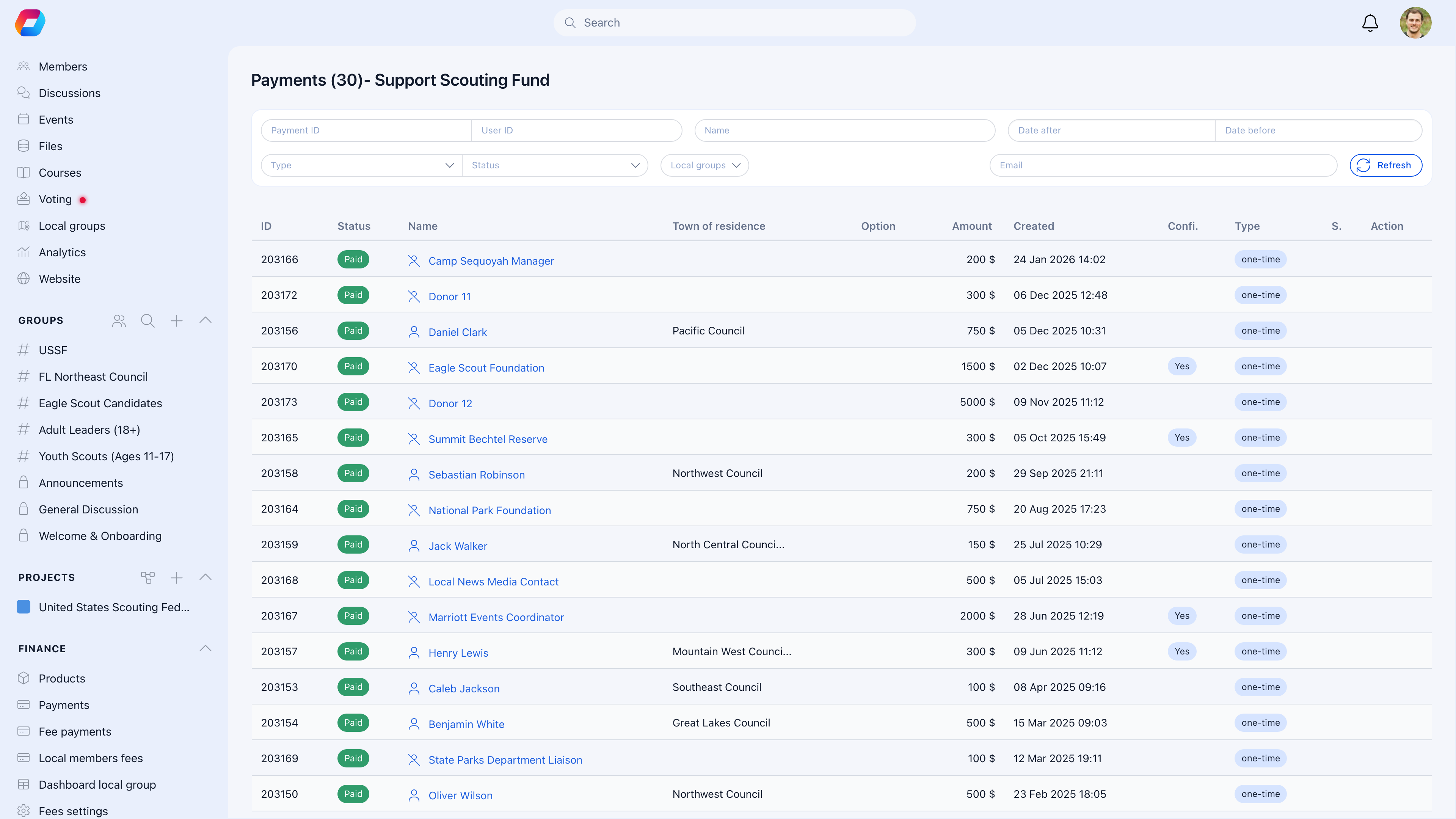 Filter by date range, amount, donor name, payment type (one-time vs. recurring), or local center.
### Stats
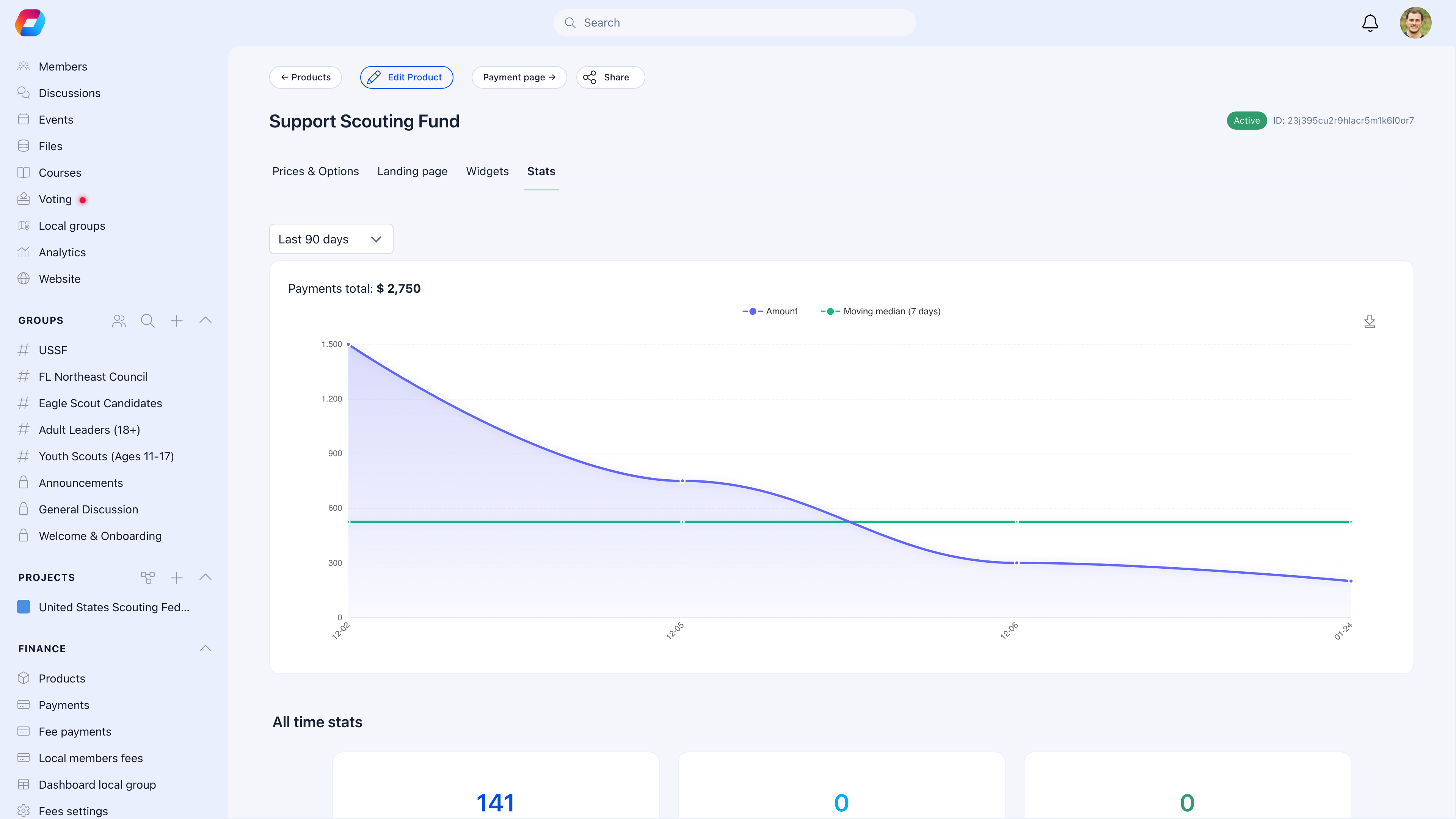
The **Stats** tab shows donation trends over time with a payments chart and all-time totals.
Filter by date range, amount, donor name, payment type (one-time vs. recurring), or local center.
### Stats
The **Stats** tab shows donation trends over time with a payments chart and all-time totals.
 ### Export
Export donation data as CSV for:
* Accounting and bookkeeping
* Tax receipt generation
* Donor acknowledgment letters
* Grant reporting
***
## Covering processing fees
Donors can optionally cover Stripe's processing fees so 100% of their intended amount goes to your organization. When enabled, the checkout shows the fee amount and lets the donor add it to their total.
Processing fee formula: **(amount x 2.9%) + fixed fee** (varies by currency).
***
## Supported currencies
Donations support 19 currencies:
USD, EUR, GBP, CAD, AUD, CHF, DKK, NOK, SEK, PLN, CZK, HUF, BGN, RON, HRK, JPY, MXN, SGD, HKD
The currency is set per product and determines the payment processing.
***
## Common scenarios
Create the donation product, set a **max date** (expiry), share the URL, and promote it. When the date passes, the page stops accepting donations. Combine with a goal to create urgency.
Enable both options but set the **default donation type** to "monthly" in your widget settings. Use lower suggested amounts for monthly ($10, $25, $50) vs. one-time ($50, $100, $250). Enable the **monthly upsell** feature to prompt one-time donors to consider recurring.
Create a donation **widget** (embed or popup type) from the Widgets tab. Copy the embed code and paste it into your site's HTML. The widget handles the entire checkout flow. Track performance per widget to see which placements work best.
Find the donation in the payments list and process a refund through Stripe. The refund returns to the donor's original payment method.
The public donation page and widgets require Stripe for online checkout. For offline donations (cash, check, wire transfer), record them manually in the payments module.
Go to the donation product's comments view. All new comments start as **Pending**. Review each one and approve or reject. Only approved comments appear on the public page. Use the filter to quickly find pending comments.
Enable **local center option** on the donation product. The public page and widgets will show a dropdown where donors select which branch receives their gift.
***
## Related
* [Products](/platform/fees/products) — Product types, pricing, and payment settings
* [Stripe Integration](/platform/fees/stripe-integration) — Connecting payment processing
* [Membership Fees](/platform/fees/fees) — For required (non-voluntary) payments
* [Local Center Fees](/platform/local-group-fees/create-local-fees) — Branch-level fee collection
### Export
Export donation data as CSV for:
* Accounting and bookkeeping
* Tax receipt generation
* Donor acknowledgment letters
* Grant reporting
***
## Covering processing fees
Donors can optionally cover Stripe's processing fees so 100% of their intended amount goes to your organization. When enabled, the checkout shows the fee amount and lets the donor add it to their total.
Processing fee formula: **(amount x 2.9%) + fixed fee** (varies by currency).
***
## Supported currencies
Donations support 19 currencies:
USD, EUR, GBP, CAD, AUD, CHF, DKK, NOK, SEK, PLN, CZK, HUF, BGN, RON, HRK, JPY, MXN, SGD, HKD
The currency is set per product and determines the payment processing.
***
## Common scenarios
Create the donation product, set a **max date** (expiry), share the URL, and promote it. When the date passes, the page stops accepting donations. Combine with a goal to create urgency.
Enable both options but set the **default donation type** to "monthly" in your widget settings. Use lower suggested amounts for monthly ($10, $25, $50) vs. one-time ($50, $100, $250). Enable the **monthly upsell** feature to prompt one-time donors to consider recurring.
Create a donation **widget** (embed or popup type) from the Widgets tab. Copy the embed code and paste it into your site's HTML. The widget handles the entire checkout flow. Track performance per widget to see which placements work best.
Find the donation in the payments list and process a refund through Stripe. The refund returns to the donor's original payment method.
The public donation page and widgets require Stripe for online checkout. For offline donations (cash, check, wire transfer), record them manually in the payments module.
Go to the donation product's comments view. All new comments start as **Pending**. Review each one and approve or reject. Only approved comments appear on the public page. Use the filter to quickly find pending comments.
Enable **local center option** on the donation product. The public page and widgets will show a dropdown where donors select which branch receives their gift.
***
## Related
* [Products](/platform/fees/products) — Product types, pricing, and payment settings
* [Stripe Integration](/platform/fees/stripe-integration) — Connecting payment processing
* [Membership Fees](/platform/fees/fees) — For required (non-voluntary) payments
* [Local Center Fees](/platform/local-group-fees/create-local-fees) — Branch-level fee collection