> ## Documentation Index
> Fetch the complete documentation index at: https://orgo.space/docs/llms.txt
> Use this file to discover all available pages before exploring further.
# Products
> Create fee products, donation campaigns, and payment pages
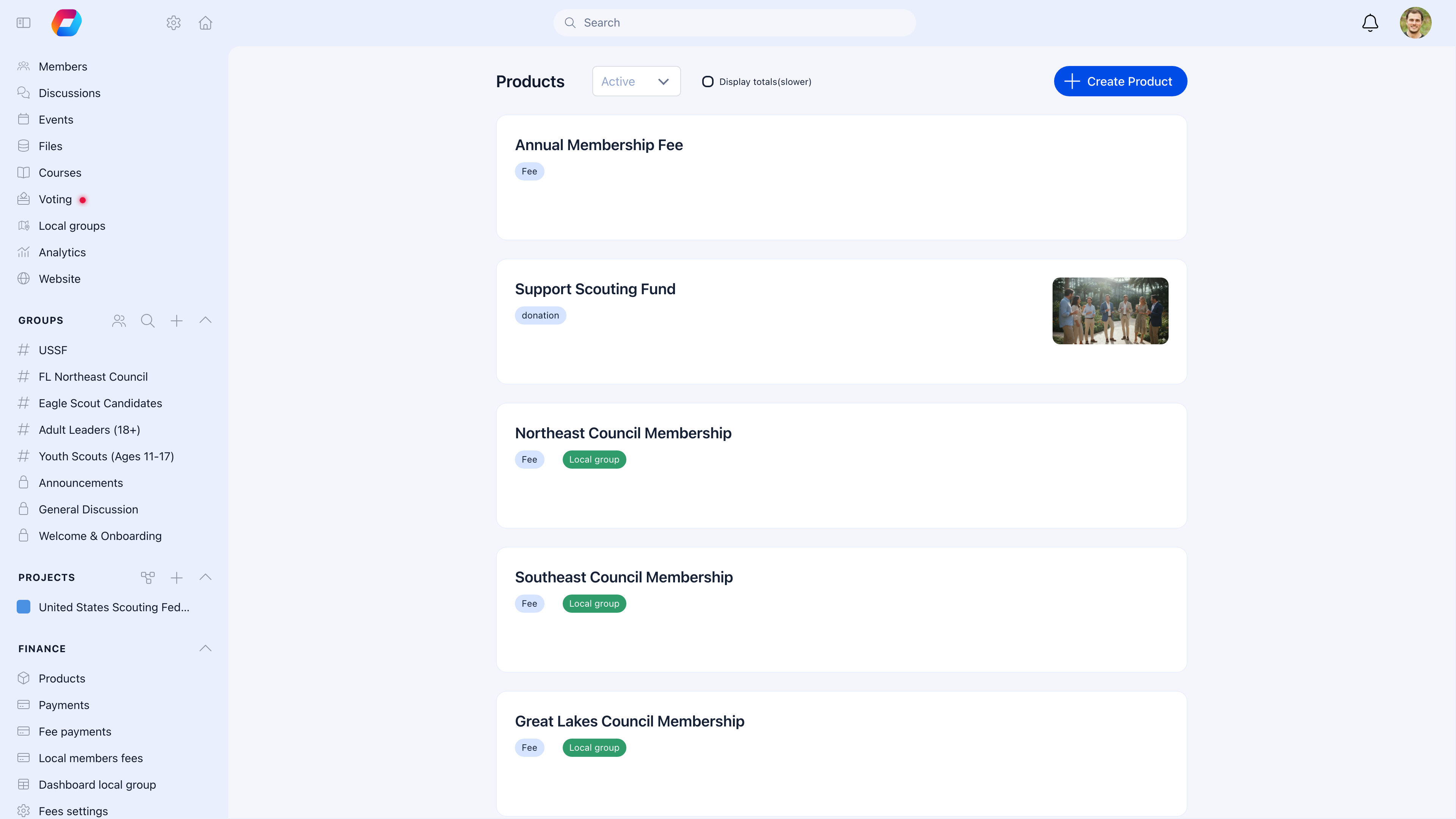
Products are the foundation of all payments in Orgo. Every payment — membership fees, donations, event tickets, merchandise — starts with creating a product. A product defines what you're selling, how much it costs, and who can buy it.
 ***
## Product types
| Type | What it's for | Example |
| ------------------ | ----------------------------------------------------------------------------- | ---------------------------------------- |
| **Fee** | Membership dues, subscriptions | "Annual Membership 2026", "Monthly Dues" |
| **Donation** | Fundraising campaigns, charitable giving | "Building Fund", "Scholarship Program" |
| **Commerce** | Physical or digital goods | "Organization T-Shirt", "Yearbook" |
| **Event** | Event tickets (usually created through the [Events](/platform/events) module) | "Conference 2026 Registration" |
| **Manual Invoice** | Custom charges, one-off invoices | "Special Assessment", "Reimbursement" |
Most organizations use **Fee** products for membership and optionally **Donation** products for fundraising. Commerce and Manual Invoice are for specific needs.
***
## Creating a product
**Settings** → **Fees** → **Products** → **Create Product**
***
## Product types
| Type | What it's for | Example |
| ------------------ | ----------------------------------------------------------------------------- | ---------------------------------------- |
| **Fee** | Membership dues, subscriptions | "Annual Membership 2026", "Monthly Dues" |
| **Donation** | Fundraising campaigns, charitable giving | "Building Fund", "Scholarship Program" |
| **Commerce** | Physical or digital goods | "Organization T-Shirt", "Yearbook" |
| **Event** | Event tickets (usually created through the [Events](/platform/events) module) | "Conference 2026 Registration" |
| **Manual Invoice** | Custom charges, one-off invoices | "Special Assessment", "Reimbursement" |
Most organizations use **Fee** products for membership and optionally **Donation** products for fundraising. Commerce and Manual Invoice are for specific needs.
***
## Creating a product
**Settings** → **Fees** → **Products** → **Create Product**
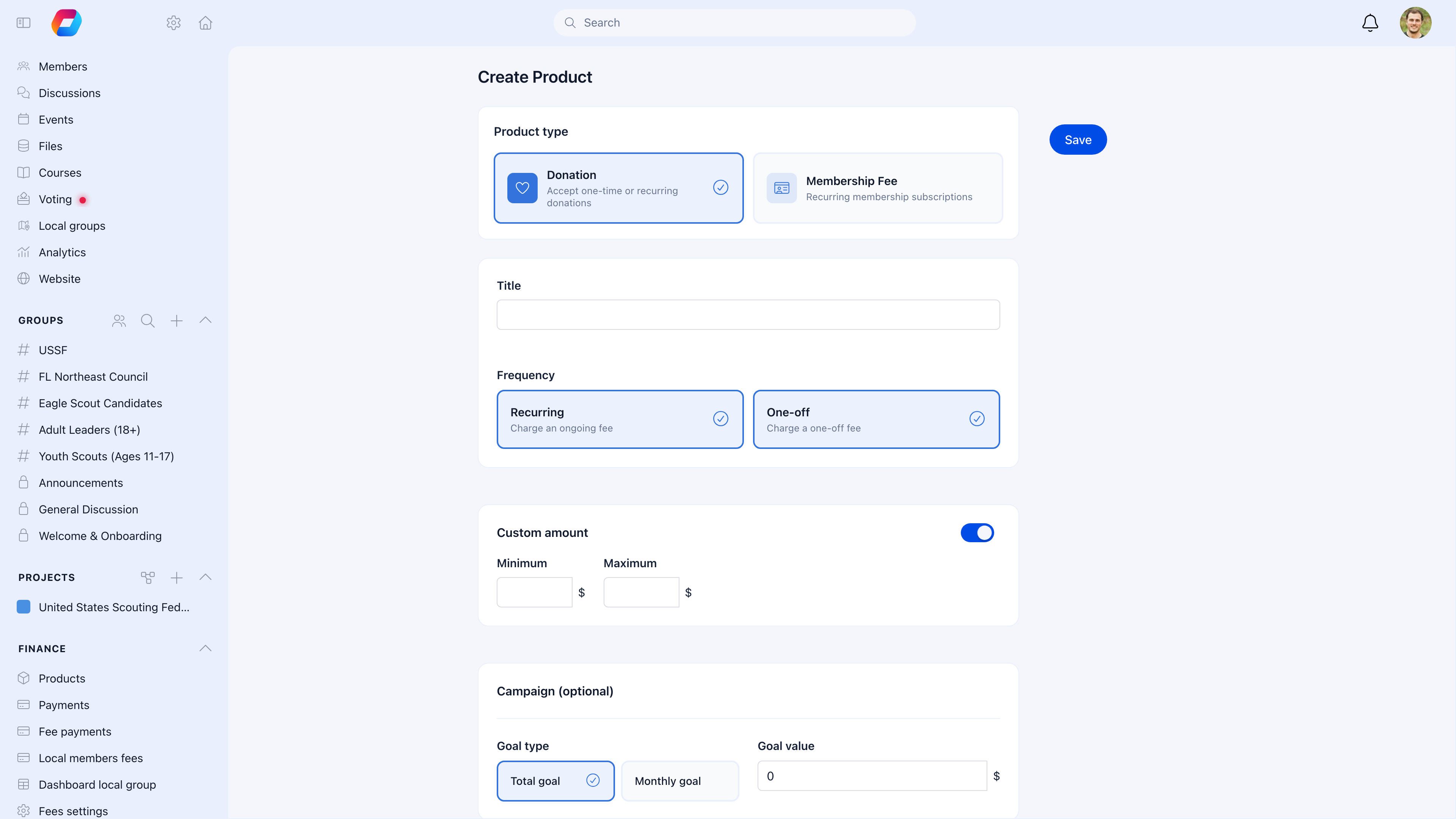 The create product form walks you through all settings:
| Field | What it does |
| ----------------- | ------------------------------------------------------------------------------------------------------------------- |
| **Product type** | **Donation** (one-time or recurring donations) or **Membership Fee** (recurring member subscriptions) |
| **Title** | Product name shown to members — "Annual Membership Fee", "Support Our Mission" |
| **Frequency** | **Recurring** (ongoing subscription charged on a cycle) or **One-off** (single charge) — or both |
| **Custom amount** | Toggle to let payers enter their own amount. Set optional min/max values. Common for donation products. |
| **Campaign** | For donations: set a **Total goal** or **Monthly goal** with a target amount. The public page shows a progress bar. |
For membership fee products, additional fields appear after saving:
| Field | What it does |
| ------------------ | ----------------------------------------------------------------------------- |
| **Billing period** | How many months per cycle — 1 (monthly), 3 (quarterly), 12 (annual) |
| **Cycle month** | Month the annual cycle starts — January (1) or September (9) for fiscal years |
| **Proration** | Charge a fair partial amount when someone joins mid-cycle |
| **Starting date** | When the fee product becomes active |
After creating the product, add **price tiers** for different membership levels and configure the **payment page** appearance.
***
## Price tiers
Each product can have multiple price tiers for different membership levels or giving amounts:
### Example: Membership fee
| Tier | Amount | Who it's for |
| -------- | ---------------- | -------------------- |
| Student | \$50/year | Members in education |
| Regular | \$100/year | Standard membership |
| Family | \$150/year | Household membership |
| Lifetime | \$1,000 one-time | Permanent membership |
### Example: Donation campaign
| Tier | Amount |
| ------------- | ---------------------- |
| Supporter | \$25 |
| Champion | \$100 |
| Patron | \$500 |
| Custom amount | Donor enters their own |
To create tiers: open the product → **Prices** tab → **Add Price** → enter tier name, amount, and currency.
### Custom amounts
For donations, enable **custom price value** to let payers enter any amount. Set optional min/max to keep it reasonable.
***
## Payment options
| Setting | What it does |
| -------------------- | ---------------------------------------------------------------------- |
| **One-time payment** | Payer pays once — no recurring billing |
| **Subscription** | Automatic recurring charges via Stripe |
| **Billing period** | How often subscriptions renew: monthly (1), quarterly (3), yearly (12) |
| **Cycle day** | Day of month when billing starts (1-28) |
| **Cycle month** | Month when annual cycle starts (1-12) |
| **Proration** | Charge a partial amount when someone joins mid-cycle |
| **Recurrences** | Number of billing cycles before subscription ends (empty = indefinite) |
Most membership organizations use a yearly subscription starting January 1. Enable proration so members who join mid-year pay a fair partial amount for the remaining months.
***
## Product visibility
| Setting | What it means |
| ---------------------- | ------------------------------------------------------------------ |
| **Internal** | Only organization members can see and purchase |
| **External** | Anyone can access via the public payment page — no login needed |
| **Display on profile** | The product appears on member profile pages for easy purchase |
| **Archived** | Hidden from everyone but data preserved — use for expired products |
### Public payment pages
External products get a shareable URL:
```
https://app.orgo.space/public/product/{slug}
```
Customize the page with your brand colors, logo, and button styling. For donation products, you can also show recent donors, top donors, and a progress bar toward your goal.
***
## Product options
Add customizable choices to products — useful for merchandise or events with preferences:
* T-shirt size (S, M, L, XL)
* Meal preference (Vegetarian, Standard)
* Workshop selection
Options are configured in the product's **Options** tab.
***
## Goal tracking (donations)
For fundraising campaigns, set a target amount:
| Setting | What it does |
| ----------------------------- | --------------------------------------------------------------- |
| **Goal value** | Target for one-time donations — progress bar on the public page |
| **Goal value (subscription)** | Target for recurring donations |
The public donation page shows a live progress bar toward your goal.
***
## Common scenarios
Create one fee product with multiple price tiers (Student, Regular, Family, etc.). When members pay, they select the tier that applies to them. You can also assign default tiers per user type.
Set the **cycle month** to 9 (September) and **cycle day** to 1. Subscriptions will renew every September 1st.
Enable **proration**. The system calculates the partial amount for March-December. From the following January, they pay the full annual amount.
**Archive** the product instead of deleting it. Archived products are hidden from members but all payment records are preserved. Never delete a product with payment history.
Each Local Center can have its own fee products linked to their own Stripe account. See [Local Center Fees](/platform/local-group-fees/create-local-fees).
***
## Related
* [Membership Fees](/platform/fees/fees) — Managing fee collection and tracking payments
* [Stripe Integration](/platform/fees/stripe-integration) — Connecting payment processing
* [Donations](/platform/fees/donations) — Running fundraising campaigns
* [Local Center Fees](/platform/local-group-fees/create-local-fees) — Branch-level fee collection
The create product form walks you through all settings:
| Field | What it does |
| ----------------- | ------------------------------------------------------------------------------------------------------------------- |
| **Product type** | **Donation** (one-time or recurring donations) or **Membership Fee** (recurring member subscriptions) |
| **Title** | Product name shown to members — "Annual Membership Fee", "Support Our Mission" |
| **Frequency** | **Recurring** (ongoing subscription charged on a cycle) or **One-off** (single charge) — or both |
| **Custom amount** | Toggle to let payers enter their own amount. Set optional min/max values. Common for donation products. |
| **Campaign** | For donations: set a **Total goal** or **Monthly goal** with a target amount. The public page shows a progress bar. |
For membership fee products, additional fields appear after saving:
| Field | What it does |
| ------------------ | ----------------------------------------------------------------------------- |
| **Billing period** | How many months per cycle — 1 (monthly), 3 (quarterly), 12 (annual) |
| **Cycle month** | Month the annual cycle starts — January (1) or September (9) for fiscal years |
| **Proration** | Charge a fair partial amount when someone joins mid-cycle |
| **Starting date** | When the fee product becomes active |
After creating the product, add **price tiers** for different membership levels and configure the **payment page** appearance.
***
## Price tiers
Each product can have multiple price tiers for different membership levels or giving amounts:
### Example: Membership fee
| Tier | Amount | Who it's for |
| -------- | ---------------- | -------------------- |
| Student | \$50/year | Members in education |
| Regular | \$100/year | Standard membership |
| Family | \$150/year | Household membership |
| Lifetime | \$1,000 one-time | Permanent membership |
### Example: Donation campaign
| Tier | Amount |
| ------------- | ---------------------- |
| Supporter | \$25 |
| Champion | \$100 |
| Patron | \$500 |
| Custom amount | Donor enters their own |
To create tiers: open the product → **Prices** tab → **Add Price** → enter tier name, amount, and currency.
### Custom amounts
For donations, enable **custom price value** to let payers enter any amount. Set optional min/max to keep it reasonable.
***
## Payment options
| Setting | What it does |
| -------------------- | ---------------------------------------------------------------------- |
| **One-time payment** | Payer pays once — no recurring billing |
| **Subscription** | Automatic recurring charges via Stripe |
| **Billing period** | How often subscriptions renew: monthly (1), quarterly (3), yearly (12) |
| **Cycle day** | Day of month when billing starts (1-28) |
| **Cycle month** | Month when annual cycle starts (1-12) |
| **Proration** | Charge a partial amount when someone joins mid-cycle |
| **Recurrences** | Number of billing cycles before subscription ends (empty = indefinite) |
Most membership organizations use a yearly subscription starting January 1. Enable proration so members who join mid-year pay a fair partial amount for the remaining months.
***
## Product visibility
| Setting | What it means |
| ---------------------- | ------------------------------------------------------------------ |
| **Internal** | Only organization members can see and purchase |
| **External** | Anyone can access via the public payment page — no login needed |
| **Display on profile** | The product appears on member profile pages for easy purchase |
| **Archived** | Hidden from everyone but data preserved — use for expired products |
### Public payment pages
External products get a shareable URL:
```
https://app.orgo.space/public/product/{slug}
```
Customize the page with your brand colors, logo, and button styling. For donation products, you can also show recent donors, top donors, and a progress bar toward your goal.
***
## Product options
Add customizable choices to products — useful for merchandise or events with preferences:
* T-shirt size (S, M, L, XL)
* Meal preference (Vegetarian, Standard)
* Workshop selection
Options are configured in the product's **Options** tab.
***
## Goal tracking (donations)
For fundraising campaigns, set a target amount:
| Setting | What it does |
| ----------------------------- | --------------------------------------------------------------- |
| **Goal value** | Target for one-time donations — progress bar on the public page |
| **Goal value (subscription)** | Target for recurring donations |
The public donation page shows a live progress bar toward your goal.
***
## Common scenarios
Create one fee product with multiple price tiers (Student, Regular, Family, etc.). When members pay, they select the tier that applies to them. You can also assign default tiers per user type.
Set the **cycle month** to 9 (September) and **cycle day** to 1. Subscriptions will renew every September 1st.
Enable **proration**. The system calculates the partial amount for March-December. From the following January, they pay the full annual amount.
**Archive** the product instead of deleting it. Archived products are hidden from members but all payment records are preserved. Never delete a product with payment history.
Each Local Center can have its own fee products linked to their own Stripe account. See [Local Center Fees](/platform/local-group-fees/create-local-fees).
***
## Related
* [Membership Fees](/platform/fees/fees) — Managing fee collection and tracking payments
* [Stripe Integration](/platform/fees/stripe-integration) — Connecting payment processing
* [Donations](/platform/fees/donations) — Running fundraising campaigns
* [Local Center Fees](/platform/local-group-fees/create-local-fees) — Branch-level fee collection