> ## Documentation Index
> Fetch the complete documentation index at: https://orgo.space/docs/llms.txt
> Use this file to discover all available pages before exploring further.
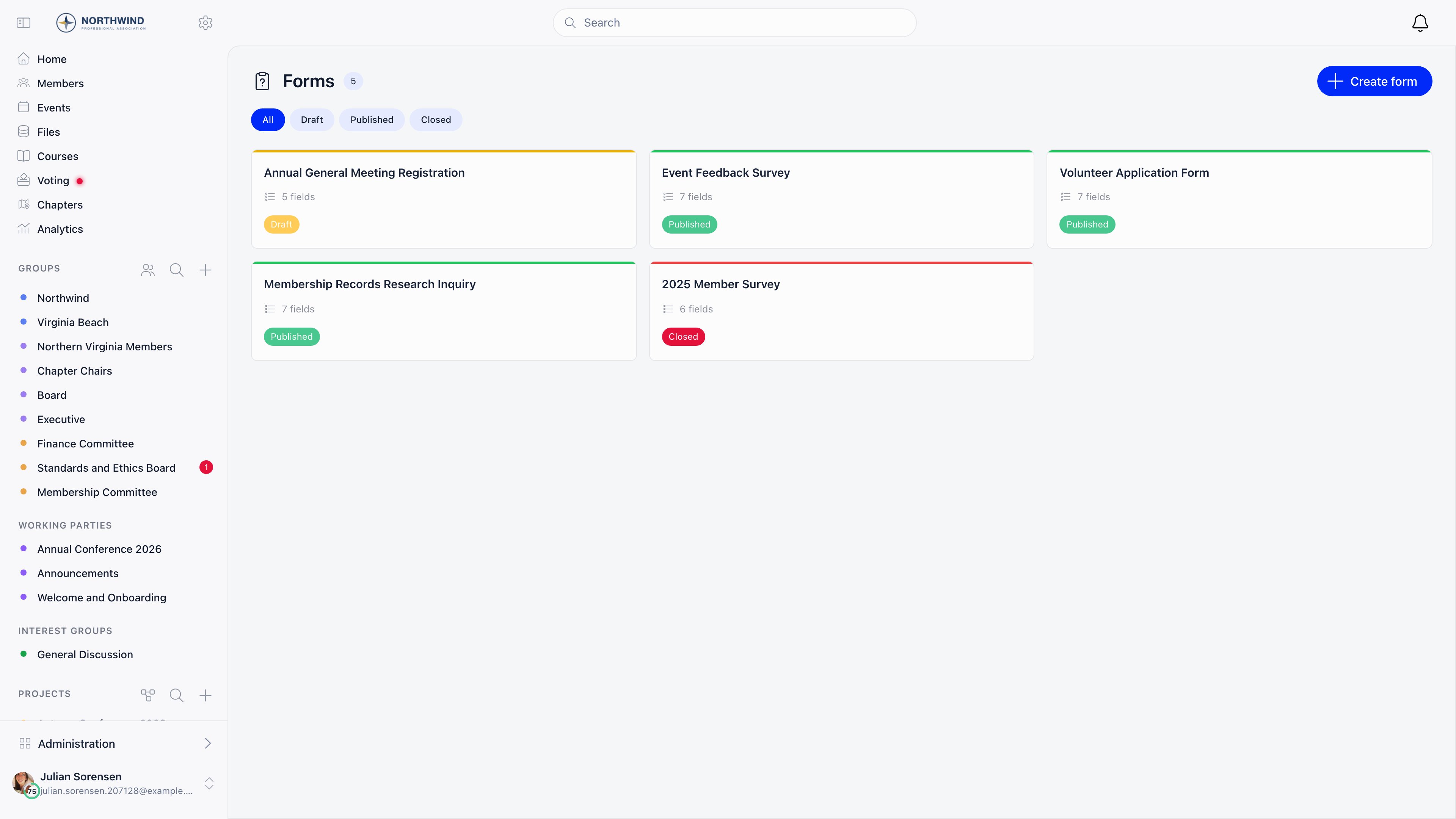
# Forms
> Build standalone forms and surveys, share them with a public link, and read the responses as charts, single answers, or a table
Forms is Orgo's standalone form builder. You write the questions, publish the
form, share one link, and read the answers back inside Orgo. Anyone who answers
with an email address that Orgo does not already know becomes a contact, so a
survey doubles as a way to grow your contact list.
**Built for** the one-off questionnaire that is not part of joining your
organisation: a satisfaction survey, an interest poll, a call for volunteers, a
sign-up sheet for an activity.
**Replaces** Google Forms or Typeform for members and the public. It has no
conditional logic, no file-upload questions, and no payment collection.
 ***
## Turning it on and who can use it
Enable the module at **Settings** → **Modules** → **Form Builder** →
**Enable Form Builder Module**, which requires `ADMIN_TENANT`.
Opening the Forms area requires `ADMIN_TENANT` or `HR_TENANT`. Creating a form
requires `HR_TENANT`, `EVENT_TENANT` or `COMMUNICATION_TENANT`; editing or
deleting one requires one of those three, or that you own it. `ADMIN_TENANT`
covers everything on this page.
A form you create belongs to you: its statistics, responses, and publish action
are open to you as its owner, and to anyone holding `ADMIN_TENANT`,
`COMMUNICATION_TENANT`, or `EVENT_TENANT`.
The **Forms** entry in the **Management** section of the sidebar is currently
shown to holders of `COMMUNICATION_TENANT` or `EVENT_TENANT`, but the page
itself only admits `ADMIN_TENANT` or `HR_TENANT`. If the link is visible and
clicking it sends you to the login screen, that is this mismatch, not a broken
session. Ask for `HR_TENANT`, or reorder the menu to hide the entry until it is
resolved.
***
## Building a form
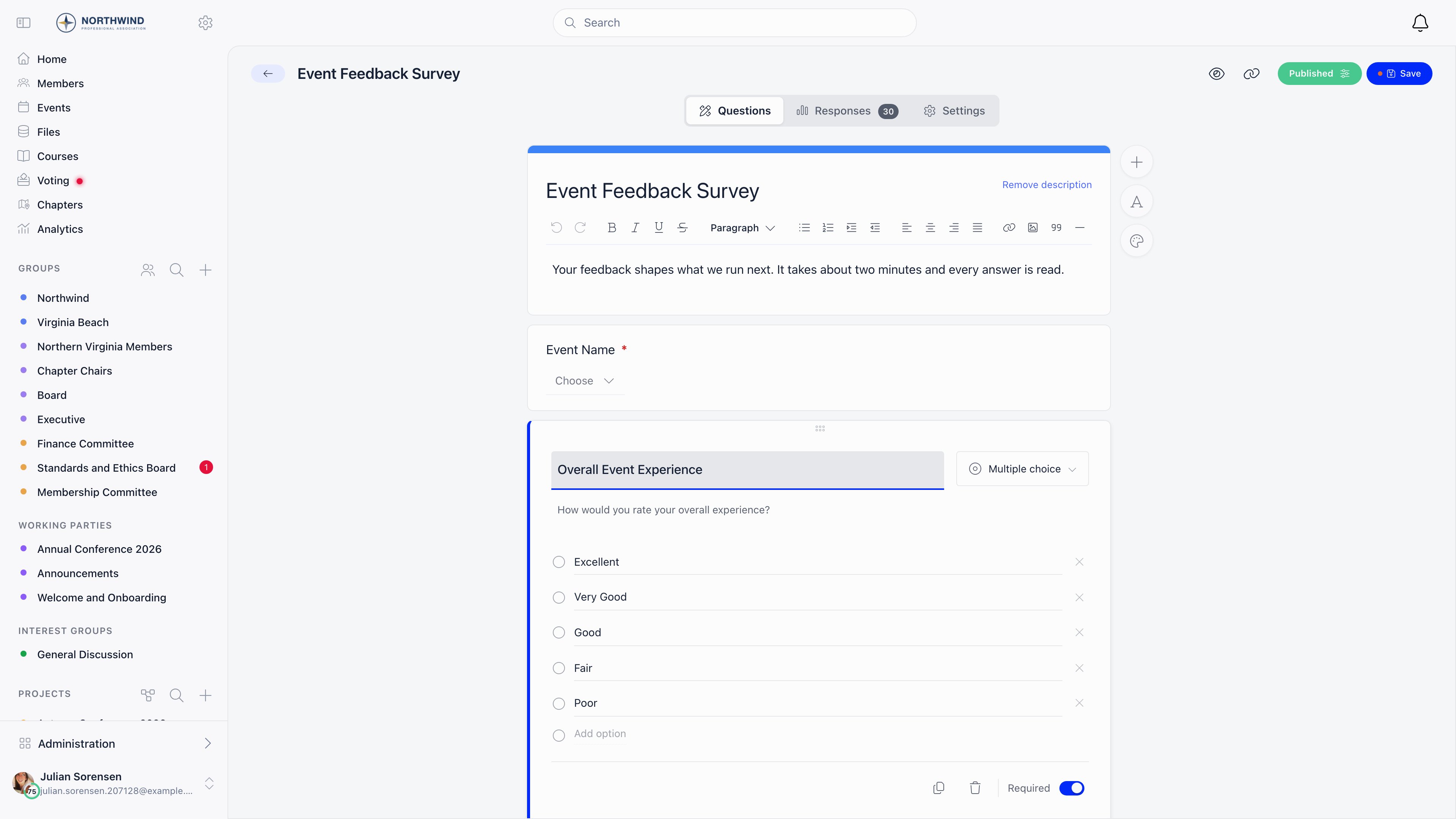
**Create form** makes a draft called "Untitled form" immediately and opens the
builder; rename it in the top bar. On the **Questions** tab, the header card
holds the title respondents see and an optional rich-text description. Add
questions with the **+** button on the right, each with a title, an optional
description shown under it, a type, and a **Required** toggle. **Add text**
inserts a rich-text block that displays instructions between questions and
collects no answer. Drag a question by the handle at the top of its card to
reorder. **Save** keeps the form as a draft; **Publish** saves everything and
opens the form to responses.
Deleting a question inside the builder marks it "Will be deleted" and offers a
**Restore** button until you press Save. To copy a question, use the duplicate
action in the question editor: questions belong to one form, cannot be reused on
another, and never appear on the
[Custom Fields](/docs/platform/users/custom-fields) settings page.
### Question types
| Type | Answer |
| ------------------- | ------------------------------ |
| **Short answer** | One line of text |
| **Paragraph** | Multi-line text |
| **Multiple choice** | One option, all shown at once |
| **Checkboxes** | Any number of options |
| **Dropdown** | One option, picked from a list |
| **Number** | A number |
| **True / False** | A switch |
| **Date** | A calendar date |
There is no file-upload question and no conditional or branching logic. Every
respondent sees every question in the order you set. For a file, collect it
through a [custom field](/docs/platform/users/custom-fields) on the profile or
registration form, or ask for a link to it in a short-answer question.
***
## Turning it on and who can use it
Enable the module at **Settings** → **Modules** → **Form Builder** →
**Enable Form Builder Module**, which requires `ADMIN_TENANT`.
Opening the Forms area requires `ADMIN_TENANT` or `HR_TENANT`. Creating a form
requires `HR_TENANT`, `EVENT_TENANT` or `COMMUNICATION_TENANT`; editing or
deleting one requires one of those three, or that you own it. `ADMIN_TENANT`
covers everything on this page.
A form you create belongs to you: its statistics, responses, and publish action
are open to you as its owner, and to anyone holding `ADMIN_TENANT`,
`COMMUNICATION_TENANT`, or `EVENT_TENANT`.
The **Forms** entry in the **Management** section of the sidebar is currently
shown to holders of `COMMUNICATION_TENANT` or `EVENT_TENANT`, but the page
itself only admits `ADMIN_TENANT` or `HR_TENANT`. If the link is visible and
clicking it sends you to the login screen, that is this mismatch, not a broken
session. Ask for `HR_TENANT`, or reorder the menu to hide the entry until it is
resolved.
***
## Building a form
**Create form** makes a draft called "Untitled form" immediately and opens the
builder; rename it in the top bar. On the **Questions** tab, the header card
holds the title respondents see and an optional rich-text description. Add
questions with the **+** button on the right, each with a title, an optional
description shown under it, a type, and a **Required** toggle. **Add text**
inserts a rich-text block that displays instructions between questions and
collects no answer. Drag a question by the handle at the top of its card to
reorder. **Save** keeps the form as a draft; **Publish** saves everything and
opens the form to responses.
Deleting a question inside the builder marks it "Will be deleted" and offers a
**Restore** button until you press Save. To copy a question, use the duplicate
action in the question editor: questions belong to one form, cannot be reused on
another, and never appear on the
[Custom Fields](/docs/platform/users/custom-fields) settings page.
### Question types
| Type | Answer |
| ------------------- | ------------------------------ |
| **Short answer** | One line of text |
| **Paragraph** | Multi-line text |
| **Multiple choice** | One option, all shown at once |
| **Checkboxes** | Any number of options |
| **Dropdown** | One option, picked from a list |
| **Number** | A number |
| **True / False** | A switch |
| **Date** | A calendar date |
There is no file-upload question and no conditional or branching logic. Every
respondent sees every question in the order you set. For a file, collect it
through a [custom field](/docs/platform/users/custom-fields) on the profile or
registration form, or ask for a link to it in a short-answer question.
 ***
## Settings
The **Settings** tab holds who may answer and when.
| Setting | What it does |
| -------------------------------------- | ------------------------------------------------------------------------------------------------------------------------------------------------------------------------------------------ |
| **Only registered users** | Only an email that matches an existing member account is accepted. Anyone else is refused. |
| **Anyone with email verification** | An email is required. A known member or contact is accepted straight away; an unknown address creates a new contact and the response stays pending until the confirmation link is clicked. |
| **Anyone (Anonymous)** | No email asked. Responses are stored with no submitter and the submitter columns disappear from the responses table. |
| **Limit to one submission per device** | A second attempt from the same device shows the thank-you page instead of the form. |
| **Schedule auto-close** | A date and time after which the form reports itself closed and stops showing the questions. |
| **Thank You Custom Message** | Rich-text page shown after a successful submission, in place of the default "Thank you!" screen. |
The device check behind **Limit to one submission per device** is a hash of the
respondent's IP address and browser user agent. It deters casual repeat entries
but is not an identity check: a different network or browser gets a fresh
attempt.
Display options live behind the palette button on the **Questions** tab: a
header image, whether to show the title and description, whether to show your
organisation's logo, and the colour of the submit button.
***
## Publishing and sharing
Publishing generates a seven-character short code and builds a shareable page
with social-media preview tags. The link button in the top bar copies the
responder link, `https:///share/form/
***
## Settings
The **Settings** tab holds who may answer and when.
| Setting | What it does |
| -------------------------------------- | ------------------------------------------------------------------------------------------------------------------------------------------------------------------------------------------ |
| **Only registered users** | Only an email that matches an existing member account is accepted. Anyone else is refused. |
| **Anyone with email verification** | An email is required. A known member or contact is accepted straight away; an unknown address creates a new contact and the response stays pending until the confirmation link is clicked. |
| **Anyone (Anonymous)** | No email asked. Responses are stored with no submitter and the submitter columns disappear from the responses table. |
| **Limit to one submission per device** | A second attempt from the same device shows the thank-you page instead of the form. |
| **Schedule auto-close** | A date and time after which the form reports itself closed and stops showing the questions. |
| **Thank You Custom Message** | Rich-text page shown after a successful submission, in place of the default "Thank you!" screen. |
The device check behind **Limit to one submission per device** is a hash of the
respondent's IP address and browser user agent. It deters casual repeat entries
but is not an identity check: a different network or browser gets a fresh
attempt.
Display options live behind the palette button on the **Questions** tab: a
header image, whether to show the title and description, whether to show your
organisation's logo, and the colour of the submit button.
***
## Publishing and sharing
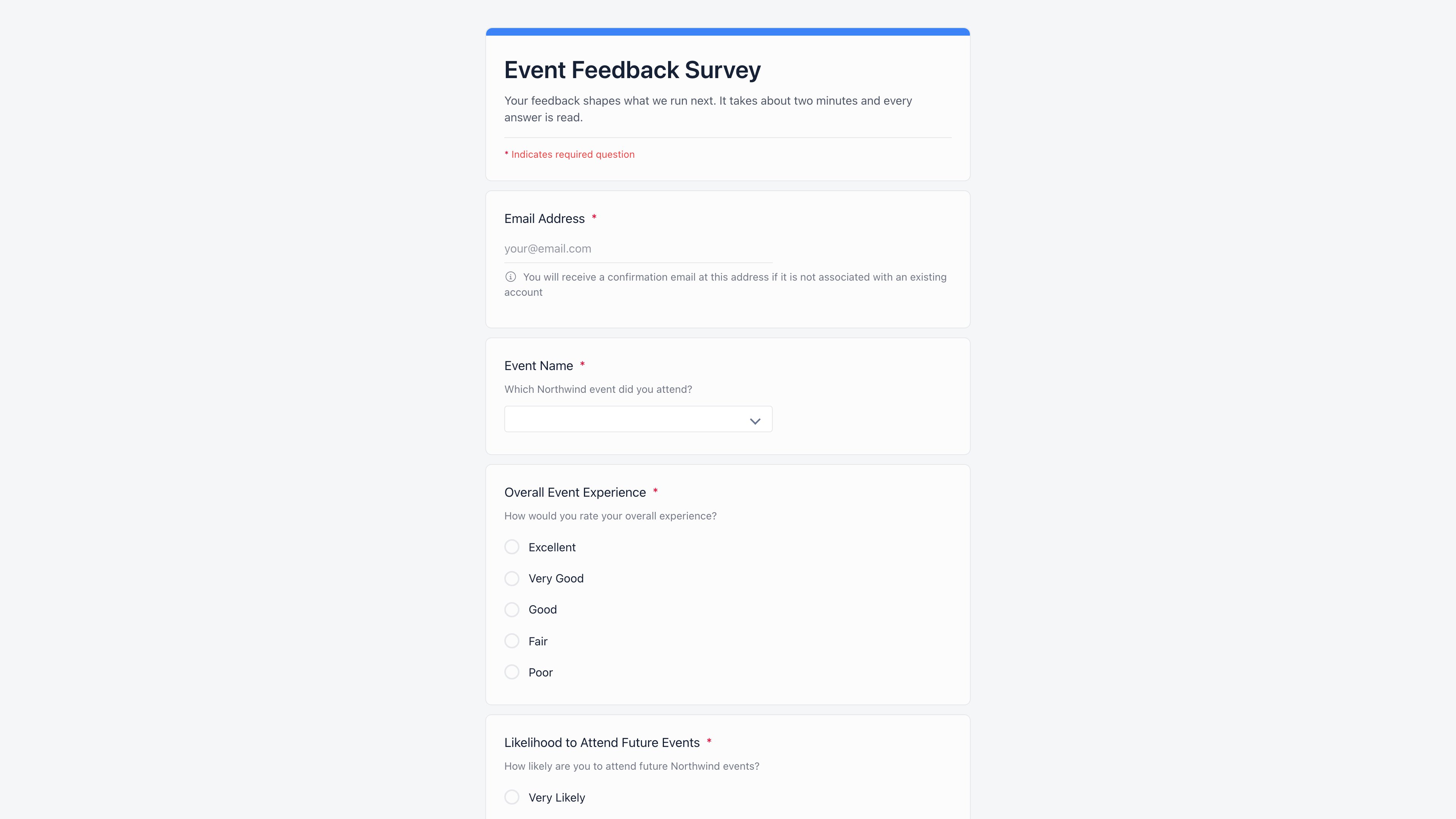
Publishing generates a seven-character short code and builds a shareable page
with social-media preview tags. The link button in the top bar copies the
responder link, `https:///share/form/`. Respondents do not
need an Orgo account to open it unless the form is set to **Only registered
users**, and a signed-in member gets their email filled in automatically and
skips the verification step.
 To stop responses without losing the link, open **Published options** in the top
bar and turn on **Not accepting responses**, or set a date under **Schedule
auto-close**. Either shows a "Form Closed" panel in place of the questions, and
turning the switch off reopens the form. Deleting a form from the list does not
free the link either: it hides the form everywhere but keeps the record and its
responses.
***
## Reading the responses
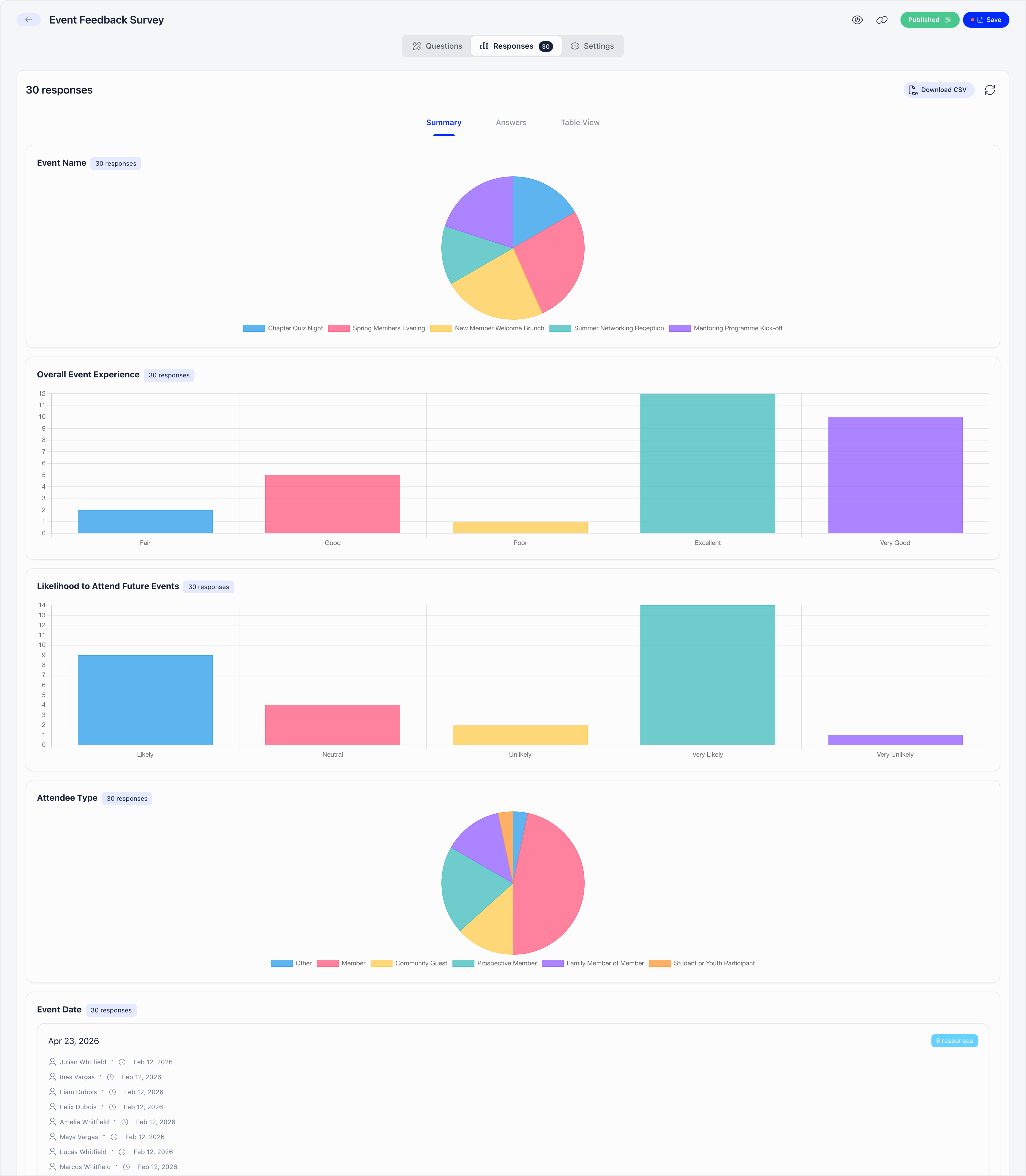
The **Responses** tab counts confirmed responses, and flags separately how many
are still pending an email confirmation. It offers three views.
* **Summary** draws a chart per choice question and lists the text answers
grouped by identical value, each with who submitted it and when.
* **Answers** walks through responses one at a time, in the same layout the
respondent saw. Covers the 100 most recent confirmed responses.
* **Table View** is one row per response, one column per question, paginated 100
rows at a time.
**Download CSV** exports up to 10,000 responses with the same columns as the
table. On an anonymous form the submitter and email columns are absent from both
the table and the export.
Response counts are cached and refresh themselves as answers arrive. If the
numbers look stale, the refresh button next to **Download CSV** forces a full
recalculation. Closing a form freezes its statistics. You can delete a single
response from the **Answers** view, permanently.
To stop responses without losing the link, open **Published options** in the top
bar and turn on **Not accepting responses**, or set a date under **Schedule
auto-close**. Either shows a "Form Closed" panel in place of the questions, and
turning the switch off reopens the form. Deleting a form from the list does not
free the link either: it hides the form everywhere but keeps the record and its
responses.
***
## Reading the responses
The **Responses** tab counts confirmed responses, and flags separately how many
are still pending an email confirmation. It offers three views.
* **Summary** draws a chart per choice question and lists the text answers
grouped by identical value, each with who submitted it and when.
* **Answers** walks through responses one at a time, in the same layout the
respondent saw. Covers the 100 most recent confirmed responses.
* **Table View** is one row per response, one column per question, paginated 100
rows at a time.
**Download CSV** exports up to 10,000 responses with the same columns as the
table. On an anonymous form the submitter and email columns are absent from both
the table and the export.
Response counts are cached and refresh themselves as answers arrive. If the
numbers look stale, the refresh button next to **Download CSV** forces a full
recalculation. Closing a form freezes its statistics. You can delete a single
response from the **Answers** view, permanently.
 ***
## What a response creates
On a form set to **Anyone with email verification**, an email that matches a
member is linked to that member, an email that matches an existing contact is
linked to that contact, and an unknown email creates a new
[contact](/docs/platform/contacts) with the first and last name given on the form,
marked as coming from a form.
Unless the respondent is signed in as the owner of that email, the response is
held as pending and a confirmation email goes out. Clicking the link inside
confirms the response, confirms the contact's email address, and lands the
respondent on the thank-you page. **The link is valid for 24 hours**; after that
the form has to be submitted again. Pending responses are counted separately and
are excluded from the charts, the table, and the export until they are confirmed,
which is the usual reason a response someone swears they sent is not visible.
***
## Standalone forms versus the other builders
| Use | Builder | Why |
| ------------------------------------------- | -------------------------------------------------------------- | ------------------------------------------------------------- |
| A survey, poll, or one-off questionnaire | **Forms** (this page) | Public link, no account needed, answers stored as responses |
| Collecting data when somebody joins | [Registration form](/docs/platform/users/registration-form) | Writes to the member's profile and creates the account |
| Different questions per kind of member | [Per-user-type registration forms](/docs/platform/users/user-types) | One field set per user type |
| Data every member keeps up to date | [Profile form](/docs/platform/users/profile-fields) | Fields live on the profile and can be required or filtered on |
| A membership application to review and sign | [Adhesion](/docs/platform/users/adhesion) | Has an approval workflow and a generated document |
| Extra questions asked when booking a place | [Event registration form](/docs/platform/events/registration-forms) | Answers attach to the event attendance |
If the answer belongs on a person's profile forever, use one of the
profile-based builders. If it belongs to one question you asked once, use Forms.
***
## Troubleshooting
The Responses tab, the statistics, the recalculate button and the **Publish**
action all check the same thing: that you created the form, or that you hold
`ADMIN_TENANT`, `COMMUNICATION_TENANT`, or `EVENT_TENANT`. `HR_TENANT` is not
on that list, and it does not imply any of the three.
Worked example: two colleagues both hold `HR_TENANT`. Both reach `/forms`,
both create and publish their own forms, and neither can open the other's
Responses tab, because for each of them the other's form fails every branch
of the check. The requests are refused rather than returning an empty table.
Fixes, in order of preference: give the people who read results
`COMMUNICATION_TENANT` or `EVENT_TENANT`, keep one shared account as the
owner of forms the whole team reads, or ask the owner to send the CSV.
Note the asymmetry: `HR_TENANT` can edit and delete a colleague's form, but
not read its answers. Reading results is deliberately the narrower right.
Not from the app. Deleting sets the form's status to `DELETED`, and every
signed-in read of forms filters that status out: the form disappears from the
list, and so do its Responses tab, its statistics and its CSV export. The
public link stops working too, because the public page only serves forms that
are published or closed.
Nothing is destroyed. The submissions, the answers and the contacts created
from them all stay in the database. But there is no undelete button, so
**Download CSV** before you delete anything you might want to read again. To
take a form out of circulation without losing access to the answers, use
**Not accepting responses** instead of Delete.
They work differently and only one of them is a hard stop.
**Not accepting responses** changes the stored status of the form to closed.
The submit endpoint accepts nothing but a published form, so responses stop
at the source, and closing the form also computes its final statistics.
**Schedule auto-close** is evaluated when the form is read. Once the date has
passed, the form reports itself as closed and the public page shows the
"Form Closed" panel in place of the questions, but the stored status is still
published.
For an audited cut-off (a vote, a deadline with money attached) set the
switch when the deadline arrives rather than relying on the date alone. One
detail worth knowing: turning **Not accepting responses** on clears the
scheduled date, so reopening the form later does not silently re-arm an old
schedule. Reopening also queues a fresh recalculation of the statistics.
That is **Limit to one submission per device**. The device is a hash of the
respondent's IP address and browser user agent, so it is really "one answer
per network plus browser build", not one answer per person.
Worked example: five colleagues answer from the same office router. The first
two use different browsers and both get through. The next three are all on
the same version of the same browser, so they produce the same hash as one of
the first two and see the thank-you page without their answers being saved.
The same person on a phone that switches from office wifi to mobile data
counts as a new device and can answer again.
Two more details. Only confirmed responses block a device, so on a form set
to **Anyone with email verification** a first respondent who never clicks the
confirmation link leaves the device open. And nothing deduplicates by email
or by member account: the device hash is the only repeat guard there is, on
every submission mode.
They read different sources. **Table View** counts confirmed submission rows
live. **Summary** reads a stored statistics record that Orgo maintains in the
background as answers arrive.
When the background update falls behind, Orgo forces a full recalculation
only once 50 or more responses have landed since the last one. Below that it
serves what it has, which is why a form collecting a handful of answers a day
can show a Summary that trails the table by a few responses for a while. The
refresh button next to **Download CSV** forces the recalculation immediately.
On a closed form the stored record is final by design: the refresh button
will not move it, and that is what "closing a form freezes its statistics"
means in practice.
The export stops at 10,000 rows and takes the newest ones, ordered by
submission date, with no warning in the file or on screen.
Worked example: a form with 12,300 confirmed responses exports a CSV with the
most recent 10,000 in it. The 2,300 oldest are simply absent, and the row
count in the file is the only clue.
Below 10,000 the export is complete. Above it, read the older responses in
**Table View**, which pages through everything 100 rows at a time, or split
long-running collection across more than one form.
***
## Related
* [Contacts](/docs/platform/contacts) for the records created by public responses
* [Custom Fields](/docs/platform/users/custom-fields) for fields that live on member profiles
* [Registration Form](/docs/platform/users/registration-form) for collecting data at sign-up
* [Event Registration Forms](/docs/platform/events/registration-forms) for questions asked at booking
* [Permissions](/docs/platform/permissions) for the permission names used above
***
## What a response creates
On a form set to **Anyone with email verification**, an email that matches a
member is linked to that member, an email that matches an existing contact is
linked to that contact, and an unknown email creates a new
[contact](/docs/platform/contacts) with the first and last name given on the form,
marked as coming from a form.
Unless the respondent is signed in as the owner of that email, the response is
held as pending and a confirmation email goes out. Clicking the link inside
confirms the response, confirms the contact's email address, and lands the
respondent on the thank-you page. **The link is valid for 24 hours**; after that
the form has to be submitted again. Pending responses are counted separately and
are excluded from the charts, the table, and the export until they are confirmed,
which is the usual reason a response someone swears they sent is not visible.
***
## Standalone forms versus the other builders
| Use | Builder | Why |
| ------------------------------------------- | -------------------------------------------------------------- | ------------------------------------------------------------- |
| A survey, poll, or one-off questionnaire | **Forms** (this page) | Public link, no account needed, answers stored as responses |
| Collecting data when somebody joins | [Registration form](/docs/platform/users/registration-form) | Writes to the member's profile and creates the account |
| Different questions per kind of member | [Per-user-type registration forms](/docs/platform/users/user-types) | One field set per user type |
| Data every member keeps up to date | [Profile form](/docs/platform/users/profile-fields) | Fields live on the profile and can be required or filtered on |
| A membership application to review and sign | [Adhesion](/docs/platform/users/adhesion) | Has an approval workflow and a generated document |
| Extra questions asked when booking a place | [Event registration form](/docs/platform/events/registration-forms) | Answers attach to the event attendance |
If the answer belongs on a person's profile forever, use one of the
profile-based builders. If it belongs to one question you asked once, use Forms.
***
## Troubleshooting
The Responses tab, the statistics, the recalculate button and the **Publish**
action all check the same thing: that you created the form, or that you hold
`ADMIN_TENANT`, `COMMUNICATION_TENANT`, or `EVENT_TENANT`. `HR_TENANT` is not
on that list, and it does not imply any of the three.
Worked example: two colleagues both hold `HR_TENANT`. Both reach `/forms`,
both create and publish their own forms, and neither can open the other's
Responses tab, because for each of them the other's form fails every branch
of the check. The requests are refused rather than returning an empty table.
Fixes, in order of preference: give the people who read results
`COMMUNICATION_TENANT` or `EVENT_TENANT`, keep one shared account as the
owner of forms the whole team reads, or ask the owner to send the CSV.
Note the asymmetry: `HR_TENANT` can edit and delete a colleague's form, but
not read its answers. Reading results is deliberately the narrower right.
Not from the app. Deleting sets the form's status to `DELETED`, and every
signed-in read of forms filters that status out: the form disappears from the
list, and so do its Responses tab, its statistics and its CSV export. The
public link stops working too, because the public page only serves forms that
are published or closed.
Nothing is destroyed. The submissions, the answers and the contacts created
from them all stay in the database. But there is no undelete button, so
**Download CSV** before you delete anything you might want to read again. To
take a form out of circulation without losing access to the answers, use
**Not accepting responses** instead of Delete.
They work differently and only one of them is a hard stop.
**Not accepting responses** changes the stored status of the form to closed.
The submit endpoint accepts nothing but a published form, so responses stop
at the source, and closing the form also computes its final statistics.
**Schedule auto-close** is evaluated when the form is read. Once the date has
passed, the form reports itself as closed and the public page shows the
"Form Closed" panel in place of the questions, but the stored status is still
published.
For an audited cut-off (a vote, a deadline with money attached) set the
switch when the deadline arrives rather than relying on the date alone. One
detail worth knowing: turning **Not accepting responses** on clears the
scheduled date, so reopening the form later does not silently re-arm an old
schedule. Reopening also queues a fresh recalculation of the statistics.
That is **Limit to one submission per device**. The device is a hash of the
respondent's IP address and browser user agent, so it is really "one answer
per network plus browser build", not one answer per person.
Worked example: five colleagues answer from the same office router. The first
two use different browsers and both get through. The next three are all on
the same version of the same browser, so they produce the same hash as one of
the first two and see the thank-you page without their answers being saved.
The same person on a phone that switches from office wifi to mobile data
counts as a new device and can answer again.
Two more details. Only confirmed responses block a device, so on a form set
to **Anyone with email verification** a first respondent who never clicks the
confirmation link leaves the device open. And nothing deduplicates by email
or by member account: the device hash is the only repeat guard there is, on
every submission mode.
They read different sources. **Table View** counts confirmed submission rows
live. **Summary** reads a stored statistics record that Orgo maintains in the
background as answers arrive.
When the background update falls behind, Orgo forces a full recalculation
only once 50 or more responses have landed since the last one. Below that it
serves what it has, which is why a form collecting a handful of answers a day
can show a Summary that trails the table by a few responses for a while. The
refresh button next to **Download CSV** forces the recalculation immediately.
On a closed form the stored record is final by design: the refresh button
will not move it, and that is what "closing a form freezes its statistics"
means in practice.
The export stops at 10,000 rows and takes the newest ones, ordered by
submission date, with no warning in the file or on screen.
Worked example: a form with 12,300 confirmed responses exports a CSV with the
most recent 10,000 in it. The 2,300 oldest are simply absent, and the row
count in the file is the only clue.
Below 10,000 the export is complete. Above it, read the older responses in
**Table View**, which pages through everything 100 rows at a time, or split
long-running collection across more than one form.
***
## Related
* [Contacts](/docs/platform/contacts) for the records created by public responses
* [Custom Fields](/docs/platform/users/custom-fields) for fields that live on member profiles
* [Registration Form](/docs/platform/users/registration-form) for collecting data at sign-up
* [Event Registration Forms](/docs/platform/events/registration-forms) for questions asked at booking
* [Permissions](/docs/platform/permissions) for the permission names used above