> ## Documentation Index
> Fetch the complete documentation index at: https://orgo.space/docs/llms.txt
> Use this file to discover all available pages before exploring further.
# Gamification
> Points members earn for taking part, tier badges those points unlock, and the leaderboard that ranks them
Gamification adds a points ledger on top of [badges](/docs/platform/badges). Members earn points for things they already do (buying, attending, referring, posting), those points feed a leaderboard, and badges with a points threshold act as tiers members climb.
**Built for** organizations with a large, quiet membership where the goal is to surface and reward the people who actually turn up.
**Replaces** the engagement spreadsheet and the manual "member of the month" shortlist. It is not a loyalty scheme with redeemable rewards: Orgo counts points, it does not spend them.
Everything on this page sits behind one switch: **Enable tiers/levels by points**. Without it, badges still work but no points are recorded anywhere.
***
## Turning it on
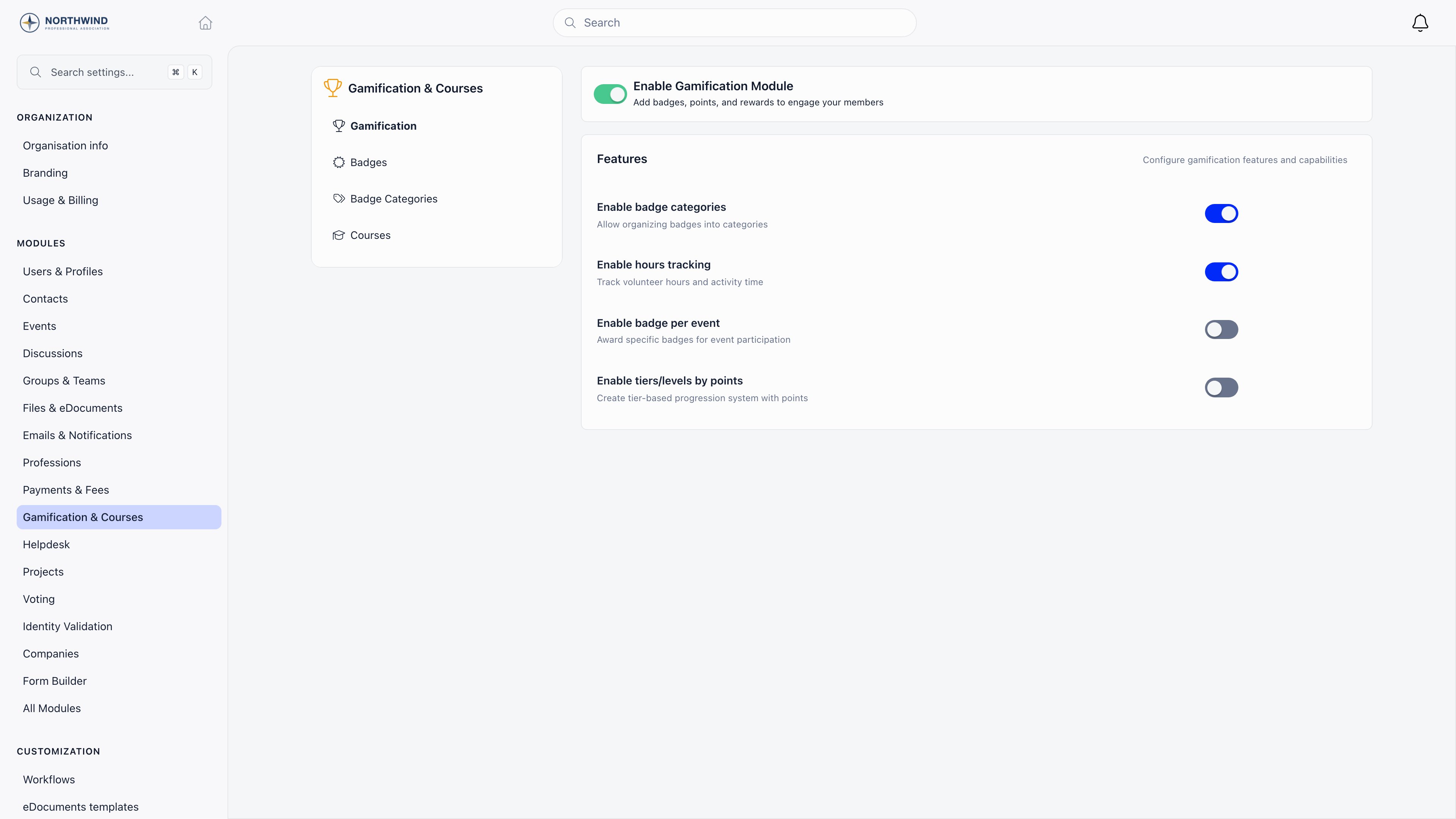
**Settings** → **Modules** → **Gamification & Courses** → **Gamification**, which needs `ADMIN_TENANT`. Changes save as you flip each switch.
| Switch | What it turns on |
| --------------------------------- | -------------------------------------------------------------------------------------------------------------------------------------- |
| **Enable Gamification Module** | Badges, the Badges tab on member profiles, and the Badges entry in the sidebar |
| **Enable badge categories** | Grouping badges into categories |
| **Enable hours tracking** | Volunteering hours and hours-threshold badges |
| **Enable badge per event** | The per-event badge field. Also needs the tiers switch below, because the event form's Gamification section only appears with tiers on |
| **Enable tiers/levels by points** | Points, the point rules panel, tier badges, and the leaderboard |
 ***
## How members earn points
Turning tiers on reveals **Point Rules** and **Engagement Points**. Set a rule to 0 and that source stops awarding.
| Setting | Awards points when | How much |
| ---------------------------------- | -------------------------------------------------- | ---------------------------------------------------------------------------------------------------------------------------- |
| **Purchase points (per ...)** | A product payment is recorded | Payment amount multiplied by the rate, rounded down to whole points. The label ends with your organisation's currency symbol |
| **Event attending default points** | A participant's RSVP becomes attending or attended | The event's own **Points** field when it is filled in, otherwise this default |
| **Referral points (per user)** | A referred signup completes | Awarded to the referrer, not the new member |
| **Create discussion** | A member starts a discussion | Flat amount. Help desk issues are excluded |
| **Create comment** | A member comments or replies | Flat amount |
| **Receive reaction** | Someone reacts to a member's post | Awarded to the post's author. Reacting to your own post awards nothing |
Every rule ships with a fallback that applies only until you save the panel for the first time: 1 point per currency unit, 100 for an event, 100 for a referral, 50 for a discussion, 10 for a comment, 2 for a reaction. After the first save, the numbers on screen are the numbers in force.
Event points are recorded once per attendance record, and they are taken back if the attendance is deleted or the RSVP moves away from attending. Points are for members only: [contacts](/docs/platform/contacts) never accumulate them.
***
## Tiers
A tier is a badge with **Points required** set on it. On a member's profile, the overview card is retitled **Membership level** and shows the member's total points, their current tier, and every tier as a card marked **Achieved** or **Locked** against that total.
Tier cards on the profile light up from the points threshold alone, but the automatic promotion that actually writes the badge onto the member also needs an ordering number (`level`) on each tier badge. The settings screen does not expose that field today, so set it through the API (`PATCH /badges/{id}`) or award tier badges by hand. When automatic promotion does run, it grants the highest tier the member qualifies for and removes their lower tier badges, so a member holds one tier at a time.
***
## The points ledger
Every point movement is a dated row: how many points, which activity type (purchase, event, engagement, referral, manual), a description, and a reference to the record that caused it. The member's total is the sum of those rows.
Open a member, go to the **Badges** tab, and the ledger sits below their badges and volunteering hours. `HR_TENANT` can correct the point value on a row or delete a row outright; the activity type, description, and reference are fixed. There is no button to add points by hand, so a correction means editing or removing an existing row.
***
## The leaderboard
**Analytics** (`/stats`) → **Leaderboards** → **Points** ranks the top 50 members by points, over the last 7 days, the last 30 days, or all time. It uses the same filters as the rest of the analytics page: member status, user type, and local center. The card only appears when both the module and tiers are on.
Who can open the Leaderboards tab at all is set by the **Leaderboards** permission under Analytics on the **Permissions setup** page (**Settings** → **Modules** → **Users & Profiles** → **Security & Permissions**). It defaults to every member, so raise it if rankings should stay with staff.
The same tab carries leaderboards that do not depend on gamification at all: events attended, posts written, reactions received, and referrers. Those stay visible whether or not points are switched on.
***
## Common questions
Check that **Enable tiers/levels by points** is on, then check the rules themselves: a rule left at 0 awards nothing. Points also start from the moment the switch goes on, so nothing is backfilled for past activity.
No. The ledger is permanent, and the 7 and 30 day buttons only narrow the leaderboard window, not the member's total.
Recording stops and the leaderboard card disappears, but nothing already earned is deleted. Turn it back on and the old totals are still there.
Not from the interface: there is no add-points button. Award a badge by hand instead, or adjust an existing ledger row.
Purchase points are awarded when the payment is recorded and are not reversed by a refund. Edit the ledger row down as `HR_TENANT`.
***
## Related
* [Badges](/docs/platform/badges) - The catalogue tiers are built from
* [Products](/docs/platform/fees/products) - Purchases that award points
* [Event attendance](/docs/platform/events/attendance) - Attendance that awards points and event badges
* [Referral program](/docs/platform/users/referral) - Referrals that award points
* [Discussions](/docs/platform/discussion) - Posts, comments, and reactions that award points
***
## How members earn points
Turning tiers on reveals **Point Rules** and **Engagement Points**. Set a rule to 0 and that source stops awarding.
| Setting | Awards points when | How much |
| ---------------------------------- | -------------------------------------------------- | ---------------------------------------------------------------------------------------------------------------------------- |
| **Purchase points (per ...)** | A product payment is recorded | Payment amount multiplied by the rate, rounded down to whole points. The label ends with your organisation's currency symbol |
| **Event attending default points** | A participant's RSVP becomes attending or attended | The event's own **Points** field when it is filled in, otherwise this default |
| **Referral points (per user)** | A referred signup completes | Awarded to the referrer, not the new member |
| **Create discussion** | A member starts a discussion | Flat amount. Help desk issues are excluded |
| **Create comment** | A member comments or replies | Flat amount |
| **Receive reaction** | Someone reacts to a member's post | Awarded to the post's author. Reacting to your own post awards nothing |
Every rule ships with a fallback that applies only until you save the panel for the first time: 1 point per currency unit, 100 for an event, 100 for a referral, 50 for a discussion, 10 for a comment, 2 for a reaction. After the first save, the numbers on screen are the numbers in force.
Event points are recorded once per attendance record, and they are taken back if the attendance is deleted or the RSVP moves away from attending. Points are for members only: [contacts](/docs/platform/contacts) never accumulate them.
***
## Tiers
A tier is a badge with **Points required** set on it. On a member's profile, the overview card is retitled **Membership level** and shows the member's total points, their current tier, and every tier as a card marked **Achieved** or **Locked** against that total.
Tier cards on the profile light up from the points threshold alone, but the automatic promotion that actually writes the badge onto the member also needs an ordering number (`level`) on each tier badge. The settings screen does not expose that field today, so set it through the API (`PATCH /badges/{id}`) or award tier badges by hand. When automatic promotion does run, it grants the highest tier the member qualifies for and removes their lower tier badges, so a member holds one tier at a time.
***
## The points ledger
Every point movement is a dated row: how many points, which activity type (purchase, event, engagement, referral, manual), a description, and a reference to the record that caused it. The member's total is the sum of those rows.
Open a member, go to the **Badges** tab, and the ledger sits below their badges and volunteering hours. `HR_TENANT` can correct the point value on a row or delete a row outright; the activity type, description, and reference are fixed. There is no button to add points by hand, so a correction means editing or removing an existing row.
***
## The leaderboard
**Analytics** (`/stats`) → **Leaderboards** → **Points** ranks the top 50 members by points, over the last 7 days, the last 30 days, or all time. It uses the same filters as the rest of the analytics page: member status, user type, and local center. The card only appears when both the module and tiers are on.
Who can open the Leaderboards tab at all is set by the **Leaderboards** permission under Analytics on the **Permissions setup** page (**Settings** → **Modules** → **Users & Profiles** → **Security & Permissions**). It defaults to every member, so raise it if rankings should stay with staff.
The same tab carries leaderboards that do not depend on gamification at all: events attended, posts written, reactions received, and referrers. Those stay visible whether or not points are switched on.
***
## Common questions
Check that **Enable tiers/levels by points** is on, then check the rules themselves: a rule left at 0 awards nothing. Points also start from the moment the switch goes on, so nothing is backfilled for past activity.
No. The ledger is permanent, and the 7 and 30 day buttons only narrow the leaderboard window, not the member's total.
Recording stops and the leaderboard card disappears, but nothing already earned is deleted. Turn it back on and the old totals are still there.
Not from the interface: there is no add-points button. Award a badge by hand instead, or adjust an existing ledger row.
Purchase points are awarded when the payment is recorded and are not reversed by a refund. Edit the ledger row down as `HR_TENANT`.
***
## Related
* [Badges](/docs/platform/badges) - The catalogue tiers are built from
* [Products](/docs/platform/fees/products) - Purchases that award points
* [Event attendance](/docs/platform/events/attendance) - Attendance that awards points and event badges
* [Referral program](/docs/platform/users/referral) - Referrals that award points
* [Discussions](/docs/platform/discussion) - Posts, comments, and reactions that award points