> ## Documentation Index
> Fetch the complete documentation index at: https://orgo.space/docs/llms.txt
> Use this file to discover all available pages before exploring further.
# Groups & Teams
> Organize members into collaborative spaces — from org-wide to project-specific
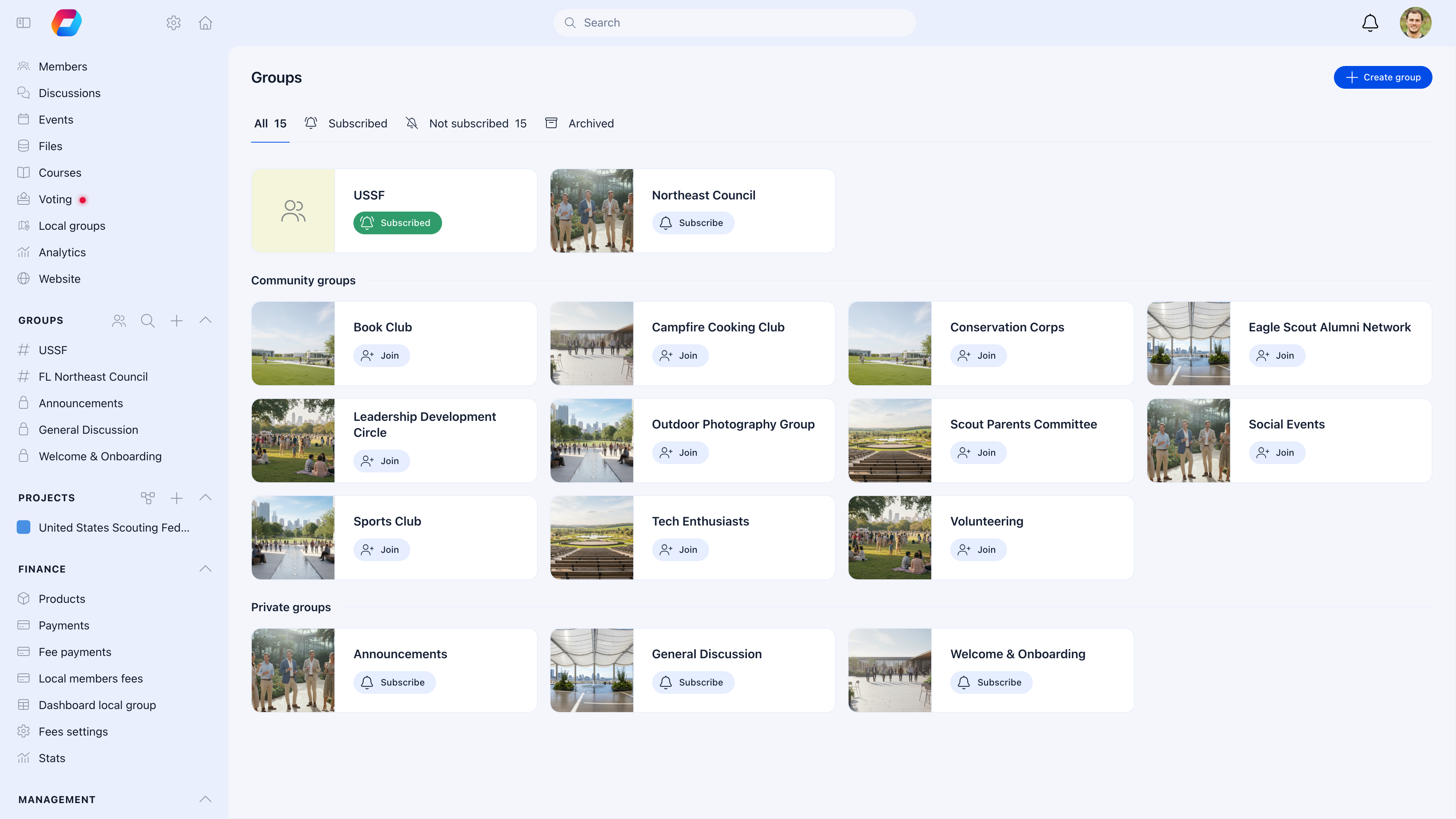
Groups are where your members actually collaborate. They're spaces with discussions, events, shared files, and task tracking — scoped to the right audience. Orgo gives you four types of groups, each for a different purpose.
 ***
## The four group types
| Type | Who's in it | How members join | Best for |
| ----------------------------------------------------- | ---------------------------------- | ------------------------------------------------------------------------------ | -------------------------------------------------------------------------------- |
| [**Main Group**](/platform/groups/main-group) | Everyone | **Automatic** — every member is included by default, can't leave | Organization-wide announcements, shared resources, full member directory |
| [**Local Centers**](/platform/groups/local-groups) | Members of a geographic branch | **Assigned** — during registration or by admin | Chapters, branches, regional divisions with their own admins and Stripe accounts |
| [**Role Groups**](/platform/groups/role-groups) | Members matching specific criteria | **Automatic** — system adds/removes based on user type, age, gender, or region | "All Leaders", "Youth 13-17", "Board members" — always up to date |
| [**Private Groups**](/platform/groups/private-groups) | Selected members | **Invited** by group owner, or **self-join** if the group is set to "joinable" | Project teams, committees, interest groups, working groups |
### Private vs. Joinable groups
Private Groups have two join modes that fundamentally change how they work:
| Mode | How members join | Visibility | Best for |
| --------------------- | --------------------------------------------- | ------------------------------------- | ----------------------------------------------------------------------- |
| **Private** (default) | Admin or owner invites them — no self-service | Only members can see the group exists | Boards, committees, confidential projects |
| **Joinable** | Any member can discover and join on their own | Listed in the groups browse page | Interest communities (Photography Club, Book Club), open working groups |
You can switch between modes at any time. Starting private and opening up later is safer than the reverse.
**Start simple.** You don't need all four types on day one. Most organizations start with just the Main Group and Local Centers, then add Role Groups and Private Groups as needs arise.
***
## Which group type should I use?
| I need a space for... | Use |
| ------------------------------------------------------------ | --------------------------------------------------------------------- |
| Announcements to everyone | **Main Group** — every member sees it |
| A city or regional chapter | **Local Center** — geographic division with its own admins and events |
| All members of a specific type (all Leaders, all Volunteers) | **Role Group** — auto-populates based on criteria |
| A project team or committee | **Private Group** — manually controlled membership |
| An interest-based community (Photography Club, Hiking Group) | **Private Group** with "joinable" enabled — members can self-join |
| A temporary working group for an initiative | **Private Group** — archive it when done |
***
## What every group can do
Each group — regardless of type — can have these features enabled:
| Feature | What it provides |
| --------------- | ----------------------------------------------------------------- |
| **Discussions** | Forum-style posts and conversations |
| **Events** | Group-specific events and calendar |
| **Files** | Shared document storage with folders |
| **Issues** | Task and issue tracking with priorities, assignees, and due dates |
| **Members** | Member list with search and filtering |
You choose which features to enable per group. A project team might need Discussions + Issues. A local chapter might need Discussions + Events + Files. The Main Group might have everything.
***
## Enabling the Groups module
**Settings** → **Groups** → **Module Settings**
***
## The four group types
| Type | Who's in it | How members join | Best for |
| ----------------------------------------------------- | ---------------------------------- | ------------------------------------------------------------------------------ | -------------------------------------------------------------------------------- |
| [**Main Group**](/platform/groups/main-group) | Everyone | **Automatic** — every member is included by default, can't leave | Organization-wide announcements, shared resources, full member directory |
| [**Local Centers**](/platform/groups/local-groups) | Members of a geographic branch | **Assigned** — during registration or by admin | Chapters, branches, regional divisions with their own admins and Stripe accounts |
| [**Role Groups**](/platform/groups/role-groups) | Members matching specific criteria | **Automatic** — system adds/removes based on user type, age, gender, or region | "All Leaders", "Youth 13-17", "Board members" — always up to date |
| [**Private Groups**](/platform/groups/private-groups) | Selected members | **Invited** by group owner, or **self-join** if the group is set to "joinable" | Project teams, committees, interest groups, working groups |
### Private vs. Joinable groups
Private Groups have two join modes that fundamentally change how they work:
| Mode | How members join | Visibility | Best for |
| --------------------- | --------------------------------------------- | ------------------------------------- | ----------------------------------------------------------------------- |
| **Private** (default) | Admin or owner invites them — no self-service | Only members can see the group exists | Boards, committees, confidential projects |
| **Joinable** | Any member can discover and join on their own | Listed in the groups browse page | Interest communities (Photography Club, Book Club), open working groups |
You can switch between modes at any time. Starting private and opening up later is safer than the reverse.
**Start simple.** You don't need all four types on day one. Most organizations start with just the Main Group and Local Centers, then add Role Groups and Private Groups as needs arise.
***
## Which group type should I use?
| I need a space for... | Use |
| ------------------------------------------------------------ | --------------------------------------------------------------------- |
| Announcements to everyone | **Main Group** — every member sees it |
| A city or regional chapter | **Local Center** — geographic division with its own admins and events |
| All members of a specific type (all Leaders, all Volunteers) | **Role Group** — auto-populates based on criteria |
| A project team or committee | **Private Group** — manually controlled membership |
| An interest-based community (Photography Club, Hiking Group) | **Private Group** with "joinable" enabled — members can self-join |
| A temporary working group for an initiative | **Private Group** — archive it when done |
***
## What every group can do
Each group — regardless of type — can have these features enabled:
| Feature | What it provides |
| --------------- | ----------------------------------------------------------------- |
| **Discussions** | Forum-style posts and conversations |
| **Events** | Group-specific events and calendar |
| **Files** | Shared document storage with folders |
| **Issues** | Task and issue tracking with priorities, assignees, and due dates |
| **Members** | Member list with search and filtering |
You choose which features to enable per group. A project team might need Discussions + Issues. A local chapter might need Discussions + Events + Files. The Main Group might have everything.
***
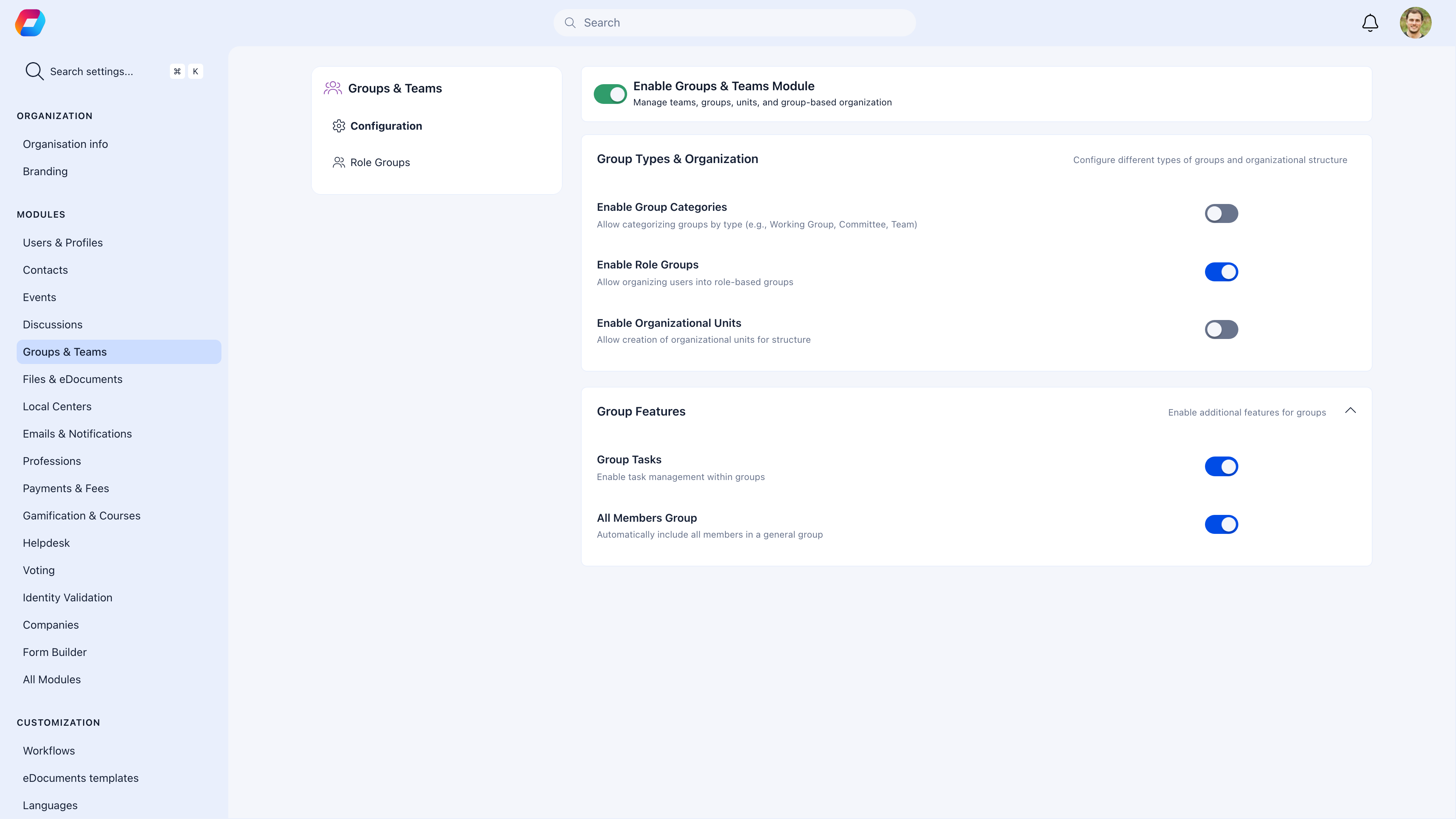
## Enabling the Groups module
**Settings** → **Groups** → **Module Settings**
 | Setting | What it does |
| ------------------------- | ------------------------------------------------------------------------------------------- |
| **Enable Groups & Teams** | Master toggle for the entire groups feature |
| **Group Categories** | Organize groups by type (Working Group, Committee, Team). Useful when you have many groups. |
| **Role Groups** | Enable automatic groups based on member criteria |
| **Units** | Enable sub-units within local centers for hierarchical structure |
| **Tasks/Issues** | Enable task tracking within groups |
| **All Members Group** | Maintain the Main Group that includes everyone |
***
## Group permissions
Every group has granular controls for who can do what:
| Permission | What it controls |
| --------------------------------- | -------------------------------------------------------------------------- |
| **Only admins can post** | Restrict discussions to administrators. Good for announcement-only groups. |
| **Only admins can create events** | Restrict event creation to group admins |
| **Only admins can upload files** | Restrict file uploads to group admins |
| **Only admins can add members** | Restrict member management to group admins |
***
## Group categories
If you have many groups, categories help members find the right ones. Enable categories in module settings, then create them at **Settings** → **Groups** → **Categories**.
Each category has a name, color, and icon — plus a permission setting controlling who can create groups in that category.
**Example categories:** Working Group, Committee, Interest Group, Project Team, Advisory Board
***
## Structuring your organization with groups
### Small community (50 members)
* **Main Group** for announcements and general discussion
* 2-3 **Private Groups** for committees (Board, Events Committee, etc.)
* That's it — keep it simple
### Regional organization (500 members, 5 branches)
* **Main Group** for org-wide announcements
* 5 **Local Centers** for geographic chapters, each with their own events and discussions
* 2-3 **Role Groups** (All Leaders, All Volunteers)
* Private Groups as needed for projects
### Large federation (10,000+ members, 50+ branches)
* **Main Group** for national-level announcements (admins-only posting)
* 50+ **Local Centers** organized under regional parent groups
* Multiple **Role Groups** by user type, age, profession
* Many **Private Groups** for committees, working groups, projects
* **Group categories** to help members navigate
***
## Common scenarios
Enable **Group Categories** to organize groups by type. Also make sure group names are descriptive — "Q4 Planning" is better than "Group 7".
Use the **Main Group** with "Only admins can post" enabled. All members see the content, but only administrators can create posts.
Create a **Role Group** with criteria "User Type = Leader". The system automatically adds all members with that user type and keeps it updated as user types change.
**Archive** the Private Group. Content is preserved for reference but the group is hidden from the sidebar. Members are removed from the active roster.
Yes. Members are in the Main Group (automatic), their Local Center (assigned), any matching Role Groups (automatic), and any Private Groups they've joined or been invited to. There's no limit.
***
## Related
* [Main Group](/platform/groups/main-group) — The org-wide hub
* [Local Centers](/platform/groups/local-groups) — Geographic branches
* [Role Groups](/platform/groups/role-groups) — Criteria-based automatic groups
* [Private Groups](/platform/groups/private-groups) — Project teams and interest groups
* [Discussions](/platform/discussion) — Forum features within groups
* [Issues](/platform/issues) — Task tracking within groups
| Setting | What it does |
| ------------------------- | ------------------------------------------------------------------------------------------- |
| **Enable Groups & Teams** | Master toggle for the entire groups feature |
| **Group Categories** | Organize groups by type (Working Group, Committee, Team). Useful when you have many groups. |
| **Role Groups** | Enable automatic groups based on member criteria |
| **Units** | Enable sub-units within local centers for hierarchical structure |
| **Tasks/Issues** | Enable task tracking within groups |
| **All Members Group** | Maintain the Main Group that includes everyone |
***
## Group permissions
Every group has granular controls for who can do what:
| Permission | What it controls |
| --------------------------------- | -------------------------------------------------------------------------- |
| **Only admins can post** | Restrict discussions to administrators. Good for announcement-only groups. |
| **Only admins can create events** | Restrict event creation to group admins |
| **Only admins can upload files** | Restrict file uploads to group admins |
| **Only admins can add members** | Restrict member management to group admins |
***
## Group categories
If you have many groups, categories help members find the right ones. Enable categories in module settings, then create them at **Settings** → **Groups** → **Categories**.
Each category has a name, color, and icon — plus a permission setting controlling who can create groups in that category.
**Example categories:** Working Group, Committee, Interest Group, Project Team, Advisory Board
***
## Structuring your organization with groups
### Small community (50 members)
* **Main Group** for announcements and general discussion
* 2-3 **Private Groups** for committees (Board, Events Committee, etc.)
* That's it — keep it simple
### Regional organization (500 members, 5 branches)
* **Main Group** for org-wide announcements
* 5 **Local Centers** for geographic chapters, each with their own events and discussions
* 2-3 **Role Groups** (All Leaders, All Volunteers)
* Private Groups as needed for projects
### Large federation (10,000+ members, 50+ branches)
* **Main Group** for national-level announcements (admins-only posting)
* 50+ **Local Centers** organized under regional parent groups
* Multiple **Role Groups** by user type, age, profession
* Many **Private Groups** for committees, working groups, projects
* **Group categories** to help members navigate
***
## Common scenarios
Enable **Group Categories** to organize groups by type. Also make sure group names are descriptive — "Q4 Planning" is better than "Group 7".
Use the **Main Group** with "Only admins can post" enabled. All members see the content, but only administrators can create posts.
Create a **Role Group** with criteria "User Type = Leader". The system automatically adds all members with that user type and keeps it updated as user types change.
**Archive** the Private Group. Content is preserved for reference but the group is hidden from the sidebar. Members are removed from the active roster.
Yes. Members are in the Main Group (automatic), their Local Center (assigned), any matching Role Groups (automatic), and any Private Groups they've joined or been invited to. There's no limit.
***
## Related
* [Main Group](/platform/groups/main-group) — The org-wide hub
* [Local Centers](/platform/groups/local-groups) — Geographic branches
* [Role Groups](/platform/groups/role-groups) — Criteria-based automatic groups
* [Private Groups](/platform/groups/private-groups) — Project teams and interest groups
* [Discussions](/platform/discussion) — Forum features within groups
* [Issues](/platform/issues) — Task tracking within groups