> ## Documentation Index
> Fetch the complete documentation index at: https://orgo.space/docs/llms.txt
> Use this file to discover all available pages before exploring further.
# Local Centers
> Geographic chapters and branches with their own admins, events, and member communities
Local Centers are your organization's geographic branches — cities, regions, chapters, districts. Each center has its own discussions, events, files, members, and local administrators, while staying connected to the national organization.
If your organization has geographic structure of any kind, Local Centers are how you model it.
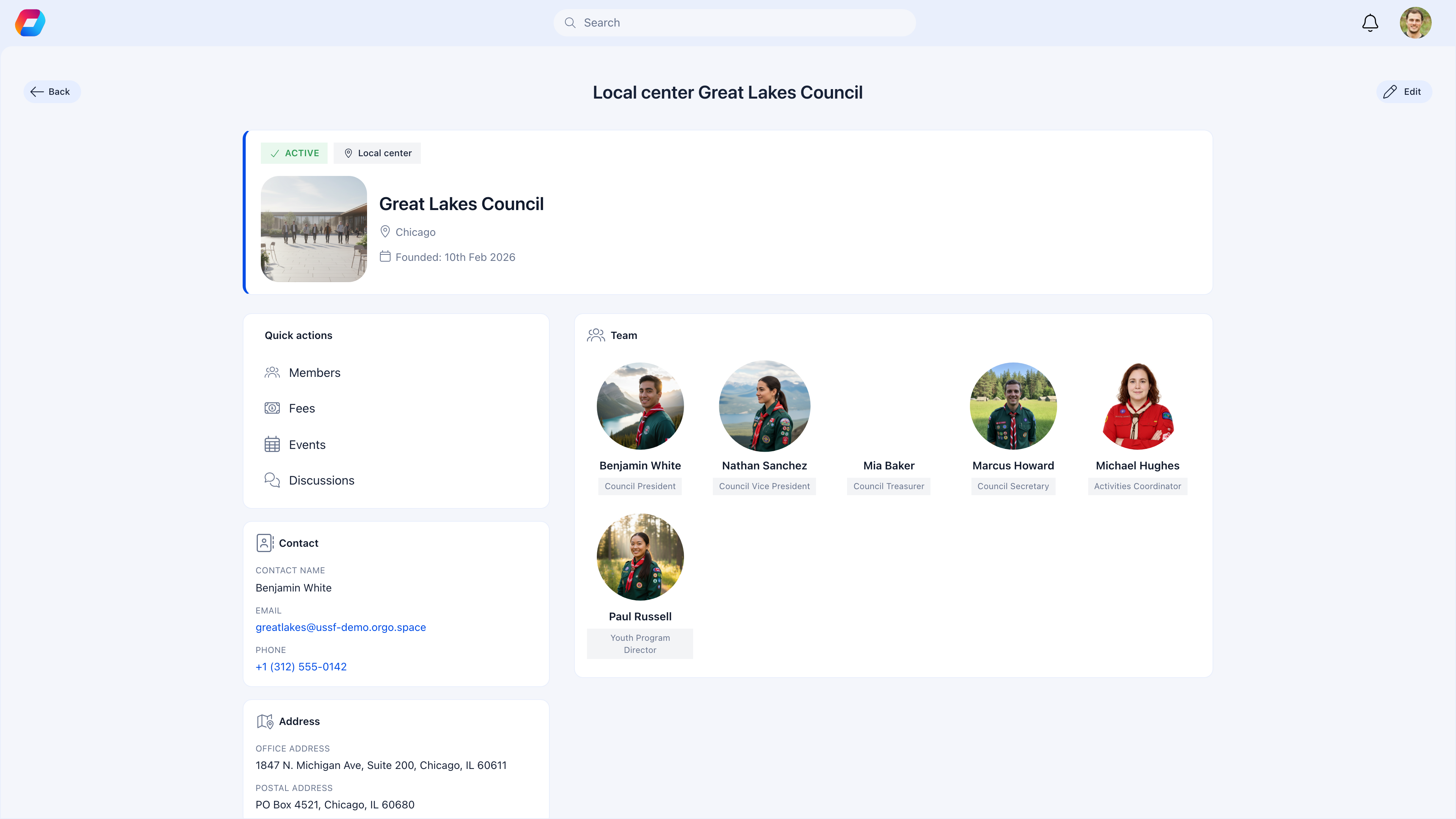
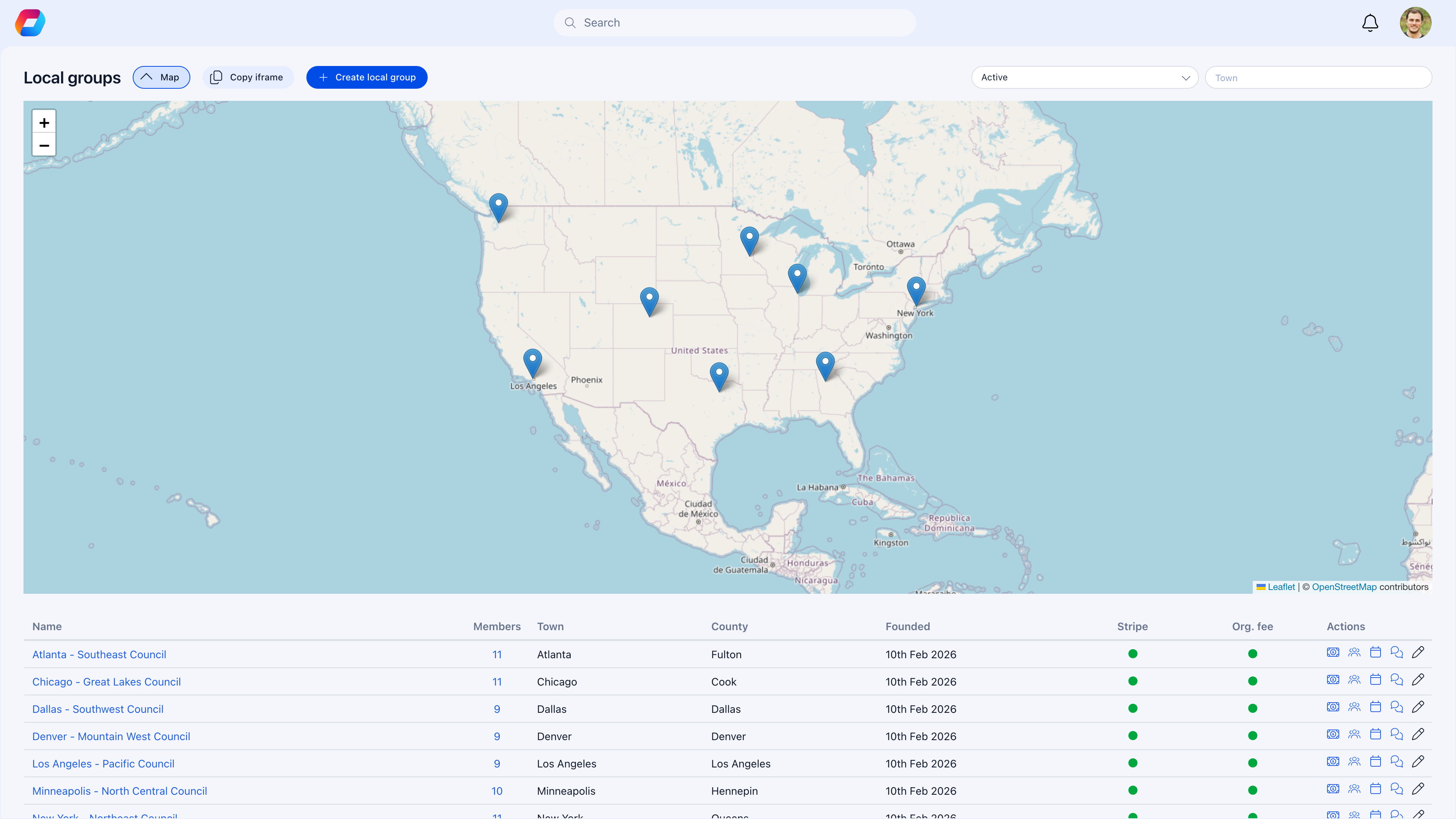 Click on any center to open its detail view with quick actions for Members, Fees, Events, and Discussions:
 ***
## Do I need Local Centers?
| Your situation | Recommendation |
| ------------------------------------------------------------ | --------------------------------------------------- |
| Members are spread across cities or regions | Yes — Local Centers let each area run independently |
| You have chapters, branches, or districts | Yes — each becomes a Local Center |
| You want local events alongside national ones | Yes — each center has its own event calendar |
| Your organization is a single location | No — use Private Groups for teams instead |
| You're a fully online community with no geographic structure | No — use Role Groups or Private Groups |
***
## How Local Centers fit in
Local Centers sit between the Main Group (everyone) and Private Groups (manual teams):
```
National Organization
├── Main Group (all members, org-wide announcements)
├── Local Centers (geographic — assigned per member)
│ ├── New York Chapter
│ │ ├── Discussions, Events, Files
│ │ └── Local admins manage independently
│ ├── London Branch
│ └── Berlin Division
├── Role Groups (automatic — by criteria)
└── Private Groups (manual — project teams)
```
Each member belongs to **one** Local Center (assigned during registration or by an admin). They see their center's content in the sidebar alongside the Main Group.
***
## Setting up Local Centers
### Enable the module
**Settings** → **Groups** → **Module Settings** → enable **Groups & Teams**
Local Centers are available by default when Groups are enabled.
### Create a center
**Settings** → **Local Centers** → **Create Local Center**
Enter the center name and select the town/city. If you've enabled regions, assign the center to its parent region.
Add the center's contact email, phone, and contact person. This information is visible to members and on the public map (if enabled).
Enter the office address and postal address. Add GPS coordinates if you want the center to appear on the public map.
Add Facebook, Instagram, website URLs. If the center collects fees, configure bank details and Stripe account.
### Organize with regions (optional)
For organizations with many centers, group them under regions:
```
National Organization
├── Northeast Region
│ ├── New York
│ ├── Boston
│ └── Philadelphia
├── Southeast Region
│ ├── Atlanta
│ ├── Miami
│ └── Charlotte
└── West Region
├── Los Angeles
├── San Francisco
└── Seattle
```
Enable regions in **Settings** → **Groups** → **Module Settings** → **Units**. Then assign each Local Center to a region when creating it.
Regional grouping gives you **Parent Local** admin roles — admins who oversee all centers in their region without needing national-level permissions.
***
## How members get assigned
| Method | How it works |
| ----------------------- | ------------------------------------------------------------------------------------------------------ |
| **During registration** | The registration form includes a Local Center field. Members select their branch when signing up. |
| **Admin assignment** | An admin edits the member's profile and assigns them to a center. |
| **Transfer** | An admin moves a member from one center to another. The member's content stays in the original center. |
Members can only belong to **one** Local Center at a time. If they need access to multiple geographic communities, use Private Groups for the cross-center collaboration.
***
## What each center can do
Every Local Center functions as a full group with these features:
| Feature | Local use case |
| --------------- | ------------------------------------------------------------------ |
| **Discussions** | Local announcements, community conversations, area-specific topics |
| **Events** | Local meetups, chapter meetings, regional activities |
| **Files** | Local documents, meeting minutes, branch-specific resources |
| **Members** | Browse and search members in this center |
| **Issues** | Track local tasks and action items (if enabled) |
Each center's content is separate from other centers. Members only see discussions, events, and files from their own center (and the Main Group).
***
## Local administration
One of the most powerful aspects of Local Centers is **delegated administration**. You don't need national admins managing every branch — each center can have its own team.
### Local admin roles
| Role | What they can do |
| -------------------- | ----------------------------------------------------------------------------- |
| **ADMIN\_LOCAL** | Full control of the center — manage members, settings, content, events, files |
| **HR\_LOCAL** | Member management within the center — edit profiles, manage assignments |
| **FINANCIAL\_LOCAL** | Financial management — process local fees, view payment reports |
### Parent Local roles (for regions)
If you use regions, you also get:
| Role | What they can do |
| ---------------------------- | --------------------------------- |
| **ADMIN\_PARENT\_LOCAL** | Oversee all centers in a region |
| **HR\_PARENT\_LOCAL** | Member management across a region |
| **FINANCIAL\_PARENT\_LOCAL** | Financial oversight for a region |
To assign local roles: go to **Members** → select a member → **Permissions** tab → assign the role scoped to their center.
***
## Center statuses
| Status | What it means |
| ----------------- | ---------------------------------------------------------------- |
| **Active** | Fully operational — members can see and interact with the center |
| **Pending Close** | Center is being wound down — visible but marked for closure |
| **Suspended** | Temporarily inactive — hidden from members but data preserved |
| **Closed** | Permanently closed — archived, no longer visible |
***
## Local fees
If your organization collects fees at the branch level (local membership dues, chapter fees), each center can have its own fee configuration:
* Assign a fee product to the center
* Set a default price (can differ from national fees)
* Enable online payment via Stripe (requires a connected Stripe account for the center)
* Local financial admins can process and track payments
See [Local Group Fees](/platform/local-group-fees/create-local-fees) for the full setup.
***
## Waitlist per center
Popular centers can become full. Enable capacity limits to manage this:
| Setting | What it does |
| ------------------- | ------------------------------------------------------------------------------------------ |
| **Capacity** | Maximum number of members for this center. New registrations go to the waitlist when full. |
| **Auto-approve** | Automatically approve waitlisted members when a spot opens |
| **Processing rate** | How many waitlisted members to process at once |
This works with the [Waitlist](/platform/users/waitlist) feature — the center-level waitlist feeds into the same admin management interface.
***
## Public map
If you enable the public map, active centers appear on an interactive map that prospective members can browse — helping them find the nearest branch before joining.
Each center shows its location, contact information, and a map description. Configure GPS coordinates and the map description when editing the center.
***
## Controlling who can post
Same as other groups, each center has permission controls:
| Setting | Recommended for |
| -------------------------------------- | --------------------------------------------------- |
| **Only admins can post** — ON | Centers where local admins control announcements |
| **Only admins can post** — OFF | Centers where members freely discuss and share |
| **Only admins can create events** — ON | When event planning should be coordinated centrally |
| **Only admins can upload files** — ON | When document management needs oversight |
Most organizations let members post freely in their Local Center while restricting the Main Group to admin-only announcements. This gives members a local community for discussion while keeping org-wide communications clean.
***
## Common scenarios
Go to the member's profile → edit → change their Local Center assignment. Their discussions and contributions stay in the original center. They'll now see content from their new center.
Assign them the **ADMIN\_PARENT\_LOCAL** role scoped to the region containing those centers. Or, if they only need access to 2-3 specific centers, assign **ADMIN\_LOCAL** separately for each center.
No — members belong to one Local Center. If they need to collaborate across centers, create a Private Group with members from multiple centers. Or use a Role Group that spans all centers.
Set the center status to **Pending Close** first to signal the upcoming change. Transfer members to other centers. Once all members are transferred, set the status to **Closed**. The center's content is archived.
Enable **Units** in **Settings** → **Groups** → **Module Settings**. Then create regions at **Settings** → **Local Centers** → **Regions**. Assign existing centers to their region.
Ensure each center has active local admins posting regularly. Start with events — a local meetup is the easiest way to build engagement. Keep the Main Group for announcements only, pushing discussion into Local Centers.
***
## Related
* [Groups Overview](/platform/groups) — All group types and when to use each
* [Main Group](/platform/groups/main-group) — The org-wide hub
* [Local Group Fees](/platform/local-group-fees/create-local-fees) — Fee collection at the branch level
* [User Types & Roles](/platform/users/user-types) — Setting up local admin roles
***
## Do I need Local Centers?
| Your situation | Recommendation |
| ------------------------------------------------------------ | --------------------------------------------------- |
| Members are spread across cities or regions | Yes — Local Centers let each area run independently |
| You have chapters, branches, or districts | Yes — each becomes a Local Center |
| You want local events alongside national ones | Yes — each center has its own event calendar |
| Your organization is a single location | No — use Private Groups for teams instead |
| You're a fully online community with no geographic structure | No — use Role Groups or Private Groups |
***
## How Local Centers fit in
Local Centers sit between the Main Group (everyone) and Private Groups (manual teams):
```
National Organization
├── Main Group (all members, org-wide announcements)
├── Local Centers (geographic — assigned per member)
│ ├── New York Chapter
│ │ ├── Discussions, Events, Files
│ │ └── Local admins manage independently
│ ├── London Branch
│ └── Berlin Division
├── Role Groups (automatic — by criteria)
└── Private Groups (manual — project teams)
```
Each member belongs to **one** Local Center (assigned during registration or by an admin). They see their center's content in the sidebar alongside the Main Group.
***
## Setting up Local Centers
### Enable the module
**Settings** → **Groups** → **Module Settings** → enable **Groups & Teams**
Local Centers are available by default when Groups are enabled.
### Create a center
**Settings** → **Local Centers** → **Create Local Center**
Enter the center name and select the town/city. If you've enabled regions, assign the center to its parent region.
Add the center's contact email, phone, and contact person. This information is visible to members and on the public map (if enabled).
Enter the office address and postal address. Add GPS coordinates if you want the center to appear on the public map.
Add Facebook, Instagram, website URLs. If the center collects fees, configure bank details and Stripe account.
### Organize with regions (optional)
For organizations with many centers, group them under regions:
```
National Organization
├── Northeast Region
│ ├── New York
│ ├── Boston
│ └── Philadelphia
├── Southeast Region
│ ├── Atlanta
│ ├── Miami
│ └── Charlotte
└── West Region
├── Los Angeles
├── San Francisco
└── Seattle
```
Enable regions in **Settings** → **Groups** → **Module Settings** → **Units**. Then assign each Local Center to a region when creating it.
Regional grouping gives you **Parent Local** admin roles — admins who oversee all centers in their region without needing national-level permissions.
***
## How members get assigned
| Method | How it works |
| ----------------------- | ------------------------------------------------------------------------------------------------------ |
| **During registration** | The registration form includes a Local Center field. Members select their branch when signing up. |
| **Admin assignment** | An admin edits the member's profile and assigns them to a center. |
| **Transfer** | An admin moves a member from one center to another. The member's content stays in the original center. |
Members can only belong to **one** Local Center at a time. If they need access to multiple geographic communities, use Private Groups for the cross-center collaboration.
***
## What each center can do
Every Local Center functions as a full group with these features:
| Feature | Local use case |
| --------------- | ------------------------------------------------------------------ |
| **Discussions** | Local announcements, community conversations, area-specific topics |
| **Events** | Local meetups, chapter meetings, regional activities |
| **Files** | Local documents, meeting minutes, branch-specific resources |
| **Members** | Browse and search members in this center |
| **Issues** | Track local tasks and action items (if enabled) |
Each center's content is separate from other centers. Members only see discussions, events, and files from their own center (and the Main Group).
***
## Local administration
One of the most powerful aspects of Local Centers is **delegated administration**. You don't need national admins managing every branch — each center can have its own team.
### Local admin roles
| Role | What they can do |
| -------------------- | ----------------------------------------------------------------------------- |
| **ADMIN\_LOCAL** | Full control of the center — manage members, settings, content, events, files |
| **HR\_LOCAL** | Member management within the center — edit profiles, manage assignments |
| **FINANCIAL\_LOCAL** | Financial management — process local fees, view payment reports |
### Parent Local roles (for regions)
If you use regions, you also get:
| Role | What they can do |
| ---------------------------- | --------------------------------- |
| **ADMIN\_PARENT\_LOCAL** | Oversee all centers in a region |
| **HR\_PARENT\_LOCAL** | Member management across a region |
| **FINANCIAL\_PARENT\_LOCAL** | Financial oversight for a region |
To assign local roles: go to **Members** → select a member → **Permissions** tab → assign the role scoped to their center.
***
## Center statuses
| Status | What it means |
| ----------------- | ---------------------------------------------------------------- |
| **Active** | Fully operational — members can see and interact with the center |
| **Pending Close** | Center is being wound down — visible but marked for closure |
| **Suspended** | Temporarily inactive — hidden from members but data preserved |
| **Closed** | Permanently closed — archived, no longer visible |
***
## Local fees
If your organization collects fees at the branch level (local membership dues, chapter fees), each center can have its own fee configuration:
* Assign a fee product to the center
* Set a default price (can differ from national fees)
* Enable online payment via Stripe (requires a connected Stripe account for the center)
* Local financial admins can process and track payments
See [Local Group Fees](/platform/local-group-fees/create-local-fees) for the full setup.
***
## Waitlist per center
Popular centers can become full. Enable capacity limits to manage this:
| Setting | What it does |
| ------------------- | ------------------------------------------------------------------------------------------ |
| **Capacity** | Maximum number of members for this center. New registrations go to the waitlist when full. |
| **Auto-approve** | Automatically approve waitlisted members when a spot opens |
| **Processing rate** | How many waitlisted members to process at once |
This works with the [Waitlist](/platform/users/waitlist) feature — the center-level waitlist feeds into the same admin management interface.
***
## Public map
If you enable the public map, active centers appear on an interactive map that prospective members can browse — helping them find the nearest branch before joining.
Each center shows its location, contact information, and a map description. Configure GPS coordinates and the map description when editing the center.
***
## Controlling who can post
Same as other groups, each center has permission controls:
| Setting | Recommended for |
| -------------------------------------- | --------------------------------------------------- |
| **Only admins can post** — ON | Centers where local admins control announcements |
| **Only admins can post** — OFF | Centers where members freely discuss and share |
| **Only admins can create events** — ON | When event planning should be coordinated centrally |
| **Only admins can upload files** — ON | When document management needs oversight |
Most organizations let members post freely in their Local Center while restricting the Main Group to admin-only announcements. This gives members a local community for discussion while keeping org-wide communications clean.
***
## Common scenarios
Go to the member's profile → edit → change their Local Center assignment. Their discussions and contributions stay in the original center. They'll now see content from their new center.
Assign them the **ADMIN\_PARENT\_LOCAL** role scoped to the region containing those centers. Or, if they only need access to 2-3 specific centers, assign **ADMIN\_LOCAL** separately for each center.
No — members belong to one Local Center. If they need to collaborate across centers, create a Private Group with members from multiple centers. Or use a Role Group that spans all centers.
Set the center status to **Pending Close** first to signal the upcoming change. Transfer members to other centers. Once all members are transferred, set the status to **Closed**. The center's content is archived.
Enable **Units** in **Settings** → **Groups** → **Module Settings**. Then create regions at **Settings** → **Local Centers** → **Regions**. Assign existing centers to their region.
Ensure each center has active local admins posting regularly. Start with events — a local meetup is the easiest way to build engagement. Keep the Main Group for announcements only, pushing discussion into Local Centers.
***
## Related
* [Groups Overview](/platform/groups) — All group types and when to use each
* [Main Group](/platform/groups/main-group) — The org-wide hub
* [Local Group Fees](/platform/local-group-fees/create-local-fees) — Fee collection at the branch level
* [User Types & Roles](/platform/users/user-types) — Setting up local admin roles