> ## Documentation Index
> Fetch the complete documentation index at: https://orgo.space/docs/llms.txt
> Use this file to discover all available pages before exploring further.
# Main Group
> The organization-wide hub that automatically includes every member
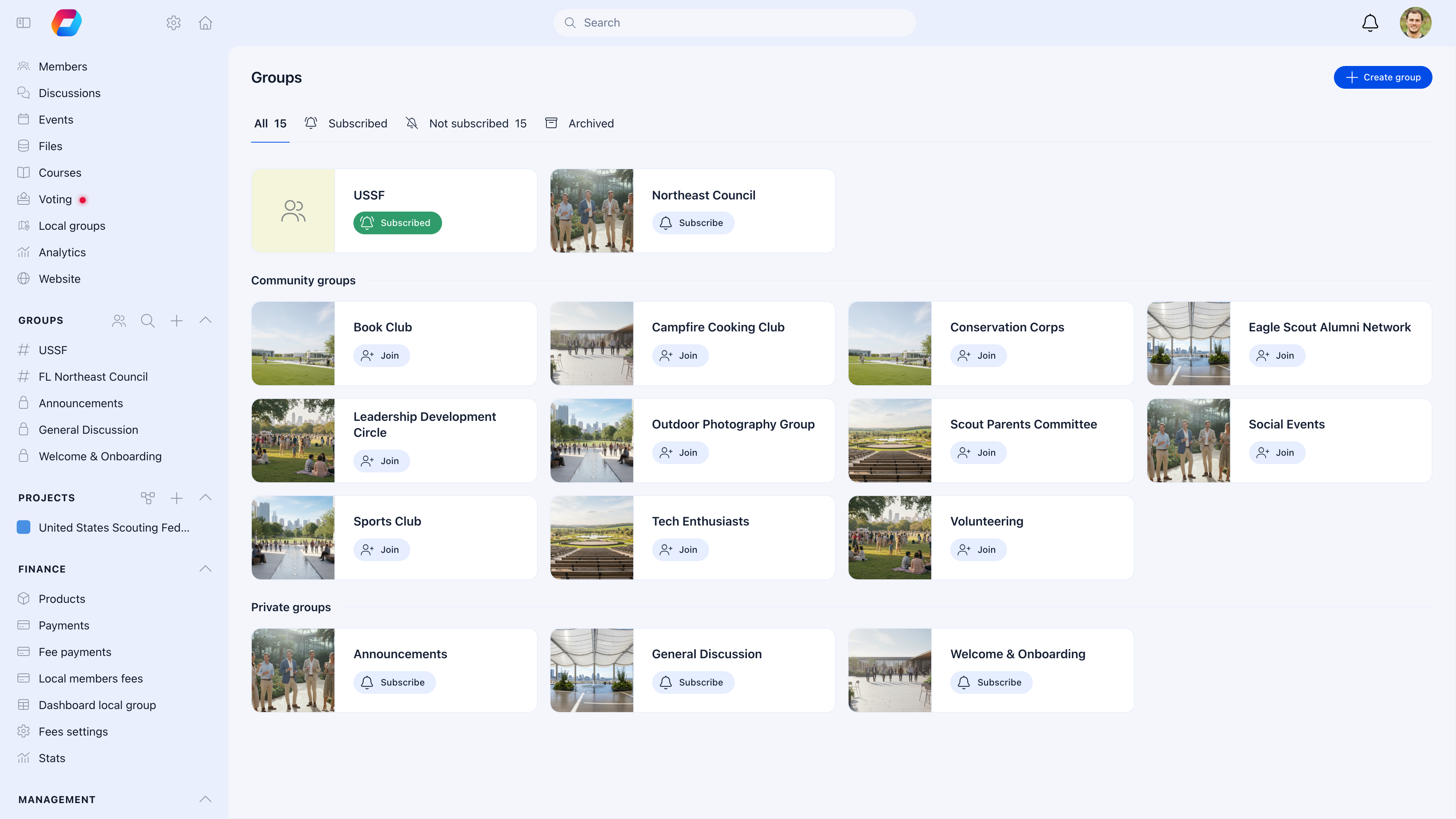
The Main Group is the central space that every member belongs to automatically. It's your organization's "town square" — the place for announcements, org-wide discussions, shared documents, and the full member directory.
You can't delete it, members can't leave it, and every new registration is added automatically. If you need one place where you're guaranteed to reach everyone, this is it.
 ***
## How to access
Click your **organization name** in the sidebar, or look for **Main Group** in the groups list.
***
## What to use the Main Group for
| Use it for | Don't use it for |
| ----------------------------------------------------- | ----------------------------------- |
| Organization-wide announcements | Content only relevant to one branch |
| Shared documents (bylaws, handbooks, templates) | Project-specific files |
| General discussions that concern all members | Niche interest topics |
| Organization-wide events (AGM, annual conference) | Local meetups |
| Member directory — finding and connecting with anyone | — |
***
## Available features
The Main Group supports the same features as any group:
### Discussions
Post announcements and start conversations that all members can see.
1. Go to Main Group → **Discussions**
2. Click **Create Post**
3. Write your content (rich text, images, file attachments supported)
4. Select a category if [discussion namespaces](/platform/discussion/discussion-namespaces) are enabled
5. Publish
### Events
Schedule organization-wide events visible to everyone.
### Files
Store shared documents organized in folders — bylaws, handbooks, brand assets, templates.
### Members
Browse, search, and filter the full member directory. Filter by permission level, location, user type, fee status, name, or join date.
***
## Controlling who can post
By default, all members can post in the Main Group. For most organizations, you'll want to restrict this.
**Settings** → **Groups** → **Main Group Settings**
| Setting | Recommended for |
| -------------------------------------- | ------------------------------------------------------------------------- |
| **Only admins can post** — ON | Organizations that want a clean announcement channel without member noise |
| **Only admins can post** — OFF | Communities that want open discussion where anyone contributes |
| **Only admins can create events** — ON | When event creation should be centrally managed |
| **Only admins can upload files** — ON | When document management should be controlled |
A common pattern: Main Group for admin-only announcements, with open discussion happening in Local Centers or Private Groups. This keeps the Main Group signal high and noise low.
***
## Common scenarios
Enable "Only admins can post." The Main Group becomes an announcement channel. Direct members to Local Centers or Private Groups for open discussion.
Go to Main Group → Files → create a folder if needed → upload the document. Every member has access.
You can turn off "All Members Group" in module settings (**Settings** → **Groups** → **Module Settings**). This hides the Main Group. Members will only see Local Centers, Role Groups, and Private Groups.
Enable [Discussion Namespaces](/platform/discussion/discussion-namespaces). This lets you create categories (Announcements, General, Questions, etc.) so posts are organized and members can filter by topic.
***
## Related
* [Groups Overview](/platform/groups) — All group types and when to use each
* [Discussion Namespaces](/platform/discussion/discussion-namespaces) — Organize discussions by topic
* [Local Centers](/platform/groups/local-groups) — Geographic groups for branch-level content
***
## How to access
Click your **organization name** in the sidebar, or look for **Main Group** in the groups list.
***
## What to use the Main Group for
| Use it for | Don't use it for |
| ----------------------------------------------------- | ----------------------------------- |
| Organization-wide announcements | Content only relevant to one branch |
| Shared documents (bylaws, handbooks, templates) | Project-specific files |
| General discussions that concern all members | Niche interest topics |
| Organization-wide events (AGM, annual conference) | Local meetups |
| Member directory — finding and connecting with anyone | — |
***
## Available features
The Main Group supports the same features as any group:
### Discussions
Post announcements and start conversations that all members can see.
1. Go to Main Group → **Discussions**
2. Click **Create Post**
3. Write your content (rich text, images, file attachments supported)
4. Select a category if [discussion namespaces](/platform/discussion/discussion-namespaces) are enabled
5. Publish
### Events
Schedule organization-wide events visible to everyone.
### Files
Store shared documents organized in folders — bylaws, handbooks, brand assets, templates.
### Members
Browse, search, and filter the full member directory. Filter by permission level, location, user type, fee status, name, or join date.
***
## Controlling who can post
By default, all members can post in the Main Group. For most organizations, you'll want to restrict this.
**Settings** → **Groups** → **Main Group Settings**
| Setting | Recommended for |
| -------------------------------------- | ------------------------------------------------------------------------- |
| **Only admins can post** — ON | Organizations that want a clean announcement channel without member noise |
| **Only admins can post** — OFF | Communities that want open discussion where anyone contributes |
| **Only admins can create events** — ON | When event creation should be centrally managed |
| **Only admins can upload files** — ON | When document management should be controlled |
A common pattern: Main Group for admin-only announcements, with open discussion happening in Local Centers or Private Groups. This keeps the Main Group signal high and noise low.
***
## Common scenarios
Enable "Only admins can post." The Main Group becomes an announcement channel. Direct members to Local Centers or Private Groups for open discussion.
Go to Main Group → Files → create a folder if needed → upload the document. Every member has access.
You can turn off "All Members Group" in module settings (**Settings** → **Groups** → **Module Settings**). This hides the Main Group. Members will only see Local Centers, Role Groups, and Private Groups.
Enable [Discussion Namespaces](/platform/discussion/discussion-namespaces). This lets you create categories (Announcements, General, Questions, etc.) so posts are organized and members can filter by topic.
***
## Related
* [Groups Overview](/platform/groups) — All group types and when to use each
* [Discussion Namespaces](/platform/discussion/discussion-namespaces) — Organize discussions by topic
* [Local Centers](/platform/groups/local-groups) — Geographic groups for branch-level content