> ## Documentation Index
> Fetch the complete documentation index at: https://orgo.space/docs/llms.txt
> Use this file to discover all available pages before exploring further.
# Role Groups
> Automatically populated groups based on user type, age, gender, or custom fields
Role Groups create themselves. You define criteria — "all Leaders", "members aged 18-25", "everyone with Certification Level = Advanced" — and the system automatically adds every matching member. When a member's profile changes, their Role Group memberships update too.
Use Role Groups when you need a collaborative space for a segment of your organization that's defined by **who members are**, not where they are (that's Local Centers) or what project they're on (that's Private Groups).
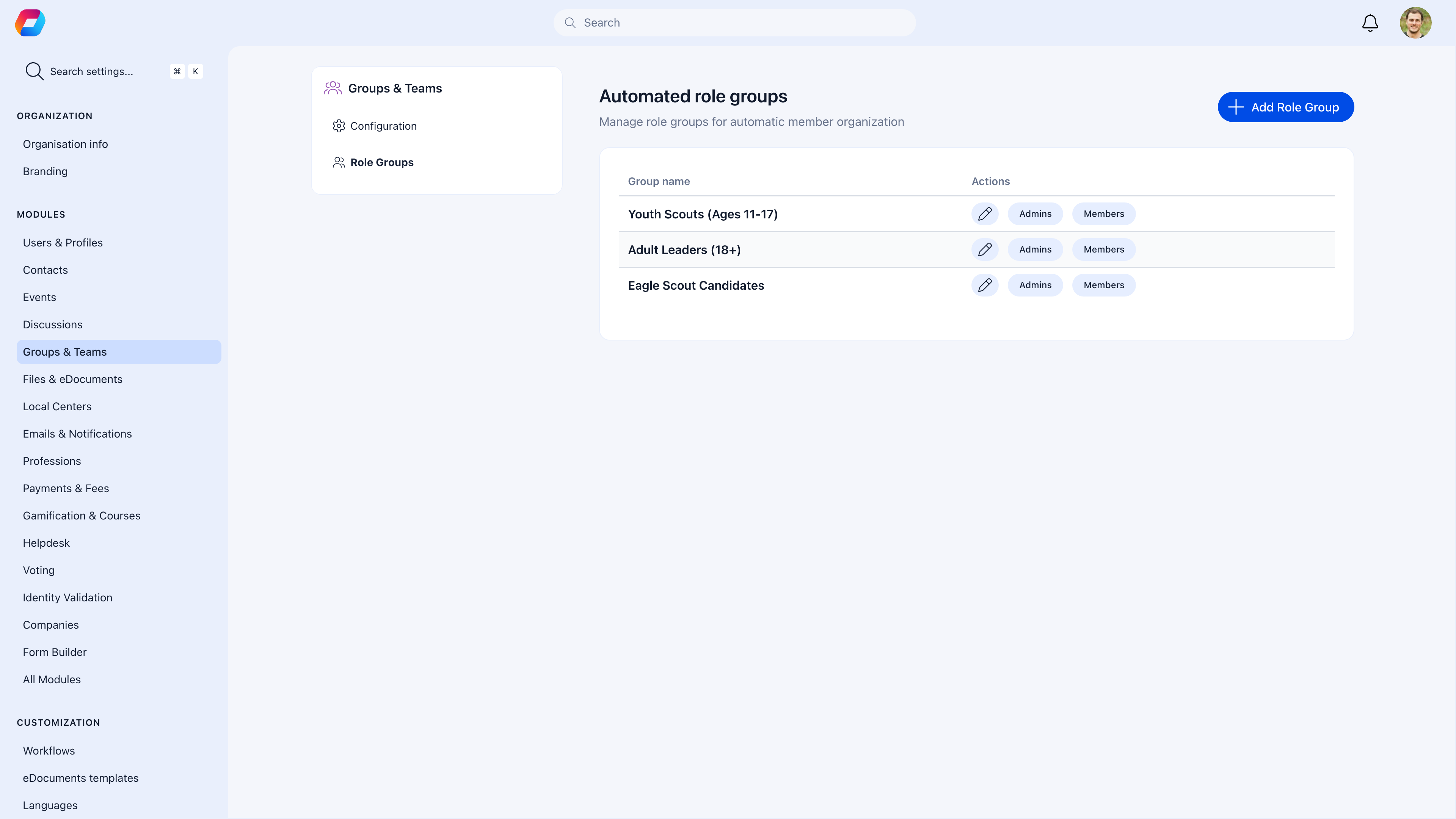 ***
## Do I need Role Groups?
| Your situation | Recommendation |
| ------------------------------------------------------------ | ------------------------------------------------------------------- |
| You want a space for all Leaders to coordinate | Yes — create a Role Group with criteria "User Type = Leader" |
| You need age-specific content (youth program, seniors group) | Yes — create a Role Group with an age range |
| You want to reach all members of a specific profession | Yes — criteria based on a custom field |
| You need a project team with hand-picked members | No — use a [Private Group](/platform/groups/private-groups) instead |
| You want to send announcements to everyone | No — use the [Main Group](/platform/groups/main-group) |
***
## How Role Groups work
```
You define criteria: User Type = "Leader"
↓
System scans all members and adds matches
↓
Maria gets promoted to Leader → automatically added
↓
Tom steps down from Leader → automatically removed
```
There is no manual membership management. The system keeps the group in sync with your member data. When someone's profile changes — they get a new user type, turn 18, update a custom field — their Role Group memberships adjust automatically.
***
## Enable Role Groups
**Settings** → **Groups** → **Module Settings** → toggle **Role Groups** on.
***
## Creating a Role Group
**Settings** → **Groups** → **Role Groups** → **Create Role Group**
Give it a clear name that reflects the membership: "All Leaders", "Youth Members (13-17)", "Board of Directors".
Select the criteria that determines membership. You can combine multiple criteria.
Choose which features the group needs: Discussions, Events, Files, Issues.
Configure who can post, create events, and upload files.
The system immediately populates the group with all matching members.
***
## Criteria types
You can base Role Groups on any of these member attributes:
| Criteria | Example groups |
| ----------------- | --------------------------------------------------------------------------------------- |
| **User Type** | "All Leaders", "All Volunteers", "Staff Members" |
| **Age range** | "Youth (13-17)", "Young Adults (18-30)", "Seniors (60+)" |
| **Gender** | "Women's Network", "Men's Group" |
| **Custom fields** | "Certification Level = Advanced", "Department = Engineering", "Years of Membership > 5" |
### Combining criteria
You can combine multiple criteria for more specific groups:
* User Type = "Leader" **AND** Age > 18 → "Adult Leaders"
* Custom Field "Department" = "Engineering" **AND** User Type = "Staff" → "Engineering Staff"
Be careful not to over-segment. A Role Group with criteria so specific that only 2-3 people qualify isn't useful — you'd be better off with a Private Group. Role Groups work best for meaningful segments with 10+ members.
***
## What happens inside a Role Group
Each Role Group is a full collaborative space, the same as any other group:
| Feature | Use it for |
| --------------- | ----------------------------------------------------------------------------------------------------------------------- |
| **Discussions** | Coordination between all members of this segment — training updates, best practice sharing, role-specific announcements |
| **Events** | Role-specific meetings, training sessions, professional development |
| **Files** | Training materials, handbooks, templates relevant to this role |
| **Issues** | Track tasks and action items for this segment |
***
## Practical examples
### Youth scouting organization
| Role Group | Criteria | Purpose |
| ------------- | ------------------------ | -------------------------------------------- |
| All Leaders | User Type = Leader | Leadership coordination, training resources |
| Youth Members | Age 10-17 | Age-appropriate activities and discussions |
| Young Adults | Age 18-25 | Transition support, young leader development |
| Board Members | User Type = Board Member | Board governance, meeting documents |
| Parents | User Type = Parent | Parent communication, volunteer coordination |
### Professional association
| Role Group | Criteria | Purpose |
| ----------------------- | ---------------------------------- | ----------------------------------------- |
| Certified Members | Custom Field "Certification" = Yes | CPD tracking, certification renewals |
| New Members (\< 1 year) | Custom Field "Join Year" = current | Onboarding resources, mentorship matching |
| Committee Chairs | User Type = Committee Chair | Cross-committee coordination |
***
## How membership stays current
* When you **change a member's user type**, their Role Group memberships update automatically
* When a member's **birthday** crosses an age threshold, age-based groups update
* When an admin **updates a custom field** value on a member's profile, relevant groups adjust
* The system syncs regularly — changes are reflected within minutes, not days
You cannot manually add or remove members from a Role Group. Membership is 100% criteria-driven. If someone needs to be in the group, adjust their profile to match the criteria. If they shouldn't be in the group, change the attribute that qualifies them.
***
## Permissions
Like all groups, Role Groups have posting controls:
| Setting | When to use |
| --------------------------------- | ------------------------------------------------------------------------------------------------------------ |
| **Only admins can post** — ON | When the group is primarily for admin-to-segment announcements (e.g., "All Leaders" gets leadership updates) |
| **Only admins can post** — OFF | When members should discuss among themselves (e.g., "Youth Members" has peer conversations) |
| **Only admins can create events** | When events should be coordinated centrally |
| **Only admins can upload files** | When documents should be curated by admins |
Assign a group administrator from within the matching segment so they understand the audience.
***
## Common scenarios
No. Change their user type to "Leader" and the system automatically adds them to any Role Group with criteria "User Type = Leader". They'll also be removed from groups they no longer qualify for (e.g., "Volunteers" if that was their old type).
Role Groups don't support manual additions. Two options: (1) Adjust the criteria to include those people — perhaps add a custom field value they share. (2) Use a Private Group instead if the membership doesn't map cleanly to profile data.
Either narrow the criteria (add an additional condition) or enable "Only admins can post" to make it an announcement channel. Direct discussion to smaller Private Groups for sub-topics.
No — that's what Local Centers already provide. Each Local Center is itself a group with discussions, events, and files. Role Groups are for cross-cutting segments that span all locations (e.g., "All Leaders" regardless of which center they belong to).
Archive the group. Content is preserved for reference but the group is hidden from the sidebar. If you're sure it's not needed, you can delete it entirely.
***
## Related
* [Groups Overview](/platform/groups) — All group types and when to use each
* [User Types](/platform/users/user-types) — The most common criteria for Role Groups
* [Custom Fields](/platform/users/custom-fields) — Create profile fields to use as Role Group criteria
* [Private Groups](/platform/groups/private-groups) — For manually controlled membership
***
## Do I need Role Groups?
| Your situation | Recommendation |
| ------------------------------------------------------------ | ------------------------------------------------------------------- |
| You want a space for all Leaders to coordinate | Yes — create a Role Group with criteria "User Type = Leader" |
| You need age-specific content (youth program, seniors group) | Yes — create a Role Group with an age range |
| You want to reach all members of a specific profession | Yes — criteria based on a custom field |
| You need a project team with hand-picked members | No — use a [Private Group](/platform/groups/private-groups) instead |
| You want to send announcements to everyone | No — use the [Main Group](/platform/groups/main-group) |
***
## How Role Groups work
```
You define criteria: User Type = "Leader"
↓
System scans all members and adds matches
↓
Maria gets promoted to Leader → automatically added
↓
Tom steps down from Leader → automatically removed
```
There is no manual membership management. The system keeps the group in sync with your member data. When someone's profile changes — they get a new user type, turn 18, update a custom field — their Role Group memberships adjust automatically.
***
## Enable Role Groups
**Settings** → **Groups** → **Module Settings** → toggle **Role Groups** on.
***
## Creating a Role Group
**Settings** → **Groups** → **Role Groups** → **Create Role Group**
Give it a clear name that reflects the membership: "All Leaders", "Youth Members (13-17)", "Board of Directors".
Select the criteria that determines membership. You can combine multiple criteria.
Choose which features the group needs: Discussions, Events, Files, Issues.
Configure who can post, create events, and upload files.
The system immediately populates the group with all matching members.
***
## Criteria types
You can base Role Groups on any of these member attributes:
| Criteria | Example groups |
| ----------------- | --------------------------------------------------------------------------------------- |
| **User Type** | "All Leaders", "All Volunteers", "Staff Members" |
| **Age range** | "Youth (13-17)", "Young Adults (18-30)", "Seniors (60+)" |
| **Gender** | "Women's Network", "Men's Group" |
| **Custom fields** | "Certification Level = Advanced", "Department = Engineering", "Years of Membership > 5" |
### Combining criteria
You can combine multiple criteria for more specific groups:
* User Type = "Leader" **AND** Age > 18 → "Adult Leaders"
* Custom Field "Department" = "Engineering" **AND** User Type = "Staff" → "Engineering Staff"
Be careful not to over-segment. A Role Group with criteria so specific that only 2-3 people qualify isn't useful — you'd be better off with a Private Group. Role Groups work best for meaningful segments with 10+ members.
***
## What happens inside a Role Group
Each Role Group is a full collaborative space, the same as any other group:
| Feature | Use it for |
| --------------- | ----------------------------------------------------------------------------------------------------------------------- |
| **Discussions** | Coordination between all members of this segment — training updates, best practice sharing, role-specific announcements |
| **Events** | Role-specific meetings, training sessions, professional development |
| **Files** | Training materials, handbooks, templates relevant to this role |
| **Issues** | Track tasks and action items for this segment |
***
## Practical examples
### Youth scouting organization
| Role Group | Criteria | Purpose |
| ------------- | ------------------------ | -------------------------------------------- |
| All Leaders | User Type = Leader | Leadership coordination, training resources |
| Youth Members | Age 10-17 | Age-appropriate activities and discussions |
| Young Adults | Age 18-25 | Transition support, young leader development |
| Board Members | User Type = Board Member | Board governance, meeting documents |
| Parents | User Type = Parent | Parent communication, volunteer coordination |
### Professional association
| Role Group | Criteria | Purpose |
| ----------------------- | ---------------------------------- | ----------------------------------------- |
| Certified Members | Custom Field "Certification" = Yes | CPD tracking, certification renewals |
| New Members (\< 1 year) | Custom Field "Join Year" = current | Onboarding resources, mentorship matching |
| Committee Chairs | User Type = Committee Chair | Cross-committee coordination |
***
## How membership stays current
* When you **change a member's user type**, their Role Group memberships update automatically
* When a member's **birthday** crosses an age threshold, age-based groups update
* When an admin **updates a custom field** value on a member's profile, relevant groups adjust
* The system syncs regularly — changes are reflected within minutes, not days
You cannot manually add or remove members from a Role Group. Membership is 100% criteria-driven. If someone needs to be in the group, adjust their profile to match the criteria. If they shouldn't be in the group, change the attribute that qualifies them.
***
## Permissions
Like all groups, Role Groups have posting controls:
| Setting | When to use |
| --------------------------------- | ------------------------------------------------------------------------------------------------------------ |
| **Only admins can post** — ON | When the group is primarily for admin-to-segment announcements (e.g., "All Leaders" gets leadership updates) |
| **Only admins can post** — OFF | When members should discuss among themselves (e.g., "Youth Members" has peer conversations) |
| **Only admins can create events** | When events should be coordinated centrally |
| **Only admins can upload files** | When documents should be curated by admins |
Assign a group administrator from within the matching segment so they understand the audience.
***
## Common scenarios
No. Change their user type to "Leader" and the system automatically adds them to any Role Group with criteria "User Type = Leader". They'll also be removed from groups they no longer qualify for (e.g., "Volunteers" if that was their old type).
Role Groups don't support manual additions. Two options: (1) Adjust the criteria to include those people — perhaps add a custom field value they share. (2) Use a Private Group instead if the membership doesn't map cleanly to profile data.
Either narrow the criteria (add an additional condition) or enable "Only admins can post" to make it an announcement channel. Direct discussion to smaller Private Groups for sub-topics.
No — that's what Local Centers already provide. Each Local Center is itself a group with discussions, events, and files. Role Groups are for cross-cutting segments that span all locations (e.g., "All Leaders" regardless of which center they belong to).
Archive the group. Content is preserved for reference but the group is hidden from the sidebar. If you're sure it's not needed, you can delete it entirely.
***
## Related
* [Groups Overview](/platform/groups) — All group types and when to use each
* [User Types](/platform/users/user-types) — The most common criteria for Role Groups
* [Custom Fields](/platform/users/custom-fields) — Create profile fields to use as Role Group criteria
* [Private Groups](/platform/groups/private-groups) — For manually controlled membership