> ## Documentation Index
> Fetch the complete documentation index at: https://orgo.space/docs/llms.txt
> Use this file to discover all available pages before exploring further.
# Member Transfers
> Move a member from one chapter to another with a request, a reason, and an approval by the receiving chapter
**Built for** organizations where members relocate and the receiving branch expects a say before someone lands on their roll.
**Replaces** the email thread between two branch secretaries, and the silent database edit that leaves neither side with a record.
A transfer request moves a member's primary chapter. Someone raises it with a written reason, the receiving chapter approves or denies it, and Orgo keeps the whole exchange: who asked, who decided, when, and why.
 ***
## Before you start
| Requirement | Where |
| ----------------------------------------------------------------- | --------------------------------------------------------------------------- |
| **Enable Local Centers Module** switched on | **Settings** → **Modules** → **Groups & Teams** → **Local Centers** |
| **Local Center Request Notifications** switched on for the emails | **Settings** → **Modules** → **Emails & Notifications** → **System Emails** |
| `HR_LOCAL` to see the requests list and to decide on a request | Scoped to the chapter concerned |
***
## Raising a request
Two **Request local transfer** buttons lead to the same form:
* On a member's profile, in the **Permissions** panel. This is the admin route, and it opens the form as a panel over the profile.
* On the support page, for members who are not part of the support team. This requires the Support module to be active.
The form itself needs nothing beyond a signed-in session, so members without a support page can be sent to it directly.
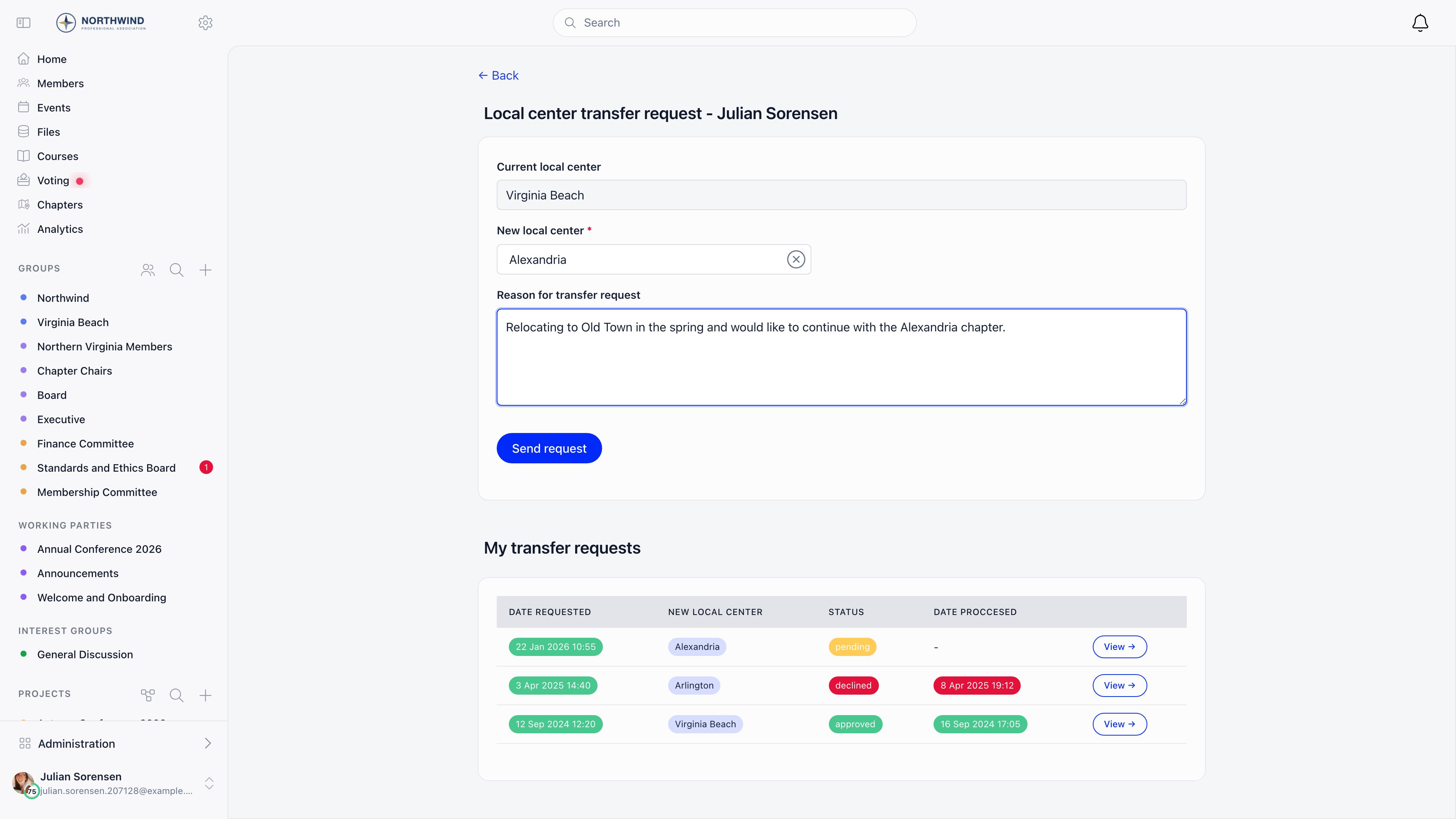
The **Current local center** field is filled in and locked. When an admin raises the request, the member's name is shown above it, also locked.
**New local center** is a searchable chapter selector and is required.
**Reason for transfer request** is a required free text field. It is shown verbatim to whoever decides.
The request is created with status **pending** and stamped with the current chapter and the time.
Below the form, the requester sees **My transfer requests**: date requested, destination chapter, status, date processed, and a link into each one.
***
## Before you start
| Requirement | Where |
| ----------------------------------------------------------------- | --------------------------------------------------------------------------- |
| **Enable Local Centers Module** switched on | **Settings** → **Modules** → **Groups & Teams** → **Local Centers** |
| **Local Center Request Notifications** switched on for the emails | **Settings** → **Modules** → **Emails & Notifications** → **System Emails** |
| `HR_LOCAL` to see the requests list and to decide on a request | Scoped to the chapter concerned |
***
## Raising a request
Two **Request local transfer** buttons lead to the same form:
* On a member's profile, in the **Permissions** panel. This is the admin route, and it opens the form as a panel over the profile.
* On the support page, for members who are not part of the support team. This requires the Support module to be active.
The form itself needs nothing beyond a signed-in session, so members without a support page can be sent to it directly.
The **Current local center** field is filled in and locked. When an admin raises the request, the member's name is shown above it, also locked.
**New local center** is a searchable chapter selector and is required.
**Reason for transfer request** is a required free text field. It is shown verbatim to whoever decides.
The request is created with status **pending** and stamped with the current chapter and the time.
Below the form, the requester sees **My transfer requests**: date requested, destination chapter, status, date processed, and a link into each one.
 ### Who may raise one for someone else
| Requester | Allowed |
| -------------------------- | ---------------------------------------------------------- |
| The member, for themselves | Always |
| `ADMIN_TENANT` | For any member in the organization |
| Anyone else | Only with `HR_LOCAL` over the member's **current** chapter |
Four rules are checked before the request is accepted:
* A destination chapter must be selected.
* The member and the destination chapter must both belong to your organization.
* The destination cannot be the member's current chapter.
* The member cannot already have an open request. Decide the existing one first.
Once the request is saved, every organization admin with a valid email address is notified, except the member themselves.
***
## Deciding a request
Open the request from the transfer requests list. The detail panel shows status, date requested, member, requester, both chapters, and the reason.
**Approving requires `HR_LOCAL` over the destination chapter**, not the source. The receiving chapter is the one that decides, so a source-chapter admin can raise a request but cannot wave it through.
* **approve** applies immediately.
* **Deny** first reveals a **Deny reason** box, which must be filled in, then **Confirm deny** applies it.
A request that has already been approved or declined cannot be decided again.
### What actually moves
On approval Orgo does exactly three things:
1. Sets the member's primary chapter to the destination.
2. Ends the member's open role assignment for their member type, stamping it to the chapter they are leaving so the history stays correct.
3. Creates a new open role assignment of the same member type in the destination chapter.
It also records the approver and the timestamp, and emails the member.
Nothing else follows the member. Discussions they wrote, events they attended, files they uploaded, fee payments, invoices, and any additional roles or group memberships all stay attached to where they were created. Treat a transfer as a change of home chapter, not as a data migration.
On denial, the member stays where they are. Orgo records who declined it, when, and the deny reason, and emails the member with that reason included.
***
## The transfer requests list
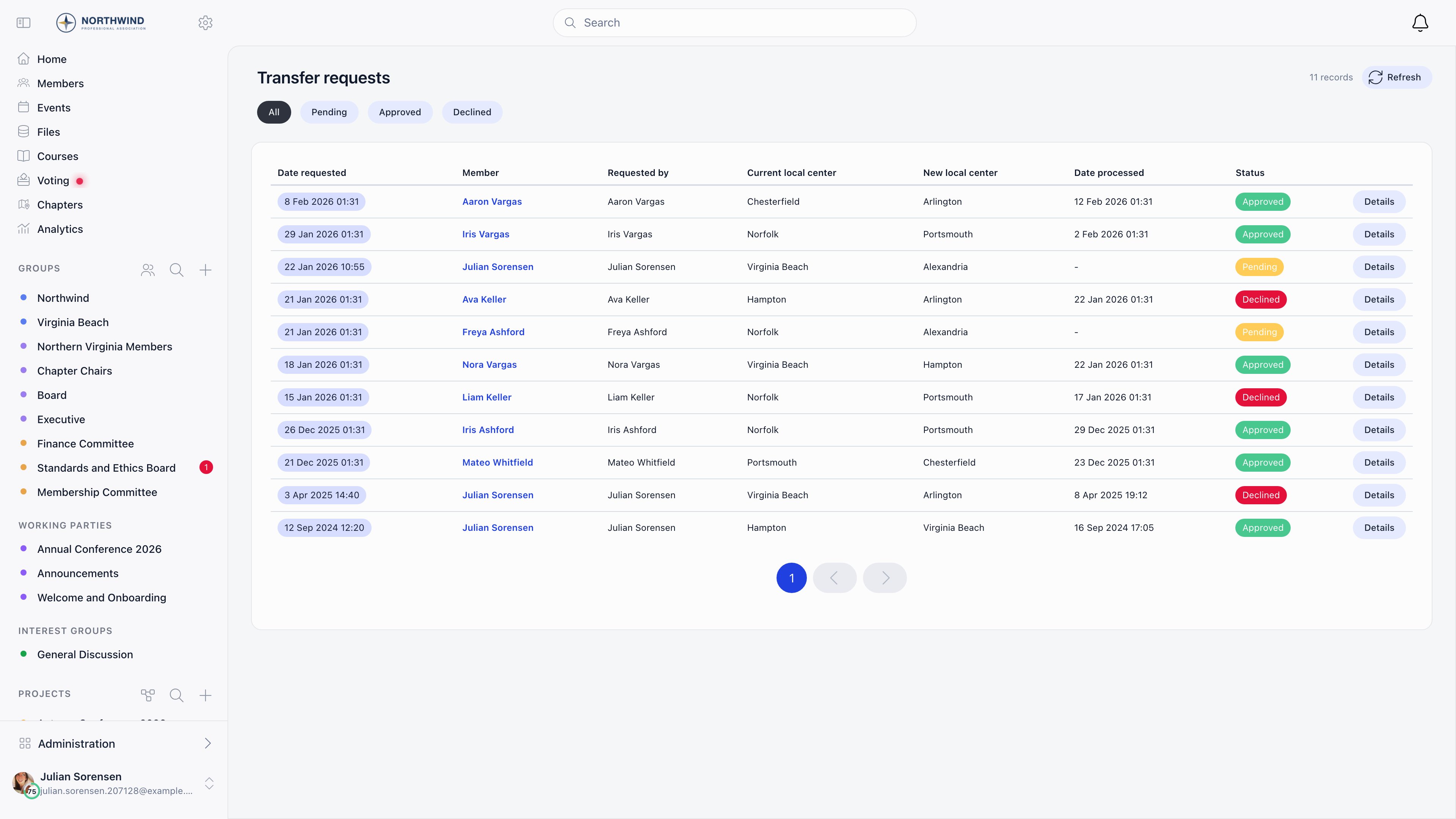
Reachable with `HR_LOCAL`; anyone without it is bounced to the dashboard. The list has no menu entry of its own, so bookmark it. Filter buttons across the top: **All**, **Pending**, **Approved**, **Declined**. Thirty rows per page, sorted newest first, with **Date requested** and **Status** sortable.
| Column | Shows |
| ------------------------ | ------------------------------------------------- |
| **Date requested** | When the request was raised |
| **member** | Who is being moved |
| **Requested by** | Who raised it |
| **Current local center** | The chapter being left |
| **New local center** | The destination |
| **Date processed** | When it was approved or declined, or a dash |
| **Status** | Pending (amber), Approved (green), Declined (red) |
What you see is scoped to what you administer:
| Your permission | Rows shown |
| ----------------- | -------------------------------------------------------------------------------------------------- |
| `HR_TENANT` | Every request in the organization |
| `HR_PARENT_LOCAL` | Requests for your anchor chapter and every chapter beneath it, at any depth, plus your own chapter |
| `HR_LOCAL` | Requests for your own chapter |
Your anchor is your own chapter when it is flagged **It's a parent chapter** or has no parent, and otherwise the chapter directly above it. See [What a parent-scope permission reaches](/docs/platform/groups/local-groups#what-a-parent-scope-permission-reaches). Everybody also sees their own requests and the ones they raised for somebody else, whatever their permissions.
**details** opens the request in a panel with the approve and deny actions, and the panel can be expanded to a full page.
***
## Transfer request or direct reassignment?
There are two ways to change someone's chapter, and they are not equivalent.
| | Transfer request | Direct reassignment |
| -------------------------- | ---------------------------------------------------------------- | -------------------------------------------------------- |
| Where | The transfer form or a member's **Permissions** panel | The chapter selector on a member's **Permissions** panel |
| Who | The member, `ADMIN_TENANT`, or `HR_LOCAL` on the current chapter | `HR_TENANT` |
| Approval | Required, by the destination chapter | None |
| Reason recorded | Required | None |
| Role assignments rewritten | Yes, closed at the old chapter and reopened at the new one | No |
| Audit trail | Full, kept indefinitely | The change alone |
Use direct reassignment for corrections (someone was filed under the wrong chapter on import). Use a transfer request whenever the move is a real one that the receiving chapter should know about.
***
## Common questions
No. Only the destination chapter decides. The source-side admin can raise the request, but approval sits with `HR_LOCAL` on the receiving chapter.
No. A second request is rejected while one is still undecided. Approve or deny the open one first.
No. Both the member and the destination chapter must be in the same organization, and the request is refused otherwise.
Check **Local Center Request Notifications** under **Settings** → **Modules** → **Emails & Notifications** → **System Emails**, and check that the member has a valid email address on their profile. Orgo skips the send rather than failing the transfer when either is missing, so the transfer itself will still have gone through.
They stay as they are. Fee records, payments, and invoices are not rewritten by a transfer, so a debt raised at the old chapter remains recorded against the old chapter. Settle or write off outstanding items before approving if your accounting requires it.
Not outright. A chapter named in any transfer request, as either side, is closed rather than deleted, keeping the request history readable.
***
## Related
* [Local Centers](/docs/platform/groups/local-groups) - the chapters a member moves between
* [Units](/docs/platform/groups/units) - team assignments inside a chapter
* [Permissions](/docs/platform/permissions) - how `HR_LOCAL` and `HR_PARENT_LOCAL` are evaluated
* [Groups Overview](/docs/platform/groups) - all group types and when to use each
### Who may raise one for someone else
| Requester | Allowed |
| -------------------------- | ---------------------------------------------------------- |
| The member, for themselves | Always |
| `ADMIN_TENANT` | For any member in the organization |
| Anyone else | Only with `HR_LOCAL` over the member's **current** chapter |
Four rules are checked before the request is accepted:
* A destination chapter must be selected.
* The member and the destination chapter must both belong to your organization.
* The destination cannot be the member's current chapter.
* The member cannot already have an open request. Decide the existing one first.
Once the request is saved, every organization admin with a valid email address is notified, except the member themselves.
***
## Deciding a request
Open the request from the transfer requests list. The detail panel shows status, date requested, member, requester, both chapters, and the reason.
**Approving requires `HR_LOCAL` over the destination chapter**, not the source. The receiving chapter is the one that decides, so a source-chapter admin can raise a request but cannot wave it through.
* **approve** applies immediately.
* **Deny** first reveals a **Deny reason** box, which must be filled in, then **Confirm deny** applies it.
A request that has already been approved or declined cannot be decided again.
### What actually moves
On approval Orgo does exactly three things:
1. Sets the member's primary chapter to the destination.
2. Ends the member's open role assignment for their member type, stamping it to the chapter they are leaving so the history stays correct.
3. Creates a new open role assignment of the same member type in the destination chapter.
It also records the approver and the timestamp, and emails the member.
Nothing else follows the member. Discussions they wrote, events they attended, files they uploaded, fee payments, invoices, and any additional roles or group memberships all stay attached to where they were created. Treat a transfer as a change of home chapter, not as a data migration.
On denial, the member stays where they are. Orgo records who declined it, when, and the deny reason, and emails the member with that reason included.
***
## The transfer requests list
Reachable with `HR_LOCAL`; anyone without it is bounced to the dashboard. The list has no menu entry of its own, so bookmark it. Filter buttons across the top: **All**, **Pending**, **Approved**, **Declined**. Thirty rows per page, sorted newest first, with **Date requested** and **Status** sortable.
| Column | Shows |
| ------------------------ | ------------------------------------------------- |
| **Date requested** | When the request was raised |
| **member** | Who is being moved |
| **Requested by** | Who raised it |
| **Current local center** | The chapter being left |
| **New local center** | The destination |
| **Date processed** | When it was approved or declined, or a dash |
| **Status** | Pending (amber), Approved (green), Declined (red) |
What you see is scoped to what you administer:
| Your permission | Rows shown |
| ----------------- | -------------------------------------------------------------------------------------------------- |
| `HR_TENANT` | Every request in the organization |
| `HR_PARENT_LOCAL` | Requests for your anchor chapter and every chapter beneath it, at any depth, plus your own chapter |
| `HR_LOCAL` | Requests for your own chapter |
Your anchor is your own chapter when it is flagged **It's a parent chapter** or has no parent, and otherwise the chapter directly above it. See [What a parent-scope permission reaches](/docs/platform/groups/local-groups#what-a-parent-scope-permission-reaches). Everybody also sees their own requests and the ones they raised for somebody else, whatever their permissions.
**details** opens the request in a panel with the approve and deny actions, and the panel can be expanded to a full page.
***
## Transfer request or direct reassignment?
There are two ways to change someone's chapter, and they are not equivalent.
| | Transfer request | Direct reassignment |
| -------------------------- | ---------------------------------------------------------------- | -------------------------------------------------------- |
| Where | The transfer form or a member's **Permissions** panel | The chapter selector on a member's **Permissions** panel |
| Who | The member, `ADMIN_TENANT`, or `HR_LOCAL` on the current chapter | `HR_TENANT` |
| Approval | Required, by the destination chapter | None |
| Reason recorded | Required | None |
| Role assignments rewritten | Yes, closed at the old chapter and reopened at the new one | No |
| Audit trail | Full, kept indefinitely | The change alone |
Use direct reassignment for corrections (someone was filed under the wrong chapter on import). Use a transfer request whenever the move is a real one that the receiving chapter should know about.
***
## Common questions
No. Only the destination chapter decides. The source-side admin can raise the request, but approval sits with `HR_LOCAL` on the receiving chapter.
No. A second request is rejected while one is still undecided. Approve or deny the open one first.
No. Both the member and the destination chapter must be in the same organization, and the request is refused otherwise.
Check **Local Center Request Notifications** under **Settings** → **Modules** → **Emails & Notifications** → **System Emails**, and check that the member has a valid email address on their profile. Orgo skips the send rather than failing the transfer when either is missing, so the transfer itself will still have gone through.
They stay as they are. Fee records, payments, and invoices are not rewritten by a transfer, so a debt raised at the old chapter remains recorded against the old chapter. Settle or write off outstanding items before approving if your accounting requires it.
Not outright. A chapter named in any transfer request, as either side, is closed rather than deleted, keeping the request history readable.
***
## Related
* [Local Centers](/docs/platform/groups/local-groups) - the chapters a member moves between
* [Units](/docs/platform/groups/units) - team assignments inside a chapter
* [Permissions](/docs/platform/permissions) - how `HR_LOCAL` and `HR_PARENT_LOCAL` are evaluated
* [Groups Overview](/docs/platform/groups) - all group types and when to use each