> ## Documentation Index
> Fetch the complete documentation index at: https://orgo.space/docs/llms.txt
> Use this file to discover all available pages before exploring further.
# Integrations
> Connect Orgo with Stripe, Google, HubSpot, n8n, and other tools your organization uses
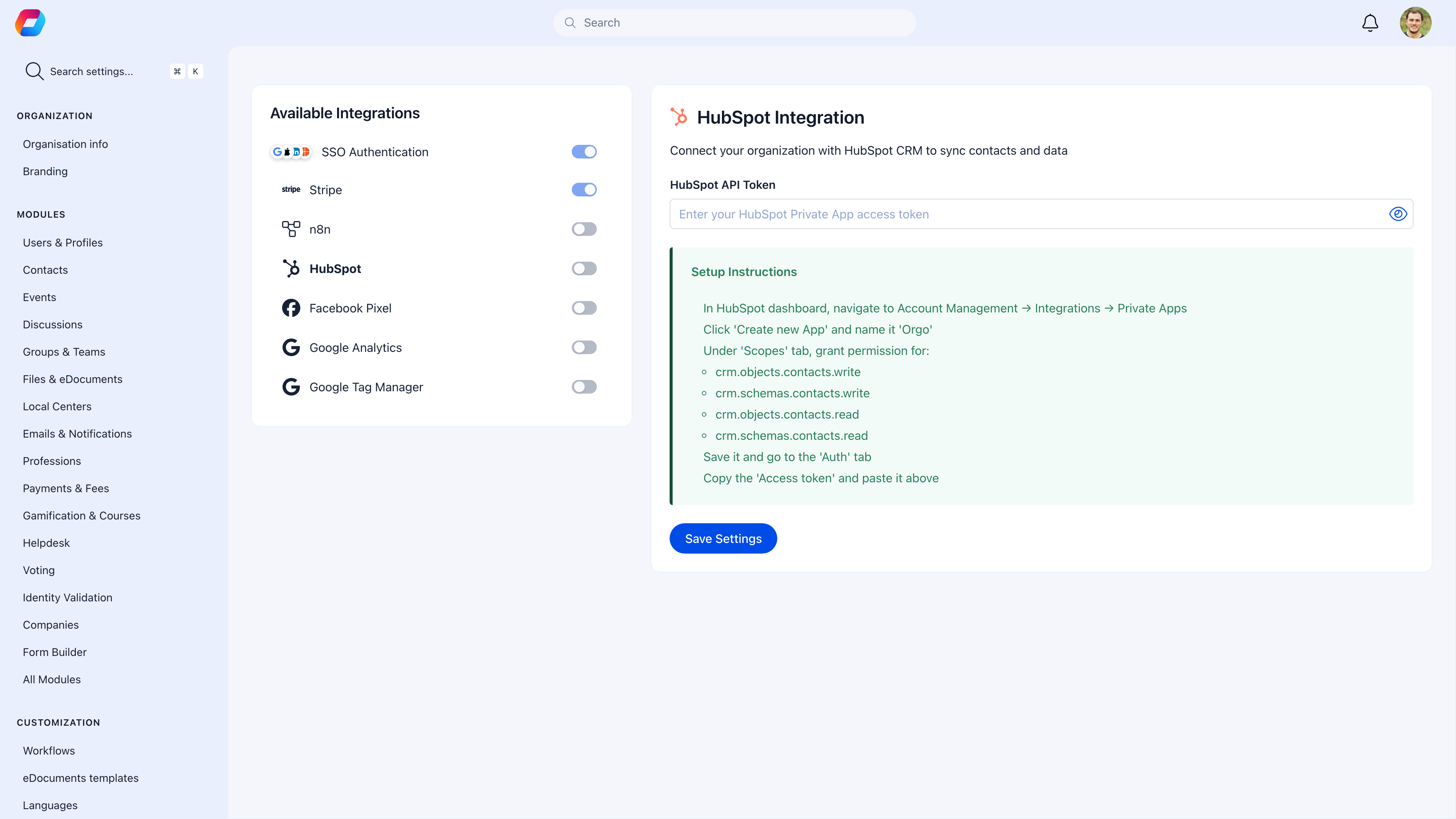
Orgo connects with third-party services so you don't have to switch between tools. Process payments with Stripe, let members log in with Google, sync contacts to HubSpot, automate workflows with n8n, and track analytics.
 ***
## Available integrations
Let members log in with Google, Facebook, Apple, LinkedIn, or Microsoft
Process payments, subscriptions, and donations
Automate workflows between Orgo and other apps
Sync members to your CRM
Track conversions for advertising
Understand how members use your platform
Manage all tracking scripts in one place
Send real-time data to any external system
***
## SSO Authentication
Let members sign in with accounts they already have — fewer passwords, faster login.
### Supported providers
| Provider | Best for |
| ------------- | -------------------------------------------- |
| **Google** | Organizations using Google Workspace |
| **Microsoft** | Organizations using Microsoft 365 / Azure AD |
| **Facebook** | Consumer-facing communities |
| **Apple** | iOS-heavy member bases |
| **LinkedIn** | Professional associations |
### Setup
Go to the provider's developer console (Google Cloud Console, Azure Portal, etc.) and register a new application.
Copy the Client ID and Client Secret.
Go to **Settings** → **Authentication** → **SSO**. Enter the credentials.
Log out and try signing in with the new provider.
You can optionally restrict SSO to specific email domains — e.g., only `@yourcompany.com` addresses can use Google SSO.
***
## Stripe
Stripe handles all payments in Orgo — membership fees, event tickets, donations, and product sales.
For detailed setup instructions, see [Stripe Integration](/platform/fees/stripe-integration).
***
## n8n (Workflow Automation)
n8n lets you build automated workflows between Orgo and hundreds of other apps — no coding required.
### What you can automate
| Trigger | Action |
| -------------------- | ------------------------------------------- |
| New member registers | Add to Mailchimp list, notify Slack channel |
| Payment completed | Update spreadsheet, send custom receipt |
| Event created | Post to social media, notify team |
| Discussion posted | Send digest to email |
### Setup
Use [n8n cloud](https://n8n.io) or self-host an instance.
Go to **Settings** → **Developers** to create API credentials.
Add your Orgo API credentials to n8n.
Use the visual editor to connect triggers and actions.
***
## HubSpot CRM
Sync member data to HubSpot for advanced CRM, marketing automation, and reporting.
| Feature | What syncs |
| -------------- | ---------------------------------- |
| **Contacts** | Members → HubSpot contacts |
| **Properties** | Custom fields → HubSpot properties |
| **Lists** | Group memberships → HubSpot lists |
| **Activities** | Engagement data → HubSpot timeline |
### Setup
1. Register an app in the HubSpot developer portal
2. Generate a private app access token
3. Go to **Settings** → **Integrations** → **HubSpot**
4. Enter the token and configure field mapping
***
## Analytics & Tracking
### Google Analytics
Track how members use your platform — page views, sessions, popular features.
**Setup:** Get your GA4 Measurement ID (`G-XXXXXXX`) from Google Analytics → go to **Settings** → **Integrations** → **Google Analytics** → paste the ID.
### Google Tag Manager
Manage all tracking scripts (Analytics, Pixel, custom scripts) from one place without touching Orgo settings again.
**Setup:** Get your Container ID (`GTM-XXXXXXX`) from Google Tag Manager → go to **Settings** → **Integrations** → **Google Tag Manager** → paste the ID.
### Facebook Pixel
Track conversions from Facebook/Instagram ads — registrations, purchases, page views.
**Setup:** Get your Pixel ID from Facebook Events Manager → go to **Settings** → **Integrations** → **Facebook Pixel** → paste the ID.
Tracked events: PageView, Lead (registration started), CompleteRegistration, Purchase (payment completed).
***
## Webhooks
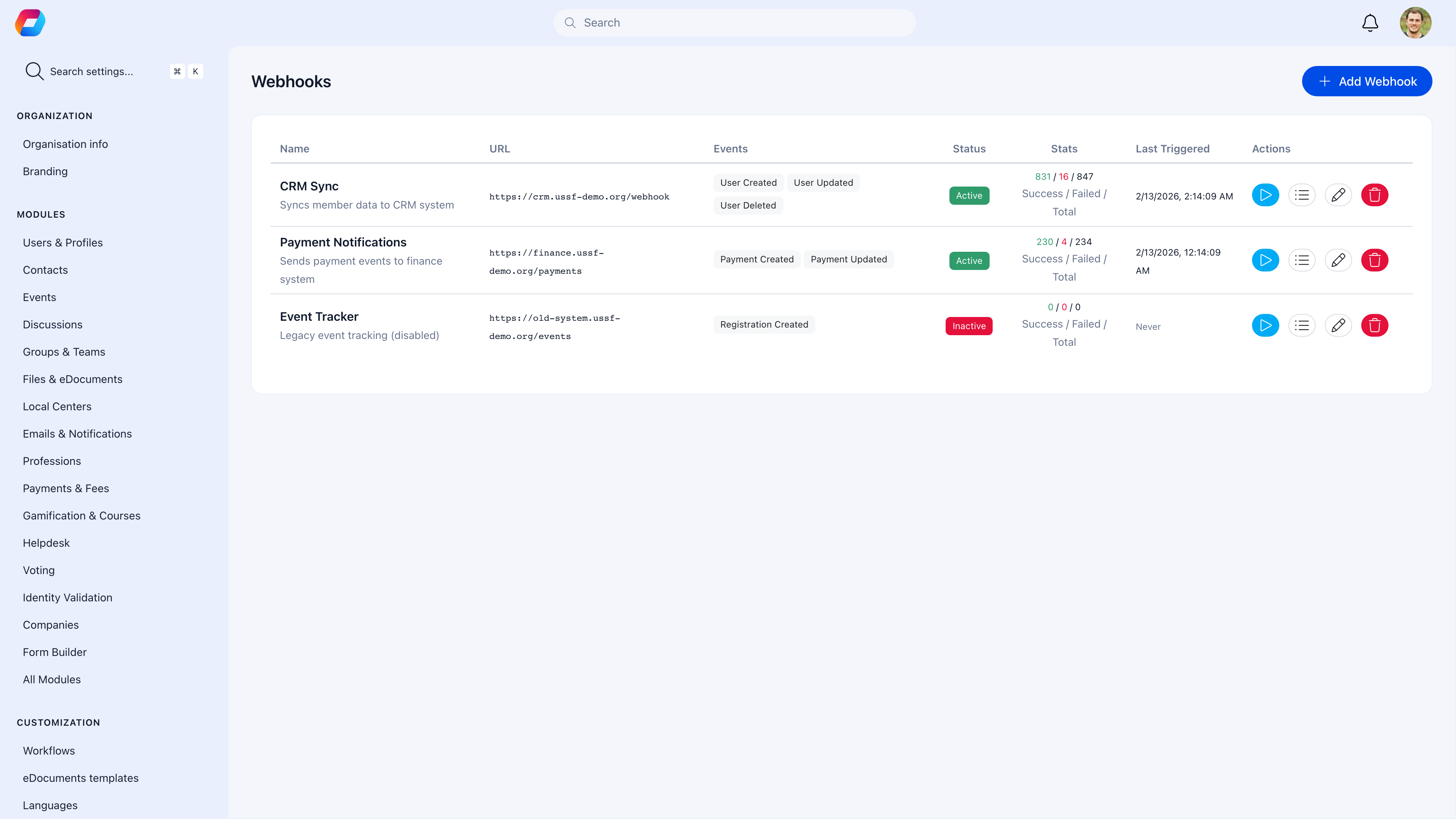
Send real-time event data to any external system via HTTP POST.
***
## Available integrations
Let members log in with Google, Facebook, Apple, LinkedIn, or Microsoft
Process payments, subscriptions, and donations
Automate workflows between Orgo and other apps
Sync members to your CRM
Track conversions for advertising
Understand how members use your platform
Manage all tracking scripts in one place
Send real-time data to any external system
***
## SSO Authentication
Let members sign in with accounts they already have — fewer passwords, faster login.
### Supported providers
| Provider | Best for |
| ------------- | -------------------------------------------- |
| **Google** | Organizations using Google Workspace |
| **Microsoft** | Organizations using Microsoft 365 / Azure AD |
| **Facebook** | Consumer-facing communities |
| **Apple** | iOS-heavy member bases |
| **LinkedIn** | Professional associations |
### Setup
Go to the provider's developer console (Google Cloud Console, Azure Portal, etc.) and register a new application.
Copy the Client ID and Client Secret.
Go to **Settings** → **Authentication** → **SSO**. Enter the credentials.
Log out and try signing in with the new provider.
You can optionally restrict SSO to specific email domains — e.g., only `@yourcompany.com` addresses can use Google SSO.
***
## Stripe
Stripe handles all payments in Orgo — membership fees, event tickets, donations, and product sales.
For detailed setup instructions, see [Stripe Integration](/platform/fees/stripe-integration).
***
## n8n (Workflow Automation)
n8n lets you build automated workflows between Orgo and hundreds of other apps — no coding required.
### What you can automate
| Trigger | Action |
| -------------------- | ------------------------------------------- |
| New member registers | Add to Mailchimp list, notify Slack channel |
| Payment completed | Update spreadsheet, send custom receipt |
| Event created | Post to social media, notify team |
| Discussion posted | Send digest to email |
### Setup
Use [n8n cloud](https://n8n.io) or self-host an instance.
Go to **Settings** → **Developers** to create API credentials.
Add your Orgo API credentials to n8n.
Use the visual editor to connect triggers and actions.
***
## HubSpot CRM
Sync member data to HubSpot for advanced CRM, marketing automation, and reporting.
| Feature | What syncs |
| -------------- | ---------------------------------- |
| **Contacts** | Members → HubSpot contacts |
| **Properties** | Custom fields → HubSpot properties |
| **Lists** | Group memberships → HubSpot lists |
| **Activities** | Engagement data → HubSpot timeline |
### Setup
1. Register an app in the HubSpot developer portal
2. Generate a private app access token
3. Go to **Settings** → **Integrations** → **HubSpot**
4. Enter the token and configure field mapping
***
## Analytics & Tracking
### Google Analytics
Track how members use your platform — page views, sessions, popular features.
**Setup:** Get your GA4 Measurement ID (`G-XXXXXXX`) from Google Analytics → go to **Settings** → **Integrations** → **Google Analytics** → paste the ID.
### Google Tag Manager
Manage all tracking scripts (Analytics, Pixel, custom scripts) from one place without touching Orgo settings again.
**Setup:** Get your Container ID (`GTM-XXXXXXX`) from Google Tag Manager → go to **Settings** → **Integrations** → **Google Tag Manager** → paste the ID.
### Facebook Pixel
Track conversions from Facebook/Instagram ads — registrations, purchases, page views.
**Setup:** Get your Pixel ID from Facebook Events Manager → go to **Settings** → **Integrations** → **Facebook Pixel** → paste the ID.
Tracked events: PageView, Lead (registration started), CompleteRegistration, Purchase (payment completed).
***
## Webhooks
Send real-time event data to any external system via HTTP POST.
 ### Available events
| Event | Fires when |
| ------------------- | ----------------------------- |
| `user.created` | A new member registers |
| `user.updated` | A member's profile is updated |
| `payment.completed` | A payment succeeds |
| `event.created` | A new event is created |
### Setup
1. Go to **Settings** → **Developers** → **Webhooks**
2. Click **Add Webhook**
3. Enter your endpoint URL (must accept POST requests)
4. Select which events to subscribe to
5. Save
Your endpoint receives a JSON payload with event data whenever the subscribed event occurs.
***
## Common scenarios
If you already use Google Analytics, just add the Measurement ID. If you use multiple tracking tools (Analytics, Pixel, custom scripts), use Google Tag Manager to manage them all from one place.
Yes — enable as many as you want. Members choose which provider to use on the login screen.
Check that your endpoint URL is correct, publicly accessible, and accepts POST requests. Verify that the webhook is subscribed to the right events. Check your endpoint's logs for errors.
Use webhooks to send data to any system, or use n8n for more complex workflows. For custom integrations, see the [OAuth Server](/platform/oauth) for authentication and the API documentation for data access.
***
## Related
* [Stripe Integration](/platform/fees/stripe-integration) — Detailed payment setup
* [OAuth Server](/platform/oauth) — Use Orgo as an identity provider for your apps
* [Notifications](/platform/notifications) — Platform notification settings
### Available events
| Event | Fires when |
| ------------------- | ----------------------------- |
| `user.created` | A new member registers |
| `user.updated` | A member's profile is updated |
| `payment.completed` | A payment succeeds |
| `event.created` | A new event is created |
### Setup
1. Go to **Settings** → **Developers** → **Webhooks**
2. Click **Add Webhook**
3. Enter your endpoint URL (must accept POST requests)
4. Select which events to subscribe to
5. Save
Your endpoint receives a JSON payload with event data whenever the subscribed event occurs.
***
## Common scenarios
If you already use Google Analytics, just add the Measurement ID. If you use multiple tracking tools (Analytics, Pixel, custom scripts), use Google Tag Manager to manage them all from one place.
Yes — enable as many as you want. Members choose which provider to use on the login screen.
Check that your endpoint URL is correct, publicly accessible, and accepts POST requests. Verify that the webhook is subscribed to the right events. Check your endpoint's logs for errors.
Use webhooks to send data to any system, or use n8n for more complex workflows. For custom integrations, see the [OAuth Server](/platform/oauth) for authentication and the API documentation for data access.
***
## Related
* [Stripe Integration](/platform/fees/stripe-integration) — Detailed payment setup
* [OAuth Server](/platform/oauth) — Use Orgo as an identity provider for your apps
* [Notifications](/platform/notifications) — Platform notification settings