> ## Documentation Index
> Fetch the complete documentation index at: https://orgo.space/docs/llms.txt
> Use this file to discover all available pages before exploring further.
# Newsletter signup widgets
> Embed a subscribe form on your website and collect confirmed newsletter subscribers into Orgo
A newsletter widget is a subscribe form you style in Orgo and embed on your own
website. Someone who fills it in confirms by email and becomes a subscribed
contact, ready for the next [campaign](/docs/platform/newsletter).
**Built for** organizations whose public website lives outside Orgo but whose
mailing list should not.
**Replaces** a third-party signup form plus the CSV export that follows it.
***
## Creating a widget
**Administration** → **COMMUNICATION** → **Newsletter subscription**. Requires
`COMMUNICATION_TENANT` or `EVENT_TENANT`.
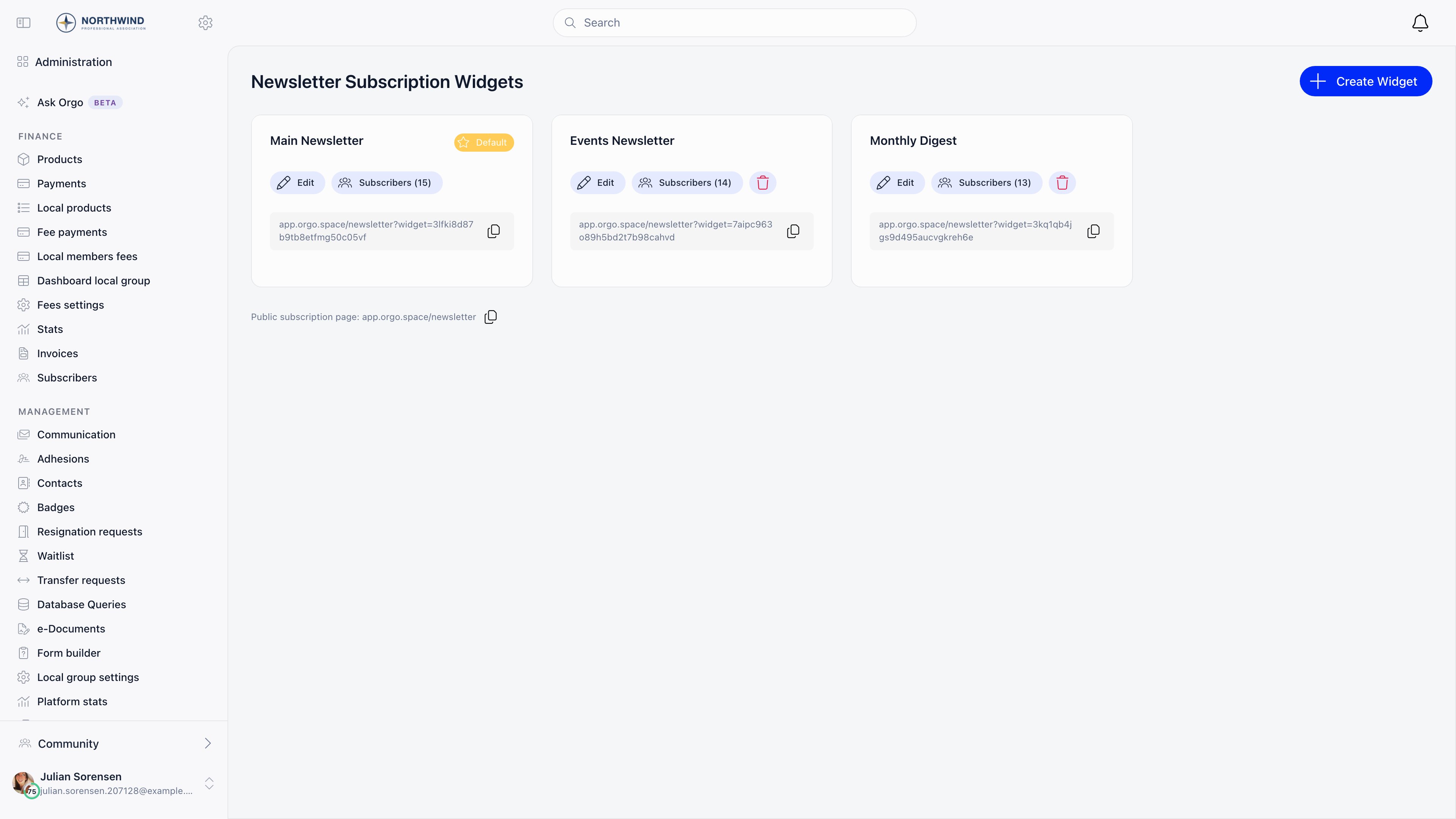
Press **Create Widget**, give it a name, and save. Styling options appear once
the widget exists. Each card in the list shows the widget's public URL, a
**Subscribers** button with the count, and **Edit**.
One widget is always the **Default**, marked with a star. It is the one served
when a page asks for your organization's widget without naming one, including
the subscribe box under a published campaign's public page. Use **Make default**
to move the star. You cannot delete the last remaining widget, and deleting the
default promotes another one automatically.
 ***
## What you can configure
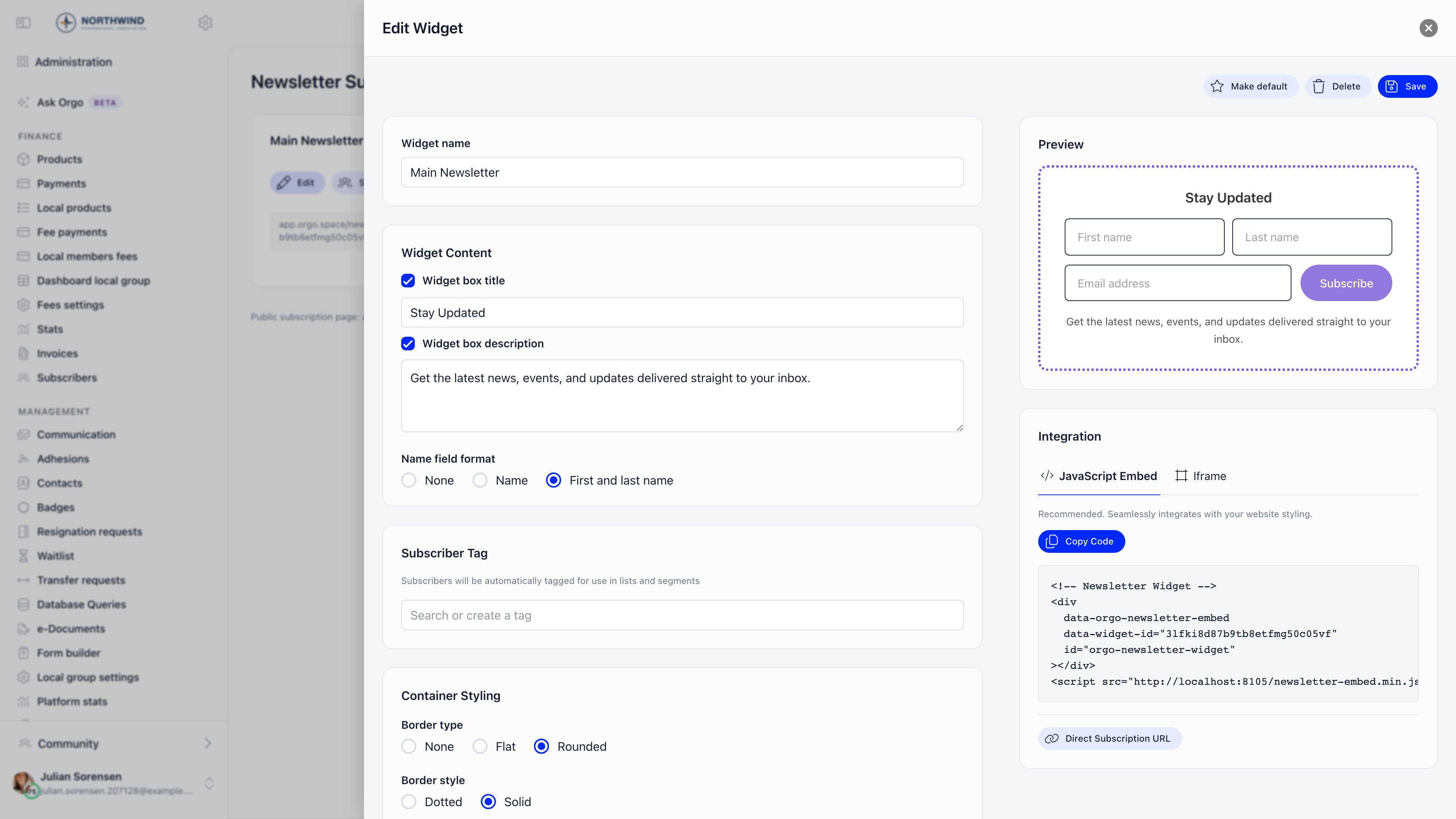
The editor is split into settings on the left and a live preview plus the embed
code on the right.
| Section | Settings |
| --------------------- | --------------------------------------------------------------------------------------------------------------------------------------------------------------------------------------- |
| **Widget Content** | **Widget box title** and **Widget box description**, each with a checkbox to hide it, and **Name field format**: None, a single full name field, or separate first and last name fields |
| **Subscriber Tag** | A [tag](/docs/platform/users/lists) applied automatically to everyone who subscribes through this widget, so you can build a list from it later |
| **Container Styling** | Border type (none, flat, radius), border style, width and colour, padding size, background and text colour, font size, element spacing |
| **Input Styling** | Field padding and corner radius |
| **Button Styling** | Corner style, background colour, text colour |
Only the email field is mandatory. Name fields appear only if you turn them on,
and then they are required in the form.
***
## What you can configure
The editor is split into settings on the left and a live preview plus the embed
code on the right.
| Section | Settings |
| --------------------- | --------------------------------------------------------------------------------------------------------------------------------------------------------------------------------------- |
| **Widget Content** | **Widget box title** and **Widget box description**, each with a checkbox to hide it, and **Name field format**: None, a single full name field, or separate first and last name fields |
| **Subscriber Tag** | A [tag](/docs/platform/users/lists) applied automatically to everyone who subscribes through this widget, so you can build a list from it later |
| **Container Styling** | Border type (none, flat, radius), border style, width and colour, padding size, background and text colour, font size, element spacing |
| **Input Styling** | Field padding and corner radius |
| **Button Styling** | Corner style, background colour, text colour |
Only the email field is mandatory. Name fields appear only if you turn them on,
and then they are required in the form.
 ***
## Putting it on your site
The **Integration** panel offers two snippets plus a plain link.
A `div` plus a script tag. The form renders inline in your page and inherits
the width of its container. Copy it with **Copy Code** and paste it where
the form should appear. The script host in the snippet is generated from the
address you are using Orgo at, so always copy it from your own organization
rather than retyping one from a screenshot.
A fixed-height `iframe`. Use it when the page cannot run third-party
JavaScript, or when you want full isolation from your site's CSS.
Every widget also has a hosted page you can simply link to, for example from
social media or a printed QR code. The organization's default widget is
served at `/newsletter` on your Orgo host.
Both snippets carry the widget's own identifier, so subscriptions are attributed
to the right widget and the right tag. Copy the code again after changing the
widget only if you switched widgets; styling changes apply to the live form
without re-pasting.
***
## What happens when someone subscribes
The address is validated. Submitting the same address twice within 5 minutes
is refused so a double click does not send two emails.
The form then shows "Please check your email for a confirmation message".
Nobody is subscribed at this point.
If the address already belongs to a member or a contact, that record is
switched to newsletter subscribed. Otherwise a new contact is created with
its source recorded as the newsletter. The widget's tag is applied, and the
subscription is recorded against the widget for the subscriber count.
This is a confirmed opt-in: an address that never clicks the link is never
subscribed and never appears in the subscriber list. If people report signing up
but not receiving campaigns, the confirmation email is the first thing to check.
**Subscribers** on a widget card lists who came in through it, newest first,
with a link to each member or contact record.
***
## Related
* [Newsletter](/docs/platform/newsletter) for sending to the subscribers you collect
* [Newsletter builder](/docs/platform/newsletter-builder) for designing the campaign
* [Contacts](/docs/platform/contacts) for what a subscribed contact record holds
* [User lists](/docs/platform/users/lists) for turning a tag into a reusable audience
***
## Putting it on your site
The **Integration** panel offers two snippets plus a plain link.
A `div` plus a script tag. The form renders inline in your page and inherits
the width of its container. Copy it with **Copy Code** and paste it where
the form should appear. The script host in the snippet is generated from the
address you are using Orgo at, so always copy it from your own organization
rather than retyping one from a screenshot.
A fixed-height `iframe`. Use it when the page cannot run third-party
JavaScript, or when you want full isolation from your site's CSS.
Every widget also has a hosted page you can simply link to, for example from
social media or a printed QR code. The organization's default widget is
served at `/newsletter` on your Orgo host.
Both snippets carry the widget's own identifier, so subscriptions are attributed
to the right widget and the right tag. Copy the code again after changing the
widget only if you switched widgets; styling changes apply to the live form
without re-pasting.
***
## What happens when someone subscribes
The address is validated. Submitting the same address twice within 5 minutes
is refused so a double click does not send two emails.
The form then shows "Please check your email for a confirmation message".
Nobody is subscribed at this point.
If the address already belongs to a member or a contact, that record is
switched to newsletter subscribed. Otherwise a new contact is created with
its source recorded as the newsletter. The widget's tag is applied, and the
subscription is recorded against the widget for the subscriber count.
This is a confirmed opt-in: an address that never clicks the link is never
subscribed and never appears in the subscriber list. If people report signing up
but not receiving campaigns, the confirmation email is the first thing to check.
**Subscribers** on a widget card lists who came in through it, newest first,
with a link to each member or contact record.
***
## Related
* [Newsletter](/docs/platform/newsletter) for sending to the subscribers you collect
* [Newsletter builder](/docs/platform/newsletter-builder) for designing the campaign
* [Contacts](/docs/platform/contacts) for what a subscribed contact record holds
* [User lists](/docs/platform/users/lists) for turning a tag into a reusable audience