> ## Documentation Index
> Fetch the complete documentation index at: https://orgo.space/docs/llms.txt
> Use this file to discover all available pages before exploring further.
# Organization Settings
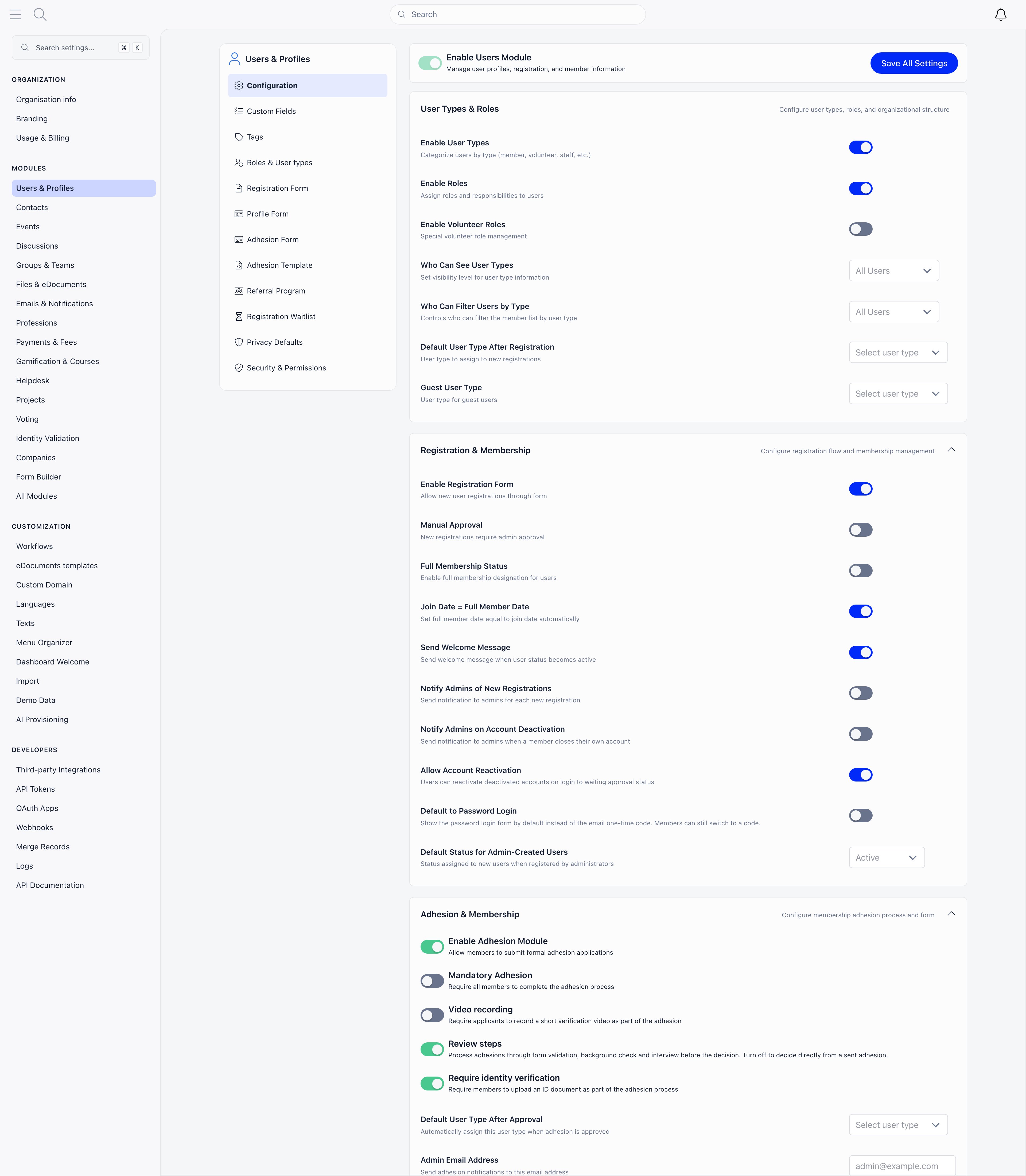
> The settings area: your organization identity, the modules you switch on, how the app is customized, and developer access.
Settings is where you define what your workspace is and what it does: your legal and contact identity, which features members can see, how the app is worded and laid out, and who gets programmatic access. This page is the map.
Open it from the cog icon in the top bar, or from your avatar menu, **Organisation Settings**.
 The cog icon and the menu entry both require **ADMIN\_TENANT**, and so does nearly every page inside. Two exceptions: **Merge Records** is open to **HR\_TENANT** and **Billing** to **FINANCIAL\_TENANT**.
***
## Organization
Who you are.
| Page | What it covers |
| ------------------------------------------------------------- | ----------------------------------------------------------------------------------------------------------------------------------------------- |
| [Organisation info](/docs/platform/organisation/organisation-info) | Name, country, timezone, default language, office contact details, legal links, social URLs, currency, VAT and registration numbers, bank IBANs |
| [Branding](/docs/platform/organisation/branding) | Logo variants and the login background |
| **Usage & Billing** | Your workspace's resource usage and Orgo subscription |
***
## Modules
What members can see and do. Each entry is a feature area with its own configuration page and its own on/off switch, and turning one off hides it across the app.
Users & Profiles, Contacts, Events, Discussions, Groups & Teams, Files & eDocuments, Emails & Notifications, Professions, Payments & Fees, Gamification & Courses, Helpdesk, Projects, Voting, Identity Validation, Companies, Form Builder, and **All Modules** for the full switchboard.
Files & eDocuments only appears in this list once the Drive module is active. See [Modules](/docs/platform/organisation/modules) for what each one turns on and the settings inside it.
***
## Customization
How the app looks, reads and is filled with data.
| Page | What it covers |
| ------------------------------------------------------------------ | ------------------------------------------------------------------------------- |
| **Workflows** | Automations you define |
| **eDocuments templates** | Document templates, shown when the eDocuments module is on |
| [Custom Domain](/docs/platform/custom-domain) | Serving Orgo on your own address, and verified email sending |
| [Languages](/docs/platform/customization/languages) | Which languages members can pick |
| [Texts](/docs/platform/customization/labels) | Renaming product vocabulary to match your organization |
| [Menu Organizer](/docs/platform/customization/menu-organizer) | Reordering and hiding sidebar entries |
| [Dashboard Organizer](/docs/platform/customization/dashboard-organizer) | Dashboard widgets and categories, shown when the custom dashboard setting is on |
| [Dashboard Welcome](/docs/platform/customization/dashboard-welcome) | The welcome message on the member dashboard |
| [Import](/docs/platform/customization/import) | Bringing members and other records in from a file |
Demo workspaces get two extra entries here, Demo Data and AI Provisioning, for seeding a workspace with sample content.
***
## Developers
| Page | What it covers |
| --------------------------------------------------- | ------------------------------------------------------------ |
| [Third-party Integrations](/docs/platform/integrations) | Connections to outside services |
| [API Tokens](/docs/platform/api) | Machine access to your data, shown when the API module is on |
| [OAuth Apps](/docs/platform/oauth) | Apps that sign members in, shown when the API module is on |
| **Webhooks** | Outbound notifications when records change |
| [Merge Records](/docs/platform/users/merging-duplicates) | Combining duplicate people |
| **Logs** | Activity history for your workspace |
| **API Documentation** | Opens the API reference in a new tab |
***
## Finding a setting
There are several hundred individual toggles. Rather than hunt through the menu, use the **Search settings...** box at the top of the settings sidebar, or press `Cmd` + `K` (`Ctrl` + `K` on Windows and Linux) while you are anywhere inside Settings. It searches page names and individual setting labels and jumps straight to the one you pick.
***
## Setting up a new workspace
Name, country, timezone, default language and office email first. Everything else reads from these, and Name and Office Email are required before the form will save.
Upload your logos and login background so the app looks like yours before anyone signs in.
Turn on what you use and leave the rest off. A module that is off does not appear in the sidebar, and its settings and email templates stay out of the way.
Configure what you collect at registration and on member profiles, under Users & Profiles.
If you will take money, finish the currency, legal name, VAT and IBAN fields on Organisation info before issuing the first invoice. Documents keep the values they were generated with.
Rename vocabulary, reorder the menu and set the dashboard once the shape of the workspace is settled.
***
## Troubleshooting
It renders for ADMIN\_TENANT only, and only on desktop. Local admins, HR and finance managers, and regular members do not get it. On a phone, use the avatar menu instead.
Some entries are conditional: Files & eDocuments appears only when the Drive module is active, eDocuments templates only when eDocuments is on, Dashboard Organizer only when the custom dashboard setting is on, and API Tokens and OAuth Apps only when the API module is on. Turn the module on under **All Modules** and the entry appears.
`Cmd` + `K` is only bound inside the settings area. Open any settings page first, then press it.
***
## Related
* [Organisation info](/docs/platform/organisation/organisation-info) every field on the organization record
* [Branding](/docs/platform/organisation/branding) logos and login background
* [Modules](/docs/platform/organisation/modules) the full module reference
* [Customization](/docs/platform/customization) languages, labels, menu and dashboard
* [Permissions](/docs/platform/permissions) who can reach what
The cog icon and the menu entry both require **ADMIN\_TENANT**, and so does nearly every page inside. Two exceptions: **Merge Records** is open to **HR\_TENANT** and **Billing** to **FINANCIAL\_TENANT**.
***
## Organization
Who you are.
| Page | What it covers |
| ------------------------------------------------------------- | ----------------------------------------------------------------------------------------------------------------------------------------------- |
| [Organisation info](/docs/platform/organisation/organisation-info) | Name, country, timezone, default language, office contact details, legal links, social URLs, currency, VAT and registration numbers, bank IBANs |
| [Branding](/docs/platform/organisation/branding) | Logo variants and the login background |
| **Usage & Billing** | Your workspace's resource usage and Orgo subscription |
***
## Modules
What members can see and do. Each entry is a feature area with its own configuration page and its own on/off switch, and turning one off hides it across the app.
Users & Profiles, Contacts, Events, Discussions, Groups & Teams, Files & eDocuments, Emails & Notifications, Professions, Payments & Fees, Gamification & Courses, Helpdesk, Projects, Voting, Identity Validation, Companies, Form Builder, and **All Modules** for the full switchboard.
Files & eDocuments only appears in this list once the Drive module is active. See [Modules](/docs/platform/organisation/modules) for what each one turns on and the settings inside it.
***
## Customization
How the app looks, reads and is filled with data.
| Page | What it covers |
| ------------------------------------------------------------------ | ------------------------------------------------------------------------------- |
| **Workflows** | Automations you define |
| **eDocuments templates** | Document templates, shown when the eDocuments module is on |
| [Custom Domain](/docs/platform/custom-domain) | Serving Orgo on your own address, and verified email sending |
| [Languages](/docs/platform/customization/languages) | Which languages members can pick |
| [Texts](/docs/platform/customization/labels) | Renaming product vocabulary to match your organization |
| [Menu Organizer](/docs/platform/customization/menu-organizer) | Reordering and hiding sidebar entries |
| [Dashboard Organizer](/docs/platform/customization/dashboard-organizer) | Dashboard widgets and categories, shown when the custom dashboard setting is on |
| [Dashboard Welcome](/docs/platform/customization/dashboard-welcome) | The welcome message on the member dashboard |
| [Import](/docs/platform/customization/import) | Bringing members and other records in from a file |
Demo workspaces get two extra entries here, Demo Data and AI Provisioning, for seeding a workspace with sample content.
***
## Developers
| Page | What it covers |
| --------------------------------------------------- | ------------------------------------------------------------ |
| [Third-party Integrations](/docs/platform/integrations) | Connections to outside services |
| [API Tokens](/docs/platform/api) | Machine access to your data, shown when the API module is on |
| [OAuth Apps](/docs/platform/oauth) | Apps that sign members in, shown when the API module is on |
| **Webhooks** | Outbound notifications when records change |
| [Merge Records](/docs/platform/users/merging-duplicates) | Combining duplicate people |
| **Logs** | Activity history for your workspace |
| **API Documentation** | Opens the API reference in a new tab |
***
## Finding a setting
There are several hundred individual toggles. Rather than hunt through the menu, use the **Search settings...** box at the top of the settings sidebar, or press `Cmd` + `K` (`Ctrl` + `K` on Windows and Linux) while you are anywhere inside Settings. It searches page names and individual setting labels and jumps straight to the one you pick.
***
## Setting up a new workspace
Name, country, timezone, default language and office email first. Everything else reads from these, and Name and Office Email are required before the form will save.
Upload your logos and login background so the app looks like yours before anyone signs in.
Turn on what you use and leave the rest off. A module that is off does not appear in the sidebar, and its settings and email templates stay out of the way.
Configure what you collect at registration and on member profiles, under Users & Profiles.
If you will take money, finish the currency, legal name, VAT and IBAN fields on Organisation info before issuing the first invoice. Documents keep the values they were generated with.
Rename vocabulary, reorder the menu and set the dashboard once the shape of the workspace is settled.
***
## Troubleshooting
It renders for ADMIN\_TENANT only, and only on desktop. Local admins, HR and finance managers, and regular members do not get it. On a phone, use the avatar menu instead.
Some entries are conditional: Files & eDocuments appears only when the Drive module is active, eDocuments templates only when eDocuments is on, Dashboard Organizer only when the custom dashboard setting is on, and API Tokens and OAuth Apps only when the API module is on. Turn the module on under **All Modules** and the entry appears.
`Cmd` + `K` is only bound inside the settings area. Open any settings page first, then press it.
***
## Related
* [Organisation info](/docs/platform/organisation/organisation-info) every field on the organization record
* [Branding](/docs/platform/organisation/branding) logos and login background
* [Modules](/docs/platform/organisation/modules) the full module reference
* [Customization](/docs/platform/customization) languages, labels, menu and dashboard
* [Permissions](/docs/platform/permissions) who can reach what