> ## Documentation Index
> Fetch the complete documentation index at: https://orgo.space/docs/llms.txt
> Use this file to discover all available pages before exploring further.
# Modules
> Turn features on and off. Configure exactly how each one behaves.
Modules control what your platform can do. Events, payments, discussions, local centers — each is a module you can turn on, turn off, and fine-tune.
Only enable what you need. Fewer modules = cleaner interface for everyone.
 Requires **Tenant Admin** permissions.
***
## Finding modules
Every module has its own page in the Settings sidebar under **MODULES**. Click one to open it.
***
## How module pages work
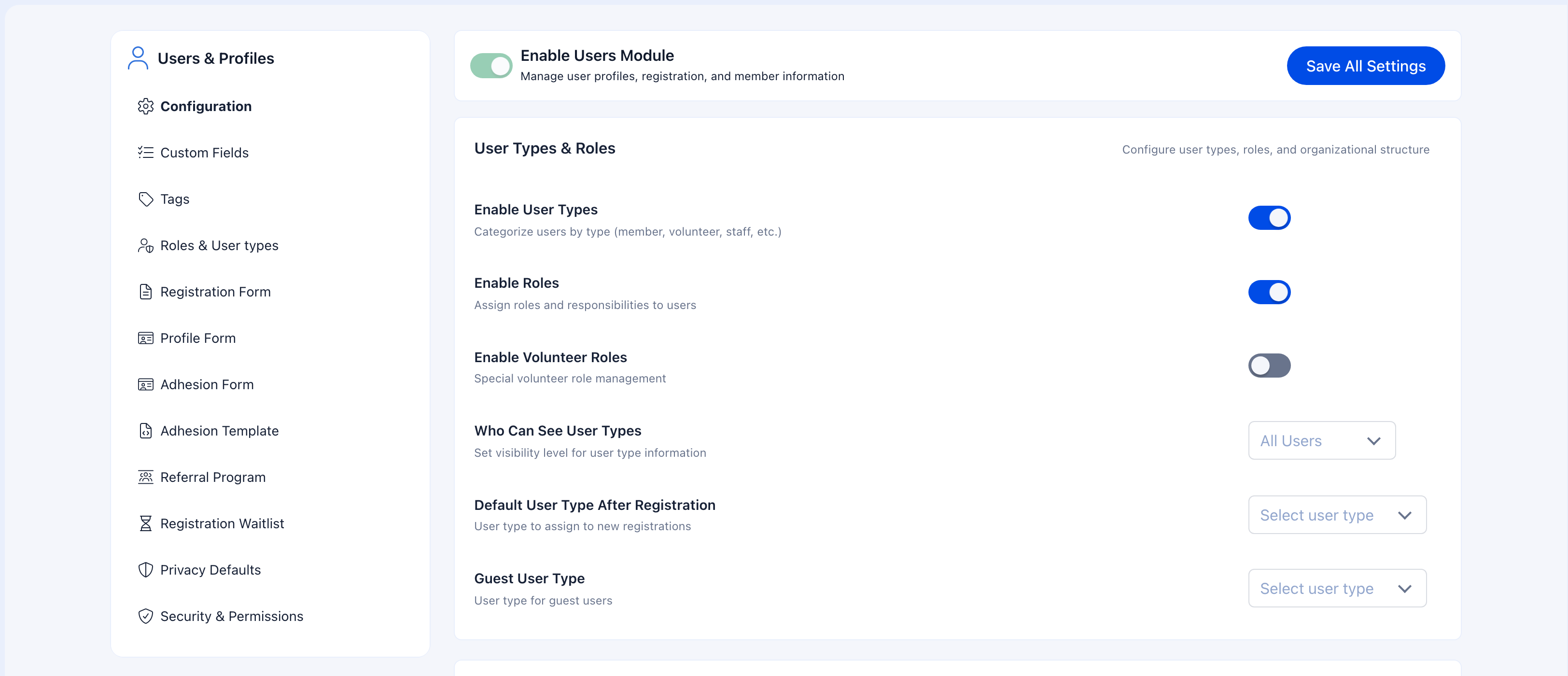
All module pages follow the same layout — learn one, you know them all.
Enable/disable toggle and **Save All Settings** button. Always pinned at the top.
Tabs specific to the module — Configuration, Custom Fields, Tags, Roles, Forms, and more.
Grouped options with toggles, dropdowns, and inputs under clear headings.
***
## Available modules
| Module | What it unlocks |
| -------------------- | ------------------------------------------------------------------------------------ |
| **Users & Profiles** | Member management, registration, family members, user types, roles. *Always active.* |
| **Contacts** | External contact management with custom statuses |
| **Local Centers** | Regional chapters with their own admins, bank accounts, maps |
| Module | What it unlocks |
| -------------------------- | ---------------------------------------------------------- |
| **Events** | Event creation, ticketing, attendance tracking, reports |
| **Discussions** | Community discussions with namespaces and posting controls |
| **Groups & Teams** | Member groups, units, role-based groups, tasks, categories |
| **Voting** | Polls and elections within groups |
| **Gamification & Courses** | Points, tiers, badges, learning courses |
| Module | What it unlocks |
| -------------------------- | ------------------------------------------------------------- |
| **Payments & Fees** | Membership fees, Stripe payments, donations, invoicing |
| **Emails & Notifications** | Notification defaults, email templates, campaigns |
| **Files & eDocuments** | Drive storage, personal drives, electronic document templates |
| **Helpdesk** | Member support tickets |
| **Analytics** | Dashboards for registration, membership, geography trends |
| Module | What it unlocks |
| ----------------------- | ------------------------------------------------------ |
| **Adhesion** | Public join forms for prospective members |
| **Waitlist** | Waiting lists with notifications and self-removal |
| **Referrals** | Referral workflows with configurable approval steps |
| **Identity Validation** | Document-based identity verification |
| **Professions** | Industry, job title, and expertise fields |
| **Companies** | Company profiles linked to members, company-level fees |
| **Form Builder** | Custom forms for structured data collection |
| Module | What it unlocks |
| ------------------------------- | --------------------------------------- |
| **Multi-Factor Authentication** | Require MFA for member logins |
| **API & OAuth** | API token access and OAuth integrations |
***
## Enabling and disabling
Open any module from the sidebar. Toggle it on or off in the header. Hit **Save**.
Disabling a module hides its features for everyone. Enable it again and everything comes back exactly as it was.
**Users & Profiles** can't be disabled — every other module depends on it.
***
## Permission levels
Some module settings use permission dropdowns to control who can perform certain actions. These range from **User** (any logged-in member) to **Admin Tenant** (full organization control), with specialized roles for HR, finance, events, and communications at both organization and local center levels.
For the full permission hierarchy and role reference, see [Permissions](/platform/permissions).
Local-level roles (e.g., **Admin Local**, **HR Local**) only appear in dropdowns when the **Local Centers** module is enabled.
***
## Troubleshooting
Refresh the page. Also check you toggled the right one — "Files & eDocuments" controls both Drive and eDocuments, for example.
Enable the **Local Centers** module first. Local-level roles only appear when it's active.
You need **Tenant Admin** permissions. Ask your organization's admin to grant the role.
Requires **Tenant Admin** permissions.
***
## Finding modules
Every module has its own page in the Settings sidebar under **MODULES**. Click one to open it.
***
## How module pages work
All module pages follow the same layout — learn one, you know them all.
Enable/disable toggle and **Save All Settings** button. Always pinned at the top.
Tabs specific to the module — Configuration, Custom Fields, Tags, Roles, Forms, and more.
Grouped options with toggles, dropdowns, and inputs under clear headings.
***
## Available modules
| Module | What it unlocks |
| -------------------- | ------------------------------------------------------------------------------------ |
| **Users & Profiles** | Member management, registration, family members, user types, roles. *Always active.* |
| **Contacts** | External contact management with custom statuses |
| **Local Centers** | Regional chapters with their own admins, bank accounts, maps |
| Module | What it unlocks |
| -------------------------- | ---------------------------------------------------------- |
| **Events** | Event creation, ticketing, attendance tracking, reports |
| **Discussions** | Community discussions with namespaces and posting controls |
| **Groups & Teams** | Member groups, units, role-based groups, tasks, categories |
| **Voting** | Polls and elections within groups |
| **Gamification & Courses** | Points, tiers, badges, learning courses |
| Module | What it unlocks |
| -------------------------- | ------------------------------------------------------------- |
| **Payments & Fees** | Membership fees, Stripe payments, donations, invoicing |
| **Emails & Notifications** | Notification defaults, email templates, campaigns |
| **Files & eDocuments** | Drive storage, personal drives, electronic document templates |
| **Helpdesk** | Member support tickets |
| **Analytics** | Dashboards for registration, membership, geography trends |
| Module | What it unlocks |
| ----------------------- | ------------------------------------------------------ |
| **Adhesion** | Public join forms for prospective members |
| **Waitlist** | Waiting lists with notifications and self-removal |
| **Referrals** | Referral workflows with configurable approval steps |
| **Identity Validation** | Document-based identity verification |
| **Professions** | Industry, job title, and expertise fields |
| **Companies** | Company profiles linked to members, company-level fees |
| **Form Builder** | Custom forms for structured data collection |
| Module | What it unlocks |
| ------------------------------- | --------------------------------------- |
| **Multi-Factor Authentication** | Require MFA for member logins |
| **API & OAuth** | API token access and OAuth integrations |
***
## Enabling and disabling
Open any module from the sidebar. Toggle it on or off in the header. Hit **Save**.
Disabling a module hides its features for everyone. Enable it again and everything comes back exactly as it was.
**Users & Profiles** can't be disabled — every other module depends on it.
***
## Permission levels
Some module settings use permission dropdowns to control who can perform certain actions. These range from **User** (any logged-in member) to **Admin Tenant** (full organization control), with specialized roles for HR, finance, events, and communications at both organization and local center levels.
For the full permission hierarchy and role reference, see [Permissions](/platform/permissions).
Local-level roles (e.g., **Admin Local**, **HR Local**) only appear in dropdowns when the **Local Centers** module is enabled.
***
## Troubleshooting
Refresh the page. Also check you toggled the right one — "Files & eDocuments" controls both Drive and eDocuments, for example.
Enable the **Local Centers** module first. Local-level roles only appear when it's active.
You need **Tenant Admin** permissions. Ask your organization's admin to grant the role.