> ## Documentation Index
> Fetch the complete documentation index at: https://orgo.space/docs/llms.txt
> Use this file to discover all available pages before exploring further.
# Organization Info
> Your name, contact details, legal info, currency, and social links — the identity card for your entire platform.
This is your organization's identity card. Everything here — name, country, contact info, financial details — flows into invoices, emails, registration pages, and the mobile app. Set this up first, before inviting members.
**Settings → Organization → Organization Info**
 Requires **Tenant Admin** permissions.
***
## Setting up your organization
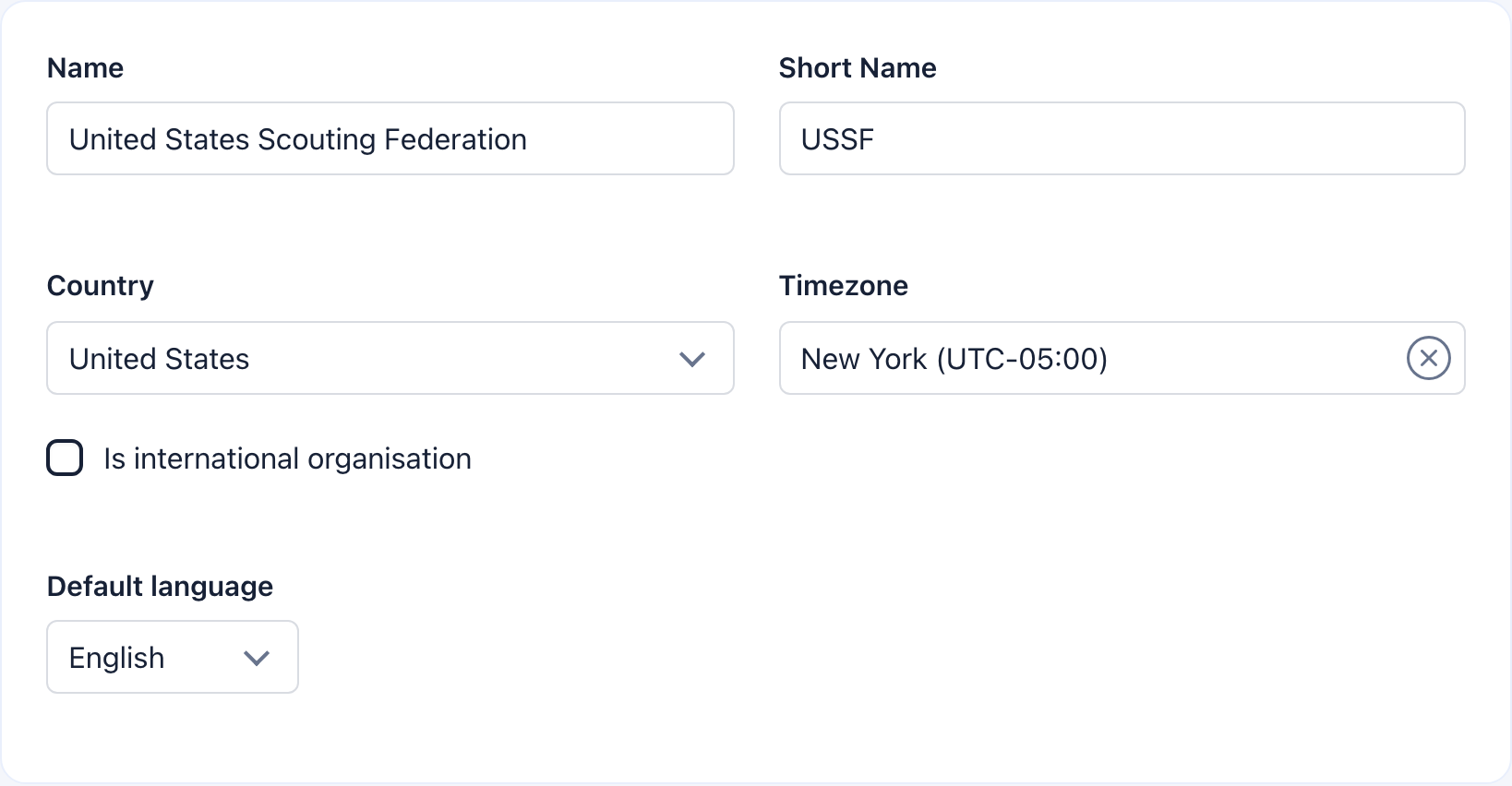
Enter your **Organization Name** (required) — this is the display name shown in the sidebar, emails, and public pages. Add a **Short Name** for mobile headers and compact UI areas. Select your **Country** and **Timezone** to set regional defaults for date/time formatting. Toggle **Is international** if you operate across multiple countries.
Select the platform language for new members and public pages. Available: English, French, German, Italian, Portuguese, Romanian, Slovak, Ukrainian, Bulgarian, Dutch, Spanish. Members can change their own language later.
Enter your **Office Email** (required — used in automated communications), **Office Phone** (select country code first), and **Office Address**. Add your **Privacy/GDPR URL** and **Terms of Service URL** — both are shown during registration and must be publicly accessible.
Paste the full URL for each platform you use: Facebook, X.com, YouTube, LinkedIn, Instagram, TikTok. Leave unused fields blank. These appear on your organization's public profile.
Select your **Currency** (the symbol auto-fills). Add your **Legal Name**, **Registration Number**, and **VAT Number** for invoices and receipts. Enter your bank **IBAN** for your primary currency, plus optional IBANs for EUR, USD, and CHF to accept multi-currency transfers.
Click the **Save** button in the sticky panel on the right. It follows you as you scroll — hit it when you're done.
***
## Basic details
**Name** is your display name (required). **Short Name** is the abbreviated version for mobile headers and compact UI.
Sets regional defaults and how dates/times display. Toggle **Is international** if you operate across multiple countries.
Your workspace identifier appears as a badge next to the save button (e.g., `myorg-42`). The slug is auto-generated from your organization name and is used in URLs.
***
## Contact information
Requires **Tenant Admin** permissions.
***
## Setting up your organization
Enter your **Organization Name** (required) — this is the display name shown in the sidebar, emails, and public pages. Add a **Short Name** for mobile headers and compact UI areas. Select your **Country** and **Timezone** to set regional defaults for date/time formatting. Toggle **Is international** if you operate across multiple countries.
Select the platform language for new members and public pages. Available: English, French, German, Italian, Portuguese, Romanian, Slovak, Ukrainian, Bulgarian, Dutch, Spanish. Members can change their own language later.
Enter your **Office Email** (required — used in automated communications), **Office Phone** (select country code first), and **Office Address**. Add your **Privacy/GDPR URL** and **Terms of Service URL** — both are shown during registration and must be publicly accessible.
Paste the full URL for each platform you use: Facebook, X.com, YouTube, LinkedIn, Instagram, TikTok. Leave unused fields blank. These appear on your organization's public profile.
Select your **Currency** (the symbol auto-fills). Add your **Legal Name**, **Registration Number**, and **VAT Number** for invoices and receipts. Enter your bank **IBAN** for your primary currency, plus optional IBANs for EUR, USD, and CHF to accept multi-currency transfers.
Click the **Save** button in the sticky panel on the right. It follows you as you scroll — hit it when you're done.
***
## Basic details
**Name** is your display name (required). **Short Name** is the abbreviated version for mobile headers and compact UI.
Sets regional defaults and how dates/times display. Toggle **Is international** if you operate across multiple countries.
Your workspace identifier appears as a badge next to the save button (e.g., `myorg-42`). The slug is auto-generated from your organization name and is used in URLs.
***
## Contact information
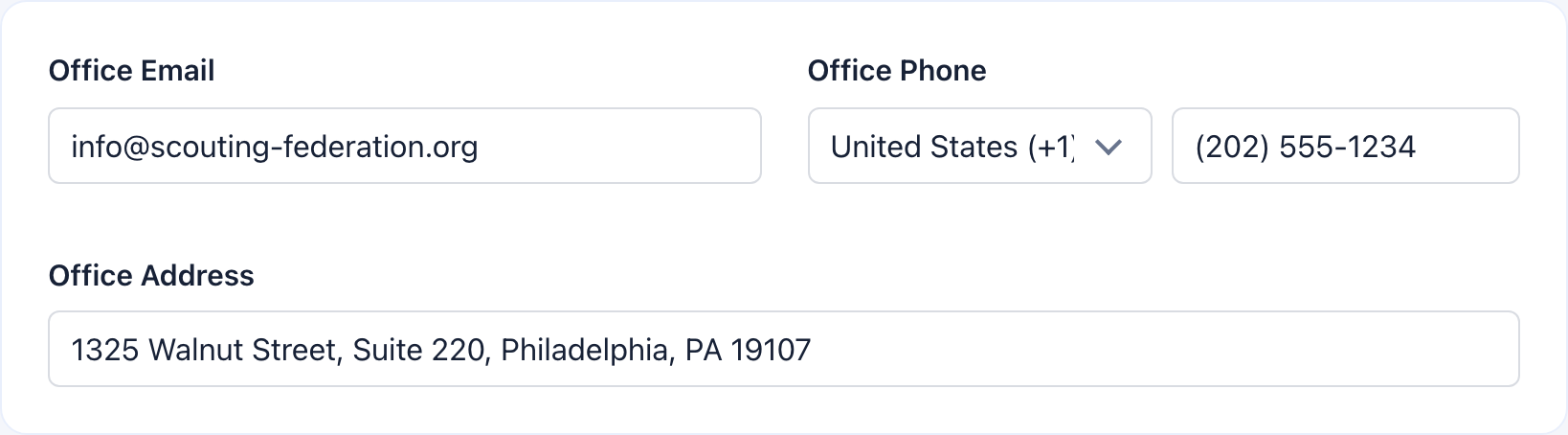 | Field | Details |
| ------------------------ | -------------------------------------------------------------------------------------------- |
| **Office Email** | Required. Used in automated emails and shown in platform communications |
| **Office Phone** | Select country code first, then enter the number. The input activates after selecting a code |
| **Office Address** | Your physical office location — shown on invoices and public profile |
| **Privacy/GDPR URL** | Link to your privacy policy. Shown during registration |
| **Terms of Service URL** | Link to your terms. Shown during registration |
***
## Social media
| Field | Details |
| ------------------------ | -------------------------------------------------------------------------------------------- |
| **Office Email** | Required. Used in automated emails and shown in platform communications |
| **Office Phone** | Select country code first, then enter the number. The input activates after selecting a code |
| **Office Address** | Your physical office location — shown on invoices and public profile |
| **Privacy/GDPR URL** | Link to your privacy policy. Shown during registration |
| **Terms of Service URL** | Link to your terms. Shown during registration |
***
## Social media
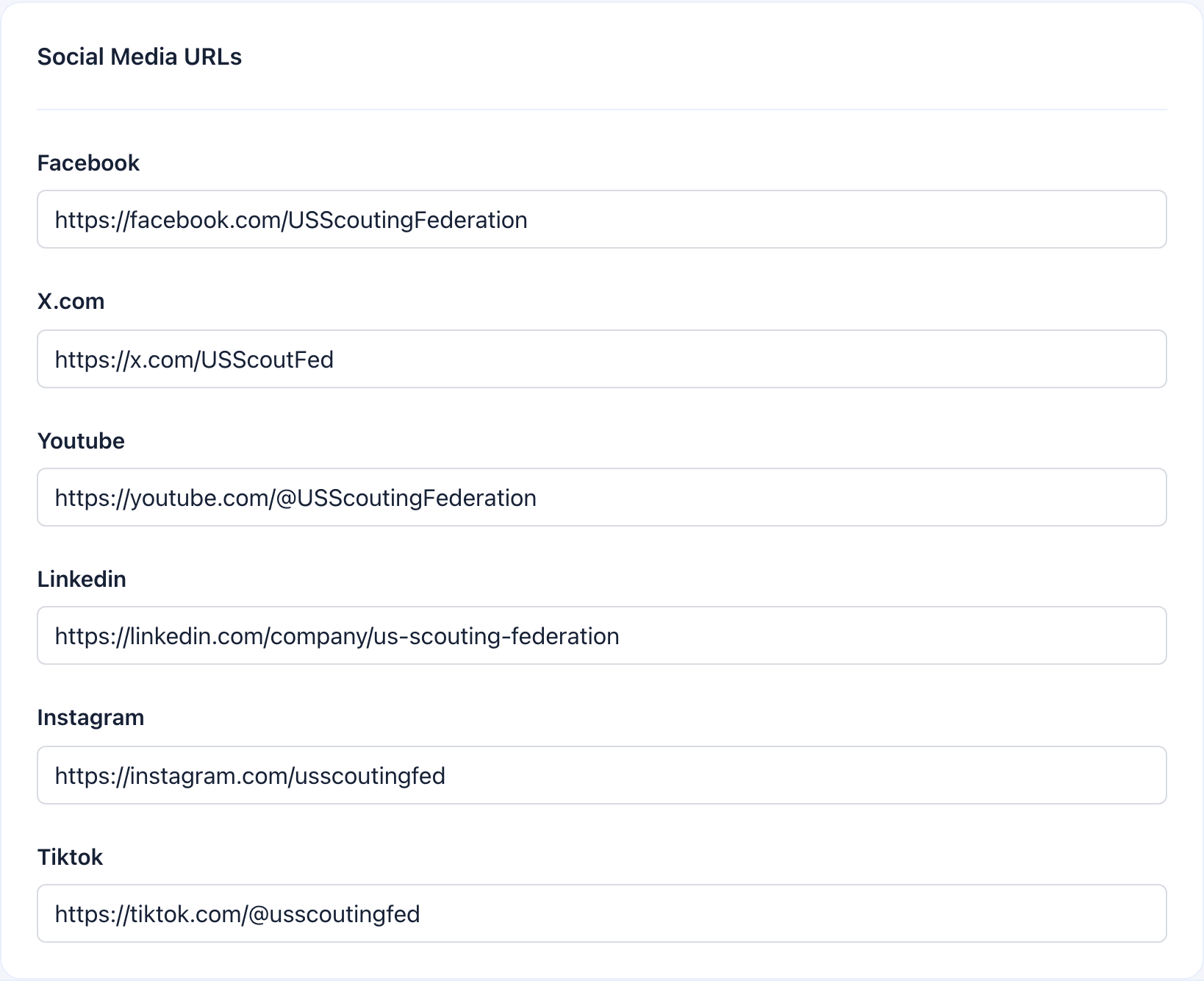 Paste the full URL for each platform you use. Leave the rest blank. These appear on your organization's public profile and in the footer of some email templates.
| Platform | URL format |
| ------------- | -------------------------------------- |
| **Facebook** | `https://facebook.com/yourorg` |
| **X.com** | `https://x.com/yourorg` |
| **YouTube** | `https://youtube.com/@yourorg` |
| **LinkedIn** | `https://linkedin.com/company/yourorg` |
| **Instagram** | `https://instagram.com/yourorg` |
| **TikTok** | `https://tiktok.com/@yourorg` |
***
## Financial details
Paste the full URL for each platform you use. Leave the rest blank. These appear on your organization's public profile and in the footer of some email templates.
| Platform | URL format |
| ------------- | -------------------------------------- |
| **Facebook** | `https://facebook.com/yourorg` |
| **X.com** | `https://x.com/yourorg` |
| **YouTube** | `https://youtube.com/@yourorg` |
| **LinkedIn** | `https://linkedin.com/company/yourorg` |
| **Instagram** | `https://instagram.com/yourorg` |
| **TikTok** | `https://tiktok.com/@yourorg` |
***
## Financial details
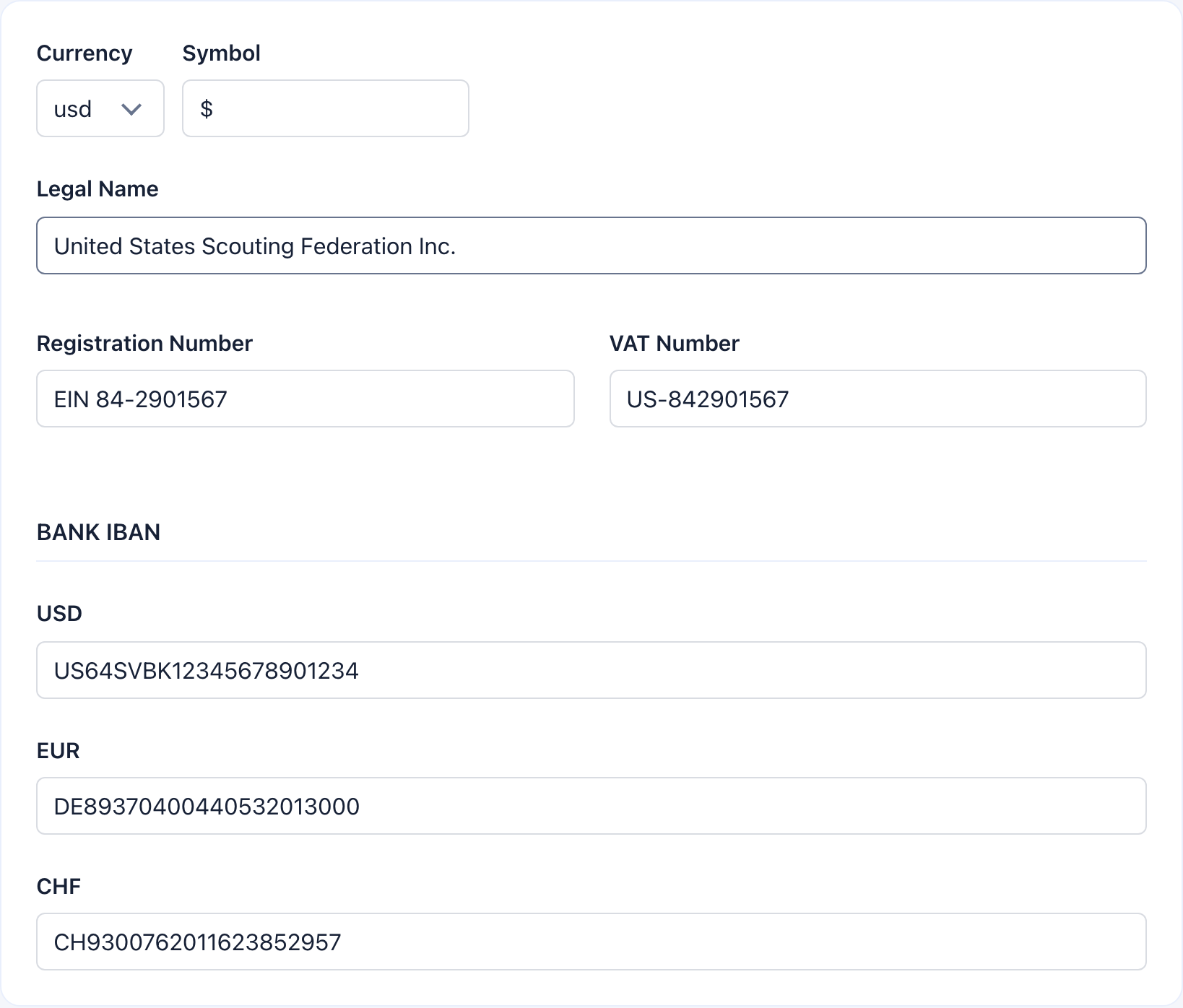 **Currency** auto-fills the symbol. Add your **Legal Name**, **Registration Number**, and **VAT Number** for invoices and receipts.
One IBAN field for your primary currency, plus optional fields for **EUR**, **USD**, and **CHF** to accept multi-currency transfers.
Get these right before enabling payments or membership fees — they appear on every invoice and donation receipt. Changing financial details later doesn't update already-generated documents.
***
## Saving
**Currency** auto-fills the symbol. Add your **Legal Name**, **Registration Number**, and **VAT Number** for invoices and receipts.
One IBAN field for your primary currency, plus optional fields for **EUR**, **USD**, and **CHF** to accept multi-currency transfers.
Get these right before enabling payments or membership fees — they appear on every invoice and donation receipt. Changing financial details later doesn't update already-generated documents.
***
## Saving
 The **Save** button sits in a sticky panel on the right — it follows you as you scroll. **Name** and **Office Email** are required — the save will fail if either is empty.
***
## Real-world example
> **Scenario**: A French-German bilingual non-profit based in Switzerland, launching Orgo for 1,200 members.
1. **Name**: "Association Pro Nature Suisse" / **Short Name**: "APN"
2. **Country**: Switzerland / **Timezone**: Europe/Zurich / **Is international**: No
3. **Default language**: French (60% of members are French-speaking)
4. **Office Email**: [contact@apn.ch](mailto:contact@apn.ch) / **Phone**: +41 31 xxx xx xx
5. **Privacy URL**: `https://example-ngo.ch/privacy` / **Terms URL**: `https://example-ngo.ch/terms`
6. **Social**: Facebook and Instagram URLs filled in, others left blank
7. **Currency**: CHF (Swiss Franc) / **Legal Name**: "Association Pro Nature Suisse" / **VAT**: CHE-xxx.xxx.xxx
8. **IBANs**: Primary CHF IBAN + EUR IBAN for cross-border donations
***
## Troubleshooting
Select a country code from the dropdown first. The phone input activates once a country is selected.
It auto-updates when you change the currency dropdown. You can manually override it in the **Symbol** field if needed.
**Name** and **Office Email** are required. Make sure both are filled in. Check that your email is in a valid format and that URLs use `https://`.
IBAN fields appear dynamically: one for your primary currency, plus EUR, USD, and CHF. If you need additional currency IBANs, change your primary currency to see the corresponding field.
***
## Related
* [Branding](/platform/organisation/branding) — Visual customization (logo, login background)
* [Modules](/platform/organisation/modules) — Enable/disable platform features
* [Languages](/platform/customization/languages) — Multi-language support beyond the default
The **Save** button sits in a sticky panel on the right — it follows you as you scroll. **Name** and **Office Email** are required — the save will fail if either is empty.
***
## Real-world example
> **Scenario**: A French-German bilingual non-profit based in Switzerland, launching Orgo for 1,200 members.
1. **Name**: "Association Pro Nature Suisse" / **Short Name**: "APN"
2. **Country**: Switzerland / **Timezone**: Europe/Zurich / **Is international**: No
3. **Default language**: French (60% of members are French-speaking)
4. **Office Email**: [contact@apn.ch](mailto:contact@apn.ch) / **Phone**: +41 31 xxx xx xx
5. **Privacy URL**: `https://example-ngo.ch/privacy` / **Terms URL**: `https://example-ngo.ch/terms`
6. **Social**: Facebook and Instagram URLs filled in, others left blank
7. **Currency**: CHF (Swiss Franc) / **Legal Name**: "Association Pro Nature Suisse" / **VAT**: CHE-xxx.xxx.xxx
8. **IBANs**: Primary CHF IBAN + EUR IBAN for cross-border donations
***
## Troubleshooting
Select a country code from the dropdown first. The phone input activates once a country is selected.
It auto-updates when you change the currency dropdown. You can manually override it in the **Symbol** field if needed.
**Name** and **Office Email** are required. Make sure both are filled in. Check that your email is in a valid format and that URLs use `https://`.
IBAN fields appear dynamically: one for your primary currency, plus EUR, USD, and CHF. If you need additional currency IBANs, change your primary currency to see the corresponding field.
***
## Related
* [Branding](/platform/organisation/branding) — Visual customization (logo, login background)
* [Modules](/platform/organisation/modules) — Enable/disable platform features
* [Languages](/platform/customization/languages) — Multi-language support beyond the default