> ## Documentation Index
> Fetch the complete documentation index at: https://orgo.space/docs/llms.txt
> Use this file to discover all available pages before exploring further.
# Public Website
> A public front page, chapter directory and events listing that anonymous visitors reach before they ever see a login screen
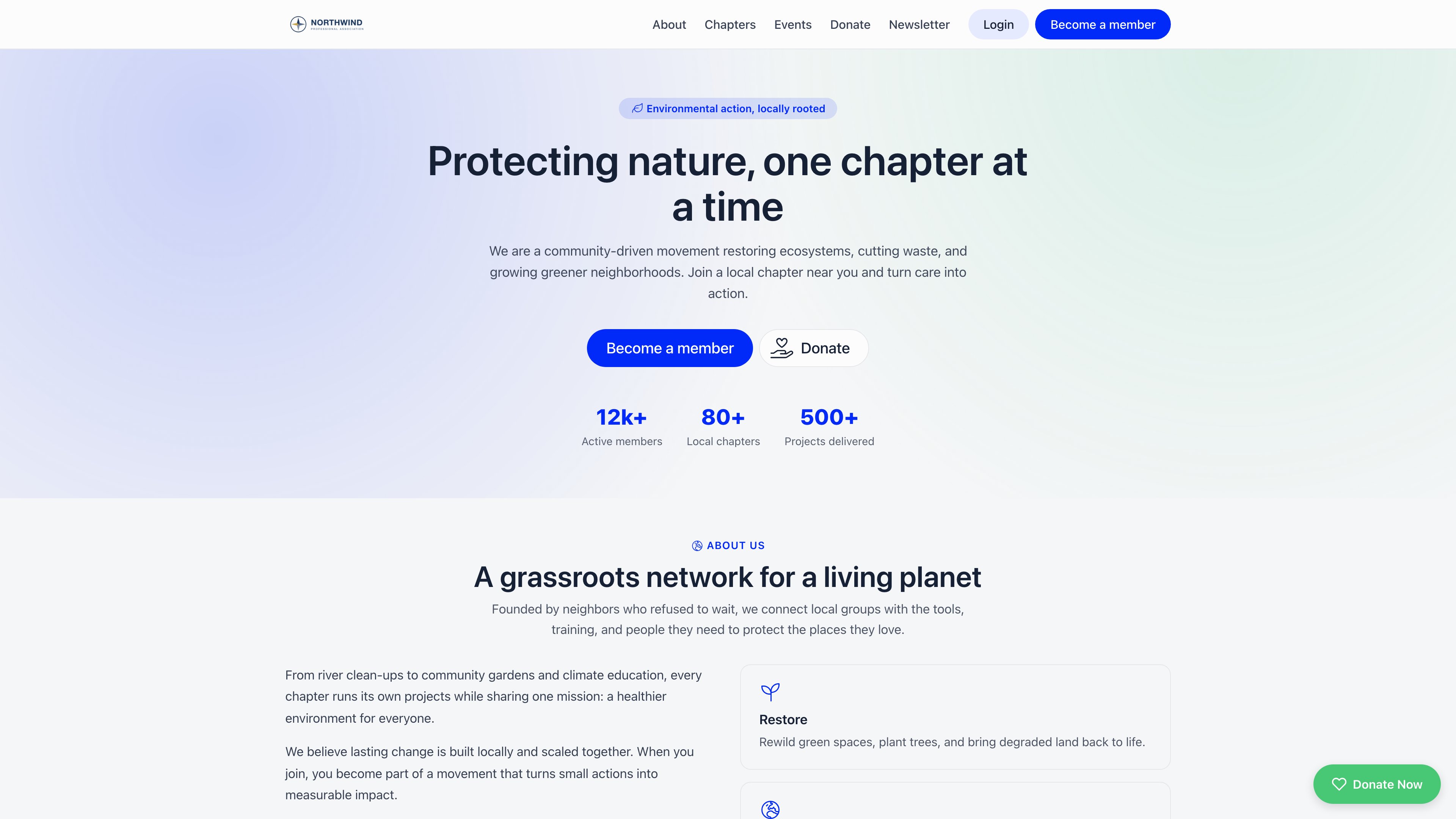
Orgo ships a small public website that sits in front of the members' area: a homepage, a directory of your local centers, a page per local center, and a public events listing. Nobody has to sign in to see any of it. One setting decides whether a first-time visitor who types your address lands there or on the sign-in screen.
**Built for** organizations whose address is handed out to people who are not members yet, including federations recruiting chapters, associations with an open events programme, and anyone whose "join us" link currently opens a login box.
**Replaces** a separate brochure site you would otherwise host, keep in sync, and re-key every chapter and event into.
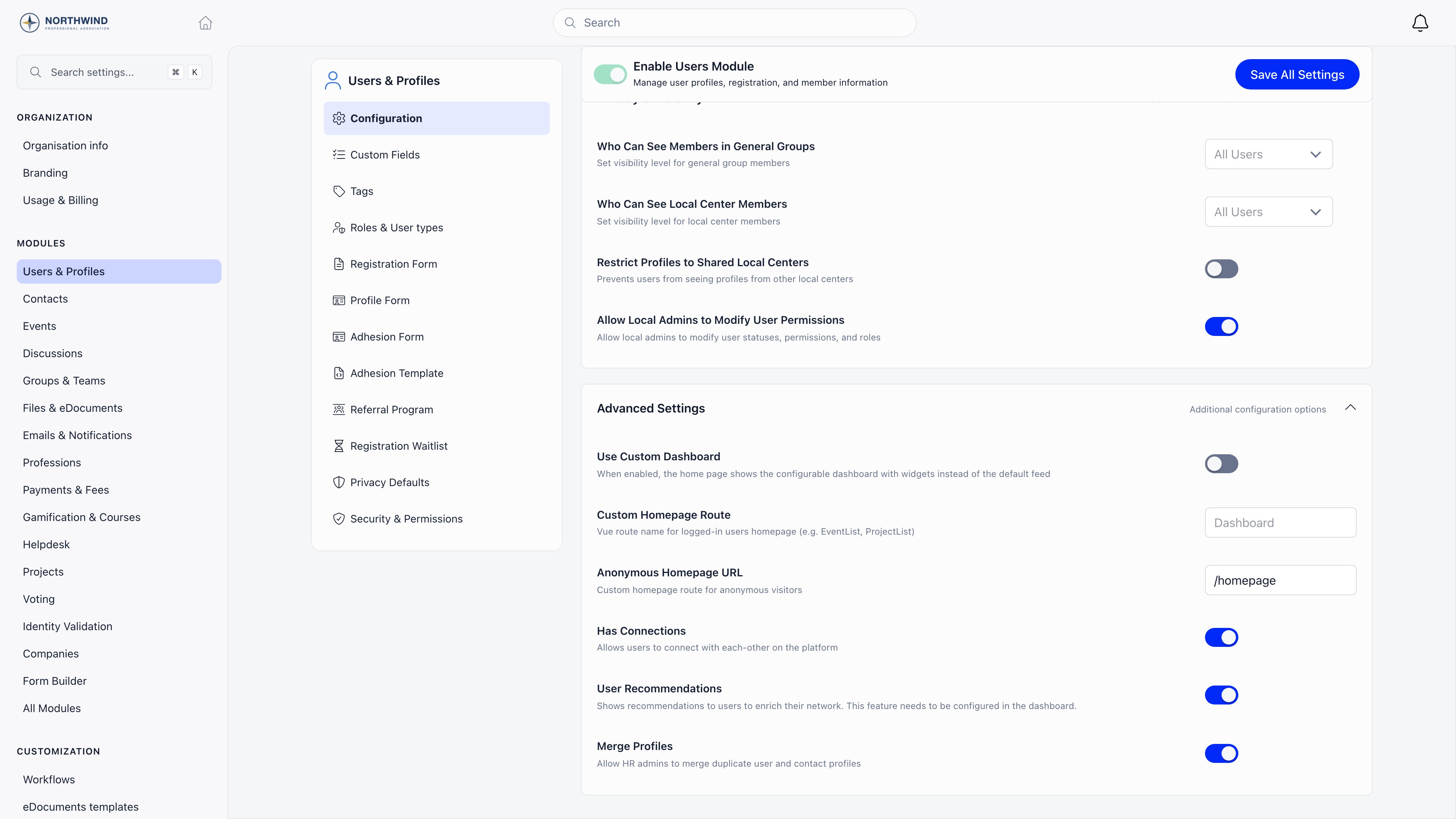
**Settings → Modules → Users & Profiles → Configuration → Advanced Settings**
Requires **ADMIN\_TENANT**. The setting is written through the tenant record, and the server checks both the role and that the tenant is your own, so the menu is not the only thing standing in the way.
 ***
## The four pages
All four exist and are reachable the moment your community does, whether or not you turn on the front door. They share one header and footer, both drawn from your organization.
| Address | What it shows |
| ------------------- | ---------------------------------------------------------------------------------------------------------------------------------- |
| `/homepage` | The front page: hero, about, a map of your local centers, your next three public events, a donation block and a newsletter sign-up |
| `/chapters` | Every active local center as a card, with its town, a short description and a link through to its own page |
| `/chapter/` | One local center: description, a map of where it meets, languages, meeting days, contact email and phone, social links |
| `/community-events` | Your public events listing, embedded whole |
The header carries your logo, links that scroll to each homepage section, a **Login** button and a **Become a member** button that opens your registration form. The footer repeats those links and prints your organization's contact email, name and the current year. Your logo is used if you have uploaded one under [Branding](/docs/platform/organisation/branding); without one, the header prints your organization's name as plain text.
***
## Turning it on
**Settings → Modules → Users & Profiles**, stay on **Configuration**, and scroll to the **Advanced Settings** card at the bottom.
Enter `/homepage`. It must begin with a forward slash. The field saves itself about a second after you stop typing, and a **Settings saved automatically** toast confirms it, so there is nothing to press.
Open your community address in a private window or a browser you are not signed into. You should land on the public homepage instead of the sign-in screen. Signing out and reloading is not the same test: what changes is where a visitor with no session is sent.
***
## The four pages
All four exist and are reachable the moment your community does, whether or not you turn on the front door. They share one header and footer, both drawn from your organization.
| Address | What it shows |
| ------------------- | ---------------------------------------------------------------------------------------------------------------------------------- |
| `/homepage` | The front page: hero, about, a map of your local centers, your next three public events, a donation block and a newsletter sign-up |
| `/chapters` | Every active local center as a card, with its town, a short description and a link through to its own page |
| `/chapter/` | One local center: description, a map of where it meets, languages, meeting days, contact email and phone, social links |
| `/community-events` | Your public events listing, embedded whole |
The header carries your logo, links that scroll to each homepage section, a **Login** button and a **Become a member** button that opens your registration form. The footer repeats those links and prints your organization's contact email, name and the current year. Your logo is used if you have uploaded one under [Branding](/docs/platform/organisation/branding); without one, the header prints your organization's name as plain text.
***
## Turning it on
**Settings → Modules → Users & Profiles**, stay on **Configuration**, and scroll to the **Advanced Settings** card at the bottom.
Enter `/homepage`. It must begin with a forward slash. The field saves itself about a second after you stop typing, and a **Settings saved automatically** toast confirms it, so there is nothing to press.
Open your community address in a private window or a browser you are not signed into. You should land on the public homepage instead of the sign-in screen. Signing out and reloading is not the same test: what changes is where a visitor with no session is sent.
 | Setting | What it does |
| -------------------------- | ------------------------------------------------------------------------------------------------------------------------------------------------------------------------- |
| **Anonymous Homepage URL** | Where a visitor with no session is sent when they open your bare address. Must be a **path**, starting with `/`. Empty by default, which sends them to the sign-in screen |
| **Custom Homepage Route** | Where a **signed-in member** lands instead of the dashboard. Accepts a path or a Vue route name. It has no effect on visitors who are not signed in |
| **Use Custom Dashboard** | Unrelated to the public site: it swaps the members' dashboard for the widget layout |
The two homepage fields sit next to each other and do **not** accept the same thing. **Anonymous Homepage URL** takes a path only. **Custom Homepage Route** also takes a route name. Typing `Homepage` into Anonymous Homepage URL therefore does nothing visible in the settings screen and quietly sends every anonymous visitor to the sign-in page, because a value with no leading slash is discarded and the sign-in screen is the fallback. Write `/homepage`, not `Homepage`.
The redirect only fires on your bare address. A visitor who follows a deep link into the members' area, say to a member profile, still meets the sign-in screen, which is the point.
***
## What is on the homepage
A hero and five sections, stacked. The header links scroll between them.
**About.** Three fixed pillars describing the shape of the organization.
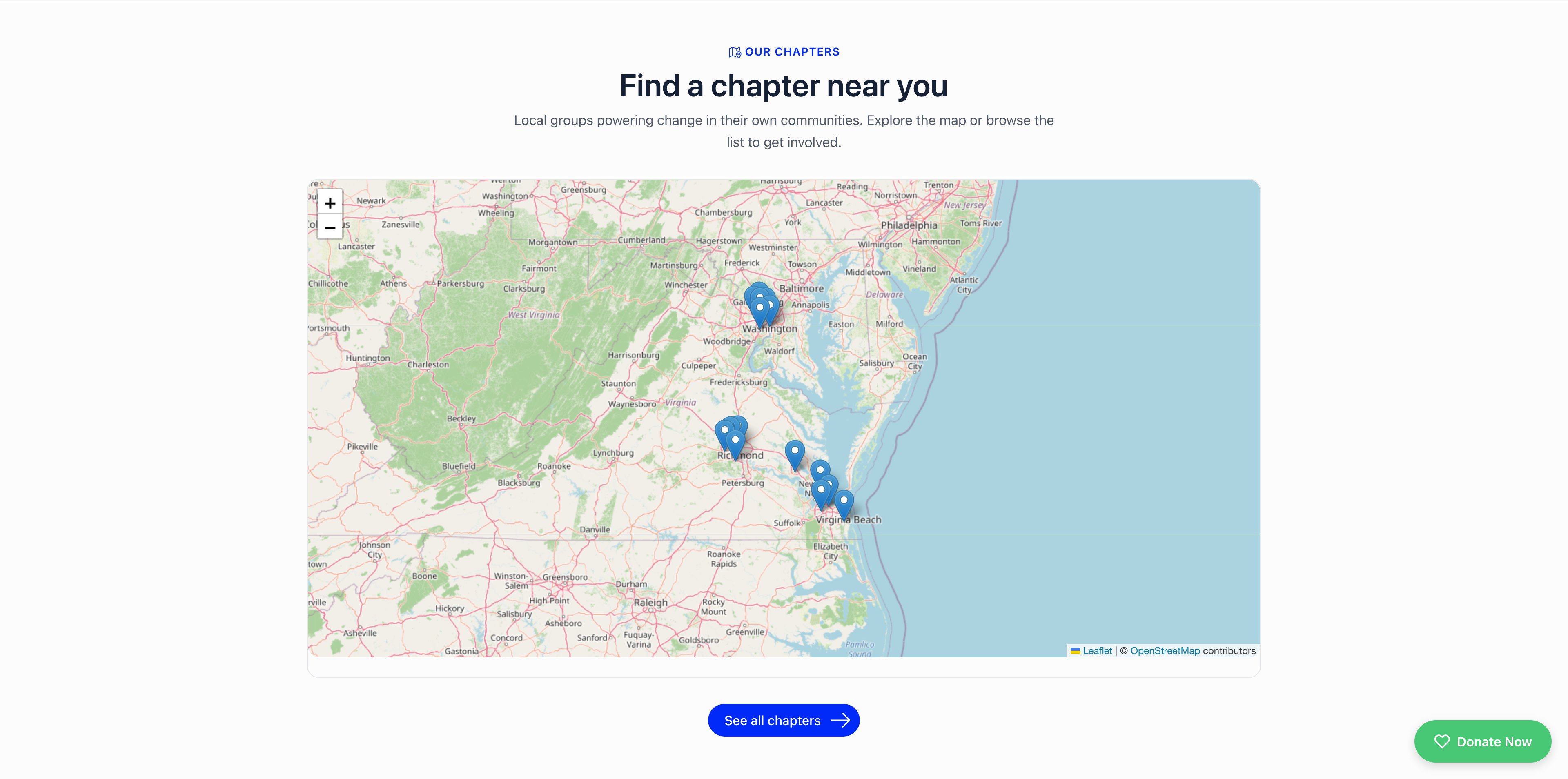
**Chapters.** A map with a pin on each active local center, and a **See all chapters** button through to the directory. The pins come from the map location on each local center, so a center with no coordinates is simply absent from the map.
| Setting | What it does |
| -------------------------- | ------------------------------------------------------------------------------------------------------------------------------------------------------------------------- |
| **Anonymous Homepage URL** | Where a visitor with no session is sent when they open your bare address. Must be a **path**, starting with `/`. Empty by default, which sends them to the sign-in screen |
| **Custom Homepage Route** | Where a **signed-in member** lands instead of the dashboard. Accepts a path or a Vue route name. It has no effect on visitors who are not signed in |
| **Use Custom Dashboard** | Unrelated to the public site: it swaps the members' dashboard for the widget layout |
The two homepage fields sit next to each other and do **not** accept the same thing. **Anonymous Homepage URL** takes a path only. **Custom Homepage Route** also takes a route name. Typing `Homepage` into Anonymous Homepage URL therefore does nothing visible in the settings screen and quietly sends every anonymous visitor to the sign-in page, because a value with no leading slash is discarded and the sign-in screen is the fallback. Write `/homepage`, not `Homepage`.
The redirect only fires on your bare address. A visitor who follows a deep link into the members' area, say to a member profile, still meets the sign-in screen, which is the point.
***
## What is on the homepage
A hero and five sections, stacked. The header links scroll between them.
**About.** Three fixed pillars describing the shape of the organization.
**Chapters.** A map with a pin on each active local center, and a **See all chapters** button through to the directory. The pins come from the map location on each local center, so a center with no coordinates is simply absent from the map.
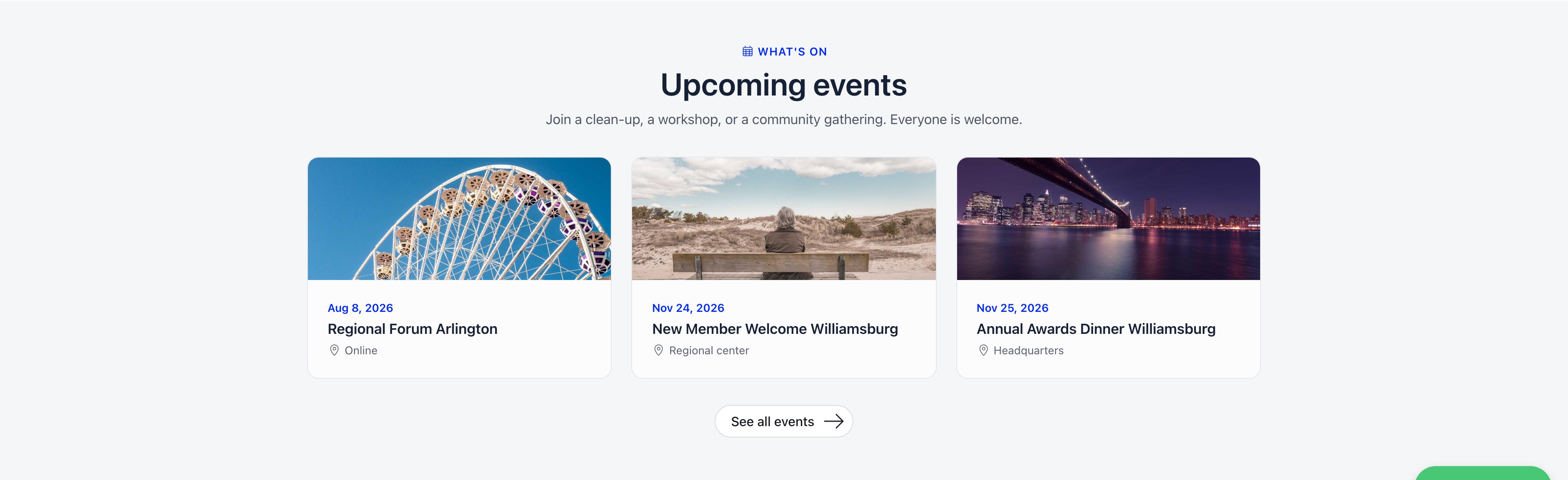
 **Events.** Your next three public events, soonest first, each linking to its own [public event page](/docs/platform/events/public-page). **See all events** opens the full listing. With nothing upcoming the section says so and points at the newsletter form rather than sitting empty.
 **Donate.** Appears only when you have set a default donation product. It loads the same donation widget you can embed elsewhere, which is what adds the floating **Donate Now** button in the corner, and it adds a **Donate** link to the header and a **Donate** button to the hero. Without that product the whole section, the header link and the hero button are gone. See [Donation Pages & Widgets](/docs/platform/fees/donation-pages).
**Newsletter.** An email field. Submitting it sends a confirmation email to that address; only when the link in it is clicked does the address become a subscriber, as a contact if it is not already a member. Unconfirmed sign-ups never reach your list. See [Newsletter signup widgets](/docs/platform/newsletter-widgets).
***
## What is yours and what is fixed
This is a template, not a page builder. Knowing which half is which saves a long search for an editor that does not exist.
**Drawn from your organization:** the logo, the organization name, the contact email in the footer, the interface language, your local centers and their descriptions, coordinates, languages, meeting days and contact details, your public events and their cover images, your donation product, and your newsletter.
**Fixed in the product, the same for every organization:** the hero headline and sub-headline, the three statistics under it, the About pillars, every section heading and sub-heading, and the footer tagline. They are written in the general voice of a community organization and cannot be edited from Settings today. If that copy does not fit you, the honest options are to leave the front door on the sign-in screen and point your public traffic at a site you control, or to talk to support.
***
## Search engines and your address
While your community runs on an `orgo.space` address, every page is served with a `noindex, nofollow` instruction, so search engines are told to skip the public site along with everything else. That is deliberate: it keeps members' area URLs out of search results.
The instruction is tied to the address, not to the pages. Move your community onto a domain you own and it stops being added, which is what makes the public site indexable. Set that up under [Custom Domain](/docs/platform/custom-domain) before you promote these pages anywhere.
***
## Troubleshooting
Almost always a missing leading slash. `/homepage` works, `homepage` and `Homepage` do not, and neither reports an error. Confirm the field reads exactly `/homepage`. If it does, check you tested the bare address in a private window: the redirect only applies to the bare address, and only to a visitor with no session.
The path is right in shape but wrong in spelling, so it matches no page and falls through to the 404 screen. The four valid paths are `/homepage`, `/chapters`, `/chapter/` and `/community-events`. Almost every case is a typo in `/homepage`.
The map plots the map location saved on each local center. A center with no coordinates, or one that is not active, does not appear. Fill in the map location on the chapter's own form, under [Local Centers](/docs/platform/groups/local-groups). The directory at `/chapters` is a separate list and does show a center with no coordinates, so a chapter visible in the list but absent from the map is missing its location.
The section only shows events that are both public and in the future. An event that is not marked public is invisible here even to members who are signed in elsewhere. See [Sharing Events](/docs/platform/events/sharing).
The donation block, the header link and the hero button all hang off one thing: a default donation product on the organization. Set one up under [Donation Pages & Widgets](/docs/platform/fees/donation-pages) and all three appear together.
A display fault, not corrupted data. When a local center has a **Region** assigned, the directory card and the chapter page print the region as a placeholder instead of its name. Nothing else is affected, the region itself is stored correctly, and clearing the Region field on that chapter removes the stray text at the cost of losing the region grouping elsewhere. Report it to support rather than editing your data around it.
`/community-events` embeds your public events listing rather than redrawing it, and the embedded list can come up blank while the calendar beside it still marks the dates. Open the events listing directly to confirm your events are there and reachable. Until it settles, link people to the homepage Events section, which builds its cards independently and is unaffected.
Signing in takes them to the dashboard as usual. What keeps bringing a member back to the public site is a bookmark saved on one of these four pages, since they stay open to everyone. Ask them to open the bare address rather than the bookmark. If signed-in members are landing somewhere other than the dashboard, that is **Custom Homepage Route**, in the same settings card, not this feature.
Expected while you are on an `orgo.space` address: those pages are served with a `noindex` instruction. Move to a domain you own under [Custom Domain](/docs/platform/custom-domain) first, then submit the address to the search engine.
***
## Related
* [Custom Domain](/docs/platform/custom-domain) - Serve the site from an address you own, and make it indexable
* [Branding](/docs/platform/organisation/branding) - The logo the site's header and footer use
* [Local Centers](/docs/platform/groups/local-groups) - The chapters behind the map and the directory
* [Sharing Events](/docs/platform/events/sharing) - What makes an event public enough to appear here
* [Donation Pages & Widgets](/docs/platform/fees/donation-pages) - The donation product the Donate section needs
* [Newsletter signup widgets](/docs/platform/newsletter-widgets) - Where the newsletter form's subscribers land
* [Permissions](/docs/platform/permissions) - What ADMIN\_TENANT unlocks
**Donate.** Appears only when you have set a default donation product. It loads the same donation widget you can embed elsewhere, which is what adds the floating **Donate Now** button in the corner, and it adds a **Donate** link to the header and a **Donate** button to the hero. Without that product the whole section, the header link and the hero button are gone. See [Donation Pages & Widgets](/docs/platform/fees/donation-pages).
**Newsletter.** An email field. Submitting it sends a confirmation email to that address; only when the link in it is clicked does the address become a subscriber, as a contact if it is not already a member. Unconfirmed sign-ups never reach your list. See [Newsletter signup widgets](/docs/platform/newsletter-widgets).
***
## What is yours and what is fixed
This is a template, not a page builder. Knowing which half is which saves a long search for an editor that does not exist.
**Drawn from your organization:** the logo, the organization name, the contact email in the footer, the interface language, your local centers and their descriptions, coordinates, languages, meeting days and contact details, your public events and their cover images, your donation product, and your newsletter.
**Fixed in the product, the same for every organization:** the hero headline and sub-headline, the three statistics under it, the About pillars, every section heading and sub-heading, and the footer tagline. They are written in the general voice of a community organization and cannot be edited from Settings today. If that copy does not fit you, the honest options are to leave the front door on the sign-in screen and point your public traffic at a site you control, or to talk to support.
***
## Search engines and your address
While your community runs on an `orgo.space` address, every page is served with a `noindex, nofollow` instruction, so search engines are told to skip the public site along with everything else. That is deliberate: it keeps members' area URLs out of search results.
The instruction is tied to the address, not to the pages. Move your community onto a domain you own and it stops being added, which is what makes the public site indexable. Set that up under [Custom Domain](/docs/platform/custom-domain) before you promote these pages anywhere.
***
## Troubleshooting
Almost always a missing leading slash. `/homepage` works, `homepage` and `Homepage` do not, and neither reports an error. Confirm the field reads exactly `/homepage`. If it does, check you tested the bare address in a private window: the redirect only applies to the bare address, and only to a visitor with no session.
The path is right in shape but wrong in spelling, so it matches no page and falls through to the 404 screen. The four valid paths are `/homepage`, `/chapters`, `/chapter/` and `/community-events`. Almost every case is a typo in `/homepage`.
The map plots the map location saved on each local center. A center with no coordinates, or one that is not active, does not appear. Fill in the map location on the chapter's own form, under [Local Centers](/docs/platform/groups/local-groups). The directory at `/chapters` is a separate list and does show a center with no coordinates, so a chapter visible in the list but absent from the map is missing its location.
The section only shows events that are both public and in the future. An event that is not marked public is invisible here even to members who are signed in elsewhere. See [Sharing Events](/docs/platform/events/sharing).
The donation block, the header link and the hero button all hang off one thing: a default donation product on the organization. Set one up under [Donation Pages & Widgets](/docs/platform/fees/donation-pages) and all three appear together.
A display fault, not corrupted data. When a local center has a **Region** assigned, the directory card and the chapter page print the region as a placeholder instead of its name. Nothing else is affected, the region itself is stored correctly, and clearing the Region field on that chapter removes the stray text at the cost of losing the region grouping elsewhere. Report it to support rather than editing your data around it.
`/community-events` embeds your public events listing rather than redrawing it, and the embedded list can come up blank while the calendar beside it still marks the dates. Open the events listing directly to confirm your events are there and reachable. Until it settles, link people to the homepage Events section, which builds its cards independently and is unaffected.
Signing in takes them to the dashboard as usual. What keeps bringing a member back to the public site is a bookmark saved on one of these four pages, since they stay open to everyone. Ask them to open the bare address rather than the bookmark. If signed-in members are landing somewhere other than the dashboard, that is **Custom Homepage Route**, in the same settings card, not this feature.
Expected while you are on an `orgo.space` address: those pages are served with a `noindex` instruction. Move to a domain you own under [Custom Domain](/docs/platform/custom-domain) first, then submit the address to the search engine.
***
## Related
* [Custom Domain](/docs/platform/custom-domain) - Serve the site from an address you own, and make it indexable
* [Branding](/docs/platform/organisation/branding) - The logo the site's header and footer use
* [Local Centers](/docs/platform/groups/local-groups) - The chapters behind the map and the directory
* [Sharing Events](/docs/platform/events/sharing) - What makes an event public enough to appear here
* [Donation Pages & Widgets](/docs/platform/fees/donation-pages) - The donation product the Donate section needs
* [Newsletter signup widgets](/docs/platform/newsletter-widgets) - Where the newsletter form's subscribers land
* [Permissions](/docs/platform/permissions) - What ADMIN\_TENANT unlocks