> ## Documentation Index
> Fetch the complete documentation index at: https://orgo.space/docs/llms.txt
> Use this file to discover all available pages before exploring further.
# Professional Network
> Let members record what they do for a living, browse each other by industry, and connect
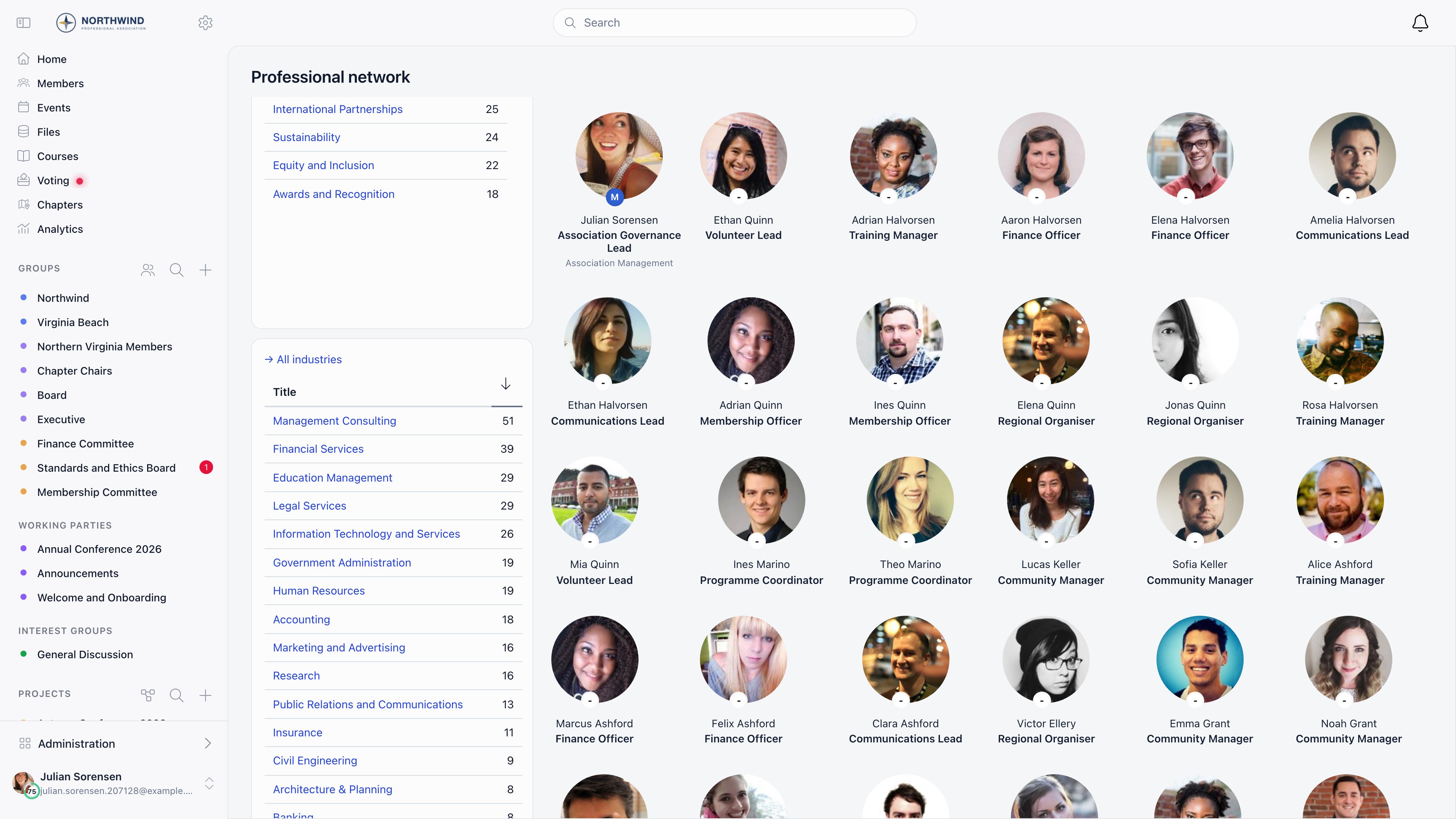
The Professional Network turns your member list into a searchable directory of what people actually do: a headline, an industry, optionally a job title and an area of expertise, and the company they work for. Members browse it by industry or by keyword and send each other connection requests.
**Built for** business networks, alumni associations, chambers of commerce, and any community whose members want to find each other by expertise.
**Replaces** a spreadsheet of "who knows about what" and a separate LinkedIn group.
 ***
## How to access
The directory lives at `/professional-network`. It is not in Orgo's default sidebar, so add a **Professional network** item through the [Menu Organizer](/docs/platform/customization/menu-organizer). Clicking an industry on someone's profile also lands here, pre-filtered. Being signed in is the only requirement, subject to [Who can see whom](#who-can-see-whom). Admins configure it under **Settings** → **Modules** → **Professions**, which requires `ADMIN_TENANT`.
***
## Turning it on
Four switches, saved the moment you flip one.
***
## How to access
The directory lives at `/professional-network`. It is not in Orgo's default sidebar, so add a **Professional network** item through the [Menu Organizer](/docs/platform/customization/menu-organizer). Clicking an industry on someone's profile also lands here, pre-filtered. Being signed in is the only requirement, subject to [Who can see whom](#who-can-see-whom). Admins configure it under **Settings** → **Modules** → **Professions**, which requires `ADMIN_TENANT`.
***
## Turning it on
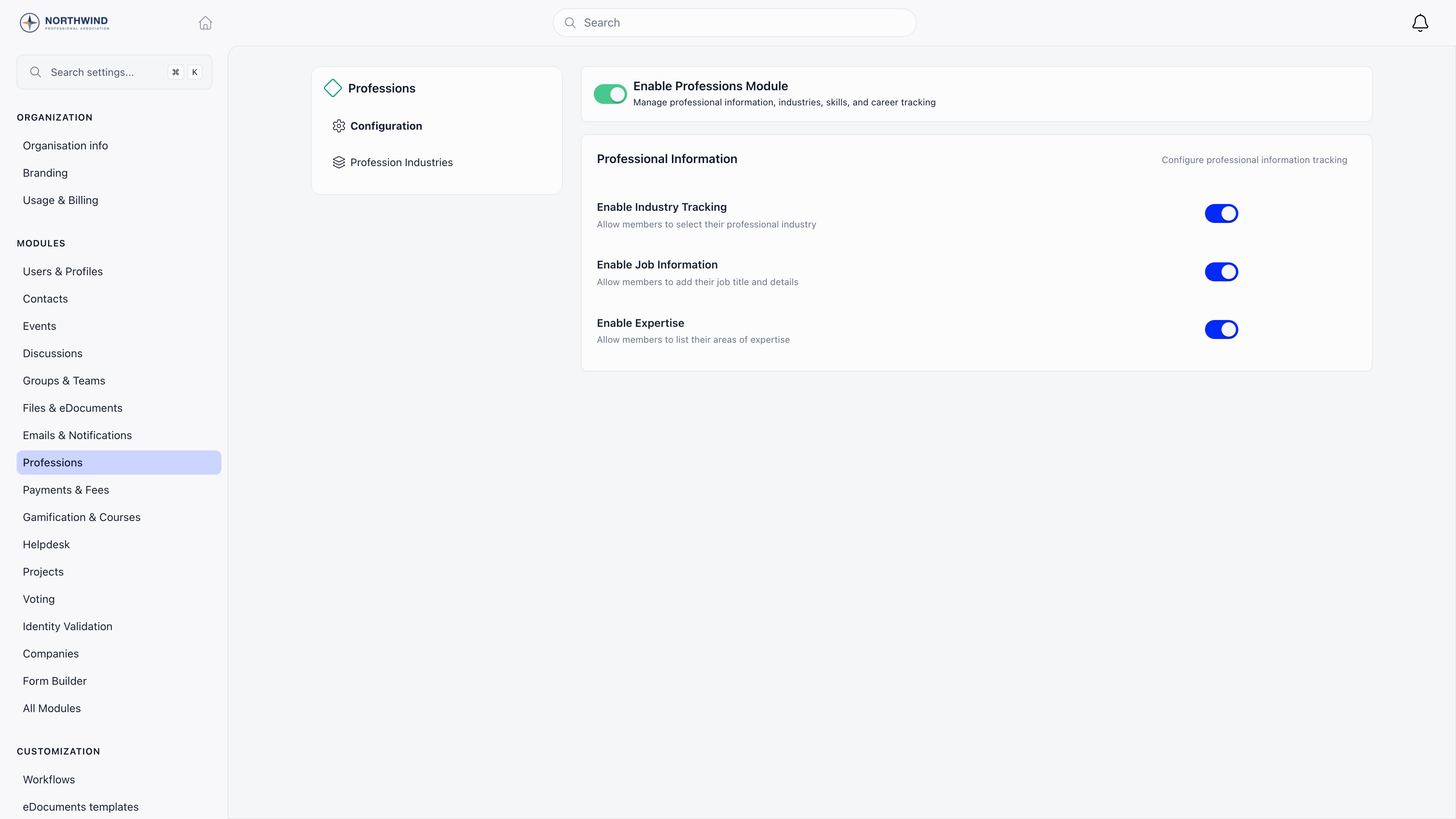
Four switches, saved the moment you flip one.
 | Setting | What it does |
| ----------------------------- | ------------------------------------------------------------------------------------------------------ |
| **Enable Professions Module** | Master switch. Off removes the profession block from member profiles. |
| **Enable Industry Tracking** | Adds the **Profession industry** picker and the **Profession Industries** admin screen. On by default. |
| **Enable Job Information** | Adds the **Profession job** picker, from a global catalogue of about 490 job titles. Off by default. |
| **Enable Expertise** | Adds the **Profession expertise** picker, from a global catalogue of about 157 areas. Off by default. |
Headline, sector and the current-organisation fields are not switches here. They are rows on the [profile form](/docs/platform/users/profile-fields).
***
## What members fill in
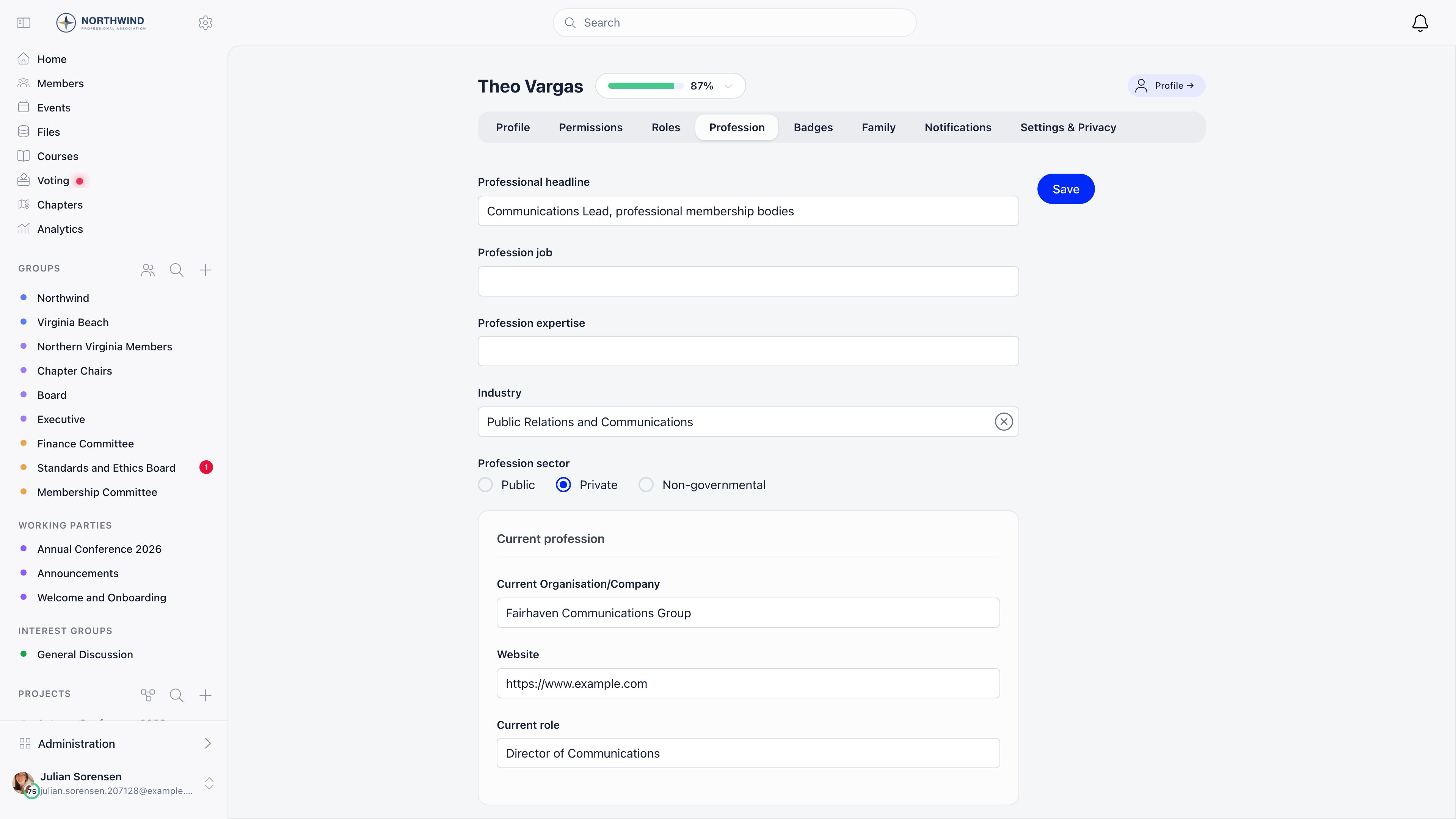
The **Profession** tab on a profile shows only the fields you have enabled. Members edit their own; an admin needs `ADMIN_LOCAL` or higher over that member.
| Setting | What it does |
| ----------------------------- | ------------------------------------------------------------------------------------------------------ |
| **Enable Professions Module** | Master switch. Off removes the profession block from member profiles. |
| **Enable Industry Tracking** | Adds the **Profession industry** picker and the **Profession Industries** admin screen. On by default. |
| **Enable Job Information** | Adds the **Profession job** picker, from a global catalogue of about 490 job titles. Off by default. |
| **Enable Expertise** | Adds the **Profession expertise** picker, from a global catalogue of about 157 areas. Off by default. |
Headline, sector and the current-organisation fields are not switches here. They are rows on the [profile form](/docs/platform/users/profile-fields).
***
## What members fill in
The **Profession** tab on a profile shows only the fields you have enabled. Members edit their own; an admin needs `ADMIN_LOCAL` or higher over that member.
 | Field | Enabled by | Notes |
| ---------------------------------------- | ------------------------------------------------------------------------------------------- | ---------------------------------------------------------------------------------------------------- |
| **Profession headline** | Profile form | Free text. The line under the name in the directory, and the only field the keyword search looks at. |
| **Profession job** | *Enable Job Information* | Global catalogue. **Other** shows a free-text box. |
| **Profession expertise** | *Enable Expertise* | Same pattern, with its own **Other** box. |
| **Profession industry** | *Enable Industry Tracking* plus the profile form's *Profession industry* row, both required | Drives the industry filter. |
| **Profession sector** | Profile form | Public, Private or Non-governmental. |
| **Current company/organization name** | Profile form | Heads the **Current profession** card. |
| **Current Company/organization website** | Profile form | Rendered as a link on the company name. |
| **Current role in company/organization** | Profile form | |
The billing fields on the same tab (company identifier, legal name, address, commerce registry number) are for invoicing, not for the directory. See [Companies](/docs/platform/users/companies).
The three company fields are shown as one **Current profession** block, and that block is keyed to **Current company/organization name**. If you remove that field from the profile form, the website and role fields disappear with it even while they are still selected. Keep the name field on the form whenever you want either of the other two.
***
## Browsing the directory
Unfiltered, the directory lists every active member with a profession headline, newest profession update first. Your own card comes first, carrying **Add profession** and **Add industry** prompts while yours is empty. Cards show photo, name, user type, headline, industry, a supporter badge if the member subscribed to your support product, and a LinkedIn icon when their LinkedIn URL is set.
Three filters, which combine:
| Filter | What it matches |
| ------------------------ | ----------------------------------------------------------------------------------------------------------------------------------------------------------------------------------------------------------------------------------------- |
| **Search by profession** | The headline text, and nothing else. |
| **Industry** | One industry, each listed with its member count. |
| **Interests** | Appears only once you designate a [custom field](/docs/platform/users/custom-fields) as the interest field under **Settings** → **Modules** → **Users & Profiles** → **Custom Fields**. Only dropdown, checkbox and radio fields are eligible. |
***
## Managing the industry catalogue
**Settings** → **Modules** → **Professions** → **Profession Industries**, visible only while **Enable Industry Tracking** is on, lists roughly 148 industries Orgo ships globally plus any you add.
| Field | Enabled by | Notes |
| ---------------------------------------- | ------------------------------------------------------------------------------------------- | ---------------------------------------------------------------------------------------------------- |
| **Profession headline** | Profile form | Free text. The line under the name in the directory, and the only field the keyword search looks at. |
| **Profession job** | *Enable Job Information* | Global catalogue. **Other** shows a free-text box. |
| **Profession expertise** | *Enable Expertise* | Same pattern, with its own **Other** box. |
| **Profession industry** | *Enable Industry Tracking* plus the profile form's *Profession industry* row, both required | Drives the industry filter. |
| **Profession sector** | Profile form | Public, Private or Non-governmental. |
| **Current company/organization name** | Profile form | Heads the **Current profession** card. |
| **Current Company/organization website** | Profile form | Rendered as a link on the company name. |
| **Current role in company/organization** | Profile form | |
The billing fields on the same tab (company identifier, legal name, address, commerce registry number) are for invoicing, not for the directory. See [Companies](/docs/platform/users/companies).
The three company fields are shown as one **Current profession** block, and that block is keyed to **Current company/organization name**. If you remove that field from the profile form, the website and role fields disappear with it even while they are still selected. Keep the name field on the form whenever you want either of the other two.
***
## Browsing the directory
Unfiltered, the directory lists every active member with a profession headline, newest profession update first. Your own card comes first, carrying **Add profession** and **Add industry** prompts while yours is empty. Cards show photo, name, user type, headline, industry, a supporter badge if the member subscribed to your support product, and a LinkedIn icon when their LinkedIn URL is set.
Three filters, which combine:
| Filter | What it matches |
| ------------------------ | ----------------------------------------------------------------------------------------------------------------------------------------------------------------------------------------------------------------------------------------- |
| **Search by profession** | The headline text, and nothing else. |
| **Industry** | One industry, each listed with its member count. |
| **Interests** | Appears only once you designate a [custom field](/docs/platform/users/custom-fields) as the interest field under **Settings** → **Modules** → **Users & Profiles** → **Custom Fields**. Only dropdown, checkbox and radio fields are eligible. |
***
## Managing the industry catalogue
**Settings** → **Modules** → **Professions** → **Profession Industries**, visible only while **Enable Industry Tracking** is on, lists roughly 148 industries Orgo ships globally plus any you add.
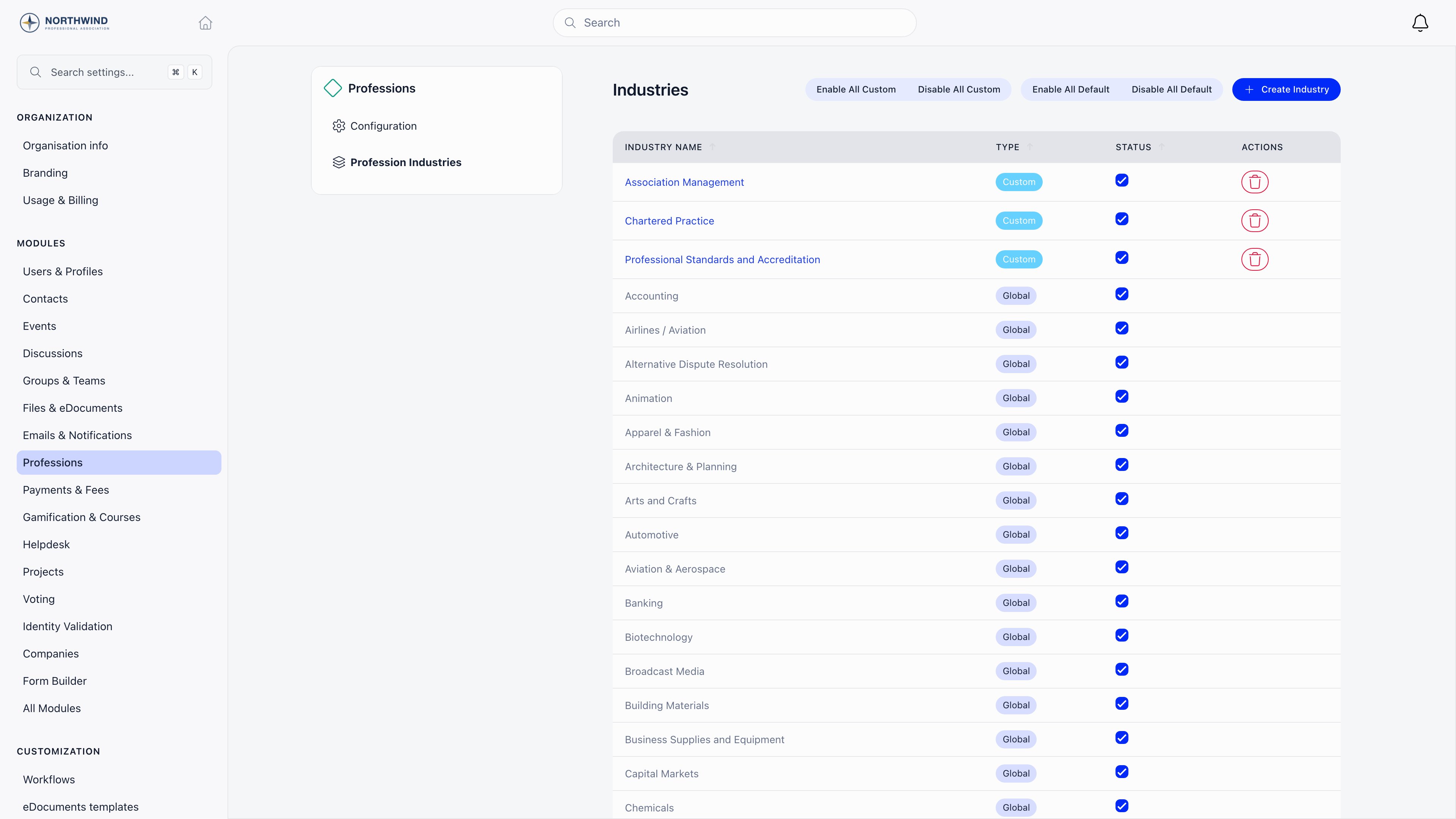 Unticking hides an industry without deleting it, and members who already picked it keep the value. **Disable All Default** clears the shipped list at once, the usual start for a short bespoke list. **Create Industry** takes a name plus optional translations per interface language; custom industries are tagged **Custom**, belong only to your organisation, and are the only ones you can rename or delete.
The job and expertise catalogues are read-only global reference data: you cannot add to them or hide entries.
Every write on this screen, creating, renaming, deleting and the bulk enable and disable buttons, is refused unless your account carries the tenant administrator **role**. An admin who holds `ADMIN_TENANT` as a permission rather than as the role can open the screen and read the list, and gets Access Denied on the buttons.
***
## Connections
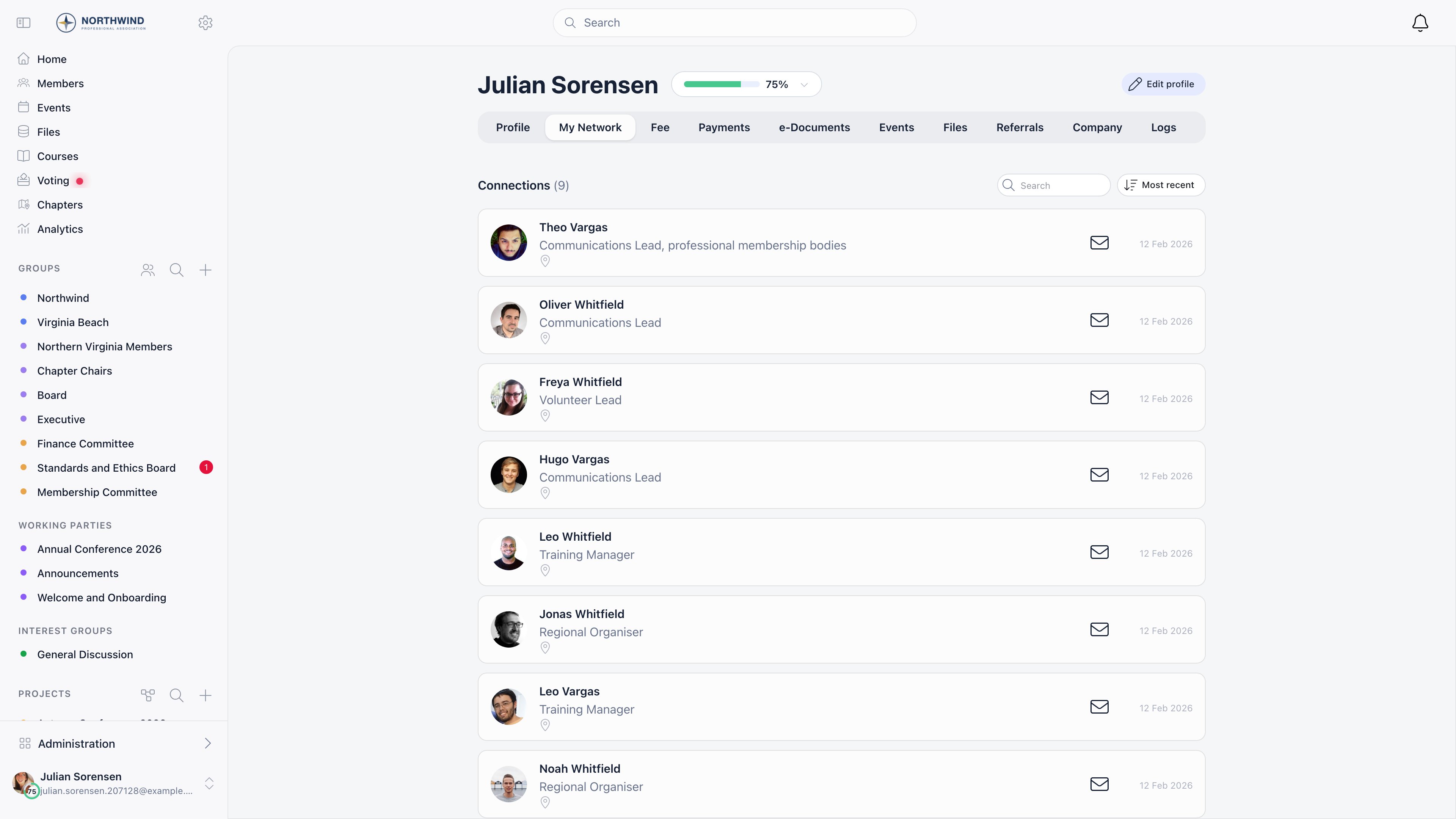
Connections have their own switch, **Settings** → **Modules** → **Users & Profiles** → **Profile Settings** → **Has Connections**, on by default and working whether or not the Professions module is on.
**Connect** on the other member's profile, or on a Discover members card.
The button is only there when the other account is active, you are not
already connected, neither of you has a request pending with the other, and
you are not inside a cooldown.
They get an in-app notification and an email. Only they can respond: the
sender's button becomes **Request pending** and does nothing until they do.
From the profile, or from **Requests received** on the **Connections** tab
of their own profile, which carries a dot while anything is waiting.
Accepting notifies and emails the sender; declining tells them nothing.
Under accepted connections on each side, searchable and sortable by most
recent, least recent or name, and counted on the tab.
Either side can remove an accepted connection later. That deletes it outright,
with no notification to the other person, and either of them can send a fresh
request afterwards.
Two server-side limits apply.
* **20 connection requests per hour** per member. The 21st is refused until the
hour is up.
* **A 21 day cooldown**, which starts when a *pending* request is cancelled, not
when one is declined. A member who sends a request and then withdraws it
cannot ask that person again for three weeks. A member whose request was
declined can ask again immediately, and the declining party is never told
either way.
Requests to accounts that are not active are refused outright.
Unticking hides an industry without deleting it, and members who already picked it keep the value. **Disable All Default** clears the shipped list at once, the usual start for a short bespoke list. **Create Industry** takes a name plus optional translations per interface language; custom industries are tagged **Custom**, belong only to your organisation, and are the only ones you can rename or delete.
The job and expertise catalogues are read-only global reference data: you cannot add to them or hide entries.
Every write on this screen, creating, renaming, deleting and the bulk enable and disable buttons, is refused unless your account carries the tenant administrator **role**. An admin who holds `ADMIN_TENANT` as a permission rather than as the role can open the screen and read the list, and gets Access Denied on the buttons.
***
## Connections
Connections have their own switch, **Settings** → **Modules** → **Users & Profiles** → **Profile Settings** → **Has Connections**, on by default and working whether or not the Professions module is on.
**Connect** on the other member's profile, or on a Discover members card.
The button is only there when the other account is active, you are not
already connected, neither of you has a request pending with the other, and
you are not inside a cooldown.
They get an in-app notification and an email. Only they can respond: the
sender's button becomes **Request pending** and does nothing until they do.
From the profile, or from **Requests received** on the **Connections** tab
of their own profile, which carries a dot while anything is waiting.
Accepting notifies and emails the sender; declining tells them nothing.
Under accepted connections on each side, searchable and sortable by most
recent, least recent or name, and counted on the tab.
Either side can remove an accepted connection later. That deletes it outright,
with no notification to the other person, and either of them can send a fresh
request afterwards.
Two server-side limits apply.
* **20 connection requests per hour** per member. The 21st is refused until the
hour is up.
* **A 21 day cooldown**, which starts when a *pending* request is cancelled, not
when one is declined. A member who sends a request and then withdraws it
cannot ask that person again for three weeks. A member whose request was
declined can ask again immediately, and the declining party is never told
either way.
Requests to accounts that are not active are refused outright.
 ***
## Discover members
**User Recommendations**, on the same Profile Settings screen, gives members a **Discover members** carousel of suggested people, also placeable on the [dashboard](/docs/platform/customization/dashboard-organizer) as a widget.
Suggestions score out of 150 points across five signals:
| Signal | Max points |
| ------------------------------------- | ---------- |
| Same county, region or country | 40 |
| Age within five years | 30 |
| Recently joined, decaying over a year | 30 |
| Mutual connections, 10 points each | 30 |
| Recent login, decaying over 30 days | 20 |
Excluded: members already connected, already asked, in a decline cooldown, under 18, or with a private profile. At most 50 suggestions are produced, cached for 48 hours and refreshed sooner when a connection is sent or accepted.
Recommendations are deliberately not based on profession. Industry, expertise, job title and the interest custom field play no part in the score, so filling the professional profile in will not change who a member is shown.
***
## Who can see whom
**Individual privacy.** Each member has a **Profession & social media** toggle in their privacy settings. Set to admin-only, it blanks their headline and industry for everyone except tenant admins, HR staff, and staff in their own local center. The organisation-wide default is **Settings** → **Modules** → **Users & Profiles** → **Privacy Defaults**. Signed-out visitors never see profession data. See [Privacy Settings](/docs/platform/users/privacy-settings).
**Directory visibility.** **Who Can See Members in General Groups**, under **Privacy & Visibility** in the same module, applies here too. Raised above ordinary members, plain members can still browse and filter by industry, but keyword and interest filters are refused and recommendations fall back to their own local center.
***
## Common questions
The unfiltered directory lists only members who have a **Profession
headline** and status Active. Industry, job title and expertise on their own
do not put anyone in the list, which is the usual cause: the member filled
in the pickers and skipped the free-text line.
A useful way to confirm it: filter by their industry. The industry filter
drops the headline requirement, so someone who appears under their industry
but not in the unfiltered list is missing a headline and nothing else.
The tab renders only when there is something to put on it. It needs
**Enable Professions Module** on, plus at least one available field, which
can come either from the module switches (industry, job, expertise) or from
the profile form (headline, sector, the current organisation fields).
Switching the module on while every field is off leaves the tab empty and
hidden. Check the [profile form](/docs/platform/users/profile-fields) as well as
the module screen.
That is **Who Can See Members in General Groups**, under **Privacy &
Visibility**, set above ordinary members. The rule is about which member
lists a plain member is allowed to pull, not about the professional network
as such, and it hits the keyword and interest filters because those ask for
a list of members with no group or industry attached.
Two things still work for those members: browsing unfiltered and filtering
by industry. So the practical workaround is to pick an industry first and
then type in the search box, since the request then carries the industry and
is allowed. Guests are refused in every case.
The button is hidden rather than disabled, so its absence is the error
message. It means one of:
* **Has Connections** is off for the organisation;
* the other account is not Active;
* a request is already pending in one direction or the other;
* the two are already connected;
* the member cancelled an earlier request to this person and the 21 day
cooldown is still running.
Only the last one expires on its own.
The interface shows one generic toast for every refusal, so read it as "the
server said no" and work through the four possible reasons: the sender has
sent 20 requests in the last hour, the sender is in a cooldown with that
person, the recipient's account is not Active, or the recipient has already
sent them a request that is waiting to be accepted.
The last one is the most common and the least obvious: the member should
look at **Requests received** on their own **My Network** tab, where the person
they were trying to reach is probably already waiting.
A decline does not block anything. If the recipient used **Decline**, the
sender can ask again straight away.
What does block for 21 days is cancelling your own pending request. If the
member withdrew the request rather than being declined, the cooldown is
running and the Connect button stays hidden until it expires. So the
question to ask is not "were they declined" but "did they cancel".
Suggestions are cached for 48 hours per member, and only rebuilt earlier
when that member sends or accepts a connection. Nothing else refreshes them,
so a member who fills in their profile and reloads sees the same list.
Also check what the score is actually made of: location, age proximity, how
recently the person joined, mutual connections and recent logins. Profession
plays no part, so telling members to complete their professional profile in
order to get better suggestions is not true. Members who are already
connected, already asked, in a cooldown, under 18 or on a private profile
are excluded entirely, which is why a small or young organisation can run
out of suggestions long before the 50-suggestion ceiling.
Expected. Unticking an industry removes it from the pickers and from the
directory's industry list, but the value stays on the member records that
already had it. Cards resolve the name from the enabled list, so those
members show an empty industry line rather than the old name.
Tick it back on to make the name reappear, or edit those members onto an
industry you kept. Deleting is only possible for industries you created
yourself, which is the safer reason to disable rather than delete.
Skills are separate: **Enable Skills Field**, on the same **Profile
Settings** screen, adds a Skills custom field seeded with a predefined
catalogue. It is not part of the Professions module and does not appear in
the directory filters, so use expertise if you want people to be findable by
it here.
***
## Related
* [Profile Fields](/docs/platform/users/profile-fields) for adding the headline, sector and company fields
* [Custom Fields](/docs/platform/users/custom-fields) for designating the interest field
* [Privacy Settings](/docs/platform/users/privacy-settings) for what members can hide
* [Members](/docs/platform/users) for the main member directory and its filters
* [Companies](/docs/platform/users/companies) for company records and billing details
***
## Discover members
**User Recommendations**, on the same Profile Settings screen, gives members a **Discover members** carousel of suggested people, also placeable on the [dashboard](/docs/platform/customization/dashboard-organizer) as a widget.
Suggestions score out of 150 points across five signals:
| Signal | Max points |
| ------------------------------------- | ---------- |
| Same county, region or country | 40 |
| Age within five years | 30 |
| Recently joined, decaying over a year | 30 |
| Mutual connections, 10 points each | 30 |
| Recent login, decaying over 30 days | 20 |
Excluded: members already connected, already asked, in a decline cooldown, under 18, or with a private profile. At most 50 suggestions are produced, cached for 48 hours and refreshed sooner when a connection is sent or accepted.
Recommendations are deliberately not based on profession. Industry, expertise, job title and the interest custom field play no part in the score, so filling the professional profile in will not change who a member is shown.
***
## Who can see whom
**Individual privacy.** Each member has a **Profession & social media** toggle in their privacy settings. Set to admin-only, it blanks their headline and industry for everyone except tenant admins, HR staff, and staff in their own local center. The organisation-wide default is **Settings** → **Modules** → **Users & Profiles** → **Privacy Defaults**. Signed-out visitors never see profession data. See [Privacy Settings](/docs/platform/users/privacy-settings).
**Directory visibility.** **Who Can See Members in General Groups**, under **Privacy & Visibility** in the same module, applies here too. Raised above ordinary members, plain members can still browse and filter by industry, but keyword and interest filters are refused and recommendations fall back to their own local center.
***
## Common questions
The unfiltered directory lists only members who have a **Profession
headline** and status Active. Industry, job title and expertise on their own
do not put anyone in the list, which is the usual cause: the member filled
in the pickers and skipped the free-text line.
A useful way to confirm it: filter by their industry. The industry filter
drops the headline requirement, so someone who appears under their industry
but not in the unfiltered list is missing a headline and nothing else.
The tab renders only when there is something to put on it. It needs
**Enable Professions Module** on, plus at least one available field, which
can come either from the module switches (industry, job, expertise) or from
the profile form (headline, sector, the current organisation fields).
Switching the module on while every field is off leaves the tab empty and
hidden. Check the [profile form](/docs/platform/users/profile-fields) as well as
the module screen.
That is **Who Can See Members in General Groups**, under **Privacy &
Visibility**, set above ordinary members. The rule is about which member
lists a plain member is allowed to pull, not about the professional network
as such, and it hits the keyword and interest filters because those ask for
a list of members with no group or industry attached.
Two things still work for those members: browsing unfiltered and filtering
by industry. So the practical workaround is to pick an industry first and
then type in the search box, since the request then carries the industry and
is allowed. Guests are refused in every case.
The button is hidden rather than disabled, so its absence is the error
message. It means one of:
* **Has Connections** is off for the organisation;
* the other account is not Active;
* a request is already pending in one direction or the other;
* the two are already connected;
* the member cancelled an earlier request to this person and the 21 day
cooldown is still running.
Only the last one expires on its own.
The interface shows one generic toast for every refusal, so read it as "the
server said no" and work through the four possible reasons: the sender has
sent 20 requests in the last hour, the sender is in a cooldown with that
person, the recipient's account is not Active, or the recipient has already
sent them a request that is waiting to be accepted.
The last one is the most common and the least obvious: the member should
look at **Requests received** on their own **My Network** tab, where the person
they were trying to reach is probably already waiting.
A decline does not block anything. If the recipient used **Decline**, the
sender can ask again straight away.
What does block for 21 days is cancelling your own pending request. If the
member withdrew the request rather than being declined, the cooldown is
running and the Connect button stays hidden until it expires. So the
question to ask is not "were they declined" but "did they cancel".
Suggestions are cached for 48 hours per member, and only rebuilt earlier
when that member sends or accepts a connection. Nothing else refreshes them,
so a member who fills in their profile and reloads sees the same list.
Also check what the score is actually made of: location, age proximity, how
recently the person joined, mutual connections and recent logins. Profession
plays no part, so telling members to complete their professional profile in
order to get better suggestions is not true. Members who are already
connected, already asked, in a cooldown, under 18 or on a private profile
are excluded entirely, which is why a small or young organisation can run
out of suggestions long before the 50-suggestion ceiling.
Expected. Unticking an industry removes it from the pickers and from the
directory's industry list, but the value stays on the member records that
already had it. Cards resolve the name from the enabled list, so those
members show an empty industry line rather than the old name.
Tick it back on to make the name reappear, or edit those members onto an
industry you kept. Deleting is only possible for industries you created
yourself, which is the safer reason to disable rather than delete.
Skills are separate: **Enable Skills Field**, on the same **Profile
Settings** screen, adds a Skills custom field seeded with a predefined
catalogue. It is not part of the Professions module and does not appear in
the directory filters, so use expertise if you want people to be findable by
it here.
***
## Related
* [Profile Fields](/docs/platform/users/profile-fields) for adding the headline, sector and company fields
* [Custom Fields](/docs/platform/users/custom-fields) for designating the interest field
* [Privacy Settings](/docs/platform/users/privacy-settings) for what members can hide
* [Members](/docs/platform/users) for the main member directory and its filters
* [Companies](/docs/platform/users/companies) for company records and billing details