> ## Documentation Index
> Fetch the complete documentation index at: https://orgo.space/docs/llms.txt
> Use this file to discover all available pages before exploring further.
# Tasks
> Create tasks with assignees, statuses, checklists and dependencies, and see them on a list, board or timeline
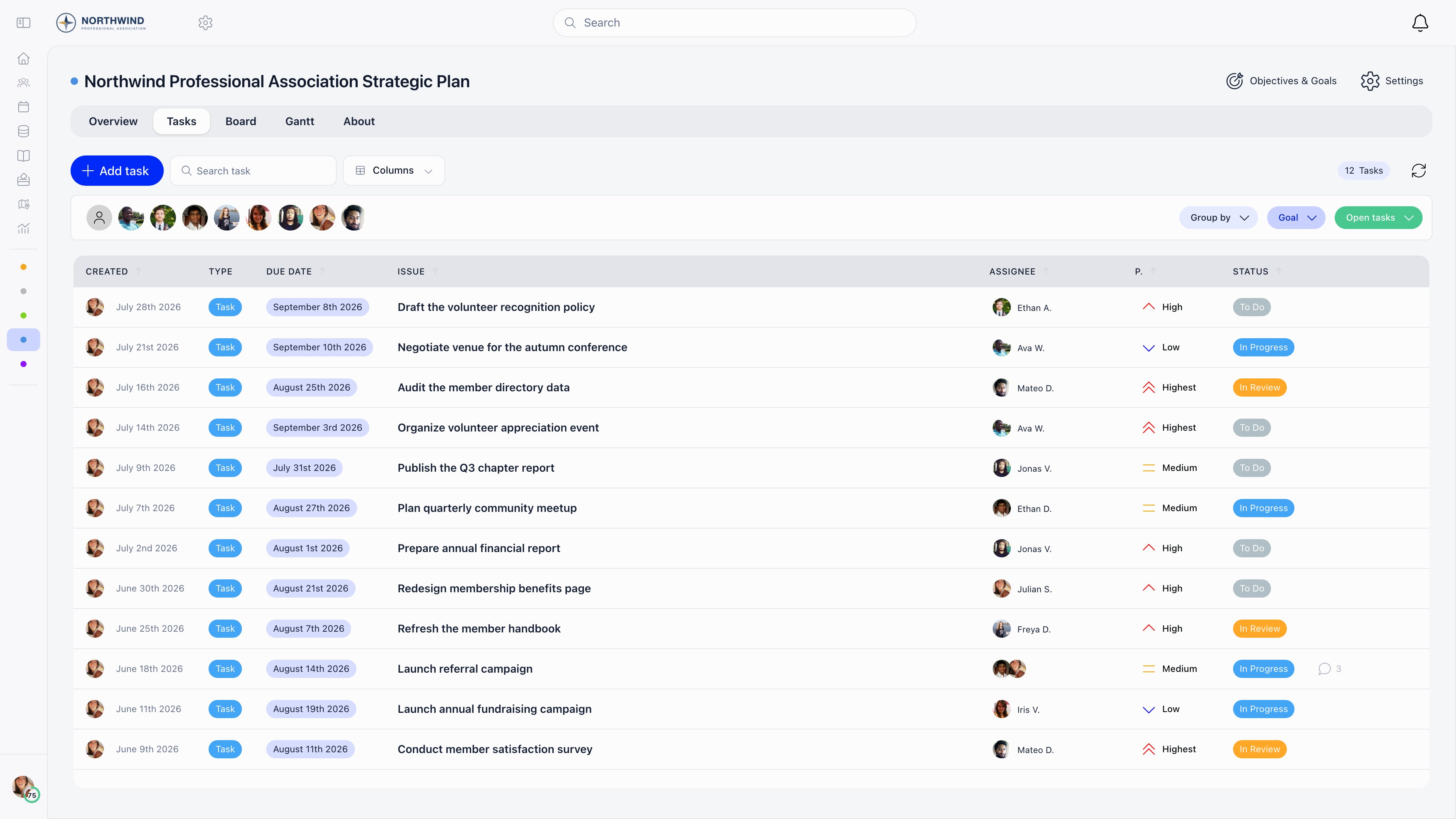
Tasks are the unit of work inside a project. A task carries a title, a rich description with attachments, a status, a type, a priority, one or more assignees, start and due dates, a checklist, dependencies on other tasks, comments and a change history.
**Built for** the day to day work of a committee or staff team: who is doing what, by when, and what is blocking it.
**Replaces** action-item spreadsheets and email chases. Tasks always belong to a project, so there is no standalone personal to-do list.
 ***
## Creating a task
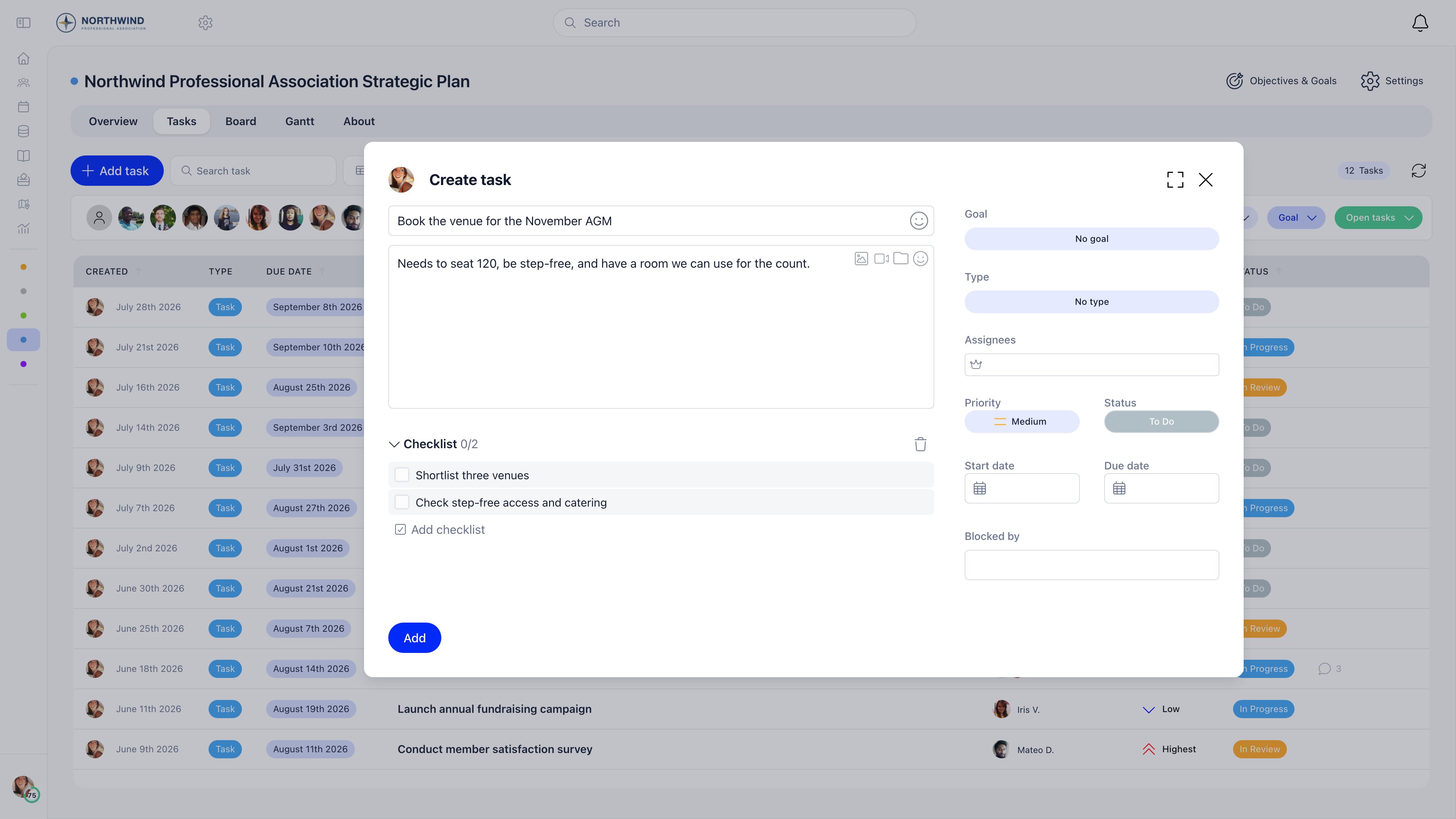
Open a project and use **Add task** on the Tasks, Board or Gantt tab. Anyone who can open the project can create tasks. Dragging files onto a project also opens the form with those files attached.
| Field | What it does |
| ------------------------------- | ---------------------------------------------------------------------------------------------------------------------- |
| **Task title** | Required. |
| Description | Rich text with images, video and file attachments. |
| **Checklist** | A list of sub-items with tick boxes. Pasting a bulleted list creates several at once. Items are reordered by dragging. |
| **Goal** | Only when **Goals** is on for the project. Puts the task under a goal. |
| **Type** | Only when the project has task types defined, for example Bug, Feature, Task. |
| **Assignees** | One or more members. Search is limited to people who can access the project. |
| **Priority** | **Highest**, **High**, **Medium**, **Low**, **Lowest**. New tasks start at **Medium**. |
| **Status** | One of the project's statuses. Defaults to the first one, normally **To do**. |
| **Start date** and **Due date** | Each optional. The pickers keep the start on or before the due date. |
| **Blocked by** | Other tasks in the same project that must be closed first. |
The task list, board and Gantt only show the fields the project has switched on under **Task options**, so a project without priorities or due dates gets a simpler form.
***
## Creating a task
Open a project and use **Add task** on the Tasks, Board or Gantt tab. Anyone who can open the project can create tasks. Dragging files onto a project also opens the form with those files attached.
| Field | What it does |
| ------------------------------- | ---------------------------------------------------------------------------------------------------------------------- |
| **Task title** | Required. |
| Description | Rich text with images, video and file attachments. |
| **Checklist** | A list of sub-items with tick boxes. Pasting a bulleted list creates several at once. Items are reordered by dragging. |
| **Goal** | Only when **Goals** is on for the project. Puts the task under a goal. |
| **Type** | Only when the project has task types defined, for example Bug, Feature, Task. |
| **Assignees** | One or more members. Search is limited to people who can access the project. |
| **Priority** | **Highest**, **High**, **Medium**, **Low**, **Lowest**. New tasks start at **Medium**. |
| **Status** | One of the project's statuses. Defaults to the first one, normally **To do**. |
| **Start date** and **Due date** | Each optional. The pickers keep the start on or before the due date. |
| **Blocked by** | Other tasks in the same project that must be closed first. |
The task list, board and Gantt only show the fields the project has switched on under **Task options**, so a project without priorities or due dates gets a simpler form.
 ***
## Statuses and types
Both are defined per project under **Settings** → **Statuses & types**, so two projects can run entirely different workflows.
A status has a name, a colour and a **Mark as closed** switch. Closed is what makes a task count as complete: it removes the task from open filters, from the daily digest and from reminder emails, and it satisfies any dependency on that task. A new project starts with **To do**, **In Progress** and **Done**, with **Done** marked as closed.
A type has a name and a colour only. It is a label for grouping and filtering.
***
## Assignees and completion
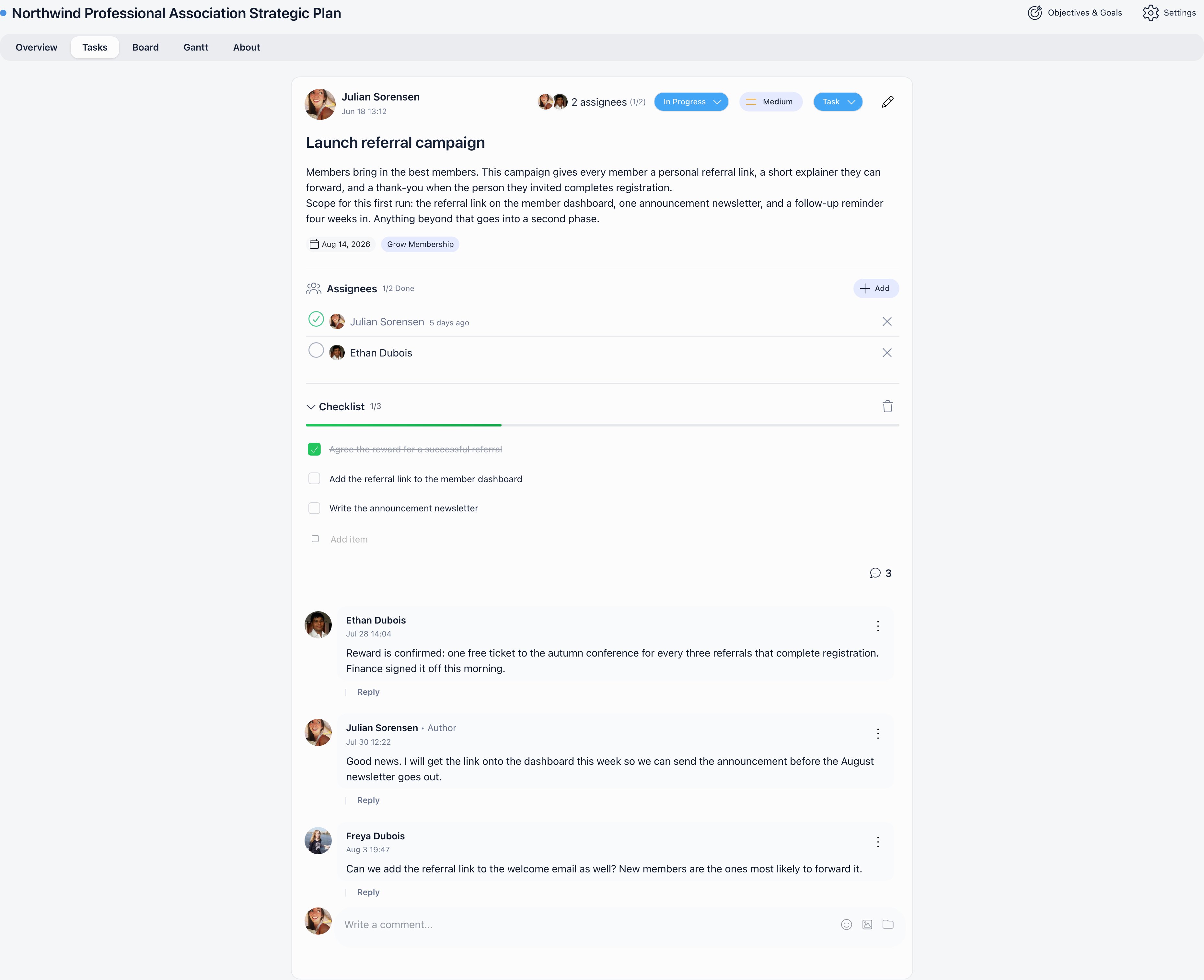
A task can have several assignees, each with their own tick box, and the task shows a counter such as 2/3. Only that assignee can tick their own box; `ADMIN_TENANT` can tick anyone's. Completing every assignee's part does not close the task automatically: someone still has to move it to a closed status.
Editing a task is open to `ADMIN_TENANT`, the project owner, any assignee, and whoever created the task. Deleting a task is limited to `ADMIN_TENANT`, the project owner and the task creator.
***
## Dependencies
**Blocked by** lists tasks that must be finished first. Orgo enforces three rules when you add one:
* the blocking task must be in the same project,
* a task cannot block itself, and the chain cannot loop back on itself,
* a dependency chain deeper than 100 levels is rejected.
While a blocking task is still open, moving the dependent task to a closed status is refused and the response names the tasks still in the way.
***
## Comments and history
Comments sit at the bottom of the task. They take rich text, images and files, support threaded replies and emoji reactions.
Posting a comment notifies the task assignee and the task creator in the app, and emails everyone assigned plus the creator, skipping whoever wrote the comment. On an archived project the comment is saved but nothing is sent.
Every status change, assignee change, priority change and due date change is written to the task history with who made it and when.
***
## Statuses and types
Both are defined per project under **Settings** → **Statuses & types**, so two projects can run entirely different workflows.
A status has a name, a colour and a **Mark as closed** switch. Closed is what makes a task count as complete: it removes the task from open filters, from the daily digest and from reminder emails, and it satisfies any dependency on that task. A new project starts with **To do**, **In Progress** and **Done**, with **Done** marked as closed.
A type has a name and a colour only. It is a label for grouping and filtering.
***
## Assignees and completion
A task can have several assignees, each with their own tick box, and the task shows a counter such as 2/3. Only that assignee can tick their own box; `ADMIN_TENANT` can tick anyone's. Completing every assignee's part does not close the task automatically: someone still has to move it to a closed status.
Editing a task is open to `ADMIN_TENANT`, the project owner, any assignee, and whoever created the task. Deleting a task is limited to `ADMIN_TENANT`, the project owner and the task creator.
***
## Dependencies
**Blocked by** lists tasks that must be finished first. Orgo enforces three rules when you add one:
* the blocking task must be in the same project,
* a task cannot block itself, and the chain cannot loop back on itself,
* a dependency chain deeper than 100 levels is rejected.
While a blocking task is still open, moving the dependent task to a closed status is refused and the response names the tasks still in the way.
***
## Comments and history
Comments sit at the bottom of the task. They take rich text, images and files, support threaded replies and emoji reactions.
Posting a comment notifies the task assignee and the task creator in the app, and emails everyone assigned plus the creator, skipping whoever wrote the comment. On an archived project the comment is saved but nothing is sent.
Every status change, assignee change, priority change and due date change is written to the task history with who made it and when.
 ***
## Finding tasks
The **Tasks** tab is the full list. It shows 20 tasks a page, or the whole set when grouping is on.
| Control | What it does |
| ----------------- | ------------------------------------------------------------------------------------------------------------------------------------------ |
| **Search task** | Matches the title. |
| Assignee row | Click an avatar to filter to that person, or **unassigned**. A search box appears once the project has more than ten members. |
| **Group by** | **assignee**, **status**, **Type**, **Goal**, **priority** or **Month**. **By assignee** adds a second level of columns inside each group. |
| **Status** | Filter by **Open tasks**, **Closed tasks** or individual statuses. |
| **Goal** | Filter to one goal, when goals are on. |
| **Columns** | Show or hide the **created**, **Type**, **Goal**, **Due date** and **Priority** columns. |
| **Reset filters** | Clears everything at once. |
The Overview tab's counters are shortcuts into the same list: clicking **overdue**, **unassigned**, **due in 3 days** or **no dates** applies that filter.
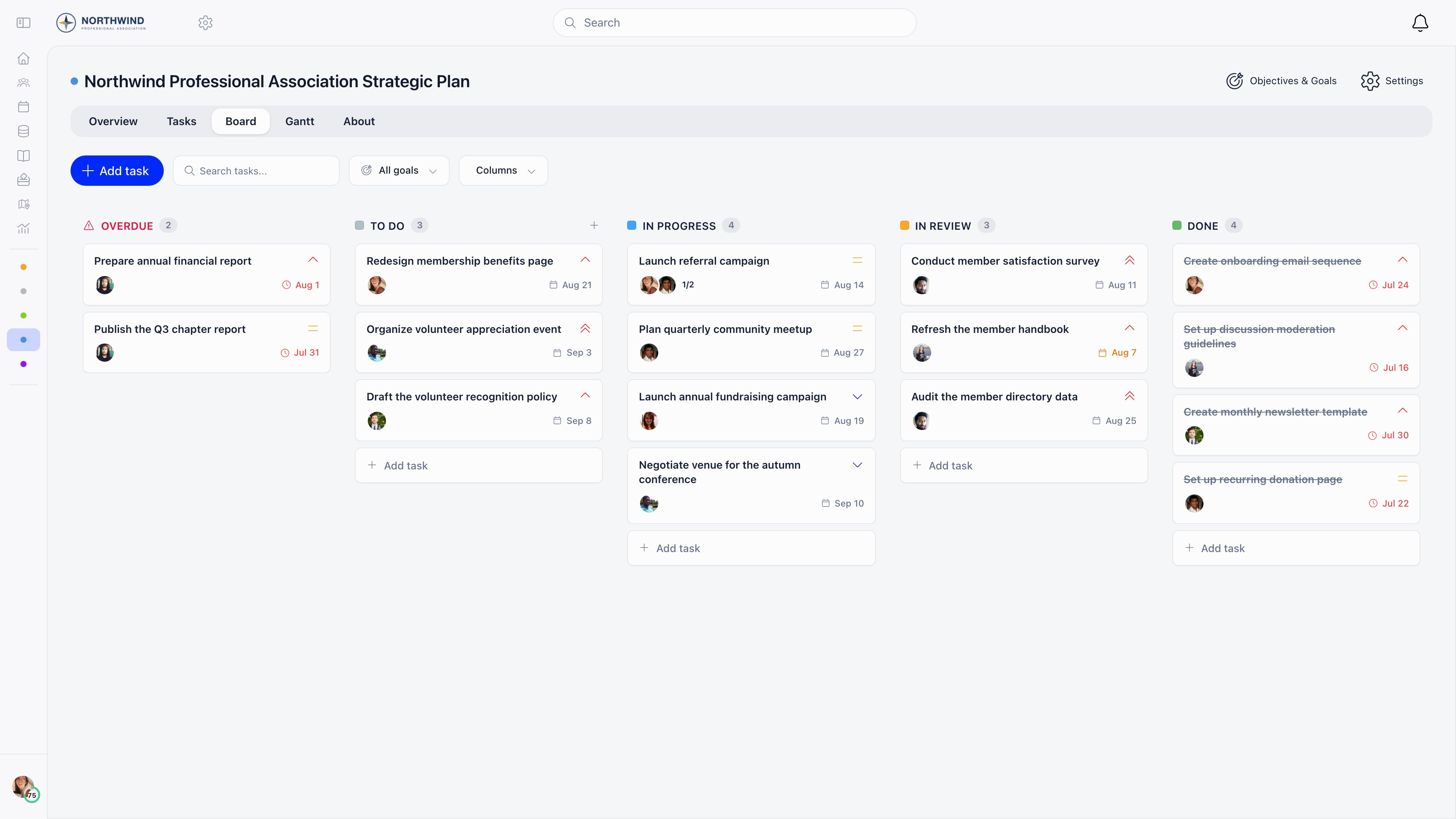
The **Board** tab is a kanban view with one column per status plus optional **Overdue** and **No status** columns; dragging a card changes its status. The **Gantt** tab plots tasks and goals over a day, week or month scale, and dragging a bar or its edges changes the dates.
***
## Finding tasks
The **Tasks** tab is the full list. It shows 20 tasks a page, or the whole set when grouping is on.
| Control | What it does |
| ----------------- | ------------------------------------------------------------------------------------------------------------------------------------------ |
| **Search task** | Matches the title. |
| Assignee row | Click an avatar to filter to that person, or **unassigned**. A search box appears once the project has more than ten members. |
| **Group by** | **assignee**, **status**, **Type**, **Goal**, **priority** or **Month**. **By assignee** adds a second level of columns inside each group. |
| **Status** | Filter by **Open tasks**, **Closed tasks** or individual statuses. |
| **Goal** | Filter to one goal, when goals are on. |
| **Columns** | Show or hide the **created**, **Type**, **Goal**, **Due date** and **Priority** columns. |
| **Reset filters** | Clears everything at once. |
The Overview tab's counters are shortcuts into the same list: clicking **overdue**, **unassigned**, **due in 3 days** or **no dates** applies that filter.
The **Board** tab is a kanban view with one column per status plus optional **Overdue** and **No status** columns; dragging a card changes its status. The **Gantt** tab plots tasks and goals over a day, week or month scale, and dragging a bar or its edges changes the dates.
 ***
## My tasks
The dashboard carries a **My Tasks** card listing your open tasks from active projects, soonest due date first and then by priority, with a link through to **Projects**. Archived projects and tasks in a closed status are left out.
***
## Emails about tasks
| Email | When it is sent | Who gets it |
| ------------------- | ----------------------------------------------------------- | -------------------------------------------------------------------------------------- |
| Task assigned | A task is created with an assignee, or its assignee changes | Everyone assigned, except the person who made the change |
| Task status changed | The status changes | Everyone assigned plus the creator, except the person who made the change |
| Task comment added | A comment is posted | Everyone assigned plus the creator, except the commenter |
| Daily task digest | Every day at 06:00 UTC | Members with at least one overdue, due today, due this week or high priority open task |
The digest groups your work into overdue, due today, due this week and high priority, and adds up to five tasks with no due date. If none of the first four groups has anything in it, no digest goes out that day.
Archiving a project silences the first three emails for its tasks. The digest is the exception: it still lists tasks from archived projects.
The daily digest is the one task email a member can switch off, using the **Task** toggle in their profile notification settings. The organisation default for new members is **Email Notifications: Tasks** under **Settings** → **Modules** → **Emails & Notifications** → **Notification Preferences**, and it ships set to Instant. The assigned, status changed and comment emails have no member-level switch and are not in the Email Templates catalogue, so they cannot be edited or turned off from Settings.
Orgo also has due soon and overdue task emails, but the job that sends them is not on the automatic schedule, so members do not receive them today. Use the daily digest, which lists the same overdue and upcoming work.
***
## Related
* [Projects](/docs/platform/projects) - projects, access, goals and the project views
* [Issues](/docs/platform/issues) - the separate issue tracker inside groups
* [Notifications](/docs/platform/notifications) - the notification switches and defaults
* [Emails](/docs/platform/emails) - how system emails are built, sent and logged
* [Permissions](/docs/platform/permissions) - what `ADMIN_TENANT` and `HR_TENANT` unlock
***
## My tasks
The dashboard carries a **My Tasks** card listing your open tasks from active projects, soonest due date first and then by priority, with a link through to **Projects**. Archived projects and tasks in a closed status are left out.
***
## Emails about tasks
| Email | When it is sent | Who gets it |
| ------------------- | ----------------------------------------------------------- | -------------------------------------------------------------------------------------- |
| Task assigned | A task is created with an assignee, or its assignee changes | Everyone assigned, except the person who made the change |
| Task status changed | The status changes | Everyone assigned plus the creator, except the person who made the change |
| Task comment added | A comment is posted | Everyone assigned plus the creator, except the commenter |
| Daily task digest | Every day at 06:00 UTC | Members with at least one overdue, due today, due this week or high priority open task |
The digest groups your work into overdue, due today, due this week and high priority, and adds up to five tasks with no due date. If none of the first four groups has anything in it, no digest goes out that day.
Archiving a project silences the first three emails for its tasks. The digest is the exception: it still lists tasks from archived projects.
The daily digest is the one task email a member can switch off, using the **Task** toggle in their profile notification settings. The organisation default for new members is **Email Notifications: Tasks** under **Settings** → **Modules** → **Emails & Notifications** → **Notification Preferences**, and it ships set to Instant. The assigned, status changed and comment emails have no member-level switch and are not in the Email Templates catalogue, so they cannot be edited or turned off from Settings.
Orgo also has due soon and overdue task emails, but the job that sends them is not on the automatic schedule, so members do not receive them today. Use the daily digest, which lists the same overdue and upcoming work.
***
## Related
* [Projects](/docs/platform/projects) - projects, access, goals and the project views
* [Issues](/docs/platform/issues) - the separate issue tracker inside groups
* [Notifications](/docs/platform/notifications) - the notification switches and defaults
* [Emails](/docs/platform/emails) - how system emails are built, sent and logged
* [Permissions](/docs/platform/permissions) - what `ADMIN_TENANT` and `HR_TENANT` unlock