> ## Documentation Index
> Fetch the complete documentation index at: https://orgo.space/docs/llms.txt
> Use this file to discover all available pages before exploring further.
# Orgo for member communication
> A setup playbook for running member communication on Orgo: which modules to enable, in what order, and which channel to use for what
This page is for the person who has decided to run their organization's member
communication on Orgo and now has to configure it. It routes you: what to switch
on, in what order, and which page documents each step.
**Built for** organizations replacing a mailing list tool plus a Facebook group
plus a folder of copy-pasted announcement emails. **Replaces** the guesswork
about which of those Orgo covers.
One of the [setup templates](/docs/platform/templates/index). Read it alongside
whichever one describes your core operation, since every organization
communicates.
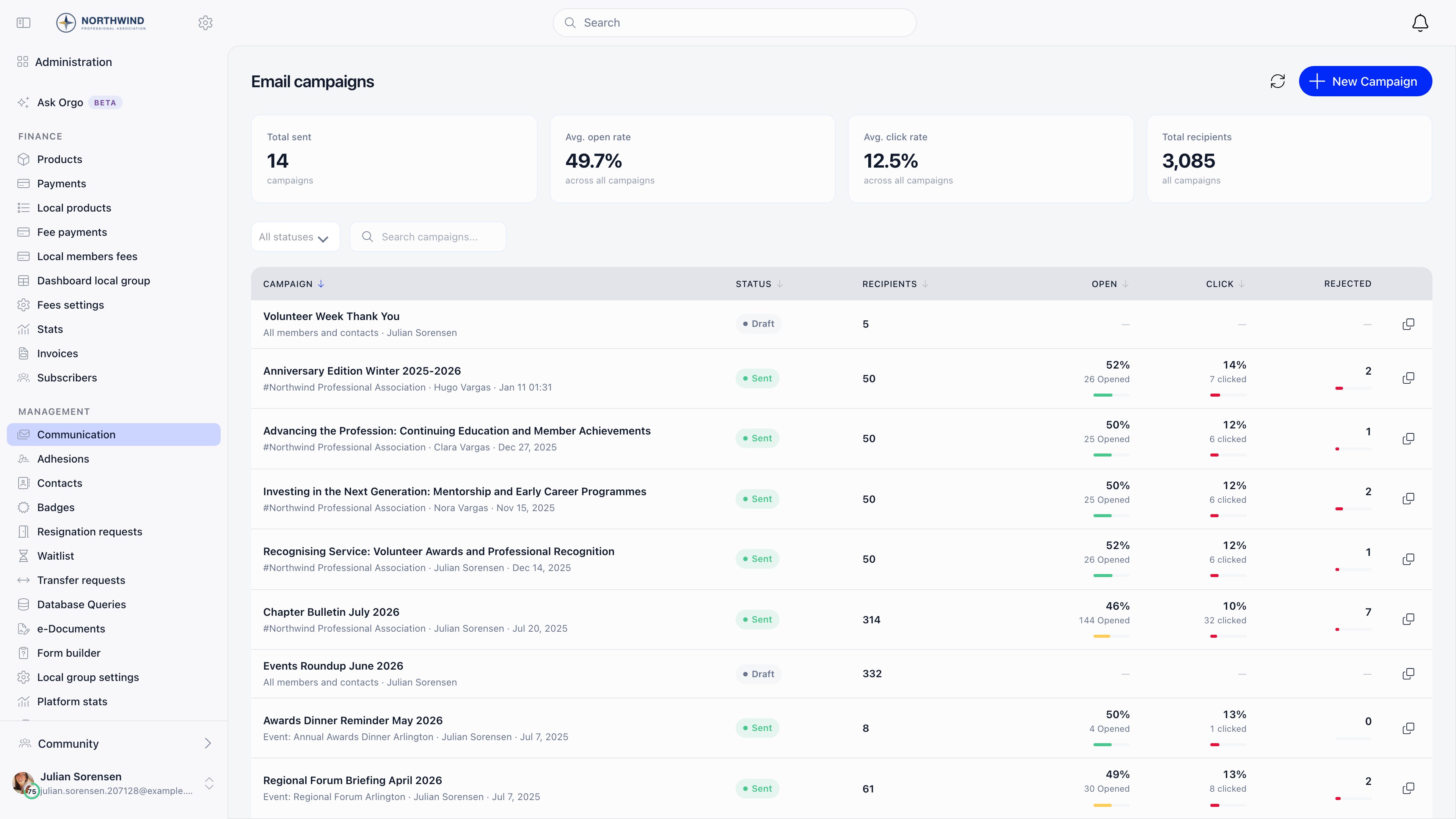
Everything below leads to one screen: **Administration** → **COMMUNICATION** →
**Email campaigns**, where campaigns are written, sent and measured.
 ***
## Before you start
Have these ready. Each one blocks a step further down, and finding out late
means resending mail.
* [ ] A sender address you control on your own domain, not a personal mailbox
* [ ] Access to your domain's DNS, if you want mail to leave as your address instead of `no-reply@orgo.space`
* [ ] A written answer to "who should receive what": what goes to everyone, what to one chapter, what to a saved segment
* [ ] A decision on language, knowing that automatic email is written in the organization's default language and only English, Romanian and German exist
* [ ] `ADMIN_TENANT` on your own account, because every setting below lives in Settings
***
## What to turn on
Everything in this table needs `ADMIN_TENANT`, because all of it lives in
Settings.
| Setting | Where | What it does |
| ------------------------------------------------------------------------------------------------------------------------------------------------------------ | -------------------------------------------------------------------- | -------------------------------------------------------------------------------------------------------------------------------------------------------------------- |
| **Enable Email Campaign Module** | Settings → Notifications & Email Campaign → Email Campaigner | Turns on campaigns, campaign templates, Lists & Segments, signup widgets and the email log, and adds the **COMMUNICATION** section to the administration sidebar |
| **Default Newsletter Widget UUID** | Settings → Notifications & Email Campaign → Email Campaigner | Which [signup widget](/docs/platform/newsletter-widgets) is served when a page asks for your organization's widget without naming one |
| **Notification Preferences** (Newsletter Notifications, Push Notifications, Email Notifications: Comments / Tasks / Votes / Events / Discussions / Mentions) | Settings → Notifications & Email Campaign → Notification Preferences | The defaults new members are created with. They are seeds applied once, not overrides. See [Notifications](/docs/platform/notifications) |
| **Emails Config** category switches | Settings → Notifications & Email Campaign → Emails Config | Switches whole categories of automatic email on or off. See [System emails](/docs/platform/emails/system-emails) |
| **Email Templates** | Settings → Notifications & Email Campaign → Email Templates | Rewrites the subject and body of one automatic email, with a per-template **Enabled** switch. See [Email templates](/docs/platform/emails/email-templates) |
| **Enable Discussions Module** and **Who Can Create Public Discussions** | Settings → Discussions | The in-app forum, and whether the organization-wide feed is open to everyone or an announcement channel. See [Discussions](/docs/platform/discussion) |
| **Enable Profanity Check** | Settings → Discussions | Holds flagged posts for review and adds **Moderation queue** to the COMMUNICATION menu for `COMMUNICATION_TENANT`. See [Moderation](/docs/platform/discussion/moderation) |
| **Enable Multi-language Support** and the default language | Settings → Customization → Languages | The interface languages members can choose, and the language automatic email is written in. See [Languages](/docs/platform/customization/languages) |
| **Contact email** | Settings → Organisation | Becomes the Reply-To on every email, and the From address once Orgo has verified it for sending. See [Emails](/docs/platform/emails) |
### Who does the day-to-day work
The module settings above are admin work you do once. Sending is a separate set
of permissions, assigned per person.
See [Assigning permissions](/docs/platform/permissions-assigning).
| Permission | What it unlocks |
| ---------------------------- | ---------------------------------------------------------------------------------------------------------------------------------------------------------------------------- |
| `COMMUNICATION_TENANT` | Campaigns for the whole organization, campaign templates, Lists & Segments, signup widgets, moderation queue. Covers everything `COMMUNICATION_LOCAL` does |
| `COMMUNICATION_LOCAL` | **Email campaigns** for the local centers they manage, and only the **Members from a group** audience. Lists, tenant-wide audiences and event audiences are hidden from them |
| `COMMUNICATION_PARENT_LOCAL` | The same as `COMMUNICATION_LOCAL`, extended to every center below their anchor center, at any depth |
| `EVENT_TENANT` | Campaigns attached to an event, and signup widgets |
| `HR_TENANT` | Creating and editing lists, alongside `COMMUNICATION_TENANT` |
| `ADMIN_TENANT` | All settings above, the [email log](/docs/platform/emails/email-log), and adding or removing individual people on a manual list |
Adding and removing people on a manual list needs `ADMIN_TENANT`, one level
higher than everything else on the Lists screen. A `COMMUNICATION_TENANT` holder
sees the **Add**, **Add CSV** and remove buttons and gets refused when using
them. If someone maintains manual lists, give them `ADMIN_TENANT`.
***
## Setup order
Do these in order. Steps 1 and 2 change what every later email looks like, so
doing them last means resending things.
The three settings screens in steps 3, 5 and 6 have no Save button. Each switch
saves as you flip it and a **Saving** indicator appears while it does.
Set your contact email under **Settings** → **Organisation**, then ask
support to verify it for sending. Verification needs DNS records on your
domain, so it is not a switch you can flip in Settings yourself.
Until it is verified, mail leaves as `no-reply@orgo.space` with your contact
address as Reply-To. See [Emails](/docs/platform/emails).
**Done when** mail your members receive arrives from your own address rather
than `no-reply@orgo.space`.
**Settings** → **Customization** → **Languages**. Automatic email is written
in the organization's default language, not the recipient's, and only
English, Romanian and German exist. Anything else falls back to English. See
[Languages](/docs/platform/customization/languages).
**Done when** the default language on that screen is the language you want
every automatic email written in.
**Settings** → **Notifications & Email Campaign** → **Emails Config** groups
every automatic email into categories (User Lifecycle, Membership & Fees,
Adhesion and the rest) with a switch each. Walk them before you invite
anyone, so members do not receive a reminder ladder you have not read. See
[System emails](/docs/platform/emails/system-emails).
***
## Before you start
Have these ready. Each one blocks a step further down, and finding out late
means resending mail.
* [ ] A sender address you control on your own domain, not a personal mailbox
* [ ] Access to your domain's DNS, if you want mail to leave as your address instead of `no-reply@orgo.space`
* [ ] A written answer to "who should receive what": what goes to everyone, what to one chapter, what to a saved segment
* [ ] A decision on language, knowing that automatic email is written in the organization's default language and only English, Romanian and German exist
* [ ] `ADMIN_TENANT` on your own account, because every setting below lives in Settings
***
## What to turn on
Everything in this table needs `ADMIN_TENANT`, because all of it lives in
Settings.
| Setting | Where | What it does |
| ------------------------------------------------------------------------------------------------------------------------------------------------------------ | -------------------------------------------------------------------- | -------------------------------------------------------------------------------------------------------------------------------------------------------------------- |
| **Enable Email Campaign Module** | Settings → Notifications & Email Campaign → Email Campaigner | Turns on campaigns, campaign templates, Lists & Segments, signup widgets and the email log, and adds the **COMMUNICATION** section to the administration sidebar |
| **Default Newsletter Widget UUID** | Settings → Notifications & Email Campaign → Email Campaigner | Which [signup widget](/docs/platform/newsletter-widgets) is served when a page asks for your organization's widget without naming one |
| **Notification Preferences** (Newsletter Notifications, Push Notifications, Email Notifications: Comments / Tasks / Votes / Events / Discussions / Mentions) | Settings → Notifications & Email Campaign → Notification Preferences | The defaults new members are created with. They are seeds applied once, not overrides. See [Notifications](/docs/platform/notifications) |
| **Emails Config** category switches | Settings → Notifications & Email Campaign → Emails Config | Switches whole categories of automatic email on or off. See [System emails](/docs/platform/emails/system-emails) |
| **Email Templates** | Settings → Notifications & Email Campaign → Email Templates | Rewrites the subject and body of one automatic email, with a per-template **Enabled** switch. See [Email templates](/docs/platform/emails/email-templates) |
| **Enable Discussions Module** and **Who Can Create Public Discussions** | Settings → Discussions | The in-app forum, and whether the organization-wide feed is open to everyone or an announcement channel. See [Discussions](/docs/platform/discussion) |
| **Enable Profanity Check** | Settings → Discussions | Holds flagged posts for review and adds **Moderation queue** to the COMMUNICATION menu for `COMMUNICATION_TENANT`. See [Moderation](/docs/platform/discussion/moderation) |
| **Enable Multi-language Support** and the default language | Settings → Customization → Languages | The interface languages members can choose, and the language automatic email is written in. See [Languages](/docs/platform/customization/languages) |
| **Contact email** | Settings → Organisation | Becomes the Reply-To on every email, and the From address once Orgo has verified it for sending. See [Emails](/docs/platform/emails) |
### Who does the day-to-day work
The module settings above are admin work you do once. Sending is a separate set
of permissions, assigned per person.
See [Assigning permissions](/docs/platform/permissions-assigning).
| Permission | What it unlocks |
| ---------------------------- | ---------------------------------------------------------------------------------------------------------------------------------------------------------------------------- |
| `COMMUNICATION_TENANT` | Campaigns for the whole organization, campaign templates, Lists & Segments, signup widgets, moderation queue. Covers everything `COMMUNICATION_LOCAL` does |
| `COMMUNICATION_LOCAL` | **Email campaigns** for the local centers they manage, and only the **Members from a group** audience. Lists, tenant-wide audiences and event audiences are hidden from them |
| `COMMUNICATION_PARENT_LOCAL` | The same as `COMMUNICATION_LOCAL`, extended to every center below their anchor center, at any depth |
| `EVENT_TENANT` | Campaigns attached to an event, and signup widgets |
| `HR_TENANT` | Creating and editing lists, alongside `COMMUNICATION_TENANT` |
| `ADMIN_TENANT` | All settings above, the [email log](/docs/platform/emails/email-log), and adding or removing individual people on a manual list |
Adding and removing people on a manual list needs `ADMIN_TENANT`, one level
higher than everything else on the Lists screen. A `COMMUNICATION_TENANT` holder
sees the **Add**, **Add CSV** and remove buttons and gets refused when using
them. If someone maintains manual lists, give them `ADMIN_TENANT`.
***
## Setup order
Do these in order. Steps 1 and 2 change what every later email looks like, so
doing them last means resending things.
The three settings screens in steps 3, 5 and 6 have no Save button. Each switch
saves as you flip it and a **Saving** indicator appears while it does.
Set your contact email under **Settings** → **Organisation**, then ask
support to verify it for sending. Verification needs DNS records on your
domain, so it is not a switch you can flip in Settings yourself.
Until it is verified, mail leaves as `no-reply@orgo.space` with your contact
address as Reply-To. See [Emails](/docs/platform/emails).
**Done when** mail your members receive arrives from your own address rather
than `no-reply@orgo.space`.
**Settings** → **Customization** → **Languages**. Automatic email is written
in the organization's default language, not the recipient's, and only
English, Romanian and German exist. Anything else falls back to English. See
[Languages](/docs/platform/customization/languages).
**Done when** the default language on that screen is the language you want
every automatic email written in.
**Settings** → **Notifications & Email Campaign** → **Emails Config** groups
every automatic email into categories (User Lifecycle, Membership & Fees,
Adhesion and the rest) with a switch each. Walk them before you invite
anyone, so members do not receive a reminder ladder you have not read. See
[System emails](/docs/platform/emails/system-emails).
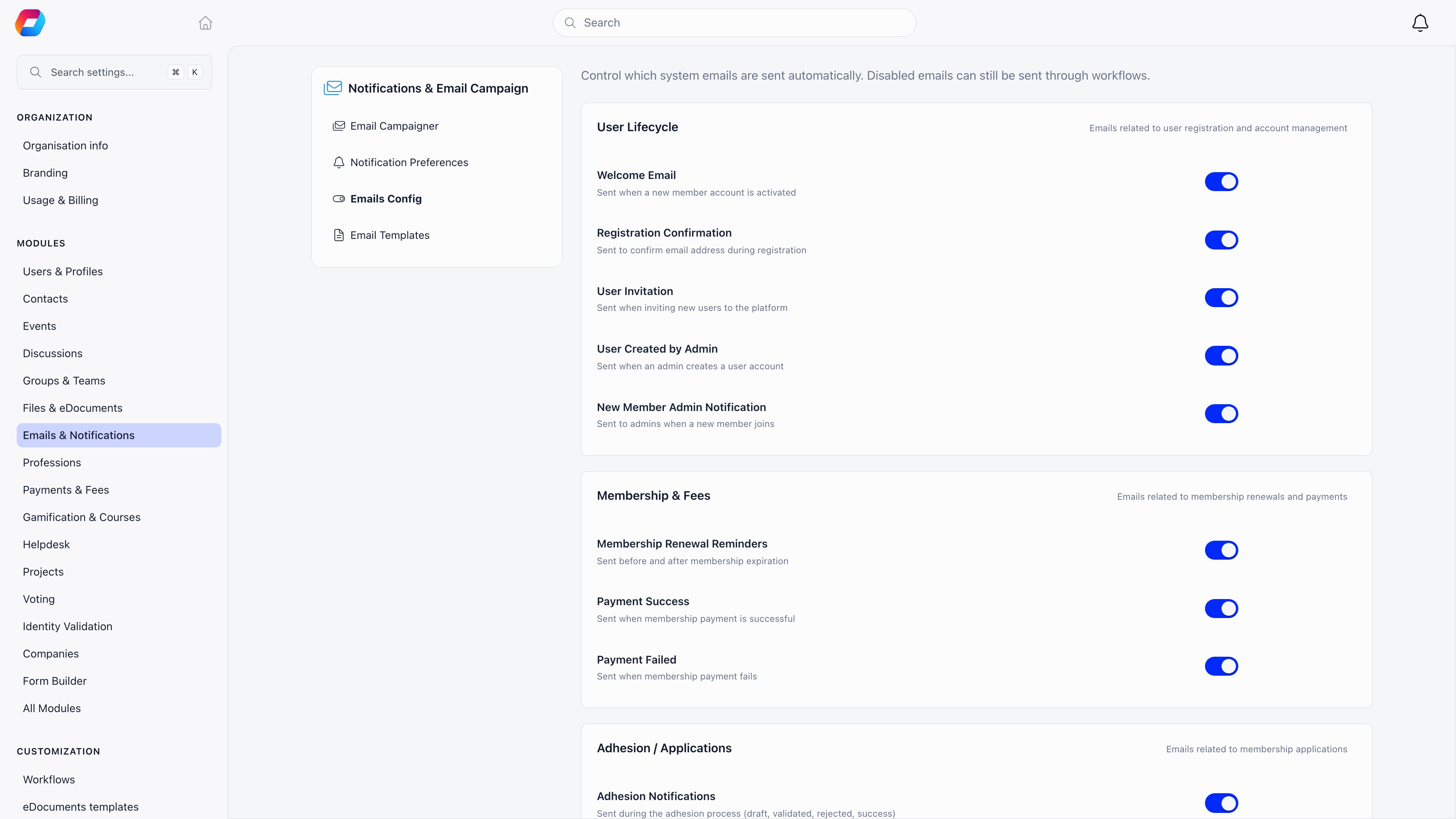 **Done when** every category is on deliberately or off deliberately, rather
than on because nobody looked.
**Email Templates**, in the same menu, gives you the subject and body of one
automatic email at a time, with placeholders and a per-template **Enabled**
switch. Note that a customized template has no language: your version is
used for every recipient. See
[Email templates](/docs/platform/emails/email-templates).
**Done when** the emails a new member meets in their first week read like
your organization wrote them.
**Notification Preferences**, same menu. These are the settings new accounts
are created with: newsletter, push, and email for comments, tasks, votes,
events, mentions and discussions.
They are applied once, at account creation. Changing them later does nothing
for anyone who already exists, so get them right first. See
[Notifications](/docs/platform/notifications).
**Done when** every category is on deliberately or off deliberately, rather
than on because nobody looked.
**Email Templates**, in the same menu, gives you the subject and body of one
automatic email at a time, with placeholders and a per-template **Enabled**
switch. Note that a customized template has no language: your version is
used for every recipient. See
[Email templates](/docs/platform/emails/email-templates).
**Done when** the emails a new member meets in their first week read like
your organization wrote them.
**Notification Preferences**, same menu. These are the settings new accounts
are created with: newsletter, push, and email for comments, tasks, votes,
events, mentions and discussions.
They are applied once, at account creation. Changing them later does nothing
for anyone who already exists, so get them right first. See
[Notifications](/docs/platform/notifications).
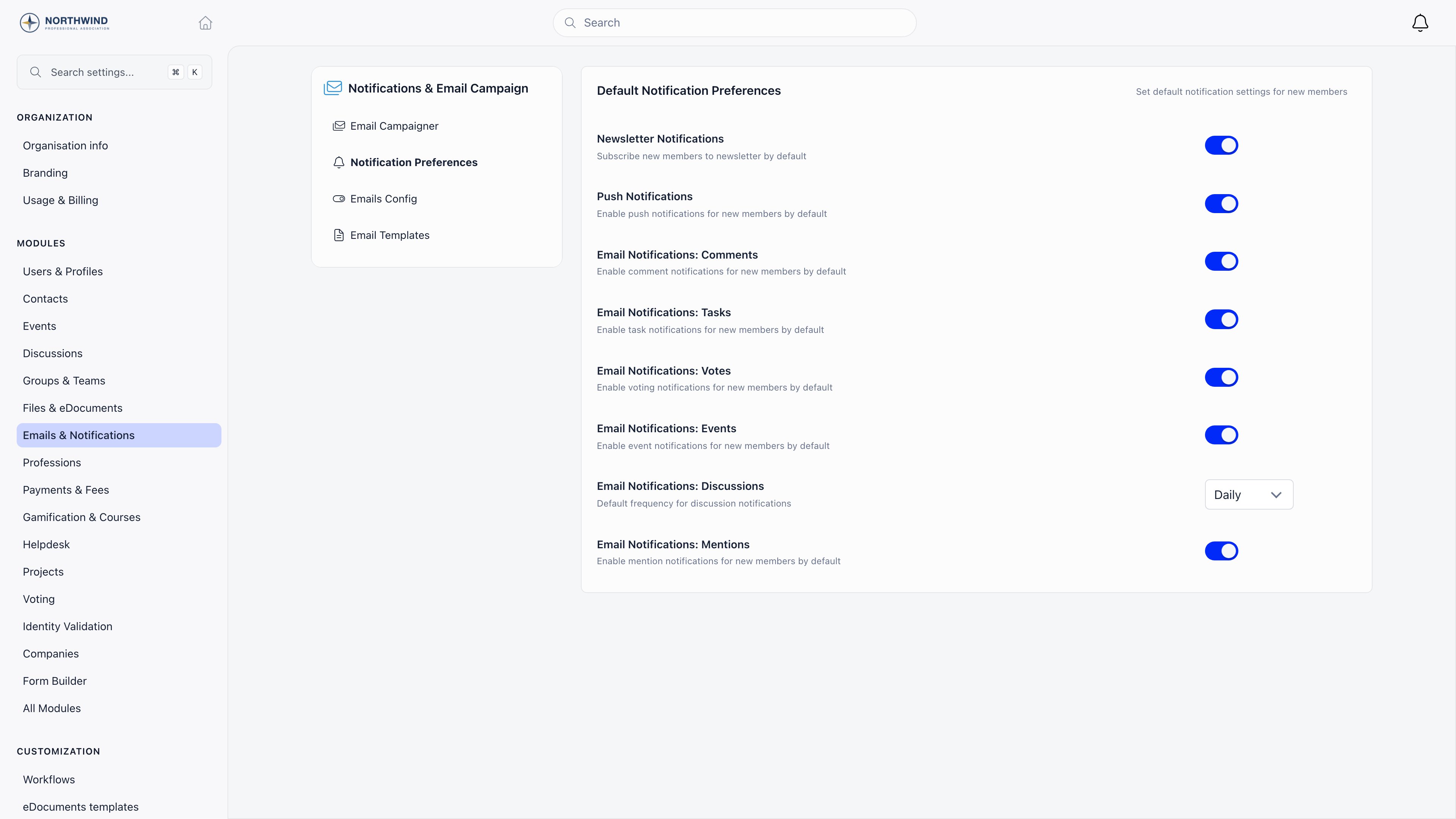 **Done when** the switches describe what a brand-new member should be signed
up for. Everyone already imported keeps whatever they have.
**Settings** → **Notifications & Email Campaign** → **Email Campaigner** →
**Enable Email Campaign Module**, then grant `COMMUNICATION_TENANT` to
whoever writes campaigns. See [Newsletter](/docs/platform/newsletter).
**Done when** the switches describe what a brand-new member should be signed
up for. Everyone already imported keeps whatever they have.
**Settings** → **Notifications & Email Campaign** → **Email Campaigner** →
**Enable Email Campaign Module**, then grant `COMMUNICATION_TENANT` to
whoever writes campaigns. See [Newsletter](/docs/platform/newsletter).
 **Done when** a **COMMUNICATION** section appears in the administration
sidebar for the people you granted the permission to.
**Administration** → **COMMUNICATION** → **Lists & Segments**. A saved list
is the only audience you can define by a question about the people
themselves. See [Lists & Segments](/docs/platform/users/lists) for the criteria,
and [Email lists](/docs/platform/emails/email-lists) for how a list behaves once
email starts moving.
**Done when** a **COMMUNICATION** section appears in the administration
sidebar for the people you granted the permission to.
**Administration** → **COMMUNICATION** → **Lists & Segments**. A saved list
is the only audience you can define by a question about the people
themselves. See [Lists & Segments](/docs/platform/users/lists) for the criteria,
and [Email lists](/docs/platform/emails/email-lists) for how a list behaves once
email starts moving.
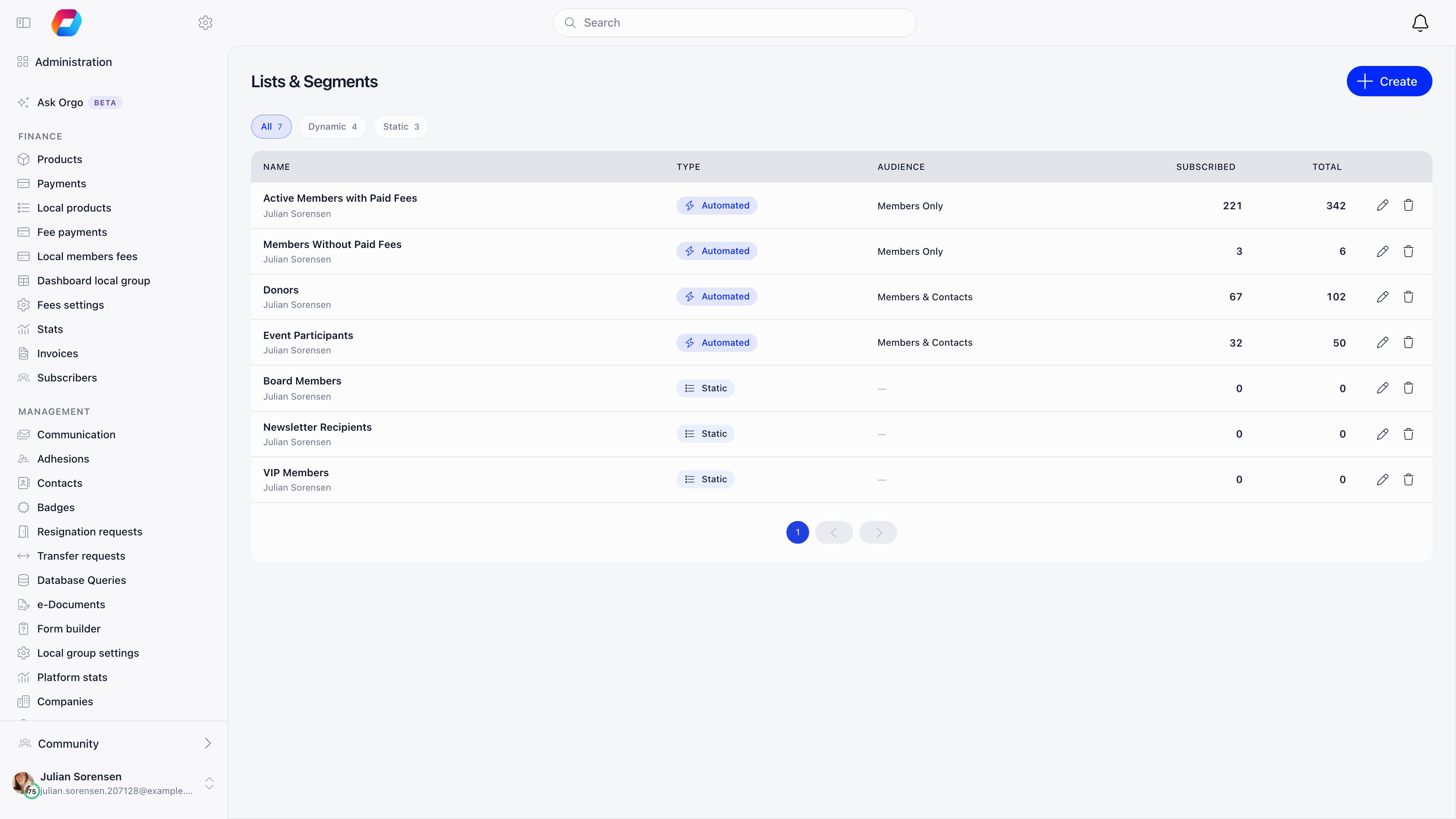 **Done when** each list shows a **Subscribed** count beside its **Total**.
The subscribed number is the one a campaign actually sends to.
Embed a [signup widget](/docs/platform/newsletter-widgets) so new subscribers
land in Orgo as contacts rather than in a spreadsheet. Set **Default
Newsletter Widget UUID** on the Email Campaigner screen to decide which
widget is served when a page asks for your organization's widget without
naming one.
**Done when** a test signup on your own site appears in Orgo as a contact.
Open any draft campaign and switch to the **Content** tab: that is the
drag-and-drop [newsletter builder](/docs/platform/newsletter-builder). Build the
house style once, then save it as a campaign template so month two is a copy
rather than a rebuild.
**Done when** each list shows a **Subscribed** count beside its **Total**.
The subscribed number is the one a campaign actually sends to.
Embed a [signup widget](/docs/platform/newsletter-widgets) so new subscribers
land in Orgo as contacts rather than in a spreadsheet. Set **Default
Newsletter Widget UUID** on the Email Campaigner screen to decide which
widget is served when a page asks for your organization's widget without
naming one.
**Done when** a test signup on your own site appears in Orgo as a contact.
Open any draft campaign and switch to the **Content** tab: that is the
drag-and-drop [newsletter builder](/docs/platform/newsletter-builder). Build the
house style once, then save it as a campaign template so month two is a copy
rather than a rebuild.
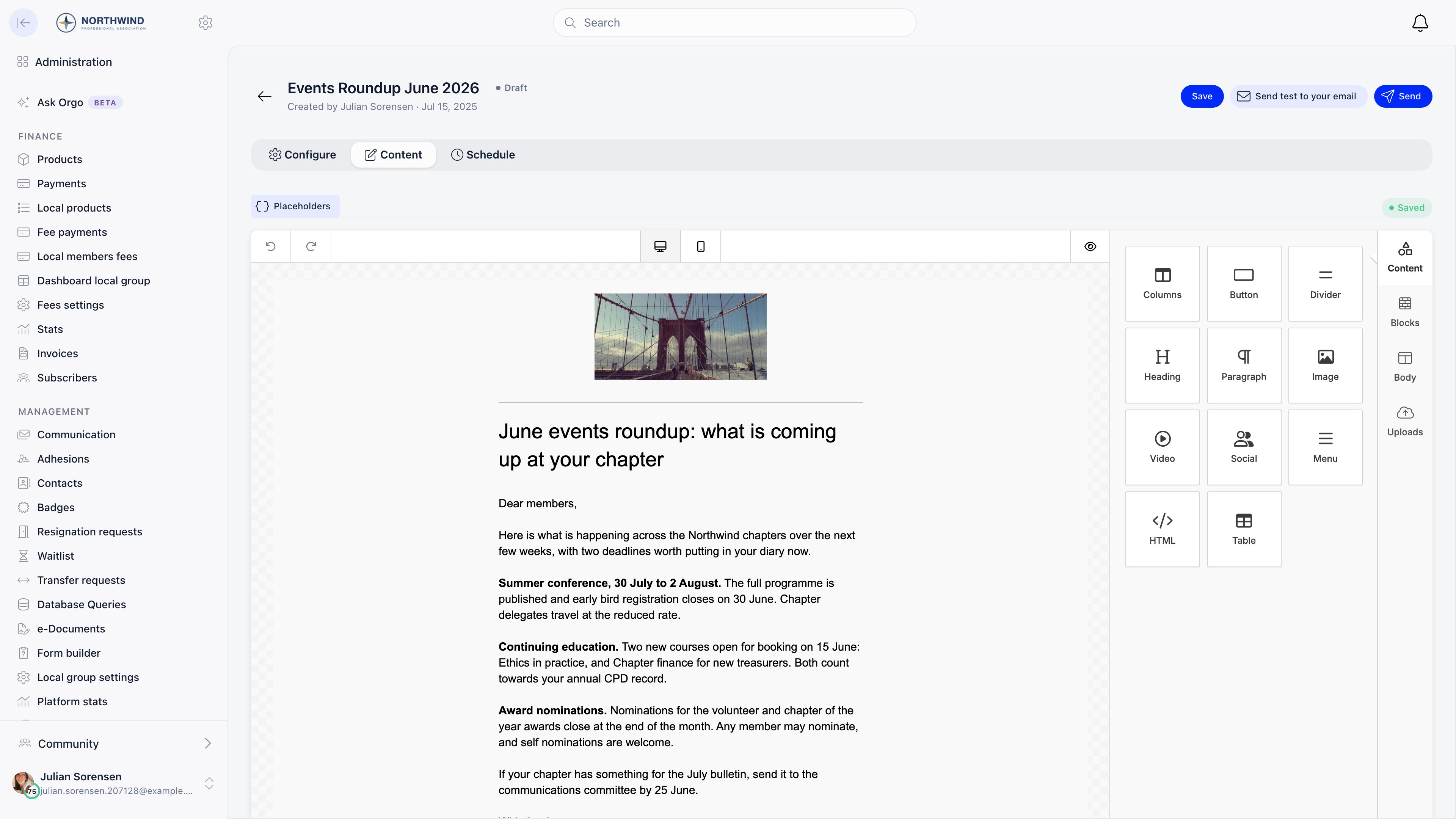 **Done when** the design is listed under **Campaign templates** and the
Content tab shows **Saved** rather than **Saving**.
**Send test to your email**, in the campaign header, renders the
placeholders against your own record, which is the only reliable way to
catch an empty field. Then **Send**, or set a time on the **Schedule** tab
at least 2 minutes ahead on a 15-minute boundary. See
[Newsletter](/docs/platform/newsletter).
**Done when** the campaign shows **Sent** and its Report tab starts filling
in as delivery events arrive.
***
## Choosing the right channel
The most useful table on this page. Find the row that matches what you are
about to send, then check the last column before you write it.
| Channel | Use it for | Who receives it | Can a member opt out |
| ------------------------ | ----------------------------------------------------------------- | -------------------------------------------------------------------------------------------------------------------------------------------- | ------------------------------------------------------------------------------------------------- |
| **Newsletter campaign** | A deliberate one-way announcement to a chosen audience | Active members with an email address and newsletter email on, plus subscribed contacts, narrowed by the audience you picked | Yes. Every campaign carries an unsubscribe link and one-click unsubscribe headers |
| **Discussion post** | Two-way conversation inside a group, role group or local center | Members who can see that group. Notification email depends on their own preference | Yes. Mute the group, or set discussions to Daily, Weekly or off |
| **Notification, in-app** | Telling someone that something happened to them | The people the event concerns, and followers of the group | No. The record is always stored and always visible under the bell |
| **Notification, email** | The same events, in an inbox | The subset of notification types that email at all: discussions, comments and replies, mentions, events, votes, tasks and membership changes | Partly. Each category has a member toggle, except membership and role changes, which always email |
| **Notification, push** | Time-sensitive nudges to a phone or browser | Members with **Push notification subscribed** on and a registered device. Everything except file uploads | Yes, one master switch |
| **System email** | One person's own membership, payment, ticket, document or account | The person the event is about, whatever their subscription state | No. Only an admin can silence one, per category or per template |
Two rules follow from that table. Anything that is about the individual (their
fee, their ticket, their password) is a system email and must not be reproduced
as a campaign. Anything that is a conversation belongs in discussions, because a
campaign has no reply path beyond your Reply-To mailbox.
***
## Recipes
Worked examples, not defaults. Adapt the criteria and names.
### Example 1: a monthly member newsletter to a saved segment
**Administration** → **COMMUNICATION** → **Lists & Segments** → create an
**Automated by criteria** list, profile type **Members Only**, member status
**Active Only**. Add criteria; they always combine with AND. Needs
`COMMUNICATION_TENANT` or `HR_TENANT`.
Build the layout once in the [builder](/docs/platform/newsletter-builder) and
save it under **Campaign templates**, so month two is a copy rather than a
rebuild.
**Email campaigns** → new campaign. On the **Configure** tab, campaign title
is internal and email subject is what members see. In **Recipients**, choose
**From a list** and pick your segment. The number next to the option is the
subscribed count, not the list total.
**Done when** the design is listed under **Campaign templates** and the
Content tab shows **Saved** rather than **Saving**.
**Send test to your email**, in the campaign header, renders the
placeholders against your own record, which is the only reliable way to
catch an empty field. Then **Send**, or set a time on the **Schedule** tab
at least 2 minutes ahead on a 15-minute boundary. See
[Newsletter](/docs/platform/newsletter).
**Done when** the campaign shows **Sent** and its Report tab starts filling
in as delivery events arrive.
***
## Choosing the right channel
The most useful table on this page. Find the row that matches what you are
about to send, then check the last column before you write it.
| Channel | Use it for | Who receives it | Can a member opt out |
| ------------------------ | ----------------------------------------------------------------- | -------------------------------------------------------------------------------------------------------------------------------------------- | ------------------------------------------------------------------------------------------------- |
| **Newsletter campaign** | A deliberate one-way announcement to a chosen audience | Active members with an email address and newsletter email on, plus subscribed contacts, narrowed by the audience you picked | Yes. Every campaign carries an unsubscribe link and one-click unsubscribe headers |
| **Discussion post** | Two-way conversation inside a group, role group or local center | Members who can see that group. Notification email depends on their own preference | Yes. Mute the group, or set discussions to Daily, Weekly or off |
| **Notification, in-app** | Telling someone that something happened to them | The people the event concerns, and followers of the group | No. The record is always stored and always visible under the bell |
| **Notification, email** | The same events, in an inbox | The subset of notification types that email at all: discussions, comments and replies, mentions, events, votes, tasks and membership changes | Partly. Each category has a member toggle, except membership and role changes, which always email |
| **Notification, push** | Time-sensitive nudges to a phone or browser | Members with **Push notification subscribed** on and a registered device. Everything except file uploads | Yes, one master switch |
| **System email** | One person's own membership, payment, ticket, document or account | The person the event is about, whatever their subscription state | No. Only an admin can silence one, per category or per template |
Two rules follow from that table. Anything that is about the individual (their
fee, their ticket, their password) is a system email and must not be reproduced
as a campaign. Anything that is a conversation belongs in discussions, because a
campaign has no reply path beyond your Reply-To mailbox.
***
## Recipes
Worked examples, not defaults. Adapt the criteria and names.
### Example 1: a monthly member newsletter to a saved segment
**Administration** → **COMMUNICATION** → **Lists & Segments** → create an
**Automated by criteria** list, profile type **Members Only**, member status
**Active Only**. Add criteria; they always combine with AND. Needs
`COMMUNICATION_TENANT` or `HR_TENANT`.
Build the layout once in the [builder](/docs/platform/newsletter-builder) and
save it under **Campaign templates**, so month two is a copy rather than a
rebuild.
**Email campaigns** → new campaign. On the **Configure** tab, campaign title
is internal and email subject is what members see. In **Recipients**, choose
**From a list** and pick your segment. The number next to the option is the
subscribed count, not the list total.
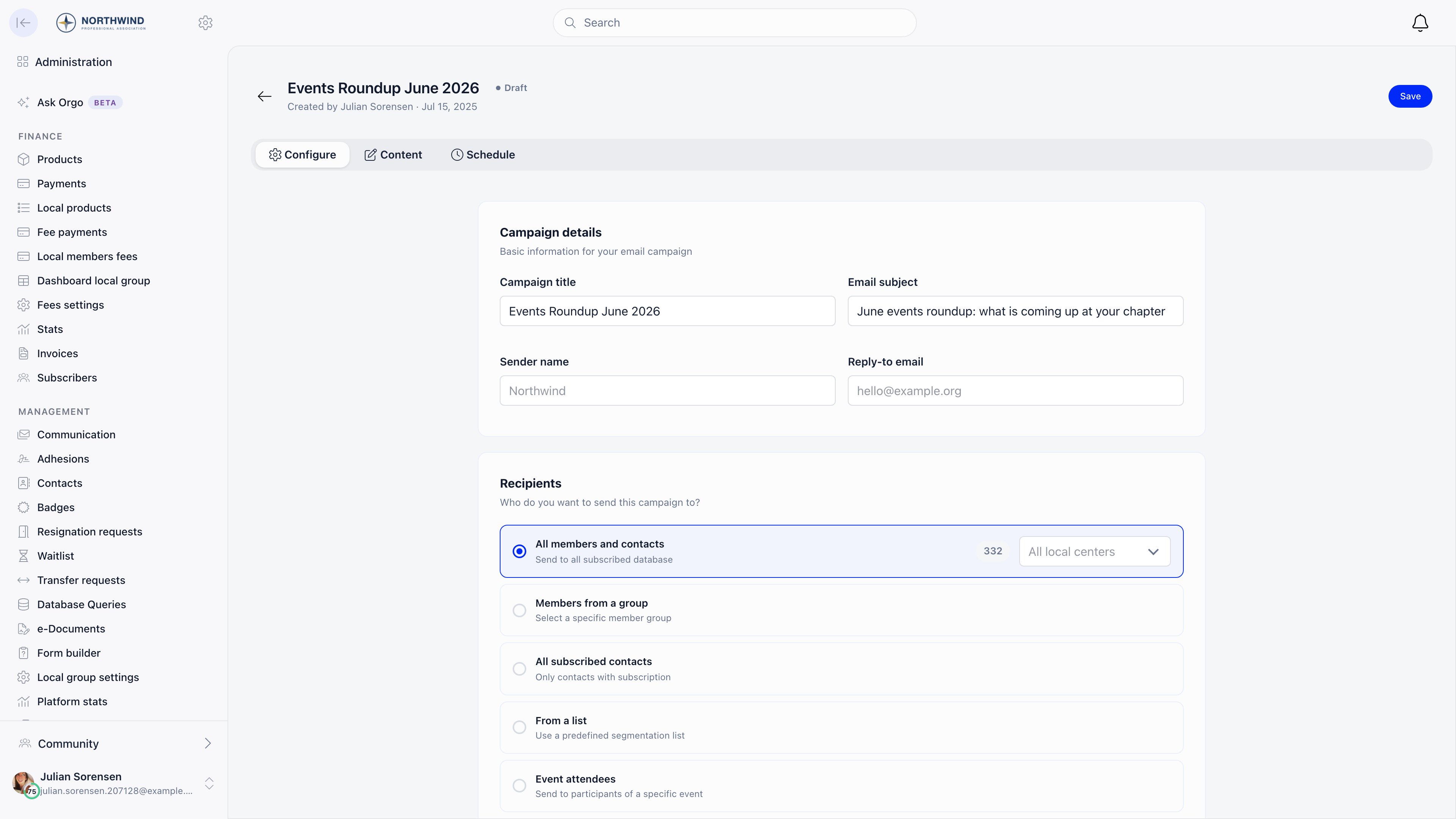 Only one option can be selected. Audiences cannot be combined, which is the
reason the segment exists.
**Send test to your email**, then schedule at least 2 minutes ahead on a
15-minute boundary. Because the list is automated, it is resolved again at
send time, so members who joined since you drafted are included.
**Duplicate campaign** on last month's send, or **Start Campaign** from the
template. Both keep the settings so only the content changes.
### Example 2: an announcement to one chapter only
They see **Email campaigns** and nothing else in the COMMUNICATION section,
and inside a campaign only the **Members from a group** audience. Tenant-wide
audiences, saved lists and event audiences are hidden.
A local center, group or role group they manage. Members outside their
center cannot be reached: the center boundary is applied again when the send
is resolved, on top of whatever audience was chosen.
A `COMMUNICATION_TENANT` holder gets the same result two ways: **Members
from a group** pointed at that local center, or **All members and contacts**
narrowed with the local center dropdown.
### Example 3: an event follow-up to the people who did not open it
**Send email for participants** on the event files the campaign under that
event's messages and unlocks the event placeholders (`{eventTitle}`,
`{eventDateBegin}`, `{eventRegisterUrl}` and the rest). Needs
`EVENT_TENANT`, or a communication permission.
A sent campaign opens on its **Report** tab: Sent, Opened, Clicks, Bounce
and Unsubscribed, each with the percentage underneath, over a campaign
details card recording the subject, sender, audience and send date.
Only one option can be selected. Audiences cannot be combined, which is the
reason the segment exists.
**Send test to your email**, then schedule at least 2 minutes ahead on a
15-minute boundary. Because the list is automated, it is resolved again at
send time, so members who joined since you drafted are included.
**Duplicate campaign** on last month's send, or **Start Campaign** from the
template. Both keep the settings so only the content changes.
### Example 2: an announcement to one chapter only
They see **Email campaigns** and nothing else in the COMMUNICATION section,
and inside a campaign only the **Members from a group** audience. Tenant-wide
audiences, saved lists and event audiences are hidden.
A local center, group or role group they manage. Members outside their
center cannot be reached: the center boundary is applied again when the send
is resolved, on top of whatever audience was chosen.
A `COMMUNICATION_TENANT` holder gets the same result two ways: **Members
from a group** pointed at that local center, or **All members and contacts**
narrowed with the local center dropdown.
### Example 3: an event follow-up to the people who did not open it
**Send email for participants** on the event files the campaign under that
event's messages and unlocks the event placeholders (`{eventTitle}`,
`{eventDateBegin}`, `{eventRegisterUrl}` and the rest). Needs
`EVENT_TENANT`, or a communication permission.
A sent campaign opens on its **Report** tab: Sent, Opened, Clicks, Bounce
and Unsubscribed, each with the percentage underneath, over a campaign
details card recording the subject, sender, audience and send date.
 Open rates need the mail client to load images, so give it a day or two
before treating an unopened message as unread.
On the sent campaign, **Follow up with non-openers** (the count is in the
button) creates a draft named "Follow-up: ..." locked to people who received
the original and never opened it, minus anyone who bounced, complained or
unsubscribed.
The button sits in the campaign header next to **Duplicate campaign**, and
only while that count is above zero. A campaign everyone opened does not
offer it.
The audience is recalculated at send time, so late openers drop out. If
nobody is left, Orgo refuses both the copy and the send.
An **Event attendees** audience does not check the newsletter subscription flag.
Registered members and external registrants receive it even if they unsubscribed
from campaigns, because event mail is treated as informational. Use it for
logistics, not for marketing.
***
## Deliverability and consent
Four things a customer has to get right.
**Verified sender identity.** The From address is your contact email only after
Orgo has verified it, which needs DNS records on your domain and is done by
support rather than in Settings. Until then mail leaves as `no-reply@orgo.space`.
Reply-To is your contact email either way, verified or not. A
[custom domain](/docs/platform/custom-domain) hands you the DKIM records and the two
`bounce.` records that make SPF align with your own domain; the DMARC policy and
the SPF record on your apex remain yours to maintain.
**Unsubscribe handling.** Campaign email carries one-click unsubscribe headers,
so a member can opt out from the mail client without opening the message. If your
design contains no `{unsubscribeUrl}`, Orgo appends an unsubscribe footer before
sending. You cannot re-subscribe someone on their behalf.
An unsubscribe applies to every account sharing that email address, in every Orgo
workspace, because it matches on the address rather than the account.
**Which sends ignore subscription flags.** Three cases, all deliberate:
* **System emails.** A renewal reminder, invoice or ticket confirmation goes to
the person it concerns whether or not they unsubscribed and whether or not they
are in any list. Only the Emails Config category switch or the per-template
**Enabled** switch stops one.
* **Event attendee campaigns.** As above, the subscription flag is not consulted.
* **Membership and role change notifications.** When an admin adds someone to a
group or changes their roles, the member is emailed and no preference switches
it off.
**Language.** Automatic email follows the organization's default language,
clamped to English, Romanian or German, and a template you customize yourself has
no language at all: your version reaches every recipient. The
[invoice email and the PDF it carries](/docs/platform/fees/invoices) are the
exception: they cover all 14 interface languages, falling back to English only
when the organization default is not one of them.
Campaigns are whatever language you wrote them in, so a bilingual organization
either writes both versions into one email or sends one campaign per language
segment. A `?lang=` parameter on a link opens the platform in that language
regardless.
***
## Limits worth knowing before you start
| Limit | Detail |
| ------------------------------------------------ | ------------------------------------------------------------------------------------------------------------------------------------ |
| One audience per campaign | Audiences are single-choice and cannot be combined. To reach two groups, send twice or build a list |
| List criteria are AND only | No OR and no grouping, and no criterion for name or email address |
| No automation and no A/B testing | Campaigns are composed and sent or scheduled. There are no drip sequences, no variants and no send-time optimization |
| Send pacing | Recipients are resolved in chunks of 2,000 and dispatched at three emails per second per worker, so a large send lands over minutes |
| Scheduling granularity | At least 2 minutes ahead and on a 15-minute boundary (:00, :15, :30, :45), because the scheduler runs every 15 minutes |
| Digests cover discussions only | A digest carries at most 10 unread items and only discussion notifications. Events, mentions, votes and tasks are instant or nothing |
| Notification retention | Notifications older than two months are deleted nightly. The [email log](/docs/platform/emails/email-log) is the durable record |
| Customized templates are single-language | Saving your own version of a system email replaces it for every recipient in every language |
| Manual list membership is ADMIN\_TENANT | Higher than the rest of the Lists screen |
| Demo organizations never send notification email | Expected on a trial workspace, not a fault |
***
## Troubleshooting
Take these in order.
* Open the campaign's **Report** tab. Sent counts recipients with a
delivered or bounced event from the mail provider, so a Sent figure of
zero means nothing left the platform, and a high bounce figure means it
left and was rejected.
* Check the recipient count on the audience. A list of 900 with 620
subscribed sends to 620, and an audience whose members are all inactive or
have no email address resolves to nobody.
* If the campaign belongs to a local center, remember the center boundary is
applied on top of the audience, so a tenant-wide list can resolve to a
handful of people.
* Check whether the send is still in flight. Recipients go out at three per
second per worker, so a large campaign is still arriving for several
minutes after the status changes.
Answer it with the [email log](/docs/platform/emails/email-log) rather than by
reasoning about settings. A campaign writes one log entry per recipient,
tagged Newsletter and linked to the campaign.
* No row at all: they were not in the resolved audience. Check the account
is Active, has an email address, and has newsletter email on in their
notification settings, since all three are required for every audience
except event attendees.
* A row with the wrong address: an old address, a typo, or a placeholder
address left by a data import.
* A row with the right address: it left Orgo. Ask them to check spam and
quarantine, and check the campaign report for a bounce or complaint
against them.
* Subject starting with FAILED: it was queued and could not be delivered
after repeated attempts, and the entry records why.
Expected, and the most confusing behaviour in this area. Unsubscribe links
match on the email address, not on the account, so one click switches that
category off for every Orgo account sharing the address, across
organizations. The one-click header does the same for all categories at once.
The fix is to turn the categories back on per account, on each affected
profile's **Notifications** tab. Nothing else is needed: the person is not
removed from any list, and list membership and subscription state are
independent of each other.
Worth knowing while investigating: opening an unsubscribe URL with a plain
GET never unsubscribes anyone. It redirects to the preferences page, so link
prefetchers in mail clients cannot opt someone out by accident.
A digest run only picks up members with at least one unread **discussion**
notification in the window. Comments, events, mentions, votes and task
activity never trigger one, so a member whose groups are quiet gets nothing
however the frequency is set.
Then check, in order: that the member is Active, that their address is
valid, that the frequency on their profile actually matches the run (daily
looks back 25 hours, weekly looks back 7 days, so someone who chose Weekly
just after the weekly run waits almost a week), and that this is not a demo
organization, which never sends notification email at all.
Also note that sending a digest marks every unread notification read for
that member, not only the ones listed in it, so the bell badge clearing is
not evidence that they read anything.
Work on the individual profile's **Notifications** tab, not on the tenant
defaults: the defaults are seeds applied once at account creation and
changing them does nothing for anyone who already exists.
Set **New discussion** to Daily or Weekly first, since discussions are
usually the bulk and the only category that batches. Then switch off the
individual categories they object to. If the volume persists, the traffic is
coming from something with no toggle: membership and role changes always
email, and system email follows the Emails Config switches instead of member
preferences.
There is no override, by design. Unsubscribing stops campaigns, and no
audience except event attendees ignores it. If the message is genuinely
about the recipient's own membership (a fee change, a governance
obligation), it belongs in the system email that already covers that event,
or in a new one, rather than in a campaign that consent rules exclude people
from.
***
## Setup checklist
The setup order above, in the form you can tick off. Two lines are conditional:
the manual-list permission only matters if you keep manual lists, and the widget
only matters if you collect subscribers from a website.
* [ ] Contact email set under **Settings** → **Organisation**, and verification requested from support
* [ ] Default language set under **Settings** → **Customization** → **Languages**
* [ ] Every **Emails Config** category reviewed and switched on or off deliberately
* [ ] Templates that did not sound like you rewritten under **Email Templates**
* [ ] **Notification Preferences** set before any member import, since they apply only at account creation
* [ ] **Enable Email Campaign Module** on, and `COMMUNICATION_TENANT` granted to whoever writes campaigns
* [ ] `ADMIN_TENANT` given to anyone who maintains manual list membership
* [ ] The lists and segments you will reuse built, each showing a subscribed count
* [ ] A signup widget embedded on your website, and **Default Newsletter Widget UUID** pointed at it
* [ ] One house-style design saved under **Campaign templates**
* [ ] A test send checked in your own inbox, with every placeholder filled in
***
## Related
* [Newsletter](/docs/platform/newsletter) - composing, audiences, sending and campaign reporting
* [Emails](/docs/platform/emails) - sender identity, language and how a message gets sent
* [Notifications](/docs/platform/notifications) - in-app, push and email delivery, and member preferences
* [Lists & Segments](/docs/platform/users/lists) - building the audiences campaigns send to
* [Discussions](/docs/platform/discussion) - the two-way channel, and where most notifications come from
Open rates need the mail client to load images, so give it a day or two
before treating an unopened message as unread.
On the sent campaign, **Follow up with non-openers** (the count is in the
button) creates a draft named "Follow-up: ..." locked to people who received
the original and never opened it, minus anyone who bounced, complained or
unsubscribed.
The button sits in the campaign header next to **Duplicate campaign**, and
only while that count is above zero. A campaign everyone opened does not
offer it.
The audience is recalculated at send time, so late openers drop out. If
nobody is left, Orgo refuses both the copy and the send.
An **Event attendees** audience does not check the newsletter subscription flag.
Registered members and external registrants receive it even if they unsubscribed
from campaigns, because event mail is treated as informational. Use it for
logistics, not for marketing.
***
## Deliverability and consent
Four things a customer has to get right.
**Verified sender identity.** The From address is your contact email only after
Orgo has verified it, which needs DNS records on your domain and is done by
support rather than in Settings. Until then mail leaves as `no-reply@orgo.space`.
Reply-To is your contact email either way, verified or not. A
[custom domain](/docs/platform/custom-domain) hands you the DKIM records and the two
`bounce.` records that make SPF align with your own domain; the DMARC policy and
the SPF record on your apex remain yours to maintain.
**Unsubscribe handling.** Campaign email carries one-click unsubscribe headers,
so a member can opt out from the mail client without opening the message. If your
design contains no `{unsubscribeUrl}`, Orgo appends an unsubscribe footer before
sending. You cannot re-subscribe someone on their behalf.
An unsubscribe applies to every account sharing that email address, in every Orgo
workspace, because it matches on the address rather than the account.
**Which sends ignore subscription flags.** Three cases, all deliberate:
* **System emails.** A renewal reminder, invoice or ticket confirmation goes to
the person it concerns whether or not they unsubscribed and whether or not they
are in any list. Only the Emails Config category switch or the per-template
**Enabled** switch stops one.
* **Event attendee campaigns.** As above, the subscription flag is not consulted.
* **Membership and role change notifications.** When an admin adds someone to a
group or changes their roles, the member is emailed and no preference switches
it off.
**Language.** Automatic email follows the organization's default language,
clamped to English, Romanian or German, and a template you customize yourself has
no language at all: your version reaches every recipient. The
[invoice email and the PDF it carries](/docs/platform/fees/invoices) are the
exception: they cover all 14 interface languages, falling back to English only
when the organization default is not one of them.
Campaigns are whatever language you wrote them in, so a bilingual organization
either writes both versions into one email or sends one campaign per language
segment. A `?lang=` parameter on a link opens the platform in that language
regardless.
***
## Limits worth knowing before you start
| Limit | Detail |
| ------------------------------------------------ | ------------------------------------------------------------------------------------------------------------------------------------ |
| One audience per campaign | Audiences are single-choice and cannot be combined. To reach two groups, send twice or build a list |
| List criteria are AND only | No OR and no grouping, and no criterion for name or email address |
| No automation and no A/B testing | Campaigns are composed and sent or scheduled. There are no drip sequences, no variants and no send-time optimization |
| Send pacing | Recipients are resolved in chunks of 2,000 and dispatched at three emails per second per worker, so a large send lands over minutes |
| Scheduling granularity | At least 2 minutes ahead and on a 15-minute boundary (:00, :15, :30, :45), because the scheduler runs every 15 minutes |
| Digests cover discussions only | A digest carries at most 10 unread items and only discussion notifications. Events, mentions, votes and tasks are instant or nothing |
| Notification retention | Notifications older than two months are deleted nightly. The [email log](/docs/platform/emails/email-log) is the durable record |
| Customized templates are single-language | Saving your own version of a system email replaces it for every recipient in every language |
| Manual list membership is ADMIN\_TENANT | Higher than the rest of the Lists screen |
| Demo organizations never send notification email | Expected on a trial workspace, not a fault |
***
## Troubleshooting
Take these in order.
* Open the campaign's **Report** tab. Sent counts recipients with a
delivered or bounced event from the mail provider, so a Sent figure of
zero means nothing left the platform, and a high bounce figure means it
left and was rejected.
* Check the recipient count on the audience. A list of 900 with 620
subscribed sends to 620, and an audience whose members are all inactive or
have no email address resolves to nobody.
* If the campaign belongs to a local center, remember the center boundary is
applied on top of the audience, so a tenant-wide list can resolve to a
handful of people.
* Check whether the send is still in flight. Recipients go out at three per
second per worker, so a large campaign is still arriving for several
minutes after the status changes.
Answer it with the [email log](/docs/platform/emails/email-log) rather than by
reasoning about settings. A campaign writes one log entry per recipient,
tagged Newsletter and linked to the campaign.
* No row at all: they were not in the resolved audience. Check the account
is Active, has an email address, and has newsletter email on in their
notification settings, since all three are required for every audience
except event attendees.
* A row with the wrong address: an old address, a typo, or a placeholder
address left by a data import.
* A row with the right address: it left Orgo. Ask them to check spam and
quarantine, and check the campaign report for a bounce or complaint
against them.
* Subject starting with FAILED: it was queued and could not be delivered
after repeated attempts, and the entry records why.
Expected, and the most confusing behaviour in this area. Unsubscribe links
match on the email address, not on the account, so one click switches that
category off for every Orgo account sharing the address, across
organizations. The one-click header does the same for all categories at once.
The fix is to turn the categories back on per account, on each affected
profile's **Notifications** tab. Nothing else is needed: the person is not
removed from any list, and list membership and subscription state are
independent of each other.
Worth knowing while investigating: opening an unsubscribe URL with a plain
GET never unsubscribes anyone. It redirects to the preferences page, so link
prefetchers in mail clients cannot opt someone out by accident.
A digest run only picks up members with at least one unread **discussion**
notification in the window. Comments, events, mentions, votes and task
activity never trigger one, so a member whose groups are quiet gets nothing
however the frequency is set.
Then check, in order: that the member is Active, that their address is
valid, that the frequency on their profile actually matches the run (daily
looks back 25 hours, weekly looks back 7 days, so someone who chose Weekly
just after the weekly run waits almost a week), and that this is not a demo
organization, which never sends notification email at all.
Also note that sending a digest marks every unread notification read for
that member, not only the ones listed in it, so the bell badge clearing is
not evidence that they read anything.
Work on the individual profile's **Notifications** tab, not on the tenant
defaults: the defaults are seeds applied once at account creation and
changing them does nothing for anyone who already exists.
Set **New discussion** to Daily or Weekly first, since discussions are
usually the bulk and the only category that batches. Then switch off the
individual categories they object to. If the volume persists, the traffic is
coming from something with no toggle: membership and role changes always
email, and system email follows the Emails Config switches instead of member
preferences.
There is no override, by design. Unsubscribing stops campaigns, and no
audience except event attendees ignores it. If the message is genuinely
about the recipient's own membership (a fee change, a governance
obligation), it belongs in the system email that already covers that event,
or in a new one, rather than in a campaign that consent rules exclude people
from.
***
## Setup checklist
The setup order above, in the form you can tick off. Two lines are conditional:
the manual-list permission only matters if you keep manual lists, and the widget
only matters if you collect subscribers from a website.
* [ ] Contact email set under **Settings** → **Organisation**, and verification requested from support
* [ ] Default language set under **Settings** → **Customization** → **Languages**
* [ ] Every **Emails Config** category reviewed and switched on or off deliberately
* [ ] Templates that did not sound like you rewritten under **Email Templates**
* [ ] **Notification Preferences** set before any member import, since they apply only at account creation
* [ ] **Enable Email Campaign Module** on, and `COMMUNICATION_TENANT` granted to whoever writes campaigns
* [ ] `ADMIN_TENANT` given to anyone who maintains manual list membership
* [ ] The lists and segments you will reuse built, each showing a subscribed count
* [ ] A signup widget embedded on your website, and **Default Newsletter Widget UUID** pointed at it
* [ ] One house-style design saved under **Campaign templates**
* [ ] A test send checked in your own inbox, with every placeholder filled in
***
## Related
* [Newsletter](/docs/platform/newsletter) - composing, audiences, sending and campaign reporting
* [Emails](/docs/platform/emails) - sender identity, language and how a message gets sent
* [Notifications](/docs/platform/notifications) - in-app, push and email delivery, and member preferences
* [Lists & Segments](/docs/platform/users/lists) - building the audiences campaigns send to
* [Discussions](/docs/platform/discussion) - the two-way channel, and where most notifications come from