> ## Documentation Index
> Fetch the complete documentation index at: https://orgo.space/docs/llms.txt
> Use this file to discover all available pages before exploring further.
# Orgo for federations and multi-tier organizations
> A playbook for associations whose members are companies and institutions: the company record, seats, company billing and invoices, and an optional chapter tier
**Built for** associations whose members are organizations rather than individuals: trade associations, chambers of commerce, industry bodies, employer federations, and federations of member organizations.
**Replaces** the member-company spreadsheet, the separate invoicing tool, and the manual list of "who at each member company should get our emails".
In Orgo a member company is a **company** record. It holds one membership, it is billed as one customer, and the people who work there attach to it and inherit its membership validity. Everything on this page is built on that: the company record first, then billing and invoices, then a geographic tier only if your federation has one.
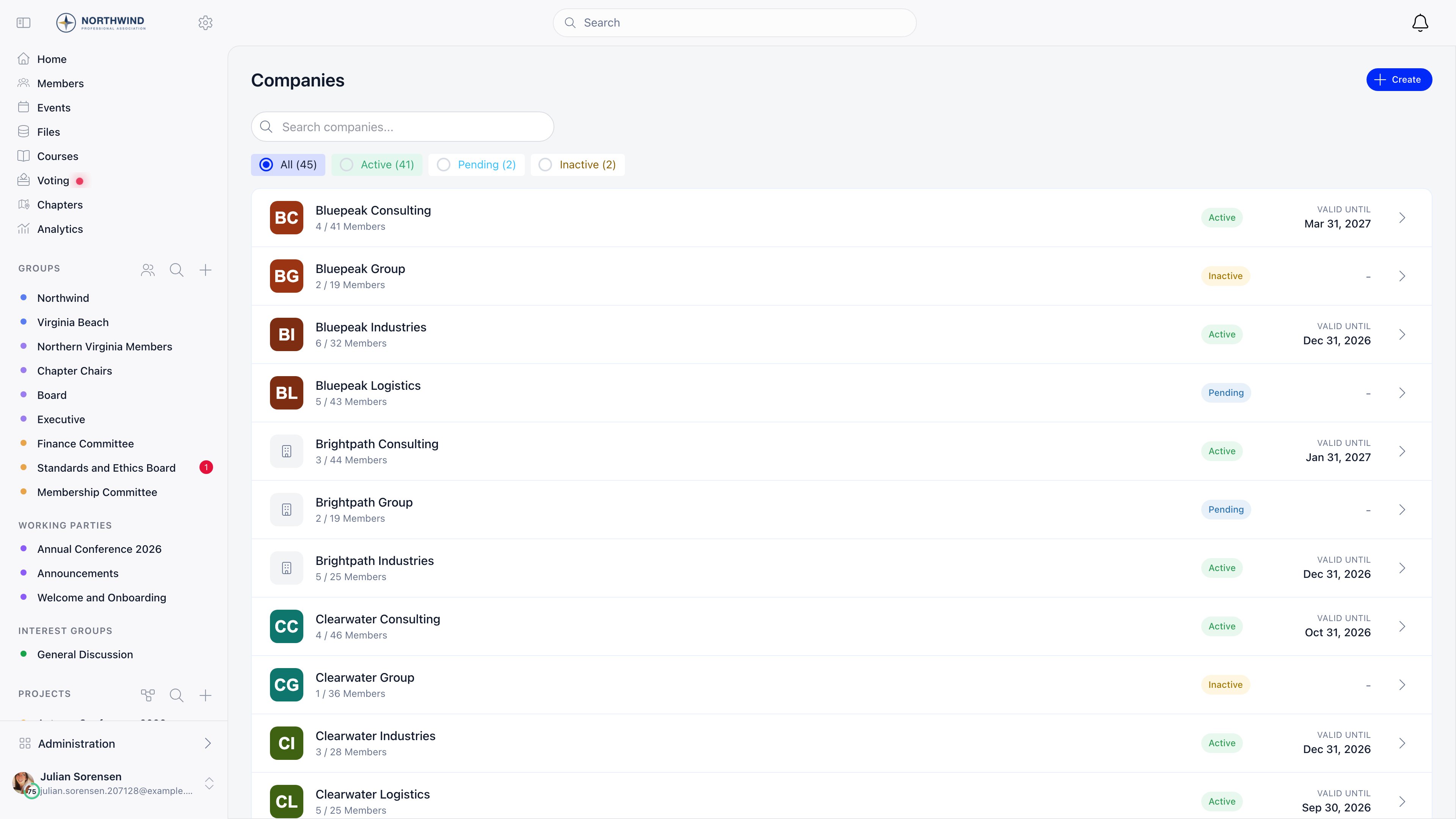
Your member roster lives under **Companies** in the sidebar. Each row carries the status, the seats used against the allowance, and the valid-until date, so the health of your membership is one screen.
 ***
## Before you start
Five decisions carry the whole setup. Settle them on paper first: each one becomes a field, a switch or a price row later, and reversing some of them means re-billing your members.
* [ ] Legal entity details collected for every member company: legal name, registration number, VAT number, billing address, town and country
* [ ] Seat policy decided: how many named people each corporate tier includes, and which tier (if any) is unlimited
* [ ] Invoicing direction agreed: your organization bills each member company centrally, because company fees never route to a region
* [ ] Payment method chosen: card through Stripe, bank transfer against an invoice, or an administrator recording money received elsewhere
* [ ] Primary contact named per company, plus the financial contact email that will receive the renewal ladder
The one that bites later is the seat policy. Seats are not typed in on a company: they arrive from the price the company buys. The tier list you design now is the seat list you live with, and changing a company's allowance means moving it to another tier and taking a payment.
***
## Who this is for
Use this playbook when the entity that joins, pays and renews is an organization, and the people are attached to it:
* a trade or industry association billing member firms an annual corporate fee;
* a chamber of commerce with tiered corporate memberships and a seat allowance per tier;
* an employer federation or umbrella body whose members are other associations;
* any body that sells team or corporate memberships alongside, or instead of, individual ones.
If your members are individuals who happen to be grouped by geography, you do not need this page. Start at [Chapters](/docs/platform/groups/local-groups) instead.
***
## Modelling your members as companies
### The company record
**Companies** in the sidebar, then **Create**. One form, three groups of fields. Only **Company Name** is required to save, but the billing block has to be complete before a payment can start.
| Group | Fields |
| ----------------- | ------------------------------------------------------------------------------------------------------------------------------------------------------------------- |
| Identity | **Company Name**, **Description**, **Website**, **Company Logo** |
| Billing Details | **Legal Name**, **Registration Number**, **VAT Number**, **Billing Address**, **Town**, **Country** |
| Financial Contact | **Financial contact full name**, **Financial contact email**, **Financial contact phone**, **Additional contact email 1 (Cc)**, **Additional contact email 2 (Cc)** |
A company starts at **Pending** and flips to **Active** on its first recorded membership payment. `ADMIN_TENANT` can also set the status by hand. **Delete Company** is a soft delete: the record moves to **Deleted** and disappears from every list, and only `ADMIN_TENANT` can do it.
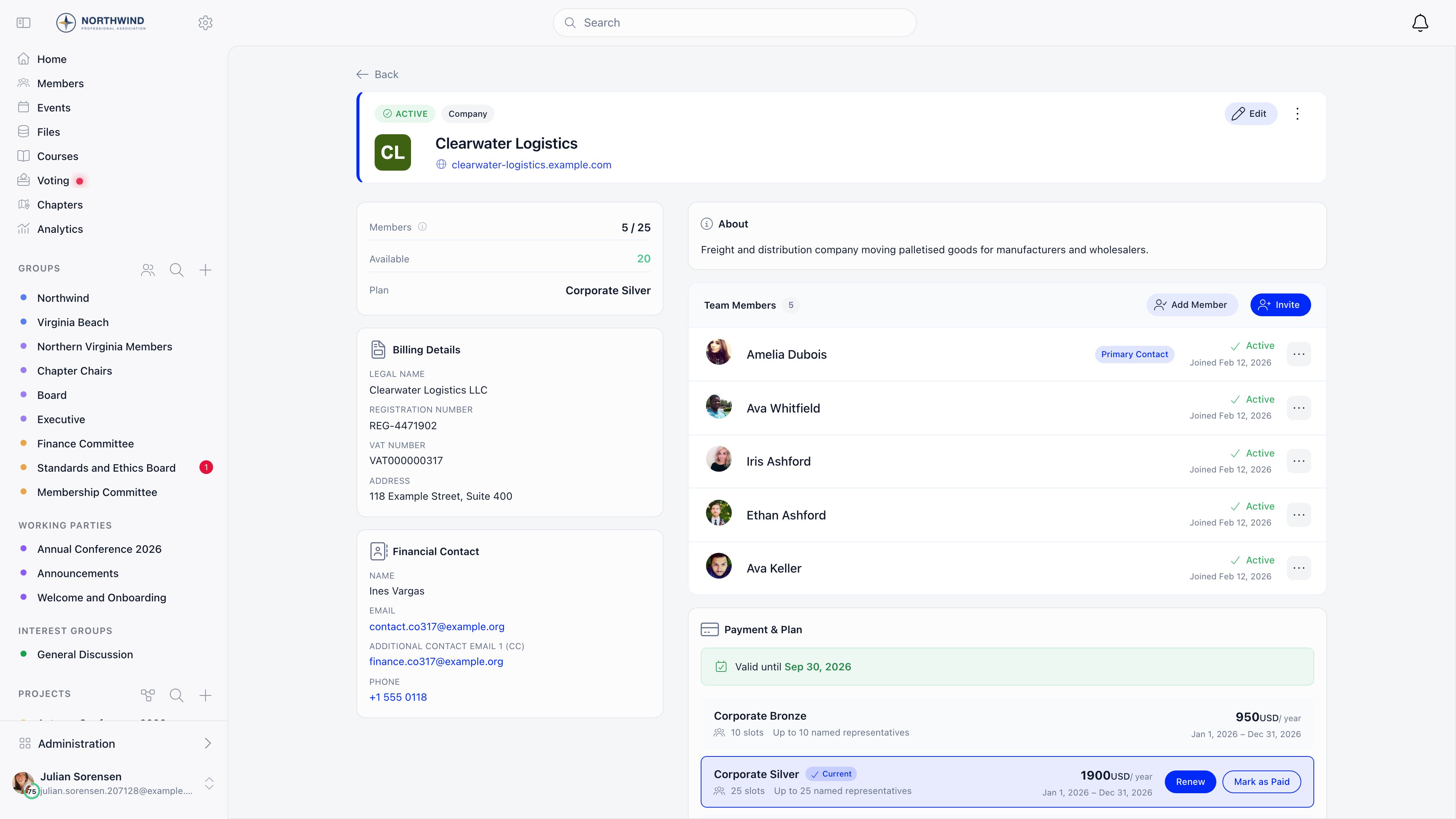
Once saved, the company page becomes the single screen your staff and the member's own primary contact both work from. Reading down the left column and then the right: the status header, the seat counter with the current plan, the **Billing Details** and **Financial Contact** cards, the member list, and the **Payment & Plan** panel.
***
## Before you start
Five decisions carry the whole setup. Settle them on paper first: each one becomes a field, a switch or a price row later, and reversing some of them means re-billing your members.
* [ ] Legal entity details collected for every member company: legal name, registration number, VAT number, billing address, town and country
* [ ] Seat policy decided: how many named people each corporate tier includes, and which tier (if any) is unlimited
* [ ] Invoicing direction agreed: your organization bills each member company centrally, because company fees never route to a region
* [ ] Payment method chosen: card through Stripe, bank transfer against an invoice, or an administrator recording money received elsewhere
* [ ] Primary contact named per company, plus the financial contact email that will receive the renewal ladder
The one that bites later is the seat policy. Seats are not typed in on a company: they arrive from the price the company buys. The tier list you design now is the seat list you live with, and changing a company's allowance means moving it to another tier and taking a payment.
***
## Who this is for
Use this playbook when the entity that joins, pays and renews is an organization, and the people are attached to it:
* a trade or industry association billing member firms an annual corporate fee;
* a chamber of commerce with tiered corporate memberships and a seat allowance per tier;
* an employer federation or umbrella body whose members are other associations;
* any body that sells team or corporate memberships alongside, or instead of, individual ones.
If your members are individuals who happen to be grouped by geography, you do not need this page. Start at [Chapters](/docs/platform/groups/local-groups) instead.
***
## Modelling your members as companies
### The company record
**Companies** in the sidebar, then **Create**. One form, three groups of fields. Only **Company Name** is required to save, but the billing block has to be complete before a payment can start.
| Group | Fields |
| ----------------- | ------------------------------------------------------------------------------------------------------------------------------------------------------------------- |
| Identity | **Company Name**, **Description**, **Website**, **Company Logo** |
| Billing Details | **Legal Name**, **Registration Number**, **VAT Number**, **Billing Address**, **Town**, **Country** |
| Financial Contact | **Financial contact full name**, **Financial contact email**, **Financial contact phone**, **Additional contact email 1 (Cc)**, **Additional contact email 2 (Cc)** |
A company starts at **Pending** and flips to **Active** on its first recorded membership payment. `ADMIN_TENANT` can also set the status by hand. **Delete Company** is a soft delete: the record moves to **Deleted** and disappears from every list, and only `ADMIN_TENANT` can do it.
Once saved, the company page becomes the single screen your staff and the member's own primary contact both work from. Reading down the left column and then the right: the status header, the seat counter with the current plan, the **Billing Details** and **Financial Contact** cards, the member list, and the **Payment & Plan** panel.
 ### One company, many people, one membership
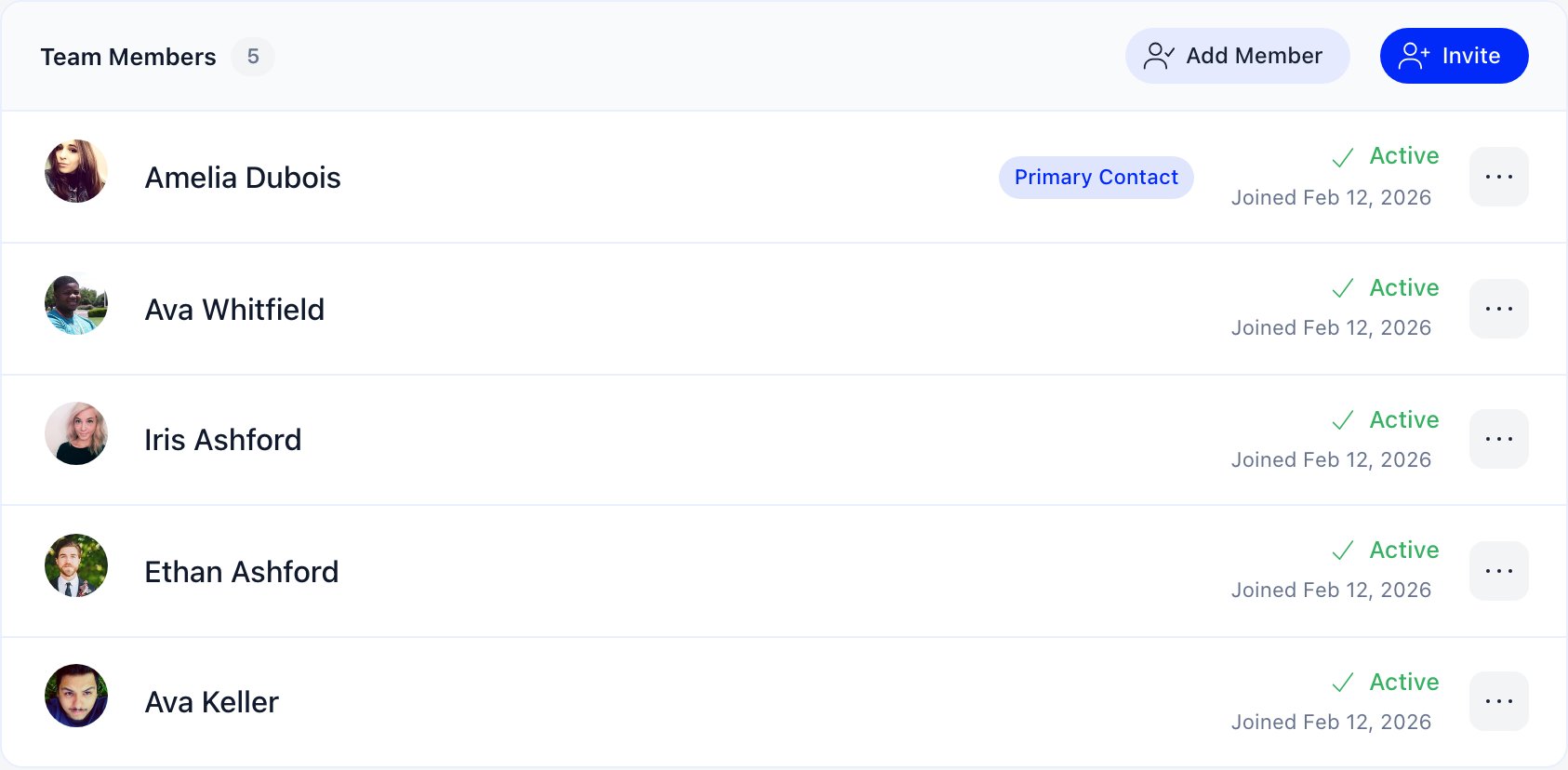
A membership row inside a company points at either a **User** (someone with an account) or a **[Contact](/docs/platform/contacts)** (a record in your database with no account). Both appear in the member list and both occupy a seat. Only user memberships inherit the company's validity date, because a contact has no fee date to write to.
### One company, many people, one membership
A membership row inside a company points at either a **User** (someone with an account) or a **[Contact](/docs/platform/contacts)** (a record in your database with no account). Both appear in the member list and both occupy a seat. Only user memberships inherit the company's validity date, because a contact has no fee date to write to.
 Roles are stored per membership, and one person can hold more than one.
| Role | What it grants |
| ------------------------- | ------------------------------------------------------------------------------------- |
| **Member** | The default. Sees the company page and inherits the membership validity |
| **Primary Contact** | Edits the company, manages members and invitations, and pays. At most one per company |
| **Voting Representative** | A label marking who speaks for the company. At most one per company |
| **Financial Rep** | Legacy. Same rights as Primary Contact, but no longer assignable from the interface |
Assigning **Primary Contact** or **Voting Representative** takes it from whoever held it before, in the same action.
An ordinary member belongs to at most one company, and a member cannot be added to a second one. Administrators who create companies on behalf of others are exempt from that rule and are not enrolled in what they create.
### Seats, and what happens when they run out
Seats are not typed in on the company. They come from the fee price the company bought: every **Company only** price carries a **Company slots** number, and paying for that price writes the number onto the company. **0 means unlimited.**
The count is active members plus pending invitations, so an outstanding invitation holds a place. Memberships that have ended, and those whose user was deleted, are not counted. When the allowance is full, **Invite** and **Add Member** disappear from the company page.
### How an employee joins
Three routes, and you will use all three: invitations for new names, **Add Member** for people already in your database, and automatic domain matching for the ones who turn up at your events.
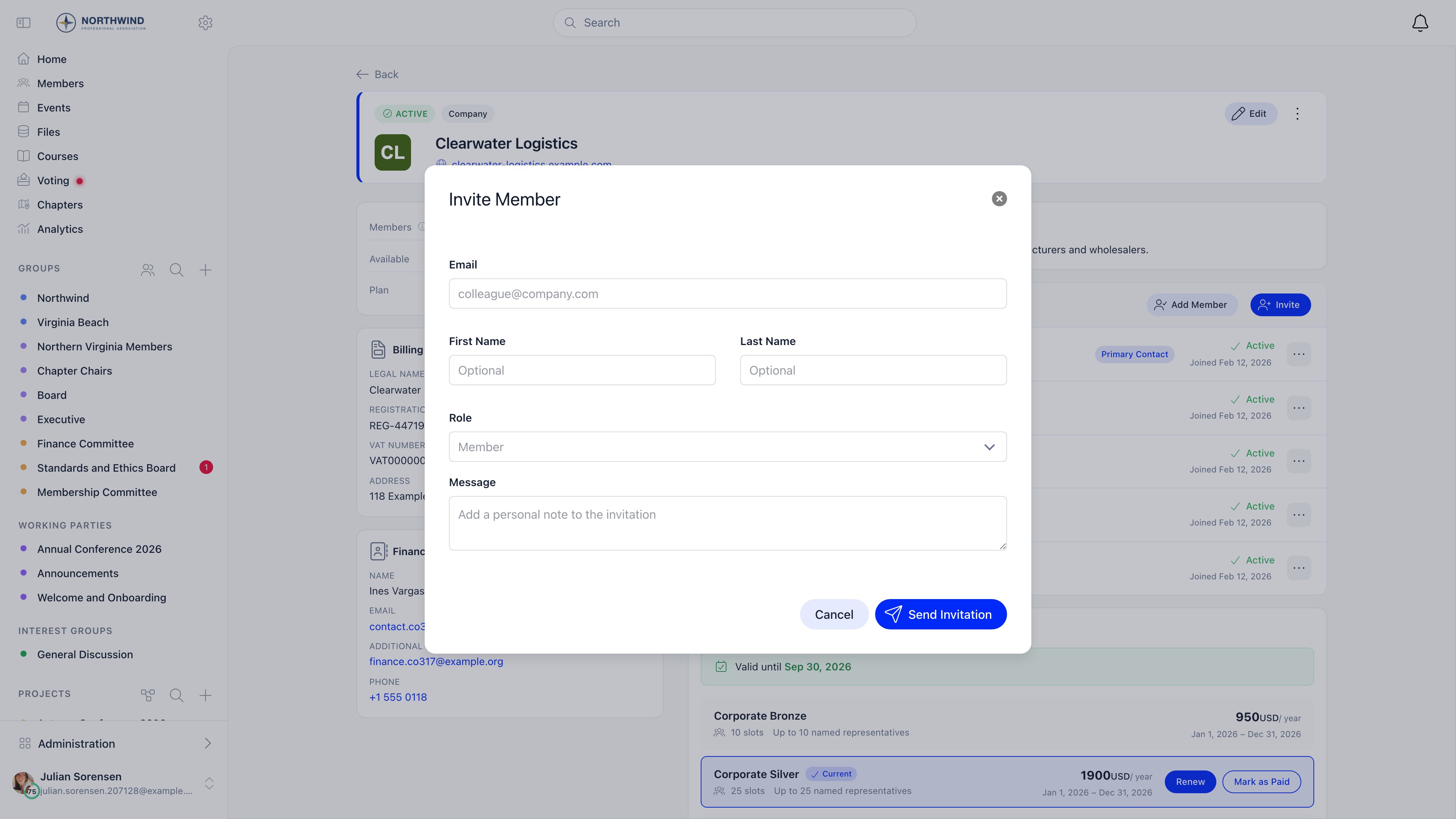
Open the company, then press **Invite** in the header of the **Team Members** panel. Fill in the email, first name, last name and role, and add a message if you want one. Both names are labelled optional in the dialog but the server rejects the invitation without them, so treat them as required.
The email links to `/company-invitation/{hash}`. Accepting joins the person to the company and emails them a one-time login code, creating the account first if they have none. Invitations expire after **30 days** and can be resent (which resets the 30 days) or revoked.
**Done when** the person appears in the **Team Members** panel with a pending invitation, and the seat counter at the top of the company has gone up by one.
Roles are stored per membership, and one person can hold more than one.
| Role | What it grants |
| ------------------------- | ------------------------------------------------------------------------------------- |
| **Member** | The default. Sees the company page and inherits the membership validity |
| **Primary Contact** | Edits the company, manages members and invitations, and pays. At most one per company |
| **Voting Representative** | A label marking who speaks for the company. At most one per company |
| **Financial Rep** | Legacy. Same rights as Primary Contact, but no longer assignable from the interface |
Assigning **Primary Contact** or **Voting Representative** takes it from whoever held it before, in the same action.
An ordinary member belongs to at most one company, and a member cannot be added to a second one. Administrators who create companies on behalf of others are exempt from that rule and are not enrolled in what they create.
### Seats, and what happens when they run out
Seats are not typed in on the company. They come from the fee price the company bought: every **Company only** price carries a **Company slots** number, and paying for that price writes the number onto the company. **0 means unlimited.**
The count is active members plus pending invitations, so an outstanding invitation holds a place. Memberships that have ended, and those whose user was deleted, are not counted. When the allowance is full, **Invite** and **Add Member** disappear from the company page.
### How an employee joins
Three routes, and you will use all three: invitations for new names, **Add Member** for people already in your database, and automatic domain matching for the ones who turn up at your events.
Open the company, then press **Invite** in the header of the **Team Members** panel. Fill in the email, first name, last name and role, and add a message if you want one. Both names are labelled optional in the dialog but the server rejects the invitation without them, so treat them as required.
The email links to `/company-invitation/{hash}`. Accepting joins the person to the company and emails them a one-time login code, creating the account first if they have none. Invitations expire after **30 days** and can be resent (which resets the 30 days) or revoked.
**Done when** the person appears in the **Team Members** panel with a pending invitation, and the seat counter at the top of the company has gone up by one.
 Press **Add Member** in the same panel header and search. The picker only returns users and contacts that are not already in a company. The button is shown to `ADMIN_TENANT` only, and only while seats are free.
**Done when** the person is listed as **Active** in **Team Members** straight away, with no invitation email involved.
Nothing to press. With the Companies module on, somebody registering for an event whose email domain matches the **Website** of an **Active** company is added to that company automatically. Common free providers (gmail.com, outlook.com and similar) are excluded, subdomains are reduced to the base domain, and the company's validity date is copied onto them if it has one. This runs on event registration only, and it does not check seats.
**Done when** an event registrant from a member firm shows up in that company's member list without anyone inviting them.
An invitation is refused up front when there are no free seats, when one is already pending for that email, or when the person already belongs to any company. The seat check runs again at acceptance, so an invitation sent before the company filled up can still fail.
***
## What to turn on
Every switch below needs `ADMIN_TENANT`, and the Settings screens themselves also need the **Orgo administrator** flag on your profile. See [Permissions](/docs/platform/permissions).
### Companies, first
**Settings** → **Modules** → **Companies** → **Configuration**
| Setting | What it does |
| ---------------------------- | --------------------------------------------------------------------------------------------------------------------------------------------------------------------------------------------- |
| **Enable Companies Module** | Adds **Companies** to the sidebar and a **Company** tab to a member's own profile |
| **Who can create companies** | **Any member**, **Local center admins and above**, or **Organization admins only**. This also decides who administers companies they do not belong to (see [Permissions](#permissions) below) |
| **Enable Company Fees** | Lets companies pay membership fees on behalf of their people. Only appears while the Payments and Fees module is active |
Press **Add Member** in the same panel header and search. The picker only returns users and contacts that are not already in a company. The button is shown to `ADMIN_TENANT` only, and only while seats are free.
**Done when** the person is listed as **Active** in **Team Members** straight away, with no invitation email involved.
Nothing to press. With the Companies module on, somebody registering for an event whose email domain matches the **Website** of an **Active** company is added to that company automatically. Common free providers (gmail.com, outlook.com and similar) are excluded, subdomains are reduced to the base domain, and the company's validity date is copied onto them if it has one. This runs on event registration only, and it does not check seats.
**Done when** an event registrant from a member firm shows up in that company's member list without anyone inviting them.
An invitation is refused up front when there are no free seats, when one is already pending for that email, or when the person already belongs to any company. The seat check runs again at acceptance, so an invitation sent before the company filled up can still fail.
***
## What to turn on
Every switch below needs `ADMIN_TENANT`, and the Settings screens themselves also need the **Orgo administrator** flag on your profile. See [Permissions](/docs/platform/permissions).
### Companies, first
**Settings** → **Modules** → **Companies** → **Configuration**
| Setting | What it does |
| ---------------------------- | --------------------------------------------------------------------------------------------------------------------------------------------------------------------------------------------- |
| **Enable Companies Module** | Adds **Companies** to the sidebar and a **Company** tab to a member's own profile |
| **Who can create companies** | **Any member**, **Local center admins and above**, or **Organization admins only**. This also decides who administers companies they do not belong to (see [Permissions](#permissions) below) |
| **Enable Company Fees** | Lets companies pay membership fees on behalf of their people. Only appears while the Payments and Fees module is active |
 ### Payments and fees
**Settings** → **Modules** → **Payments & Fees**
| Setting | Tab | What it does |
| ------------------------------------------------------------- | --------------- | -------------------------------------------------------------------------------------------------------- |
| **Payment Gateway** | Payment Gateway | Connects your organization's Stripe account. See [Stripe Integration](/docs/platform/fees/stripe-integration) |
| **Enable Membership Fees** | Membership fees | The master switch for dues |
| **Membership Fee Product** / **Default Membership Fee Price** | Membership fees | The product companies are billed against |
| **Enable VAT on Fees** | Membership fees | While off, no VAT is added, whatever a price row stores. See [VAT](/docs/platform/fees/vat) |
| **Allow Bank Transfer Payments** | Membership fees | Shows your bank details as a payment option |
| **Enable Membership Payments via Bank Transfer** | Membership fees | Required, together with Invoices, for the **Get invoice for bank transfer** button on a company |
| **Allow Mark as Paid** | Membership fees | Lets an administrator record money received outside the platform |
| **Company Fee Payment Mandatory** | Membership fees | Locks company people out of the platform while the company's fee is unpaid |
### Invoices
Switch **Invoices** on in **Settings** → **Modules** → **All Modules**, then set **Manual Invoice Product** under **Payments & Fees** → **Invoice Product**. Without that product, invoice creation fails. The same tab holds **Send invoice emails automatically** (on by default) and **Invoice membership fee payments**.
### Chapters, only if you have a geographic tier
**Settings** → **Modules** → **Groups & Teams** → **Local Centers** → **Enable Local Centers Module**. Skip this unless the answer to "does a region of ours hold its own members, events and budget?" is yes. See [Adding a geographic tier](#adding-a-geographic-tier-if-you-need-one).
***
## Setup order
Work through these in order. Steps 1 to 4 build the money side, 5 turns the member companies on, and 6 to 9 get your real data in and the enforcement switched on last.
Go to **Settings** → **Modules** → **Payments & Fees** → **Payment Gateway** and connect your organization's Stripe account.
Set a **country** under **Settings** → **Organisation info** first, because Stripe fixes the country when the account is created and it cannot be changed afterwards.
**Done when** the Payment Gateway tab shows your account as connected rather than offering the connect button. See [Stripe Integration](/docs/platform/fees/stripe-integration).
Go to **Finance** → **Products** → **Create Product** and choose **Membership Fee**.
Set **Period** and **Cycle beginning** now: both are locked once saved. A federation billing an annual corporate fee usually wants **Period** annually and a fixed **Cycle beginning** month, so every member company renews together instead of on its own separate anniversary.
**Done when** the product opens on its own page with a **Prices & Options** tab, and the period you chose can no longer be edited.
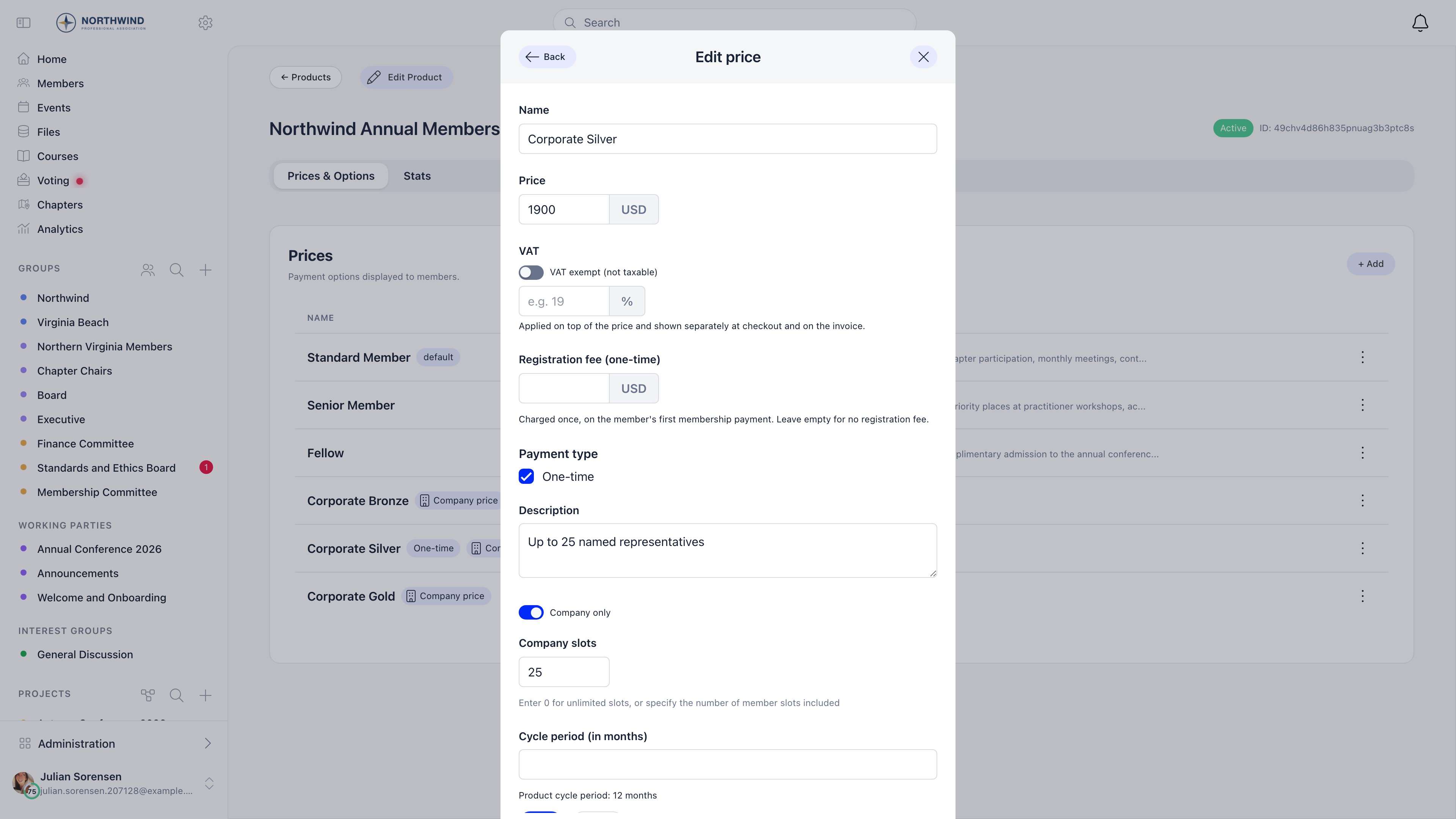
On the product's **Prices & Options** tab, press **Add** and create one price per tier. In the price dialog, switch **Company only** on and enter the **Company slots** that tier buys. `0` slots means unlimited.
Prices without **Company only** stay available to individual members, so a federation with associate individual members can run both from one product.
**Done when** each corporate tier is listed on **Prices & Options** carrying a **Company price** tag, and opening one shows the slot number you typed.
### Payments and fees
**Settings** → **Modules** → **Payments & Fees**
| Setting | Tab | What it does |
| ------------------------------------------------------------- | --------------- | -------------------------------------------------------------------------------------------------------- |
| **Payment Gateway** | Payment Gateway | Connects your organization's Stripe account. See [Stripe Integration](/docs/platform/fees/stripe-integration) |
| **Enable Membership Fees** | Membership fees | The master switch for dues |
| **Membership Fee Product** / **Default Membership Fee Price** | Membership fees | The product companies are billed against |
| **Enable VAT on Fees** | Membership fees | While off, no VAT is added, whatever a price row stores. See [VAT](/docs/platform/fees/vat) |
| **Allow Bank Transfer Payments** | Membership fees | Shows your bank details as a payment option |
| **Enable Membership Payments via Bank Transfer** | Membership fees | Required, together with Invoices, for the **Get invoice for bank transfer** button on a company |
| **Allow Mark as Paid** | Membership fees | Lets an administrator record money received outside the platform |
| **Company Fee Payment Mandatory** | Membership fees | Locks company people out of the platform while the company's fee is unpaid |
### Invoices
Switch **Invoices** on in **Settings** → **Modules** → **All Modules**, then set **Manual Invoice Product** under **Payments & Fees** → **Invoice Product**. Without that product, invoice creation fails. The same tab holds **Send invoice emails automatically** (on by default) and **Invoice membership fee payments**.
### Chapters, only if you have a geographic tier
**Settings** → **Modules** → **Groups & Teams** → **Local Centers** → **Enable Local Centers Module**. Skip this unless the answer to "does a region of ours hold its own members, events and budget?" is yes. See [Adding a geographic tier](#adding-a-geographic-tier-if-you-need-one).
***
## Setup order
Work through these in order. Steps 1 to 4 build the money side, 5 turns the member companies on, and 6 to 9 get your real data in and the enforcement switched on last.
Go to **Settings** → **Modules** → **Payments & Fees** → **Payment Gateway** and connect your organization's Stripe account.
Set a **country** under **Settings** → **Organisation info** first, because Stripe fixes the country when the account is created and it cannot be changed afterwards.
**Done when** the Payment Gateway tab shows your account as connected rather than offering the connect button. See [Stripe Integration](/docs/platform/fees/stripe-integration).
Go to **Finance** → **Products** → **Create Product** and choose **Membership Fee**.
Set **Period** and **Cycle beginning** now: both are locked once saved. A federation billing an annual corporate fee usually wants **Period** annually and a fixed **Cycle beginning** month, so every member company renews together instead of on its own separate anniversary.
**Done when** the product opens on its own page with a **Prices & Options** tab, and the period you chose can no longer be edited.
On the product's **Prices & Options** tab, press **Add** and create one price per tier. In the price dialog, switch **Company only** on and enter the **Company slots** that tier buys. `0` slots means unlimited.
Prices without **Company only** stay available to individual members, so a federation with associate individual members can run both from one product.
**Done when** each corporate tier is listed on **Prices & Options** carrying a **Company price** tag, and opening one shows the slot number you typed.
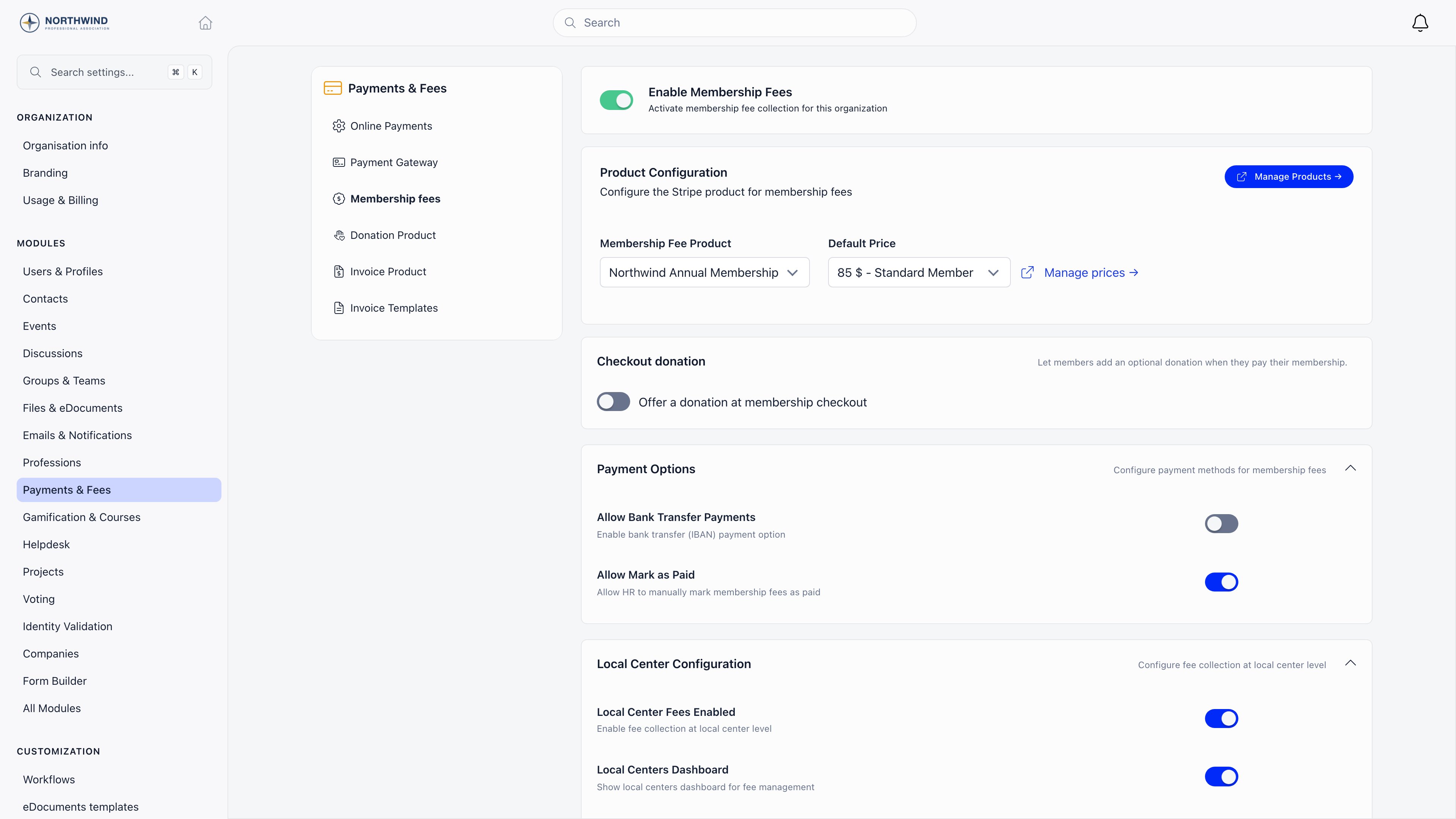
 Go to **Settings** → **Modules** → **Payments & Fees** → **Membership fees**. Switch **Enable Membership Fees** on, then pick your **Membership Fee Product** and a **Default Membership Fee Price**.
Nothing charges until the product is selected here, however complete the product itself looks.
**Done when** the **Product Configuration** card names your product and a default price, and a company's **Payment & Plan** panel starts listing tiers instead of sitting empty.
Go to **Settings** → **Modules** → **Payments & Fees** → **Membership fees**. Switch **Enable Membership Fees** on, then pick your **Membership Fee Product** and a **Default Membership Fee Price**.
Nothing charges until the product is selected here, however complete the product itself looks.
**Done when** the **Product Configuration** card names your product and a default price, and a company's **Payment & Plan** panel starts listing tiers instead of sitting empty.
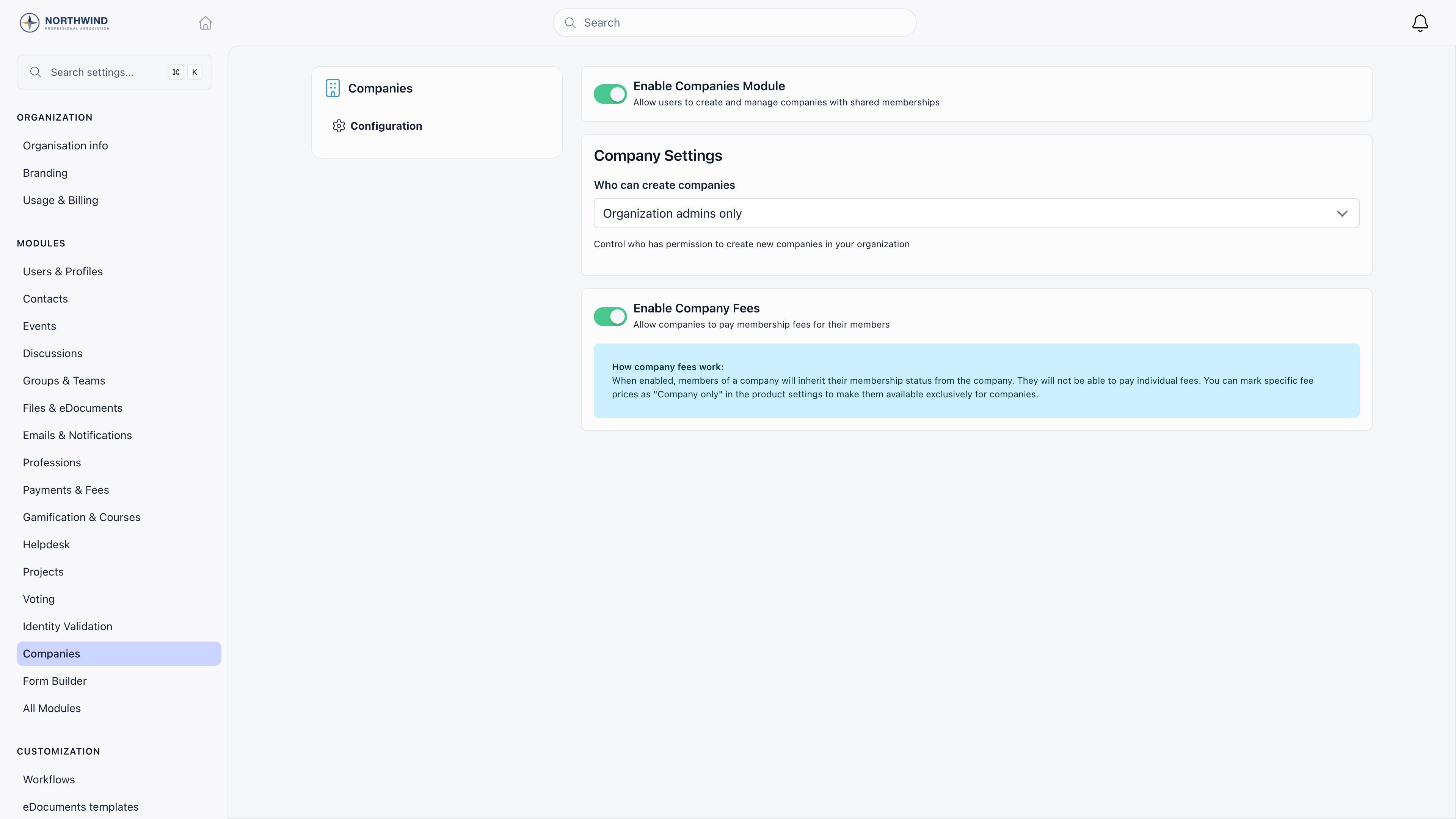
 Go to **Settings** → **Modules** → **Companies** → **Configuration**. Switch **Enable Companies Module** on, choose **Who can create companies**, then switch **Enable Company Fees** on.
Read [Permissions](#permissions) before you pick the **Who can create companies** value: it quietly decides who can administer companies they do not belong to.
**Done when** **Companies** appears in the sidebar and the **Enable Company Fees** switch shows its "How company fees work" note underneath.
Switch **Invoices** on under **Settings** → **Modules** → **All Modules**, then set a **Manual Invoice Product** under **Payments & Fees** → **Invoice Product**.
Do this before you import companies, so the first renewal round can attach invoices. Without that product, invoice creation fails outright.
**Done when** the **Invoices** list is reachable and creating a manual invoice no longer errors. See [Invoices](/docs/platform/fees/invoices).
Go to **Settings** → **Import**. It offers **Companies** (with membership details) and **Company Members** (assigning users to companies with roles), each with an example CSV. Run **Companies** first, then **Company Members**, so every membership has a company to attach to.
**Done when** the **Companies** list shows your real roster with the expected **All** count, and opening one shows its people in **Team Members**. See [Import](/docs/platform/customization/import).
On each company, give one person the **Primary Contact** role: that is who pays and who manages the seats. Fill in **Financial contact email** on the **Financial Contact** card too, because it is the address the renewal ladder writes to.
**Done when** every company shows a **Primary Contact** badge on exactly one member row, and no company is left with an empty **Financial Contact** card.
Leave **Company Fee Payment Mandatory** off until your companies are actually billed and paid. Switching it on with unpaid records blocks their people out on the next page load.
**Done when** your first billing round has settled and you have deliberately chosen whether to enforce, rather than discovering the lockout through support tickets.
***
## Billing companies
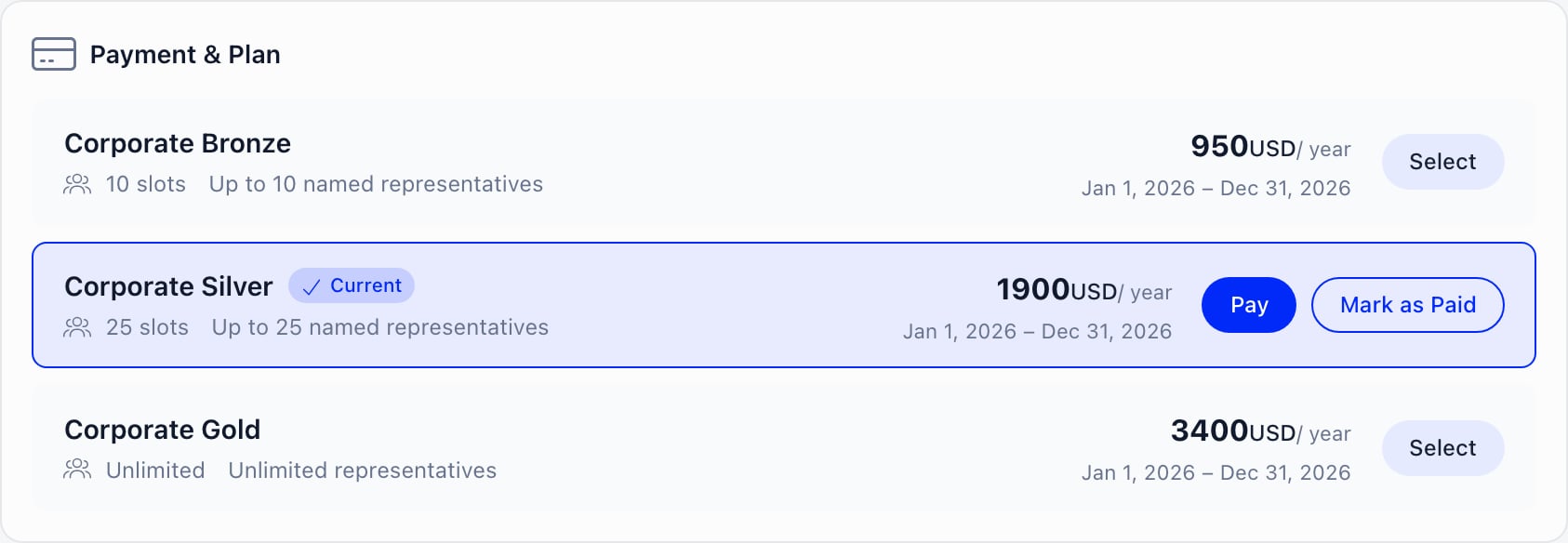
The **Payment & Plan** panel on a company lists every non-archived **Company only** price on your organization's fee product, with its slot count and amount. It is visible to the Primary Contact (and any legacy Financial Rep) and to `ADMIN_TENANT`.
The tier the company is on is marked **Current** and carries the action buttons; the others offer **Select** to move the company across.
Go to **Settings** → **Modules** → **Companies** → **Configuration**. Switch **Enable Companies Module** on, choose **Who can create companies**, then switch **Enable Company Fees** on.
Read [Permissions](#permissions) before you pick the **Who can create companies** value: it quietly decides who can administer companies they do not belong to.
**Done when** **Companies** appears in the sidebar and the **Enable Company Fees** switch shows its "How company fees work" note underneath.
Switch **Invoices** on under **Settings** → **Modules** → **All Modules**, then set a **Manual Invoice Product** under **Payments & Fees** → **Invoice Product**.
Do this before you import companies, so the first renewal round can attach invoices. Without that product, invoice creation fails outright.
**Done when** the **Invoices** list is reachable and creating a manual invoice no longer errors. See [Invoices](/docs/platform/fees/invoices).
Go to **Settings** → **Import**. It offers **Companies** (with membership details) and **Company Members** (assigning users to companies with roles), each with an example CSV. Run **Companies** first, then **Company Members**, so every membership has a company to attach to.
**Done when** the **Companies** list shows your real roster with the expected **All** count, and opening one shows its people in **Team Members**. See [Import](/docs/platform/customization/import).
On each company, give one person the **Primary Contact** role: that is who pays and who manages the seats. Fill in **Financial contact email** on the **Financial Contact** card too, because it is the address the renewal ladder writes to.
**Done when** every company shows a **Primary Contact** badge on exactly one member row, and no company is left with an empty **Financial Contact** card.
Leave **Company Fee Payment Mandatory** off until your companies are actually billed and paid. Switching it on with unpaid records blocks their people out on the next page load.
**Done when** your first billing round has settled and you have deliberately chosen whether to enforce, rather than discovering the lockout through support tickets.
***
## Billing companies
The **Payment & Plan** panel on a company lists every non-archived **Company only** price on your organization's fee product, with its slot count and amount. It is visible to the Primary Contact (and any legacy Financial Rep) and to `ADMIN_TENANT`.
The tier the company is on is marked **Current** and carries the action buttons; the others offer **Select** to move the company across.
 ### Where the money goes
A company fee checkout always charges **your organization's Stripe account**. There is no chapter routing for company fees and no revenue split: the full amount lands in one account, and any onward distribution to regions or member bodies happens in your own accounting, not in Orgo. Orgo takes no commission of its own; the platform application fee is present in the code but forced to zero on every charge, so what you lose is Stripe's processing fee.
### The three ways a company pays
| Route | What happens | Needs |
| --------------------------------- | ---------------------------------------------------------------------------------------------------------------------------------------------------------------------------------------- | --------------------------------------------------------------------------------- |
| **Pay online** | Stripe checkout. Membership activates as soon as the payment lands | A connected Stripe account |
| **Get invoice for bank transfer** | Generates an unpaid invoice, emails it, and shows a reference to quote on the transfer | **Enable Membership Payments via Bank Transfer** and the Invoices module, both on |
| **Mark as Paid** | Records money received outside the platform. Asks for a period start, defaulting to the current expiry so it extends rather than overwrites, and voids any pending bank-transfer invoice | `ADMIN_TENANT` |
Before any of them, Orgo checks that **Legal Name**, **Billing Address**, **Financial contact full name** and **Financial contact email** are filled in, and sends you to the edit form if one is missing.
**Renewal opens 60 days before the current period ends.** Before that window a company with a valid membership has no Pay button, and the bank-transfer invoice endpoint refuses with "Membership can only be renewed closer to its expiry date."
On a calendar-anchored cycle a mid-cycle payment buys only the remainder and is prorated: the panel shows the list price struck through beside the real charge, plus "{months} of {total} months". The amount is always recomputed on the server at checkout, so a stale quote can never undercharge.
VAT is added on top of the net price as its own line when **Enable VAT on Fees** is on and the price is not marked exempt.
### Invoices
A company only ever has one open renewal invoice. The renewal reminder flow and the **Get invoice for bank transfer** button share it: an unpaid membership invoice matching the current period and plan is reused, a stale one is voided and replaced, and a new one is created otherwise.
While the Invoices module is active, the renewal reminder emails carry that invoice as a PDF attachment. Marking a membership invoice paid is what extends the company's membership, which is why the **Membership** switch on a manual invoice matters: an invoice without it is just a document.
Every invoice carries a number (the highest used in your organization plus one, never reset) and a five-character series. Voided and refunded invoices keep their number. Full detail in [Invoices](/docs/platform/fees/invoices) and [Cancelling invoices](/docs/platform/fees/cancelling-invoices).
### What a company payment does to its people
When a payment lands, Orgo:
1. sets the company's valid-until date, never shortening one that is already further out;
2. sets the company **Active** if it was **Pending**;
3. writes the plan's **Company slots** onto the company;
4. copies the valid-until date onto every active member who has an account.
Somebody who joins an already-paid company inherits the date on joining. Somebody removed from a company has their fee date and fee price cleared. A refunded payment rolls the company back to the previous non-refunded period, or clears it entirely, and re-syncs everyone.
With **Enable Company Fees** on, anyone who belongs to a company loses their individual fee screen entirely. Their profile **Fee** tab shows "Membership managed by company" with a link to the company, in place of both the organization fee card and the chapter fee card. This happens as soon as they are attached to a company, whether or not the company has paid anything yet.
### When a company fee lapses
Companies have their own reminder ladder, separate from the individual one: about a month before expiry, 7 days before, 1 day before, on the expiry day, then 7, 14 and 30 days after. Each goes **To** the **Financial contact email**, copying the active Primary Contacts and the two **Additional contact email** addresses. Without a financial contact email, the first Primary Contact is promoted to the To line, and a company with nobody reachable is skipped. Only **Active** and **Pending** companies are reminded, so setting one to Inactive stops both the reminder and the renewal invoice attached to it. The post-expiry rungs are exact day counts, so a company 3 days lapsed hears nothing that day.
With **Company Fee Payment Mandatory** on and the membership lapsed:
| Who | Where they land |
| --------------------------------------- | ------------------------------------------------------------------------------------------------------ |
| Primary Contact or legacy Financial Rep | `/company-fee-payment`, a guided three-step page: Billing Information, Select a Plan, Complete Payment |
| Everyone else in the company | `/company-fee-required`, which names the company and points them at the financial contact |
The company pages themselves stay reachable, so a locked-out Primary Contact can still edit billing details and pay. The gate exempts `ADMIN_TENANT` and fee-exempt user types, and nothing else.
The company gate is stricter than the individual one. The individual mandatory-fee gate lets `HR_TENANT` and `FINANCIAL_TENANT` through; the company gate does not. A staff member of yours who happens to belong to a member company with a lapsed fee is locked out unless they hold `ADMIN_TENANT`.
***
## Adding a geographic tier, if you need one
Chapters (called **local centers** in the data model, the API and the permission names) are optional. Turn them on when a region genuinely holds its own members, events, files and budget, and skip them otherwise: they add a permission scope, a second fee, and a second set of admin screens to every screen you already run.
**Settings** → **Modules** → **Groups & Teams** → **Local Centers** → **Enable Local Centers Module**. What it changes:
| Area | With chapters on |
| ------------------------- | ------------------------------------------------------------------------------------------------------------------------------------------------------------------------------------------------------------ |
| Members | Every member has exactly one primary chapter. Moving someone is a [transfer request](/docs/platform/groups/transfers), approved by the receiving chapter |
| Permissions | The `_LOCAL` family appears on the profile permission panel, scoped to the holder's chapter. **Enable Parent Centers** adds the `_PARENT_LOCAL` family on top |
| Structure above a chapter | **Enable Parent Centers** lets a chapter sit under another chapter, to any depth. A national body holding regions holding member bodies is three layers of one tree, not three products |
| Fees | **Local Center Fees Enabled** gives each chapter its own fee product, default price and validity date, independent of the organization fee. See [Chapter Fees](/docs/platform/local-group-fees/create-local-fees) |
| Money | A chapter that connects its own Stripe account receives its own chapter fee payments. Without one, they fall back to the organization account |
| Structure below a chapter | **Enable Organizational Units** adds typed, nestable teams inside a chapter. See [Units](/docs/platform/groups/units) |
Chapters and companies do not meet. A company record has no chapter field, a company fee is never routed to a chapter Stripe account, and chapter fee screens work on individual members, not on companies. If your regions need their own income from member companies, either bill it centrally and distribute it in your accounting, or give each region its own corporate tier and reconcile from the payment records.
If your federation has tiers (a national body, its regions, their member bodies), build them as chapters nested inside each other rather than as regions or groups. **Enable Parent Centers**, flag each chapter that holds others with **It's a parent chapter**, then set **Belongs to parent chapter** on the ones below it. A chapter can be both at once, which is what makes a middle tier possible. Moving a chapter later requires `HR_TENANT`, because the link decides who administers the branch.
Two grouping tools that are not chapters and are worth knowing before you build a hierarchy you cannot undo:
* **Regions** (**Enable Regions**) are a flat label on a chapter, used for filtering and grouping. They grant nothing on their own, and they are not a layer of the chapter tree.
* **[Role groups](/docs/platform/groups/role-groups)** are spaces whose membership is a query over roles, age, gender, region or fee tier, recalculated as your data changes. They are the right tool for "every Primary Contact" or "every company representative in the north", and the wrong tool for a permanent tier of your organization.
***
## Permissions
Company access is decided by a company-specific check, not by the chapter permission family.
| Action | Who |
| ----------------------------------------------------- | ------------------------------------------------------------------------------------------------------ |
| See a company | Any active member of that company |
| Edit the company record | Primary Contact, legacy Financial Rep |
| Add, remove and re-role members | Primary Contact, legacy Financial Rep. **Add Member** in the interface is shown to `ADMIN_TENANT` only |
| Send, resend and revoke invitations | Primary Contact, legacy Financial Rep |
| Select a plan, pay, request the bank-transfer invoice | Primary Contact, legacy Financial Rep |
| **Mark as Paid** | `ADMIN_TENANT` |
| Change company status | `ADMIN_TENANT` |
| Delete a company | `ADMIN_TENANT` |
| Open **Settings** at all | `ADMIN_TENANT`, plus the **Orgo administrator** flag |
On top of that there is one bypass, and it is the setting people get wrong: **Who can create companies** also decides who administers companies they do not belong to, floored at `ADMIN_LOCAL`.
| **Who can create companies** | Who can then view, edit, manage members and pay on *every* company |
| --------------------------------- | --------------------------------------------------------------------------------------------------------------- |
| **Any member** | Anyone holding `ADMIN_LOCAL` or above (the floor keeps ordinary members out of companies they do not belong to) |
| **Local center admins and above** | Anyone holding `ADMIN_LOCAL` or above |
| **Organization admins only** | `ADMIN_TENANT` only |
Because a company has no chapter, that `ADMIN_LOCAL` check is not scoped to anything: a chapter admin who qualifies reaches every company in the organization, not the ones "in their area". Set **Who can create companies** to **Organization admins only** if that is not what you want.
Two more things worth knowing before you delegate:
* The **Company** tab appears on a member's **own** profile only. An administrator looking at somebody else's profile cannot see which company they belong to from there; go through the company record, or read the fee column on the members list.
* Renewal correspondence follows the company record, not permissions. Whoever is in **Financial contact email** and **Additional contact email 1 and 2** receives the ladder, regardless of what they can do in the platform.
***
## Reporting
| Question | Where |
| --------------------------------------------------- | --------------------------------------------------------------------------------------------------------------------------------------------------------------------------------------------------- |
| How many member companies, by status | **Companies** list. The **All**, **Active**, **Pending** and **Inactive** filters carry live counts, and each row shows seats used against the allowance and the valid-until date |
| Which companies have lapsed | The same list: sort or scan the **Valid until** column, and filter on **Active** to separate paid from **Pending** |
| Who is in a company, and which of them are contacts | The company page member list. Contacts are tagged and link to the contact record |
| What a member is billed at | **Members** list, **fee** column. For anyone in a company it shows the *company's* tier rather than their own, even while the company is **Pending** or its fee is unpaid |
| Invoices and their state | **Invoices** list, searchable by customer name, invoice number, series and internal id, filterable by status |
| Anything else, in plain language | **Ask Orgo** (`ADMIN_TENANT`). Its catalogue includes companies and company membership, payments, invoices and subscription profiles, and results export to CSV. See [Insights](/docs/platform/insights) |
| Who voted, by company | Vote exports carry a **Company** column while the Companies module is on. See [E-voting](/docs/platform/e-voting) |
The Analytics dashboards have no company dimension. Members, geography, leaderboards, platform and finance all count individuals and money, not member organizations. For "revenue by member company" or "companies renewed this quarter", use Ask Orgo or the invoice list.
If you also run chapters, **Finance** → **Stats** (route `/fee/stats`, `FINANCIAL_TENANT`) adds a fees-by-chapter table: chapter, status, active member count and fees paid for a chosen period, with chapters under **Minimum Members per Local Center** or **Minimum Active Members Percentage** highlighted for `ADMIN_TENANT`.
***
## Limits worth knowing before you start
* **A person belongs to at most one company.** There is no way to attach somebody to two member companies, and an invitation to a second one is refused.
* **Companies are organization-wide.** A company has no chapter field, so it cannot be owned by a region, filtered by one, or billed through one.
* **Voting Representative is a label.** Nothing in the voting module reads it: every employee with an account votes as an individual, and there is no one-company-one-vote weighting.
* **Contacts occupy seats but inherit nothing.** A contact has no fee date, so company membership sync skips them. Use contacts for people you communicate with, not for people who need to sign in.
* **Domain matching ignores the seat allowance.** An event registration that matches a company's website domain adds the person even when the company is full, so a company can end up over its allowance without anyone acting.
* **Company fees replace individual fees entirely for those people.** There is no "company pays half" arrangement, and no way to leave an individual fee in place beside a company one.
* **One Stripe account for company money.** Company fees never route to a chapter account, and Orgo performs no split between tiers.
* **Renewal is windowed.** A company cannot pay several periods in advance: the Pay button and the bank-transfer invoice both wait for the 60 day window.
* **The company gate is all or nothing.** With **Company Fee Payment Mandatory** on, only `ADMIN_TENANT` and fee-exempt user types are spared.
***
## Setup checklist
Work down this list once and your federation is live. Each line is an outcome you can see on screen, in the same order as [Setup order](#setup-order) above.
* [ ] Organization country set under **Organisation info**, and Stripe connected on the **Payment Gateway** tab
* [ ] Membership fee product created with the right **Period** and **Cycle beginning** (both lock on save)
* [ ] Company fee prices created on that product: one **Company only** price per corporate tier, each carrying its own **Company slots** allowance
* [ ] Organization pointed at the product: **Enable Membership Fees** on, with a **Membership Fee Product** and a **Default Membership Fee Price** selected
* [ ] Companies module on, **Who can create companies** deliberately chosen, and **Enable Company Fees** on
* [ ] Invoices module on and a **Manual Invoice Product** set, so renewal reminders can carry a PDF
* [ ] Member companies imported, each with legal name, billing address and VAT number filled in
* [ ] One **Primary Contact** named per company, and a **Financial contact email** on every **Financial Contact** card
* [ ] Employees invited or added, with each company's seat counter below its allowance
* [ ] First billing round settled, then **Company Fee Payment Mandatory** switched on or left off as a decision
***
## Troubleshooting
Three separate causes, in the order worth checking.
The payment may not have been recorded as one: a **Get invoice for bank transfer** invoice sits unpaid until somebody marks it paid, and nothing propagates before that.
The people may be contacts rather than users. Membership sync writes the company's valid-until date onto members who have an account, and skips contact rows, which have no fee date to write to. They still occupy seats and still show in the member list.
Or they joined after the payment through a path that did not sync. Invitations, **Add Member** and domain matching all copy the company's date on joining, so this should be rare; if you see it, re-record the payment with **Mark as Paid** starting at the current expiry, which re-syncs everybody.
The most common reason is the renewal window. Renewal opens 60 days before the current period ends, so a company that paid two months ago has no Pay button and is not meant to.
After that, check that a plan is selected: the panel needs a **Company only** price chosen before it can quote or charge. And check who is looking. The panel renders for the Primary Contact, the legacy Financial Rep and `ADMIN_TENANT`; an ordinary employee never sees it.
It needs four things at once: **Enable Membership Payments via Bank Transfer** on, the Invoices module active, a plan selected on the company, and the renewal window open. Each missing one produces its own refusal message rather than a silent failure.
If it works but the company says nothing arrived, check the addresses on the company record. The invoice email goes to the company contact address with the two **Additional contact email** addresses copied in, and if none is set, nothing is sent.
The seat allowance is full. The count is active members plus pending invitations, so outstanding invitations are the usual culprit: revoke the ones that will never be accepted and the buttons come back.
Seats come from the plan, not from a field you can edit. To give a company more room, move it to a tier with a larger **Company slots** value and take the payment; the new number is written on when the payment is recorded. A tier with `0` slots is unlimited.
That is email domain matching. When somebody registers for an event and their email domain matches the **Website** of an **Active** company, Orgo attaches them to that company and copies its validity date onto them.
It is deliberate, and for a federation it is usually what you want: an employee of a member firm registering for a conference is recognised as covered by that firm's membership. It has two edges. It ignores the seat allowance, so a full company can go over. And it depends entirely on the **Website** field being right, so a company whose website is recorded as a shared portal or a marketing domain can collect people who do not work there. Correct the **Website** on the company, then remove the wrong memberships.
Free email providers are excluded, so nobody is ever matched by a gmail.com or outlook.com address.
The company lockout exempts `ADMIN_TENANT` and fee-exempt user types, and nobody else. The individual mandatory-fee gate is more forgiving (it lets `HR_TENANT` and `FINANCIAL_TENANT` through), which is why this only bites on the company side.
If the person genuinely belongs to a member company, the honest fix is to settle that company's fee. If they were attached to a company by mistake, or by domain matching, remove the membership: that clears their fee date and fee price, and the individual rules take over again.
They cannot, and the platform is deliberate about it. With **Enable Company Fees** on, anyone attached to a company sees "Membership managed by company" in place of the whole fee area, including the chapter fee card when chapters are on.
If a company covers only some of its people, do not attach the rest to the company record. Keep them as ordinary members on an individual price, and use a [private group](/docs/platform/groups/private-groups) or a [role group](/docs/platform/groups/role-groups) if you still want them grouped by employer for communication.
Not as a company fee. Chapter fees are individual: they resolve from a member's own chapter and their chapter fee tier, and a company has no chapter at all. A chapter's own Stripe account receives chapter fee payments from members, never company fees.
Two workable shapes. Bill everything centrally and distribute in your accounting, which is what most federations end up doing. Or create a corporate tier per region on the organization fee product, so the payment record itself names the region and you can report on it, while the money still settles in the organization account.
No. **Voting Representative** is a label on a company membership and nothing outside the company screens reads it. Voting eligibility is per person, so every employee with an account can vote on a session they are eligible for.
The closest you can get is procedural: name the representative on the company so the record is unambiguous, and restrict the vote's audience to a [role group](/docs/platform/groups/role-groups) or private group holding one person per company. Vote exports carry a **Company** column, so you can check afterwards that nobody's firm voted twice.
The **Company** tab is rendered on your own profile only, so an administrator opening somebody else's profile does not get it. This is a display rule, not a permission: nothing is hidden from them elsewhere.
Two ways round it. The **fee** column on the members list shows the company's tier for anybody in a company, so the tier name is a reliable tell. And Ask Orgo has both companies and company memberships in its catalogue, so "which company is X in" and "list every member with their company" both answer.
Deleting is a soft delete: the record moves to **Deleted** and drops out of every list, but the memberships attached to it are not unwound, so the people keep the validity date they inherited until it expires on its own.
Remove the members first, which clears each person's fee date and fee price, then delete the company. If it is already done, correct the affected people from their own fee tab or with a recorded payment.
***
## Related
* [Companies](/docs/platform/users/companies) - the full company record, roles, seats and invitations
* [Membership Fees](/docs/platform/fees/fees) - cycles, proration, validity and the mandatory-fee settings
* [Products](/docs/platform/fees/products) - fee products, **Company only** prices and **Company slots**
* [Invoices](/docs/platform/fees/invoices) - numbering, templates, and getting the document to the payer
* [Stripe Integration](/docs/platform/fees/stripe-integration) - which account receives what, and what breaks without it
* [Chapters](/docs/platform/groups/local-groups) - the optional geographic tier and its permission scopes
### Where the money goes
A company fee checkout always charges **your organization's Stripe account**. There is no chapter routing for company fees and no revenue split: the full amount lands in one account, and any onward distribution to regions or member bodies happens in your own accounting, not in Orgo. Orgo takes no commission of its own; the platform application fee is present in the code but forced to zero on every charge, so what you lose is Stripe's processing fee.
### The three ways a company pays
| Route | What happens | Needs |
| --------------------------------- | ---------------------------------------------------------------------------------------------------------------------------------------------------------------------------------------- | --------------------------------------------------------------------------------- |
| **Pay online** | Stripe checkout. Membership activates as soon as the payment lands | A connected Stripe account |
| **Get invoice for bank transfer** | Generates an unpaid invoice, emails it, and shows a reference to quote on the transfer | **Enable Membership Payments via Bank Transfer** and the Invoices module, both on |
| **Mark as Paid** | Records money received outside the platform. Asks for a period start, defaulting to the current expiry so it extends rather than overwrites, and voids any pending bank-transfer invoice | `ADMIN_TENANT` |
Before any of them, Orgo checks that **Legal Name**, **Billing Address**, **Financial contact full name** and **Financial contact email** are filled in, and sends you to the edit form if one is missing.
**Renewal opens 60 days before the current period ends.** Before that window a company with a valid membership has no Pay button, and the bank-transfer invoice endpoint refuses with "Membership can only be renewed closer to its expiry date."
On a calendar-anchored cycle a mid-cycle payment buys only the remainder and is prorated: the panel shows the list price struck through beside the real charge, plus "{months} of {total} months". The amount is always recomputed on the server at checkout, so a stale quote can never undercharge.
VAT is added on top of the net price as its own line when **Enable VAT on Fees** is on and the price is not marked exempt.
### Invoices
A company only ever has one open renewal invoice. The renewal reminder flow and the **Get invoice for bank transfer** button share it: an unpaid membership invoice matching the current period and plan is reused, a stale one is voided and replaced, and a new one is created otherwise.
While the Invoices module is active, the renewal reminder emails carry that invoice as a PDF attachment. Marking a membership invoice paid is what extends the company's membership, which is why the **Membership** switch on a manual invoice matters: an invoice without it is just a document.
Every invoice carries a number (the highest used in your organization plus one, never reset) and a five-character series. Voided and refunded invoices keep their number. Full detail in [Invoices](/docs/platform/fees/invoices) and [Cancelling invoices](/docs/platform/fees/cancelling-invoices).
### What a company payment does to its people
When a payment lands, Orgo:
1. sets the company's valid-until date, never shortening one that is already further out;
2. sets the company **Active** if it was **Pending**;
3. writes the plan's **Company slots** onto the company;
4. copies the valid-until date onto every active member who has an account.
Somebody who joins an already-paid company inherits the date on joining. Somebody removed from a company has their fee date and fee price cleared. A refunded payment rolls the company back to the previous non-refunded period, or clears it entirely, and re-syncs everyone.
With **Enable Company Fees** on, anyone who belongs to a company loses their individual fee screen entirely. Their profile **Fee** tab shows "Membership managed by company" with a link to the company, in place of both the organization fee card and the chapter fee card. This happens as soon as they are attached to a company, whether or not the company has paid anything yet.
### When a company fee lapses
Companies have their own reminder ladder, separate from the individual one: about a month before expiry, 7 days before, 1 day before, on the expiry day, then 7, 14 and 30 days after. Each goes **To** the **Financial contact email**, copying the active Primary Contacts and the two **Additional contact email** addresses. Without a financial contact email, the first Primary Contact is promoted to the To line, and a company with nobody reachable is skipped. Only **Active** and **Pending** companies are reminded, so setting one to Inactive stops both the reminder and the renewal invoice attached to it. The post-expiry rungs are exact day counts, so a company 3 days lapsed hears nothing that day.
With **Company Fee Payment Mandatory** on and the membership lapsed:
| Who | Where they land |
| --------------------------------------- | ------------------------------------------------------------------------------------------------------ |
| Primary Contact or legacy Financial Rep | `/company-fee-payment`, a guided three-step page: Billing Information, Select a Plan, Complete Payment |
| Everyone else in the company | `/company-fee-required`, which names the company and points them at the financial contact |
The company pages themselves stay reachable, so a locked-out Primary Contact can still edit billing details and pay. The gate exempts `ADMIN_TENANT` and fee-exempt user types, and nothing else.
The company gate is stricter than the individual one. The individual mandatory-fee gate lets `HR_TENANT` and `FINANCIAL_TENANT` through; the company gate does not. A staff member of yours who happens to belong to a member company with a lapsed fee is locked out unless they hold `ADMIN_TENANT`.
***
## Adding a geographic tier, if you need one
Chapters (called **local centers** in the data model, the API and the permission names) are optional. Turn them on when a region genuinely holds its own members, events, files and budget, and skip them otherwise: they add a permission scope, a second fee, and a second set of admin screens to every screen you already run.
**Settings** → **Modules** → **Groups & Teams** → **Local Centers** → **Enable Local Centers Module**. What it changes:
| Area | With chapters on |
| ------------------------- | ------------------------------------------------------------------------------------------------------------------------------------------------------------------------------------------------------------ |
| Members | Every member has exactly one primary chapter. Moving someone is a [transfer request](/docs/platform/groups/transfers), approved by the receiving chapter |
| Permissions | The `_LOCAL` family appears on the profile permission panel, scoped to the holder's chapter. **Enable Parent Centers** adds the `_PARENT_LOCAL` family on top |
| Structure above a chapter | **Enable Parent Centers** lets a chapter sit under another chapter, to any depth. A national body holding regions holding member bodies is three layers of one tree, not three products |
| Fees | **Local Center Fees Enabled** gives each chapter its own fee product, default price and validity date, independent of the organization fee. See [Chapter Fees](/docs/platform/local-group-fees/create-local-fees) |
| Money | A chapter that connects its own Stripe account receives its own chapter fee payments. Without one, they fall back to the organization account |
| Structure below a chapter | **Enable Organizational Units** adds typed, nestable teams inside a chapter. See [Units](/docs/platform/groups/units) |
Chapters and companies do not meet. A company record has no chapter field, a company fee is never routed to a chapter Stripe account, and chapter fee screens work on individual members, not on companies. If your regions need their own income from member companies, either bill it centrally and distribute it in your accounting, or give each region its own corporate tier and reconcile from the payment records.
If your federation has tiers (a national body, its regions, their member bodies), build them as chapters nested inside each other rather than as regions or groups. **Enable Parent Centers**, flag each chapter that holds others with **It's a parent chapter**, then set **Belongs to parent chapter** on the ones below it. A chapter can be both at once, which is what makes a middle tier possible. Moving a chapter later requires `HR_TENANT`, because the link decides who administers the branch.
Two grouping tools that are not chapters and are worth knowing before you build a hierarchy you cannot undo:
* **Regions** (**Enable Regions**) are a flat label on a chapter, used for filtering and grouping. They grant nothing on their own, and they are not a layer of the chapter tree.
* **[Role groups](/docs/platform/groups/role-groups)** are spaces whose membership is a query over roles, age, gender, region or fee tier, recalculated as your data changes. They are the right tool for "every Primary Contact" or "every company representative in the north", and the wrong tool for a permanent tier of your organization.
***
## Permissions
Company access is decided by a company-specific check, not by the chapter permission family.
| Action | Who |
| ----------------------------------------------------- | ------------------------------------------------------------------------------------------------------ |
| See a company | Any active member of that company |
| Edit the company record | Primary Contact, legacy Financial Rep |
| Add, remove and re-role members | Primary Contact, legacy Financial Rep. **Add Member** in the interface is shown to `ADMIN_TENANT` only |
| Send, resend and revoke invitations | Primary Contact, legacy Financial Rep |
| Select a plan, pay, request the bank-transfer invoice | Primary Contact, legacy Financial Rep |
| **Mark as Paid** | `ADMIN_TENANT` |
| Change company status | `ADMIN_TENANT` |
| Delete a company | `ADMIN_TENANT` |
| Open **Settings** at all | `ADMIN_TENANT`, plus the **Orgo administrator** flag |
On top of that there is one bypass, and it is the setting people get wrong: **Who can create companies** also decides who administers companies they do not belong to, floored at `ADMIN_LOCAL`.
| **Who can create companies** | Who can then view, edit, manage members and pay on *every* company |
| --------------------------------- | --------------------------------------------------------------------------------------------------------------- |
| **Any member** | Anyone holding `ADMIN_LOCAL` or above (the floor keeps ordinary members out of companies they do not belong to) |
| **Local center admins and above** | Anyone holding `ADMIN_LOCAL` or above |
| **Organization admins only** | `ADMIN_TENANT` only |
Because a company has no chapter, that `ADMIN_LOCAL` check is not scoped to anything: a chapter admin who qualifies reaches every company in the organization, not the ones "in their area". Set **Who can create companies** to **Organization admins only** if that is not what you want.
Two more things worth knowing before you delegate:
* The **Company** tab appears on a member's **own** profile only. An administrator looking at somebody else's profile cannot see which company they belong to from there; go through the company record, or read the fee column on the members list.
* Renewal correspondence follows the company record, not permissions. Whoever is in **Financial contact email** and **Additional contact email 1 and 2** receives the ladder, regardless of what they can do in the platform.
***
## Reporting
| Question | Where |
| --------------------------------------------------- | --------------------------------------------------------------------------------------------------------------------------------------------------------------------------------------------------- |
| How many member companies, by status | **Companies** list. The **All**, **Active**, **Pending** and **Inactive** filters carry live counts, and each row shows seats used against the allowance and the valid-until date |
| Which companies have lapsed | The same list: sort or scan the **Valid until** column, and filter on **Active** to separate paid from **Pending** |
| Who is in a company, and which of them are contacts | The company page member list. Contacts are tagged and link to the contact record |
| What a member is billed at | **Members** list, **fee** column. For anyone in a company it shows the *company's* tier rather than their own, even while the company is **Pending** or its fee is unpaid |
| Invoices and their state | **Invoices** list, searchable by customer name, invoice number, series and internal id, filterable by status |
| Anything else, in plain language | **Ask Orgo** (`ADMIN_TENANT`). Its catalogue includes companies and company membership, payments, invoices and subscription profiles, and results export to CSV. See [Insights](/docs/platform/insights) |
| Who voted, by company | Vote exports carry a **Company** column while the Companies module is on. See [E-voting](/docs/platform/e-voting) |
The Analytics dashboards have no company dimension. Members, geography, leaderboards, platform and finance all count individuals and money, not member organizations. For "revenue by member company" or "companies renewed this quarter", use Ask Orgo or the invoice list.
If you also run chapters, **Finance** → **Stats** (route `/fee/stats`, `FINANCIAL_TENANT`) adds a fees-by-chapter table: chapter, status, active member count and fees paid for a chosen period, with chapters under **Minimum Members per Local Center** or **Minimum Active Members Percentage** highlighted for `ADMIN_TENANT`.
***
## Limits worth knowing before you start
* **A person belongs to at most one company.** There is no way to attach somebody to two member companies, and an invitation to a second one is refused.
* **Companies are organization-wide.** A company has no chapter field, so it cannot be owned by a region, filtered by one, or billed through one.
* **Voting Representative is a label.** Nothing in the voting module reads it: every employee with an account votes as an individual, and there is no one-company-one-vote weighting.
* **Contacts occupy seats but inherit nothing.** A contact has no fee date, so company membership sync skips them. Use contacts for people you communicate with, not for people who need to sign in.
* **Domain matching ignores the seat allowance.** An event registration that matches a company's website domain adds the person even when the company is full, so a company can end up over its allowance without anyone acting.
* **Company fees replace individual fees entirely for those people.** There is no "company pays half" arrangement, and no way to leave an individual fee in place beside a company one.
* **One Stripe account for company money.** Company fees never route to a chapter account, and Orgo performs no split between tiers.
* **Renewal is windowed.** A company cannot pay several periods in advance: the Pay button and the bank-transfer invoice both wait for the 60 day window.
* **The company gate is all or nothing.** With **Company Fee Payment Mandatory** on, only `ADMIN_TENANT` and fee-exempt user types are spared.
***
## Setup checklist
Work down this list once and your federation is live. Each line is an outcome you can see on screen, in the same order as [Setup order](#setup-order) above.
* [ ] Organization country set under **Organisation info**, and Stripe connected on the **Payment Gateway** tab
* [ ] Membership fee product created with the right **Period** and **Cycle beginning** (both lock on save)
* [ ] Company fee prices created on that product: one **Company only** price per corporate tier, each carrying its own **Company slots** allowance
* [ ] Organization pointed at the product: **Enable Membership Fees** on, with a **Membership Fee Product** and a **Default Membership Fee Price** selected
* [ ] Companies module on, **Who can create companies** deliberately chosen, and **Enable Company Fees** on
* [ ] Invoices module on and a **Manual Invoice Product** set, so renewal reminders can carry a PDF
* [ ] Member companies imported, each with legal name, billing address and VAT number filled in
* [ ] One **Primary Contact** named per company, and a **Financial contact email** on every **Financial Contact** card
* [ ] Employees invited or added, with each company's seat counter below its allowance
* [ ] First billing round settled, then **Company Fee Payment Mandatory** switched on or left off as a decision
***
## Troubleshooting
Three separate causes, in the order worth checking.
The payment may not have been recorded as one: a **Get invoice for bank transfer** invoice sits unpaid until somebody marks it paid, and nothing propagates before that.
The people may be contacts rather than users. Membership sync writes the company's valid-until date onto members who have an account, and skips contact rows, which have no fee date to write to. They still occupy seats and still show in the member list.
Or they joined after the payment through a path that did not sync. Invitations, **Add Member** and domain matching all copy the company's date on joining, so this should be rare; if you see it, re-record the payment with **Mark as Paid** starting at the current expiry, which re-syncs everybody.
The most common reason is the renewal window. Renewal opens 60 days before the current period ends, so a company that paid two months ago has no Pay button and is not meant to.
After that, check that a plan is selected: the panel needs a **Company only** price chosen before it can quote or charge. And check who is looking. The panel renders for the Primary Contact, the legacy Financial Rep and `ADMIN_TENANT`; an ordinary employee never sees it.
It needs four things at once: **Enable Membership Payments via Bank Transfer** on, the Invoices module active, a plan selected on the company, and the renewal window open. Each missing one produces its own refusal message rather than a silent failure.
If it works but the company says nothing arrived, check the addresses on the company record. The invoice email goes to the company contact address with the two **Additional contact email** addresses copied in, and if none is set, nothing is sent.
The seat allowance is full. The count is active members plus pending invitations, so outstanding invitations are the usual culprit: revoke the ones that will never be accepted and the buttons come back.
Seats come from the plan, not from a field you can edit. To give a company more room, move it to a tier with a larger **Company slots** value and take the payment; the new number is written on when the payment is recorded. A tier with `0` slots is unlimited.
That is email domain matching. When somebody registers for an event and their email domain matches the **Website** of an **Active** company, Orgo attaches them to that company and copies its validity date onto them.
It is deliberate, and for a federation it is usually what you want: an employee of a member firm registering for a conference is recognised as covered by that firm's membership. It has two edges. It ignores the seat allowance, so a full company can go over. And it depends entirely on the **Website** field being right, so a company whose website is recorded as a shared portal or a marketing domain can collect people who do not work there. Correct the **Website** on the company, then remove the wrong memberships.
Free email providers are excluded, so nobody is ever matched by a gmail.com or outlook.com address.
The company lockout exempts `ADMIN_TENANT` and fee-exempt user types, and nobody else. The individual mandatory-fee gate is more forgiving (it lets `HR_TENANT` and `FINANCIAL_TENANT` through), which is why this only bites on the company side.
If the person genuinely belongs to a member company, the honest fix is to settle that company's fee. If they were attached to a company by mistake, or by domain matching, remove the membership: that clears their fee date and fee price, and the individual rules take over again.
They cannot, and the platform is deliberate about it. With **Enable Company Fees** on, anyone attached to a company sees "Membership managed by company" in place of the whole fee area, including the chapter fee card when chapters are on.
If a company covers only some of its people, do not attach the rest to the company record. Keep them as ordinary members on an individual price, and use a [private group](/docs/platform/groups/private-groups) or a [role group](/docs/platform/groups/role-groups) if you still want them grouped by employer for communication.
Not as a company fee. Chapter fees are individual: they resolve from a member's own chapter and their chapter fee tier, and a company has no chapter at all. A chapter's own Stripe account receives chapter fee payments from members, never company fees.
Two workable shapes. Bill everything centrally and distribute in your accounting, which is what most federations end up doing. Or create a corporate tier per region on the organization fee product, so the payment record itself names the region and you can report on it, while the money still settles in the organization account.
No. **Voting Representative** is a label on a company membership and nothing outside the company screens reads it. Voting eligibility is per person, so every employee with an account can vote on a session they are eligible for.
The closest you can get is procedural: name the representative on the company so the record is unambiguous, and restrict the vote's audience to a [role group](/docs/platform/groups/role-groups) or private group holding one person per company. Vote exports carry a **Company** column, so you can check afterwards that nobody's firm voted twice.
The **Company** tab is rendered on your own profile only, so an administrator opening somebody else's profile does not get it. This is a display rule, not a permission: nothing is hidden from them elsewhere.
Two ways round it. The **fee** column on the members list shows the company's tier for anybody in a company, so the tier name is a reliable tell. And Ask Orgo has both companies and company memberships in its catalogue, so "which company is X in" and "list every member with their company" both answer.
Deleting is a soft delete: the record moves to **Deleted** and drops out of every list, but the memberships attached to it are not unwound, so the people keep the validity date they inherited until it expires on its own.
Remove the members first, which clears each person's fee date and fee price, then delete the company. If it is already done, correct the affected people from their own fee tab or with a recorded payment.
***
## Related
* [Companies](/docs/platform/users/companies) - the full company record, roles, seats and invitations
* [Membership Fees](/docs/platform/fees/fees) - cycles, proration, validity and the mandatory-fee settings
* [Products](/docs/platform/fees/products) - fee products, **Company only** prices and **Company slots**
* [Invoices](/docs/platform/fees/invoices) - numbering, templates, and getting the document to the payer
* [Stripe Integration](/docs/platform/fees/stripe-integration) - which account receives what, and what breaks without it
* [Chapters](/docs/platform/groups/local-groups) - the optional geographic tier and its permission scopes