> ## Documentation Index
> Fetch the complete documentation index at: https://orgo.space/docs/llms.txt
> Use this file to discover all available pages before exploring further.
# Orgo for fundraising
> Which modules to enable, in what order, to run one-off gifts, recurring giving, campaign pages and donor reporting on Orgo
This template is for organisations whose money comes from supporters giving voluntarily, whether or not those supporters are members: nonprofits, foundations, faith communities, alumni networks, advocacy groups. It assumes you already have an Orgo workspace and want to know which parts of it fundraising actually uses.
It routes rather than explains. Each step links to the page that covers it in depth, so read this once to get the order right, then work from the feature pages.
***
## Before you start
Gather these before you open Orgo. Every one of them is asked for during setup, and stopping halfway to find a bank statement or write a thank-you message is how half-built campaigns end up published.
* [ ] A Stripe account you can sign into, or the legal entity and bank details to create one during setup
* [ ] Your organisation's country, which Stripe fixes at account creation and cannot change afterwards
* [ ] Campaign copy written: a title, a short story, and the thank-you message donors read after paying
* [ ] A hero image, or the URL of a hero video
* [ ] A decision on suggested amounts: the figures you want offered, or a plan to press **Generate** and start from what Orgo proposes
* [ ] A decision on frequency: one-off gifts, monthly giving, or both
* [ ] Someone with `ADMIN_TENANT` to change the settings, and someone with `FINANCIAL_TENANT` to build the campaign
***
## What to turn on
Everything in this table lives under **Settings**. Module settings pages all require `ADMIN_TENANT`, which is what the permission column says when the setting itself is what you are changing.
| What | Exact label | Where | Permission |
| ------------------------------------------- | ----------------------------------------------------------------------------- | -------------------------------------------------------------------------------------------------------------------------------------------- | ----------------------------------------------------------------------- |
| Country on the organisation profile | **Country** | **Settings → Organisation info** | `ADMIN_TENANT` |
| The payments module | **Enable Online Payments** | **Settings → Modules → Payments & Fees → Online Payments** | `ADMIN_TENANT` |
| Stripe account | **Connect existing Stripe account** or **Generate Stripe Account** | **Settings → Modules → Payments & Fees → Payment Gateway** | `ADMIN_TENANT` (organisation), `ADMIN_LOCAL` (chapter) |
| Accounts for donors who are not members | **Create Accounts for External Buyers** | **Settings → Modules → Payments & Fees → Online Payments** | `ADMIN_TENANT` |
| Phone on the donation form | **Collect Phone at Checkout** | **Settings → Modules → Payments & Fees → Online Payments** | `ADMIN_TENANT` |
| Forced confidentiality notice | **Confidentiality Agreement Mandatory** | **Settings → Modules → Payments & Fees → Online Payments** | `ADMIN_TENANT` |
| Chapter designations on a campaign | **Products with Local Center Option** | **Settings → Modules → Payments & Fees → Online Payments** | `ADMIN_TENANT` |
| Chapters taking their own money | **Local Center Payments**, then **All Local Centers Eligible** or per chapter | **Settings → Modules → Payments & Fees → Online Payments** | `ADMIN_TENANT` |
| The default `/donate` campaign | **Donation Product** | **Settings → Modules → Payments & Fees → Donation Product** | `ADMIN_TENANT` |
| The campaign that grants the Supporter flag | **Recurring Donation Product** | **Settings → Modules → Payments & Fees → Donation Product** | `ADMIN_TENANT` |
| Stripe's own receipt email | **Stripe Email Receipts** | **Settings → Modules → Payments & Fees → Online Payments** | `ADMIN_TENANT` |
| The campaign itself | **Create Product**, then the **Donation** card | **Finance → Products** (or **Finance → Local products** for a chapter) | `FINANCIAL_TENANT`, or `FINANCIAL_LOCAL` for a chapter campaign |
| Appeal emails | **Enable Email Campaign Module** | **Settings → Modules → Emails & Notifications → Email Campaigner** | `ADMIN_TENANT` to switch on, `COMMUNICATION_TENANT` to send |
| Wording of the thank-you email | **Donation thank you** template | **Settings → Modules → Emails & Notifications → Email Templates** | `ADMIN_TENANT` |
| Revenue dashboards | analytics module, then **Minimum access level** | **Settings → Modules → All Modules** for the module, **Settings → Modules → Users & Profiles → Security & Permissions** for the access level | `ADMIN_TENANT` to configure, `FINANCIAL_TENANT` to read the Finance tab |
Nothing here needs the **Invoices** module. Donation payments cannot be turned into Orgo invoices: see [Limits](#limits-worth-knowing-before-you-start).
***
## Setup order
Do these in order. The main reason is Stripe: several controls stay greyed out until an account is connected, and a campaign saved without them needs revisiting.
Each step says where in the interface it happens and how you can tell it worked, so you can follow along with Orgo open beside you.
Open **Settings → Organisation info**, set **Country**, and save.
Stripe needs the country at account creation and it cannot be changed afterwards, so the connect buttons stay disabled until **Settings → Organisation info** has one.
**Done when:** the connect buttons on the Payment Gateway page below are clickable rather than greyed out.
See [Organisation info](/docs/platform/organisation/organisation-info).
Go to **Settings → Modules → Payments & Fees → Payment Gateway** and either **Connect existing Stripe account** or **Generate Stripe Account**. Stripe runs its own onboarding and returns you to this page.
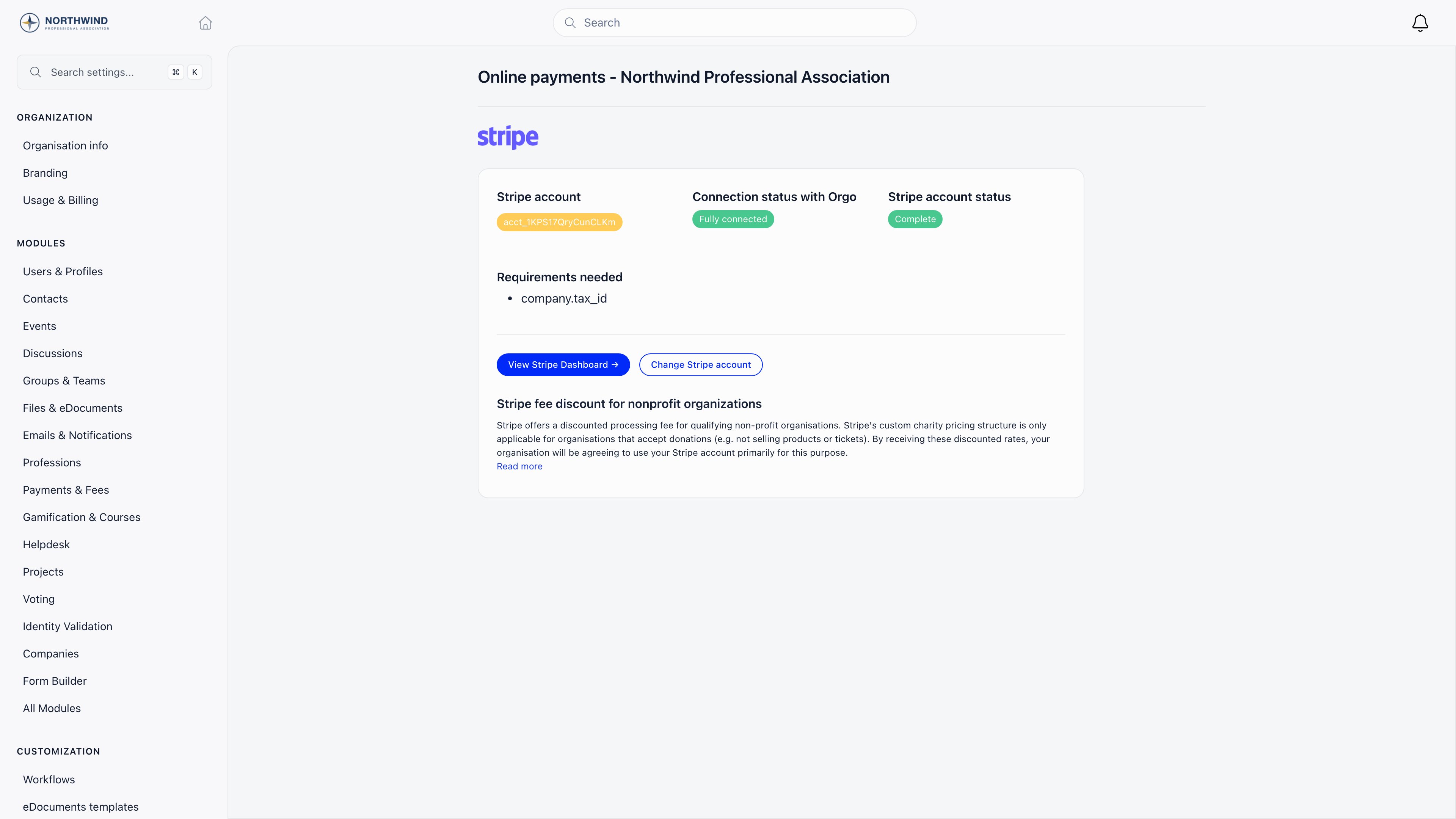 **Done when:** the page reads **Fully connected** and **Complete**. Build nothing before it does, because **One-off** and **Recurring** are both unavailable on the campaign form while no account is linked. An entry under **Requirements needed** with a future deadline is normal and does not stop you charging.
See [Stripe integration](/docs/platform/fees/stripe-integration).
**Settings → Modules → Payments & Fees → Online Payments** holds the switches that shape every donation form you will ever build.
**Done when:** the page reads **Fully connected** and **Complete**. Build nothing before it does, because **One-off** and **Recurring** are both unavailable on the campaign form while no account is linked. An entry under **Requirements needed** with a future deadline is normal and does not stop you charging.
See [Stripe integration](/docs/platform/fees/stripe-integration).
**Settings → Modules → Payments & Fees → Online Payments** holds the switches that shape every donation form you will ever build.
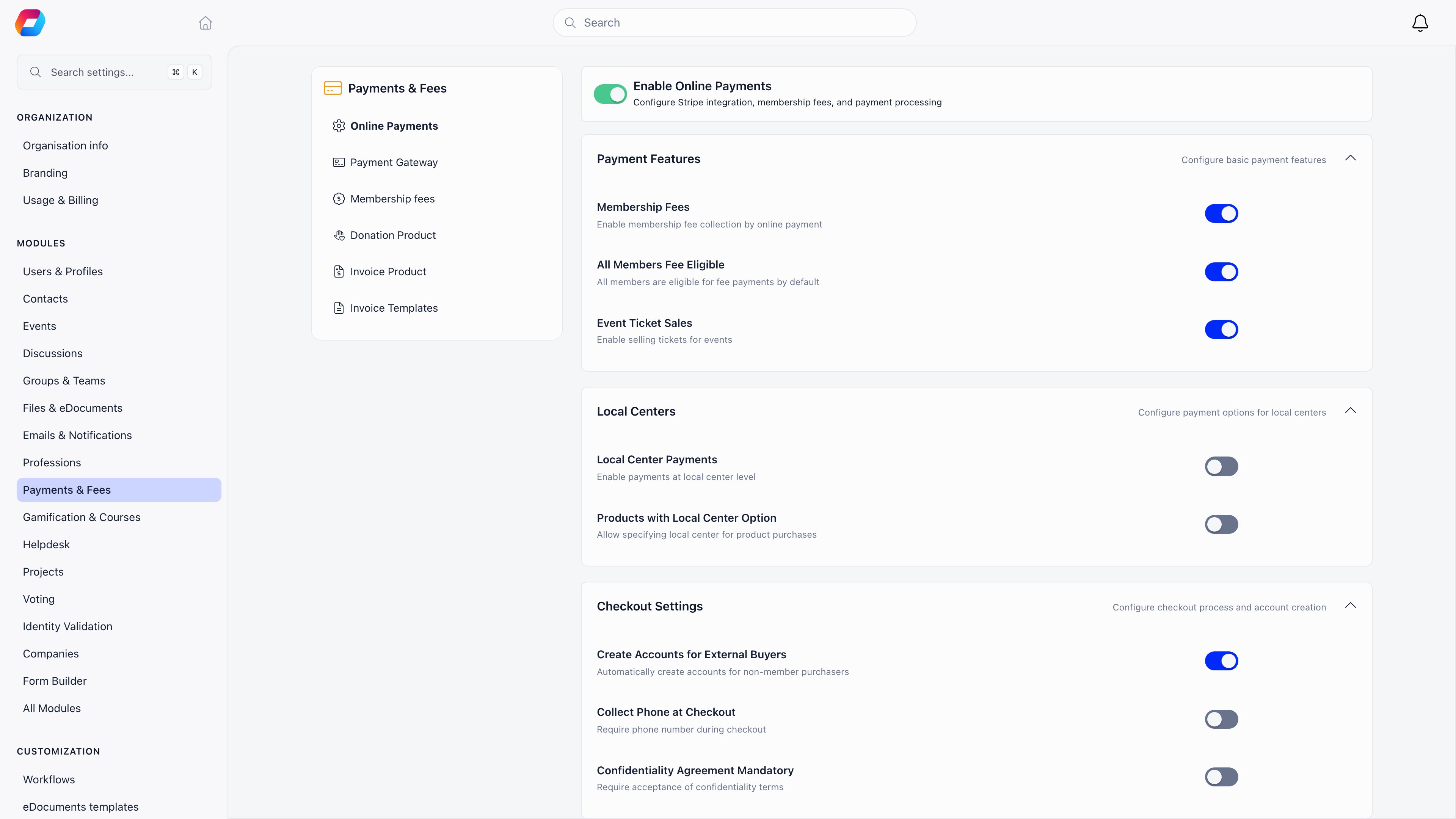 **Create Accounts for External Buyers**, **Collect Phone at Checkout**, **Confidentiality Agreement Mandatory** and **Products with Local Center Option** are organisation-wide, not per campaign. Setting them now saves rebuilding forms later.
**Done when:** each switch reads the way you want it for every campaign, not just the first one.
See [Modules](/docs/platform/organisation/modules).
**Finance → Products → Create Product**, pick **Donation**, name it, check the URL slug, and turn on **One-off**, **Recurring**, or both.
**Create Accounts for External Buyers**, **Collect Phone at Checkout**, **Confidentiality Agreement Mandatory** and **Products with Local Center Option** are organisation-wide, not per campaign. Setting them now saves rebuilding forms later.
**Done when:** each switch reads the way you want it for every campaign, not just the first one.
See [Modules](/docs/platform/organisation/modules).
**Finance → Products → Create Product**, pick **Donation**, name it, check the URL slug, and turn on **One-off**, **Recurring**, or both.
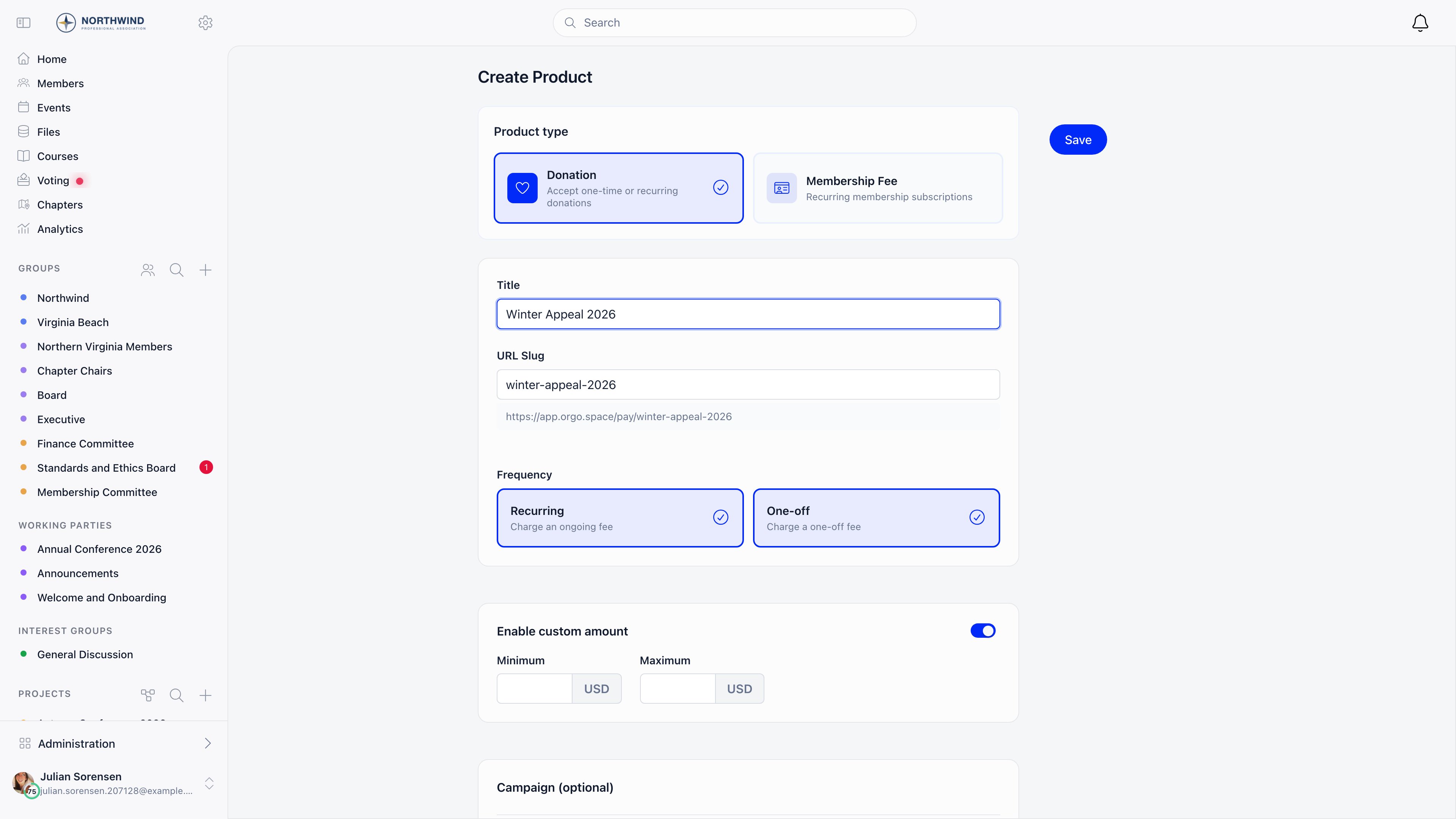 The frequency choice is the one that is awkward to undo: a saved campaign must keep at least one of the two.
**Done when:** the campaign opens on its own detail page with **Prices & Options**, **Landing page**, **Widgets** and **Stats** tabs and an **Active** badge.
See [Donations](/docs/platform/fees/donations).
On **Prices & Options**, add a price row per suggested amount and mark one default. These are the buttons a donor sees before they type anything.
The frequency choice is the one that is awkward to undo: a saved campaign must keep at least one of the two.
**Done when:** the campaign opens on its own detail page with **Prices & Options**, **Landing page**, **Widgets** and **Stats** tabs and an **Active** badge.
See [Donations](/docs/platform/fees/donations).
On **Prices & Options**, add a price row per suggested amount and mark one default. These are the buttons a donor sees before they type anything.
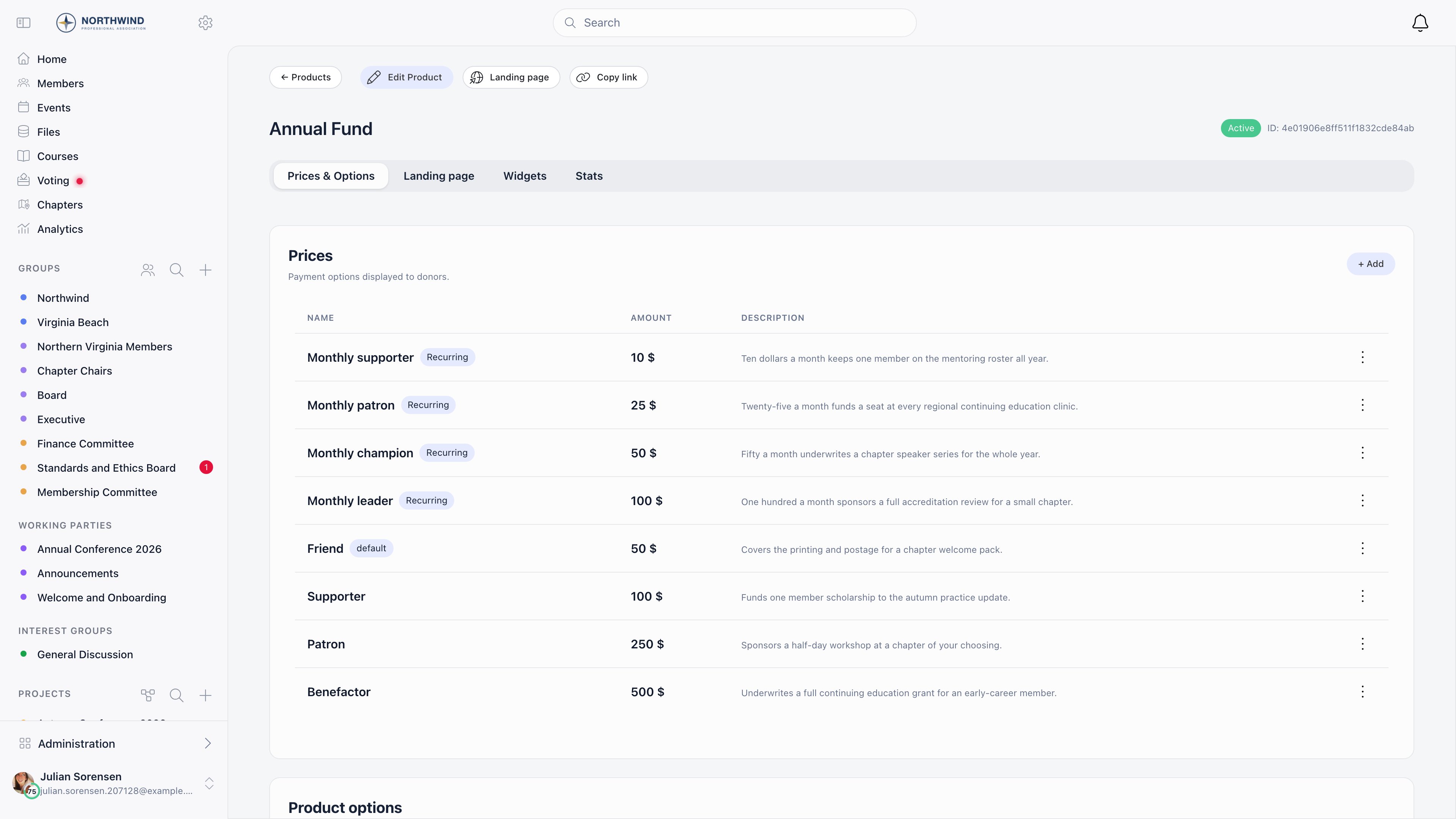 On a campaign with no prices yet, **Generate** proposes three A/B variations of three amounts each from your country, currency and campaign title, registers them in Stripe and switches A/B testing on. It disappears once any price exists, so use it before you add the first row by hand.
**Done when:** every amount you want offered has a row, and exactly one carries the **default** tag.
See [Donations](/docs/platform/fees/donations).
**Product options** on the same tab are what the donor picks under **Designate to**: one option per fund, project or purpose you take restricted gifts for.
Each one has its own link that pre-selects it, which is what you put behind a button on your own site or in an appeal email.
**Done when:** the option list holds one row per restricted purpose, and its link opens the donation page with **Designate to** already filled in.
See [Products](/docs/platform/fees/products).
Under **Campaign**, choose **Total goal** (cumulative one-off gifts) or **Monthly goal** (recurring revenue), a **Goal value**, and optionally a **Target date**, which replaces the completion percentage on the public progress bar.
| If you want | Choose |
| ------------------------------------------- | ------------------------------------- |
| A running total that climbs toward a number | **Total goal** |
| Monthly recurring revenue tracked per month | **Monthly goal** |
| A visible deadline instead of a percentage | Any goal type, plus a **Target date** |
The goal type selector only appears when both **Recurring** and **One-off** are enabled, since with one frequency there is nothing to choose between. Goals are unavailable on multi-currency campaigns.
**Done when:** the public page prints an amount raised, a goal and a progress bar.
See [Donations](/docs/platform/fees/donations).
The **Landing page** tab edits hero media, colours, the campaign story, the thank-you message and the social share image against a live preview.
On a campaign with no prices yet, **Generate** proposes three A/B variations of three amounts each from your country, currency and campaign title, registers them in Stripe and switches A/B testing on. It disappears once any price exists, so use it before you add the first row by hand.
**Done when:** every amount you want offered has a row, and exactly one carries the **default** tag.
See [Donations](/docs/platform/fees/donations).
**Product options** on the same tab are what the donor picks under **Designate to**: one option per fund, project or purpose you take restricted gifts for.
Each one has its own link that pre-selects it, which is what you put behind a button on your own site or in an appeal email.
**Done when:** the option list holds one row per restricted purpose, and its link opens the donation page with **Designate to** already filled in.
See [Products](/docs/platform/fees/products).
Under **Campaign**, choose **Total goal** (cumulative one-off gifts) or **Monthly goal** (recurring revenue), a **Goal value**, and optionally a **Target date**, which replaces the completion percentage on the public progress bar.
| If you want | Choose |
| ------------------------------------------- | ------------------------------------- |
| A running total that climbs toward a number | **Total goal** |
| Monthly recurring revenue tracked per month | **Monthly goal** |
| A visible deadline instead of a percentage | Any goal type, plus a **Target date** |
The goal type selector only appears when both **Recurring** and **One-off** are enabled, since with one frequency there is nothing to choose between. Goals are unavailable on multi-currency campaigns.
**Done when:** the public page prints an amount raised, a goal and a progress bar.
See [Donations](/docs/platform/fees/donations).
The **Landing page** tab edits hero media, colours, the campaign story, the thank-you message and the social share image against a live preview.
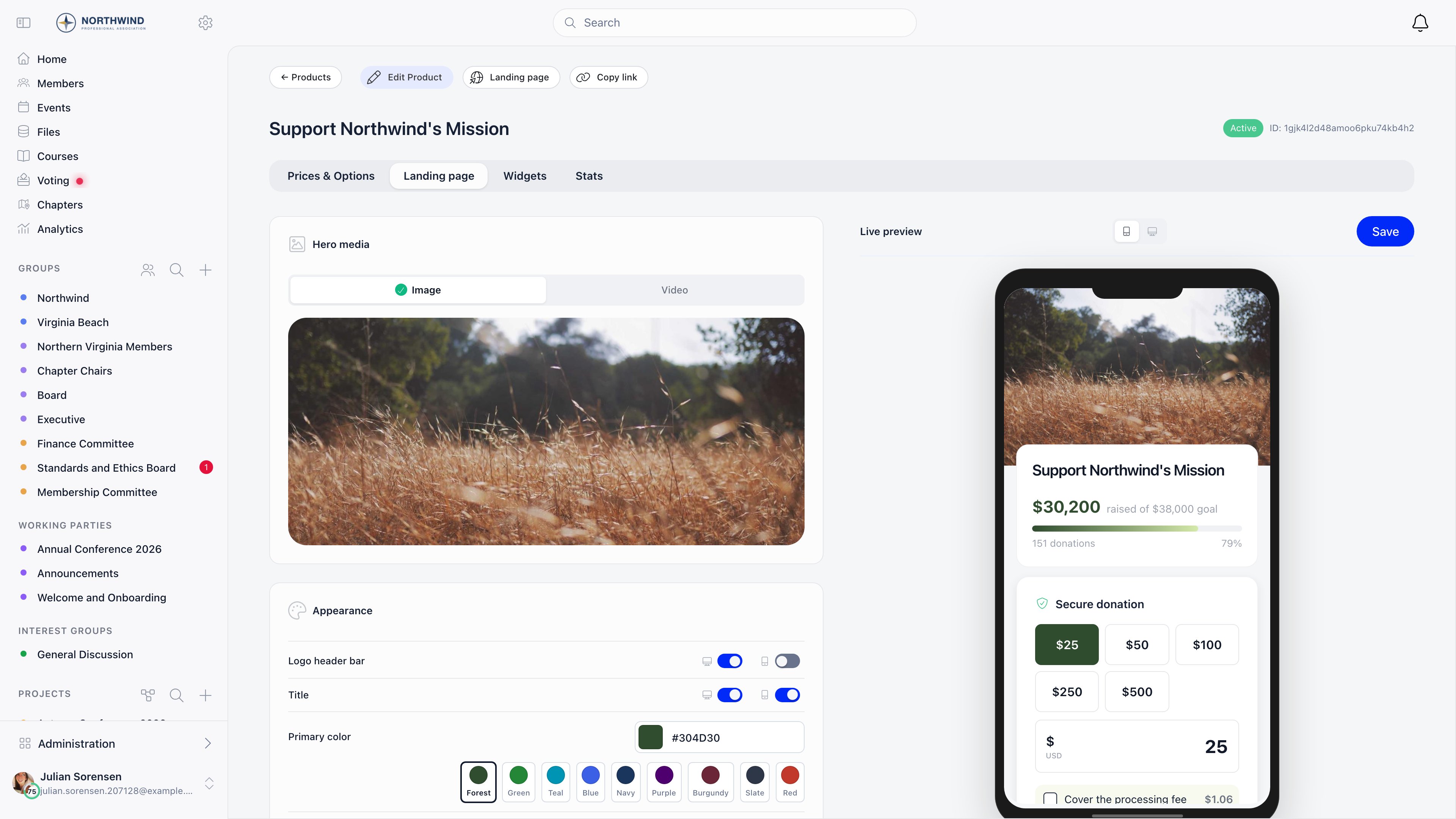 Work down the left column and watch the preview: it renders the real public page, so it shows what a donor will see on the phone most of them are holding.
**Done when:** the preview shows your hero, your story and your amounts, and you have pressed **Save** in the preview header.
See [Donation pages and widgets](/docs/platform/fees/donation-pages).
**Settings → Modules → Payments & Fees → Donation Product** sets which campaign answers `/donate`, and which one grants the **Supporter** flag on member profiles.
Work down the left column and watch the preview: it renders the real public page, so it shows what a donor will see on the phone most of them are holding.
**Done when:** the preview shows your hero, your story and your amounts, and you have pressed **Save** in the preview header.
See [Donation pages and widgets](/docs/platform/fees/donation-pages).
**Settings → Modules → Payments & Fees → Donation Product** sets which campaign answers `/donate`, and which one grants the **Supporter** flag on member profiles.
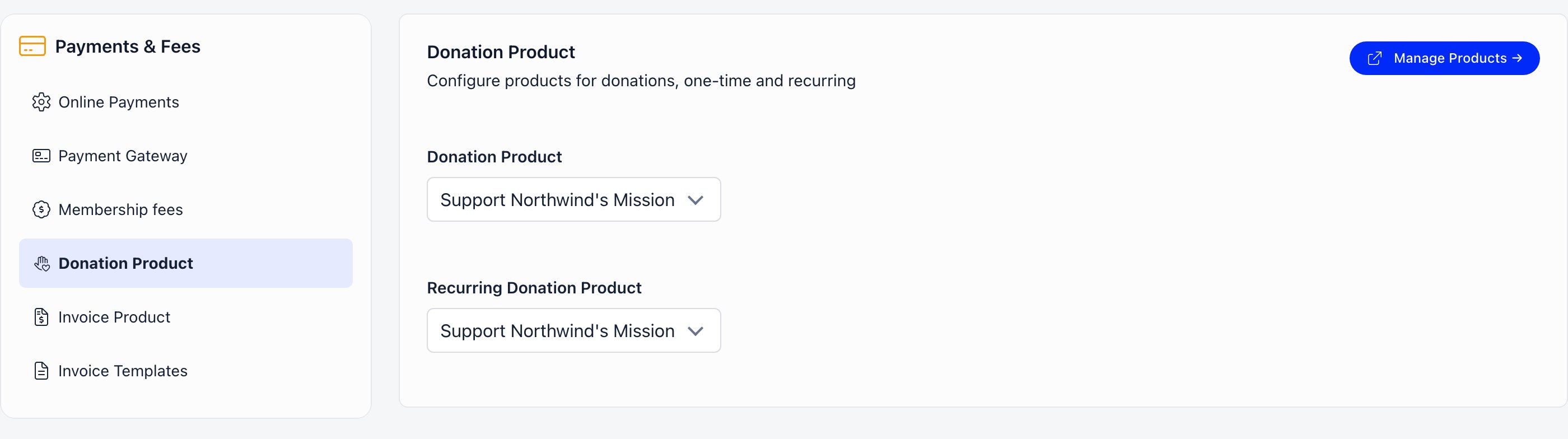 The first donation campaign you create claims the first of those automatically, which is rarely the one you want six months later. The two selectors can name the same campaign, as they do above, when that one campaign has both **One-off** and **Recurring** switched on.
**Done when:** **Donation Product** names the campaign you are currently promoting, and **Recurring Donation Product** names the monthly programme if you run one.
See [Donations](/docs/platform/fees/donations).
Open **Settings → Modules → Emails & Notifications → Email Templates** and edit **Donation thank you**.
This is the only message a one-off donor receives, so it carries the whole relationship: what the gift does, and what happens next.
Your version has no language of its own. It goes to every donor as written, whatever language they read the platform in, so pick the language most of your donors share. Leave the template untouched if you would rather each donor got the built-in wording in your organisation's default language.
**Done when:** the template reads in your own voice, and you have decided which language your donors get.
See [Email templates](/docs/platform/emails/email-templates) and [System emails](/docs/platform/emails/system-emails).
**Settings → Modules → Emails & Notifications → Email Campaigner**, then **Enable Email Campaign Module**.
You need the campaign live before you can link to it from an appeal.
**Done when:** a newsletter draft can link to the campaign page you just published.
See [Newsletter](/docs/platform/newsletter).
***
## What you get
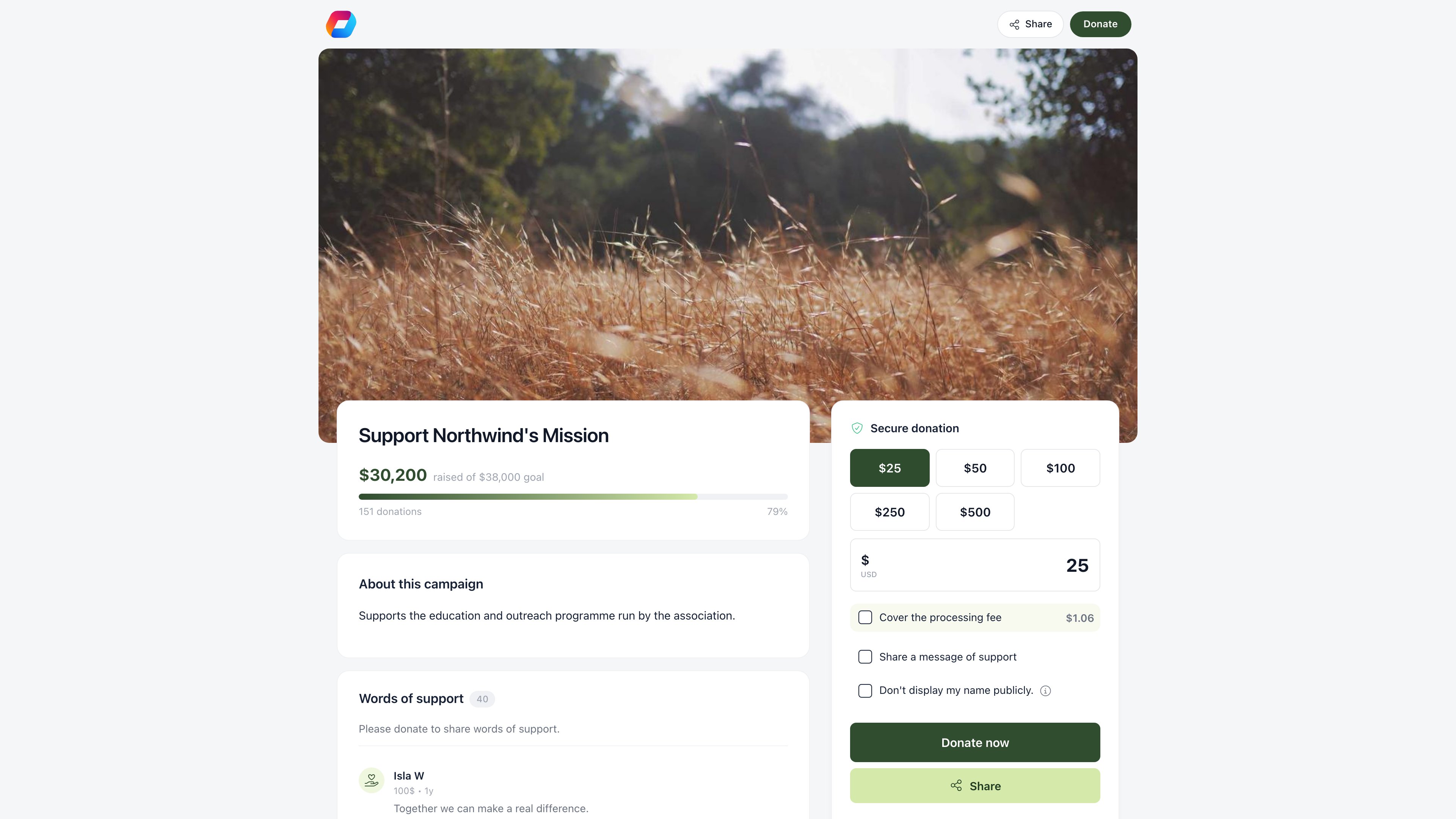
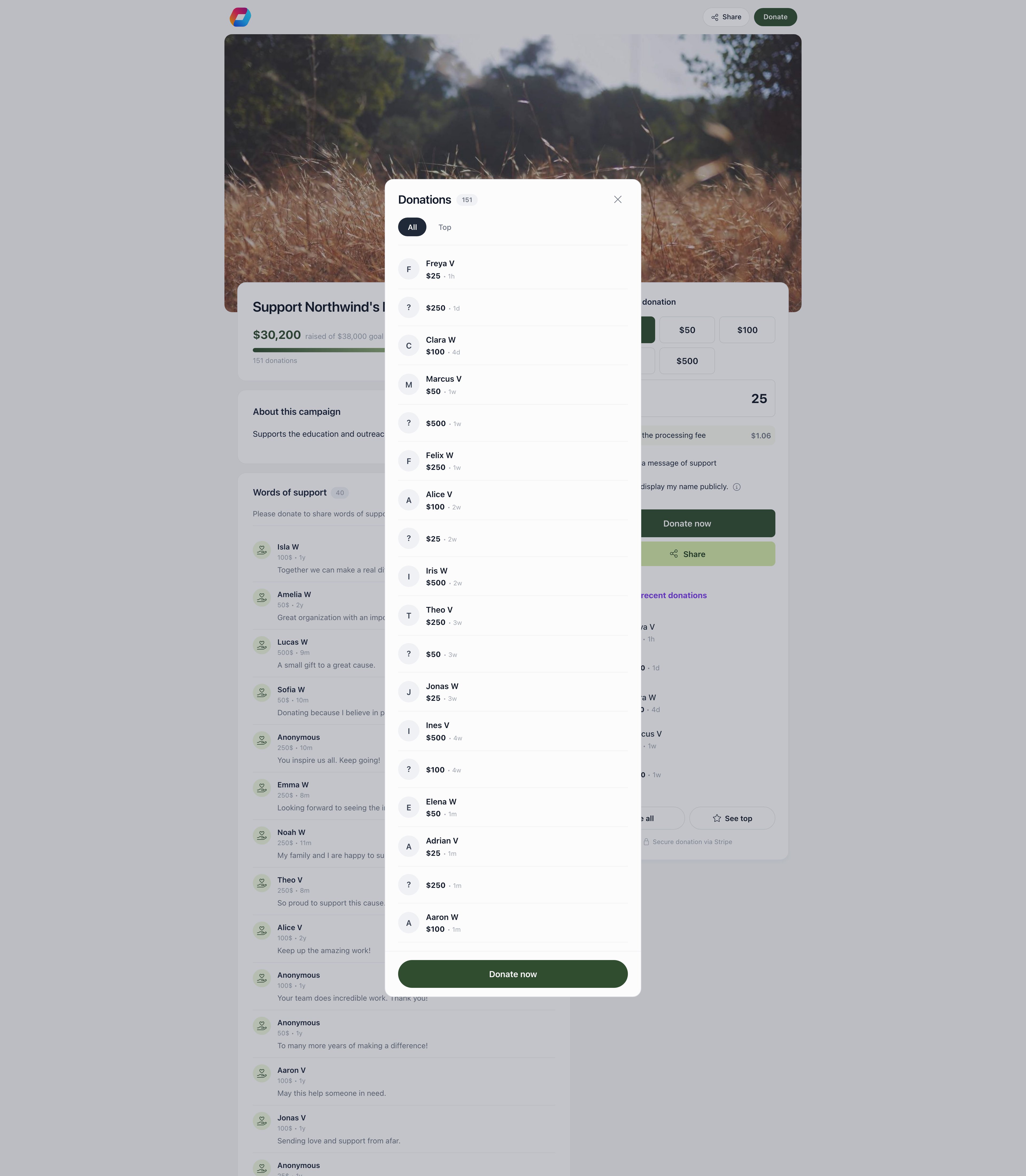
Everything below lands on one public page or one click from it. This is a campaign mid-flight: story and progress on the left, the donation form pinned on the right, recent gifts underneath it.
The first donation campaign you create claims the first of those automatically, which is rarely the one you want six months later. The two selectors can name the same campaign, as they do above, when that one campaign has both **One-off** and **Recurring** switched on.
**Done when:** **Donation Product** names the campaign you are currently promoting, and **Recurring Donation Product** names the monthly programme if you run one.
See [Donations](/docs/platform/fees/donations).
Open **Settings → Modules → Emails & Notifications → Email Templates** and edit **Donation thank you**.
This is the only message a one-off donor receives, so it carries the whole relationship: what the gift does, and what happens next.
Your version has no language of its own. It goes to every donor as written, whatever language they read the platform in, so pick the language most of your donors share. Leave the template untouched if you would rather each donor got the built-in wording in your organisation's default language.
**Done when:** the template reads in your own voice, and you have decided which language your donors get.
See [Email templates](/docs/platform/emails/email-templates) and [System emails](/docs/platform/emails/system-emails).
**Settings → Modules → Emails & Notifications → Email Campaigner**, then **Enable Email Campaign Module**.
You need the campaign live before you can link to it from an appeal.
**Done when:** a newsletter draft can link to the campaign page you just published.
See [Newsletter](/docs/platform/newsletter).
***
## What you get
Everything below lands on one public page or one click from it. This is a campaign mid-flight: story and progress on the left, the donation form pinned on the right, recent gifts underneath it.
 | What you need | What Orgo gives you | Where it is documented |
| ------------------------------------------- | ---------------------------------------------------------------------------------------------------------------------------------------------------------------------------------- | ----------------------------------------------------------- |
| One-off gifts | A donation campaign with **One-off** on: suggested amounts, a custom amount with optional minimum and maximum, **Cover the processing fee**, 19 currencies | [Donations](/docs/platform/fees/donations) |
| Recurring giving | The same campaign with **Recurring** on: a **Give once / Monthly** toggle on the page, a **Subscribers** tab, and a personal cancel link in the donor's subscription emails | [Donations](/docs/platform/fees/donations) |
| A campaign page | A public page at `/pay/`, no login needed, with hero media, story, goal progress bar, donor wall and share button | [Donation pages and widgets](/docs/platform/fees/donation-pages) |
| Giving from your own website | Embed and popup widgets with their own colours, language, preset amounts and statistics | [Donation pages and widgets](/docs/platform/fees/donation-pages) |
| Restricted or designated gifts | **Product options** under **Designate to**, each with its own deep link, filterable on the payments list | [Products](/docs/platform/fees/products) |
| Donor recognition | The donor wall (**Display top 50 recent donations**), **Words of support** messages, and the **Supporter** tag on profiles and in the member directory for active recurring donors | [Donation pages and widgets](/docs/platform/fees/donation-pages) |
| Anonymous giving | **Enable payment confidentiality**: the gift counts toward the goal, the name shows as "anonymous" | [Donation pages and widgets](/docs/platform/fees/donation-pages) |
| Receipts | The **Donation thank you** email, plus optional **Stripe Email Receipts** from your own Stripe account | [System emails](/docs/platform/emails/system-emails) |
| Offline gifts (cash, cheque, bank transfer) | **Record payment** on the donor's **Payments** tab, or on the campaign's **Payments** tab | [Recording a payment](/docs/platform/fees/record-payment) |
| Refunds | **Refund** on the payment row, which returns that row's amount through Stripe | [Stripe integration](/docs/platform/fees/stripe-integration) |
| Appeal emails | Newsletter campaigns, with **Follow up with non-openers** to re-mail the people who did not read the first one | [Newsletter](/docs/platform/newsletter) |
| Donor segments | Lists with **Has Payment** and **Has Recurring Payment** criteria, both of which reveal a **Product** selector so you can narrow to one campaign | [Lists and segments](/docs/platform/users/lists) |
| Campaign reporting | The campaign's **Stats** tab: views, device split, widget versus public page, and UTM source, medium and campaign breakdowns for both views and gifts | [Donations](/docs/platform/fees/donations) |
| Revenue reporting | The **Donation Revenue** tile on the Analytics **Finance** tab, and free-form questions in Ask Orgo | [Insights and Ask Orgo](/docs/platform/insights) |
### Where you read the results
Two tabs on the campaign answer different questions. **Payments** is the ledger: one row per gift. **Stats** is the campaign view: money over time above the page analytics.
| What you need | What Orgo gives you | Where it is documented |
| ------------------------------------------- | ---------------------------------------------------------------------------------------------------------------------------------------------------------------------------------- | ----------------------------------------------------------- |
| One-off gifts | A donation campaign with **One-off** on: suggested amounts, a custom amount with optional minimum and maximum, **Cover the processing fee**, 19 currencies | [Donations](/docs/platform/fees/donations) |
| Recurring giving | The same campaign with **Recurring** on: a **Give once / Monthly** toggle on the page, a **Subscribers** tab, and a personal cancel link in the donor's subscription emails | [Donations](/docs/platform/fees/donations) |
| A campaign page | A public page at `/pay/`, no login needed, with hero media, story, goal progress bar, donor wall and share button | [Donation pages and widgets](/docs/platform/fees/donation-pages) |
| Giving from your own website | Embed and popup widgets with their own colours, language, preset amounts and statistics | [Donation pages and widgets](/docs/platform/fees/donation-pages) |
| Restricted or designated gifts | **Product options** under **Designate to**, each with its own deep link, filterable on the payments list | [Products](/docs/platform/fees/products) |
| Donor recognition | The donor wall (**Display top 50 recent donations**), **Words of support** messages, and the **Supporter** tag on profiles and in the member directory for active recurring donors | [Donation pages and widgets](/docs/platform/fees/donation-pages) |
| Anonymous giving | **Enable payment confidentiality**: the gift counts toward the goal, the name shows as "anonymous" | [Donation pages and widgets](/docs/platform/fees/donation-pages) |
| Receipts | The **Donation thank you** email, plus optional **Stripe Email Receipts** from your own Stripe account | [System emails](/docs/platform/emails/system-emails) |
| Offline gifts (cash, cheque, bank transfer) | **Record payment** on the donor's **Payments** tab, or on the campaign's **Payments** tab | [Recording a payment](/docs/platform/fees/record-payment) |
| Refunds | **Refund** on the payment row, which returns that row's amount through Stripe | [Stripe integration](/docs/platform/fees/stripe-integration) |
| Appeal emails | Newsletter campaigns, with **Follow up with non-openers** to re-mail the people who did not read the first one | [Newsletter](/docs/platform/newsletter) |
| Donor segments | Lists with **Has Payment** and **Has Recurring Payment** criteria, both of which reveal a **Product** selector so you can narrow to one campaign | [Lists and segments](/docs/platform/users/lists) |
| Campaign reporting | The campaign's **Stats** tab: views, device split, widget versus public page, and UTM source, medium and campaign breakdowns for both views and gifts | [Donations](/docs/platform/fees/donations) |
| Revenue reporting | The **Donation Revenue** tile on the Analytics **Finance** tab, and free-form questions in Ask Orgo | [Insights and Ask Orgo](/docs/platform/insights) |
### Where you read the results
Two tabs on the campaign answer different questions. **Payments** is the ledger: one row per gift. **Stats** is the campaign view: money over time above the page analytics.
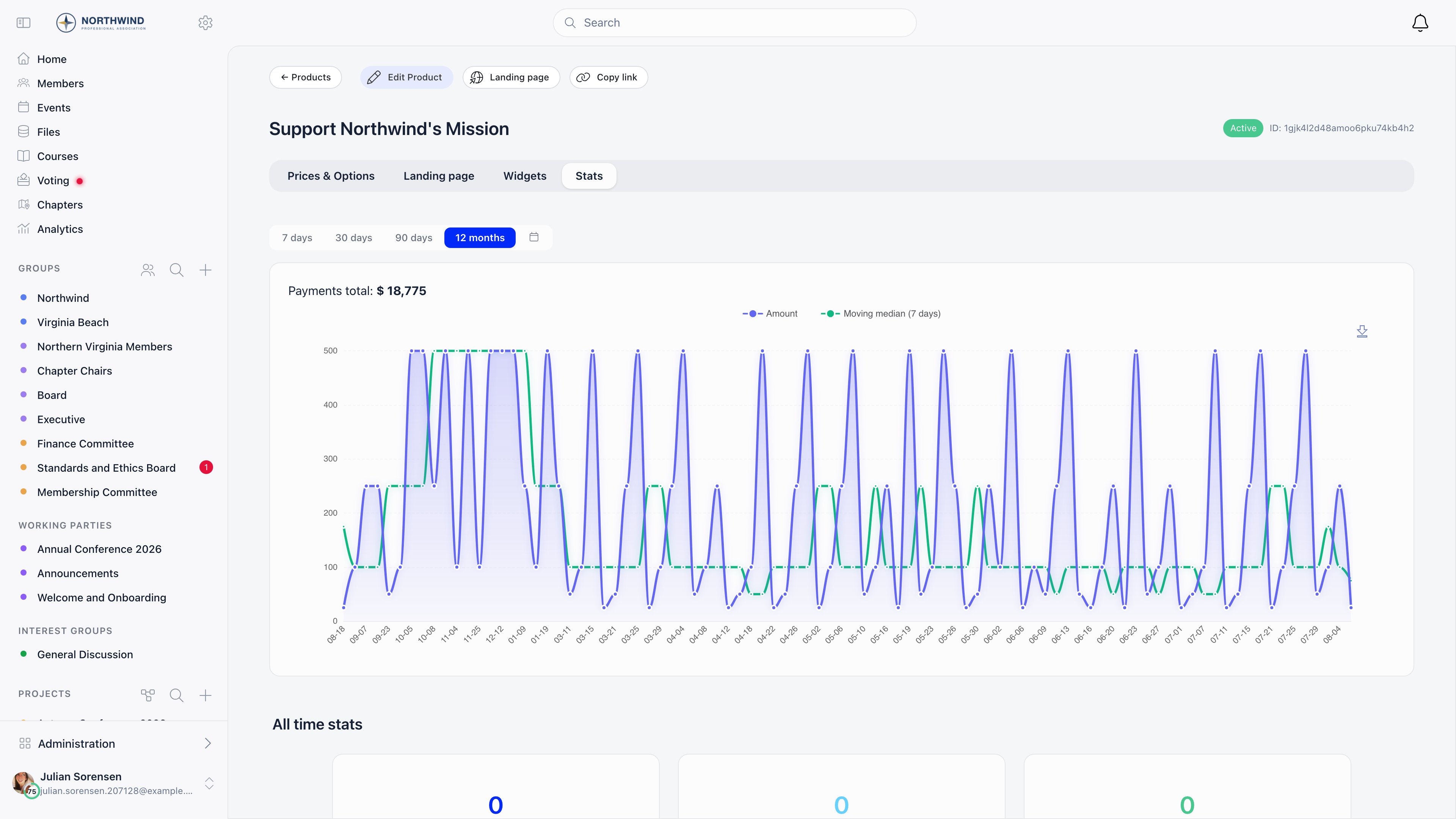 The range buttons above the chart matter more than they look: an appeal that ran last autumn is invisible on the default 90-day window.
***
## Recipes
Three worked configurations. **These are examples, not defaults.** Nothing below is preconfigured, and none of it is the only way to set the feature up.
### Example: a year-end appeal
A six-week campaign with a published target, tested ask amounts, and two emails.
| Step | Setting |
| ------------------ | ---------------------------------------------------------------------------------------------------------------------------------------------------------------------------------------------- |
| Frequency | **One-off** only, so the page does not split attention with a monthly toggle |
| Suggested amounts | Press **Generate** on the empty **Prices & Options** tab. It creates three variations of three amounts, registers them in Stripe and switches **Pricing A/B Testing** on |
| Goal | **Total goal**, **Goal value** set to your target, **Target date** 31 December. The progress bar then prints the date instead of the completion percentage, which is what creates the deadline |
| Page | Hero image, a short story in **Description**, and a **Thank you message** that names what the money does |
| Recognition | **Display top 50 recent donations** and **Messages of support from donors** both on, so the page fills up with activity as the appeal runs |
| First email | A newsletter to **All members and contacts**, or to a list of everyone who has given before (**Has Payment**, then the **Product** selector on last year's campaign) |
| Second email | **Follow up with non-openers** on the first campaign, roughly a week later. The set is recalculated at send time, so people who opened late drop out |
| Reading the result | Each A/B variation reports total raised, average gift and transaction count on the **Prices & Options** tab. A variation that has collected money cannot be deleted |
A week in, the recognition settings are what make the page look busy. The sidebar lists recent gifts, and **See all** opens the full donor wall with an **All** and a **Top** tab.
The range buttons above the chart matter more than they look: an appeal that ran last autumn is invisible on the default 90-day window.
***
## Recipes
Three worked configurations. **These are examples, not defaults.** Nothing below is preconfigured, and none of it is the only way to set the feature up.
### Example: a year-end appeal
A six-week campaign with a published target, tested ask amounts, and two emails.
| Step | Setting |
| ------------------ | ---------------------------------------------------------------------------------------------------------------------------------------------------------------------------------------------- |
| Frequency | **One-off** only, so the page does not split attention with a monthly toggle |
| Suggested amounts | Press **Generate** on the empty **Prices & Options** tab. It creates three variations of three amounts, registers them in Stripe and switches **Pricing A/B Testing** on |
| Goal | **Total goal**, **Goal value** set to your target, **Target date** 31 December. The progress bar then prints the date instead of the completion percentage, which is what creates the deadline |
| Page | Hero image, a short story in **Description**, and a **Thank you message** that names what the money does |
| Recognition | **Display top 50 recent donations** and **Messages of support from donors** both on, so the page fills up with activity as the appeal runs |
| First email | A newsletter to **All members and contacts**, or to a list of everyone who has given before (**Has Payment**, then the **Product** selector on last year's campaign) |
| Second email | **Follow up with non-openers** on the first campaign, roughly a week later. The set is recalculated at send time, so people who opened late drop out |
| Reading the result | Each A/B variation reports total raised, average gift and transaction count on the **Prices & Options** tab. A variation that has collected money cannot be deleted |
A week in, the recognition settings are what make the page look busy. The sidebar lists recent gifts, and **See all** opens the full donor wall with an **All** and a **Top** tab.
 Two things to know before you rely on this. The A/B test is on the suggested amounts, not on the email: newsletter campaigns have no A/B testing. And a variation that is winning cannot be promoted to "the default" while A/B testing is on, because **Make default** is hidden in that mode. Turn A/B testing off and mark the winning amount default once the appeal closes.
### Example: a monthly giving programme
| Step | Setting |
| ------------------ | --------------------------------------------------------------------------------------------------------------------------------------------------------------------------------------------------------------------------------------------------- |
| Frequency | **Recurring** and **One-off** both on, so the page shows the **Give once / Monthly** toggle and the "Boost your impact by giving monthly" prompt |
| Goal | **Monthly goal**, so the progress bar tracks recurring revenue per month rather than a cumulative total |
| Suggested amounts | Price rows tagged **Is recurring**, at monthly rather than annual figures |
| Supporter flag | Point **Recurring Donation Product** at this campaign under **Settings → Modules → Payments & Fees → Donation Product**. Members with an active, non-confidential subscription then carry a **Supporter** tag on their profile and in the directory |
| Website widget | Create a widget, set **Default Donation Type** to monthly, leave **Show Monthly Upsell** on, and set separate preset amounts for one-time and monthly |
| Running it | The **Subscribers** tab lists every recurring donor with status, chapter, designation and amount, and **Unsubscribe** cancels one |
| Donor self-service | Every **Subscription created** and **Subscription payment received** email carries a personal cancel link that works without a login |
Switching off **Subscription Notifications** on **Settings → Modules → Emails & Notifications → Emails Config** silences those two emails, and with them the only cancel link a donor who is not a member ever receives. Leave the category on for a recurring programme. See [System emails](/docs/platform/emails/system-emails).
### Example: an appeal tied to an event
Orgo has no donation step inside event checkout, so an event-linked appeal is a normal campaign with the event used as the audience and the designation.
On **Prices & Options**, add an option such as "Spring Conference bursary fund". Copy its link: it opens the donation page with that designation pre-selected, so it is what you put on the event page and in the run of show.
Create a newsletter with the **Event attendees** audience, or start from the event with **Send email for participants**, which files the campaign under the event's own messages and unlocks the event placeholders. See [Newsletter](/docs/platform/newsletter).
Append UTM parameters to the link you publish. The campaign's **Stats** tab breaks both views and gifts down by UTM source, medium and campaign, which is the only way to tell the stage announcement apart from the follow-up email.
Filter the campaign's **Payments** tab by option to get the total raised for that event, separate from the rest of the campaign.
Two things to know before you rely on this. The A/B test is on the suggested amounts, not on the email: newsletter campaigns have no A/B testing. And a variation that is winning cannot be promoted to "the default" while A/B testing is on, because **Make default** is hidden in that mode. Turn A/B testing off and mark the winning amount default once the appeal closes.
### Example: a monthly giving programme
| Step | Setting |
| ------------------ | --------------------------------------------------------------------------------------------------------------------------------------------------------------------------------------------------------------------------------------------------- |
| Frequency | **Recurring** and **One-off** both on, so the page shows the **Give once / Monthly** toggle and the "Boost your impact by giving monthly" prompt |
| Goal | **Monthly goal**, so the progress bar tracks recurring revenue per month rather than a cumulative total |
| Suggested amounts | Price rows tagged **Is recurring**, at monthly rather than annual figures |
| Supporter flag | Point **Recurring Donation Product** at this campaign under **Settings → Modules → Payments & Fees → Donation Product**. Members with an active, non-confidential subscription then carry a **Supporter** tag on their profile and in the directory |
| Website widget | Create a widget, set **Default Donation Type** to monthly, leave **Show Monthly Upsell** on, and set separate preset amounts for one-time and monthly |
| Running it | The **Subscribers** tab lists every recurring donor with status, chapter, designation and amount, and **Unsubscribe** cancels one |
| Donor self-service | Every **Subscription created** and **Subscription payment received** email carries a personal cancel link that works without a login |
Switching off **Subscription Notifications** on **Settings → Modules → Emails & Notifications → Emails Config** silences those two emails, and with them the only cancel link a donor who is not a member ever receives. Leave the category on for a recurring programme. See [System emails](/docs/platform/emails/system-emails).
### Example: an appeal tied to an event
Orgo has no donation step inside event checkout, so an event-linked appeal is a normal campaign with the event used as the audience and the designation.
On **Prices & Options**, add an option such as "Spring Conference bursary fund". Copy its link: it opens the donation page with that designation pre-selected, so it is what you put on the event page and in the run of show.
Create a newsletter with the **Event attendees** audience, or start from the event with **Send email for participants**, which files the campaign under the event's own messages and unlocks the event placeholders. See [Newsletter](/docs/platform/newsletter).
Append UTM parameters to the link you publish. The campaign's **Stats** tab breaks both views and gifts down by UTM source, medium and campaign, which is the only way to tell the stage announcement apart from the follow-up email.
Filter the campaign's **Payments** tab by option to get the total raised for that event, separate from the rest of the campaign.
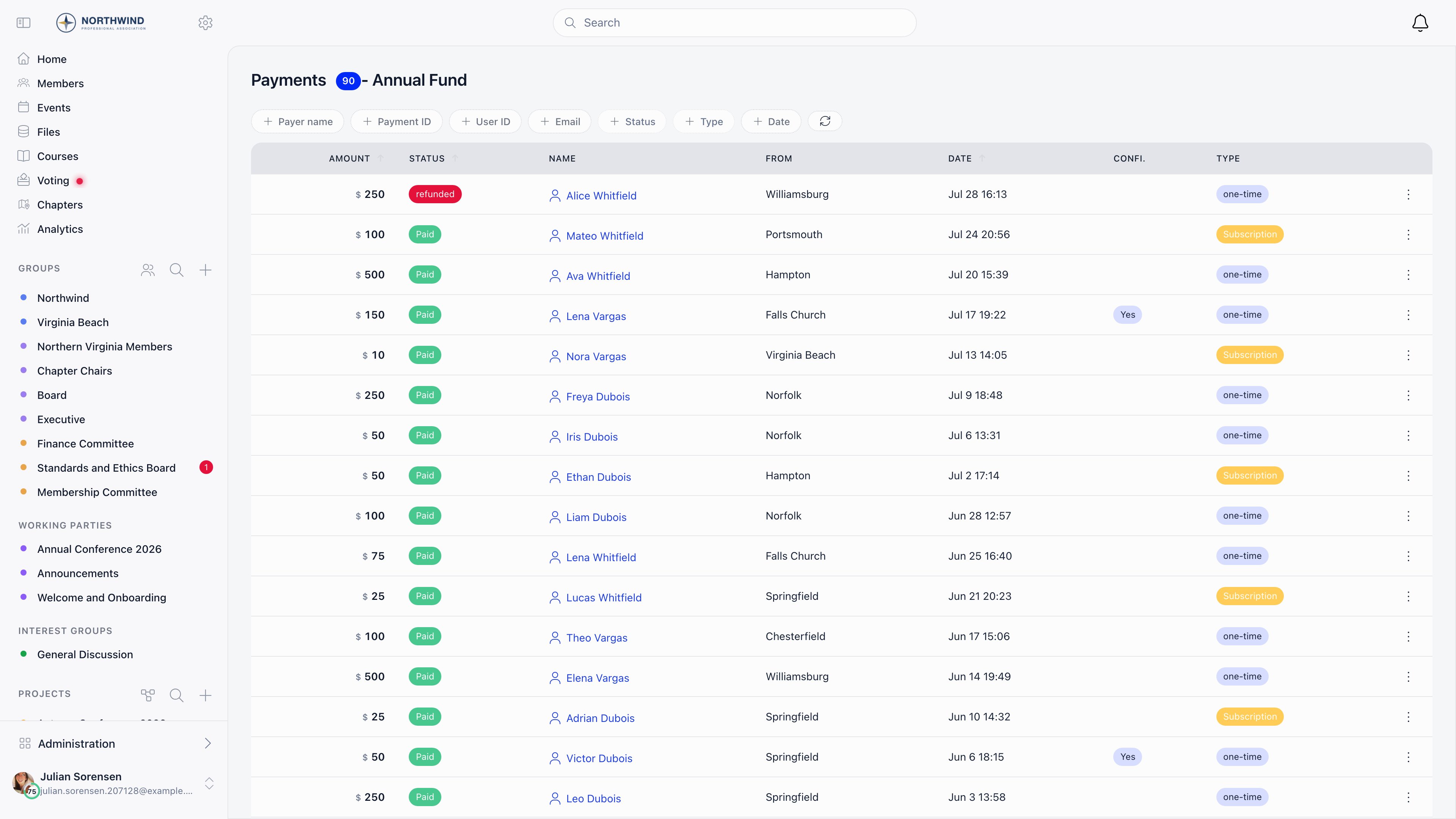 The same list is where you check a gift somebody says they made, and where **Refund** lives.
***
## Setup checklist
Work down this before you publish the first link. It mirrors [Setup order](#setup-order), so anything unticked tells you which step to go back to.
* [ ] **Country** is set on **Settings → Organisation info**
* [ ] The Payment Gateway page reads **Fully connected** and **Complete**
* [ ] The organisation-wide checkout switches are set the way you want them for every campaign
* [ ] The campaign exists, with **One-off**, **Recurring** or both switched on
* [ ] Every suggested amount has a price row, and exactly one is marked default
* [ ] There is a **Product option** for each restricted purpose, if you take restricted gifts
* [ ] A goal type and **Goal value** are set, plus a **Target date** if the appeal has a deadline
* [ ] Hero, story and thank-you message are saved on the **Landing page** tab
* [ ] **Donation Product** points at the campaign you are promoting, and **Recurring Donation Product** at the monthly programme if you run one
* [ ] The **Donation thank you** template is rewritten in your own voice, in the one language every donor will receive
* [ ] **Enable Email Campaign Module** is on, so a newsletter draft can link to the campaign
* [ ] You have given a test gift yourself and received the thank-you email
* [ ] The link you are about to publish opens the right campaign, with the right designation pre-selected
***
## Limits worth knowing before you start
Stated plainly, because each one has caught somebody out.
The one that surprises fundraisers most: Orgo has no donation receipt or tax document anywhere in the product. Read the first limit below before you promise donors anything on paper.
**Donations do not produce invoices or tax receipts.** **Generate Invoice** on a payment row only appears for membership fee and event registration payments; a donation payment is refused. There is no annual giving statement, no Gift Aid support and no donation tax form anywhere in the product. The donor gets the **Donation thank you** email, and Stripe's own receipt if you enable **Stripe Email Receipts**. If your donors need a document for tax purposes, produce it outside Orgo.
**The PDF Receipts/Proofs setting is not a general donation receipt.** It adds a downloadable proof on paid rows, but the document is generated from the payer's validated identity record, so it only produces anything for donors who went through [identity validation](/docs/platform/identity-validation). Do not enable it expecting receipts for ordinary card gifts.
**A chapter designation is a label, not a bank instruction.** With **Has local center option** on, a donor picking a chapter under **Designate to** stamps the payment with that chapter, which is what the payments filter and the refund permission read. A gift with no designation is treated as organisation-level, and the refund, cancel, accept and proof actions on it require `FINANCIAL_TENANT` rather than any one chapter's `FINANCIAL_LOCAL`. The money still settles into the Stripe account the campaign resolves to. Only fee payments follow chapter Stripe routing: see [Stripe integration](/docs/platform/fees/stripe-integration).
**There is no CSV export on the campaign payments or subscribers lists.** Both are filterable and paginated on screen only. For a donor extract, build a payments report in [Reports](/docs/platform/reports): **Payments** is one of the builder's starting points, you can add columns from the product, the price, the payer and the company, and the download holds every matching row rather than one page. The alternative is to ask the question in [Ask Orgo](/docs/platform/insights) and use **Export CSV**, which returns the first 500 rows; save the query and run it from **Database Queries** for the whole set. Both routes require `ADMIN_TENANT`, so a fundraiser holding only `FINANCIAL_TENANT` cannot do this themselves.
**Refunds are all or nothing.** **Refund** returns exactly that payment row's amount. There is no partial refund in Orgo, so a donor who wants half their gift back has to be refunded in full and give again.
**Donor messages publish immediately.** A message attached to a successful or on-hold payment is stored as approved and appears in **Words of support** straight away. Moderation is after the fact: there is no pending queue to approve. Leave **Messages of support from donors** off if you cannot watch the page.
**There is no abandoned-gift reminder for one-off donations.** The only checkout reminder in the product chases recurring subscriptions that stalled after identity validation, and it fires once, at least 48 hours later. Somebody who opens your donation page and leaves is never emailed.
**Goals are unavailable on multi-currency campaigns**, because there is no single number to total toward. Pick one currency for any campaign you want a progress bar on.
**Widget ids are public by design.** Anyone with the id can render your donation form on their own site. Delete a widget you no longer want live rather than removing the snippet from your page.
**A campaign that has taken any money cannot be deleted.** Archive it. The page keeps loading and the form is replaced with a notice that payments are disabled.
**Orgo is not a peer-to-peer or team fundraising tool.** There are no supporter-created pages, no individual fundraiser targets and no team leaderboards for giving.
***
## Troubleshooting
No Stripe account is connected: the organisation's for an organisation campaign, the chapter's own for a chapter campaign. Connect one under **Settings → Modules → Payments & Fees → Payment Gateway**. If the connect buttons themselves are disabled, the organisation has no **Country** set under **Settings → Organisation info**. See [Stripe integration](/docs/platform/fees/stripe-integration).
Stripe has stopped letting the account charge. Open the settings page and read **Requirements needed**, or the same list in the Stripe Dashboard, and clear it. The page shows **Partially connected** rather than **Fully connected** while this is true. An open requirement with a future deadline does not block anything yet, so a working account with a warning is normal.
Check three things in order. Is it on the campaign's **Payments** tab with a status other than `success`? A payment on hold shows as **on-hold** and has not been captured. Was it designated to a chapter you do not hold `FINANCIAL_LOCAL` on? The payments list is scoped by permission, and the payment-ID and email filters are only offered to `FINANCIAL_TENANT`. And is it on the right campaign at all? The `/donate` shortcut resolves to whichever campaign is set as **Donation Product**, which is not necessarily the one you were promoting.
The **Donation thank you** email is sent when Stripe confirms the payment, and it sits under the **Payment Confirmations** category on **Settings → Modules → Emails & Notifications → Emails Config**. A category switched off sends nothing and writes no log row. If the switch is on, check the [email log](/docs/platform/emails/email-log) for the recipient address: a gift given with a mistyped email has nowhere to go. Offline gifts you recorded by hand never trigger it, because there is no Stripe confirmation to react to.
Orgo has no donation receipt document. Your options are **Stripe Email Receipts**, which lets Stripe send its own receipt from your account (it needs customer emails enabled on the Stripe account, and Stripe never sends receipts in test mode), or raising a document outside Orgo. **Generate Invoice** is not available on donation payments. See [Invoices](/docs/platform/fees/invoices) for what invoicing does cover.
**Refund** on the payment row, which needs `FINANCIAL_LOCAL` on the chapter the gift was designated to, or `FINANCIAL_TENANT` when the gift carries no chapter. `ADMIN_TENANT` qualifies either way, and a chapter treasurer cannot refund an undesignated gift. It only works on a payment already in `success`; a payment still on hold is cancelled instead, and the full row amount goes back. Refunds you issue in the Stripe Dashboard are picked up and marked in Orgo too, so you do not have to do it twice.
Send them the cancel link from their **Subscription created** or **Subscription payment received** email: it opens a page that cancels without a login, and it is the only self-service route a donor who is not a member has. A donor who is a member can instead open the **Payments** tab of their own profile, which lists their active recurring gifts with an **Unsubscribe** action. Failing both, cancel it for them from the campaign's **Subscribers** tab.
**Display top 50 recent donations** has to be on for the panel to exist at all. Donors who ticked confidentiality show as "anonymous" throughout, and a gift given with **Enable payment confidentiality** on never sets the **Supporter** flag either, so a recurring donor can be entirely invisible by their own choice. The wall shows a first name and a surname initial, never a full name.
The flag needs all of: the setting pointed at the right campaign, an active subscription (not cancelled, not pending), and a subscription the donor did not mark confidential. Cancelling clears it. Check the campaign's **Subscribers** tab for the donor's actual status before assuming the flag is broken.
Each currency carries its own Stripe minimum charge, for example 0.50 USD and EUR, 0.30 GBP, 2.00 RON. That floor applies underneath whatever **Minimum** you set on the campaign, so a lower amount is refused at the payment step rather than by your own validation.
Two reasons. The goal type selector only appears when both **Recurring** and **One-off** are enabled, since with one frequency there is nothing to choose between. And goals are not offered at all on a campaign with more than one currency.
Organisation campaigns need `FINANCIAL_TENANT`. `FINANCIAL_LOCAL` reaches only campaigns belonging to a chapter the holder is attached to, which is why a chapter finance admin sees **Finance → Local products** but not the organisation's campaigns. Someone without the permission is sent to the login screen rather than shown a permission message, which reads like an expired session and is not one. See [Permissions](/docs/platform/permissions).
***
## Related
* [Donations](/docs/platform/fees/donations): campaigns, suggested amounts, A/B testing, payments and refunds
* [Donation pages and widgets](/docs/platform/fees/donation-pages): the public page, donor messages, the donor wall, embeds
* [Stripe integration](/docs/platform/fees/stripe-integration): connecting payment processing, statuses and payouts
* [Recording a payment](/docs/platform/fees/record-payment): cash, cheque and bank transfer gifts
* [Newsletter](/docs/platform/newsletter): appeal emails, audiences and follow-ups
* [Insights and Ask Orgo](/docs/platform/insights): revenue dashboards and donor questions
* [Setup templates](/docs/platform/templates/index): the other playbooks
The same list is where you check a gift somebody says they made, and where **Refund** lives.
***
## Setup checklist
Work down this before you publish the first link. It mirrors [Setup order](#setup-order), so anything unticked tells you which step to go back to.
* [ ] **Country** is set on **Settings → Organisation info**
* [ ] The Payment Gateway page reads **Fully connected** and **Complete**
* [ ] The organisation-wide checkout switches are set the way you want them for every campaign
* [ ] The campaign exists, with **One-off**, **Recurring** or both switched on
* [ ] Every suggested amount has a price row, and exactly one is marked default
* [ ] There is a **Product option** for each restricted purpose, if you take restricted gifts
* [ ] A goal type and **Goal value** are set, plus a **Target date** if the appeal has a deadline
* [ ] Hero, story and thank-you message are saved on the **Landing page** tab
* [ ] **Donation Product** points at the campaign you are promoting, and **Recurring Donation Product** at the monthly programme if you run one
* [ ] The **Donation thank you** template is rewritten in your own voice, in the one language every donor will receive
* [ ] **Enable Email Campaign Module** is on, so a newsletter draft can link to the campaign
* [ ] You have given a test gift yourself and received the thank-you email
* [ ] The link you are about to publish opens the right campaign, with the right designation pre-selected
***
## Limits worth knowing before you start
Stated plainly, because each one has caught somebody out.
The one that surprises fundraisers most: Orgo has no donation receipt or tax document anywhere in the product. Read the first limit below before you promise donors anything on paper.
**Donations do not produce invoices or tax receipts.** **Generate Invoice** on a payment row only appears for membership fee and event registration payments; a donation payment is refused. There is no annual giving statement, no Gift Aid support and no donation tax form anywhere in the product. The donor gets the **Donation thank you** email, and Stripe's own receipt if you enable **Stripe Email Receipts**. If your donors need a document for tax purposes, produce it outside Orgo.
**The PDF Receipts/Proofs setting is not a general donation receipt.** It adds a downloadable proof on paid rows, but the document is generated from the payer's validated identity record, so it only produces anything for donors who went through [identity validation](/docs/platform/identity-validation). Do not enable it expecting receipts for ordinary card gifts.
**A chapter designation is a label, not a bank instruction.** With **Has local center option** on, a donor picking a chapter under **Designate to** stamps the payment with that chapter, which is what the payments filter and the refund permission read. A gift with no designation is treated as organisation-level, and the refund, cancel, accept and proof actions on it require `FINANCIAL_TENANT` rather than any one chapter's `FINANCIAL_LOCAL`. The money still settles into the Stripe account the campaign resolves to. Only fee payments follow chapter Stripe routing: see [Stripe integration](/docs/platform/fees/stripe-integration).
**There is no CSV export on the campaign payments or subscribers lists.** Both are filterable and paginated on screen only. For a donor extract, build a payments report in [Reports](/docs/platform/reports): **Payments** is one of the builder's starting points, you can add columns from the product, the price, the payer and the company, and the download holds every matching row rather than one page. The alternative is to ask the question in [Ask Orgo](/docs/platform/insights) and use **Export CSV**, which returns the first 500 rows; save the query and run it from **Database Queries** for the whole set. Both routes require `ADMIN_TENANT`, so a fundraiser holding only `FINANCIAL_TENANT` cannot do this themselves.
**Refunds are all or nothing.** **Refund** returns exactly that payment row's amount. There is no partial refund in Orgo, so a donor who wants half their gift back has to be refunded in full and give again.
**Donor messages publish immediately.** A message attached to a successful or on-hold payment is stored as approved and appears in **Words of support** straight away. Moderation is after the fact: there is no pending queue to approve. Leave **Messages of support from donors** off if you cannot watch the page.
**There is no abandoned-gift reminder for one-off donations.** The only checkout reminder in the product chases recurring subscriptions that stalled after identity validation, and it fires once, at least 48 hours later. Somebody who opens your donation page and leaves is never emailed.
**Goals are unavailable on multi-currency campaigns**, because there is no single number to total toward. Pick one currency for any campaign you want a progress bar on.
**Widget ids are public by design.** Anyone with the id can render your donation form on their own site. Delete a widget you no longer want live rather than removing the snippet from your page.
**A campaign that has taken any money cannot be deleted.** Archive it. The page keeps loading and the form is replaced with a notice that payments are disabled.
**Orgo is not a peer-to-peer or team fundraising tool.** There are no supporter-created pages, no individual fundraiser targets and no team leaderboards for giving.
***
## Troubleshooting
No Stripe account is connected: the organisation's for an organisation campaign, the chapter's own for a chapter campaign. Connect one under **Settings → Modules → Payments & Fees → Payment Gateway**. If the connect buttons themselves are disabled, the organisation has no **Country** set under **Settings → Organisation info**. See [Stripe integration](/docs/platform/fees/stripe-integration).
Stripe has stopped letting the account charge. Open the settings page and read **Requirements needed**, or the same list in the Stripe Dashboard, and clear it. The page shows **Partially connected** rather than **Fully connected** while this is true. An open requirement with a future deadline does not block anything yet, so a working account with a warning is normal.
Check three things in order. Is it on the campaign's **Payments** tab with a status other than `success`? A payment on hold shows as **on-hold** and has not been captured. Was it designated to a chapter you do not hold `FINANCIAL_LOCAL` on? The payments list is scoped by permission, and the payment-ID and email filters are only offered to `FINANCIAL_TENANT`. And is it on the right campaign at all? The `/donate` shortcut resolves to whichever campaign is set as **Donation Product**, which is not necessarily the one you were promoting.
The **Donation thank you** email is sent when Stripe confirms the payment, and it sits under the **Payment Confirmations** category on **Settings → Modules → Emails & Notifications → Emails Config**. A category switched off sends nothing and writes no log row. If the switch is on, check the [email log](/docs/platform/emails/email-log) for the recipient address: a gift given with a mistyped email has nowhere to go. Offline gifts you recorded by hand never trigger it, because there is no Stripe confirmation to react to.
Orgo has no donation receipt document. Your options are **Stripe Email Receipts**, which lets Stripe send its own receipt from your account (it needs customer emails enabled on the Stripe account, and Stripe never sends receipts in test mode), or raising a document outside Orgo. **Generate Invoice** is not available on donation payments. See [Invoices](/docs/platform/fees/invoices) for what invoicing does cover.
**Refund** on the payment row, which needs `FINANCIAL_LOCAL` on the chapter the gift was designated to, or `FINANCIAL_TENANT` when the gift carries no chapter. `ADMIN_TENANT` qualifies either way, and a chapter treasurer cannot refund an undesignated gift. It only works on a payment already in `success`; a payment still on hold is cancelled instead, and the full row amount goes back. Refunds you issue in the Stripe Dashboard are picked up and marked in Orgo too, so you do not have to do it twice.
Send them the cancel link from their **Subscription created** or **Subscription payment received** email: it opens a page that cancels without a login, and it is the only self-service route a donor who is not a member has. A donor who is a member can instead open the **Payments** tab of their own profile, which lists their active recurring gifts with an **Unsubscribe** action. Failing both, cancel it for them from the campaign's **Subscribers** tab.
**Display top 50 recent donations** has to be on for the panel to exist at all. Donors who ticked confidentiality show as "anonymous" throughout, and a gift given with **Enable payment confidentiality** on never sets the **Supporter** flag either, so a recurring donor can be entirely invisible by their own choice. The wall shows a first name and a surname initial, never a full name.
The flag needs all of: the setting pointed at the right campaign, an active subscription (not cancelled, not pending), and a subscription the donor did not mark confidential. Cancelling clears it. Check the campaign's **Subscribers** tab for the donor's actual status before assuming the flag is broken.
Each currency carries its own Stripe minimum charge, for example 0.50 USD and EUR, 0.30 GBP, 2.00 RON. That floor applies underneath whatever **Minimum** you set on the campaign, so a lower amount is refused at the payment step rather than by your own validation.
Two reasons. The goal type selector only appears when both **Recurring** and **One-off** are enabled, since with one frequency there is nothing to choose between. And goals are not offered at all on a campaign with more than one currency.
Organisation campaigns need `FINANCIAL_TENANT`. `FINANCIAL_LOCAL` reaches only campaigns belonging to a chapter the holder is attached to, which is why a chapter finance admin sees **Finance → Local products** but not the organisation's campaigns. Someone without the permission is sent to the login screen rather than shown a permission message, which reads like an expired session and is not one. See [Permissions](/docs/platform/permissions).
***
## Related
* [Donations](/docs/platform/fees/donations): campaigns, suggested amounts, A/B testing, payments and refunds
* [Donation pages and widgets](/docs/platform/fees/donation-pages): the public page, donor messages, the donor wall, embeds
* [Stripe integration](/docs/platform/fees/stripe-integration): connecting payment processing, statuses and payouts
* [Recording a payment](/docs/platform/fees/record-payment): cash, cheque and bank transfer gifts
* [Newsletter](/docs/platform/newsletter): appeal emails, audiences and follow-ups
* [Insights and Ask Orgo](/docs/platform/insights): revenue dashboards and donor questions
* [Setup templates](/docs/platform/templates/index): the other playbooks