> ## Documentation Index
> Fetch the complete documentation index at: https://orgo.space/docs/llms.txt
> Use this file to discover all available pages before exploring further.
# Usage & Billing
> What your organization consumes against its plan, and the subscription, cards and invoices for Orgo itself
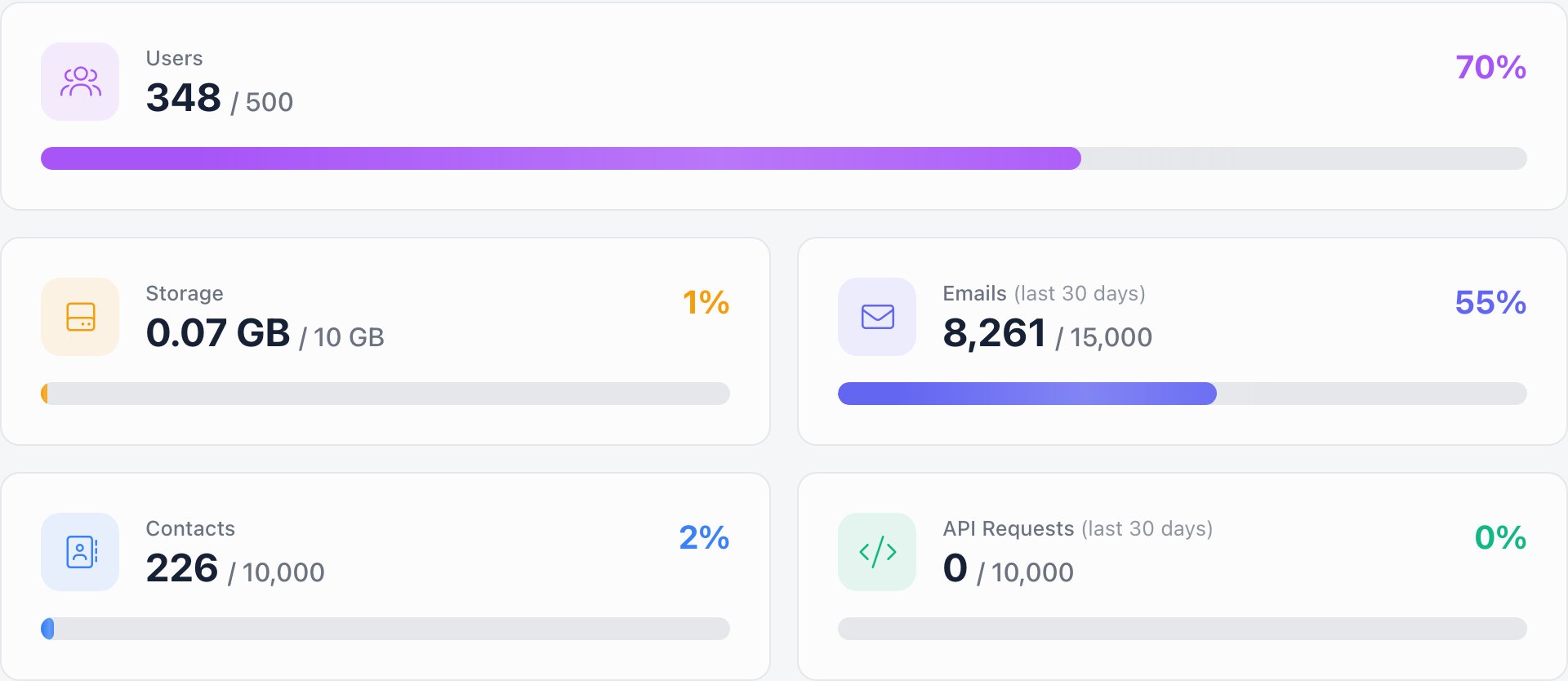
This is what your organization pays **Orgo**: five meters showing what you consume against your plan limits, the invoices Orgo issues you, and the controls for your plan, cards and billing address.
**Built for** the administrator who owns the account and has to answer "are we about to outgrow our plan" and "where is last quarter's invoice".
**Replaces** emailing Orgo to ask.
This is billing for Orgo itself, not for your members. Membership fees, member invoices and member payments live under [Membership Fees](/docs/platform/fees/fees) and [Stripe Integration](/docs/platform/fees/stripe-integration), and are unrelated to anything on this page.
***
## Where it lives
| Screen | Path | Permission |
| --------------------------------------------- | --------------- | --------------------------------------------------------------------- |
| **Settings → Organization → Usage & Billing** | `/tenant/usage` | `ADMIN_TENANT` |
| Subscription, cards and billing address | `/billing` | `FINANCIAL_TENANT` to open the route, `ADMIN_TENANT` to load anything |
**Usage & Billing** is the everyday screen, and its sidebar entry only appears for `ADMIN_TENANT`. The subscription screen has no sidebar entry at all: you reach it from the warning link in the top bar when something needs attention (payment details missing, trial ending, trial expired, subscription cancelled, payment failed). That link is also admin-only.
The `/billing` route admits `FINANCIAL_TENANT`, but every piece of data behind it requires `ADMIN_TENANT`. A finance-only user opens the page and sees nothing at all.
 ***
## The five meters
| Meter | What it counts |
| ------------------------------- | ---------------------------------------------------------------------------------------------- |
| **Users** | Active members aged 18 or over, plus active members with no date of birth on file |
| **Storage** | Total size of all files uploaded in your organization, in GB |
| **Emails** (last 30 days) | Newsletter emails plus notification and system emails sent in the last 30 days |
| **Contacts** | Contacts, plus every member who is not an active adult: inactive accounts and members under 18 |
| **API Requests** (last 30 days) | Requests made with your API tokens in the last 30 days |
Two of these are worth reading twice.
**A member under 18 counts as a contact, not a user.** So does a member whose status is anything other than active. If your Users meter looks lower than your member directory, that is why.
**A member with no date of birth counts as an adult.** An incomplete profile lands in the Users bucket, not the cheaper one.
Deleted accounts are counted nowhere.
### Bars, percentages and "Unlimited"
A meter with a real limit shows a bar and a percentage. The bar turns amber at 75% and red at 90%. A meter whose limit is set to unlimited shows the current figure followed by **Unlimited** and no bar at all.
The limits themselves are part of your plan. They are set by Orgo and cannot be edited from this page; the meters are read-only.
### How fresh the numbers are
Storage is measured on request. Users and Contacts come from a count that is cached for 15 minutes, so a member added a moment ago can take that long to show up. The email figure is assembled from a nightly aggregation (04:00 UTC) for completed days, with today's sending added live on top, so today's emails do appear. API requests are counted from durable per-token daily totals.
On top of all that, the whole page caches for 5 minutes, so a change you make now shows up on the next refresh after that window.
***
## Invoices from Orgo
Below the meters is your billing history with Orgo, read straight from the payment provider.
* **Upcoming invoice**: the amount you will next be charged and the date of the attempt. It is a preview, so it has no number and no PDF yet.
* **Past invoices**: date, amount, status, and a **download** link to the PDF. Up to the 100 most recent are listed. Drafts and voided invoices are left out, but a finalized zero-amount invoice, such as the one that opens a trial, is shown because it is a real event in your history.
| Status shown | Meaning |
| ------------ | ------------------------------------------------------------ |
| **paid** | Settled |
| **credited** | A paid invoice with a negative total, that is, a credit note |
| **Unpaid** | Issued and still open |
| **failed** | Anything else, including a failed collection attempt |
Until Orgo has issued you an invoice the block is a single empty panel reading "There are no invoices". Organizations on the free plan stay on that state indefinitely, because nothing is ever charged.
### Cancel and reactivate
Next to the Invoices heading you will see the state of your subscription and one button.
* **Active**: shown while the subscription is active, in trial, or past due. The button reads **Cancel subscription** and asks for confirmation.
* **Cancels on ``**: shown once a cancellation is scheduled. The subscription keeps working until that date, and the button becomes **Reactivate subscription**.
Cancelling does not cut you off immediately: it schedules the cancellation for the end of the period you have already paid for. Reactivating before that date simply removes the scheduled cancellation.
Reactivation is refused while your most recent invoice is unpaid. Settle it first, then reactivate.
If there is no subscription yet, or it has already ended rather than being scheduled to end, no state tag and no button appear.
***
## The subscription screen
`/billing` is the larger screen behind the top-bar warning. It shows your plan next to current consumption (users, storage, emails), the monthly total, and any coupon line. Prices are billed in USD, or in RON when your billing country is Romania.
| State | What you see |
| ------------------------- | ---------------------------------------------------------------------------------- |
| **Free plan** | "You are on the free plan", with no card, address or invoice sections |
| **Free trial** | The trial end date, with a prompt to add a card and billing address before it ends |
| **Active** | The day of the month you are billed on |
| **Trial expired** | A prompt to complete card and billing address to activate |
| **Cancels at period end** | A tag with the date access ends |
| **Cancelled** | A notice plus an **Activate subscription** button |
Two arrangements have no self-service controls at all. **Manual** and **custom** subscriptions show their agreed monthly total and a note asking you to email `contact@orgo.space` instead of a change button.
### Changing your plan
On the free plan the button reads **Upgrade subscription**.
Each option shows its monthly price in your billing currency.
A second selector offers storage add-ons larger than the amount already included in the chosen plan.
Enter the code and click **Apply**. Invalid codes are rejected straight away; valid ones show the percentage off and the discounted total.
The new total takes effect on your subscription.
If a payment has failed, saving a plan change reopens the failed-payment dialog instead. Settle the outstanding invoice before changing plans; the change is refused server-side too while the latest invoice is unpaid.
### Cards and billing address
The **Cards** section lists each saved card by brand, last four digits and expiry, flagging expired ones. You can add a card, mark one **primary** (the card Stripe charges), or remove any card that is not primary. Card details go straight from your browser to Stripe; Orgo stores only the reference.
**Update billing address** collects organisation name, address, billing email and country. All four are required. The country sets your billing currency, and these details are pushed to Stripe so they appear on the invoices Orgo issues you. Once a subscription exists the country can no longer be switched to Romania; that choice has to be made before the subscription is created.
Saving a card and a billing address is also what starts a subscription: as soon as the profile has a country and a default card and no subscription yet, Orgo creates one. Adding a card while a payment is outstanding makes it the default and retries the open invoice immediately.
### Paying a failed invoice
A failed payment opens a dialog on this screen with a **Pay now** button, which charges the primary card for the most recent invoice. If your bank asks for 3D Secure, the confirmation appears in place and the page refreshes once the payment succeeds. Once the invoice clears, the top-bar warning disappears on the next page load without waiting for Stripe.
***
## When billing blocks access
If your organization is on a paid plan with no Stripe subscription, and is not on a manual arrangement, Orgo restricts access until that is resolved:
* **Tenant admins** land on the subscription screen, where the plan, card and billing address can be completed.
* **Everyone else** sees a short notice saying access is restricted because of incomplete billing details or unpaid invoices, and telling them to contact their administrator.
***
## Troubleshooting
Expected. Users counts active members aged 18 and over. Members under 18 and members whose status is not active are counted under Contacts instead. Deleted accounts are counted nowhere. A member added in the last few minutes may also not be in the count yet.
The page caches for 5 minutes. Reload after that. Storage is the total size of the files held in your organization, so files still sitting in a drive folder or attached to an old event continue to count.
Today's sending is added live on top of the nightly aggregation, but the 5-minute page cache still applies, so a send from the last few minutes may not be reflected yet.
An unlimited meter is a deliberate setting on your plan rather than a missing value. If it looks wrong for your agreement, raise it with Orgo; it cannot be changed from this page.
Two conditions refuse it: the latest invoice is not paid, or the subscription has been marked inactive rather than scheduled to cancel. Settle the outstanding invoice first; if the state does not change after that, contact Orgo.
The list shows the 100 most recent finalized invoices and excludes drafts and voided ones. For anything older, contact Orgo.
The subscription data requires `ADMIN_TENANT`. `FINANCIAL_TENANT` is enough to open the route but not to load anything on it.
The organization is on a paid plan with no active subscription. An admin needs to open the subscription screen from the top-bar link, add a card and a billing address, and activate.
The most recent invoice is unpaid. Use **Pay now** in the dialog, or add a card, which retries the open invoice with it.
Manual and custom subscriptions are managed by Orgo. Email `contact@orgo.space`.
***
## Related
* [Organization info](/docs/platform/organisation/organisation-info)
* [Modules](/docs/platform/organisation/modules)
* [Membership fees](/docs/platform/fees/fees)
* [Stripe Integration](/docs/platform/fees/stripe-integration)
* [API tokens and rate limits](/docs/platform/api)
***
## The five meters
| Meter | What it counts |
| ------------------------------- | ---------------------------------------------------------------------------------------------- |
| **Users** | Active members aged 18 or over, plus active members with no date of birth on file |
| **Storage** | Total size of all files uploaded in your organization, in GB |
| **Emails** (last 30 days) | Newsletter emails plus notification and system emails sent in the last 30 days |
| **Contacts** | Contacts, plus every member who is not an active adult: inactive accounts and members under 18 |
| **API Requests** (last 30 days) | Requests made with your API tokens in the last 30 days |
Two of these are worth reading twice.
**A member under 18 counts as a contact, not a user.** So does a member whose status is anything other than active. If your Users meter looks lower than your member directory, that is why.
**A member with no date of birth counts as an adult.** An incomplete profile lands in the Users bucket, not the cheaper one.
Deleted accounts are counted nowhere.
### Bars, percentages and "Unlimited"
A meter with a real limit shows a bar and a percentage. The bar turns amber at 75% and red at 90%. A meter whose limit is set to unlimited shows the current figure followed by **Unlimited** and no bar at all.
The limits themselves are part of your plan. They are set by Orgo and cannot be edited from this page; the meters are read-only.
### How fresh the numbers are
Storage is measured on request. Users and Contacts come from a count that is cached for 15 minutes, so a member added a moment ago can take that long to show up. The email figure is assembled from a nightly aggregation (04:00 UTC) for completed days, with today's sending added live on top, so today's emails do appear. API requests are counted from durable per-token daily totals.
On top of all that, the whole page caches for 5 minutes, so a change you make now shows up on the next refresh after that window.
***
## Invoices from Orgo
Below the meters is your billing history with Orgo, read straight from the payment provider.
* **Upcoming invoice**: the amount you will next be charged and the date of the attempt. It is a preview, so it has no number and no PDF yet.
* **Past invoices**: date, amount, status, and a **download** link to the PDF. Up to the 100 most recent are listed. Drafts and voided invoices are left out, but a finalized zero-amount invoice, such as the one that opens a trial, is shown because it is a real event in your history.
| Status shown | Meaning |
| ------------ | ------------------------------------------------------------ |
| **paid** | Settled |
| **credited** | A paid invoice with a negative total, that is, a credit note |
| **Unpaid** | Issued and still open |
| **failed** | Anything else, including a failed collection attempt |
Until Orgo has issued you an invoice the block is a single empty panel reading "There are no invoices". Organizations on the free plan stay on that state indefinitely, because nothing is ever charged.
### Cancel and reactivate
Next to the Invoices heading you will see the state of your subscription and one button.
* **Active**: shown while the subscription is active, in trial, or past due. The button reads **Cancel subscription** and asks for confirmation.
* **Cancels on ``**: shown once a cancellation is scheduled. The subscription keeps working until that date, and the button becomes **Reactivate subscription**.
Cancelling does not cut you off immediately: it schedules the cancellation for the end of the period you have already paid for. Reactivating before that date simply removes the scheduled cancellation.
Reactivation is refused while your most recent invoice is unpaid. Settle it first, then reactivate.
If there is no subscription yet, or it has already ended rather than being scheduled to end, no state tag and no button appear.
***
## The subscription screen
`/billing` is the larger screen behind the top-bar warning. It shows your plan next to current consumption (users, storage, emails), the monthly total, and any coupon line. Prices are billed in USD, or in RON when your billing country is Romania.
| State | What you see |
| ------------------------- | ---------------------------------------------------------------------------------- |
| **Free plan** | "You are on the free plan", with no card, address or invoice sections |
| **Free trial** | The trial end date, with a prompt to add a card and billing address before it ends |
| **Active** | The day of the month you are billed on |
| **Trial expired** | A prompt to complete card and billing address to activate |
| **Cancels at period end** | A tag with the date access ends |
| **Cancelled** | A notice plus an **Activate subscription** button |
Two arrangements have no self-service controls at all. **Manual** and **custom** subscriptions show their agreed monthly total and a note asking you to email `contact@orgo.space` instead of a change button.
### Changing your plan
On the free plan the button reads **Upgrade subscription**.
Each option shows its monthly price in your billing currency.
A second selector offers storage add-ons larger than the amount already included in the chosen plan.
Enter the code and click **Apply**. Invalid codes are rejected straight away; valid ones show the percentage off and the discounted total.
The new total takes effect on your subscription.
If a payment has failed, saving a plan change reopens the failed-payment dialog instead. Settle the outstanding invoice before changing plans; the change is refused server-side too while the latest invoice is unpaid.
### Cards and billing address
The **Cards** section lists each saved card by brand, last four digits and expiry, flagging expired ones. You can add a card, mark one **primary** (the card Stripe charges), or remove any card that is not primary. Card details go straight from your browser to Stripe; Orgo stores only the reference.
**Update billing address** collects organisation name, address, billing email and country. All four are required. The country sets your billing currency, and these details are pushed to Stripe so they appear on the invoices Orgo issues you. Once a subscription exists the country can no longer be switched to Romania; that choice has to be made before the subscription is created.
Saving a card and a billing address is also what starts a subscription: as soon as the profile has a country and a default card and no subscription yet, Orgo creates one. Adding a card while a payment is outstanding makes it the default and retries the open invoice immediately.
### Paying a failed invoice
A failed payment opens a dialog on this screen with a **Pay now** button, which charges the primary card for the most recent invoice. If your bank asks for 3D Secure, the confirmation appears in place and the page refreshes once the payment succeeds. Once the invoice clears, the top-bar warning disappears on the next page load without waiting for Stripe.
***
## When billing blocks access
If your organization is on a paid plan with no Stripe subscription, and is not on a manual arrangement, Orgo restricts access until that is resolved:
* **Tenant admins** land on the subscription screen, where the plan, card and billing address can be completed.
* **Everyone else** sees a short notice saying access is restricted because of incomplete billing details or unpaid invoices, and telling them to contact their administrator.
***
## Troubleshooting
Expected. Users counts active members aged 18 and over. Members under 18 and members whose status is not active are counted under Contacts instead. Deleted accounts are counted nowhere. A member added in the last few minutes may also not be in the count yet.
The page caches for 5 minutes. Reload after that. Storage is the total size of the files held in your organization, so files still sitting in a drive folder or attached to an old event continue to count.
Today's sending is added live on top of the nightly aggregation, but the 5-minute page cache still applies, so a send from the last few minutes may not be reflected yet.
An unlimited meter is a deliberate setting on your plan rather than a missing value. If it looks wrong for your agreement, raise it with Orgo; it cannot be changed from this page.
Two conditions refuse it: the latest invoice is not paid, or the subscription has been marked inactive rather than scheduled to cancel. Settle the outstanding invoice first; if the state does not change after that, contact Orgo.
The list shows the 100 most recent finalized invoices and excludes drafts and voided ones. For anything older, contact Orgo.
The subscription data requires `ADMIN_TENANT`. `FINANCIAL_TENANT` is enough to open the route but not to load anything on it.
The organization is on a paid plan with no active subscription. An admin needs to open the subscription screen from the top-bar link, add a card and a billing address, and activate.
The most recent invoice is unpaid. Use **Pay now** in the dialog, or add a card, which retries the open invoice with it.
Manual and custom subscriptions are managed by Orgo. Email `contact@orgo.space`.
***
## Related
* [Organization info](/docs/platform/organisation/organisation-info)
* [Modules](/docs/platform/organisation/modules)
* [Membership fees](/docs/platform/fees/fees)
* [Stripe Integration](/docs/platform/fees/stripe-integration)
* [API tokens and rate limits](/docs/platform/api)