> ## Documentation Index
> Fetch the complete documentation index at: https://orgo.space/docs/llms.txt
> Use this file to discover all available pages before exploring further.
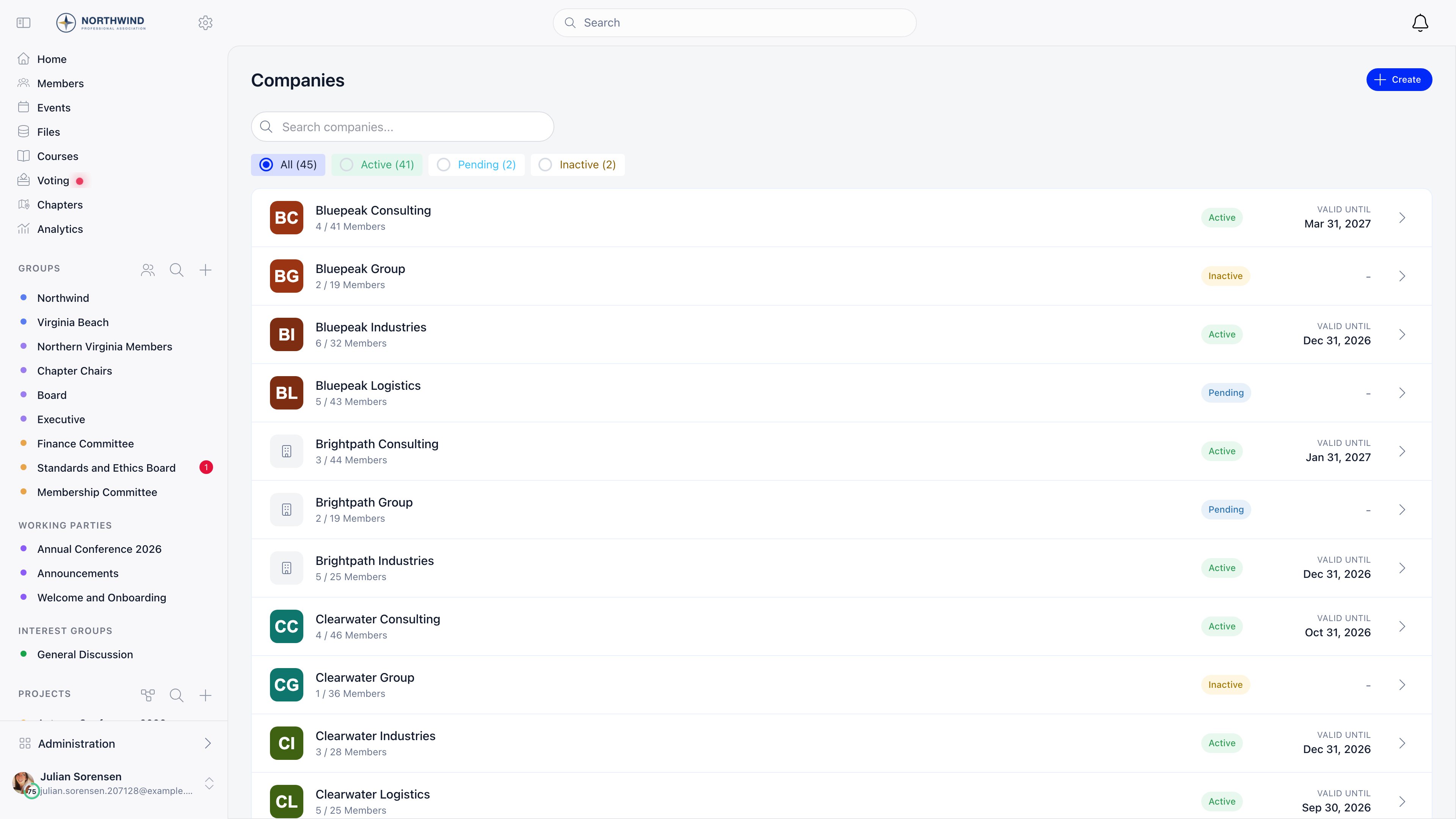
# Companies
> Corporate membership: one company record, a seat allowance, invited employees, and a single fee that covers them all
A company is an organization that holds a membership on behalf of its people. It has its own record, its own billing details, a seat allowance, and one membership fee. Everyone inside it inherits the company's membership validity instead of paying individually.
**Built for** organizations whose members are businesses rather than individuals, including business networks, chambers of commerce, trade and industry associations, and any body that sells corporate or team memberships. **Replaces** spreadsheets of member companies plus manual invoicing and per-employee fee tracking.
This page is about **member companies**, not about adding people to your
organization in general. Everything below applies once a company record exists
and holds the membership. To create an account for an ordinary member, use
**Register member** in the member directory: see
[Adding Members](/docs/platform/users/adding-members).
 ***
## How to enable
**Settings** → **Modules** → **Companies** → **Configuration**. Requires `ADMIN_TENANT`.
| Setting | What it does |
| ---------------------------- | -------------------------------------------------------------------------------------------------------------- |
| **Enable Companies Module** | Turns the feature on. Adds **Companies** to the sidebar and a **Company** tab to each member's own profile |
| **Who can create companies** | **Any member**, **Local center admins and above**, or **Organization admins only** |
| **Enable Company Fees** | Lets companies pay membership fees for their members. Only appears when the Payments and Fees module is active |
With **Enable Company Fees** on, mark fee prices **Company only** in the fee product settings and give each a **Company slots** number: company members then inherit membership status from the company and cannot buy an individual fee. A separate switch, **Settings** → **Modules** → **Payments & Fees** → **Company Fee Payment Mandatory**, locks company members out of the platform until the company fee is paid.
***
## Creating a company
**Create** on the Companies list opens one form. Only **Company Name** is required, though payment needs the billing block completed.
| Group | Fields |
| ----------------- | ----------------------------------------------------------------------------------------------------------------------------------------------- |
| Identity | Company Name, Description, Website, Company Logo |
| Billing Details | Legal Name, Registration Number, VAT Number, Billing Address, Town, Country |
| Financial Contact | Financial contact full name, Financial contact email, Financial contact phone, Additional contact email 1 (Cc), Additional contact email 2 (Cc) |
Companies start **Pending** and flip to **Active** on the first paid membership fee. `ADMIN_TENANT` can also set status by hand from the company page. **Delete Company** is a soft delete: the record moves to status Deleted and disappears from every list.
An ordinary member who creates a company is added to it as **Primary Contact** and can only ever belong to one company. Administrators (`ADMIN_LOCAL` and above) create companies on behalf of others, so they are exempt from the one-company rule and are not enrolled in what they create.
***
## Roles inside a company
Roles are stored per membership; a person may hold several.
| Role | What it grants |
| ------------------------- | ------------------------------------------------------------------------------------------- |
| **Member** | The default. Sees the company page, inherits the membership validity |
| **Primary Contact** | Edits the company, manages members and invitations, pays. At most one per company |
| **Voting Representative** | A label marking who speaks for the company. At most one per company |
| **Financial Rep** | Legacy. Same rights as Primary Contact, but it can no longer be assigned from the interface |
Assigning Primary Contact or Voting Representative takes it from whoever held it before, in the same action.
`ADMIN_TENANT` can do anything on any company in the tenant, and so can whoever **Who can create companies** names, with a floor of `ADMIN_LOCAL`. Setting it to "Any member" does not grant access to companies you do not belong to.
That reach is organization-wide by design, chapter admins included. A company is not attached to a chapter anywhere in its record, so there is nothing for a chapter-scoped permission to narrow down to: an `ADMIN_LOCAL` holder in one chapter sees, edits and manages members and payments on every company in the organization. If that is wider than you want, set **Who can create companies** to **Organization admins only**, which raises the floor to `ADMIN_TENANT`.
***
## Members: users and contacts
A membership points at either a **User** (has an account) or a **Contact** (in your database, no account). Both appear in the member list, occupy a seat, and can carry a joined date; contacts are tagged **Contact** and link to the contact record rather than a member profile. Only user memberships inherit the company's validity date: a contact has no fee date, so membership sync skips it.
**Add Member** is an `ADMIN_TENANT` action and searches users and contacts not already in a company. Company admins invite by email instead.
Both act on people who are already in your database: **Add Member** attaches an existing user or contact to this company, it does not create anybody. To create a member who is not joining through a company, use [Adding Members](/docs/platform/users/adding-members).
***
## Inviting employees
The **Team Members** panel and its **Invite** and **Add Member** buttons put a person into *this company*, taking one of its seats and passing the company's membership validity to them. That is a narrower job than adding a member to your organization, which starts from the member directory instead: [Adding Members](/docs/platform/users/adding-members).
***
## How to enable
**Settings** → **Modules** → **Companies** → **Configuration**. Requires `ADMIN_TENANT`.
| Setting | What it does |
| ---------------------------- | -------------------------------------------------------------------------------------------------------------- |
| **Enable Companies Module** | Turns the feature on. Adds **Companies** to the sidebar and a **Company** tab to each member's own profile |
| **Who can create companies** | **Any member**, **Local center admins and above**, or **Organization admins only** |
| **Enable Company Fees** | Lets companies pay membership fees for their members. Only appears when the Payments and Fees module is active |
With **Enable Company Fees** on, mark fee prices **Company only** in the fee product settings and give each a **Company slots** number: company members then inherit membership status from the company and cannot buy an individual fee. A separate switch, **Settings** → **Modules** → **Payments & Fees** → **Company Fee Payment Mandatory**, locks company members out of the platform until the company fee is paid.
***
## Creating a company
**Create** on the Companies list opens one form. Only **Company Name** is required, though payment needs the billing block completed.
| Group | Fields |
| ----------------- | ----------------------------------------------------------------------------------------------------------------------------------------------- |
| Identity | Company Name, Description, Website, Company Logo |
| Billing Details | Legal Name, Registration Number, VAT Number, Billing Address, Town, Country |
| Financial Contact | Financial contact full name, Financial contact email, Financial contact phone, Additional contact email 1 (Cc), Additional contact email 2 (Cc) |
Companies start **Pending** and flip to **Active** on the first paid membership fee. `ADMIN_TENANT` can also set status by hand from the company page. **Delete Company** is a soft delete: the record moves to status Deleted and disappears from every list.
An ordinary member who creates a company is added to it as **Primary Contact** and can only ever belong to one company. Administrators (`ADMIN_LOCAL` and above) create companies on behalf of others, so they are exempt from the one-company rule and are not enrolled in what they create.
***
## Roles inside a company
Roles are stored per membership; a person may hold several.
| Role | What it grants |
| ------------------------- | ------------------------------------------------------------------------------------------- |
| **Member** | The default. Sees the company page, inherits the membership validity |
| **Primary Contact** | Edits the company, manages members and invitations, pays. At most one per company |
| **Voting Representative** | A label marking who speaks for the company. At most one per company |
| **Financial Rep** | Legacy. Same rights as Primary Contact, but it can no longer be assigned from the interface |
Assigning Primary Contact or Voting Representative takes it from whoever held it before, in the same action.
`ADMIN_TENANT` can do anything on any company in the tenant, and so can whoever **Who can create companies** names, with a floor of `ADMIN_LOCAL`. Setting it to "Any member" does not grant access to companies you do not belong to.
That reach is organization-wide by design, chapter admins included. A company is not attached to a chapter anywhere in its record, so there is nothing for a chapter-scoped permission to narrow down to: an `ADMIN_LOCAL` holder in one chapter sees, edits and manages members and payments on every company in the organization. If that is wider than you want, set **Who can create companies** to **Organization admins only**, which raises the floor to `ADMIN_TENANT`.
***
## Members: users and contacts
A membership points at either a **User** (has an account) or a **Contact** (in your database, no account). Both appear in the member list, occupy a seat, and can carry a joined date; contacts are tagged **Contact** and link to the contact record rather than a member profile. Only user memberships inherit the company's validity date: a contact has no fee date, so membership sync skips it.
**Add Member** is an `ADMIN_TENANT` action and searches users and contacts not already in a company. Company admins invite by email instead.
Both act on people who are already in your database: **Add Member** attaches an existing user or contact to this company, it does not create anybody. To create a member who is not joining through a company, use [Adding Members](/docs/platform/users/adding-members).
***
## Inviting employees
The **Team Members** panel and its **Invite** and **Add Member** buttons put a person into *this company*, taking one of its seats and passing the company's membership validity to them. That is a narrower job than adding a member to your organization, which starts from the member directory instead: [Adding Members](/docs/platform/users/adding-members).
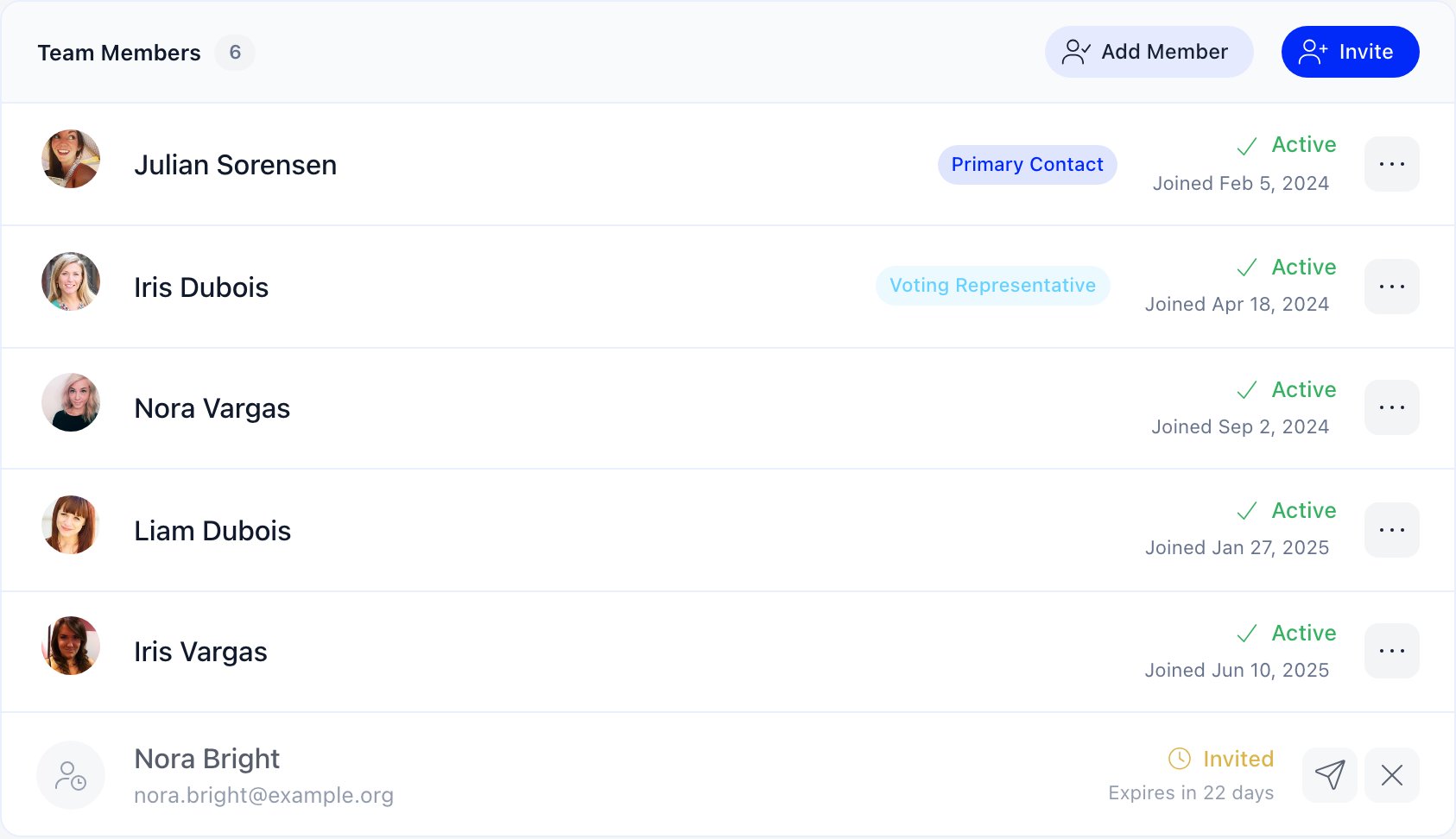 **Invite** on the company page. Enter the email, first name and last name, pick a role, and add an optional personal message.
The email carries a link to `/company-invitation/{hash}`, which shows the company name and logo, who invited them, the message, and the role they were offered.
Accepting joins them to the company and emails a one-time login code, creating their account first if they do not have one.
Invitations expire **30 days** after they are sent. Pending ones show in the member list with an **Invited** badge and a countdown; admins can resend (resetting the 30 days) or revoke them.
An invitation is rejected up front when there are no free seats, when one is already pending for that email, or when the person already belongs to any company. The seat check runs again at acceptance, so one sent before the company filled up can still fail.
First name and last name are labelled Optional in the invite dialog, but the server rejects the invitation without them. Fill both in.
***
## Seats
Seats come from the fee price the company bought: each **Company only** price carries a **Company slots** value, and paying for it writes that number onto the company. **0 means unlimited.**
The count is active members plus pending invitations, so an outstanding invitation holds a place. Memberships that ended, and those whose user was deleted, do not count. When the allowance is full, **Invite** and **Add Member** disappear.
***
## Paying the company fee
**Invite** on the company page. Enter the email, first name and last name, pick a role, and add an optional personal message.
The email carries a link to `/company-invitation/{hash}`, which shows the company name and logo, who invited them, the message, and the role they were offered.
Accepting joins them to the company and emails a one-time login code, creating their account first if they do not have one.
Invitations expire **30 days** after they are sent. Pending ones show in the member list with an **Invited** badge and a countdown; admins can resend (resetting the 30 days) or revoke them.
An invitation is rejected up front when there are no free seats, when one is already pending for that email, or when the person already belongs to any company. The seat check runs again at acceptance, so one sent before the company filled up can still fail.
First name and last name are labelled Optional in the invite dialog, but the server rejects the invitation without them. Fill both in.
***
## Seats
Seats come from the fee price the company bought: each **Company only** price carries a **Company slots** value, and paying for it writes that number onto the company. **0 means unlimited.**
The count is active members plus pending invitations, so an outstanding invitation holds a place. Memberships that ended, and those whose user was deleted, do not count. When the allowance is full, **Invite** and **Add Member** disappear.
***
## Paying the company fee
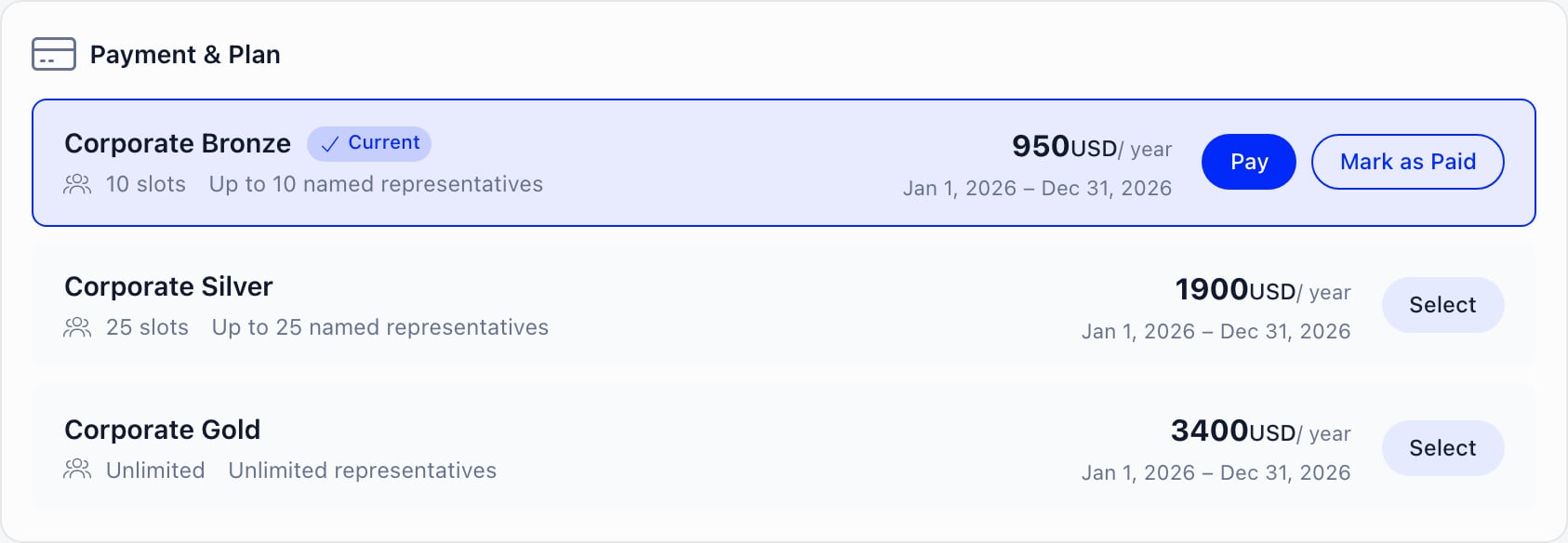 The **Payment & Plan** panel is visible to the Primary Contact (and any legacy Financial Rep) and to `ADMIN_TENANT`. It lists every non-archived **Company only** price on the tenant fee product, with its slot count and price.
Select a plan, then **Pay**. Orgo checks that Legal Name, Billing Address, Financial contact full name and Financial contact email are filled in, sending you to the edit form if any are missing, then offers:
* **Pay online**: a Stripe checkout. VAT is added on top of the configured net price as a separate line when your tenant charges VAT on fees and the price is not exempt.
* **Get invoice for bank transfer**: generates an unpaid invoice, emails it, and shows a reference to quote on the transfer. Only offered when both bank-transfer membership payments and invoicing are enabled.
* **Mark as Paid** (`ADMIN_TENANT` only): records money received outside the platform. It asks for a period start, defaulting to the current expiry so it extends rather than overwrites, records a payment, updates the seats, and voids any pending bank-transfer invoice.
On a calendar-anchored fee cycle, a mid-cycle payment buys only the remainder and is prorated: the panel shows the list price struck through next to what you will actually be charged, plus "{months} of {total} months" and the exact period. The charge is always recomputed server-side at checkout, so the quote can never undercharge.
Renewal opens **60 days** before the current period ends. Before that window, a company with a valid membership sees no Pay button.
***
## What members get from a company fee
When a payment lands, Orgo copies the company's valid-until date onto every active member who has an account, sets the company to Active, and applies the plan's seat count. Joining an existing paid company inherits its date immediately; leaving or being removed clears the person's fee date and fee price. On their own fee screen, company-covered members see "Membership managed by company" with a link to the company, instead of the individual payment options.
If **Company Fee Payment Mandatory** is on and the membership has lapsed, members are blocked out: Primary Contacts land on `/company-fee-payment`, a guided three-step page (Billing Information, Select a Plan, Complete Payment), everyone else on `/company-fee-required`, which names the company and points them at the financial contact.
***
## Renewal reminders
Companies get their own reminder ladder, separate from individual member reminders: about a month before expiry, 7 days before, 1 day before, on the expiry date, then 7, 14 and 30 days after.
Each goes **To** the financial contact email, copying the active Primary Contacts and the two additional Cc addresses. Without a financial contact email, the first Primary Contact is promoted to the To line. A company with nobody reachable is skipped.
Only **Active** and **Pending** companies with a plan and a renewal date are reminded. Setting a company to Inactive, or deleting it, stops both the reminder and the renewal invoice that goes with it.
***
## Importing companies
**Settings** → **Import** offers **Companies** (with membership details) and **Company Members** (assigning users to companies with roles), both gated on the module being active. Example CSV files are linked next to each.
***
## Related
* [Adding Members](/docs/platform/users/adding-members) - the four ways people get into your organization, and where this one fits
* [Family Members](/docs/platform/users/family-members) - the household equivalent, without shared fees
* [Membership Fees](/docs/platform/fees/fees) - fee products, prices and cycles
* [Record a Payment](/docs/platform/fees/record-payment) - payments taken outside the platform
* [VAT](/docs/platform/fees/vat) - how VAT is added to a fee price
* [Contacts](/docs/platform/contacts) - non-member records that can hold a company seat
* [Permissions](/docs/platform/permissions) - what `ADMIN_TENANT` and `ADMIN_LOCAL` cover
The **Payment & Plan** panel is visible to the Primary Contact (and any legacy Financial Rep) and to `ADMIN_TENANT`. It lists every non-archived **Company only** price on the tenant fee product, with its slot count and price.
Select a plan, then **Pay**. Orgo checks that Legal Name, Billing Address, Financial contact full name and Financial contact email are filled in, sending you to the edit form if any are missing, then offers:
* **Pay online**: a Stripe checkout. VAT is added on top of the configured net price as a separate line when your tenant charges VAT on fees and the price is not exempt.
* **Get invoice for bank transfer**: generates an unpaid invoice, emails it, and shows a reference to quote on the transfer. Only offered when both bank-transfer membership payments and invoicing are enabled.
* **Mark as Paid** (`ADMIN_TENANT` only): records money received outside the platform. It asks for a period start, defaulting to the current expiry so it extends rather than overwrites, records a payment, updates the seats, and voids any pending bank-transfer invoice.
On a calendar-anchored fee cycle, a mid-cycle payment buys only the remainder and is prorated: the panel shows the list price struck through next to what you will actually be charged, plus "{months} of {total} months" and the exact period. The charge is always recomputed server-side at checkout, so the quote can never undercharge.
Renewal opens **60 days** before the current period ends. Before that window, a company with a valid membership sees no Pay button.
***
## What members get from a company fee
When a payment lands, Orgo copies the company's valid-until date onto every active member who has an account, sets the company to Active, and applies the plan's seat count. Joining an existing paid company inherits its date immediately; leaving or being removed clears the person's fee date and fee price. On their own fee screen, company-covered members see "Membership managed by company" with a link to the company, instead of the individual payment options.
If **Company Fee Payment Mandatory** is on and the membership has lapsed, members are blocked out: Primary Contacts land on `/company-fee-payment`, a guided three-step page (Billing Information, Select a Plan, Complete Payment), everyone else on `/company-fee-required`, which names the company and points them at the financial contact.
***
## Renewal reminders
Companies get their own reminder ladder, separate from individual member reminders: about a month before expiry, 7 days before, 1 day before, on the expiry date, then 7, 14 and 30 days after.
Each goes **To** the financial contact email, copying the active Primary Contacts and the two additional Cc addresses. Without a financial contact email, the first Primary Contact is promoted to the To line. A company with nobody reachable is skipped.
Only **Active** and **Pending** companies with a plan and a renewal date are reminded. Setting a company to Inactive, or deleting it, stops both the reminder and the renewal invoice that goes with it.
***
## Importing companies
**Settings** → **Import** offers **Companies** (with membership details) and **Company Members** (assigning users to companies with roles), both gated on the module being active. Example CSV files are linked next to each.
***
## Related
* [Adding Members](/docs/platform/users/adding-members) - the four ways people get into your organization, and where this one fits
* [Family Members](/docs/platform/users/family-members) - the household equivalent, without shared fees
* [Membership Fees](/docs/platform/fees/fees) - fee products, prices and cycles
* [Record a Payment](/docs/platform/fees/record-payment) - payments taken outside the platform
* [VAT](/docs/platform/fees/vat) - how VAT is added to a fee price
* [Contacts](/docs/platform/contacts) - non-member records that can hold a company seat
* [Permissions](/docs/platform/permissions) - what `ADMIN_TENANT` and `ADMIN_LOCAL` cover