> ## Documentation Index
> Fetch the complete documentation index at: https://orgo.space/docs/llms.txt
> Use this file to discover all available pages before exploring further.
# Deletion of Account
> Permanently remove a member account and personal data
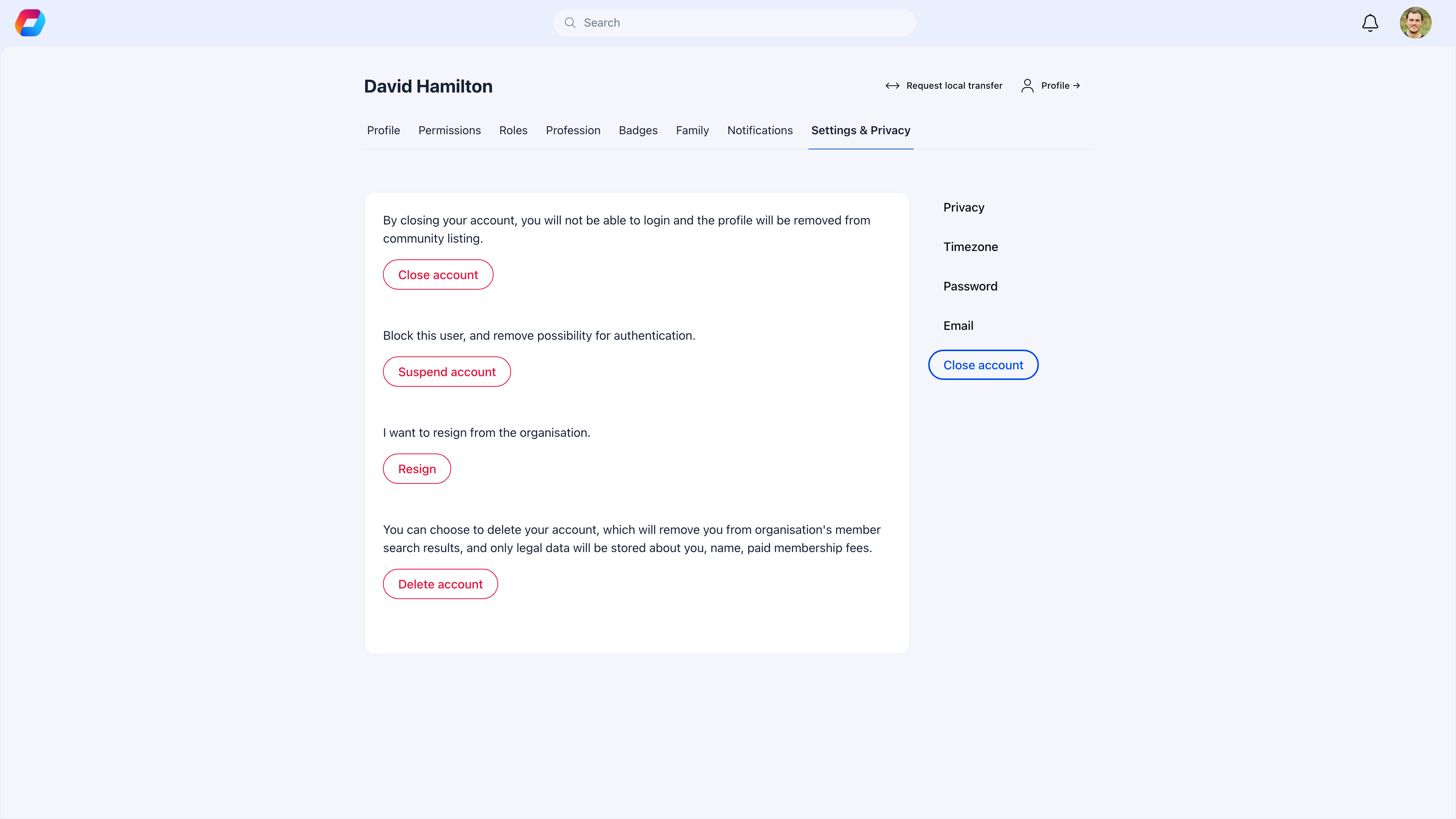
Account deletion permanently removes a member's profile, activity history, and personal data. This is irreversible — once deleted, the account cannot be recovered. Only the legal minimum (name and payment records) is retained.
This feature exists primarily for **GDPR compliance** — the right to erasure (Article 17). Members should be able to request that their data be removed.
 Account deletion is **permanent and irreversible**. If you just need to block access, [change the member's status](/platform/users/statuses) to Inactive or Suspended instead — their data stays intact and the action can be undone.
***
## How to enable
Account deletion is available from the **Close account** page in member profiles. There is no separate toggle — if you want to prevent deletions, enable the [Resignation module](/platform/users/resignation), which adds an approval gate before deletion becomes available.
***
## What the member sees
**Path:** Profile → Settings & Privacy → Close account
***
## How deletion works (with and without resignation)
### If Resignation is enabled (recommended)
Members must resign and get approved **before** the delete option becomes available. This gives you two safeguards:
They provide a reason for leaving. This goes to admin review.
The resignation is processed. The member's reason is recorded.
The Delete account button becomes active. They click it and confirm.
Profile, activity, and personal data are erased. Only name and payment records remain for legal compliance.
### If Resignation is not enabled
Members can delete their account directly — one click and confirm. No admin approval, no reason captured, no opportunity to intervene.
Enable [Resignation](/platform/users/resignation) even if you don't think you need it. It gives you visibility into why members leave before their data disappears. Without it, people vanish and you never know why.
***
## What data is kept vs removed
| Data | After deletion |
| -------------------------------------------------------- | ----------------------------------------- |
| **Profile information** (bio, photo, custom fields) | Permanently removed |
| **Member directory listing** | Removed — they no longer appear in search |
| **Activity history** (posts, comments, event attendance) | Removed or anonymized |
| **Roles and permissions** | Removed |
| **Group and event memberships** | Removed — their slot is freed |
| **Name** | Retained for legal records |
| **Payment/transaction records** | Retained for financial compliance |
***
## Admin notifications
When a member deletes their account:
* Administrators receive a notification
* The deletion is logged for compliance records
* The member's slot in any groups, events, or waitlists is automatically freed
Admins **cannot** block or undo a deletion once confirmed. The only way to require approval is by enabling the Resignation module as a prerequisite.
***
## Common scenarios
No. Deletion is permanent and irreversible. The member will need to register again from scratch. This is why the confirmation step exists — and why enabling Resignation as a prerequisite is recommended (it adds a cooling-off period).
They should [resign](/platform/users/resignation) without toggling "Close my account", or ask an admin to set their status to Inactive. Both options preserve their data while formally recording the departure.
If a member contacts you requesting data deletion but can't do it themselves, an admin can access their profile and process the deletion. Document the request for your compliance records.
Their payment records are retained after deletion for financial compliance. Outstanding fees should be resolved through your normal billing process — account deletion doesn't cancel debts.
Use **Inactive** when the member might come back, or when you want to keep their history for reporting. Use **Deletion** when the member explicitly wants their data removed (GDPR), or when you're cleaning up abandoned accounts. When in doubt, use Inactive — it's reversible.
***
## GDPR compliance
Account deletion directly supports the **right to erasure** (GDPR Article 17):
| GDPR requirement | How Orgo handles it |
| -------------------------------- | ----------------------------------------------------------- |
| Members can request data removal | Self-service Delete account button |
| Data minimization after deletion | Only legally required data retained (name, payment records) |
| Admins are informed | Notification sent on deletion |
| Audit trail | Deletion event logged for compliance |
***
## Related
* [Resignation](/platform/users/resignation) — Formal departure process (recommended prerequisite)
* [User Statuses](/platform/users/statuses) — Reversible alternative: Inactive or Suspended
* [Privacy Settings](/platform/users/privacy-settings) — Control data visibility (less extreme than deletion)
Account deletion is **permanent and irreversible**. If you just need to block access, [change the member's status](/platform/users/statuses) to Inactive or Suspended instead — their data stays intact and the action can be undone.
***
## How to enable
Account deletion is available from the **Close account** page in member profiles. There is no separate toggle — if you want to prevent deletions, enable the [Resignation module](/platform/users/resignation), which adds an approval gate before deletion becomes available.
***
## What the member sees
**Path:** Profile → Settings & Privacy → Close account
***
## How deletion works (with and without resignation)
### If Resignation is enabled (recommended)
Members must resign and get approved **before** the delete option becomes available. This gives you two safeguards:
They provide a reason for leaving. This goes to admin review.
The resignation is processed. The member's reason is recorded.
The Delete account button becomes active. They click it and confirm.
Profile, activity, and personal data are erased. Only name and payment records remain for legal compliance.
### If Resignation is not enabled
Members can delete their account directly — one click and confirm. No admin approval, no reason captured, no opportunity to intervene.
Enable [Resignation](/platform/users/resignation) even if you don't think you need it. It gives you visibility into why members leave before their data disappears. Without it, people vanish and you never know why.
***
## What data is kept vs removed
| Data | After deletion |
| -------------------------------------------------------- | ----------------------------------------- |
| **Profile information** (bio, photo, custom fields) | Permanently removed |
| **Member directory listing** | Removed — they no longer appear in search |
| **Activity history** (posts, comments, event attendance) | Removed or anonymized |
| **Roles and permissions** | Removed |
| **Group and event memberships** | Removed — their slot is freed |
| **Name** | Retained for legal records |
| **Payment/transaction records** | Retained for financial compliance |
***
## Admin notifications
When a member deletes their account:
* Administrators receive a notification
* The deletion is logged for compliance records
* The member's slot in any groups, events, or waitlists is automatically freed
Admins **cannot** block or undo a deletion once confirmed. The only way to require approval is by enabling the Resignation module as a prerequisite.
***
## Common scenarios
No. Deletion is permanent and irreversible. The member will need to register again from scratch. This is why the confirmation step exists — and why enabling Resignation as a prerequisite is recommended (it adds a cooling-off period).
They should [resign](/platform/users/resignation) without toggling "Close my account", or ask an admin to set their status to Inactive. Both options preserve their data while formally recording the departure.
If a member contacts you requesting data deletion but can't do it themselves, an admin can access their profile and process the deletion. Document the request for your compliance records.
Their payment records are retained after deletion for financial compliance. Outstanding fees should be resolved through your normal billing process — account deletion doesn't cancel debts.
Use **Inactive** when the member might come back, or when you want to keep their history for reporting. Use **Deletion** when the member explicitly wants their data removed (GDPR), or when you're cleaning up abandoned accounts. When in doubt, use Inactive — it's reversible.
***
## GDPR compliance
Account deletion directly supports the **right to erasure** (GDPR Article 17):
| GDPR requirement | How Orgo handles it |
| -------------------------------- | ----------------------------------------------------------- |
| Members can request data removal | Self-service Delete account button |
| Data minimization after deletion | Only legally required data retained (name, payment records) |
| Admins are informed | Notification sent on deletion |
| Audit trail | Deletion event logged for compliance |
***
## Related
* [Resignation](/platform/users/resignation) — Formal departure process (recommended prerequisite)
* [User Statuses](/platform/users/statuses) — Reversible alternative: Inactive or Suspended
* [Privacy Settings](/platform/users/privacy-settings) — Control data visibility (less extreme than deletion)