> ## Documentation Index
> Fetch the complete documentation index at: https://orgo.space/docs/llms.txt
> Use this file to discover all available pages before exploring further.
# Users & Profiles
> Set up registration, manage members, and handle the complete member lifecycle
Everything about the people in your organisation lives here: how they join, what
you store about them, how you find them again, and what happens when they leave.
Looking for how to add someone? There are four routes and
[Adding Members](/docs/platform/users/adding-members) compares them: register a member
yourself, invite them, let them sign themselves up, or import a spreadsheet.
***
## The member directory
**Members** in the sidebar lists everyone in your organisation.
**Settings** → **Users & Profiles** → **Who Can See Members in General Groups**
decides who sees it at all: All Users, HR Local, HR Tenant, Admin Local or Admin
Tenant. At an admin level, ordinary members never see the directory.
Always reach the directory from the sidebar rather than by typing a URL. The
organisation-wide list lives at `/users?generalUnit=true`; a bare `/users` has no
scope to show and renders an empty page. The same screen shows a single group's
members at `/users?unit={id}`.
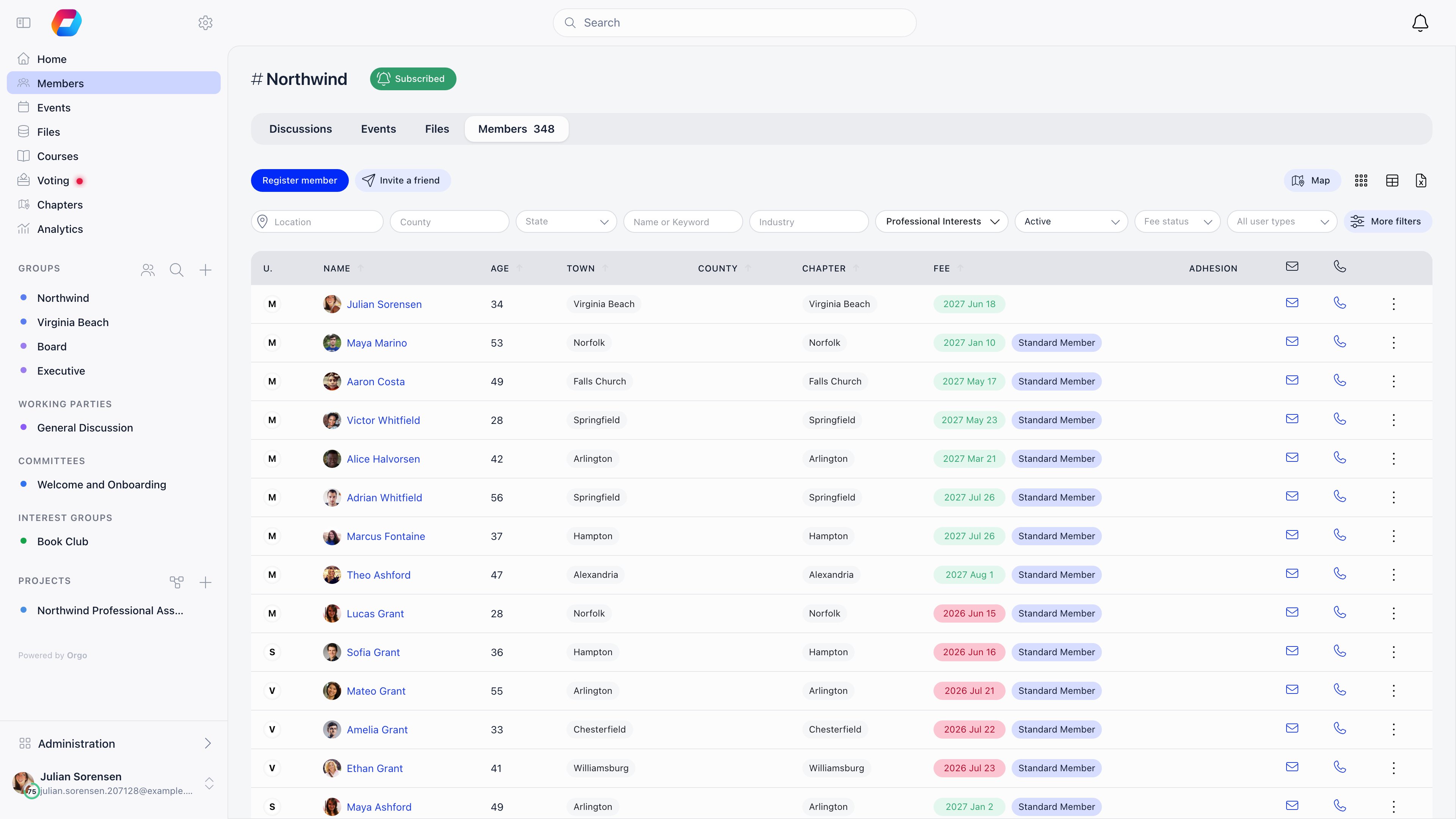 Three views share the same filters: the table, **Gallery** (photo cards) and
**Map**, which plots members who have a town on their profile.
### Filters
The filter bar changes with your permissions and active modules. Only these
filters exist:
| Filter | What it matches | Shown when |
| --------------------------------------- | ------------------------------------------------------------------ | ----------------------------------------------------------------------- |
| **Name or Keyword** | Full name, profession headline, company, or role at that company | Always |
| **Location** | Town of residence | Organisation-wide and role-group lists |
| **Country** / **County** / **State** | Country for international organisations, county or state otherwise | Depends on the organisation country |
| **Status** | One member status (see [User Statuses](/docs/platform/users/statuses)) | HR\_LOCAL on that local center, or HR\_TENANT organisation-wide |
| **Fee status** | Fee paid, Fee not paid, or Grace period | Fees module on and HR\_TENANT |
| **Fee type** | A specific membership fee price | Fees module on and HR\_TENANT or FINANCIAL\_TENANT |
| **Card ID** | Partial match on the member card number | **Enable Card/Member IDs** is on |
| **Profession** | Profession industry | Professions module with industries on |
| Skills, interests, **Availability** | Values from those profile fields | The matching field is enabled |
| User type | One user type | **Who Can Filter Users by Type** (All Users or Admin Tenant) allows you |
| **Chapter** | Local center | The organisation has local centers |
| **All members** / **Only full members** | Full membership | **Full Membership Status** is on |
| **All permissions** | Members holding one or more permissions | ADMIN\_TENANT only |
**Grace period** only appears when the fee is mandatory, auto deactivation on
expiry is on, and the deactivation delay is more than zero days. It finds members
whose fee has expired but who are still inside that delay.
The permission and user-type filters are enforced server side: asking without the
required permission returns access denied, not an unfiltered list. A date-joined
range (**From** / **Until**) exists in the mobile filter sheet only; the desktop
bar has no equivalent.
### Columns, sorting and row actions
Sortable headers: name, user type, full member, age, card ID, town, country or
county, chapter, fee date and status. Sorting applies to the whole result set,
not just the current page.
Columns are permission-gated rather than chosen:
| Column | Requires |
| ---------------------------------------------------------------------------------- | --------------------------------------------------------------------- |
| Email and phone (copy-to-clipboard icons), age | HR\_ASSISTANT\_LOCAL |
| Fee | HR\_LOCAL or FINANCIAL\_LOCAL, fees module on |
| Adhesion | HR\_LOCAL, adhesion on |
| Status | HR\_LOCAL, and no status filter active |
| **Groups**, from the column menu | HR\_LOCAL on a chapter list, HR\_TENANT on the organisation-wide list |
| One column per [custom field](/docs/platform/users/custom-fields), from the column menu | HR\_TENANT |
The column menu itself (the table icon above the list) needs HR\_TENANT, and it only
appears in the table view, never in Gallery or Map.
Each row's menu holds **View Profile**, **Modify Profile** and **Modify Roles**
(ADMIN\_LOCAL and above), plus making or removing a unit admin inside a unit.
Members pending approval (**New request**) or waitlisted get **Approve** and **Add
to waiting list** shortcuts next to the name, and a **New requests (N)** button
jumps to that queue. There is no multi-select: actions apply one member at a
time.
### Export and adding members
The Excel icon exports the current filtered, sorted list as CSV. Exports are
paged at 500 profiles: below that you confirm and download, above it you pick
which page, so a large organisation needs several exports. Export needs
HR\_TENANT, or HR\_LOCAL with a chapter selected, and each export is written to the
audit log with the exact query used.
A **Members** report in [Reports](/docs/platform/reports) has no such paging: the
download holds every matching member in one file, however many there are. It
needs ADMIN\_TENANT and it is built from its own column and filter picker rather
than from the list you are looking at, so the directory export stays the quicker
route for a chapter admin or for the list already on screen.
**Register member** creates an account directly; it needs HR\_TENANT, or HR\_LOCAL
for your own local center. The status comes from **Default Status for
Admin-Created Users**, and with an email address supplied the member gets a
welcome message with a login link. For many people at once, use
[Import](/docs/platform/customization/import). **Invite a friend**, next to it, sends a
registration link instead. All four routes side by side:
[Adding Members](/docs/platform/users/adding-members).
***
## Worked example: what a chapter treasurer sees
Permission names on their own do not tell you what lands on screen, because the
directory gates the filters, the columns and the export separately. Here is the
same person, a chapter treasurer holding only `FINANCIAL_LOCAL` on their own
chapter, walking through the list.
| What they want | Do they get it | Why |
| ---------------------------------------------------------- | -------------- | ---------------------------------------------------------------------------------------- |
| The **Fee** column | Yes | The fee column asks for `FINANCIAL_LOCAL` or `HR_LOCAL` |
| Email, phone and age columns | Yes | `FINANCIAL_LOCAL` implies `HR_ASSISTANT_LOCAL`, which is what those columns ask for |
| The **Fee status** filter (Paid / Not paid / Grace period) | No | That filter asks for `HR_TENANT`, an organisation-wide permission |
| The **Fee type** filter | No | That filter asks for `HR_TENANT` or `FINANCIAL_TENANT` |
| The CSV export | No | Export asks for `HR_TENANT` organisation-wide, or `HR_LOCAL` on the chapter being listed |
| The column menu, to add a custom field column | No | The column menu asks for `HR_TENANT` |
So a treasurer who needs to work through unpaid members chapter by chapter needs
`FINANCIAL_LOCAL` **and** `HR_LOCAL` on that chapter: `FINANCIAL_LOCAL` for the
money, `HR_LOCAL` for the export and the status column. The fee filters are a
bigger step: `FINANCIAL_TENANT` unlocks **Fee type** but not **Fee status**, which
only `HR_TENANT` opens, and both reach every chapter in the organisation. Before
widening someone's scope that far, check whether the chapter-scoped screens in
[Local group fees](/docs/platform/local-group-fees/member-fees) already answer the
question they are asking.
Two implications worth remembering for any permission you hand out:
* `FINANCIAL_LOCAL`, `HR_LOCAL` and `HR_PARENT_LOCAL` all imply
`HR_ASSISTANT_LOCAL`, so any of them unlocks contact details. `EVENT_LOCAL` and
`COMMUNICATION_LOCAL` do not.
* Filters and columns are not the same gate. Seeing a value in a column does not
mean you can filter or sort a list by it, and being able to read the list does
not mean you can export it.
***
## The member profile
Clicking a name opens the profile in a modal you can expand to a full page
(`/user/{id}`). Which tabs appear depends on modules, permissions and whether the
profile is your own.
Three views share the same filters: the table, **Gallery** (photo cards) and
**Map**, which plots members who have a town on their profile.
### Filters
The filter bar changes with your permissions and active modules. Only these
filters exist:
| Filter | What it matches | Shown when |
| --------------------------------------- | ------------------------------------------------------------------ | ----------------------------------------------------------------------- |
| **Name or Keyword** | Full name, profession headline, company, or role at that company | Always |
| **Location** | Town of residence | Organisation-wide and role-group lists |
| **Country** / **County** / **State** | Country for international organisations, county or state otherwise | Depends on the organisation country |
| **Status** | One member status (see [User Statuses](/docs/platform/users/statuses)) | HR\_LOCAL on that local center, or HR\_TENANT organisation-wide |
| **Fee status** | Fee paid, Fee not paid, or Grace period | Fees module on and HR\_TENANT |
| **Fee type** | A specific membership fee price | Fees module on and HR\_TENANT or FINANCIAL\_TENANT |
| **Card ID** | Partial match on the member card number | **Enable Card/Member IDs** is on |
| **Profession** | Profession industry | Professions module with industries on |
| Skills, interests, **Availability** | Values from those profile fields | The matching field is enabled |
| User type | One user type | **Who Can Filter Users by Type** (All Users or Admin Tenant) allows you |
| **Chapter** | Local center | The organisation has local centers |
| **All members** / **Only full members** | Full membership | **Full Membership Status** is on |
| **All permissions** | Members holding one or more permissions | ADMIN\_TENANT only |
**Grace period** only appears when the fee is mandatory, auto deactivation on
expiry is on, and the deactivation delay is more than zero days. It finds members
whose fee has expired but who are still inside that delay.
The permission and user-type filters are enforced server side: asking without the
required permission returns access denied, not an unfiltered list. A date-joined
range (**From** / **Until**) exists in the mobile filter sheet only; the desktop
bar has no equivalent.
### Columns, sorting and row actions
Sortable headers: name, user type, full member, age, card ID, town, country or
county, chapter, fee date and status. Sorting applies to the whole result set,
not just the current page.
Columns are permission-gated rather than chosen:
| Column | Requires |
| ---------------------------------------------------------------------------------- | --------------------------------------------------------------------- |
| Email and phone (copy-to-clipboard icons), age | HR\_ASSISTANT\_LOCAL |
| Fee | HR\_LOCAL or FINANCIAL\_LOCAL, fees module on |
| Adhesion | HR\_LOCAL, adhesion on |
| Status | HR\_LOCAL, and no status filter active |
| **Groups**, from the column menu | HR\_LOCAL on a chapter list, HR\_TENANT on the organisation-wide list |
| One column per [custom field](/docs/platform/users/custom-fields), from the column menu | HR\_TENANT |
The column menu itself (the table icon above the list) needs HR\_TENANT, and it only
appears in the table view, never in Gallery or Map.
Each row's menu holds **View Profile**, **Modify Profile** and **Modify Roles**
(ADMIN\_LOCAL and above), plus making or removing a unit admin inside a unit.
Members pending approval (**New request**) or waitlisted get **Approve** and **Add
to waiting list** shortcuts next to the name, and a **New requests (N)** button
jumps to that queue. There is no multi-select: actions apply one member at a
time.
### Export and adding members
The Excel icon exports the current filtered, sorted list as CSV. Exports are
paged at 500 profiles: below that you confirm and download, above it you pick
which page, so a large organisation needs several exports. Export needs
HR\_TENANT, or HR\_LOCAL with a chapter selected, and each export is written to the
audit log with the exact query used.
A **Members** report in [Reports](/docs/platform/reports) has no such paging: the
download holds every matching member in one file, however many there are. It
needs ADMIN\_TENANT and it is built from its own column and filter picker rather
than from the list you are looking at, so the directory export stays the quicker
route for a chapter admin or for the list already on screen.
**Register member** creates an account directly; it needs HR\_TENANT, or HR\_LOCAL
for your own local center. The status comes from **Default Status for
Admin-Created Users**, and with an email address supplied the member gets a
welcome message with a login link. For many people at once, use
[Import](/docs/platform/customization/import). **Invite a friend**, next to it, sends a
registration link instead. All four routes side by side:
[Adding Members](/docs/platform/users/adding-members).
***
## Worked example: what a chapter treasurer sees
Permission names on their own do not tell you what lands on screen, because the
directory gates the filters, the columns and the export separately. Here is the
same person, a chapter treasurer holding only `FINANCIAL_LOCAL` on their own
chapter, walking through the list.
| What they want | Do they get it | Why |
| ---------------------------------------------------------- | -------------- | ---------------------------------------------------------------------------------------- |
| The **Fee** column | Yes | The fee column asks for `FINANCIAL_LOCAL` or `HR_LOCAL` |
| Email, phone and age columns | Yes | `FINANCIAL_LOCAL` implies `HR_ASSISTANT_LOCAL`, which is what those columns ask for |
| The **Fee status** filter (Paid / Not paid / Grace period) | No | That filter asks for `HR_TENANT`, an organisation-wide permission |
| The **Fee type** filter | No | That filter asks for `HR_TENANT` or `FINANCIAL_TENANT` |
| The CSV export | No | Export asks for `HR_TENANT` organisation-wide, or `HR_LOCAL` on the chapter being listed |
| The column menu, to add a custom field column | No | The column menu asks for `HR_TENANT` |
So a treasurer who needs to work through unpaid members chapter by chapter needs
`FINANCIAL_LOCAL` **and** `HR_LOCAL` on that chapter: `FINANCIAL_LOCAL` for the
money, `HR_LOCAL` for the export and the status column. The fee filters are a
bigger step: `FINANCIAL_TENANT` unlocks **Fee type** but not **Fee status**, which
only `HR_TENANT` opens, and both reach every chapter in the organisation. Before
widening someone's scope that far, check whether the chapter-scoped screens in
[Local group fees](/docs/platform/local-group-fees/member-fees) already answer the
question they are asking.
Two implications worth remembering for any permission you hand out:
* `FINANCIAL_LOCAL`, `HR_LOCAL` and `HR_PARENT_LOCAL` all imply
`HR_ASSISTANT_LOCAL`, so any of them unlocks contact details. `EVENT_LOCAL` and
`COMMUNICATION_LOCAL` do not.
* Filters and columns are not the same gate. Seeing a value in a column does not
mean you can filter or sort a list by it, and being able to read the list does
not mean you can export it.
***
## The member profile
Clicking a name opens the profile in a modal you can expand to a full page
(`/user/{id}`). Which tabs appear depends on modules, permissions and whether the
profile is your own.
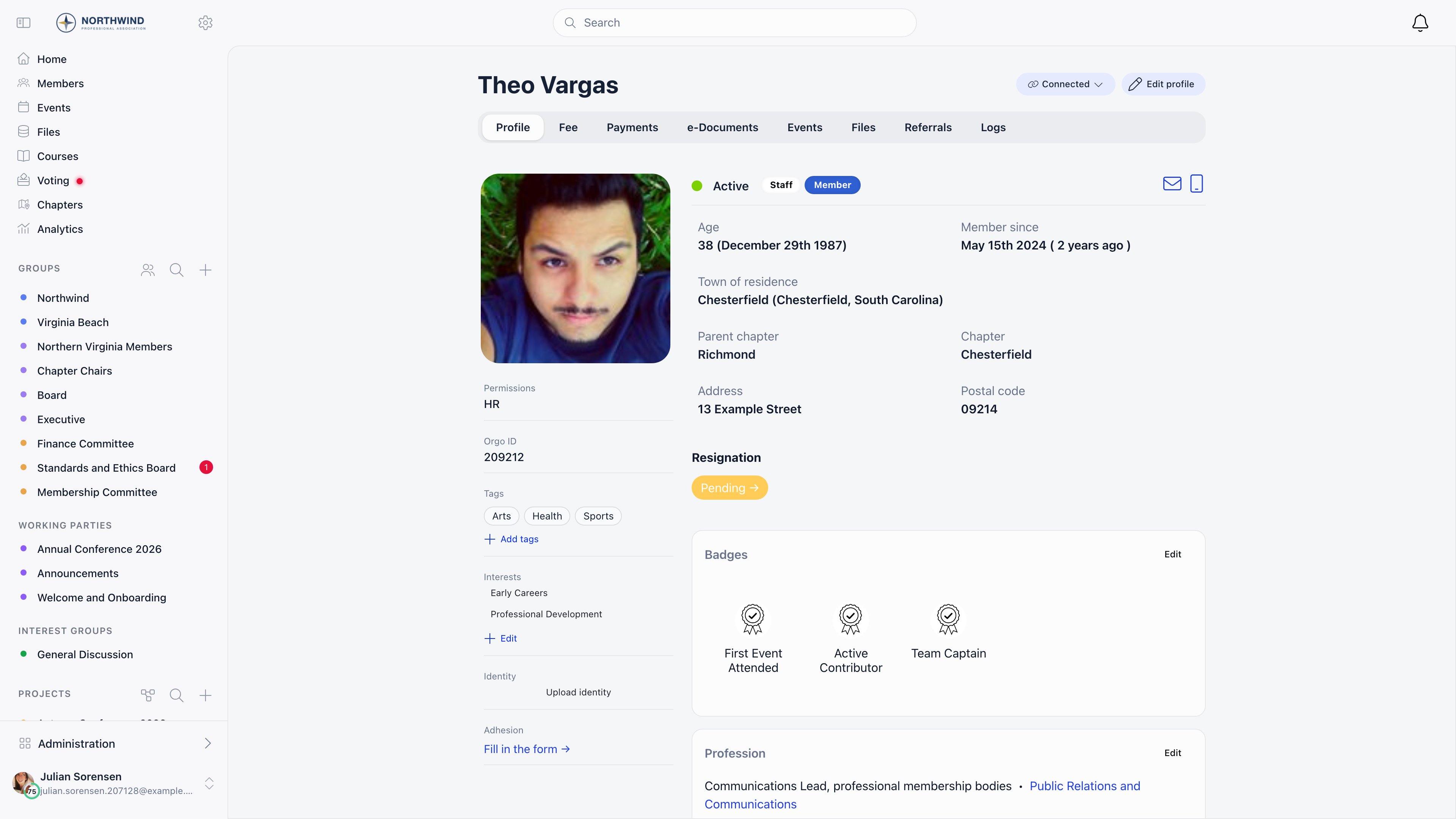 | Tab | What is there | Who sees it |
| ------------------------------------------------ | -------------------------------------------------------------------------------------------------------------------------------------------------- | ------------------------------------------------------------------------------------------------------------- |
| **Profile** | Photo, status, user type, age, town, chapter, member since, badges, permissions, roles, social links, resignation, identity and adhesion shortcuts | Everyone who can see the profile |
| **My Network** | Connection requests and accepted connections | Own profile, connections enabled |
| **Fee** | Fee level, periods and history | Self, HR\_LOCAL, FINANCIAL\_LOCAL, or a parent managing the profile |
| **Payments** | Every payment: fees, tickets, donations | Same as Fee, online payments enabled |
| **e-Documents** | Contracts and documents assigned to the member | Self, HR\_LOCAL, or a managing parent |
| **Events** | Events attended or registered for | Per event-module visibility |
| **Files** | The member's personal drive | Self and admins in scope |
| **Referrals** | People they referred or invited | Referral or invitations enabled |
| **Company** | The company they belong to | Own profile, companies module on |
| **[Activity](/docs/platform/users/profile-activity)** | Staff notes, donations, form submissions and tag changes on one feed | HR\_LOCAL or FINANCIAL\_LOCAL over that member, or ADMIN\_TENANT, with **Enable Profile Notes & Activity** on |
| **Logs** | Audit and email history | ADMIN\_TENANT |
| Tab | What is there | Who sees it |
| ------------------------------------------------ | -------------------------------------------------------------------------------------------------------------------------------------------------- | ------------------------------------------------------------------------------------------------------------- |
| **Profile** | Photo, status, user type, age, town, chapter, member since, badges, permissions, roles, social links, resignation, identity and adhesion shortcuts | Everyone who can see the profile |
| **My Network** | Connection requests and accepted connections | Own profile, connections enabled |
| **Fee** | Fee level, periods and history | Self, HR\_LOCAL, FINANCIAL\_LOCAL, or a parent managing the profile |
| **Payments** | Every payment: fees, tickets, donations | Same as Fee, online payments enabled |
| **e-Documents** | Contracts and documents assigned to the member | Self, HR\_LOCAL, or a managing parent |
| **Events** | Events attended or registered for | Per event-module visibility |
| **Files** | The member's personal drive | Self and admins in scope |
| **Referrals** | People they referred or invited | Referral or invitations enabled |
| **Company** | The company they belong to | Own profile, companies module on |
| **[Activity](/docs/platform/users/profile-activity)** | Staff notes, donations, form submissions and tag changes on one feed | HR\_LOCAL or FINANCIAL\_LOCAL over that member, or ADMIN\_TENANT, with **Enable Profile Notes & Activity** on |
| **Logs** | Audit and email history | ADMIN\_TENANT |
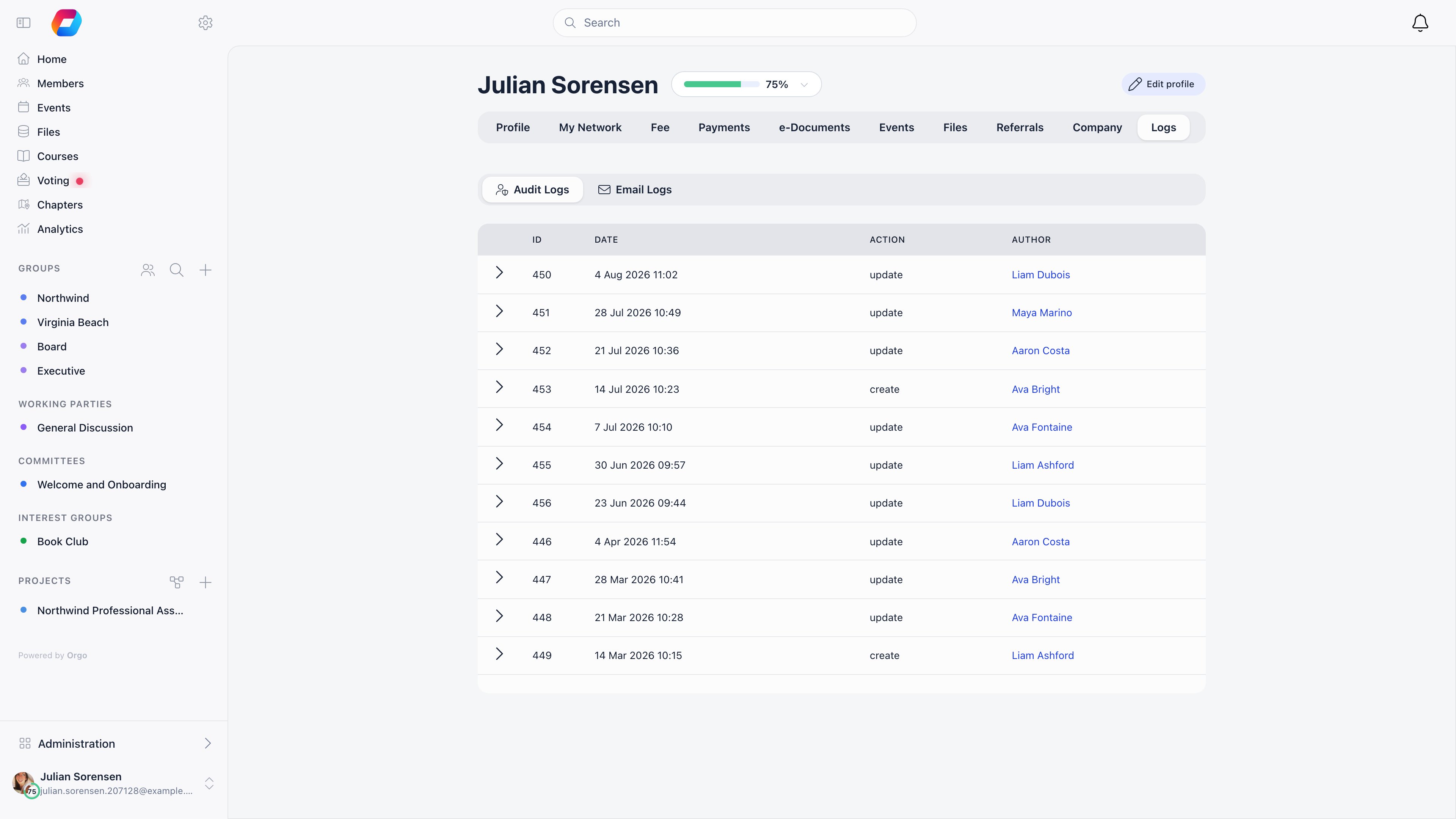 The Logs tab has two sub-tabs. **Audit Logs** records every change with the date,
the action, who made it, and an expandable before-and-after view of each field.
**Email Logs** shows what the platform sent this member and what happened to it:
the fastest answer to "they say they never got it".
***
## Setting up
Start minimal: you can collect more later.
[Registration form](/docs/platform/users/registration-form)
Use these when members fall into categories that behave differently, such as
Scout and Leader. Each type can have its own registration form.
[User types](/docs/platform/users/user-types)
Turn on **Manual Approval** to review each one from the directory.
[Statuses](/docs/platform/users/statuses)
[Profile fields](/docs/platform/users/profile-fields) ·
[Custom fields](/docs/platform/users/custom-fields)
Members can restrict themselves further, never less.
[Privacy settings](/docs/platform/users/privacy-settings)
[Permissions](/docs/platform/permissions)
The Logs tab has two sub-tabs. **Audit Logs** records every change with the date,
the action, who made it, and an expandable before-and-after view of each field.
**Email Logs** shows what the platform sent this member and what happened to it:
the fastest answer to "they say they never got it".
***
## Setting up
Start minimal: you can collect more later.
[Registration form](/docs/platform/users/registration-form)
Use these when members fall into categories that behave differently, such as
Scout and Leader. Each type can have its own registration form.
[User types](/docs/platform/users/user-types)
Turn on **Manual Approval** to review each one from the directory.
[Statuses](/docs/platform/users/statuses)
[Profile fields](/docs/platform/users/profile-fields) ·
[Custom fields](/docs/platform/users/custom-fields)
Members can restrict themselves further, never less.
[Privacy settings](/docs/platform/users/privacy-settings)
[Permissions](/docs/platform/permissions)
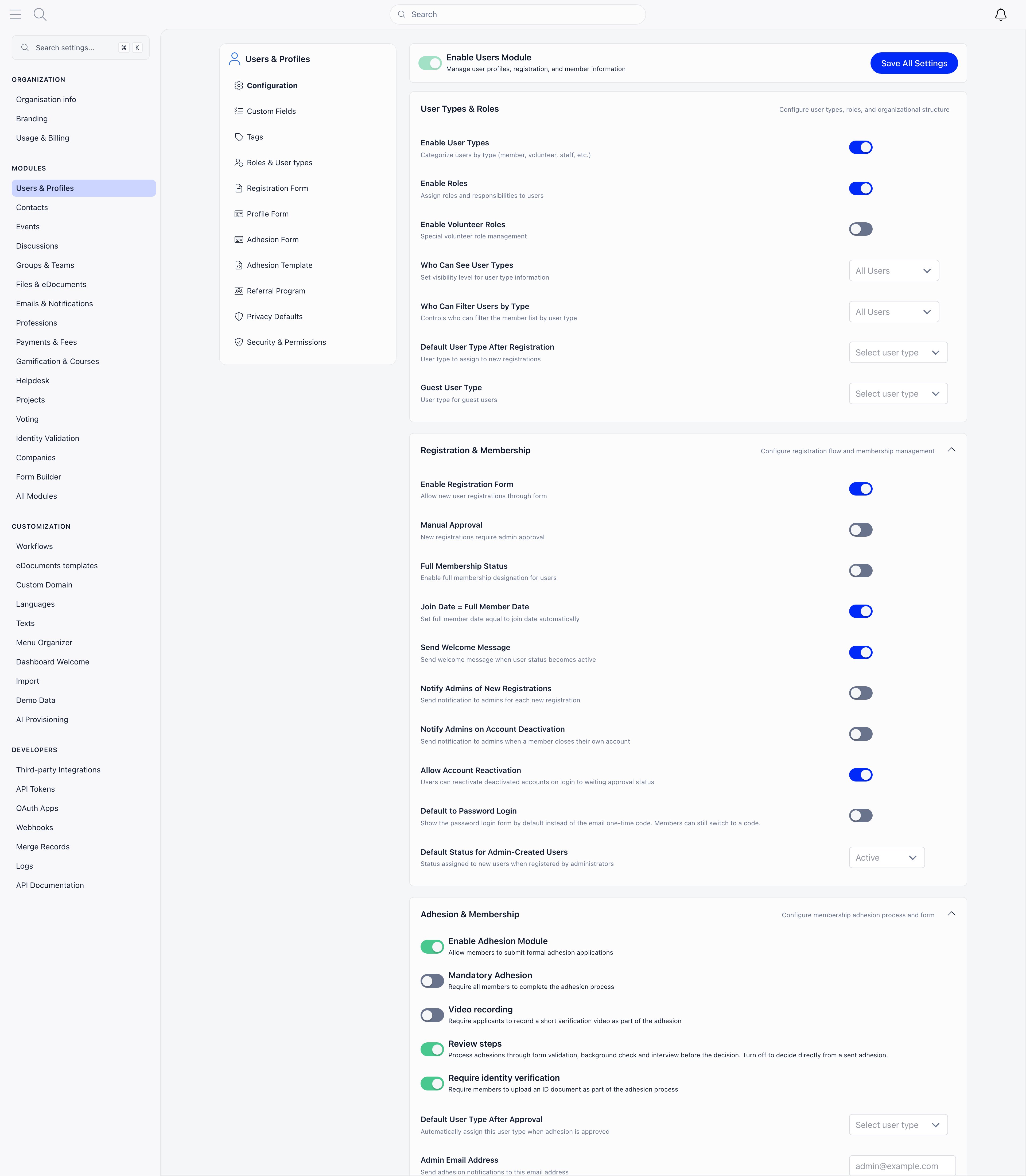 All of this lives under **Settings** → **Users & Profiles** and needs
ADMIN\_TENANT to edit. The left sub-navigation also holds Custom Fields, Tags,
Roles & User types, the Registration and Profile forms, the Referral Program,
Privacy Defaults and Security & Permissions. Entries appear only for what is
switched on, so the Adhesion form, the Adhesion template and the Registration
Waitlist are absent until those modules are active.
***
## Choosing what to turn on
| If you want to | Turn on |
| ------------------------------------------------ | ----------------------------------------------------------------------------------- |
| Review every application before admitting people | [Adhesion](/docs/platform/users/adhesion) |
| Queue people when membership is full or closed | [Waitlist](/docs/platform/users/waitlist) |
| Let members bring in others | [Invitations](/docs/platform/users/invitations) and [Referral](/docs/platform/users/referral) |
| Verify who someone is | [Identity Validation](/docs/platform/identity-validation) |
| Support families with children | [Family Members](/docs/platform/users/family-members) |
| Track why people leave | [Resignation](/docs/platform/users/resignation) |
| Support the GDPR right to erasure | [Account Deletion](/docs/platform/users/deletion-of-account) |
| Clean up duplicate records | [Merging duplicates](/docs/platform/users/merging-duplicates) |
***
## Troubleshooting
Start with their status: Inactive, Suspended, New request (still awaiting
approval) and Unconfirmed email all block access. Full elimination sequence in
[Troubleshooting member access](/docs/platform/users/troubleshooting-access).
Add the field in [Profile Fields](/docs/platform/users/profile-fields) and mark it
required. On their next visit, members with missing required fields are
redirected to an onboarding screen that lists exactly what is missing.
That redirect only knows about a fixed set of fields: first name, last name,
date of birth, gender, phone, address, town born, town current, and the
Facebook, Twitter, LinkedIn, Instagram, Telegram and TikTok links, plus any
custom field. Marking anything else required, in particular **Bio**,
**Postal code**, **Website**, **Location on members map**, the three
**Profession** fields or any of the company fields, still marks it required
on the profile form, so a member who opens that form cannot save without it.
What it does not do is trigger the prompt, so nobody is ever sent there and
the field quietly stays empty for everyone who does not edit their profile.
If one of those is what you actually need, collect it with a
[custom field](/docs/platform/users/custom-fields) instead, which the prompt does
check.
The directory opens in **Gallery** for everyone who is not an Orgo
administrator, and in the table for those who are. Nothing is missing: the
view toggle above the list switches between table, Gallery and Map, and your
choice is remembered in that browser from then on. If a colleague says a
column is missing, first check that they are looking at the table and not at
Gallery, since the column menu is only offered in the table view.
Columns are not a shared setting. Each one is gated on the permission in the
table above, evaluated per person and, for chapter permissions, per chapter.
Turning a column on from the column menu changes what you see, not what your
colleagues see.
The two that surprise people most: email, phone and age need
`HR_ASSISTANT_LOCAL`, which `HR_LOCAL`, `HR_PARENT_LOCAL` and
`FINANCIAL_LOCAL` all imply but `EVENT_LOCAL` and `COMMUNICATION_LOCAL` do
not; and the custom-field columns need `HR_TENANT`, so a chapter
administrator does not get them even on their own chapter's list.
Export is gated separately from reading the list. On the organisation-wide
list it needs `HR_TENANT`. On a chapter's list it needs `HR_LOCAL` on that
chapter. `FINANCIAL_LOCAL`, `ADMIN_LOCAL` and `HR_ASSISTANT_LOCAL` are not
enough, even though all of them can read the list and some of them see more
columns than the export contains.
A chapter secretary who has `HR_LOCAL` but still sees no button is usually
on the organisation-wide list rather than their chapter's. Pick the chapter
in the **Chapter** filter first.
Four conditions have to hold at once: **Manual Approval** is on, you hold
`ADMIN_LOCAL`, you are looking at either your own chapter's list or the
organisation-wide list with `HR_TENANT`, and you are not already filtering by
the Unapproved status. The last one catches people out: the button hides once
you are in the queue it would take you to.
`HR_LOCAL` alone does not show the counter. The **Approve** and **Add to
waiting list** shortcuts on the row are a separate gate and do appear for
`HR_LOCAL`, because approving somebody is an ordinary status change and asks
for `HR_LOCAL` over that member's chapter. So a chapter secretary can approve
people one at a time from the list; what they do not get is the counter that
jumps them to the queue.
Sidebar entries and page permissions are configured in two different places
and can disagree. Each entry in the sidebar carries its own permission, set
in **Settings** → **Customization** →
[Menu Organizer](/docs/platform/customization/menu-organizer), while what the
Members page shows is decided by **Settings** → **Users & Profiles** →
**Configuration** → **Who Can See Members in General Groups**. Set the menu
entry more generously than that setting and people see a link that leads to
an empty page.
Fix it at whichever end reflects your intent: raise the menu entry's
permission to match the visibility setting, or lower the visibility setting
if the members really should see the directory. Do not assume a hidden link
means a protected page, or that a visible link means an accessible one.
***
## Related
* [Adding Members](/docs/platform/users/adding-members) - the four ways people get an account
* [Lists & Segments](/docs/platform/users/lists) - reusable audiences built from member criteria
* [User Statuses](/docs/platform/users/statuses) - what each status blocks
* [Permissions](/docs/platform/permissions) - who can do what
* [Custom Fields](/docs/platform/users/custom-fields) - data Orgo does not ship with
* [Contacts](/docs/platform/contacts) - people who are not members
All of this lives under **Settings** → **Users & Profiles** and needs
ADMIN\_TENANT to edit. The left sub-navigation also holds Custom Fields, Tags,
Roles & User types, the Registration and Profile forms, the Referral Program,
Privacy Defaults and Security & Permissions. Entries appear only for what is
switched on, so the Adhesion form, the Adhesion template and the Registration
Waitlist are absent until those modules are active.
***
## Choosing what to turn on
| If you want to | Turn on |
| ------------------------------------------------ | ----------------------------------------------------------------------------------- |
| Review every application before admitting people | [Adhesion](/docs/platform/users/adhesion) |
| Queue people when membership is full or closed | [Waitlist](/docs/platform/users/waitlist) |
| Let members bring in others | [Invitations](/docs/platform/users/invitations) and [Referral](/docs/platform/users/referral) |
| Verify who someone is | [Identity Validation](/docs/platform/identity-validation) |
| Support families with children | [Family Members](/docs/platform/users/family-members) |
| Track why people leave | [Resignation](/docs/platform/users/resignation) |
| Support the GDPR right to erasure | [Account Deletion](/docs/platform/users/deletion-of-account) |
| Clean up duplicate records | [Merging duplicates](/docs/platform/users/merging-duplicates) |
***
## Troubleshooting
Start with their status: Inactive, Suspended, New request (still awaiting
approval) and Unconfirmed email all block access. Full elimination sequence in
[Troubleshooting member access](/docs/platform/users/troubleshooting-access).
Add the field in [Profile Fields](/docs/platform/users/profile-fields) and mark it
required. On their next visit, members with missing required fields are
redirected to an onboarding screen that lists exactly what is missing.
That redirect only knows about a fixed set of fields: first name, last name,
date of birth, gender, phone, address, town born, town current, and the
Facebook, Twitter, LinkedIn, Instagram, Telegram and TikTok links, plus any
custom field. Marking anything else required, in particular **Bio**,
**Postal code**, **Website**, **Location on members map**, the three
**Profession** fields or any of the company fields, still marks it required
on the profile form, so a member who opens that form cannot save without it.
What it does not do is trigger the prompt, so nobody is ever sent there and
the field quietly stays empty for everyone who does not edit their profile.
If one of those is what you actually need, collect it with a
[custom field](/docs/platform/users/custom-fields) instead, which the prompt does
check.
The directory opens in **Gallery** for everyone who is not an Orgo
administrator, and in the table for those who are. Nothing is missing: the
view toggle above the list switches between table, Gallery and Map, and your
choice is remembered in that browser from then on. If a colleague says a
column is missing, first check that they are looking at the table and not at
Gallery, since the column menu is only offered in the table view.
Columns are not a shared setting. Each one is gated on the permission in the
table above, evaluated per person and, for chapter permissions, per chapter.
Turning a column on from the column menu changes what you see, not what your
colleagues see.
The two that surprise people most: email, phone and age need
`HR_ASSISTANT_LOCAL`, which `HR_LOCAL`, `HR_PARENT_LOCAL` and
`FINANCIAL_LOCAL` all imply but `EVENT_LOCAL` and `COMMUNICATION_LOCAL` do
not; and the custom-field columns need `HR_TENANT`, so a chapter
administrator does not get them even on their own chapter's list.
Export is gated separately from reading the list. On the organisation-wide
list it needs `HR_TENANT`. On a chapter's list it needs `HR_LOCAL` on that
chapter. `FINANCIAL_LOCAL`, `ADMIN_LOCAL` and `HR_ASSISTANT_LOCAL` are not
enough, even though all of them can read the list and some of them see more
columns than the export contains.
A chapter secretary who has `HR_LOCAL` but still sees no button is usually
on the organisation-wide list rather than their chapter's. Pick the chapter
in the **Chapter** filter first.
Four conditions have to hold at once: **Manual Approval** is on, you hold
`ADMIN_LOCAL`, you are looking at either your own chapter's list or the
organisation-wide list with `HR_TENANT`, and you are not already filtering by
the Unapproved status. The last one catches people out: the button hides once
you are in the queue it would take you to.
`HR_LOCAL` alone does not show the counter. The **Approve** and **Add to
waiting list** shortcuts on the row are a separate gate and do appear for
`HR_LOCAL`, because approving somebody is an ordinary status change and asks
for `HR_LOCAL` over that member's chapter. So a chapter secretary can approve
people one at a time from the list; what they do not get is the counter that
jumps them to the queue.
Sidebar entries and page permissions are configured in two different places
and can disagree. Each entry in the sidebar carries its own permission, set
in **Settings** → **Customization** →
[Menu Organizer](/docs/platform/customization/menu-organizer), while what the
Members page shows is decided by **Settings** → **Users & Profiles** →
**Configuration** → **Who Can See Members in General Groups**. Set the menu
entry more generously than that setting and people see a link that leads to
an empty page.
Fix it at whichever end reflects your intent: raise the menu entry's
permission to match the visibility setting, or lower the visibility setting
if the members really should see the directory. Do not assume a hidden link
means a protected page, or that a visible link means an accessible one.
***
## Related
* [Adding Members](/docs/platform/users/adding-members) - the four ways people get an account
* [Lists & Segments](/docs/platform/users/lists) - reusable audiences built from member criteria
* [User Statuses](/docs/platform/users/statuses) - what each status blocks
* [Permissions](/docs/platform/permissions) - who can do what
* [Custom Fields](/docs/platform/users/custom-fields) - data Orgo does not ship with
* [Contacts](/docs/platform/contacts) - people who are not members