> ## Documentation Index
> Fetch the complete documentation index at: https://orgo.space/docs/llms.txt
> Use this file to discover all available pages before exploring further.
# Privacy Settings
> Control who can see member profile information — admin defaults and member overrides
Privacy settings control the visibility of member data. As an admin, you set organization-wide defaults. Members can then adjust their own privacy — but only to make things more private, never more public than your defaults allow.
**The core question:** For each piece of profile data (name, email, phone, etc.), who should see it — all community members, or only admins?
 ***
## How it works
Privacy operates on two levels:
1. **Admin defaults** — You set the starting point for all members
2. **Member overrides** — Individual members can restrict their own data further
A member can hide their phone number even if you've set it to visible by default. But they cannot make their phone number visible if you've restricted it to admin-only.
***
## Setting admin defaults
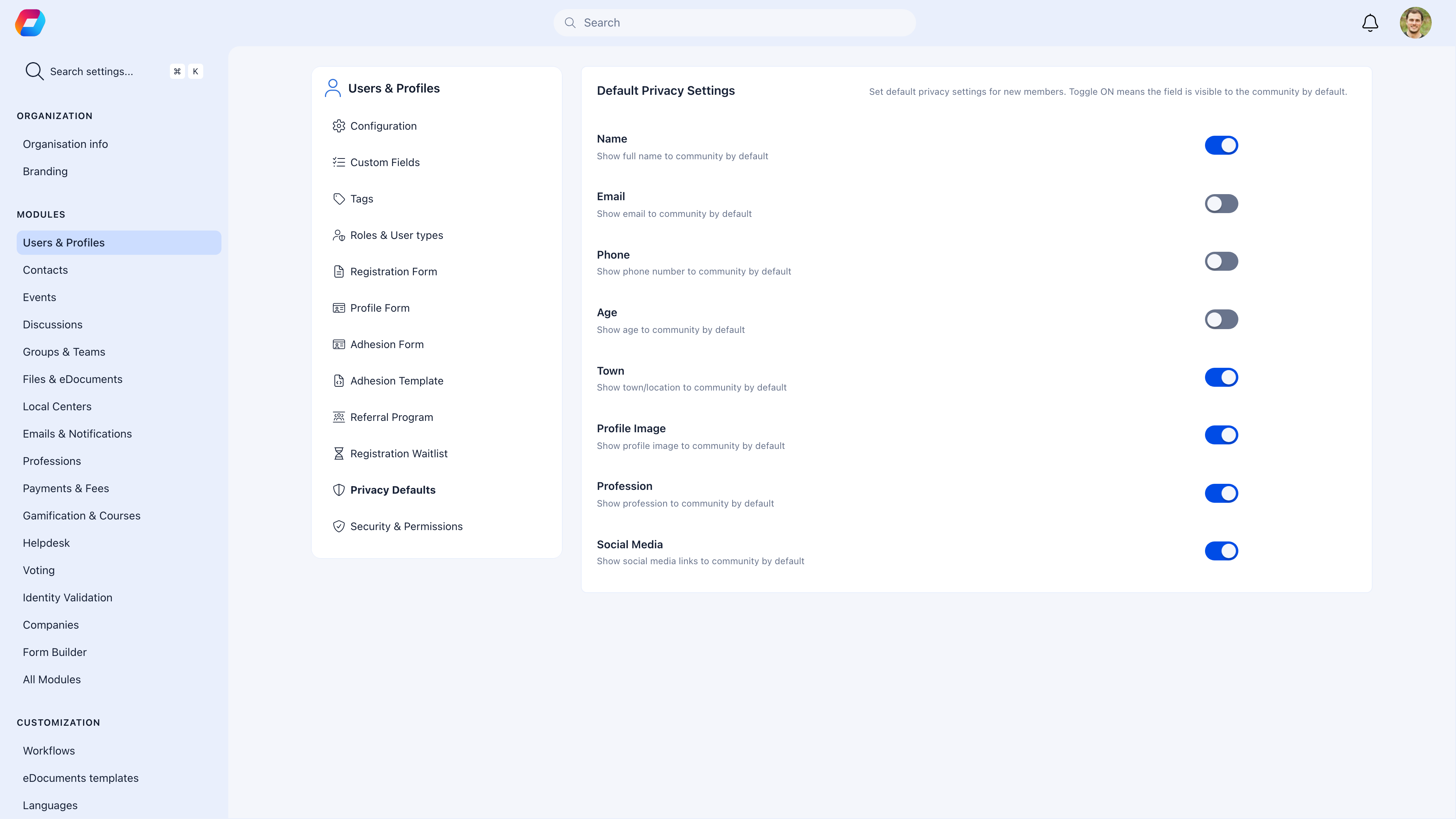
**Settings** → **Users & Profiles** → **Privacy Defaults**
### What each field controls
| Field | Toggle ON (community visible) | Toggle OFF (admin only) |
| ----------------- | --------------------------------- | --------------------------------------------- |
| **Name** | Full name visible to all members | Community sees first name + last initial only |
| **Email** | Email visible in member directory | Hidden — only admins see it |
| **Phone** | Phone number visible to members | Hidden — only admins see it |
| **Age** | Date of birth / age visible | Hidden from other members |
| **Town** | Location visible in directory | Hidden — only admins see it |
| **Profile Image** | Photo visible to all | Only admins see the photo |
| **Profession** | Professional info visible | Hidden from other members |
| **Social Media** | Social links visible on profile | Hidden — only admins see them |
### Recommended defaults by organization type
| Organization type | Show to community | Restrict to admins |
| ---------------------------- | ------------------------------- | ------------------------------- |
| **Social community** | Name, Photo, Town, Profession | Email, Phone, Age |
| **Professional association** | Name, Photo, Profession, Social | Email, Phone, Age, Town |
| **Youth organization** | Name, Photo | Email, Phone, Age, Town, Social |
| **Alumni network** | Name, Photo, Profession, Town | Email, Phone, Age |
When in doubt, default to private. Members who want to share can opt in. It's easier to open up than to lock down after members have already been exposed.
***
## Member privacy controls
Members manage their own privacy at **Profile** → **Settings & Privacy** → **Privacy**.
***
## How it works
Privacy operates on two levels:
1. **Admin defaults** — You set the starting point for all members
2. **Member overrides** — Individual members can restrict their own data further
A member can hide their phone number even if you've set it to visible by default. But they cannot make their phone number visible if you've restricted it to admin-only.
***
## Setting admin defaults
**Settings** → **Users & Profiles** → **Privacy Defaults**
### What each field controls
| Field | Toggle ON (community visible) | Toggle OFF (admin only) |
| ----------------- | --------------------------------- | --------------------------------------------- |
| **Name** | Full name visible to all members | Community sees first name + last initial only |
| **Email** | Email visible in member directory | Hidden — only admins see it |
| **Phone** | Phone number visible to members | Hidden — only admins see it |
| **Age** | Date of birth / age visible | Hidden from other members |
| **Town** | Location visible in directory | Hidden — only admins see it |
| **Profile Image** | Photo visible to all | Only admins see the photo |
| **Profession** | Professional info visible | Hidden from other members |
| **Social Media** | Social links visible on profile | Hidden — only admins see them |
### Recommended defaults by organization type
| Organization type | Show to community | Restrict to admins |
| ---------------------------- | ------------------------------- | ------------------------------- |
| **Social community** | Name, Photo, Town, Profession | Email, Phone, Age |
| **Professional association** | Name, Photo, Profession, Social | Email, Phone, Age, Town |
| **Youth organization** | Name, Photo | Email, Phone, Age, Town, Social |
| **Alumni network** | Name, Photo, Profession, Town | Email, Phone, Age |
When in doubt, default to private. Members who want to share can opt in. It's easier to open up than to lock down after members have already been exposed.
***
## Member privacy controls
Members manage their own privacy at **Profile** → **Settings & Privacy** → **Privacy**.
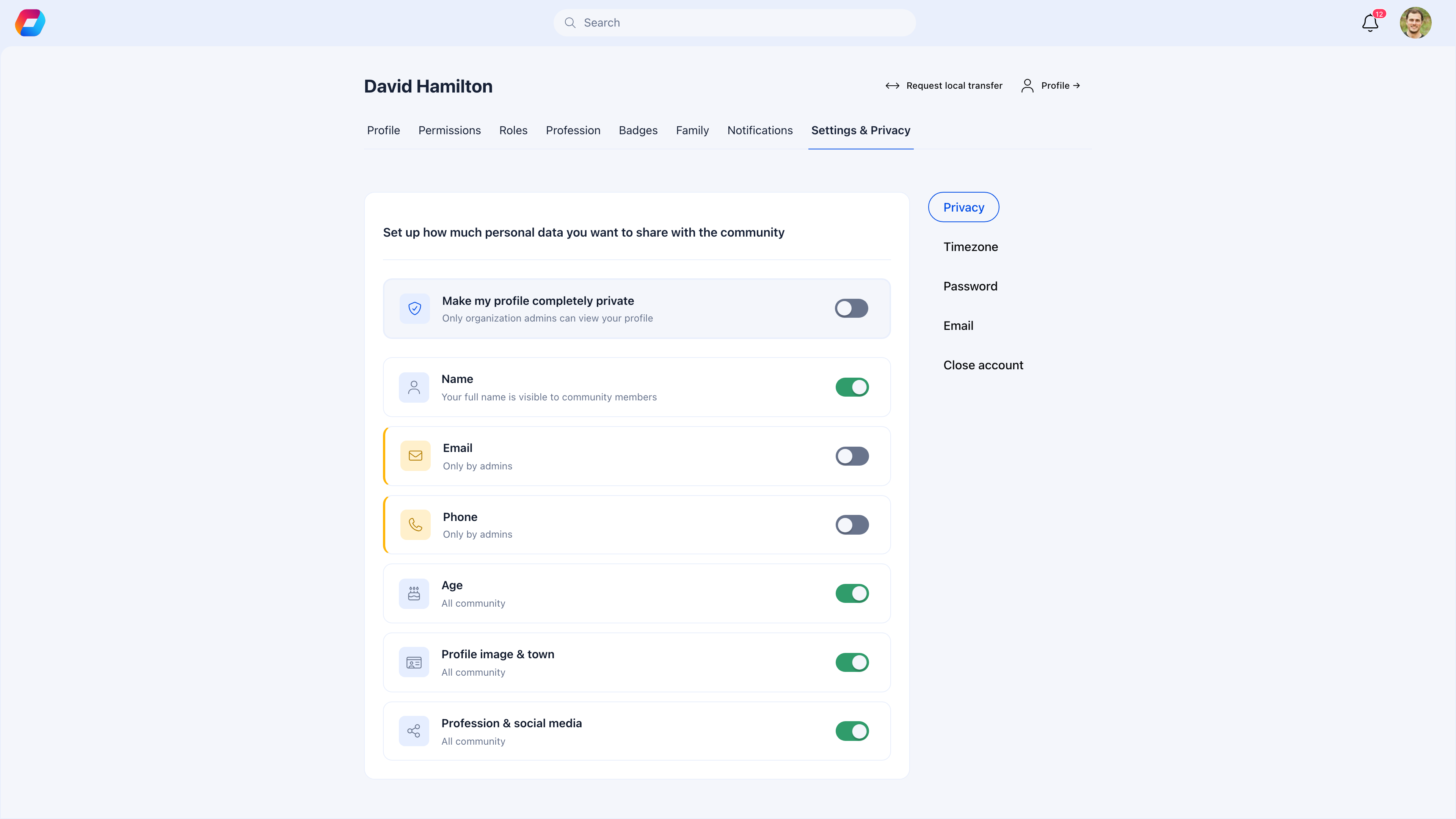 The member's privacy page (under Settings & Privacy → Privacy) shows the same field categories as the admin defaults, but as personal overrides. Each category has a toggle — blue/ON means "All community" (shared with other members), gray/OFF means "Only by admins" (hidden from other members). A master toggle at the top — **Make my profile completely private** — overrides all individual settings to restrict everything to admins only. The subtitle under each toggle shows the current visibility level (e.g., "All community" or "Only by admins").
### The "completely private" toggle
**Make my profile completely private** is a master override. When a member enables this:
* All their profile data is hidden from other members
* Only organization admins can see their information
* They essentially become invisible in the member directory
This is useful for members who want to participate in the organization but don't want a public-facing profile.
***
## How defaults and overrides interact
| Admin default | Member can set to... | Result |
| ---------------- | -------------------- | ----------------------------------------------- |
| ON (community) | ON (community) | Visible to all members |
| ON (community) | OFF (admin only) | Hidden — member chose privacy |
| OFF (admin only) | — | Always hidden — member can't override to public |
The key rule: **Members can only restrict, never expand.** If you set email to admin-only, no member can make their email publicly visible — even if they want to.
***
## Common scenarios
Check your privacy defaults. If Name and Profile Image are set to admin-only, members appear as anonymous entries in the directory. Set at least Name to community-visible so members can identify each other.
You'd need to change the admin default for Email to community-visible. This affects all members, not just one person. If most members want email private, keep the default and suggest the member add their email to their bio or social links instead.
GDPR requires that members can control their own data visibility. Orgo's privacy settings satisfy this:
* Members can restrict any field to admin-only
* Members can make their profile completely private
* Members can [delete their account](/platform/users/deletion-of-account) entirely
As a best practice, default sensitive fields (email, phone, age) to admin-only and let members opt in to sharing.
Admin defaults apply to new members and to anyone who hasn't customized their personal settings. If a member has already set their own privacy preferences, changing the admin defaults won't override their choices. The defaults only set the starting point.
***
## Related
* [Profile Fields](/platform/users/profile-fields) — What data members can add (privacy controls who sees it)
* [Custom Fields](/platform/users/custom-fields) — Custom fields with admin-only option
* [Account Deletion](/platform/users/deletion-of-account) — Permanent data removal (the ultimate privacy option)
The member's privacy page (under Settings & Privacy → Privacy) shows the same field categories as the admin defaults, but as personal overrides. Each category has a toggle — blue/ON means "All community" (shared with other members), gray/OFF means "Only by admins" (hidden from other members). A master toggle at the top — **Make my profile completely private** — overrides all individual settings to restrict everything to admins only. The subtitle under each toggle shows the current visibility level (e.g., "All community" or "Only by admins").
### The "completely private" toggle
**Make my profile completely private** is a master override. When a member enables this:
* All their profile data is hidden from other members
* Only organization admins can see their information
* They essentially become invisible in the member directory
This is useful for members who want to participate in the organization but don't want a public-facing profile.
***
## How defaults and overrides interact
| Admin default | Member can set to... | Result |
| ---------------- | -------------------- | ----------------------------------------------- |
| ON (community) | ON (community) | Visible to all members |
| ON (community) | OFF (admin only) | Hidden — member chose privacy |
| OFF (admin only) | — | Always hidden — member can't override to public |
The key rule: **Members can only restrict, never expand.** If you set email to admin-only, no member can make their email publicly visible — even if they want to.
***
## Common scenarios
Check your privacy defaults. If Name and Profile Image are set to admin-only, members appear as anonymous entries in the directory. Set at least Name to community-visible so members can identify each other.
You'd need to change the admin default for Email to community-visible. This affects all members, not just one person. If most members want email private, keep the default and suggest the member add their email to their bio or social links instead.
GDPR requires that members can control their own data visibility. Orgo's privacy settings satisfy this:
* Members can restrict any field to admin-only
* Members can make their profile completely private
* Members can [delete their account](/platform/users/deletion-of-account) entirely
As a best practice, default sensitive fields (email, phone, age) to admin-only and let members opt in to sharing.
Admin defaults apply to new members and to anyone who hasn't customized their personal settings. If a member has already set their own privacy preferences, changing the admin defaults won't override their choices. The defaults only set the starting point.
***
## Related
* [Profile Fields](/platform/users/profile-fields) — What data members can add (privacy controls who sees it)
* [Custom Fields](/platform/users/custom-fields) — Custom fields with admin-only option
* [Account Deletion](/platform/users/deletion-of-account) — Permanent data removal (the ultimate privacy option)