> ## Documentation Index
> Fetch the complete documentation index at: https://orgo.space/docs/llms.txt
> Use this file to discover all available pages before exploring further.
# Referral Program
> Track which members bring in new people — and optionally make registration invite-only
The Referral Program tracks which members bring in new registrations through [Invitations](/platform/users/invitations). It answers "who brought this member?" and "who are our best recruiters?" — and can optionally make your organization invite-only.
**Referrals build on Invitations.** The [Invitations](/platform/users/invitations) feature lets members send invitation emails. The Referral Program adds the tracking and statistics layer on top. Enable both for the full picture.
 ***
## How to enable
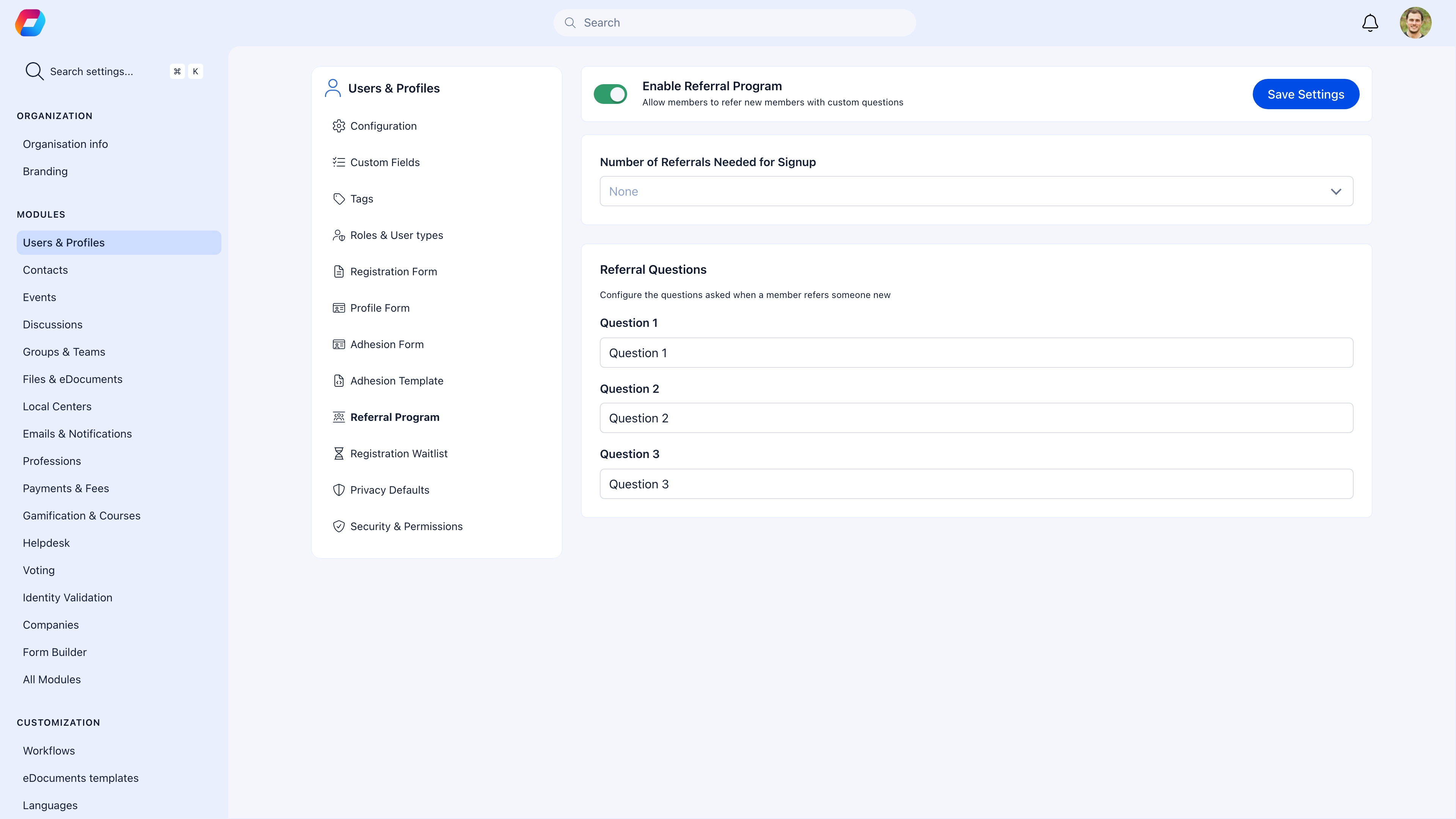
**Settings** → **Users & Profiles** → **Referral Program**
| Setting | What it does |
| ------------------------------- | --------------------------------------------------------------------------------------------------------------------------------------------------------------------------------------------------------- |
| **Referral Program** | Toggle on to start tracking who refers who |
| **Referrals needed for signup** | Set to **0** (or empty): Open registration, referrals tracked in the background. Set to **1+**: **Invite-only mode** — public registration is disabled, new users must receive an invitation to register. |
***
## Open tracking vs invite-only
### Open registration with tracking (recommended to start)
Set "Referrals needed for signup" to **0**.
* Anyone can register normally
* If they came through a member's invitation link, the referral is recorded
* If they registered on their own, no referral is recorded
* You get data on organic vs referred growth
### Invite-only mode
Set "Referrals needed for signup" to **1**.
* Public registration page shows a message that membership is by invitation only
* Only people who received an invitation link can register
* Every new member is tracked to their referrer
* Growth is entirely controlled by existing members
Invite-only mode significantly limits growth. Only use it if your organization specifically requires controlled, member-vetted membership. Most organizations are better served by open registration with referral tracking.
***
## What gets tracked
| Data point | Description |
| ------------ | -------------------------------------------------------------- |
| **Referrer** | Who sent the invitation |
| **Referee** | Who registered through the link |
| **Date** | When the referral was completed |
| **Status** | Pending (invited but not registered) or Completed (registered) |
### For admins
View organization-wide referral stats:
* Top referrers — who's bringing in the most members
* Referral trends — growth over time from referrals vs direct registration
* Conversion rates — invitations sent vs accepted
### For members
Members can see their own referral activity:
* How many people they've successfully referred
* Status of pending invitations
***
## Combining with gamification
If you have the Gamification module enabled, reward your best recruiters:
* Award points for each successful referral
* Create badges for referral milestones (5 referrals, 10 referrals, etc.)
* Display a leaderboard of top referrers
[Learn more about Gamification →](/platform/badges)
***
## Common scenarios
Enable the Referral Program with "Referrals needed" set to 0. Registration stays open. You'll see which members came through referrals vs found you on their own.
Enable Referral with "Referrals needed" set to 1. Enable [Invitations](/platform/users/invitations) so existing members can send invites. Consider also enabling [Adhesion](/platform/users/adhesion) so you can review invited applicants before they're admitted.
Referrals are only counted when the invited person completes registration. If someone was invited but never registered, it stays as "pending" and doesn't count toward the referrer's total.
***
## Related
* [Invitations](/platform/users/invitations) — The mechanism for sending invitations (referral tracks them)
* [Gamification](/platform/badges) — Reward referrers with points and badges
***
## How to enable
**Settings** → **Users & Profiles** → **Referral Program**
| Setting | What it does |
| ------------------------------- | --------------------------------------------------------------------------------------------------------------------------------------------------------------------------------------------------------- |
| **Referral Program** | Toggle on to start tracking who refers who |
| **Referrals needed for signup** | Set to **0** (or empty): Open registration, referrals tracked in the background. Set to **1+**: **Invite-only mode** — public registration is disabled, new users must receive an invitation to register. |
***
## Open tracking vs invite-only
### Open registration with tracking (recommended to start)
Set "Referrals needed for signup" to **0**.
* Anyone can register normally
* If they came through a member's invitation link, the referral is recorded
* If they registered on their own, no referral is recorded
* You get data on organic vs referred growth
### Invite-only mode
Set "Referrals needed for signup" to **1**.
* Public registration page shows a message that membership is by invitation only
* Only people who received an invitation link can register
* Every new member is tracked to their referrer
* Growth is entirely controlled by existing members
Invite-only mode significantly limits growth. Only use it if your organization specifically requires controlled, member-vetted membership. Most organizations are better served by open registration with referral tracking.
***
## What gets tracked
| Data point | Description |
| ------------ | -------------------------------------------------------------- |
| **Referrer** | Who sent the invitation |
| **Referee** | Who registered through the link |
| **Date** | When the referral was completed |
| **Status** | Pending (invited but not registered) or Completed (registered) |
### For admins
View organization-wide referral stats:
* Top referrers — who's bringing in the most members
* Referral trends — growth over time from referrals vs direct registration
* Conversion rates — invitations sent vs accepted
### For members
Members can see their own referral activity:
* How many people they've successfully referred
* Status of pending invitations
***
## Combining with gamification
If you have the Gamification module enabled, reward your best recruiters:
* Award points for each successful referral
* Create badges for referral milestones (5 referrals, 10 referrals, etc.)
* Display a leaderboard of top referrers
[Learn more about Gamification →](/platform/badges)
***
## Common scenarios
Enable the Referral Program with "Referrals needed" set to 0. Registration stays open. You'll see which members came through referrals vs found you on their own.
Enable Referral with "Referrals needed" set to 1. Enable [Invitations](/platform/users/invitations) so existing members can send invites. Consider also enabling [Adhesion](/platform/users/adhesion) so you can review invited applicants before they're admitted.
Referrals are only counted when the invited person completes registration. If someone was invited but never registered, it stays as "pending" and doesn't count toward the referrer's total.
***
## Related
* [Invitations](/platform/users/invitations) — The mechanism for sending invitations (referral tracks them)
* [Gamification](/platform/badges) — Reward referrers with points and badges