> ## Documentation Index
> Fetch the complete documentation index at: https://orgo.space/docs/llms.txt
> Use this file to discover all available pages before exploring further.
# Resignation
> Formal member departure with reason tracking and admin approval
Resignation is a formal departure process. Unlike simply setting someone to Inactive, resignation captures why people leave — giving you data to improve retention. Every resignation goes through admin approval, so no one disappears without someone knowing.
 **When to use resignation vs other options:**
* **Resignation** — Member wants to leave formally. You want to know why and have a record.
* **Status → Inactive** — Member is lapsing or taking a break. No formal process needed.
* **Status → Suspended** — Admin needs to block someone immediately. No member input.
* **Account Deletion** — Member wants their data removed (GDPR). If resignation is enabled, they must resign first.
***
## How to enable
Go to **Settings** → **Users & Profiles** → **Configuration** → enable **Resignations**.
Once enabled, members see a **Resign** button on their Close account page, and admins see **Resignation Requests** in the sidebar.
***
## What the member sees
Members reach the resignation form through **Profile** → **Settings & Privacy** → **Close account** → **Resign**.
**When to use resignation vs other options:**
* **Resignation** — Member wants to leave formally. You want to know why and have a record.
* **Status → Inactive** — Member is lapsing or taking a break. No formal process needed.
* **Status → Suspended** — Admin needs to block someone immediately. No member input.
* **Account Deletion** — Member wants their data removed (GDPR). If resignation is enabled, they must resign first.
***
## How to enable
Go to **Settings** → **Users & Profiles** → **Configuration** → enable **Resignations**.
Once enabled, members see a **Resign** button on their Close account page, and admins see **Resignation Requests** in the sidebar.
***
## What the member sees
Members reach the resignation form through **Profile** → **Settings & Privacy** → **Close account** → **Resign**.
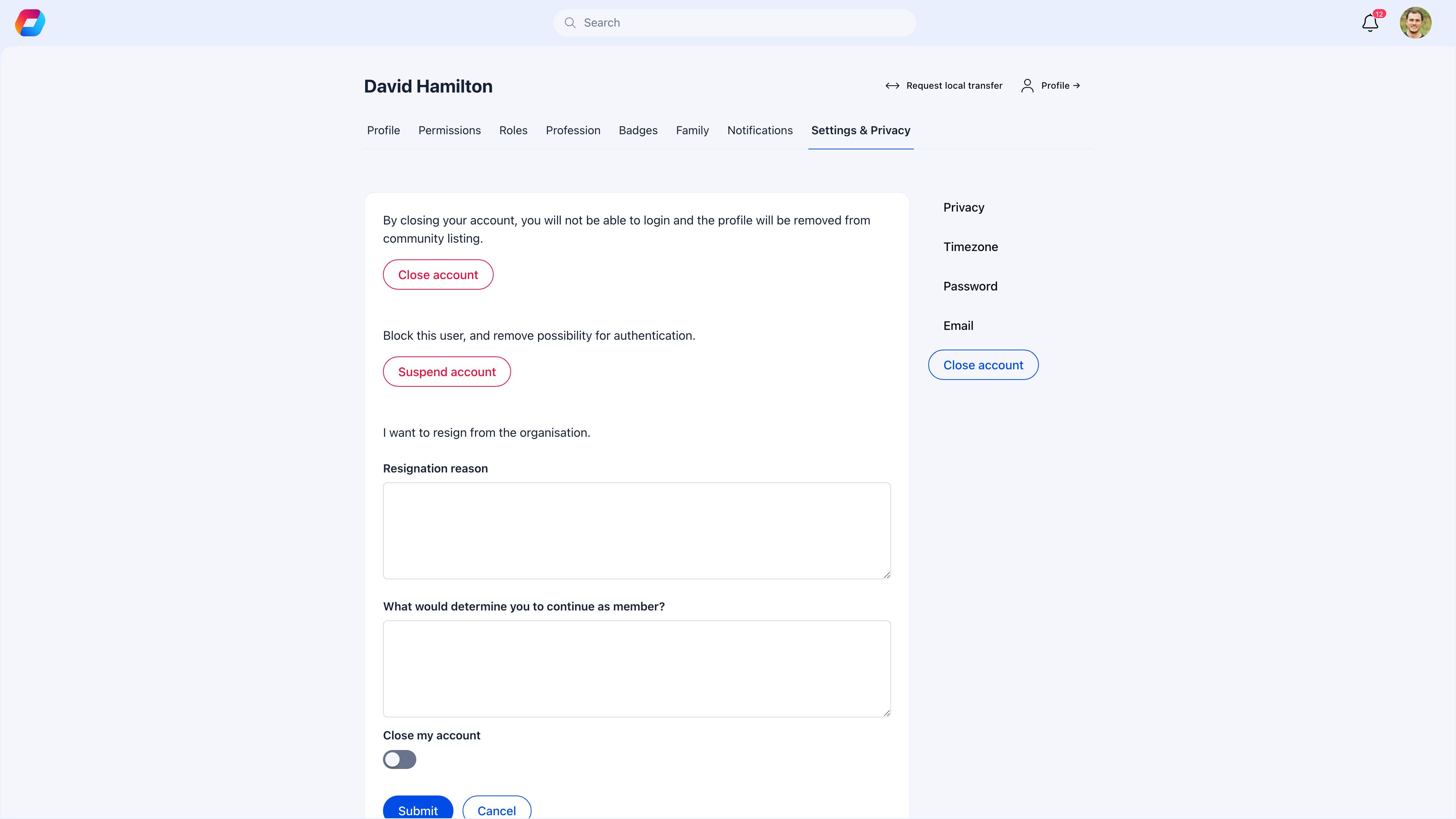 When a member clicks **Resign** on the Close account page, the resignation form appears inline. It contains a mandatory **Resignation reason** text area, an optional **What would determine you to continue as member?** feedback field, and a **Close my account** toggle (off by default — if enabled, the account is also deactivated upon approval). At the bottom, **Submit** sends the request for admin review and **Cancel** returns to the Close account page without submitting.
| Field | Required | What it does |
| --------------------------------------------------- | -------- | ----------------------------------------------------------------------------------------------------------------------------------------------------------------------------------------------------------------------- |
| **Resignation reason** | Yes | Why they're leaving. This is the most valuable data you'll collect — it tells you what's pushing people away. |
| **What would determine you to continue as member?** | No | What could change their mind. Surprisingly useful for identifying fixable issues. |
| **Close my account** | No | If toggled on, their account status changes to Inactive when the resignation is approved. If off, the resignation is on record but their account stays Active (useful for "I'm leaving in spirit but keep my profile"). |
After submitting, the member sees a confirmation. Their account continues to work normally until an admin processes the request.
***
## What admins see
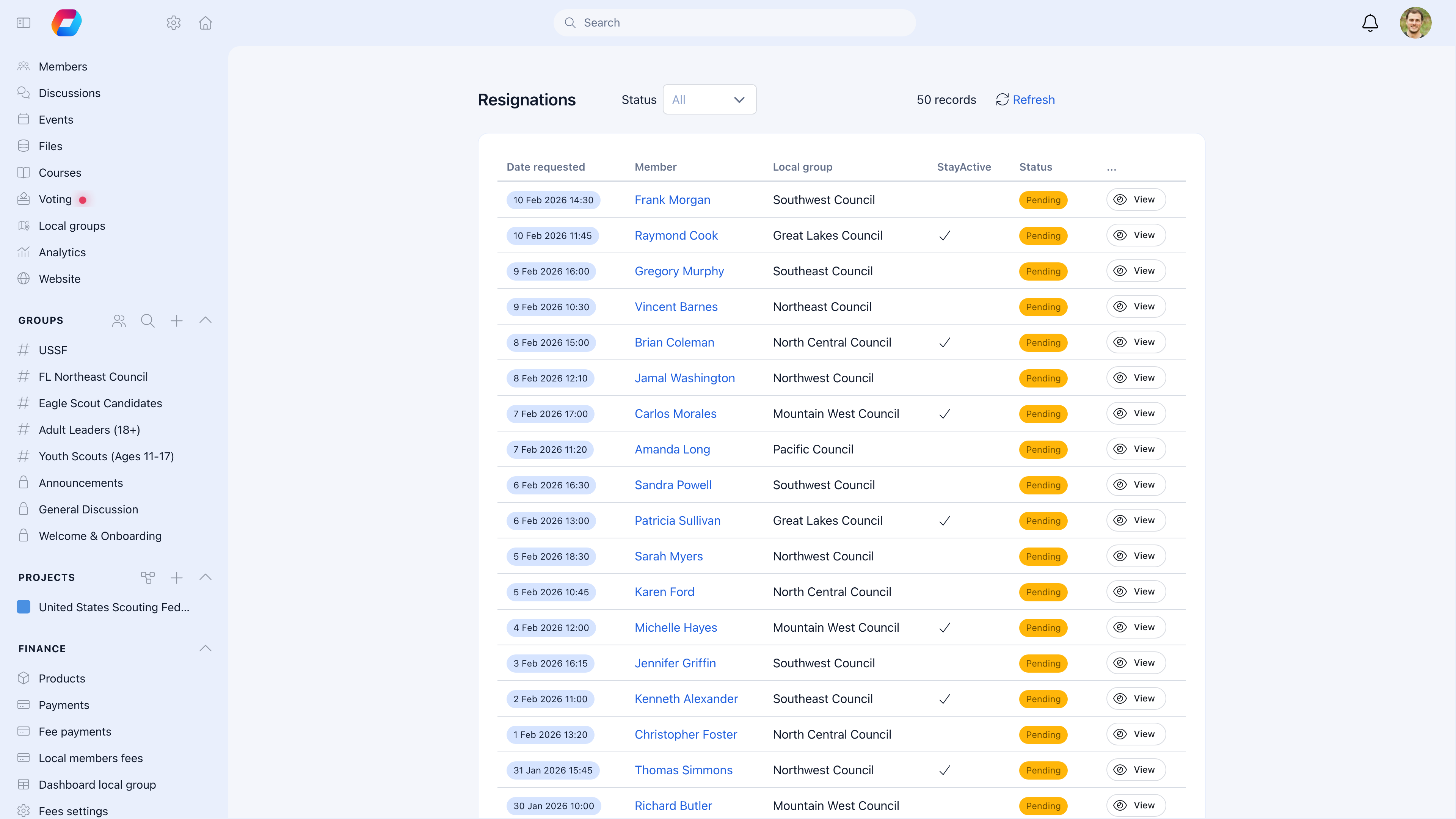
Navigate to **Resignation Requests** in the sidebar to see all submissions.
### Processing a resignation
Click **View** on a pending request. Read the resignation reason and feedback carefully.
If the member mentioned something fixable, or they're a key contributor, contact them before processing. The feedback field often reveals retention opportunities.
* **Approve**: Processes the resignation. If the member checked "Close my account", their status changes to Inactive. An email notification is sent to the member.
* **Delete**: Removes the request entirely. The member is not notified. Only Admin Tenant can do this.
### Who can do what
| Action | HR Tenant | Admin Tenant |
| ------------------------- | --------- | ------------ |
| View resignation requests | Yes | Yes |
| Approve resignations | Yes | Yes |
| Delete requests | No | Yes |
***
## Resignation + account deletion
When both features are enabled, they work as a pipeline:
1. Member must **resign first** and get approved
2. Only after resignation is processed can they **delete their account**
3. Deletion permanently removes their data
This gives you a two-step safeguard: you see why they're leaving (resignation) before any data is lost (deletion).
If only deletion is enabled (resignation is off), members can delete their accounts directly without any admin oversight.
Enable resignation even if you also enable account deletion. The resignation reason data alone is worth it — it tells you what's driving people away before their data disappears.
***
## Using resignation data
The resignation reasons you collect are a retention goldmine. Look for patterns:
* Are multiple people citing the same issue? That's a systemic problem worth fixing.
* Are departures clustered in a specific local center? That center may have leadership or culture issues.
* Are people leaving at a particular time of year? You may have a seasonal engagement problem.
* Is the feedback field showing fixable issues? "I'd stay if there were events near me" is actionable.
***
## Common scenarios
If the request is still **Pending**, an Admin Tenant can **Delete** the request. The member keeps their account as-is. If it was already **Approved**, you'll need to manually change their status back to Active (Profile → Edit → Permissions tab → Status → Active).
This means the member didn't toggle "Close my account" when they resigned. The resignation is on record, but they chose to keep their profile active. This is normal — some members resign from formal membership but want to stay connected.
If you're processing many resignations at once, check if there's a pattern in the reasons. High volume often signals an organizational issue worth addressing. For the processing itself, work through the list — there's no bulk approve option, as each resignation should be reviewed individually.
Delete is for removing invalid or test requests. Don't use it to prevent a member from leaving — that creates a bad experience. If a member genuinely wants to leave, approve the resignation. If they submitted by mistake, reach out and confirm before deleting.
***
## Related
* [Account Deletion](/platform/users/deletion-of-account) — Permanent data removal (can require resignation first)
* [User Statuses](/platform/users/statuses) — Alternative: set to Inactive without the formal process
* [Adhesion](/platform/users/adhesion) — The opposite flow: joining the organization
When a member clicks **Resign** on the Close account page, the resignation form appears inline. It contains a mandatory **Resignation reason** text area, an optional **What would determine you to continue as member?** feedback field, and a **Close my account** toggle (off by default — if enabled, the account is also deactivated upon approval). At the bottom, **Submit** sends the request for admin review and **Cancel** returns to the Close account page without submitting.
| Field | Required | What it does |
| --------------------------------------------------- | -------- | ----------------------------------------------------------------------------------------------------------------------------------------------------------------------------------------------------------------------- |
| **Resignation reason** | Yes | Why they're leaving. This is the most valuable data you'll collect — it tells you what's pushing people away. |
| **What would determine you to continue as member?** | No | What could change their mind. Surprisingly useful for identifying fixable issues. |
| **Close my account** | No | If toggled on, their account status changes to Inactive when the resignation is approved. If off, the resignation is on record but their account stays Active (useful for "I'm leaving in spirit but keep my profile"). |
After submitting, the member sees a confirmation. Their account continues to work normally until an admin processes the request.
***
## What admins see
Navigate to **Resignation Requests** in the sidebar to see all submissions.
### Processing a resignation
Click **View** on a pending request. Read the resignation reason and feedback carefully.
If the member mentioned something fixable, or they're a key contributor, contact them before processing. The feedback field often reveals retention opportunities.
* **Approve**: Processes the resignation. If the member checked "Close my account", their status changes to Inactive. An email notification is sent to the member.
* **Delete**: Removes the request entirely. The member is not notified. Only Admin Tenant can do this.
### Who can do what
| Action | HR Tenant | Admin Tenant |
| ------------------------- | --------- | ------------ |
| View resignation requests | Yes | Yes |
| Approve resignations | Yes | Yes |
| Delete requests | No | Yes |
***
## Resignation + account deletion
When both features are enabled, they work as a pipeline:
1. Member must **resign first** and get approved
2. Only after resignation is processed can they **delete their account**
3. Deletion permanently removes their data
This gives you a two-step safeguard: you see why they're leaving (resignation) before any data is lost (deletion).
If only deletion is enabled (resignation is off), members can delete their accounts directly without any admin oversight.
Enable resignation even if you also enable account deletion. The resignation reason data alone is worth it — it tells you what's driving people away before their data disappears.
***
## Using resignation data
The resignation reasons you collect are a retention goldmine. Look for patterns:
* Are multiple people citing the same issue? That's a systemic problem worth fixing.
* Are departures clustered in a specific local center? That center may have leadership or culture issues.
* Are people leaving at a particular time of year? You may have a seasonal engagement problem.
* Is the feedback field showing fixable issues? "I'd stay if there were events near me" is actionable.
***
## Common scenarios
If the request is still **Pending**, an Admin Tenant can **Delete** the request. The member keeps their account as-is. If it was already **Approved**, you'll need to manually change their status back to Active (Profile → Edit → Permissions tab → Status → Active).
This means the member didn't toggle "Close my account" when they resigned. The resignation is on record, but they chose to keep their profile active. This is normal — some members resign from formal membership but want to stay connected.
If you're processing many resignations at once, check if there's a pattern in the reasons. High volume often signals an organizational issue worth addressing. For the processing itself, work through the list — there's no bulk approve option, as each resignation should be reviewed individually.
Delete is for removing invalid or test requests. Don't use it to prevent a member from leaving — that creates a bad experience. If a member genuinely wants to leave, approve the resignation. If they submitted by mistake, reach out and confirm before deleting.
***
## Related
* [Account Deletion](/platform/users/deletion-of-account) — Permanent data removal (can require resignation first)
* [User Statuses](/platform/users/statuses) — Alternative: set to Inactive without the formal process
* [Adhesion](/platform/users/adhesion) — The opposite flow: joining the organization