
Electronic voting lets nonprofit organizations and associations run secure, legally valid elections without requiring members to be physically present. Organizations that switch to online elections consistently see higher voter participation and fewer quorum failures than those relying on in-person ballots. Moving to digital elections requires updating your governing documents, choosing the right voting method, and selecting a system that meets ballot secrecy and data protection requirements.

Why associations are switching to electronic voting
Physical-only elections create three problems that grow worse as your organization scales.
Low turnout is the most common barrier. When voting requires physical presence, association participation rates are often well short of what's needed for quorum. Members who travel frequently, have disabilities, or live far from the meeting venue are effectively excluded. Online voting removes those barriers. Orgo's e-voting module is used by associations running elections for thousands of members across multiple chapters and geographic regions.
Quorum failures follow directly. A quorum is the minimum number of members required for a vote to be valid, typically 50 percent plus one, or a percentage defined in your bylaws. If quorum is not reached, the entire meeting and every resolution on the agenda is invalid. Online voting dramatically reduces quorum failures by removing geographic and scheduling barriers.
Administrative overhead adds to both. Paper ballots need printing, distributing, collecting, counting, and archiving. For a multi-hundred-member association, this process can consume substantial volunteer hours per election cycle. Digital systems automate vote counting instantly and produce auditable records without manual reconciliation.
Step 1: Update your bylaws to authorize electronic voting
Before running any online election, your governing documents must explicitly permit electronic voting. Most association bylaws written before 2015 only reference in-person voting. If yours don't mention electronic or online voting, a bylaw amendment is required first.
What your bylaws should address
| Topic | What to define | Example language |
|---|---|---|
| Electronic voting authorization | Explicit permission to use online voting systems | "The Board may authorize the use of electronic voting systems for any election or resolution that would otherwise require a physical ballot." |
| Voter authentication | How voter identity is verified | "Each eligible voter shall be authenticated through the organization's membership management system prior to casting a ballot." |
| Ballot secrecy | How anonymity is maintained | "The electronic voting system shall separate voter identity from ballot content, ensuring secret ballot provisions are maintained." |
| Voting window | How long the vote stays open | "Online voting periods shall remain open for no fewer than 72 hours and no more than 14 calendar days." |
| Quorum for online votes | Whether online participation counts toward quorum | "Members voting electronically shall be counted toward quorum requirements." |
| Record retention | How long election records are kept | "Electronic voting records, including anonymized ballot data and audit logs, shall be retained for a minimum of three years." |
Amending bylaws typically requires a vote itself. Plan ahead: do not wait until you need an online election to discover your bylaws don't allow one. Many organizations pass the electronic voting amendment at their last in-person general assembly.
Step 2: Choose your voting method
Not all online elections work the same way. The right method depends on your meeting format and the type of decision being made.
Live (synchronous) voting
Members vote during a live video meeting. Votes open and close in real time, with results displayed immediately. This method works best for board meetings, quick motions, and procedural votes. The limitation is that all voters must be online simultaneously.
Asynchronous voting
A voting period opens, typically 3 to 14 days, and members vote whenever convenient. Results are published after the window closes. Asynchronous voting is the most common method for associations because it maximizes participation across time zones and schedules. It is well suited to board elections, bylaw amendments, and annual resolutions.
Hybrid voting
Hybrid combines in-person and online voting. Members at the physical meeting vote on-site via tablets or a digital system, while remote members vote through the online platform. Votes are tallied together. This approach suits large associations transitioning from physical ballots to digital voting, or those with consistently mixed attendance.
Ballot types
- Single choice: select one option, such as yes or no on a motion, or one candidate for a position
- Multiple choice: select several options, such as three of eight candidates for a committee
- Ranked choice: rank candidates in order of preference; this eliminates the spoiler effect and typically produces more broadly acceptable outcomes
- Weighted voting: some members' votes count more, for example chapter delegates voting proportionally to chapter size
Step 3: Set up the election
Whether you use a standalone voting tool or a membership platform with built-in voting, the setup process follows the same pattern.
- Define voter eligibility. Who can vote? All members, only those in good standing with dues paid, or only delegates? The system needs to enforce this automatically, not through manual checking.
- Create ballots. Write clear ballot text. For candidate elections, include candidate statements and photos. For motions, include the full resolution text and any supporting materials.
- Set the voting window. For asynchronous votes, 5 to 7 days balances accessibility with urgency. For board elections, 7 to 14 days allows broader participation.
- Configure notifications. Schedule email and push notification reminders: an announcement when voting opens, a reminder at the midpoint, and a last-chance notice 24 hours before closing.
- Test the ballot. Have 2 to 3 team members run through the full voting flow. Verify they can authenticate, see the ballot, cast a vote, and receive confirmation. Fix any issues before going live.
Step 4: Security and compliance for electronic voting
Election integrity is non-negotiable. Members must trust that results reflect the actual will of the membership. A secure online voting system must meet four requirements.
Voter authentication
Every voter must be verified as an eligible member before casting a ballot. The most reliable approach is integrating voting directly with your membership database: the system already knows who is a current, dues-paid member. Standalone voting tools typically require a manual voter list upload before each election, which creates a risk of outdated data excluding eligible voters.
Ballot anonymity
Secret ballot provisions require that it is impossible to connect a specific ballot to the person who cast it. Secure systems achieve this by separating voter identity from ballot content at the moment of submission. The system records that a member voted, preventing double-voting, but cannot reveal how they voted.
Tamper evidence
Ballot data must be immutable after submission. Look for systems that log every ballot with a cryptographic hash, making any post-submission modification immediately detectable. This audit trail is the proof of election integrity if results are challenged.
GDPR compliance (for European organizations)
If your association operates in the EU or has EU-based members, your voting system must comply with GDPR. Key requirements include data minimization (collect only what is necessary to run the election), data residency (member data should be stored within the EU), the right to erasure (members can request deletion of personal data, though anonymized ballot records can be retained for audit purposes), and a lawful basis for processing (typically legitimate interest for governance activities).
European associations should strongly prefer EU-native platforms that store data within the EU by default, rather than relying on US-based tools with bolt-on compliance arrangements.
Step 5: Run the election
Election day, or election week, is straightforward if setup was completed correctly.
- Open voting. Publish the ballot and send the first notification. Include clear instructions on how to access and cast votes.
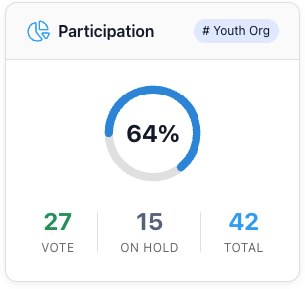
- Monitor participation. Track how many eligible voters have cast ballots. If participation is low after 48 hours, send a reminder. Track whether members have voted, not how they voted.
- Handle issues. Common problems include members who cannot log in (reset credentials), members who did not receive the notification (resend), and members who want to change their vote (most systems do not allow this, so communicate it upfront).
- Close voting. At the designated time, the system closes the ballot. No votes are accepted after this point.
Step 6: Publish and verify results
After the voting window closes, follow this process before making results official.
- Generate results. The system should produce results instantly, with charts and breakdowns by option.
- Run integrity verification. Confirm the audit trail is intact. Each vote should have a timestamp and verification hash. The total number of ballots cast should match the number of unique voters recorded.
- Announce results. Share results with all members, not just those who voted. Include total eligible voters, number of votes cast, participation rate, and the outcome of each ballot item.
- Archive records. Store the anonymized ballot data, voter participation list, and integrity report per your retention policy. A minimum of three years is recommended for association governance records.
Built-in vs. standalone voting tools
Associations typically choose between standalone voting tools and membership platforms with built-in voting. The right choice depends on whether elections are a standalone need or part of broader member administration.
| Standalone voting tool | Membership platform with built-in voting | |
|---|---|---|
| Examples | ElectionBuddy, NemoVote, OpaVote, Voteer | Orgo |
| Pricing model | Per-election or annual subscription | Included in membership platform subscription |
| Cost for 4 elections per year | $80 to $1,200+ depending on voter count | No additional cost (included in platform fee) |
| Voter list | Manual CSV upload before each election | Automatic, synced from live member database |
| Voter eligibility | You must manually filter and upload eligible voters | Automatic, filters by membership status, dues paid, and group |
| Member notification | Separate email system or manual sending | Built-in email and push notifications |
| Results archive | Stored in voting tool, separate from member records | Stored alongside member profiles and event history |
| GDPR compliance | Varies; most US-based tools store data outside the EU | Depends on platform; EU-native platforms store data in the EU |
| Setup time per election | 30 to 60 minutes (export voters, upload, configure) | 5 to 10 minutes (voters already in the system) |
The hidden cost of standalone tools is not just the per-election fee. The real cost is administrative time spent exporting voter lists, reconciling data between systems, and managing a separate vendor relationship. For associations running 3 to 4 votes per year, this adds up to 8 to 12 hours of unnecessary administrative work annually.
If your organization already uses a membership management platform, check whether it includes voting functionality before purchasing a separate tool. Elections, member data, and communications in one system eliminates data sync problems and reduces the risk of eligible voters being accidentally excluded. Book a demo to see how Orgo handles elections for organizations of any size.
Checklist: before you run your first online election
Most election problems are preventable. They happen when one step in the setup is skipped or assumed rather than confirmed. Run through this list before opening any vote to members. Every item should be confirmed before the ballot goes live, not discovered as a problem after voting opens.
| ☑ | Bylaws explicitly authorize electronic voting |
| ☑ | Voter eligibility criteria are defined and documented |
| ☑ | Voting system supports required ballot types |
| ☑ | System separates voter identity from ballot content (secret ballot) |
| ☑ | Tamper-evident audit trail is available |
| ☑ | Data protection requirements confirmed (GDPR for EU organizations, applicable local law for others) |
| ☑ | Voting window duration decided (5 to 14 days for asynchronous votes) |
| ☑ | Notification schedule set: opening, midpoint reminder, closing |
| ☑ | Test vote completed by 2 to 3 team members |
| ☑ | Results publication and archiving process documented |
Frequently asked questions about electronic voting for nonprofits
Is online voting legally valid for associations?
Yes, in most jurisdictions, provided your bylaws authorize it. In the EU, electronic voting for associations is generally permitted when the organization's statutes allow it. In the US, laws vary by state, but most states permit electronic voting for nonprofit boards and memberships if bylaws are updated accordingly. Always confirm your local legislation before proceeding.
How do you ensure anonymity in online elections?
Secure voting systems separate voter identity from ballot content at the moment of submission. The system records that a member has voted, to prevent double-voting, but stores the ballot itself without any identifying information attached. This is the digital equivalent of dropping a paper ballot into a sealed box: the election officials know you voted, but not how.
What voter turnout can we expect with online elections?
Most associations see higher voter participation when switching from physical-only to online elections, because members can vote from any device at any time during the voting window. The improvement is especially pronounced for members who travel, have disabilities, or are based in a different city from the meeting venue. Asynchronous voting windows of 5 to 7 days tend to produce the highest participation rates.
Can members change their vote after submitting?
In most systems, no, and this is by design. Allowing vote changes would compromise the integrity of the audit trail. Best practice is to clearly communicate this before voting opens: once submitted, a vote is final and cannot be changed. Some systems offer a confirmation step where voters review their choices before final submission.
What happens if we don't reach quorum?
If your bylaws require a quorum and you don't reach it, the vote is invalid regardless of the outcome. Online voting reduces quorum failure risk by making voting accessible from any device. If quorum is a recurring problem, consider amending your bylaws to lower the threshold for electronic votes, or implementing a two-round system where a lower quorum applies in the second round.