A Salesforce Nonprofit Cloud
alternative for membership organizations
Salesforce Nonprofit Cloud is the most powerful nonprofit CRM on the market. Its donor management, fundraising analytics, and program tracking are best-in-class. But when your organization needs membership dues workflows, multi-chapter coordination, member communities, and governance tools without a 6-month implementation, there's Orgo.
This page includes an honest comparison. We'll show you where Salesforce actually wins, who should stick with them, and where Orgo genuinely does it better. You decide.
TLDR: Quick verdict
The main difference between Salesforce Nonprofit Cloud and Orgo is that Salesforce is an enterprise CRM platform adapted for nonprofits, requiring months of implementation and ongoing administration, while Orgo is a purpose-built membership management platform where dues collection, multi-chapter coordination, community, and governance tools work natively from day one with no consulting partner required.
Choose Orgo if:
You need membership dues, renewals, and member lifecycle management as a core workflow, not a CRM add-on You manage 500+ paying members across multiple chapters or regional branches You need governance tools (eVoting, eDocuments, eSignatures) and a member-facing community in one platform You want to go live in weeks, not months, without hiring a certified consulting partner Your team does not include a dedicated Salesforce administrator
Choose Salesforce Nonprofit Cloud if:
Your primary need is a donor CRM with relationship timelines, wealth screening, and multi-channel fundraising attribution You have a dedicated Salesforce administrator (or budget for one) and access to a certified consulting partner You need enterprise-grade program and outcome management with case manager workflows You rely on the AppExchange ecosystem for ERP, HR, or advanced marketing integrations
Why organizations look for alternatives to Salesforce Nonprofit Cloud
Salesforce Nonprofit Cloud is a powerful platform that serves large nonprofits with complex donor portfolios and dedicated technical staff exceptionally well. Three gaps emerge consistently when membership-focused organizations evaluate it against their operational needs.
Orgo vs Salesforce Nonprofit Cloud
Both platforms serve nonprofits. Where they diverge is in scope and approach. Salesforce is an enterprise CRM that excels at donor management, fundraising analytics, and program tracking. Orgo is a purpose-built membership platform that combines dues, chapters, community, and governance in a single system.
The table below covers features both platforms share, areas where Salesforce has a genuine edge, and areas where Orgo provides capabilities Salesforce does not include natively.
Side-by-side feature comparison
Every cell has been verified against both platforms' current documentation and user-reported data.
| Feature | | |
|---|---|---|
| Membership management | ||
| Member database and profiles | ||
| Membership dues and renewals | Requires AppExchange AMS (Fonteva, Nimble AMS) or custom config | |
| Membership application and approval workflow | Requires custom configuration or AppExchange app | |
| Multi-tier membership categories | Requires AppExchange AMS or custom objects | |
| Lapsed member and grace period management | Requires custom automation or AppExchange | |
| Fundraising & donor management | ||
| Donor CRM with relationship timelines | ||
| Wealth screening and prospect research | ||
| Gift history and pledge management | ||
| Grant management | ||
| Fundraising campaigns | ||
| Community & engagement | ||
| Discussion forums and groups | Requires Experience Cloud (separate license) | |
| Member networking and directory | Requires Experience Cloud (separate license) | |
| Gamification (points, levels, leaderboards) | ||
| Event management | Basic; full event management via AppExchange | |
| Courses and learning management | ||
| Email campaigns and newsletters | Marketing Cloud (separate product, ~$400-500/mo) | |
| Payments & billing | ||
| Online payment processing | Requires AppExchange payment processor or custom integration | |
| Per-transaction platform fee | Varies by payment processor and AppExchange app | |
| Program management | ||
| Program and outcome tracking | Project management module | |
| Volunteer management | ||
| Administration & security | ||
| Granular permissions / RBAC | ||
| Analytics and reporting | ||
| SSO | ||
| API and integrations | ||
| AI features | ||
| Data residency (EU/US) | ||
| Platform & mobile | ||
| Native mobile app (iOS/Android) | Salesforce Mobile App (admin-focused, not member-facing) | |
| Implementation timeline | 3-12+ months with certified consulting partner | |
| Requires dedicated administrator | Yes; Salesforce admin or consulting partner recommended | |
A Salesforce Nonprofit Cloud alternative with native membership management
Salesforce excels at donor CRM, fundraising analytics, and enterprise program management. These are the capabilities that membership organizations need beyond that, and that only Orgo provides natively without add-ons or custom development.
| Your organization needs... | | |
|---|---|---|
| Membership operations | ||
| Native membership dues collection with approval workflows and membership categories | ||
| Automated renewal sequences and lapsed-member handling | ||
| Member-facing community (discussions, networking, DMs) | ||
| Learning management system (courses, quizzes, certificates) | ||
| Gamification (points, levels, leaderboards) | ||
| Multi-chapter management | ||
| Multi-chapter hierarchy (HQ, regions, local chapters) | ||
| Member transfers between chapters | ||
| Per-chapter Stripe payment accounts | ||
| Governance | ||
| eVoting and elections | ||
| eDocuments and eSignatures | ||
| Mobile & onboarding | ||
| Branded member-facing mobile app (iOS/Android) | ||
| Go live in 2-4 weeks with white-glove onboarding | ||
These capabilities fall outside Salesforce Nonprofit Cloud's native scope because Salesforce was designed as a CRM platform, not an association management system. If your operations depend on any of them, Orgo was built with them as first-class features from the start.
Why membership organizations choose Orgo over Salesforce Nonprofit Cloud
Both platforms handle constituent data. The difference is how they handle the membership lifecycle around that data.
The Orgo way
A member applies. An admin approves. Dues are collected via Stripe. The member is assigned to a chapter and membership tier. From there, the member participates in community discussions, votes in elections, and renews automatically each year.
No add-ons. No consultant. No AppExchange subscriptions. The entire membership lifecycle is a single integrated workflow. Campaigns target members by chapter, tenure, or tier. Lapsed members enter grace period workflows. Renewals route to the correct Stripe account for the member's chapter.
The administrative overhead that consumes staff time in most associations is handled by the platform.
The Salesforce way
The CRM core is excellent for tracking constituent relationships and giving history. Household management, relationship timelines, and wealth screening are genuine strengths that few platforms match.
Adding a full membership lifecycle requires AppExchange AMS products (Fonteva, Nimble AMS, or AC MemberSmart), Experience Cloud for the member portal, and custom configuration for dues workflows.
Each layer adds cost and implementation time. For large nonprofits with dedicated Salesforce staff, this assembly is manageable. For organizations without technical resources, it creates ongoing dependency on external partners.
The question is not which platform stores member data more effectively. It is whether your organization needs a CRM that can be extended into membership management, or a membership platform that handles the full lifecycle natively.
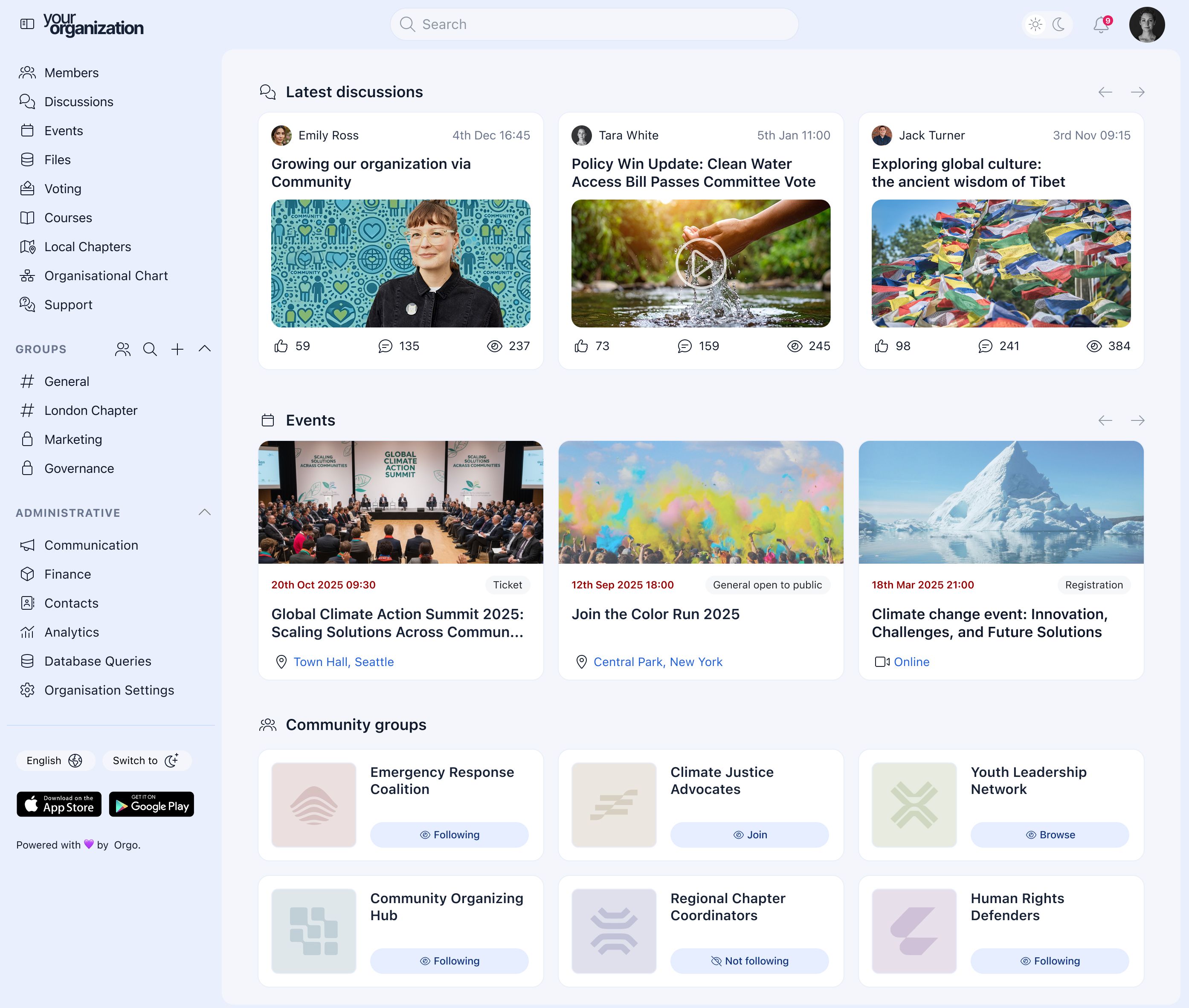
Orgo dashboard
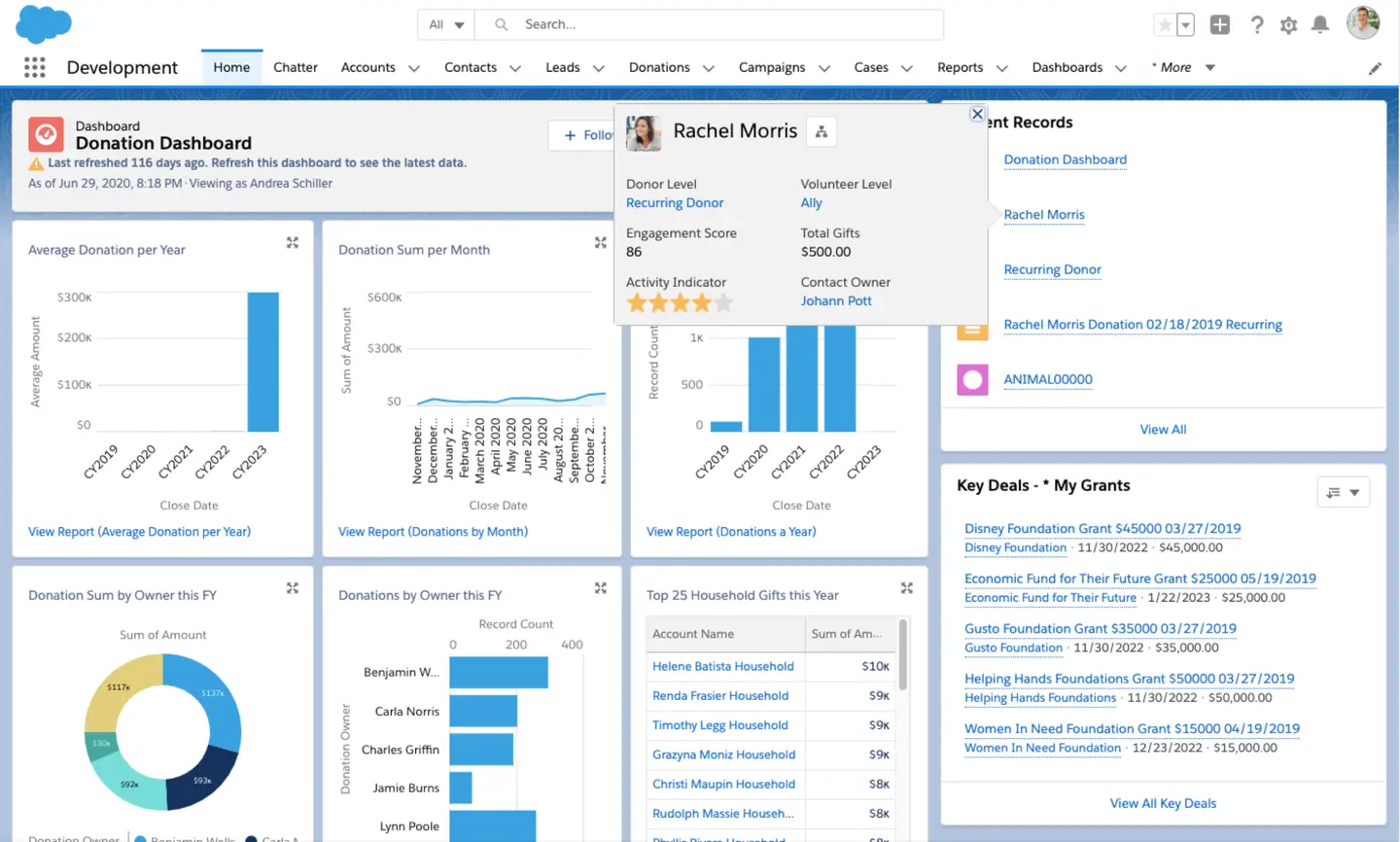
Salesforce Nonprofit Cloud dashboard
Implementation timeline is one of the most significant practical differences between the two platforms.
The Orgo way
Orgo's onboarding team handles data migration, chapter configuration, branding setup, and team training. Timeline: 2 to 4 weeks from kickoff to launch.
No Salesforce certification required. No consulting partner needed. The platform is designed for non-technical staff to operate on day one.
We have migrated 40 years of member lifecycle data for one of our clients. No matter how deep your records go, our team handles it.
The Salesforce way
Salesforce is a platform, not a product you switch on. A QuickStart implementation (basic configuration, minimal customization) takes 6 to 8 weeks and costs $7,000 to $30,000.
A standard mid-sized nonprofit implementation takes 3 to 6 months and costs $30,000 to $60,000. Complex multi-program implementations run 6 months to a year and cost $100,000 to $300,000+.
The investment is justified for organizations building an enterprise data system across fundraising, programs, and operations. For organizations that primarily need to manage membership operations and go live quickly, the ratio of cost to capability is unfavorable.
Associations need more than a CRM. They need a place where members connect, learn, and participate in organizational governance. These are different requirements that demand different architectures.
The Orgo way
Member-facing discussion groups, networking, direct messaging, courses, gamification, eVoting, and eDocuments are all part of the same platform. No separate licenses. No assembly required.
Orgo's eVoting module runs binding elections with anonymous encrypted ballots, configurable eligibility rules, audit trails, and result reporting. Chapters can run local elections independently while headquarters maintains oversight.
eDocuments and eSignatures (Scale plan) handle membership agreements, consent forms, and board resolutions.
The Salesforce way
Experience Cloud offers genuine community capabilities: branded portals, discussion forums, member networking, knowledge bases, and AI-powered recommendations. It is a well-built platform for digital experiences.
Experience Cloud is a separate product with separate licensing. Building a functioning association community on it requires either significant configuration effort or a third-party AppExchange app.
Governance features (board elections, eVoting, policy ratification) are not part of any Salesforce product. They require third-party AppExchange tools. Multi-chapter hierarchy is not native and requires customization.
What our clients say about Orgo
""With an organization of 8,000 members and more than 80 chapters coordinated almost exclusively by volunteers, Orgo is at the heart of our digitisation process, allowing us to focus on what we do best - learning by doing, nature, and personal development."


Find the right fit
When Orgo is the better fit
Orgo is built for organizations like yours if:
Membership dues collection, renewals, and member lifecycle management are your primary operational need You manage 500+ paying members across multiple chapters or regional branches You need elections or board votes that comply with your governing documents You want to go live in weeks, not months, without a certified consulting partner Your team does not include a dedicated Salesforce administrator You want a member-facing community and branded mobile app alongside membership operations
If this sounds like your organization, get a demo and we'll show you exactly how Orgo handles your structure.
Get a DemoWhen Salesforce Nonprofit Cloud is the better fit
We believe in transparency. Salesforce Nonprofit Cloud is probably the better choice if:
Your primary need is a donor CRM with relationship timelines, wealth screening, gift history, and multi-channel fundraising attribution You have a dedicated Salesforce administrator on staff (or budget for one) and access to a certified consulting partner You need enterprise-grade program and outcome management with enrollment, attendance, and case manager workflows You rely on the AppExchange ecosystem for ERP, HR, grant management, or advanced marketing integrations You operate a large nonprofit (50+ staff) with complex donor portfolios that justify a multi-year implementation investment
But if your organization needs membership operations, chapter coordination, community, and governance tools without a 6-month implementation and ongoing consulting fees, that is the combination Orgo was built to provide.
Switching from Salesforce Nonprofit Cloud is easier than you think
The biggest objection after "does it do what I need?" is "how painful is the switch?" Our team handles the migration end to end. You stay focused on your members while we move your data, configure your structure, and get your team up to speed.
Data migration
We handle the heavy lifting. Your member records, contact history, chapter assignments, and dues data are exported from Salesforce and imported by our team. Not your staff. We've successfully migrated 40 years' worth of member lifecycle data for one of our clients. No matter how deep your Salesforce records go, we've done it before.
Stripe payment continuity
If your organization already uses Stripe for payment processing, active subscriptions can be migrated without interrupting members. Orgo integrates directly with Stripe. No re-billing. No member disruption. Your existing Stripe setup transfers cleanly.
Dedicated onboarding
A real person walks your team through setup, configuration, and training. Typical timeline: 2 to 4 weeks from kickoff to launch. No Salesforce certification required. No consulting partner needed.
Chapter setup
We configure your multi-tier hierarchy (headquarters, regions, local chapters) to mirror your actual organization from day one. Regional coordinators and chapter leaders get their own access and permissions immediately.
Your brand first
Extensive white-label branding options ensure your platform looks and feels like your organization. Not like a generic software tool.
Orgo vs Salesforce Nonprofit Cloud pricing
Salesforce uses a per-user licensing model with separate products for different capabilities. Orgo uses a per-member model with all membership features included. Here is how they compare.
Orgo pricing
Orgo offers 3 plans based on active member count, starting at $59/month for 200 members on the Grow plan (annual billing).
Grow includes core membership management, eVoting, LMS (courses), fundraising, gamification, and custom branding. Platform fee: 2%.
Impact (most popular) adds multi-chapter management (up to 50 chapters), workflows, and API access, starting at $359/month for 1,000 members. Platform fee: 1%.
Scale offers custom pricing with unlimited chapters, eDocuments, eSignatures, a branded mobile app, and a dedicated customer success manager. Platform fee: 0%.
All plans use Stripe directly (46+ countries). No forced payment processor. No per-user licensing. No surprise renewal hikes.
See full Orgo pricingSalesforce Nonprofit Cloud pricing
Enterprise: $60/user/month (annual billing). Core CRM with donor management, fundraising tools, and program management.
Unlimited: $100/user/month (annual billing). Adds advanced analytics, AI features, and premium support.
Power of Us program: 10 free Enterprise licenses for eligible nonprofits (in-kind value ~$15,000/year). Additional licenses at ~$12/user/month (~80% nonprofit discount).
Experience Cloud (member portal): separate license, not included. Marketing Cloud (email): separate product, approximately $400-$500/month.
Implementation: $7,000 to $30,000 (basic), $30,000 to $60,000 (mid-range), $100,000 to $300,000+ (enterprise). Many organizations also budget for an ongoing Salesforce administrator or consulting partner retainer.
Typical 3-year total cost of ownership for a mid-sized nonprofit: $100,000 to $250,000 when implementation, consulting, AppExchange add-ons, and admin staff are factored in.
The bottom line
Salesforce's Power of Us program provides genuine value: 10 free Enterprise CRM licenses. For organizations that need a donor CRM, this reduces the entry cost meaningfully.
For membership-focused organizations, the 10 free licenses are the starting point of a larger investment. Adding membership management (AppExchange AMS), a member community (Experience Cloud), email campaigns (Marketing Cloud), and governance tools (third-party apps) builds a total cost that typically reaches $100,000 to $250,000 over 3 years.
Orgo includes membership dues, community, governance, chapters, LMS, and email in every plan. The comparison is total cost against total capability for your specific use case.
Salesforce Nonprofit Cloud migration: Frequently asked questions
Yes. Most organizations run both platforms for 2 to 4 weeks during onboarding. This lets your team get comfortable with Orgo while Salesforce continues handling active workflows. We help you plan the transition timeline so nothing falls through the cracks.
Our onboarding team handles the data migration. We export your member records, contact history, chapter assignments, and dues data from Salesforce and import them into Orgo. We have successfully migrated 40 years of member lifecycle data for one of our clients. No matter how deep your Salesforce records go, we have done it before.
Both scenarios are common. If your organization uses Salesforce Nonprofit Cloud primarily for membership operations (dues, chapters, community), Orgo replaces that function entirely and simplifies your stack.
If you rely on Salesforce for donor CRM, grant management, and fundraising campaigns, you do not need to give that up. Many organizations keep Salesforce on the donor side and use Orgo for the member-facing layer: the community portal, membership lifecycle, chapter coordination, and governance. The two platforms serve different functions and work well together.
A Salesforce-Orgo integration can be built on request through Orgo's API (available on the Impact plan and above).
Sunk cost is a real consideration. The question is whether your ongoing Salesforce costs (admin staff, consulting, AppExchange subscriptions, Experience Cloud licenses) are delivering proportional value for your membership operations. If your team spends more time configuring Salesforce than serving members, the investment may be working against you. A 15-minute demo will show you what the day-to-day looks like in Orgo so you can make the comparison yourself.
Typical timeline: 2 to 4 weeks from kickoff to launch. This includes data migration, chapter configuration, branding setup, and team training. The complexity of your Salesforce configuration affects the timeline, but Orgo's onboarding team handles the heavy lifting. Most organizations run both systems in parallel for 2 to 4 weeks before fully switching over.
Orgo is THE Salesforce Nonprofit Cloud
alternative for membership organizations
Salesforce Nonprofit Cloud is the right choice for large nonprofits that need an enterprise donor CRM with dedicated technical staff. But when your organization needs native membership dues, multi-chapter coordination, community, and governance tools with a 2-to-4-week go-live timeline, Orgo is the alternative built for exactly that.
Also worth reading:
- Orgo vs Wild Apricot: How Orgo compares to Wild Apricot for membership management.
- Orgo vs Hivebrite: How Orgo compares to Hivebrite for nonprofits and associations.
- Orgo Pricing