
Members install the app from the App Store or Play Store and sign in with the credentials they already use on the web. There is no separate app account, no workspace code and nothing to configure per screen: every screen in the app is the Orgo web interface, so a feature that exists on the web exists in the app.
What the app adds is the two things a browser cannot do: push notifications on the lock screen, and links that open straight into the app. What it takes away is short and specific, and the item you will be asked about is fee payments on iPhone.
Which app your members install
Most organisations use the shared Orgo Community app. There is nothing to enable: any member of any Orgo organisation can install it and sign in.
| Platform | Store listing |
|---|---|
| iOS | apps.apple.com/us/app/orgo-community/id1484759378 |
| Android | play.google.com/store/apps/details?id=com.orgoapp |
Orgo also builds branded apps: a separate App Store and Play Store listing under your own name and icon, with its own push credentials and its own deep links. A branded app is provisioned by Orgo rather than self-served, because it needs entries in your Apple Developer and Google Play accounts. Once one exists, every download link in the product points at your listing instead of the shared one.
How members find the download
Two places surface it, both automatic.
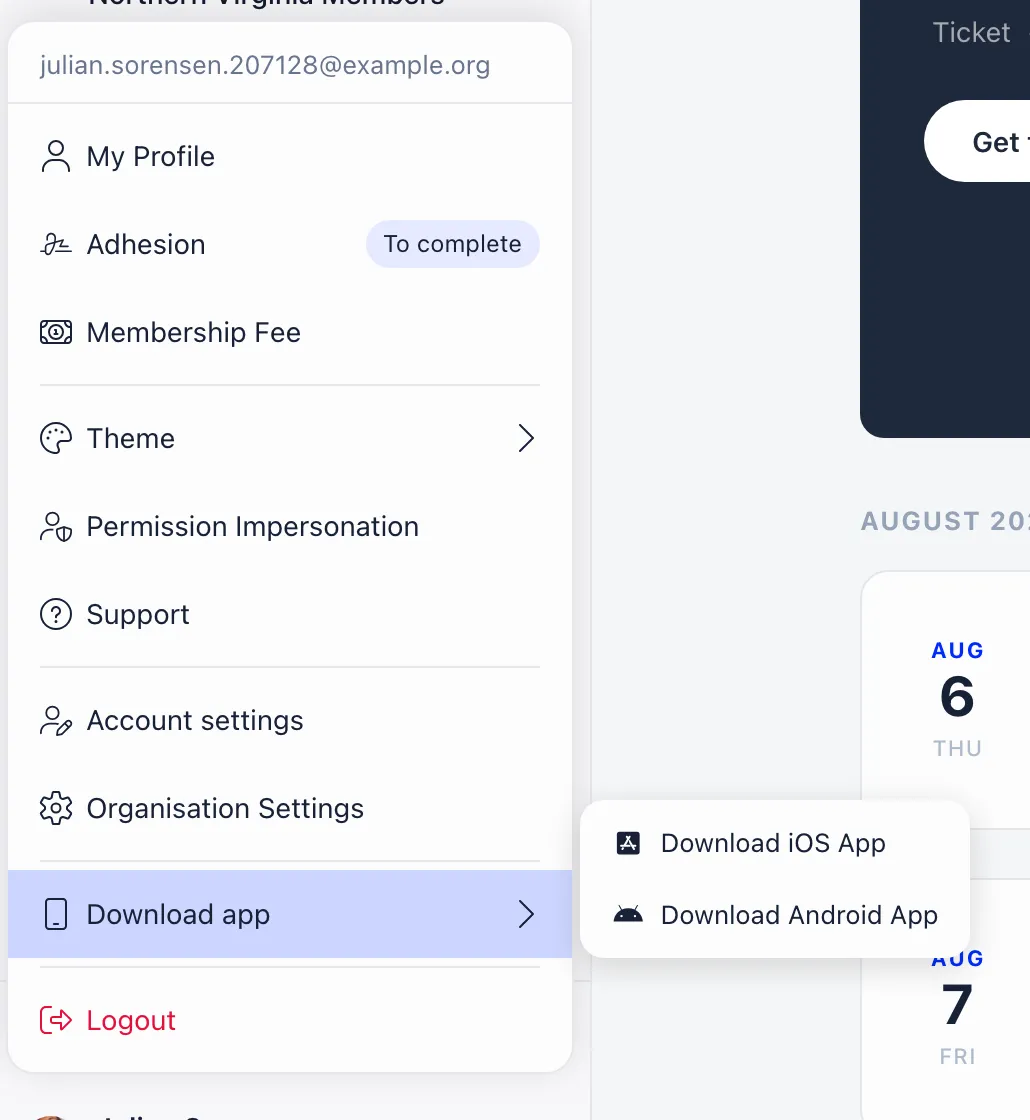
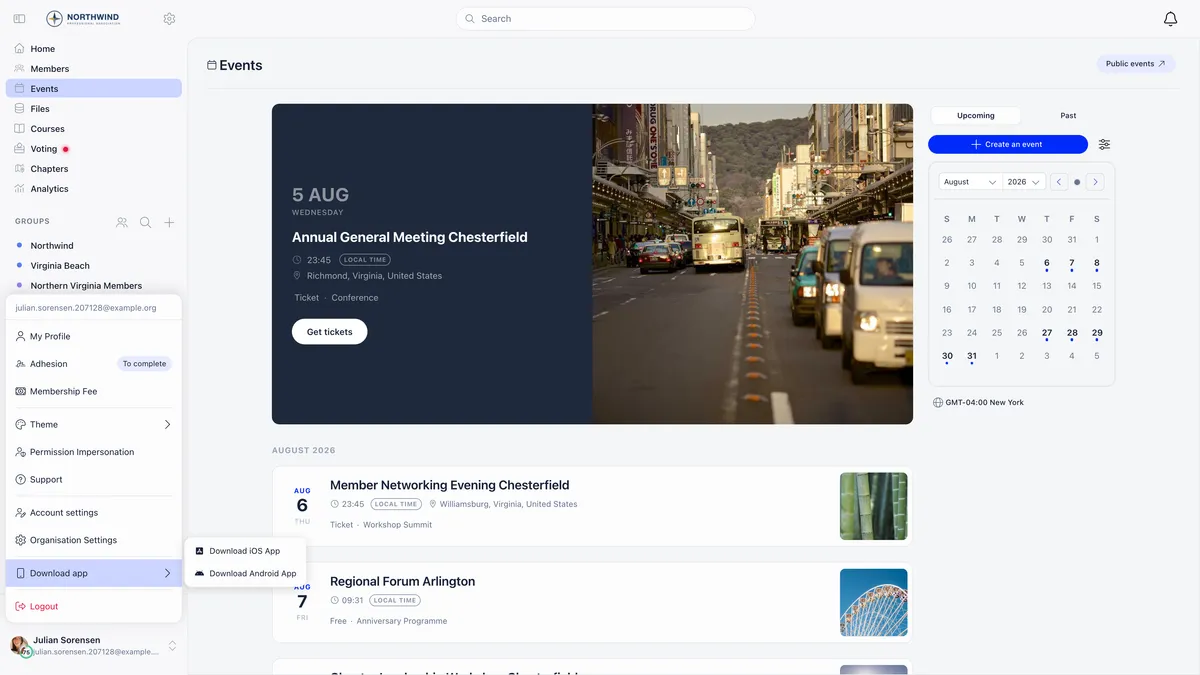
Download app sits in the user menu, in the sidebar on desktop and the profile menu on mobile. It opens a submenu with the iOS and Android links, and it is hidden when the member is already inside the app.
An install banner appears at the top of the screen in mobile browsers, showing the app name and an Install app button. On a device that already has the app the button becomes Open app and hands the current page over to it. Dismissing it is remembered on that device.
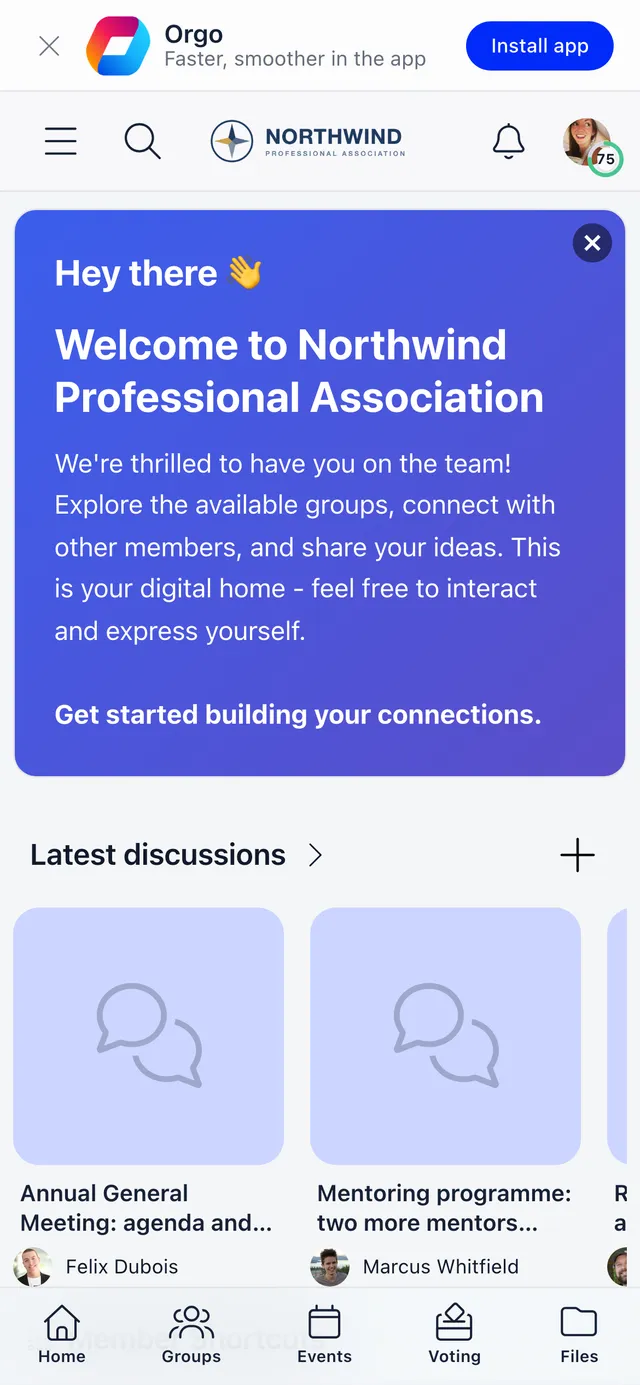
The banner keys off the device, not the window size, so a phone or tablet browser shows it and a narrow desktop window does not, because there is nothing to install there.
Signing in
Members sign in with the same email and password they use on the web, or with any other method your organisation allows, such as a one-time code or MFA.
If a member belongs to more than one Orgo organisation under the same email address, signing in through the shared app signs them into all of them at once, and they switch between organisations from the workspace switcher. Signing in through a branded app or a custom domain signs them into that organisation only.
Non-member ticket holders do not use this login at all. They reach the Event App through a one-time code sent to the email on their ticket, which is a separate sign-in with a narrower set of permissions.
Push notifications
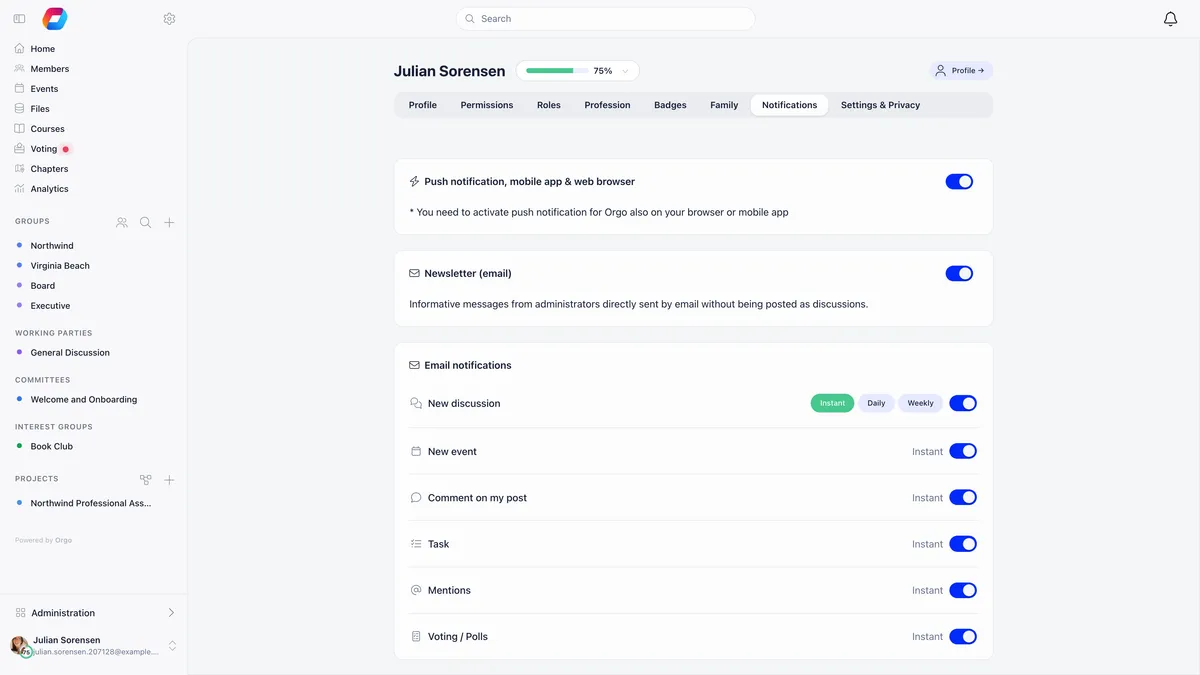
Push has three moving parts, and all three must be true before a notification arrives. Most “no notifications” reports are one of these three, and usually the first.
Your organisation also sets the default for new members, in the notification preferences under the emails and notifications settings. That needs organisation admin rights.
A device is registered per organisation. A member in two organisations who only ever opens one of them in the app receives push for that one until they open the other. Signing out of the app removes that device’s registration.
Browsers get push too, through a different mechanism, on Chrome, Edge, Firefox and other Chromium browsers. Safari is excluded, so a member whose only Orgo access is Safari gets email notifications but not push. Installing the app is the fix.
Proving push works before you debug anything
Organisation admins can open the demo notification page and send a test push to their own devices, or to a specific member id, with a title, body and target link. It is the fastest way to establish whether a device is registered at all, and it turns a vague report into a yes or no.
Paying fees on iPhone and iPad
This is the question members ask most, and the answer is the same every time: it is Apple’s in-app purchase policy, not an Orgo setting, and there is no switch that changes it.
Inside the iOS app, payment buttons are hidden and replaced with the line “To make a payment, please access app in browser.” The member opens the same page in Safari or any other browser, pays there, and the payment then appears in the app like any other. The Android app is not affected, and neither is a mobile browser.
The button in question is the one on the member’s Fee tab, alongside their status and payment history. Everything else on that screen behaves the same in the app.
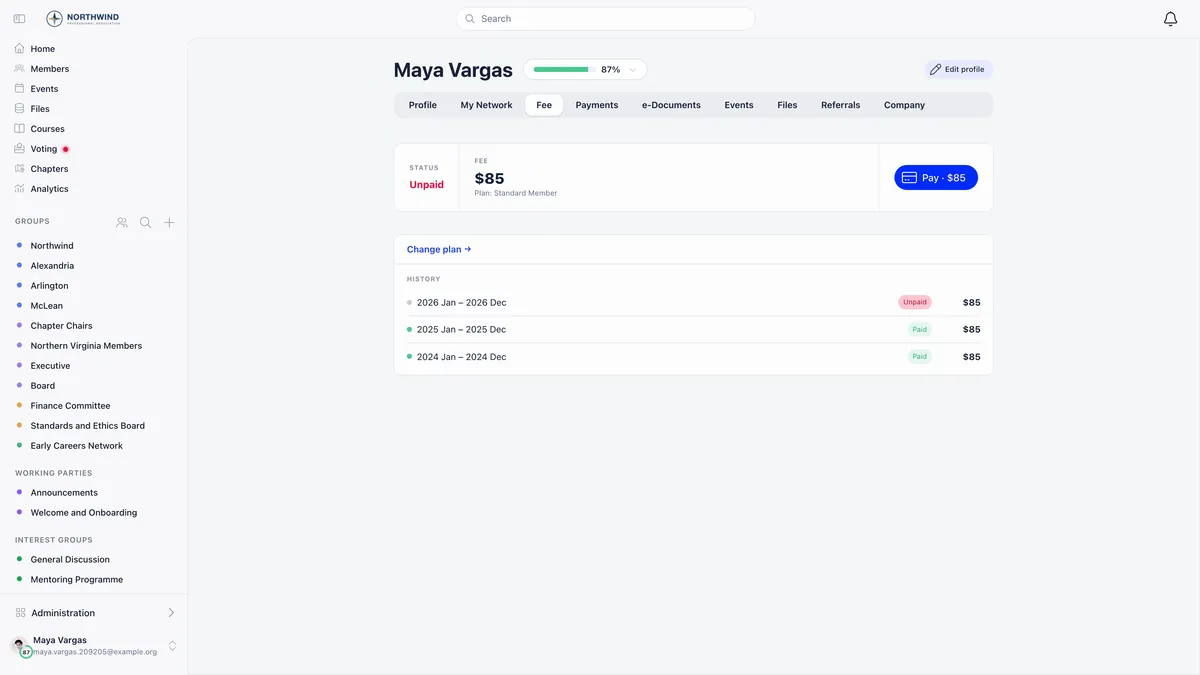
If a member reports that a fee they paid in a browser still looks unpaid in the app, that is a fee question rather than an app question. Start with the year filter on the fee list.
Links that open in the app
Links Orgo sends to a mobile surface are built as smart links. Opened on a phone with the app installed, the operating system hands them to the app. On any other device they fall through to the web, so nothing breaks for members without the app.
Smart links are used for push notifications about discussions and mentions, events and event feed posts, event networking invitations, connection requests, chapter and unit membership, task assignment and status changes, and new media files. They are also used in email links for event invitations and registrations, discussion notifications, task assignment and networking invitations, and for event ticket QR codes and vote share links, which always prefer the app.
Everything else links to your normal Orgo address.
The questions members actually ask
”Nothing arrives on my phone”
Work the three-part chain above in order, then send a test push. If a member has signed out of the app, that device is no longer registered and signing back in re-registers it.
”The app looks different from my colleague’s”
It will, because the app shows your workspace. Sidebar labels, which modules exist and what a member can reach all follow their permissions and your configuration, and the same applies in a browser.
”I added Orgo to my home screen and it has the wrong icon”
Adding the web app to the home screen from a browser uses Orgo’s own name and icon, even for organisations with their own branding elsewhere. A branded app is the way to get your own icon on the home screen.
”I cannot record a voice note or video”
Screens that record audio or video are blocked in current app builds and offer to reopen the page in the device browser instead. Uploading a file that is already recorded works normally.
Related
- Mobile apps, the full reference
- Notifications, types and channels
- The Event App and its separate sign-in
- Branding across the product
- Using your own domain
- Member paid but shows as unpaid
Frequently asked questions
Why can my members not pay their membership fee in the app?
On iPhone and iPad only. Payment buttons are hidden inside the iOS app and replaced with the line To make a payment, please access app in browser. This is Apple's in-app purchase policy, not an Orgo setting, and it cannot be switched on. Members pay from any mobile or desktop browser, and the payment then shows in the app like any other. The Android app is unaffected.
A member says they get no notifications on their phone. What do I check?
Four things in order. Notification permission for the app in the phone's own system settings, because turning the toggle on inside Orgo is not enough. The Push notification switch on the Notifications tab of their profile. Whether they have opened the app at least once while signed in to your organisation, since that is what registers the device. Then send a test push from the demo notification page to prove the device is registered.
Do we need our own app in the App Store?
No. Most organisations use the shared Orgo Community app, which any member of any Orgo organisation can install and sign in to, with nothing to enable. A branded app with your own name, icon, push credentials and deep links is available, but it is provisioned by Orgo rather than self-served, because it needs entries in your Apple Developer and Google Play accounts.