
Five different things produce this symptom, and only one of them is a payment problem. Work through them in the order below, because the first two take seconds and account for most cases.
The short version: the fee list defaults to the current year, so check the year filter first. Then confirm money actually moved, rather than a fee being ticked or marked.
The five states people mistake for each other
This is the single most useful thing to know about fees in Orgo, and almost every case in this article comes back to it.
| What you did | What it means | Did money move? |
|---|---|---|
| Ticked a fee | You selected it. Nothing more. | No |
| Saved the selection | You recorded which fees you intend to collect. | No |
| Marked as paid | Bookkeeping. You are recording money that arrived somewhere else, like a bank transfer. | No |
| Pressed the green Pay on the chapter member fees table | Records a batch of collected dues, waiting for an organisation admin to approve. | No |
| The member pressed their own blue Pay button | A card payment is taken. | Yes |
Only the last row is a payment. The other four are administrative states that look identical on a crowded screen, which is why “I ticked it and saved and it still says unpaid” is the most common message we get about fees.
Note there are two buttons labelled Pay and they do different things. The blue Pay on a member’s own fee tab opens the card checkout and charges.

The green Pay on the chapter member fees table records what a chapter has collected and sends it for approval, taking no card payment.

See recording a payment made outside Orgo for which to use when.
1. Check the year filter
The member fees list is scoped to one year at a time and opens on the current one. If you are looking at a member who paid for last year, or you are working in January on periods that belong to the year before, the list will show them as unpaid because you are looking at the wrong year.
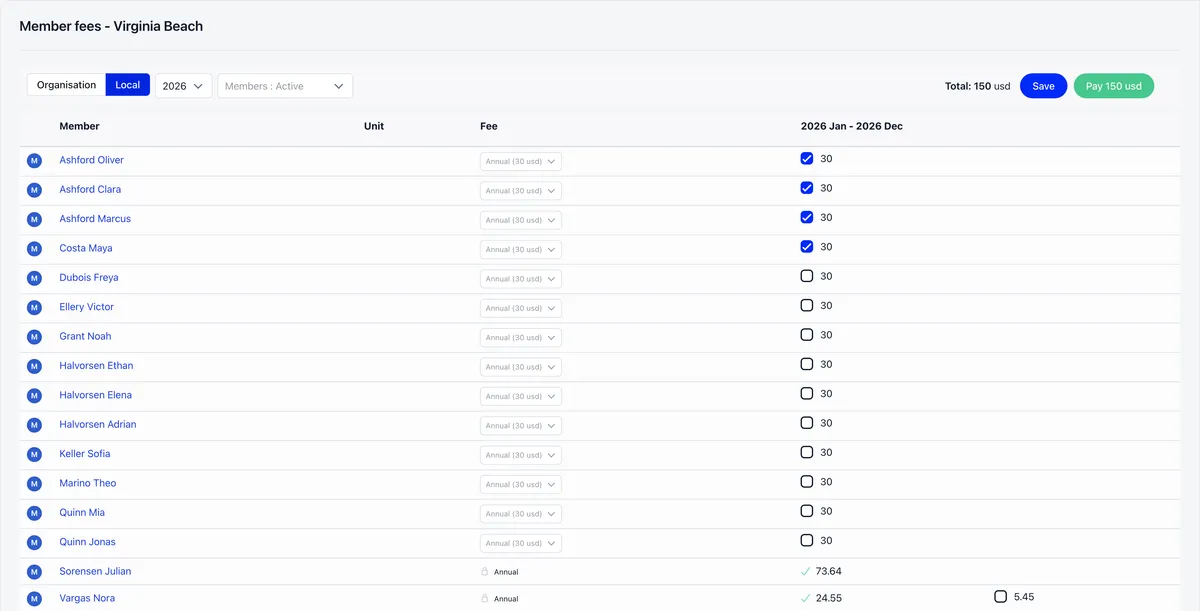
This also runs the other way. If most of your members appear already paid for a year you have not started collecting, you are almost certainly on the wrong year.
Change the year, then re-read the row. This resolves more of these reports than every other cause combined.
2. Confirm a payment was actually taken
Open the member’s Fee tab and look at their payment history rather than the fee row.
- A payment with a card method was taken through Orgo.
- A payment marked check was entered by hand. Somebody recorded that money arrived. Orgo never saw it, and it is only as reliable as the person who entered it.
- No payment at all means the fee was ticked or saved, but never collected.
Method is stamped on every fee payment. On the organisation-wide fee payments list it has a column of its own.
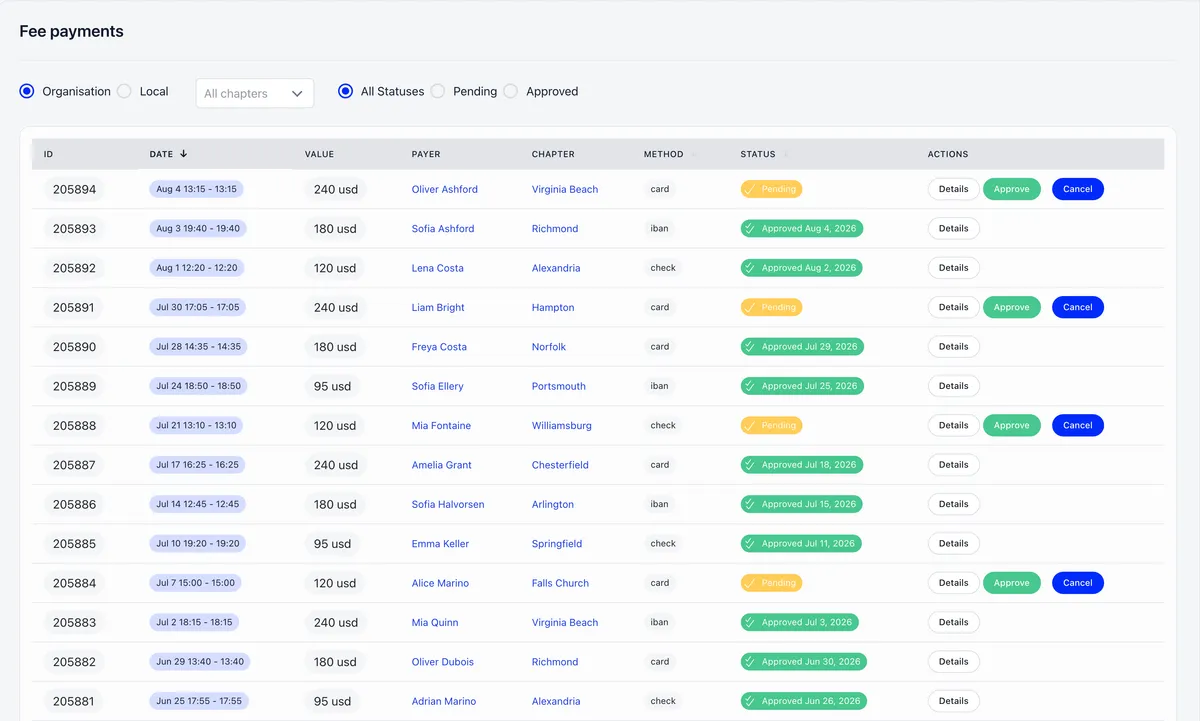
If the member says they paid by card and there is no payment record, ask what they saw on screen. A card that is declined during checkout leaves no record in Orgo, so “I definitely tried to pay” and “there is nothing here” are both true at the same time. Have them try again and watch for an error at the point of payment.
If they paid moments ago, reload the page before concluding anything. The payment screen confirms success once the charge is recorded, and a payment that is still settling can briefly show as complete before the record appears.
3. Check the account status, not the fee
Account status and fee status are independent, and this catches experienced admins constantly.
A member can be fully paid and still have an account status of Inactive, which blocks sign-in on its own. The reverse also happens: a cancelled or refunded membership can still read as active on the profile card, while the Fee tab tells the truth. Account status, dues and validity dates are three separate records in how Orgo tracks membership, which is why they can disagree.
The status sits on the profile itself, beside the tabs.
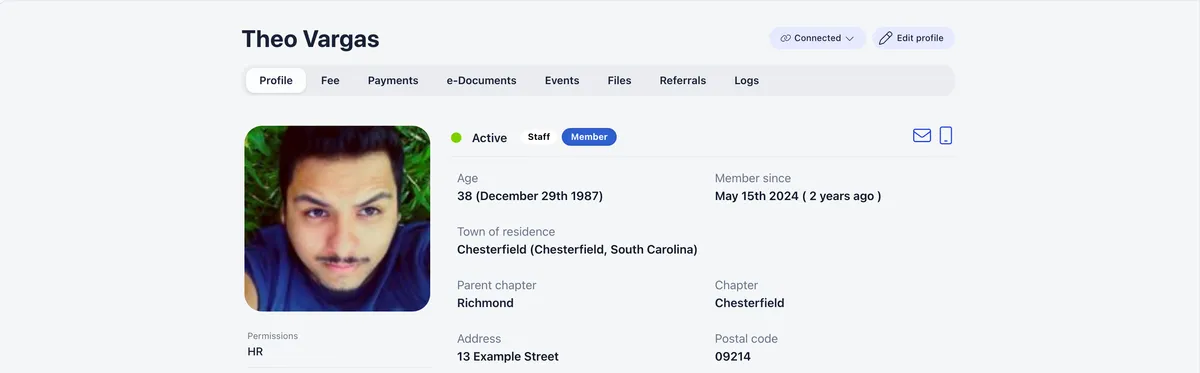
If the complaint is “they paid and still cannot get in”, check the status on their profile first. If the complaint is “the profile says active but I think they lapsed”, believe the Fee tab.
4. Look for a live subscription
If the member is paid and still receiving payment reminders, this is your cause.
A recurring Stripe subscription can sit alongside a one-off payment. The one-off settles the current period, so the profile reads as paid. The subscription carries on its own billing cycle and keeps generating reminders, and in some cases keeps charging.
This is the mechanism behind the most alarming message an admin can receive, which is a member saying the organisation has been breached because they are being chased for money they have already paid.
Cancel the subscription from the red Cancel button on the member’s Fee tab. Cancelling the subscription does not undo the payment they already made, and a one-off payment never needs cancelling.
5. Check which period the money landed on
If a payment exists but the member still shows unpaid, the payment may have settled a different period than the one you are looking at.
Two situations produce this:
- A donation is not a fee. If a member was asked to cover an increase “as a donation”, the money arrives as a donation and the fee periods stay open. The member sees arrears they believe they have already cleared.
- Back-payment lands at today’s price. Paying for earlier months uses the current amount, not the amount that applied at the time. If your rate changed, the older periods can stay short and therefore unpaid.
Before you contact support
Have these four answers ready, because they are the first things we will ask:
- Which year is the fee list showing?
- Does the Fee tab show a payment, and what method does it carry?
- What is the member’s account status?
- Is there a live subscription on their Fee tab?
Those four cover the large majority of cases, and you can usually resolve them without us.
Related
- Recording a payment made by bank transfer or cash
- Fees and membership periods
- Stripe integration
- Invoices
- Member status and profiles
Frequently asked questions
Does ticking a member's fee mark it as paid?
No. Ticking a fee selects it. Saving records that selection. Neither takes money and neither marks the fee paid. Only the member's own blue Pay button opens a card checkout and actually charges. Mark as paid is a bookkeeping entry for money that arrived somewhere else, and the green Pay button on the chapter member fees table records a batch for approval rather than taking a card payment.
Why is a member who has paid still getting payment reminders?
Almost always because a recurring Stripe subscription is still live alongside a one-off payment. The one-off settles the current period, so the profile reads as paid, while the subscription continues its own billing cycle and keeps generating reminders. Cancel the subscription from the red Cancel button on the member's Fee tab.
A member paid but still cannot log in. Why?
Account status and fee status are independent. A member can be fully paid and still have an account status of Inactive, which blocks sign-in on its own. Check the account status on their profile before looking at anything to do with money.