

Where it lives
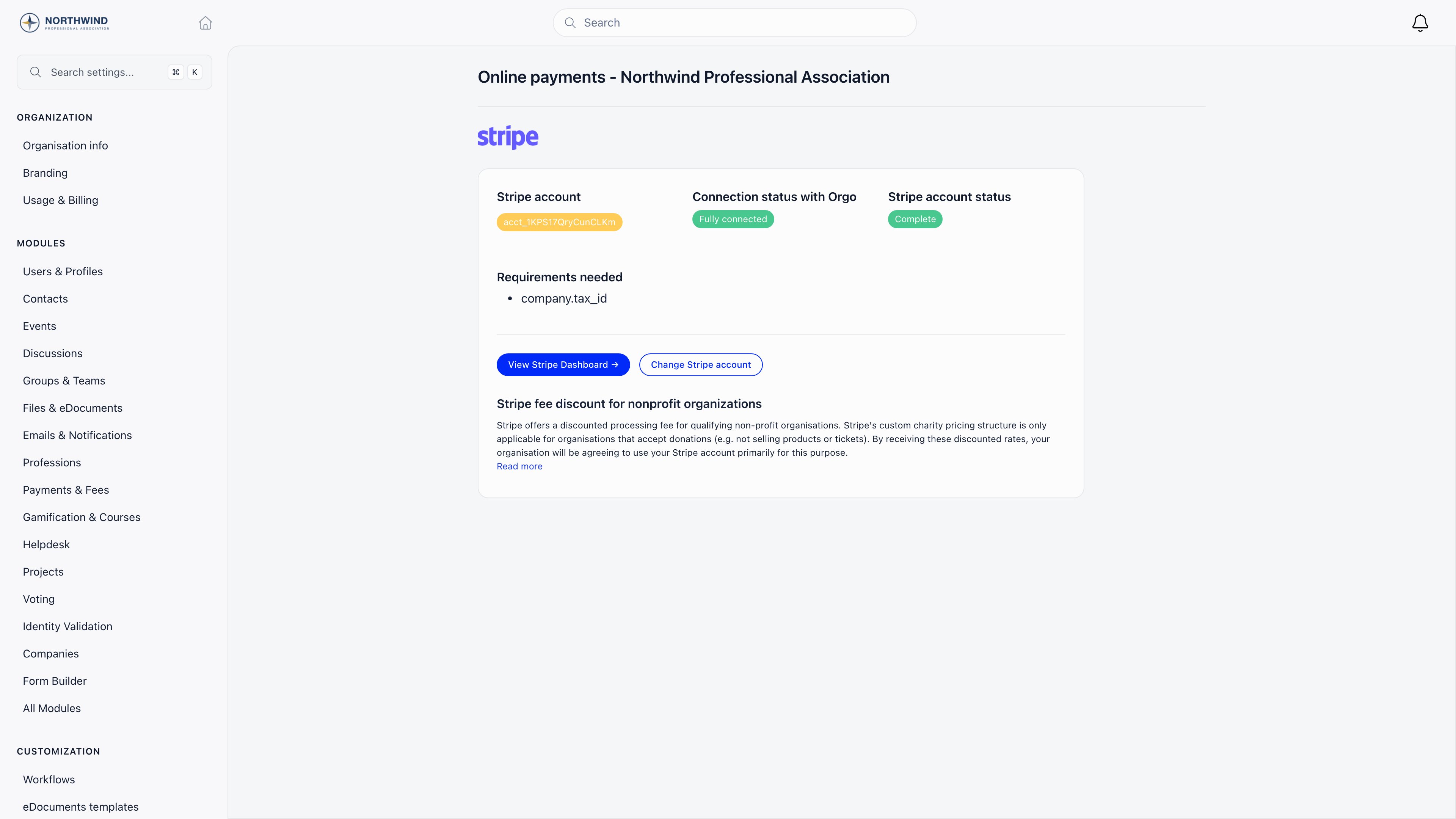
Both open the same screen, titled Online payments followed by the organisation or chapter name. Its direct addresses are
/tenant/settings/online-payments and /local/settings/online-payments, which is also where Stripe returns you after authorisation.
The chapter screen is only listed in the sidebar when the Online Payments module is on, Local Center Payments is on, and the chapter is eligible (either All Local Centers Eligible is on, or that chapter is individually flagged).
Before you connect
Your organisation must have a country set in Settings → Organisation info. Without it the connect buttons are disabled and the API refuses to create or authorise an account, because Stripe needs the country at account creation time and it cannot be changed afterwards.Connecting Stripe
Two buttons appear while no account is linked:1
Connect existing Stripe account
Sends you to Stripe’s authorisation page (
connect.stripe.com). Log in, pick the account, and approve. Orgo stores the resulting account id and returns you to the settings page with a confirmation.2
Generate Stripe Account
Creates a Stripe Standard account in your organisation’s country with card payments and transfers requested, then sends you straight into Stripe’s onboarding form.

A tenant admin can complete onboarding on behalf of a chapter by opening the chapter, then Local online payments settings. The chapter is carried through the Stripe round trip and back.
Reading the status
Once an account is linked the page shows three things. Connection status with Orgo
Stripe account status
Requirements needed lists whatever Stripe currently asks of you (identity documents, bank details, business information). Clear them in Stripe and the badges update on the next page load.
The buttons change with the status: Add Stripe details while onboarding is unfinished, View Stripe Dashboard once it is done, and Change Stripe account at any time to re-authorise a different account.
What breaks if onboarding is incomplete
- No account at all: product, ticket, and donation checkouts refuse to start. The products list shows “Stripe account is not configured in organisation settings” with a link to the settings page, and the membership payment modal redirects there.
- Account linked but charges disabled: members see “Payments are temporarily unavailable for this account. Please try again later or contact support.”
- Open requirement with a future deadline: payments keep working. Stripe only blocks charges once the deadline passes.
Payment methods
Orgo pins no list. Checkouts use Stripe’s automatic payment methods, so members are offered exactly what your Stripe account has enabled for that currency and country (cards, wallets, local methods). Turn methods on or off in the Stripe Dashboard, not in Orgo. Bank transfer is separate: an offline method you record by hand. See Recording payments.Chapter accounts
A chapter (local center) can connect its own Stripe account. When it has one, local fees charged to that chapter settle there. When it does not, the charge falls back to the organisation’s account, so the chapter is never blocked, its money simply lands centrally. A chapter’s own Stripe account is used by any product the chapter owns, not just fees: a donation campaign or ticket product with Belongs to a local center set charges the chapter’s account. The fall-back differs, though. Fee payments fall back to the organisation account when the chapter has none. Donation and ticket checkouts do not: connect the chapter’s account before selling anything the chapter owns. Donation widgets are the exception and always charge the organisation account.Commission, fees and payouts
Orgo takes no commission. The platform application fee is present in code but forced to zero on every charge, and the per-organisation rate defaults to 0. What you pay is Stripe’s own processing fee, deducted before payout: see stripe.com/pricing. The settings page also links Stripe’s discounted pricing for qualifying non-profits. Payouts are between Stripe and your bank. Orgo does not set the schedule, does not hold funds, and does not display payout history: use the Stripe Dashboard.Refunds
Refund from the payment’s row in the payments list. Orgo refunds exactly that row’s amount, which matters when one card charge produced several records (a membership payment plus its registration fee, for example). A refund also cancels any linked event attendance, releases the seat, and recalculates the member’s fee validity date. Refunds issued in the Stripe Dashboard are picked up and marked in Orgo too. Refunding requiresFINANCIAL_LOCAL on the payment’s chapter, and FINANCIAL_TENANT when the payment carries no chapter, which is the case for every organisation-level payment. ADMIN_TENANT qualifies either way. It only works on a payment that succeeded.
Staying in sync
You configure no webhook. Orgo listens on a single platform endpoint and updates records when Stripe reports a successful payment, a failed or action-required invoice, a subscription created, updated or cancelled, a cancelled payment intent, or a refunded charge. Two settings control receipts, under Settings → Modules → Payments & Fees:Test mode
Test mode is not a switch in your settings. Orgo runs against live Stripe keys; only demo organisations provisioned by Orgo are wired to Stripe’s test mode. Switching your own Stripe Dashboard to test mode changes nothing about what Orgo charges, so ask Orgo for a demo organisation if you want to rehearse a checkout.Troubleshooting
I get an error after returning from Stripe
I get an error after returning from Stripe
The one-hour authorisation token expired, was already used, or the return landed on an unexpected domain. Start the connection again from the settings page.
A chapter's fees are landing in the national account
A chapter's fees are landing in the national account
That chapter has not connected its own Stripe account. Until it does, its charges fall back to the organisation account by design.
Related
- Products - what you sell through Stripe
- Membership Fees - fee collection and validity
- Donations - one-off and recurring giving
- Recording payments - offline and manual payments
- Local Center Fees - chapter-level fee setup
- Usage & Billing - paying Orgo, not your members