

/admin/merge). It needs HR_TENANT, and the Merge Profiles toggle under
Settings → Users & Profiles must be on. With the toggle off, the page
redirects to the dashboard.
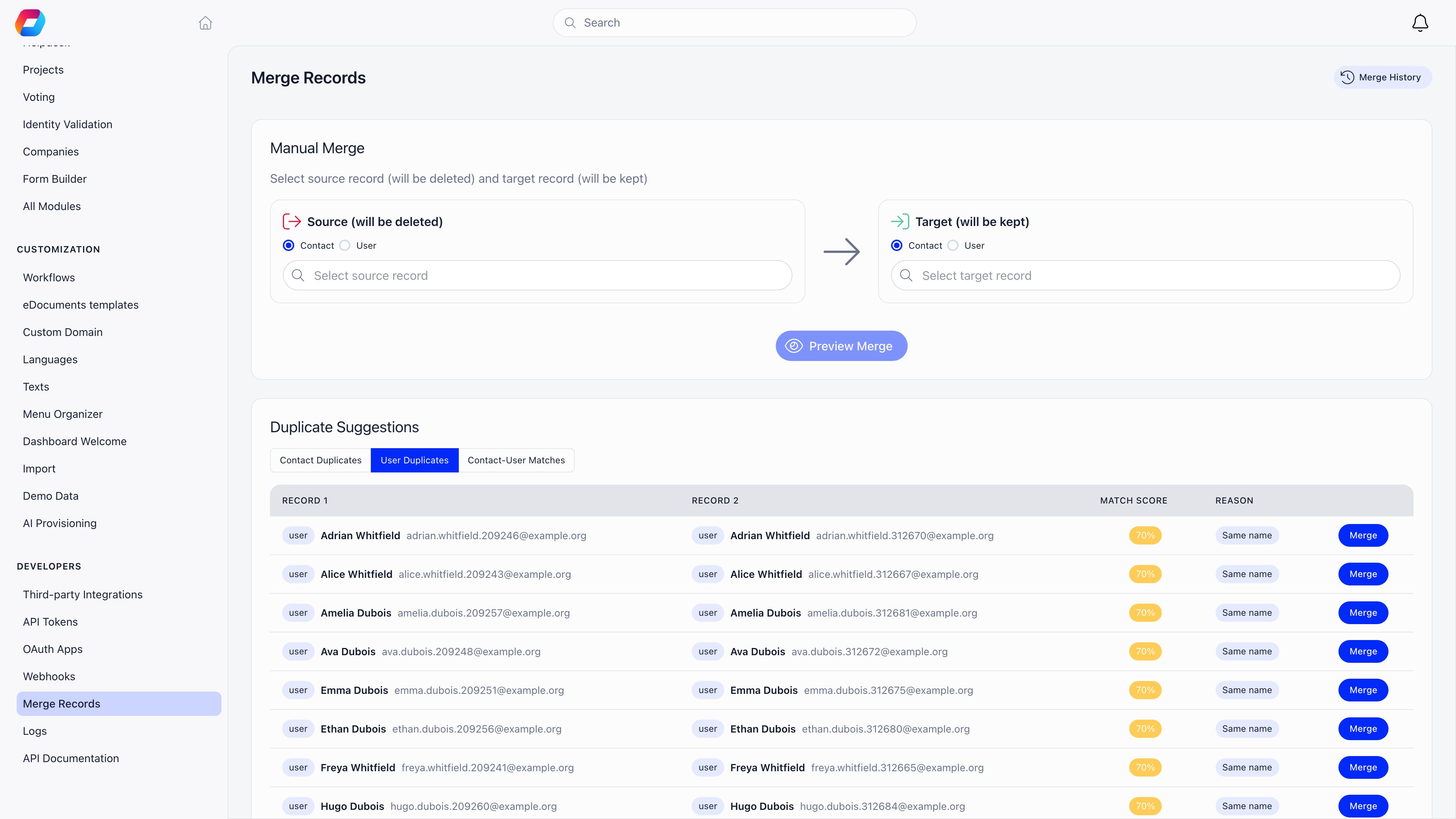
What can merge into what
A member is never folded into a contact. If you pick that combination the page
tells you to swap the two: select the contact as source and the member as target.
The source is the record that goes away. The target is the record you
keep. The page labels them exactly that way: Source (will be deleted) and
Target (will be kept).
Finding duplicates
Duplicate Suggestions at the bottom of the page has three tabs, searched separately:- Contact Duplicates and User Duplicates find records that share an email address (scored 100%) or share a name while having different emails (scored 70%).
- Contact-User Matches finds a contact and a member with the same email (scored 95%). This is the common case after importing a mailing list.
Reviewing before you merge
The comparison is the point of the feature. It puts source and target side by side, one row per field. Fields where the two agree are ticked and left alone. Fields where they disagree are tagged Conflict and get a pair of radio buttons: keep the source value or keep the target value. Orgo preselects a suggestion for every field, preferring a filled value over an empty one, and the longer text when both are filled. Read the conflicts anyway, particularly email and phone. For member-to-member merges, profile custom field values are compared in the same table alongside the built-in fields. Underneath, Related Records to Transfer counts everything attached to the source: event attendance, payments, invoices, subscriptions, fee payments, roles, badges, adhesions, course enrolments, form submissions, identity documents, tags, company memberships, family links, posts and discussions, files, votes, tasks and more. Those counts are what will move.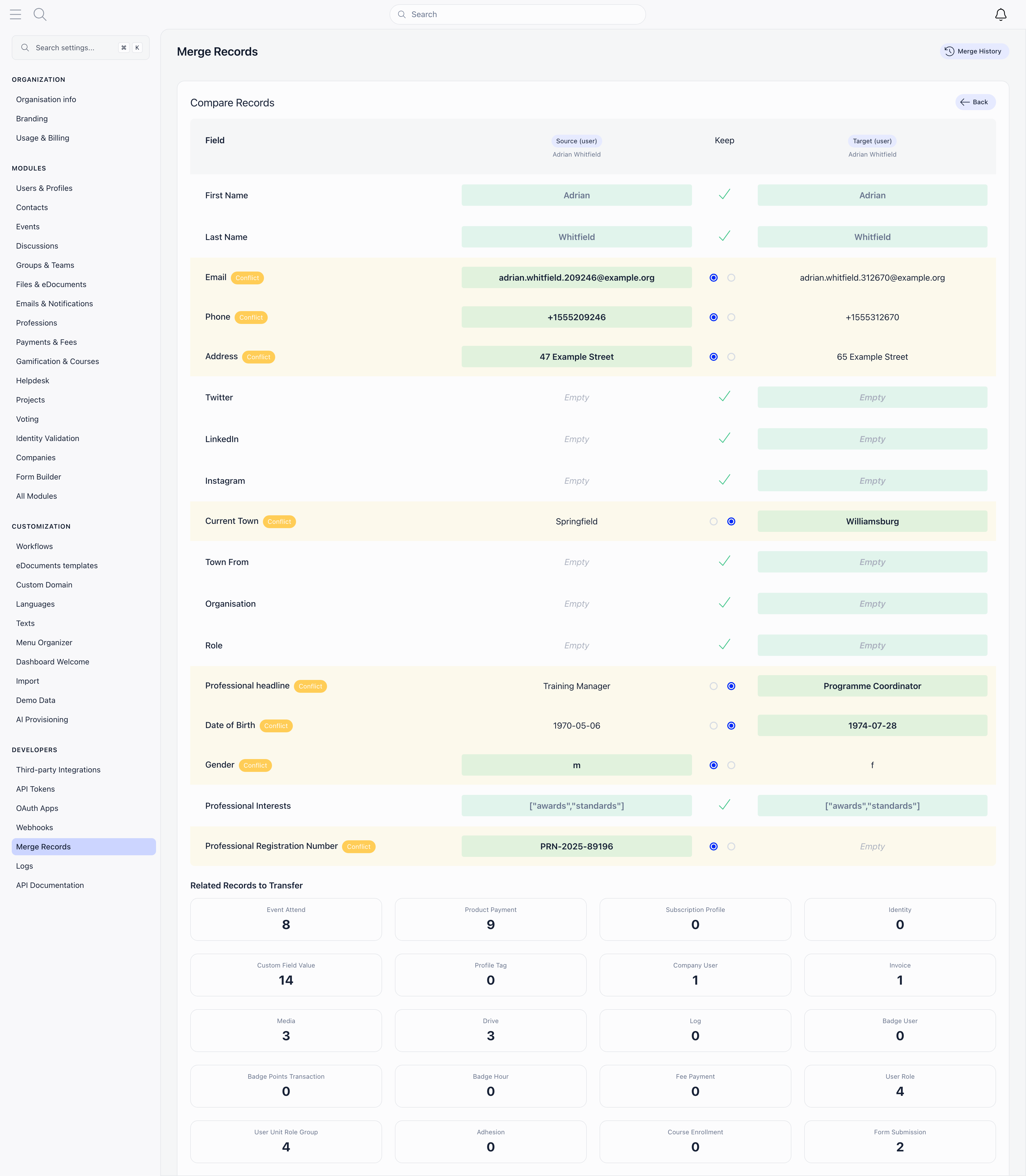
What happens when you confirm
Everything below runs in a single transaction. If any part fails, nothing changes.- The field values you chose are written to the target.
- Related records are re-pointed at the target. Where both records already have the same thing, the duplicate is dropped rather than doubled: one attendance per event (the source’s status and payment win), one value per custom field, one tag, one company membership.
- The source’s sign-in material is destroyed, not moved: sessions, API tokens, push tokens and any active impersonation session are deleted.
- A source contact is deleted outright.
- A source member is kept as a tombstone so nothing breaks: their status
becomes Deleted, their email and username are prefixed so the address is
free for reuse, their identity link is cleared, and their first name is
prefixed with
[MERGED]. A deleted record is hidden wherever deleted members are hidden: the member list, search, duplicate suggestions, email lists and campaigns. It cannot be opened or edited afterwards, so undo is the only route back. - The source drops out of any manual list it was in: it stops being counted, stops appearing in the recipients table, and stops receiving campaigns sent to that list. Its place in the list is not moved to the target, so add the target by hand if it should be on the list.
- The chapter does not move. The survivor keeps its own chapter, even though the source’s roles do move across, so check the Roles tab afterwards when the two records sat in different chapters.
- For a member-to-member merge, both profiles get a merge entry in their Logs tab, recording who did it and which record it was merged into. When the source is a contact, only the surviving member gets an entry, and a contact-to-contact merge writes none: Merge History is the record for those.
Undoing a merge
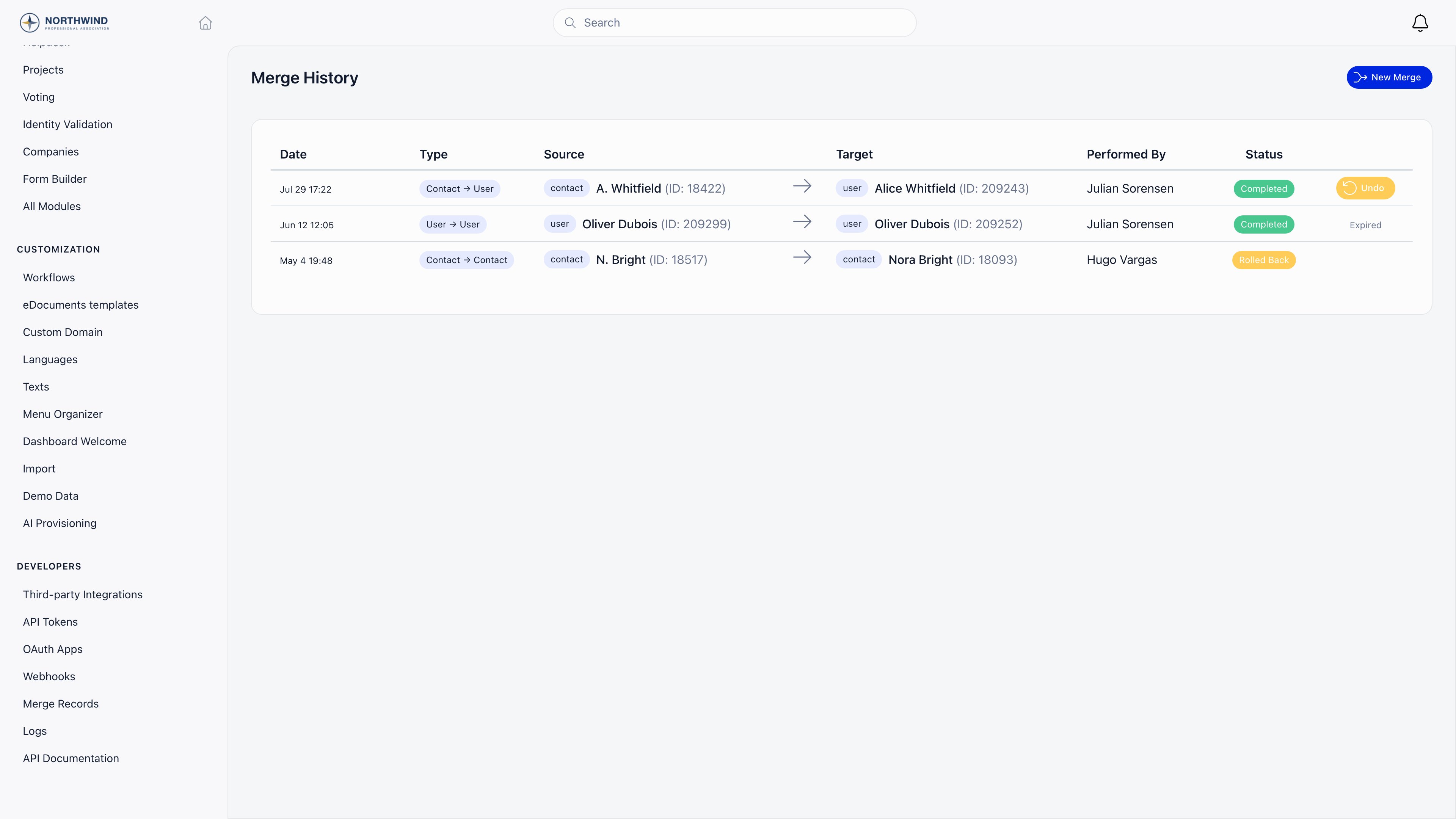
Merge History (top right of the page,/admin/merge/history) lists every
merge with its date, direction, both record names, who performed it, and its
status.
Undo restores the source from the snapshot taken at merge time and points the
transferred records back at it. A source contact that was deleted is recreated,
which means it comes back with a new id.
It also rewinds the surviving record. Every field you took from the source goes
back to the survivor’s own pre-merge value: profile fields, custom field values,
the username the merge regenerated from the new email address, and the identity
record and payment customer reference it was handed. A value is only put back
while it still holds exactly what the merge wrote into it, so anything you edited
on the survivor after the merge is left as you left it.
What undo does not do is remove activity. Anything created on the survivor since
the merge stays there. Roll back promptly if a merge was wrong, before new
activity piles up on the record you would have to sort out by hand.
If the source’s old email address was claimed by a new account while the merge
stood, the source comes back under a suffixed username so the live account keeps
its own sign-in; the restored person still signs in with their email address as
normal. If undo cannot proceed at all because it would duplicate a unique value,
it is refused with a message naming that value and nothing is changed.
What merging is not for
Merging is for two records that are the same person. It is not the way to remove someone from your database: use deletion, so their history is not silently attached to somebody else. It is also not a bulk tool. There is no “merge all suggestions” action, and each pair is reviewed on its own. If an import created thousands of duplicates, roll the import back instead.Related
- Data Import - the usual source of duplicates, and how to undo one
- Contacts - what a contact is, and how it differs from a member
- Deletion of Account - removing a record instead of merging it
- Custom Fields - the profile values compared during a merge
- Permissions - what HR_TENANT unlocks