

Where to find it
Analytics needs the analytics module active. The module switch is on Settings
→ Modules → All Modules (
/tenants/settings/features), under
analytics. The Minimum access level and the per-tab roles are on Settings
→ Modules → Users & Profiles → Security & Permissions, which collects
those dropdowns from every active module onto one page.
Ask Orgo
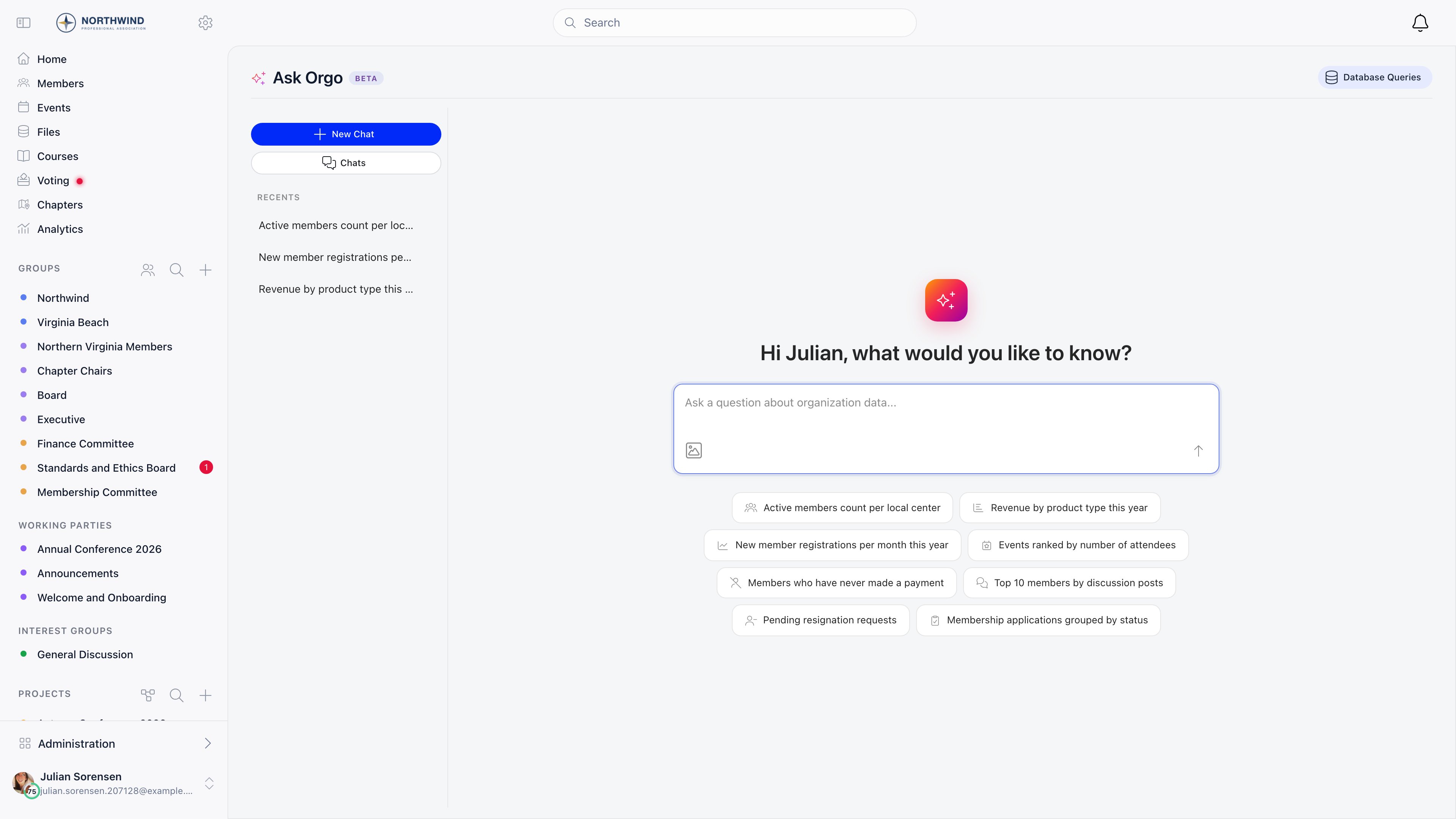
Type a question and press Enter. Questions are capped at 1000 characters, and you can attach one image (PNG, JPEG, GIF, or WebP, up to 5 MB). The welcome screen offers eight starting points, including Active members count per local center, Revenue by product type this year, Members who have never made a payment, and Top 10 members by discussion posts. Ask Orgo replies with one of three things:- a result: a summary sentence, a table, and a chart when the shape of the data suits one;
- a clarifying question, when the request is too vague to turn into a query;
- a segment proposal, when you asked it to build or save a list rather than show one. It shows the criteria and an estimated member count, with Open in editor to finish it as an email list.
What Ask Orgo can reach
Ask Orgo has no free access to the database. It works from a fixed catalogue of 55 record types and, within each, a hand-picked list of fields.
Some are reachable only through a related record: registrations always through
their event, prices through their product.
Not in the catalogue: credentials, tokens, and session data. Identity
verification records expose only the upload date, validation status, and
validation date, because ID and personal numbers are stored encrypted and are not
queryable (see Identity validation). Voting
records expose only whether a member voted, never which option they chose (see
E-voting).
Values stored in encrypted custom fields come
back in their stored encrypted form through Ask Orgo, because results are read
as raw rows rather than as full records. Read those values on the member profile
instead.
How a question becomes an answer
1
Your question goes to the model
Orgo sends Anthropic’s Claude API your question, the catalogue above (record
and field names with their descriptions), and the structured queries from
earlier turns in the same chat. It does not send result rows, which is why a
follow-up cannot refer to “those ones” and has to name the values.
2
The model returns a query description, not SQL
A structured description: which record type to start from, which related
records to join, filters, columns, grouping, and sorting.
3
Orgo validates it
Unknown record types, fields, and operators are rejected. A query may use at
most 6 joins, 20 filters, 20 columns, and 5 aggregate filters, and the page
size is clamped to 500 rows. Queries that would inflate totals by combining
several one-to-many relations are refused with an explanation rather than
returning a wrong number.
4
Orgo runs it against your tenant only
Before anything else is added, the compiler pins the query to your
organisation, and every joined record hangs off that filter. Only SELECT
statements are allowed, and a non-SELECT is refused before it reaches the
database.
Working with a result
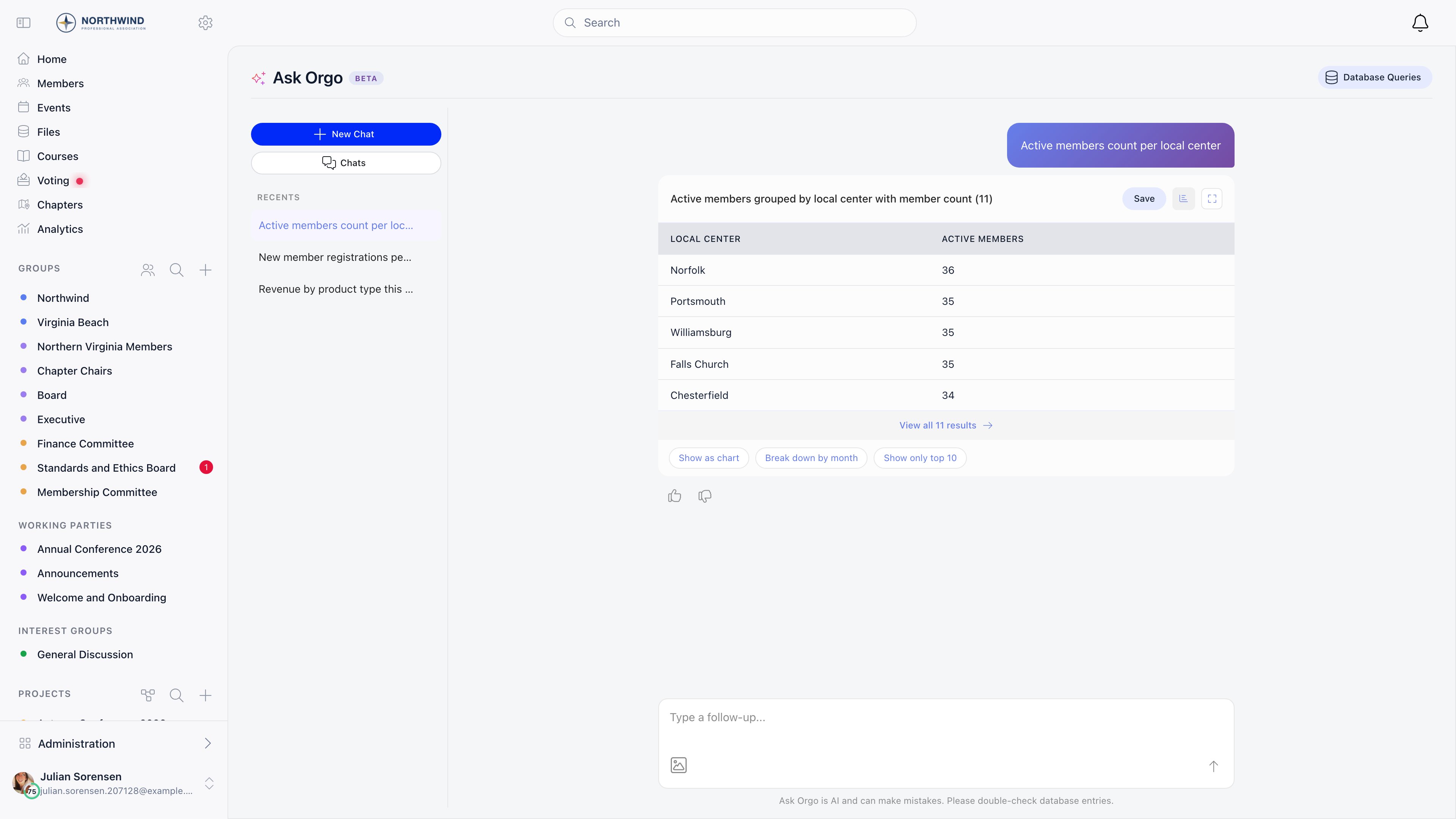
Column headers come back in the language you asked the question in.
Analytics
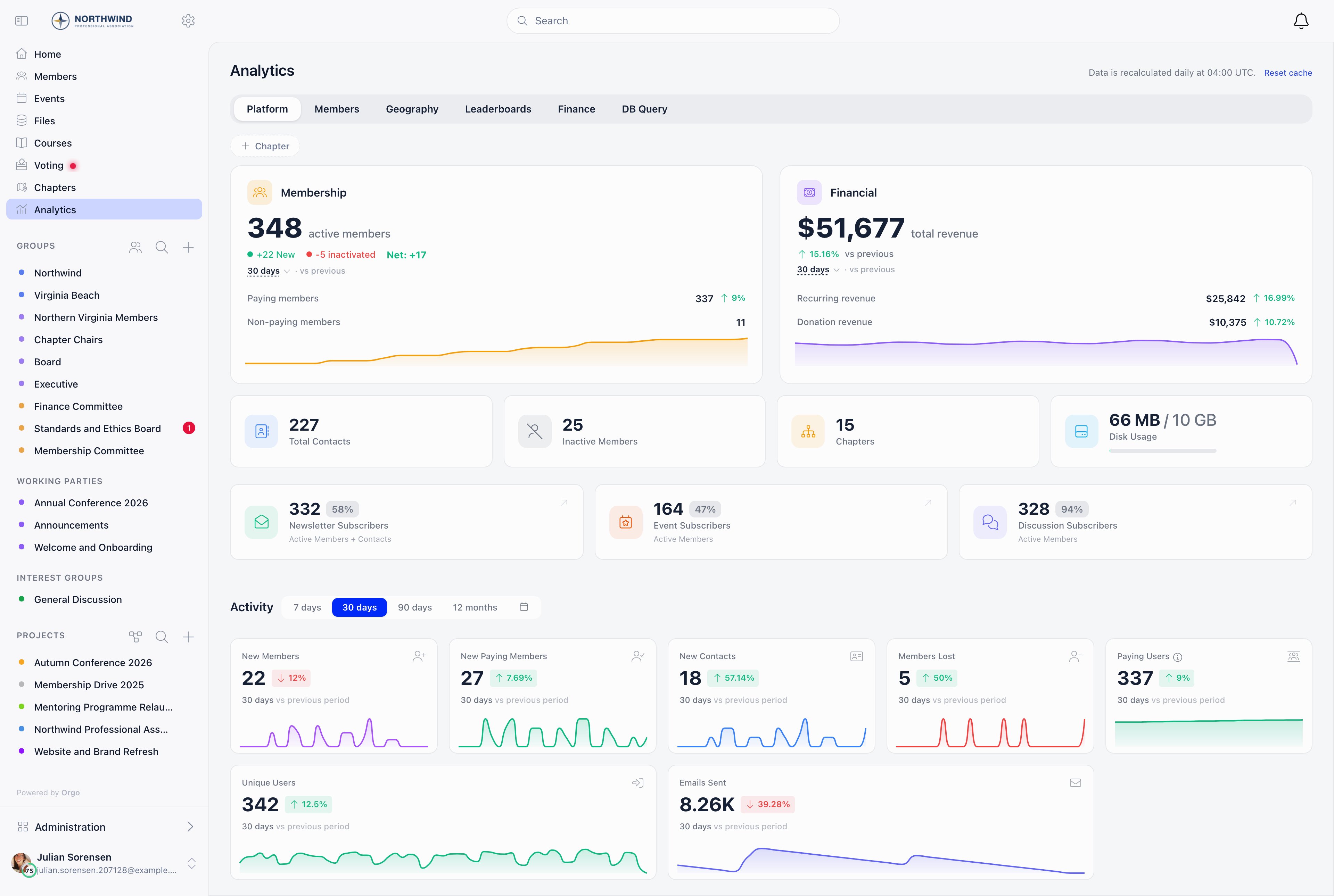
The Platform tab is also open to
ADMIN_LOCAL and ADMIN_PARENT_LOCAL when
local centers are in use, scoped to their own local center and its descendants,
never organisation-wide. Membership and geography tabs accept a local center
filter and check the local equivalent of the tab role against it.
Period selectors offer 7 days, 30 days, 90 days, 12 months, and a custom range.
Daily totals are aggregated overnight, at 04:00 UTC for the previous day, and the
page says so. Today’s figures are computed live and added on top, and responses
are cached for five minutes. Reset cache next to the page title clears that
cache and reloads, which is the fix when a number looks stale after a bulk import
or a large payment run.
Database Queries
Anything you save from Ask Orgo lands here as a named query that admins can run again without the chat. Opening one runs it and shows the results, with Export for a download. It is stored as the finished statement, with your organisation’s filter baked in, so it keeps returning your data only.FINANCIAL_TENANT
admins see every saved query in the organisation; everyone else sees only the
queries shared with them, listed under Extra access on the query. Every run
is recorded in the activity log with the query name and who ran it.
Troubleshooting
Ask Orgo says it cannot understand my question
Ask Orgo says it cannot understand my question
Give it a scope: “how many active members joined each month this year” works
better than “membership trends”.
Clicking Analytics drops me back on the dashboard
Clicking Analytics drops me back on the dashboard
Two settings are checked before the page renders, and failing either one
redirects you to the dashboard with no message. The analytics module has to
be active, and you have to clear the analytics setting labelled Minimum
access level, which ships as any signed-in member.Worked example: an organisation raises Minimum access level to
HR_TENANT so that ordinary members stop seeing the numbers. That works, but
it also takes away the Geography and Leaderboards tabs, which default to any
signed-in member and were the two tabs the organisation actually wanted
everyone to have. The minimum is a gate on the whole page, evaluated before
any per-tab role.If you get in and the page is empty, the minimum passed and none of the tab
roles did.I hold FINANCIAL_TENANT but there is no Finance tab
I hold FINANCIAL_TENANT but there is no Finance tab
Finance needs the role and online payments switched on. The tab checks both,
so an organisation that collects fees by bank transfer only never sees it,
whoever is looking. Revenue totals still show on the Platform tab.DB Query is the other tab keyed to
FINANCIAL_TENANT, and it does not
check the payments setting, so seeing Database Queries but no Finance is the
normal shape of that combination rather than a fault.Ask Orgo refused to put two figures in one answer
Ask Orgo refused to put two figures in one answer
It refuses when the arithmetic would be wrong rather than returning a number
that looks fine.Worked example: ask for total fees paid and the number of events attended,
per member. Both hang off the member as separate one-to-many branches, so
joining them multiplies every fee row by every attendance row: a member with
4 payments and 5 events contributes 20 rows, and the fee total comes back
five times too high. Orgo detects the shape, blocks the sum, and tells you to
query each metric separately.Ask it as two questions, then line the answers up by member in a spreadsheet,
or ask for counts rather than sums when you only need magnitude.
Export CSV gave me far fewer rows than the answer said
Export CSV gave me far fewer rows than the answer said
The export from the chat asks for pages of 10,000 rows, but every query,
including that one, is capped at 500 rows per request. So a result of more
than 500 rows exports as a single file holding the first 500, and the
completion message still says the export finished.Worked example: a question matching 3,000 members reports 3,000 in the chat
and downloads a CSV with 500 rows in it.For a full extract, use Save to store the query, then run and export it
from Database Queries. Saving deliberately drops the paging limit, so the
saved statement returns the whole result set. The other option is to narrow
the question until it fits, one local center or one month at a time.
A saved query returns more rows than the chat did
A saved query returns more rows than the chat did
Saving removes any row limit of 50 or more, on the assumption that it came
from the default paging rather than from your question. Limits below 50 are
kept, because those look like something you asked for.Worked example: “top 100 members by discussion posts” answers with 100 rows
in the chat. Saved and re-run from Database Queries, it returns every member
ranked by posts, which for a large organisation is a much heavier query than
the one you tested. “Top 25” saves as 25.If you want a fixed cut-off in a saved query, ask for fewer than 50, or add
the real filter you mean (a date range, a status) instead of relying on the
count.
A long conversation lost track of what I asked earlier
A long conversation lost track of what I asked earlier
A conversation keeps 20 messages: the first two, which hold the original
framing, and the most recent eighteen. Turns in the middle are dropped, so in
a long session a follow-up can no longer see a constraint you set twenty
turns ago. Restate it, or start a fresh chat for a new line of questioning.Reopening an old chat shows at most 50 rows of the last result, because that
is the size of the snapshot stored with the conversation. It is a record of
what you saw, not a live result. Re-run the question to page through
everything or to pick up data that has changed since.
Can another admin read my Ask Orgo conversations?
Can another admin read my Ask Orgo conversations?
Your chat list shows your own conversations only, and there is no shared
inbox of everyone’s chats. But conversations are stored per organisation
rather than sealed per person, and another organisation admin who has the
address of one can open it.In practice this changes little, because the feature is limited to
ADMIN_TENANT and any admin can ask the same question themselves and get the
same data. Treat chats as a shared admin workspace rather than private notes,
and delete a conversation when you want its text and its stored rows gone.A dashboard number is stale and I cannot clear the cache
A dashboard number is stale and I cannot clear the cache
Reset cache requires
ADMIN_TENANT, while the tabs themselves can be
opened by HR_TENANT, FINANCIAL_TENANT or ordinary members depending on
your settings. A finance admin looking at a stale figure after a large
payment run has no button to press and has to wait out the five minute cache,
or ask an organisation admin.Reset cache also only clears the five minute cache. It does not rebuild
the overnight aggregation, so a figure that is a whole day out rather than
minutes out will not move until the next nightly run, however many times you
press it.The number here does not match the number on the members list
The number here does not match the number on the members list
Check the assumptions in the summary line. Ask Orgo defaults to active
members, successful payments, and published events unless you say otherwise.
Ask “include inactive members too” to widen it.
What is sent to the model, and where is the conversation kept?
What is sent to the model, and where is the conversation kept?
Result rows are never sent. What leaves Orgo is your question, the catalogue
of record and field names, and the structured queries from the same chat; an
attached image goes with the question and is not stored on the conversation
afterwards. The conversation itself lives in your organisation’s own data as
the message text, the structured query, and a snapshot of up to 50 rows from
the last result, so reopening a chat does not re-run the query. Deleting the
conversation removes all of it.
Related
- Members for the directory the answers are drawn from
- Email lists for where a segment proposal ends up
- Permissions for what
ADMIN_TENANTandFINANCIAL_TENANTunlock - Custom fields for which values are encrypted
- Event analytics for per-event numbers, separate from these dashboards