

Before you start
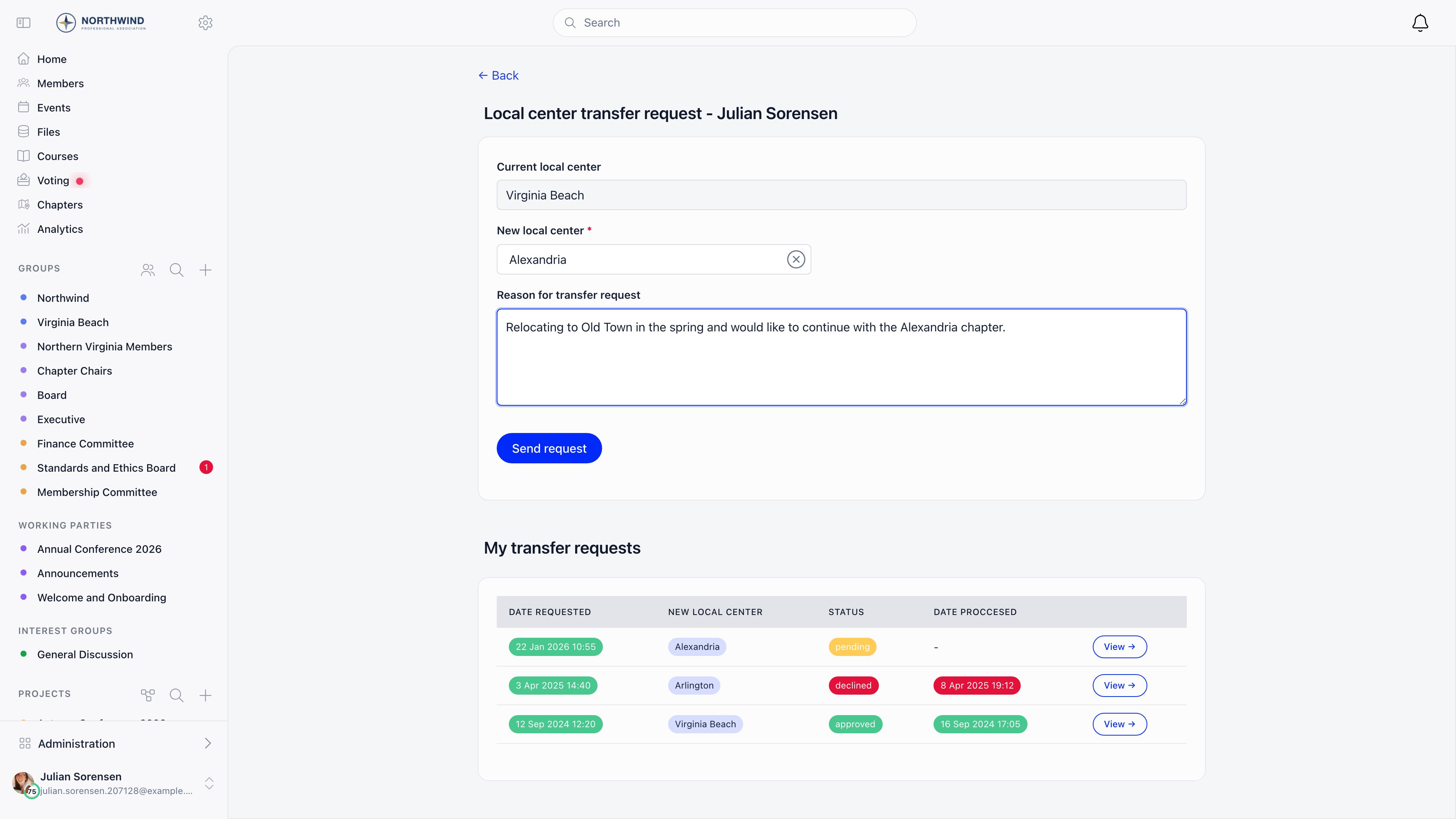
Raising a request
Two Request local transfer buttons lead to the same form:- On a member’s profile, in the Permissions panel. This is the admin route, and it opens the form as a panel over the profile.
- On the support page, for members who are not part of the support team. This requires the Support module to be active.
1
Confirm the current chapter
The Current local center field is filled in and locked. When an admin raises the request, the member’s name is shown above it, also locked.
2
Pick the destination
New local center is a searchable chapter selector and is required.
3
Write the reason
Reason for transfer request is a required free text field. It is shown verbatim to whoever decides.
4
Send request
The request is created with status pending and stamped with the current chapter and the time.
Who may raise one for someone else
Four rules are checked before the request is accepted:
- A destination chapter must be selected.
- The member and the destination chapter must both belong to your organization.
- The destination cannot be the member’s current chapter.
- The member cannot already have an open request. Decide the existing one first.
Deciding a request
Open the request from the transfer requests list. The detail panel shows status, date requested, member, requester, both chapters, and the reason. Approving requiresHR_LOCAL over the destination chapter, not the source. The receiving chapter is the one that decides, so a source-chapter admin can raise a request but cannot wave it through.
- approve applies immediately.
- Deny first reveals a Deny reason box, which must be filled in, then Confirm deny applies it.
What actually moves
On approval Orgo does exactly three things:- Sets the member’s primary chapter to the destination.
- Ends the member’s open role assignment for their member type, stamping it to the chapter they are leaving so the history stays correct.
- Creates a new open role assignment of the same member type in the destination chapter.
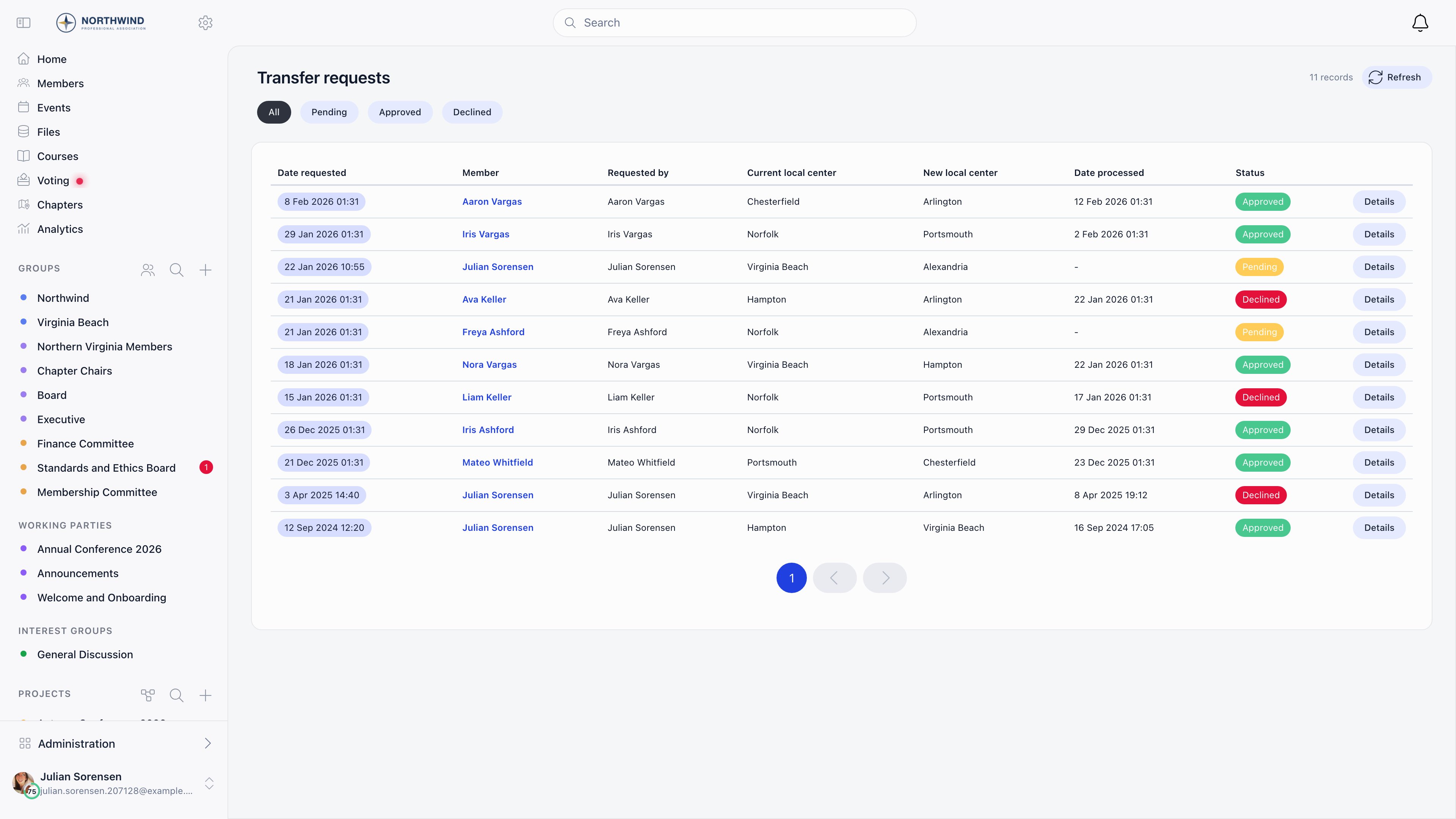
The transfer requests list
Reachable withHR_LOCAL; anyone without it is bounced to the dashboard. The list has no menu entry of its own, so bookmark it. Filter buttons across the top: All, Pending, Approved, Declined. Thirty rows per page, sorted newest first, with Date requested and Status sortable.
What you see is scoped to what you administer:
Your anchor is your own chapter when it is flagged It’s a parent chapter or has no parent, and otherwise the chapter directly above it. See What a parent-scope permission reaches. Everybody also sees their own requests and the ones they raised for somebody else, whatever their permissions.
details opens the request in a panel with the approve and deny actions, and the panel can be expanded to a full page.
Transfer request or direct reassignment?
There are two ways to change someone’s chapter, and they are not equivalent.
Use direct reassignment for corrections (someone was filed under the wrong chapter on import). Use a transfer request whenever the move is a real one that the receiving chapter should know about.
Common questions
Does the source chapter have to agree?
Does the source chapter have to agree?
No. Only the destination chapter decides. The source-side admin can raise the request, but approval sits with
HR_LOCAL on the receiving chapter.Can a member have two requests open at once?
Can a member have two requests open at once?
No. A second request is rejected while one is still undecided. Approve or deny the open one first.
Can I move someone into another organization?
Can I move someone into another organization?
No. Both the member and the destination chapter must be in the same organization, and the request is refused otherwise.
The member never got an email.
The member never got an email.
Check that the group transfer emails are switched on at Settings → Modules → Emails & Notifications → Emails, and check that the member has a valid email address on their profile. Orgo skips the send rather than failing the transfer when either is missing, so the transfer itself will still have gone through.
What happens to their unpaid fees?
What happens to their unpaid fees?
They stay as they are. Fee records, payments, and invoices are not rewritten by a transfer, so a debt raised at the old chapter remains recorded against the old chapter. Settle or write off outstanding items before approving if your accounting requires it.
Can I delete a chapter that has transfer requests pointing at it?
Can I delete a chapter that has transfer requests pointing at it?
Not outright. A chapter named in any transfer request, as either side, is closed rather than deleted, keeping the request history readable.
Related
- Local Centers - the chapters a member moves between
- Units - team assignments inside a chapter
- Permissions - how
HR_LOCALandHR_PARENT_LOCALare evaluated - Groups Overview - all group types and when to use each