

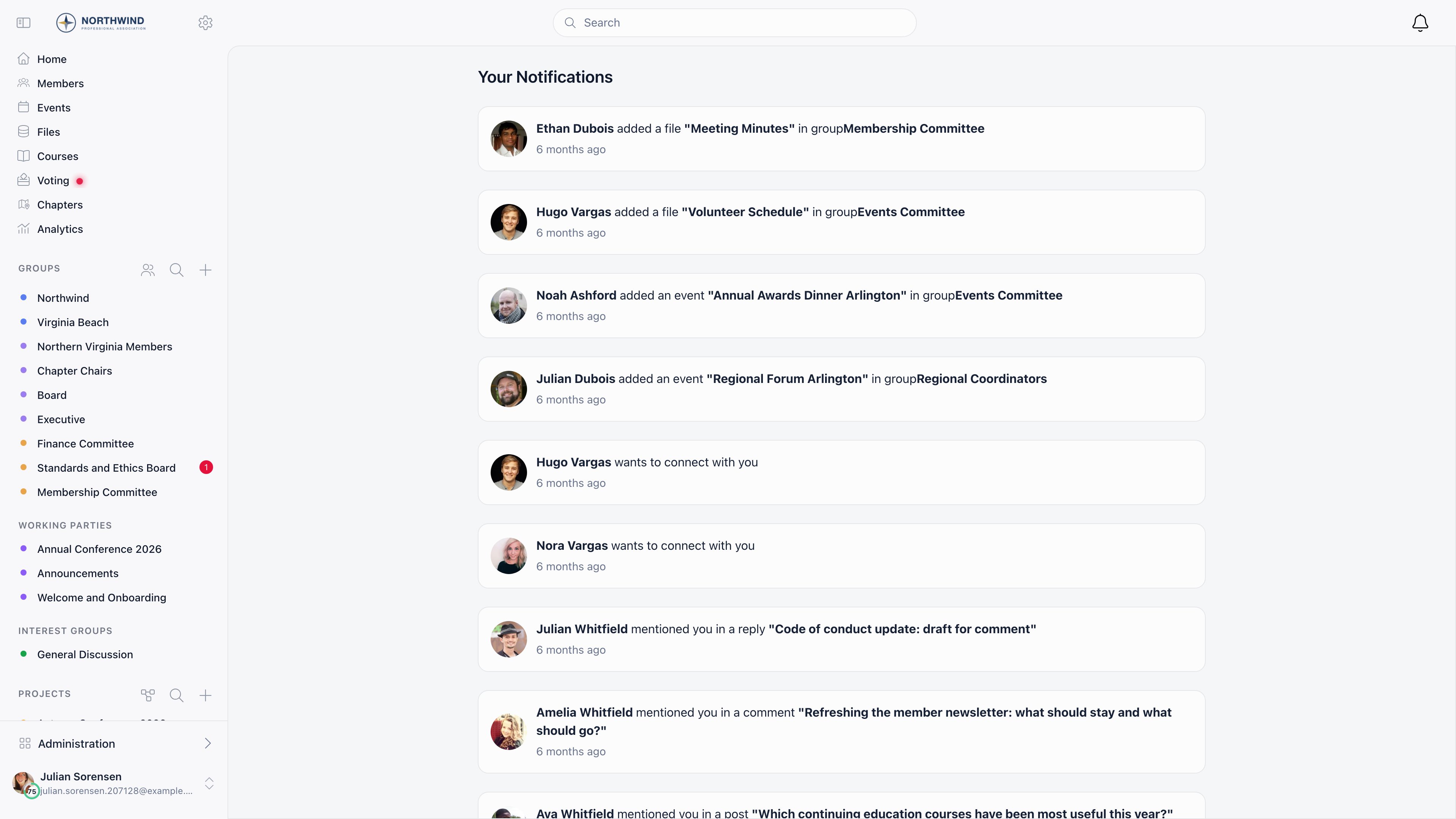
Where members see them
The bell in the header opens a side panel: 20 per page, newest first, loading more as you scroll. Your Notifications (/notifications) is the same list as
a full page. Clicking an entry opens what it refers to; file notifications open
the document in a new tab.
The unread badge is per workspace, so a member of several organizations sees a
separate count for each. It refreshes on a 180-second poll, and immediately when
a notification is created: the badge increments and a toast appears in any open
tab. Live delivery reaches members only, not contacts on an
event-app session.
Opening the panel or the full page marks everything read, as does opening what a
notification points at: a discussion, an event, or a drive file.
What generates a notification
Inactive members are never notified, and nobody is notified about their own
action.
Channels
Membership and role changes are the surprising row. When an administrator gives
a member a new role, the member gets an email as well as the in-app entry, and
no notification preference switches it off. The single exception is a change to
the member’s user type, which is deliberately silent. Removing a role
notifies nobody, and neither does editing your own roles.
Task comments are the other category the preference screen does not cover.
Comments on a project task email the assignees and the task creator through the
task email path rather than through notification preferences, so the Task
toggle does not stop them. That toggle governs support tickets and issues.
Member preferences
Members set their own under Edit profile → Notifications. Admins withADMIN_LOCAL see the same tab on a member’s profile and can change it for them.
Turning an email toggle off never hides the notification in the app. It only
stops the email.
List-Unsubscribe header that opens a page switching off
everything. True one-click unsubscribe, where the mail client acts without
opening anything, exists on campaign email only.
Daily and weekly digests
Setting New discussion to Daily or Weekly replaces instant discussion emails with a summary.- A discussion notification is what triggers a digest, but the email itself carries the ten most recent unread notifications of any type. A member who switched off event or mention email still sees those items listed in their digest, because nothing marked them read.
- A digest carries at most 10 unread items.
- Daily runs at 06:00 UTC looking back 25 hours; weekly runs at 09:00 UTC on its scheduled day looking back 7 days.
- Sending a digest marks those notifications read, so the bell badge resets with it.
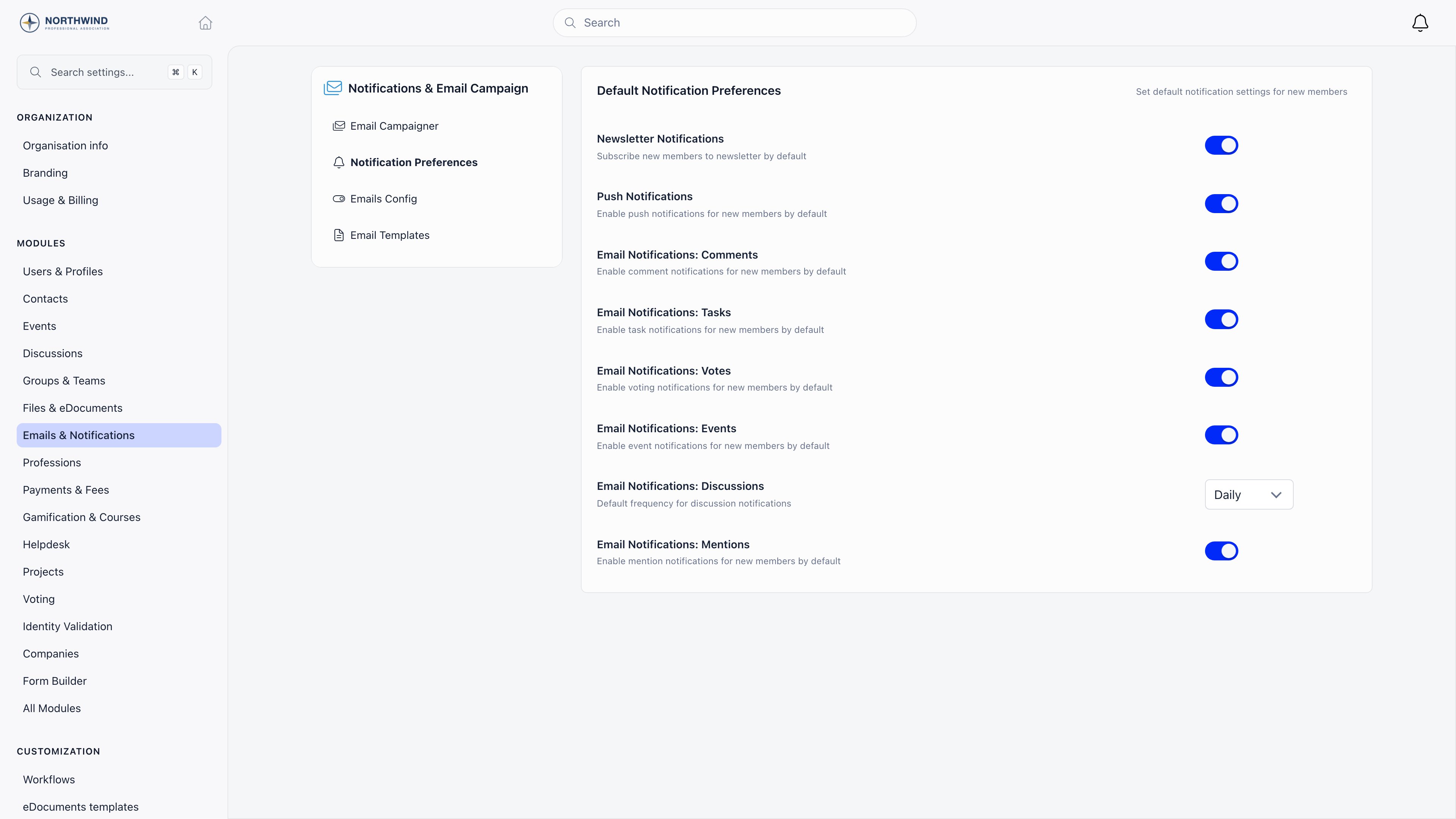
Tenant defaults
Settings → Modules → Emails & Notifications → Notification Preferences. RequiresADMIN_TENANT.
Push notification setup
Browser push is offered automatically: a supported browser asks for permission on first load, and allowing it registers that browser. Revoking permission removes the registration. Safari and the native app wrapper skip this path. Mobile push runs through OneSignal. The device registers when the member signs in to the Orgo app, tagged with the workspace so the right organization’s messages reach it. A tenant with its own branded app sets its own OneSignal app ID and REST API key on its organization record; every other tenant uses the shared Orgo app. Registration is per member, per workspace, per device: someone in two organizations registers the same phone once for each, and the two never share notifications. Signing out removes that device’s registration, which is why a member who never signs out on an old phone keeps receiving there.Muting a group
Members can mute a group they cannot leave: an all-member group, a role group, or an open-access local center. The button reads Mute on the group card and Subscribe in the group header. Muting stops new discussion, event, and file notifications from that group, but not direct ones such as mentions.Retention
Notifications older than two months are deleted nightly. The bell is a recent activity feed, not an audit trail: for a durable record of email, use the email log.Troubleshooting
A member says they get too many emails. What do I change?
A member says they get too many emails. What do I change?
Work on their profile, Notifications tab, not on the tenant defaults:
the defaults are seeds applied once at onboarding and changing them does
nothing for anyone already in the organization.Take the categories in this order.
- Set New discussion to Daily or Weekly. Discussions are usually the bulk of the volume and the only category that batches.
- Turn off the individual categories they object to. Each one only stops the email; the notification still appears under the bell.
- If they are still unhappy, check whether the traffic is coming from something with no toggle: membership and role changes always email, and task comments email through the task email path.
Push notifications are not arriving. What do I check?
Push notifications are not arriving. What do I check?
Work down the chain, because each link fails independently.
- Push notification subscribed on their profile. Off means no device receives anything, whatever the browser says.
- Permission at the operating system or browser level. Orgo cannot see a revoked permission, and revoking it removes the browser registration.
- Whether a device is actually registered. Registration happens at sign-in, so signing out and back in is the reliable fix, and a member who never signs out on an old phone keeps receiving there instead.
- The notification type. File notifications never push, in-app only.
- For an organization with its own branded app, whether the OneSignal app ID and REST API key are set on the organization record. Without them the mobile sends are rejected and only browser push works.
The notification is in the app but no email arrived. Why?
The notification is in the app but no email arrived. Why?
In-app and email are separate deliveries of the same record, so the record
existing proves nothing about the email. Check, in order:
- the type, against the Channels table above. Reactions, file uploads and networking invitations have no email at all, and moderation alerts are emailed on their own path rather than this one;
- the matching per-member toggle, and for discussions whether the frequency is Daily or Weekly, in which case the email is waiting for the next digest run;
- whether they used an unsubscribe link, which switches a category off with no confirmation step and no trace on the profile other than the toggle itself;
- the address on the account. An empty or malformed address is skipped silently, without an entry in the email log;
- whether this is a demo organization. Demo tenants never send notification emails.
A member unsubscribed in one organization and stopped getting emails from another. Is that expected?
A member unsubscribed in one organization and stopped getting emails from another. Is that expected?
Yes, and it is the most confusing behaviour on this page. Unsubscribe links
match on the email address, not on the account, so one click switches that
category off for every Orgo account sharing that address, in every
organization. The one-click unsubscribe in the mail header does the same for
all categories at once.The fix is to turn the categories back on per account, on each affected
profile’s Notifications tab.
Nobody is notified about our group's posts. What is wrong?
Nobody is notified about our group's posts. What is wrong?
Start with the group type, because who receives is decided there and not by
a setting on the discussion.
- A restricted group notifies the members who follow it, and nobody else. An empty follower list means an empty notification run.
- An open-access local center, an all-member group and a role group notify every active member except those who muted the group.
- Inactive members are never notified in any group, and the person who posted is always excluded.
The unread badge cleared without anyone reading anything. What clears it?
The unread badge cleared without anyone reading anything. What clears it?
More things than most admins expect, which is why the badge is a poor proxy
for “has the member seen this”.
- Opening the bell panel or the notifications page marks every unread notification read, not just the ones on screen.
- Opening the thing a notification points at (a discussion, an event, a drive file) marks the notifications for that item read.
- Sending an instant email for a notification marks that notification read, so an unopened inbox still zeroes the badge.
- Sending a digest marks every unread notification read for that member, not only the ones listed in the digest.
A member set Daily or Weekly and no digest ever arrives. Why?
A member set Daily or Weekly and no digest ever arrives. Why?
A digest run only picks up members who have at least one unread
discussion notification in the window. Comments, events, mentions, votes
and task activity do not trigger a digest, so a member whose groups are
quiet gets nothing even with the frequency set.Also check that the member is Active, that their address is valid, and the
timing: the daily run is 06:00 UTC looking back 25 hours, and the weekly run
is Wednesday 09:00 UTC looking back 7 days. A member who set Weekly on a
Thursday waits almost a week for the first one.
An old notification has disappeared from the list. Can I get it back?
An old notification has disappeared from the list. Can I get it back?
No. Notifications older than two months are deleted nightly, records and
read state together. The bell is a recent-activity feed, not an archive.
For a durable record of what was sent, use the
email log, which is not on this retention
schedule.
A member sees the toast and badge update but a colleague does not. Why?
A member sees the toast and badge update but a colleague does not. Why?
Live delivery goes to members only. People signed in through an event-app
session as contacts get the notification stored and
pushed, but no live badge or toast: their count moves on the next refresh.
The badge also polls every 180 seconds, so a member with a stale tab can be
up to three minutes behind.
Related
- Newsletter: Deliberate email campaigns to a chosen audience
- Discussions: The activity that generates most notifications
- Mobile Apps: Branded apps and device setup
- Groups: Who follows what, and therefore who gets notified
- Permissions: Which roles can change tenant-wide defaults